
Please disclose if any significant portion of your mod was created using AI tools by adding the 'AI Generated' category. Failing to do so may result in the mod being removed from Thunderstore.
SkillsPreview
Custom skills mod for Valheim. Extends and enhances the default skill system.
| Date uploaded | 2 months ago |
| Version | 0.3.3 |
| Download link | godzki-SkillsPreview-0.3.3.zip |
| Downloads | 27 |
| Dependency string | godzki-SkillsPreview-0.3.3 |
This mod requires the following mods to function

denikson-BepInExPack_Valheim
BepInEx pack for Valheim. Preconfigured with the correct entry point for mods and preferred defaults for the community.
Preferred version: 5.4.2333README
Skills Preview
Note: This plugin is currently under active development. Bugs may occur and features may change in future versions.
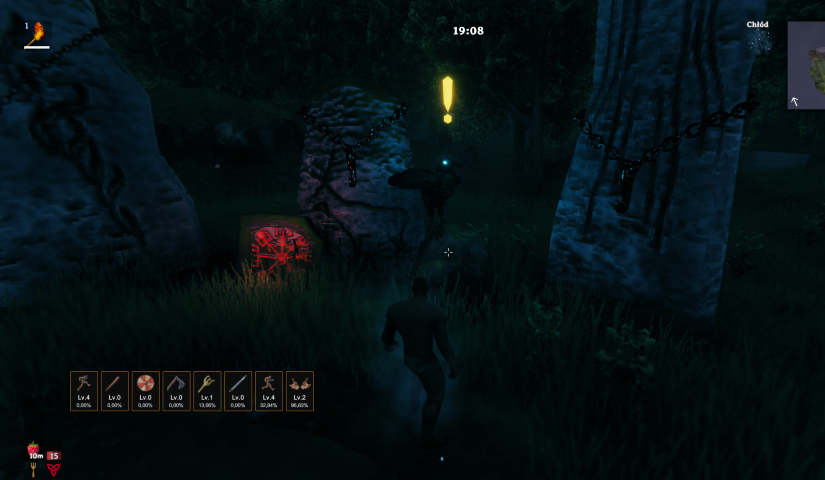
Skills Preview is a Valheim mod that adds compact HUD widgets for your chosen skills. It gives you a quick glance at each skill's level and progress without ever opening the character window.
Each widget shows:
- the skill icon,
- current level (e.g.
Lv.45), - percentage progress to the next level (e.g.
72.00%), - a flash animation when you level up.
Table of Contents
Requirements
- Valheim — (current Steam version)
- BepInEx — Valheim modding framework (version 5.x required)
Installation
Manual
- Download the latest release from the Releases tab.
- Make sure BepInEx is installed. If it isn't, grab it from the project page and follow the setup instructions there.
- Copy
SkillsPreview.dllinto:<game_directory>/BepInEx/plugins/ - Launch the game — the plugin loads automatically.
- You can confirm it loaded by checking the BepInEx console.
Via mod manager (e.g. Thunderstore Mod Manager)
Search for Skills Preview in the manager and click "Install".
How to Use
- Open the skills window (
Lby default). - A star icon appears next to each skill — click a skill to mark it as a favourite. Skills are tracked in the order you select them.
- Your favourited skills show up as HUD widgets during gameplay.
- Widgets can be repositioned and resized through the settings panel (see Configuration).
Configuration
In-game settings panel
The plugin includes a built-in settings panel accessible directly from the skills window. You can change the following without leaving the game:
- HUD panel position — where the widgets appear on screen (default: bottom-left corner near the player stats),
- Widget element colours — background, border, level text, progress text, "MAX" colour, level-up flash colour,
- Star colours — active (favourited) and inactive star colours,
- Widget size and appearance — width, height, icon size, font sizes, corner rounding, border thickness, spacing between widgets.
Every option has a ↺ button to reset it individually, or you can hit Reset all to restore all defaults at once.
Config file
Settings are saved automatically to:
<game_directory>/BepInEx/config/godzki.skills_preview.cfg
You can edit this file in any text editor. Each option has a comment explaining what it does. Changes made manually take effect after restarting the game.
All configuration options
[1 - General]
| Key | Description |
|---|---|
DebugMode |
Enables verbose logging in the BepInEx console |
HudWidgetsVisible |
Shows or hides the HUD widgets (does not affect the skills panel) |
[2 - Skill Panel]
| Key | Description |
|---|---|
FavoriteStarColor |
Star colour for a favourited skill |
UnfavoriteStarColor |
Star colour for a non-favourited skill |
[3 - HUD Position]
| Key | Description |
|---|---|
PositionX |
Horizontal position of the widget panel (px from the left edge of the screen) |
PositionY |
Vertical position of the widget panel (px from the bottom edge of the screen) |
[4 - HUD Widget]
| Key | Description |
|---|---|
Width |
Width of each widget in pixels |
Height |
Height of each widget in pixels |
IconSize |
Skill icon size inside the widget (px) |
FontSizeLevel |
Font size for the level text (e.g. Lv.45) |
FontSizeProgress |
Font size for the progress text (e.g. 72.00% or MAX) |
Spacing |
Gap between widgets in the horizontal panel (px) |
BorderSize |
Border thickness for each widget (px) |
CornerRadius |
Corner rounding radius (px); 0 disables rounding |
BorderColor |
Widget border colour |
BackgroundColor |
Widget background colour (RGBA) |
LevelColor |
Skill level text colour |
ProgressColor |
Progress percentage text colour |
ProgressMaxColor |
Text colour for MAX when a skill reaches level 100 |
LevelUpColor |
Border flash colour on level-up |
LevelUpDuration |
Duration of the level-up flash effect (seconds) |
Troubleshooting
Plugin doesn't load / no widgets visible
-
Delete the config file — a corrupted or incompatible config can prevent the plugin from loading. The file is located at:
<game_directory>/BepInEx/config/godzki.skills_preview.cfgDelete it and start the game again — it will be recreated with default values.
-
Check your BepInEx version — this plugin requires BepInEx 5.x. Version 6.x is not currently supported.
-
Make sure the
.dllis in the right folder — the path should beBepInEx/plugins/, notBepInEx/directly.
Diagnosing issues with debug mode
- Open
godzki.skills_preview.cfgin a text editor. - Under
[1 - General], set:DebugMode = true - Launch the game and check the BepInEx console (or
BepInEx/LogOutput.log). The detailed logs should point you to the root cause. - Once the issue is resolved, turn debug mode off by setting
DebugMode = false.
Plugin conflicts with another mod
Check BepInEx/LogOutput.log for errors. If it looks like a conflict with a specific mod, please open a report in the Issues tab — include your mod list and the relevant error from the log.
AI Assistance
AI-powered tools were used during development to assist with problem analysis and code refactoring.
CHANGELOG
Changelog
0.5.2
- New: each HUD widget now has a slim progress bar at the bottom that fills as you gain XP and turns gold once the skill reaches level 100.
- New: theme presets in the settings panel — pick Valheim, Dark, Minimal, or High contrast to restyle every widget colour and size with a single click.
- New settings to show or hide the progress bar, adjust its height, and choose its track colour — all available in the in-game settings panel.
- Smoother HUD: widgets only redraw when something visible actually changes, so the panel stays light even with many favourite skills.
0.5.0
- New: Valheim-style level-up banner shown in the centre-top area of the screen when a favourited skill levels up.
- Fully configurable: enable/disable, distance from the top of the screen (%), display duration, font size, and text colour.
- All toast settings exposed in the in-game settings panel and translated into every supported language.
0.4.3
- Add new languages: Spanish, Portuguese, Italian.
0.4.2
- Fix language switching.
- Add new languages: German, French, Ukrainian.
0.4.0
- Displaying skill information on the character selection screen at the start of the game.
0.3.5
- New mod icon
- Update README.md
0.3.4
- Sliders in the settings for easier use
0.3.3
- Widget interface scaling
0.3.0
- Initial release
