
Please disclose if any significant portion of your mod was created using AI tools by adding the 'AI Generated' category. Failing to do so may result in the mod being removed from Thunderstore.

ScrollToArms
Hold Left Alt and scroll to pick the weapon or tool in your hand from the hotbar, while the game still decides when it can be changed.
| Date uploaded | 11 hours ago |
| Version | 0.2.2 |
| Download link | isimp-ScrollToArms-0.2.2.zip |
| Downloads | 50 |
| Dependency string | isimp-ScrollToArms-0.2.2 |
This mod requires the following mods to function

denikson-BepInExPack_Valheim
BepInEx pack for Valheim. Preconfigured with the correct entry point for mods and preferred defaults for the community.
Preferred version: 5.4.2350README
ScrollToArms
Pick the weapon or tool in your hand with the mouse wheel. Hold Left Alt and scroll, and a frame ticks along your hotbar with the item's name above it. Let go of Alt and whatever it rests on goes into your hand, or out of it if you were already holding it. A quick tap on Alt goes back to what you held before, and whenever the wheel does something else, such as rotating a building piece, the same spot above the hotbar says so.
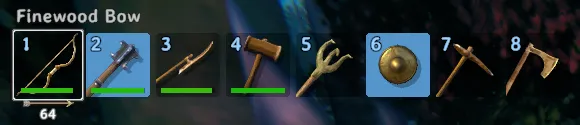
You decide how the wheel is shared. By default plain scrolling still zooms the camera and Alt with the wheel picks from the hotbar. Swap them, and the wheel picks straight away while Alt with the wheel zooms. A pick goes into your hand when you let go of Alt, or once the wheel has been still for a moment, whichever you prefer. The key, that pause, the scroll direction and wrapping at the ends of the bar can all be changed too.
The game keeps its rules. The wheel passes over food, armour and materials. When the game refuses a pick because you attack, dodge, swim or run, its slot pulses until the item can go into your hand, and flashes red with a short sound if it never gets there. While building, the plain wheel still rotates the piece and Alt with the wheel still switches away.
ScrollToArms only runs on your own machine, and servers do not need it.
AI notice
Most of ScrollToArms was written by Claude Code (Anthropic), which did the heavy lifting on implementation and design. Heads-up so you can judge for yourself.
Settings
All settings are in BepInEx/config/isimp.ScrollToArms.cfg, each with a description. Besides the modes above, they cover items the wheel should pass over, skipping build tools, tools that keep the wheel for themselves (PlanBuild's by default) and how long a pick may wait. Items are named as the game shows them, such as Bronze Pickaxe. The name, the wheel line, the messages and the sounds can each be switched off.
More
Technical notes and build instructions are on GitHub at https://github.com/isimp/ScrollToArms
CHANGELOG
Changelog
0.2.2
Landing on the item you already hold unequips it, as its number key would. A tap on Alt brings it back.
0.2.1
The frame ticks as it moves, and a lost pick makes a sound. Both follow the game's sound effects volume and only you hear them.
0.2.0
A quick tap on Alt goes back to what you held before.
The item under the frame is named above the hotbar. The same spot says what the wheel does when that changes, such as while building.
SkipItems lists items the wheel passes over. Item lists also take the names shown in game.
0.1.0
First release.
