
Please disclose if any significant portion of your mod was created using AI tools by adding the 'AI Generated' category. Failing to do so may result in the mod being removed from Thunderstore.

CaptainSkillTree
Valheim Skill Tree Expansion - EpicMMOSystem Expert System Enjoy an RPG-style experience with seven classes and weapon-specific skill trees.
| Date uploaded | a day ago |
| Version | 2.1.494 |
| Download link | korCaptain-CaptainSkillTree-2.1.494.zip |
| Downloads | 542 |
| Dependency string | korCaptain-CaptainSkillTree-2.1.494 |
This mod requires the following mods to function

denikson-BepInExPack_Valheim
BepInEx pack for Valheim. Preconfigured with the correct entry point for mods and preferred defaults for the community.
Preferred version: 5.4.2333
WackyMole-WackyEpicMMOSystem
Adds to your Valheim world a system of levels and distribution of characteristics
Preferred version: 1.9.66
ValheimModding-Jotunn
Jötunn (/ˈjɔːtʊn/, 'giant'), the Valheim Library was created with the goal of making the lives of mod developers easier. It enables you to create mods for Valheim using an abstracted API so you can focus on the actual content creation.
Preferred version: 2.30.0README
CaptainSkillTree - Valheim Skill Tree Mod

한국어 설명 보기 | English Description
📸 ScreenShot~!
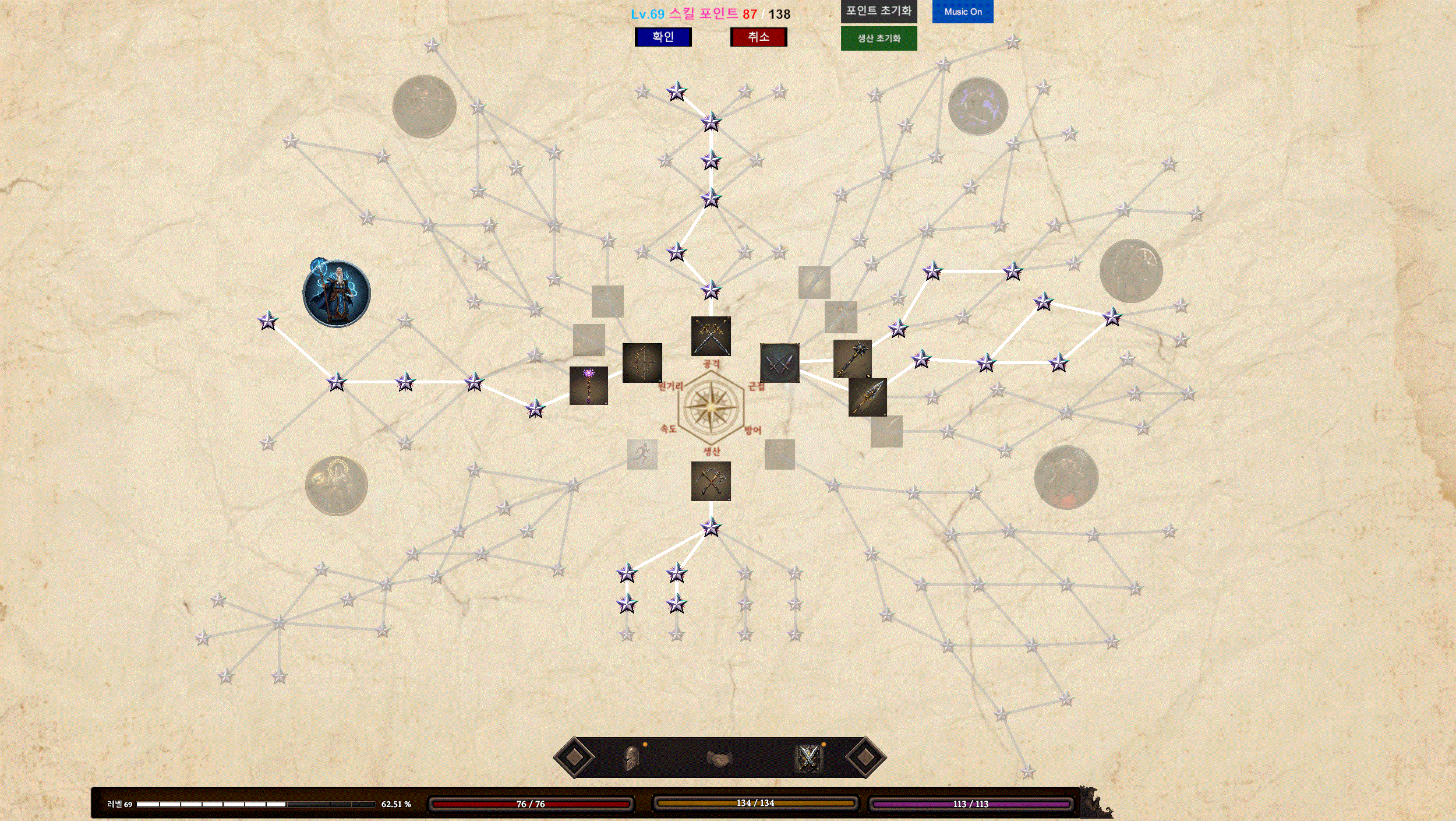
🌳 Skill Tree Overview
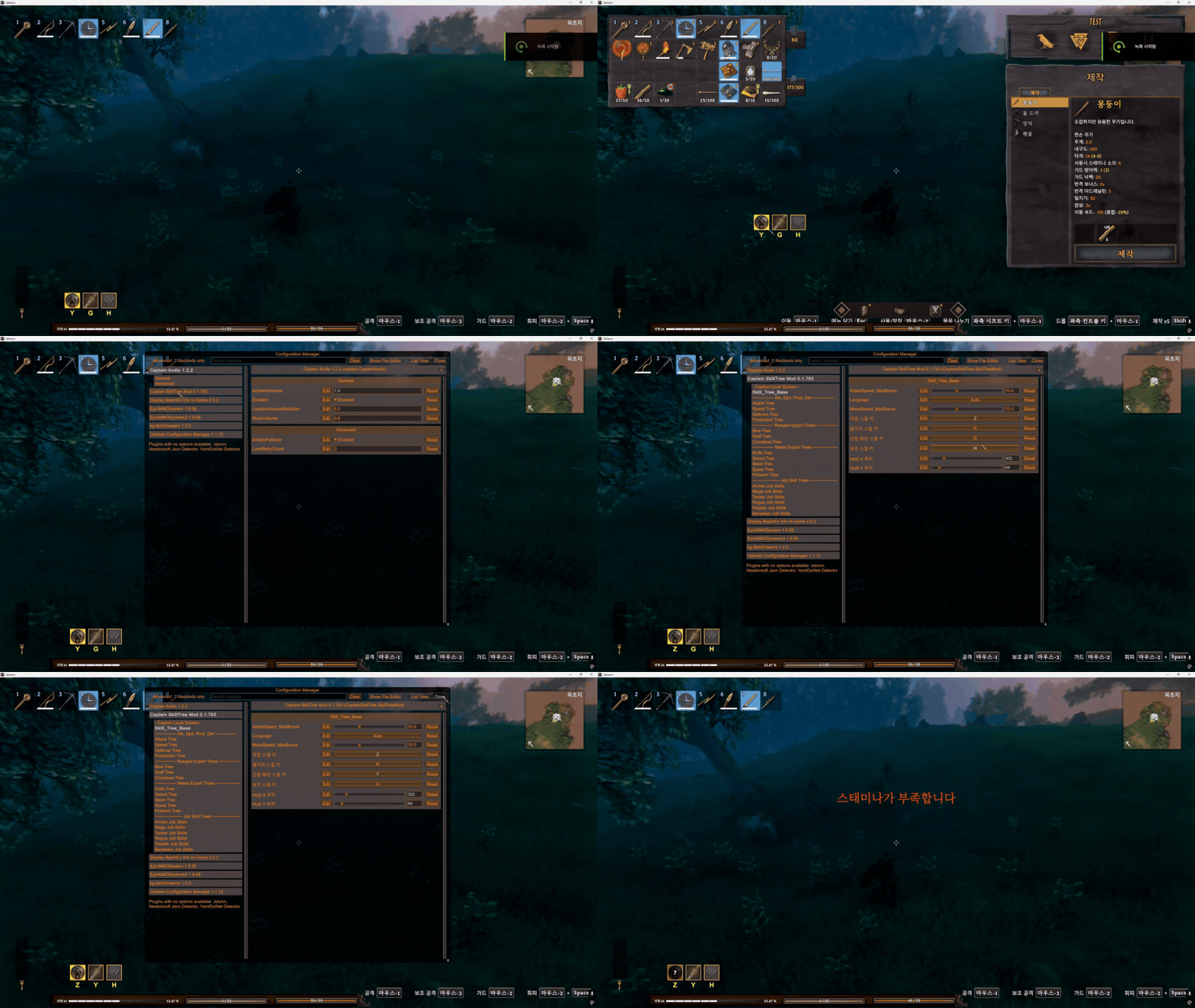
⚔️ Skill Icons
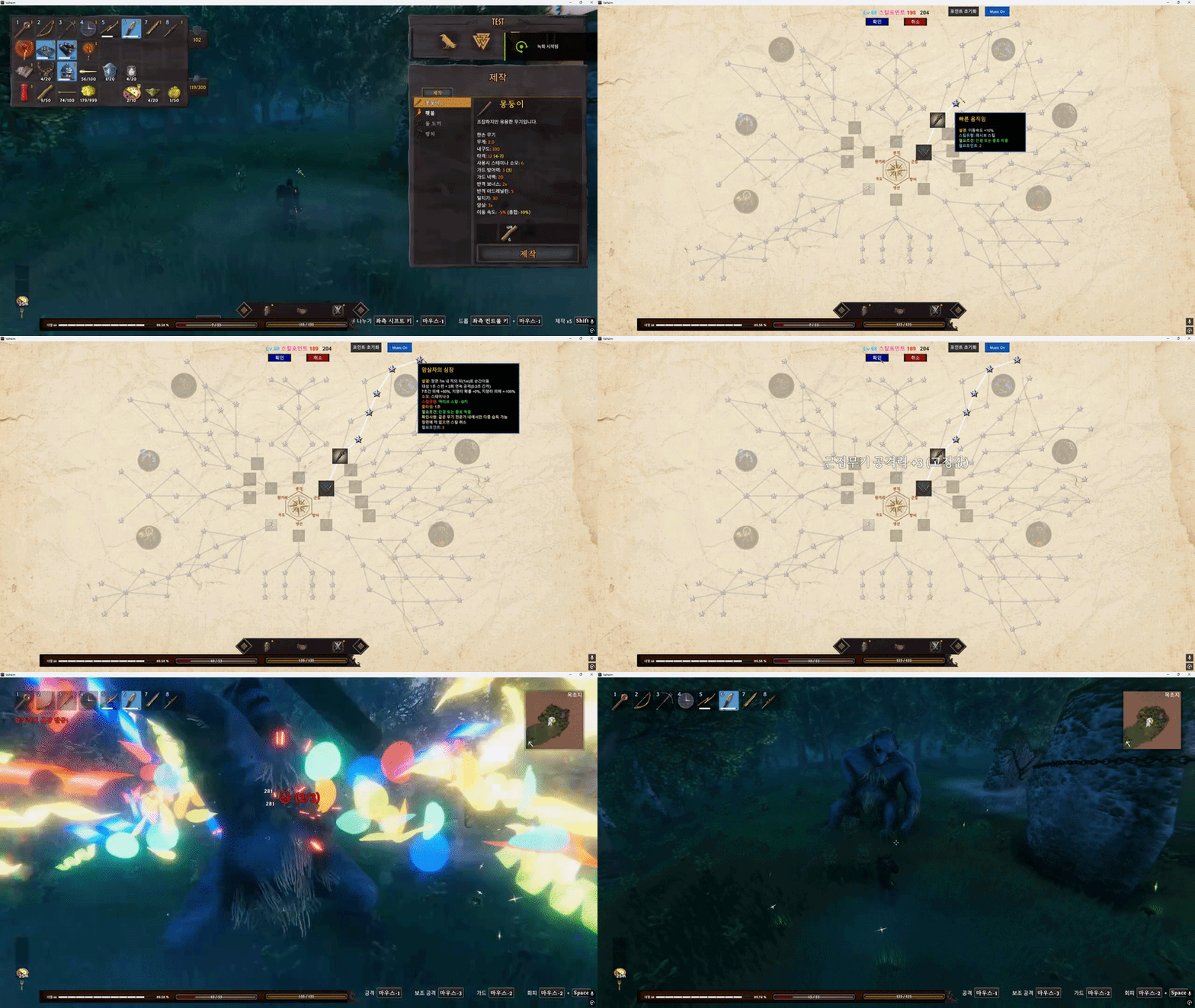
🎥 Play~
🗡️ Assassin - Stealth Strike (Knife / G)
🏃 Rush Slash (Sword / G)
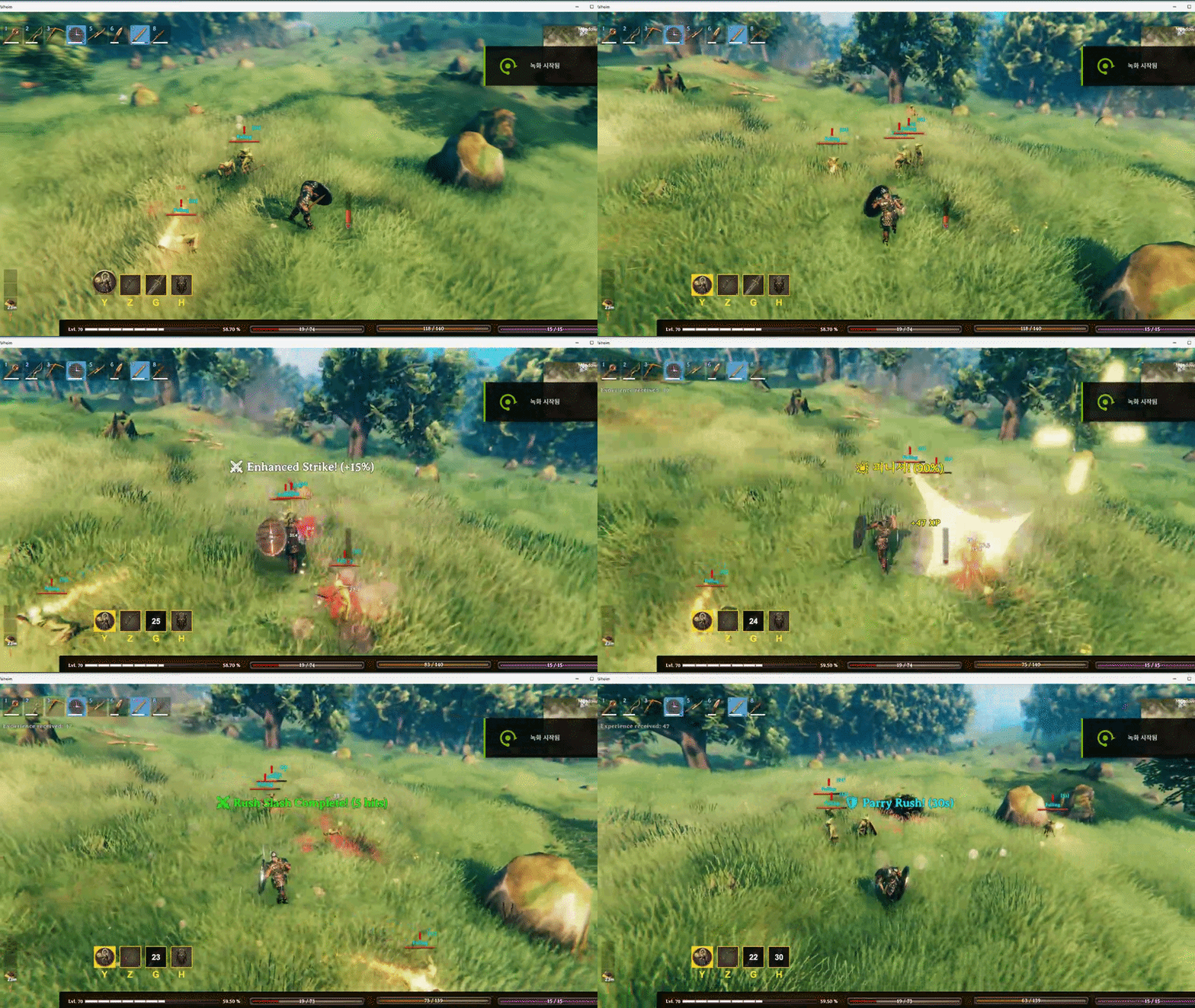
⚔️ Whirlwind Slash / 회오리베기 (Sword / H)
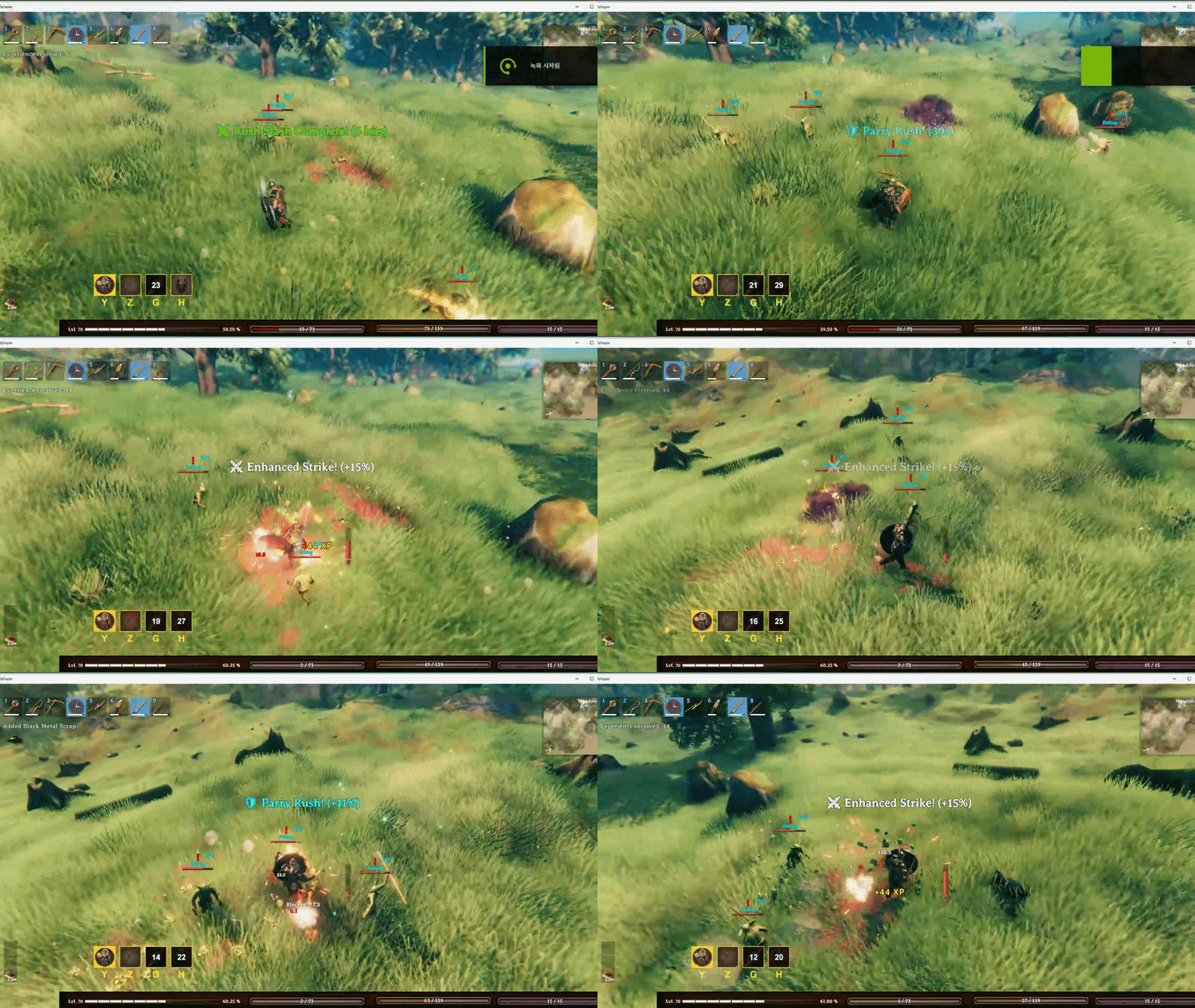
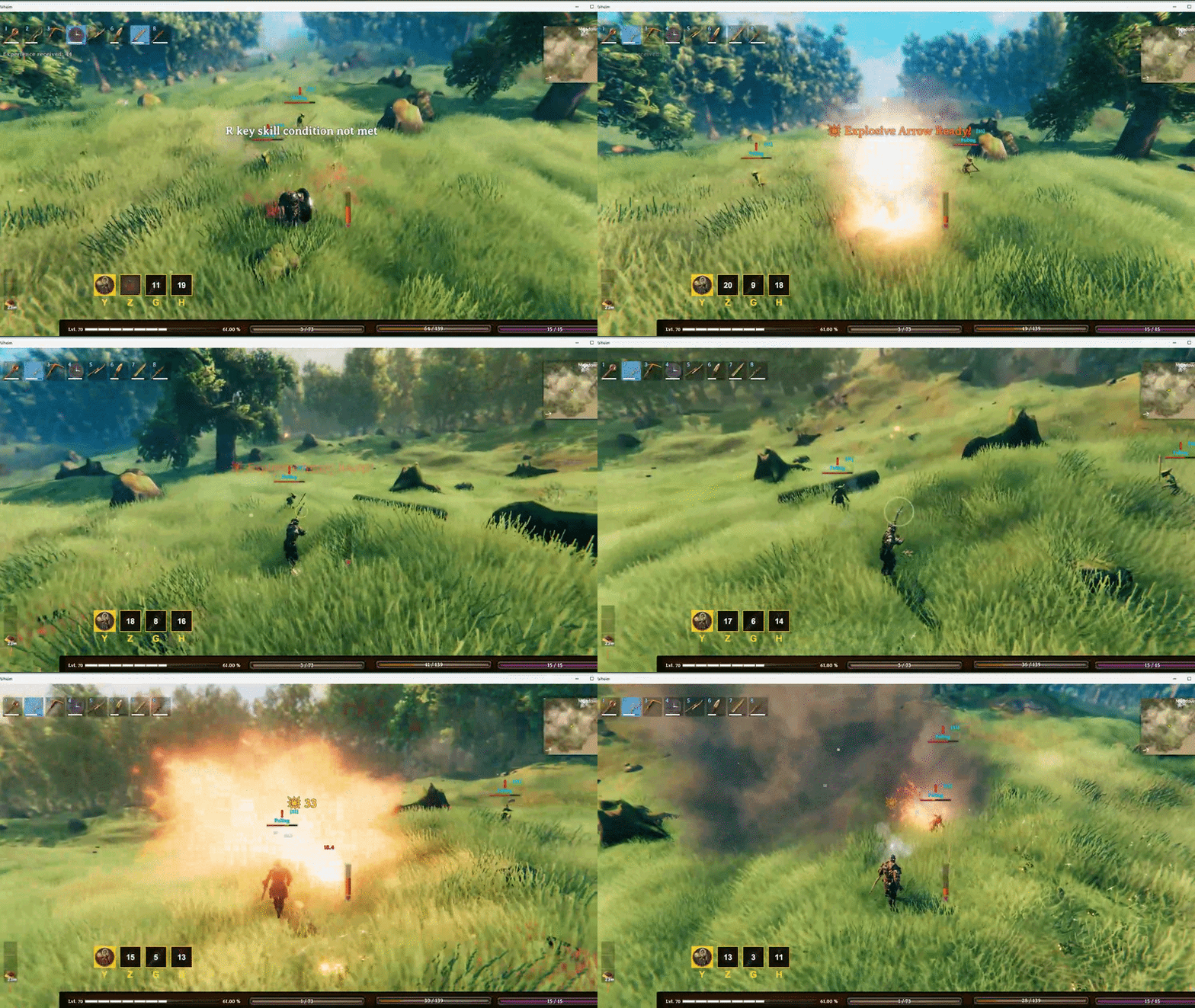
🏹 Explosive Arrow (Bow / Z)
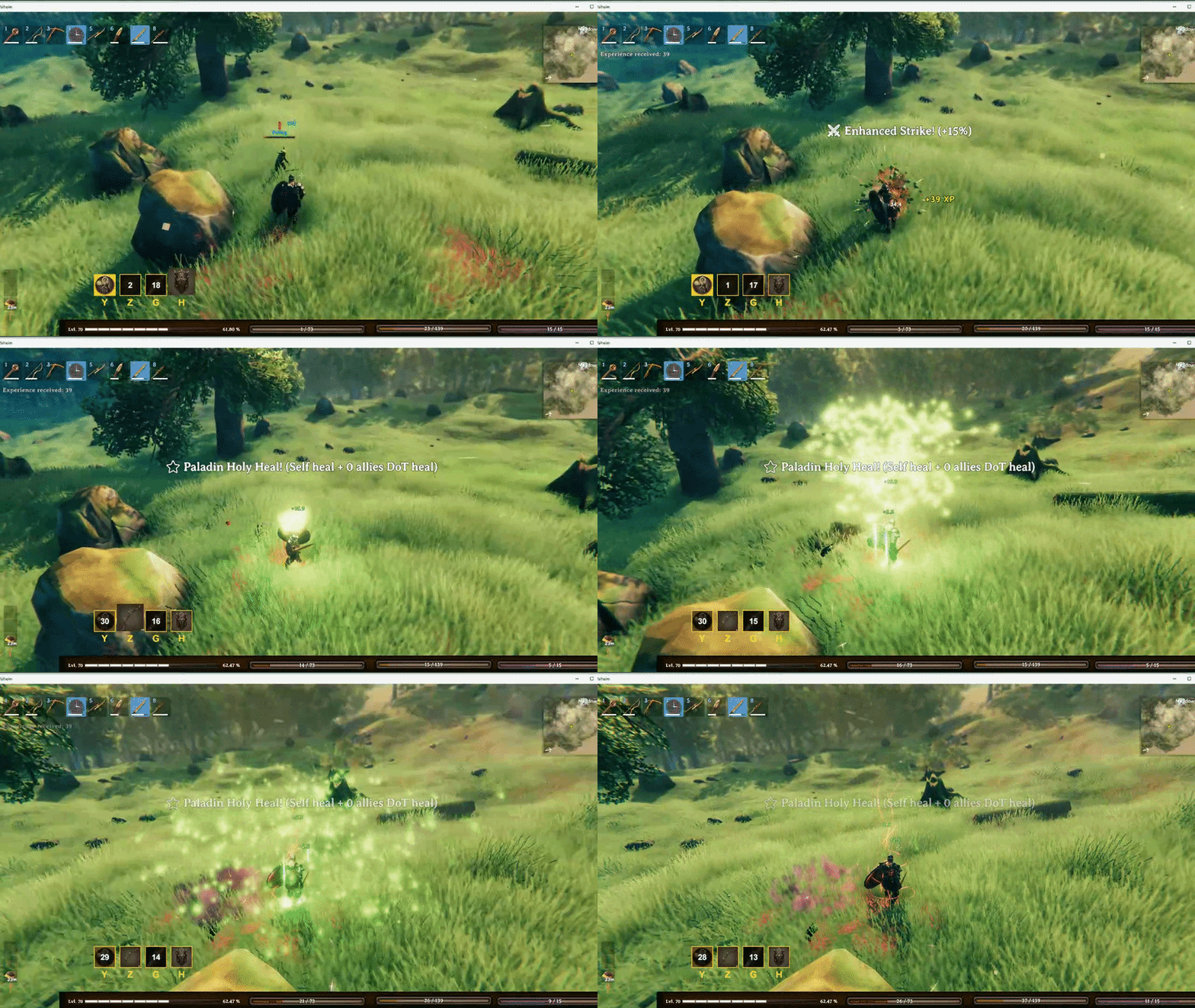
💚 Heal (Paladin / Y)
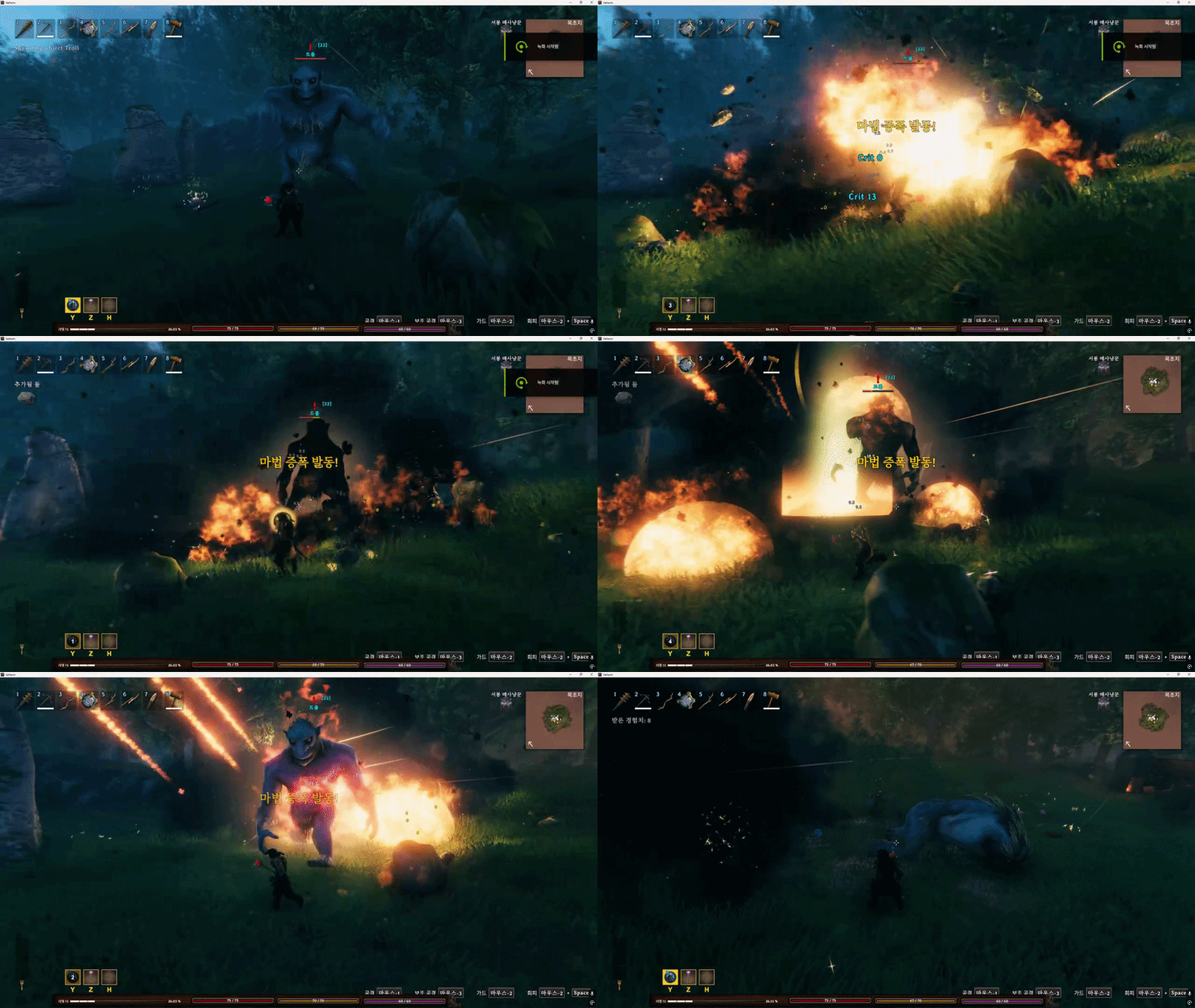
⚡ Fire Rain (Mage / Y)
⚡ Double battle (Staff or Wand / Z)
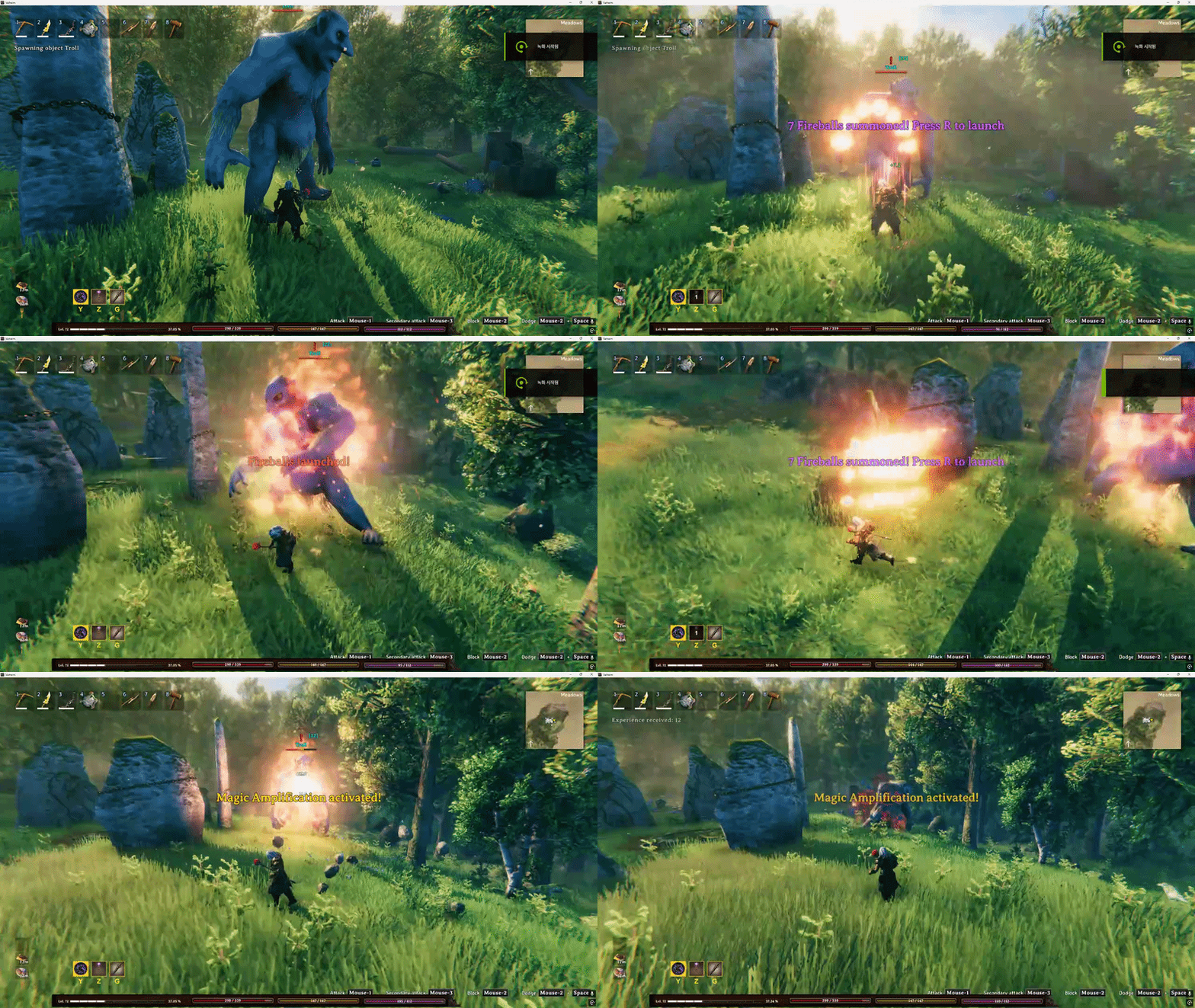
🌧️ Arrow Rain (Bow / H)
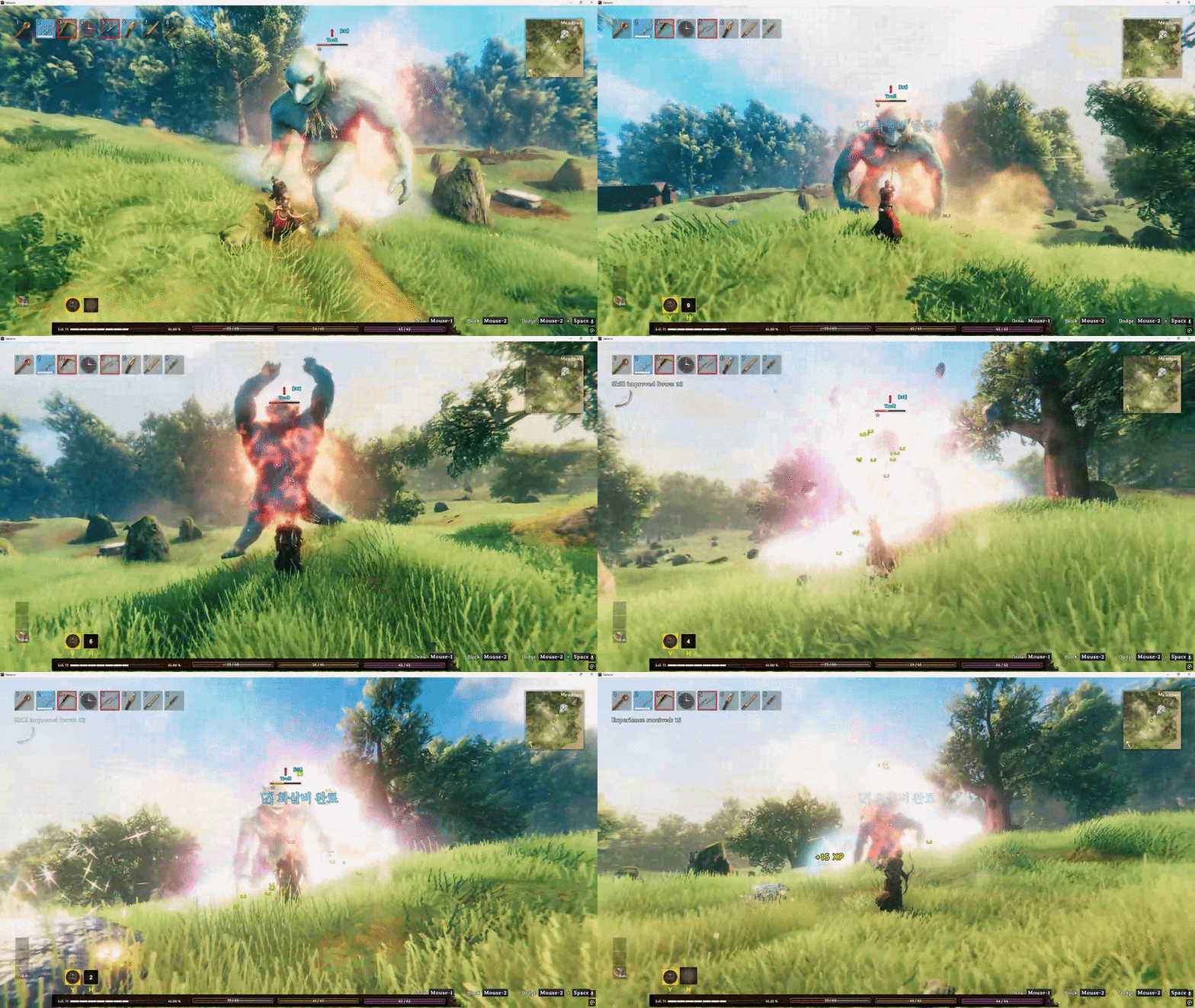
🔨 Fury Hammer (Mace / G)
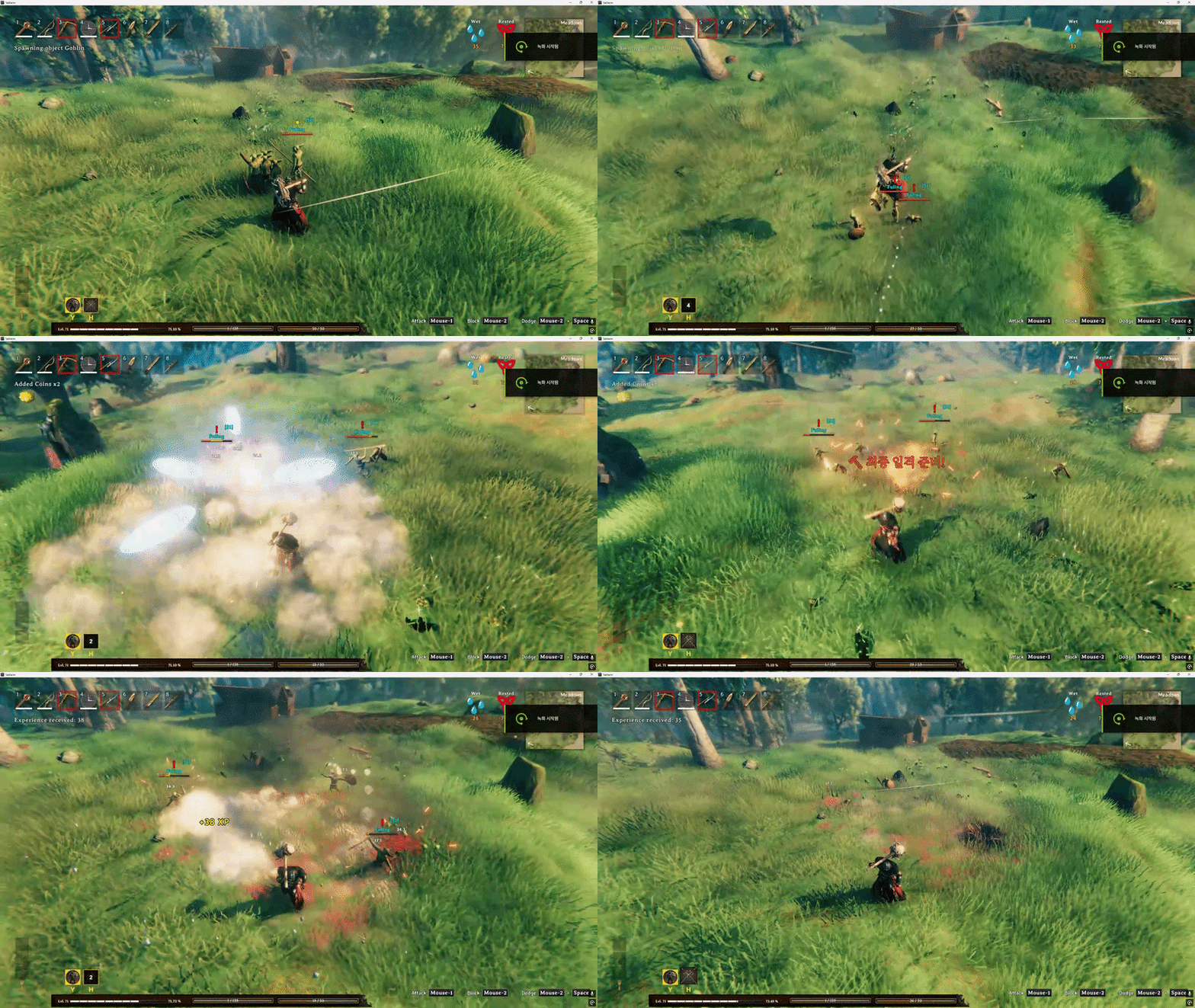
⚡ Rush Shield (Mace / H)
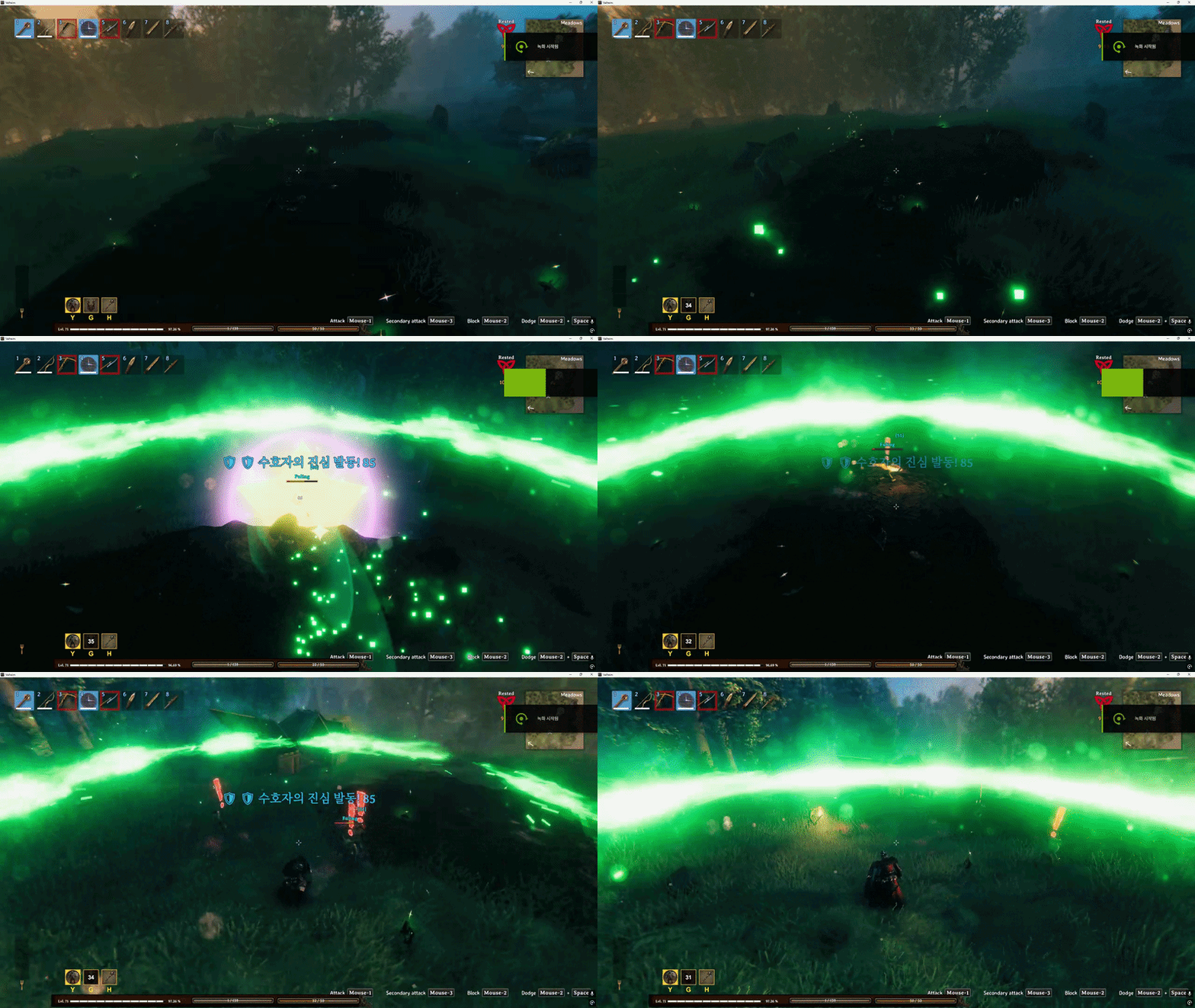
#Language support: 한국어, English, Русский, Português-Brasil, das Deutsche, 中国话, 日本語, Tiếng Việt, Čeština
🇰🇷 한국어 (Korean)
개요
CaptainSkillTree는 발헤임의 캐릭터 성장을 위한 종합 스킬트리 모드입니다. 전문가 트리, 무기 트리, 직업 시스템을 통해 바이킹의 능력을 강화하세요!
📦 필수 모드 (Dependencies)
| 모드 | 버전 | 필수 여부 |
|---|---|---|
| BepInExPack_Valheim | 5.4.2200+ | 필수 |
| Jotunn | 2.20.0+ | 필수 |
| WackyEpicMMOSystem | 최신 | 권장 |
| ConfigurationManager | 최신 | 권장 (GUI 설정용) |
참고: CaptainSkillTree는 자체 레벨 시스템을 내장하고 있습니다. WackyEpicMMOSystem이 설치되지 않은 경우 자동으로 내장 레벨 시스템을 사용합니다.(보조적인 진행을 위함입니다. 가능한 WackyEpicMMOSystem을 설치하고 플레이 바랍니다.)
✨ 주요 특징
종합 스킬트리 시스템
- 4개 전문가 트리: 공격, 속도, 방어, 생산
- 8개 무기 트리: 활, 지팡이, 석궁, 단검, 검, 둔기, 창, 폴암
- 7개 직업: 궁수, 마법사, 탱커, 로그, 광전사, 성기사, 제작전문가
패시브 & 액티브 스킬
- 패시브 스킬: 자동 효과 보너스
- 액티브 스킬: 키 바인딩으로 발동하는 강력한 스킬 + 화려한 VFX
- 활전문가 화살비 (H): 하늘에서 다수의 화살을 내리꽂는 범위 공격
- 석궁전문가 빙결폭발 (H): 빙결 효과를 발동시키는 폭발형 석궁 스킬
- 폴암전문가 휠윈드 (H): 폴암을 회전시켜 주변 전체를 타격하는 광역 스킬
- 단검전문가 스택폭발 (H): 스택을 쌓아 한꺼번에 폭발시키는 단검 스킬
스킬트리 UI 편의 기능
- 탈출 버튼: 스킬트리 UI에서 클릭 한 번으로 즉시 닫기 가능
- 스킬 아이콘 HUD: 화면 크기에 따라 자동 크기 조절, 단축키 표시
- 상체 회피모션: 회피 시 상체가 회피 방향으로 자연스럽게 기울어지는 모션
막기훈련 (Block Training)
- 방어 전문가 트리 보유 스킬
- 패링 성공 시 자동 반격: 막기력 × 300% 타격 데미지 + 4m 밀어내기
- 쿨타임 없음, 스태미나 소모 없음 (근접무기 또는 방패 착용 시 발동)
게임 난이도 선택
- 첫 설치 시 팝업 창으로 난이도 선택 ( Normal / Veryhard / Usertting)
- 언제든지 Config 파일에서 변경 가능
서버 싱크
- 모든 Config가 서버에서 클라이언트로 동기화
- 관리자가 Config 파일로 밸런스 조절 가능
- 서버 재시작 없이 실시간 업데이트
독립 실행 모드
- EpicMMOSystem 없이도 독립적으로 작동(EpicMMO 모드 설치 및 연동 권장)
- 자동 감지 및 내장 레벨 시스템으로 전환
- 발헤임 업데이트로 인한 필수 모드만으로도 끊김 없이 플레이 가능
전용 BGM
- 스킬트리 전용 배경음악 탑재
- 스킬트리 UI가 열리면 자동 재생
- 발헤임 음악을 일시정지하고, 닫으면 자동 재개
🗺️ 스킬트리 여는 방법
- TAB 키로 인벤토리 열기
- 레벨 시스템 버튼 옆의 스킬트리 아이콘 (검 아이콘) 클릭
- EpicMMO 모드 없을때는 캐릭터 머리위 스킬트리 아이콘 (검 아이콘) 클릭
- 전용 BGM과 함께 스킬트리 UI 열림
- UI 우측 하단의 탈출 버튼으로 창 닫기
⌨️ 키 바인딩
* 같은 단축 키는 1개만 배울 수 있음| 키 | 용도 | 설명 |
|---|---|---|
| Z | 원거리 액티브 | 석궁/활/지팡이 중 택1 |
| G | 근접 메인 액티브 | |
| H | 보조 액티브 | 화살비(활), 빙결폭발(석궁), 회오리베기(검), 방패돌진(둔기), 휠윈드(폴암), 스택폭발(단검) 등 |
| Y | 직업 액티브 | 7개 직업 중 택1 |
🌳 스킬 트리
전문가 트리 (Expert Trees)
| 트리 | 설명 | 주요 효과 |
|---|---|---|
| Attack | 공격 전문가 | 데미지+, 크리티컬 확률/데미지 |
| Speed | 속도 전문가 | 이동속도, 공격속도, 쿨타임 감소 (Lv1~7 성장형) |
| Defense | 방어 전문가 | 체력, 방어력, 회피율, 재생력, 막기훈련(패링 자동 반격) |
| Production | 생산 전문가 | 채집 효율, 제작 보너스 |
무기 트리 (Weapon Trees)
원거리
| 트리 | 설명 | 액티브 스킬 |
|---|---|---|
| Bow | 활 전문가 | 폭발화살 (Z키), 화살비 (H키) |
| Staff | 지팡이 전문가 | 연속시전 (Z키), 힐+범위넉백 (H키) |
| Crossbow | 석궁 전문가 | 단한발 (Z키), 빙결폭발 (H키) |
근접
| 트리 | 설명 | 액티브 스킬 |
|---|---|---|
| Knife | 단검 전문가 | 암살자 (G키), 스택폭발 (H키) |
| Sword | 검 전문가 | 돌진베기 (G키), 회오리베기 (H키) |
| Mace | 둔기 전문가 | 분노의망치 (G키), 방패돌진 (H키) |
| Spear | 창 전문가 | 꿰뚫기+돌진 (G키), 연공창 (H키), 빠른공격모션 (Tier1, 모션 변경) |
| Polearm | 폴암 전문가 | 장창제왕 (G키), 휠윈드 (H키) |
직업 트리 (Job Classes)
| 직업 | 설명 | 액티브 (Y키) | 패시브 |
|---|---|---|---|
| Archer | 궁수 | 멀티샷 | 점프 높이+, 낙사 감소, 화살/볼트 50% 무소모, 스태미나 소모 -15~55% |
| Mage | 마법사 | 마나폭발 | Eitr 보너스 |
| Tanker | 탱커 | 전장의 함성 (범위 도발 + 피해 축적 폭발 + 피해감소) | 피해감소, 체력+ |
| Rogue | 로그 | 암살 | 크리티컬+, 은신 |
| Berserker | 광전사 | 광전사의 분노 | 체력 낮을수록 데미지+ |
| Paladin | 성기사 | 신성한 빛 | 힐, 버프 |
| Producer | 제작전문가 | 장인의 축복 | 팜그리드, 내구도+, 재료감소, 마법부여 |
🌾 제작전문가 (Producer) 상세
팜그리드 (Farm Grid)
- 경작 도구(Cultivator/Hoe) 장착 시 녹색 격자 시각화 자동 표시
- 씨앗 심을 때 격자 위치에 자동 추가 식재 (보유 씨앗 소모)
휠마우스 조작:
| 조작 | 효과 | 범위 |
|---|---|---|
| 휠마우스 | 격자 회전 (5도 단위) | -180° ~ +180° |
| Alt + 휠마우스 | 격자 간격 조절 (0.1x 단위) | 0.5x ~ 3.0x |
레벨별 그리드 크기:
| 레벨 | 크기 | 한번에 심는 총 칸 수 |
|---|---|---|
| Lv1 | 1×2 | 2칸 |
| Lv2 | 2×2 | 4칸 |
| Lv3 | 2×3 | 6칸 |
| Lv4 | 3×3 | 9칸 |
| Lv5 | 3×4 | 12칸 |
경작 도구 해제 시 격자·회전·간격이 초기화됩니다.
마법부여 (Enchant) - Lv3+ 활성화
- 아이템 제작 완료 시 확률적으로 마법부여 적용
- 마법부여된 아이템은 인벤토리/핫키바에 붉은 테두리 표시
- 아이템 툴팁에 금색 ✨ 아이콘과 마법부여 수치 표시
마법부여 확률:
| 레벨 | 확률 |
|---|---|
| Lv1 | 25% |
| Lv2 | 45% |
| Lv3 | 65% |
| Lv4 | 75% |
| Lv5 | 95% |
마법부여 종류 - 일반 무기 (공격력/공격속도 1:1):
| 종류 | Lv3 | Lv4 | Lv5 |
|---|---|---|---|
| 공격력 (WeaponDmg) | 3~5% | 6~8% | 9~12% |
| 공격속도 (WeaponSpd) | 3~5% | 6~8% | 9~12% |
마법부여 종류 - 활 (공격력/치명타 1:1):
| 종류 | Lv3 | Lv4 | Lv5 |
|---|---|---|---|
| 공격력 (WeaponDmg) | 3~5% | 6~8% | 9~12% |
| 치명타 확률 (BowCrit) | +3~5% | +6~8% | +9~12% |
마법부여 종류 - 석궁 (공격력/재장전 1:1):
| 종류 | Lv3 | Lv4 | Lv5 |
|---|---|---|---|
| 공격력 (WeaponDmg) | 3~5% | 6~8% | 9~12% |
| 재장전 단축 (CrossbowReload) | 20~40% | 45~70% | 75~100% |
마법부여 종류 - 투구 (최대체력/쿨타임감소 1:1):
| 종류 | Lv3 | Lv4 | Lv5 |
|---|---|---|---|
| 최대체력 (MaxHP) | +3~5% | +6~8% | +9~12% |
| 쿨타임 감소 (CooldownReduce) | 3~5% | 6~8% | 9~12% |
마법부여 종류 - 상의 (최대체력/방어력 1:1):
| 종류 | Lv3 | Lv4 | Lv5 |
|---|---|---|---|
| 최대체력 (MaxHP) | +3~5% | +6~8% | +9~12% |
| 방어력 (Armor) | +3~5% | +6~8% | +9~12% |
마법부여 종류 - 하의 (회피스태미나/이동속도 1:1):
| 종류 | Lv3 | Lv4 | Lv5 |
|---|---|---|---|
| 회피 스태미나 감소 (DodgeRoll) | 3~5% | 6~8% | 9~12% |
| 이동속도 (MoveSpeed) | +3~5% | +6~8% | +9~12% |
마법부여 종류 - 망토 (스태미나/에이트르 1:1):
| 종류 | Lv3 | Lv4 | Lv5 |
|---|---|---|---|
| 최대스태미나 (MaxStamina) | +5~8% | +9~12% | +13~15% |
| 에이트르 (Eitr) | +5~8 | +9~12 | +13~15 |
마법부여 종류 - 방패 (가드 방어력/이동속도 1:1): | 가드 방어력 | +3~5% | +6~8% | +9~12% | | 이동속도 (MoveSpeed) | +3~5% | +6~8% | +9~12% |
마법부여 종류 - 악세사리 (인벤무게/에이트르회복/점프력 중 랜덤):
| 종류 | Lv3 | Lv4 | Lv5 |
|---|---|---|---|
| 인벤 최대 무게 (InvWeight) | +80~100 | +100~125 | +130~150 |
| 에이트르 회복속도 (EitrRegen) | +5~8% | +9~12% | +13~15% |
| 점프력 (JumpForce) | +5~8% | +9~12% | +13~15% |
적용 가능 아이템: 한손/양손무기, 활, 석궁, 투구, 상의, 하의, 망토, 악세사리
🔧 마법부여 수치 커스텀 (Producer_Enchant.json)
마법부여 수치와 슬롯 풀은 모드 내부의 Producer_Enchant.json으로 관리됩니다.
소스코드에서 이 파일을 수정 후 빌드하면 모든 수치를 자유롭게 조정할 수 있습니다.
JSON 구조
{
  "enchant_types": [
    {
      "id": 6,
      "name": "BowCrit",
      "display_key": "producer_enchant_bow_crit",
      "unit": "%",
      "lv3": { "min": 3.0, "max": 5.0 },
      "lv4": { "min": 6.0, "max": 8.0 },
      "lv5": { "min": 9.0, "max": 12.0 }
    }
  ],
  "slot_pools": {
    "Bow": [{"id": 1, "weight": 1}, {"id": 6, "weight": 1}]
  }
}
| 필드 | 설명 |
|---|---|
id |
마법부여 고유 번호 (1~14, 변경 금지) |
unit |
표시 단위 (%, ms, 또는 빈 문자열) |
lv3/lv4/lv5 |
제작 전문가 Lv3/4/5 적용 시 랜덤 수치 범위 |
slot_pools |
슬롯별 마법부여 후보 목록 |
weight |
가중치 — 높을수록 더 자주 등장 (기본: 모두 1) |
슬롯 키 목록
| 슬롯 키 | 대응 아이템 |
|---|---|
Weapon |
한손/양손 무기 |
Bow |
활 |
Crossbow |
석궁 |
Helmet |
투구 |
Chest |
상의 |
Legs |
하의 |
Shoulder |
망토 |
Accessory |
악세사리 |
커스텀 예시
활의 치명타 확률 상한을 높이고, 공격력보다 2배 자주 등장시키려면:
"slot_pools": {
  "Bow": [{"id": 1, "weight": 1}, {"id": 6, "weight": 2}]
},
"enchant_types": [
  { "id": 6, "name": "BowCrit", "unit": "%",
    "lv3": {"min": 5.0, "max": 8.0},
    "lv4": {"min": 8.0, "max": 12.0},
    "lv5": {"min": 12.0, "max": 18.0} }
]
마법부여 확률(Lv별 등장 %)은 F1 ConfigManager → Producer Job Skills에서 조정 가능합니다.
🌀 포탈 시스템
스킬포탈 (제작전문가 전용)
- 제작전문가 스킬로 습득 (기본 5스킬포인트)
- 기본키: - (하이픈) — 재료 소모 없이 생성 (최대체력 %/스태미나 소모)
- 파티원 소환: 포탈이 활성화된 동안 Ctrl+F를 누르면 온라인 파티원 전체에게 소환 요청 전송 — 각자 화면에 수락/거절 팝업과 카운트다운(기본 15초)이 뜨고, 수락하면 즉시 포탈 위치로 텔레포트
- 포탈을 가까이서 보면 "파티원 소환 : Control + F" 호버 힌트 표시
- 파티원이 없어도 본인이 걸어 들어가면 리스폰 지점으로 이동 가능
귀환 (누구나 사용 가능한 기본 유틸리티, 구 "탈출 버튼")
- 직업/스킬 습득과 무관하게 전체 플레이어 사용 가능
- 기본키: 넘패드 -
- 수르트링 코어 1개 소모, 쿨타임 1시간, 포탈은 100초 후 자동 소멸
- 파티원 소환 기능 없음 — 본인만 걸어 들어가 리스폰 지점으로 이동
🤝 파티 시스템
서드파티 Groups 모드를 대체하는 자체 내장 파티 시스템입니다. Groups 모드가 설치·활성화돼 있으면 시작 시 자동으로 감지해 정지시켜 충돌을 방지합니다.
파티 구성
- 스킬트리 UI 좌하단의 [Party] 박스 클릭 또는 Alt+P → 온라인 유저 목록에서 초대하거나, 다른 파티에 가입 신청(해당 파티 리더에게 수락 요청)
- 명령어(채팅창에
/로 입력):/party create/join/invite/leave/kick/disband/promote/info/autojoin, 관리자 전용forcejoin/forcekick—/party만 입력하면 사용법 표시 - 별칭 명령어:
/pcreate,/pjoin <이름>,/pinvite <이름>,/pleave,/pkick <이름>,/pdisband,/ppromote <이름>,/pinfo,/pautojoin on|off(관리자:/pforcejoin,/pforcekick) —/party <명령>과 완전히 같은 기능입니다. KGMarketplace처럼 채팅의/party를 가로채 파티 채팅 모드로 전환하는 모드와 함께 쓸 때는 이 별칭을 사용하세요. - 파티 채팅:
/p <메시지>— 파티원 전원에게 거리와 무관하게 전달 - 파티원 접속 종료 시 15분 유예 후 자동 제거(그 사이 재접속하면 자동 복귀), 리더 접속 종료 시 다른 온라인 파티원이 자동으로 리더 승계
파티 HUD & 시각 효과
- 항상 표시되는 파티 HUD(좌측 상단, 드래그로 위치 이동 가능) — 파티원 이름 + 실시간 HP/스태미나/에이트르 바(실수치 표시, 스태미나·에이트르 표시는 설정에서 켜고 끌 수 있음)
- 각 멤버 행에 그 사람의 직업 색상 테두리 표시, 파티장 행엔 금색 왕관
- 파티원 발밑에 색상 원형(파랑/빨강/주황 자동 배정) 표시 — 파티 소속 여부와 무관하게 전체 플레이어에게 보임
- Shift+PageUp: 온라인 파티원 중 안내 대상 순환 선택 / Shift+PageDown: 선택한 대상 방향으로 안내선 표시(10초)
파티 전용 기능
- 아군 피해 방지: PvP가 켜져 있어도 파티원끼리는 서로 피해를 줄 수 없음
- 파티 전용 맵 핑 공유: 설정 키(기본 Alt)를 누른 채 핑을 찍으면 파티원에게만 파란 핀으로 표시, 우클릭으로 제거하거나 5분 후 자동 삭제
- 몬스터 처치 경험치 공유: EpicMMOSystem 연동 시 실제 지급량을 그대로 분배, 미설치 시 자체 경험치 테이블 사용 — 분배 비율/범위는 Config로 조절(기본 70% / 70m)
⚠️ 파티원 전원이 네이티브 파티 시스템을 포함한 이 버전으로 업데이트해야 서로의 파티가 보입니다 — 구버전과는 호환되지 않습니다.
🛡️ 길드 시스템
길드를 만들어 가입하고, 길드원끼리 게시판과 채팅을 함께 쓰는 자체 내장 길드 시스템입니다. 길드 소속은 서버를 다시 시작해도 유지됩니다.
길드 구성
- 스킬트리 UI의 [Party] 버튼 옆 [Guild] 버튼 또는 Alt+O → 길드 목록에서 가입 신청하거나 새 길드 생성 (공개 길드 / 초대 전용 길드)
- 계급: 길드장 / 임원 / 길드원 — 승급·강등·추방, 가입 신청 승인 대기열, 길드 탈퇴 시 확인창
- 길드 게시판(길드원 누구나 작성), 엠블럼 10종 선택
- 명령어(채팅창에
/로 입력):/gcreate <길드이름>,/gjoin <길드이름>,/gleave,/ginvite <이름>,/gkick <이름>,/gpromote <이름>,/gdemote <이름>,/ginfo(길드원 목록),/gautojoin on|off(가입 신청 자동 승인),/gsetpublic true|false,/gsetdescription <설명>,/gdisband— 처음부터g접두어 방식이라 KGMarketplace처럼/party를 가로채는 모드와도 충돌하지 않습니다 - 관리자 전용:
/gforcejoin <이름> <길드>,/gforcekick <이름>,/gforcedisband <길드>
길드 채팅
/g <메시지>— 접속 중인 길드원 전원에게 전달(금색[길드]표시)
연동
- PotalMap의 길드 모드가 이 길드 시스템과 연동되어, 같은 길드원끼리 포탈을 공유할 수 있습니다.
⚠️ 서버와 모든 길드원이 길드 시스템이 포함된 이 버전으로 업데이트해야 합니다.
⌨️ 파티·길드 단축키 & 명령어 요약
단축키
- Alt+P — 파티 창 열기/닫기 (스킬트리 UI의 [Party] 버튼과 동일)
- Alt+O — 길드 창 열기/닫기 (스킬트리 UI의 [Guild] 버튼과 동일: 가입 시 길드 정보, 미가입 시 길드 목록)
- Shift+PageUp / Shift+PageDown — 파티원 안내 대상 순환 / 선택한 파티원 방향 안내선 표시
채팅 (Enter로 채팅창을 연 뒤 입력)
/p <메시지>파티 채팅 ·/g <메시지>길드 채팅
파티 명령어 — 채팅창에 /party <명령> 또는 별칭(기능 동일)을 입력. KGMarketplace처럼 /party를 가로채는 모드가 있으면 별칭을 사용하세요.
| 기능 | 명령어 | 별칭 |
|---|---|---|
| 파티 생성 | /party create |
/pcreate |
| 가입 신청 | /party join <이름> |
/pjoin <이름> |
| 초대 | /party invite <이름> |
/pinvite <이름> |
| 탈퇴 | /party leave |
/pleave |
| 파티 정보 | /party info |
/pinfo |
| 추방 (파티장) | /party kick <이름> |
/pkick <이름> |
| 파티장 위임 (파티장) | /party promote <이름> |
/ppromote <이름> |
| 해체 (파티장) | /party disband |
/pdisband |
| 가입 신청 자동 승인 (파티장) | /party autojoin on|off |
/pautojoin on|off |
| 강제 가입/추방 (관리자) | /party forcejoin <대상> <파티장> / forcekick <이름> |
/pforcejoin / /pforcekick |
길드 명령어 — 처음부터 g 접두어 방식이라 별칭이 필요 없습니다.
| 기능 | 명령어 |
|---|---|
| 생성 / 가입 신청 / 탈퇴 | /gcreate <길드이름> · /gjoin <길드이름> · /gleave |
| 길드 정보(길드원 목록) | /ginfo |
| 초대 / 추방 | /ginvite <이름> · /gkick <이름> |
| 승급 / 강등 | /gpromote <이름> · /gdemote <이름> |
| 가입 신청 자동 승인 | /gautojoin on|off |
| 공개 여부 / 설명 / 해체 | /gsetpublic true|false · /gsetdescription <설명> · /gdisband |
| 관리자 전용 | /gforcejoin <이름> <길드> · /gforcekick <이름> · /gforcedisband <길드> |
📜 퀘스트 시스템
개요
바이옴별 채집·처치·보스 처치 퀘스트를 완료하고 코인, 아이템, 특수 보상(테이밍, 영구 스탯 보너스 등)을 획득하세요.
여는 방법
- 스킬트리 UI 내 퀘스트 버튼 클릭
- 탭 인벤토리 화면의 퀘스트 아이콘 클릭
- Ctrl + J 단축키 (F1 Config Manager의 "Quest System" 항목에서 변경 가능)
- 닫기: ESC 또는 Tab
진행 방식
- 목표 달성 시 폭죽 VFX와 함께 "완료" 상태로 전환 (보상은 자동 지급되지 않음)
- 퀘스트 창의 [보상] 버튼을 눌러야 실제 보상이 지급되고 "수령완료" 상태로 바뀜
바이옴별 퀘스트
목초지 / 검은숲 / 늪지 / 산 / 평원 / 안개숲 / 잿빛땅, 총 7개 바이옴에 채집·처치·보스 처치 퀘스트가 배치되어 있습니다.
보상 종류
- 코인: 인벤토리에 자리가 있으면 즉시 지급, 없으면 캐릭터 앞에 드롭
- 아이템: 퀘스트당 최대 2종류 지정 가능
- 특수 보상: 테이밍된 새끼 동물(록스/늑대) 지급, 점프 숙련도·스태미나 최대치·물리/속성 공격력 등 영구 스탯 보너스
Config로 전체 커스터마이즈
- F1 ConfigurationManager → Quest System 섹션에서 퀘스트별 활성화 여부, 목표 대상/수량, 보상 아이템/수량, 코인 범위까지 전부 조정 가능
- 관리자가 설정하면 서버에 접속한 모든 클라이언트에 자동 동기화 (재시작 불필요)
🛠️ 관리자 명령어
⚠️
skillreset,skilladd는 devcommands 활성화 필요
| 명령어 | 설명 |
|---|---|
skillreset <플레이어이름> |
플레이어 스킬 초기화 (생산 전문가 스킬 유지) |
skilladd <숫자> <캐릭터이름> |
스킬 포인트 추가 |
skillconfig sync |
관리자 Config를 서버에 동기화 및 전체 클라이언트 즉시 적용 |
⚙️ 설정 관리 (Configuration Management)
ConfigurationManager를 사용하면 게임 내에서 GUI로 모든 모드 설정을 편리하게 조정할 수 있습니다. 게임 내 간편한 설정을 위해 ConfigurationManager 사용을 강력히 권장합니다:
- Thunderstore에서 BepInEx.ConfigurationManager 설치
- 게임 내에서 F1 키를 눌러 Configuration Manager 열기
- 모드 목록에서 CaptainSkillTree 찾기
- 슬라이더, 체크박스, 입력 필드로 원하는 설정 조정
- 변경사항이 즉시 적용 - 재시작 불필요!
GUI 기능
- 실시간 미리보기: 변경사항을 즉시 확인
- 검색 기능: 특정 설정을 빠르게 찾기
- 카테고리 정리: 트리/스킬 타입별로 그룹화
- 기본값 복원: 원클릭으로 원래 값으로 복원
- 서버 싱크 표시: 서버에서 동기화되는 설정 표시
Config 파일 위치
BepInEx/config/CaptainSkillTree.cfg
| 카테고리 | 설명 | 예시 설정 |
|---|---|---|
| Attack Tree | 공격 전문가 설정 | 데미지 보너스 %, 크리티컬 확률 |
| Speed Tree | 속도 전문가 설정 | 이동속도 %, 공격속도 % |
| Defense Tree | 방어 전문가 설정 | 체력 보너스, 방어력 보너스, 회피율 |
| Production Tree | 생산 전문가 설정 | 채집 효율 % |
| Bow Tree | 활 스킬 설정 | 멀티샷 확률, 화살 수, 화살비 데미지/범위 |
| Staff Tree | 지팡이 스킬 설정 | 이중시전 확률, 힐량 |
| Crossbow Tree | 석궁 스킬 설정 | 단한발 데미지, 빙결폭발 데미지/범위/쿨타임 |
| Sword Tree | 검 스킬 설정 | 돌진베기 데미지, 패링돌격 쿨타임 |
| Knife Tree | 단검 스킬 설정 | 암살자 데미지 배율, 스택폭발 스택 수/데미지 |
| Spear Tree | 창 스킬 설정 | 꿰뚫기 데미지, 콤보 횟수 |
| Polearm Tree | 폴암 스킬 설정 | 장창제왕 범위/넉백, 휠윈드 범위/데미지/쿨타임 |
| Mace Tree | 둔기 스킬 설정 | 방패돌진 반경, 분노의망치 데미지 |
| Archer Job Skills | 궁수 직업 설정 | 멀티샷 화살 수, 쿨타임 |
| Mage Job Skills | 마법사 직업 설정 | 마나폭발 데미지, Eitr 소모 |
| Tanker Job Skills | 탱커 직업 설정 | 전장의 함성 범위/지속시간, 피해 반사 |
| Rogue Job Skills | 로그 직업 설정 | 암살 배율 |
| Berserker Job Skills | 광전사 직업 설정 | 분노 지속시간, HP당 데미지 |
| Paladin Job Skills | 성기사 직업 설정 | 힐량, 버프 지속시간 |
| Producer Job Skills | 제작전문가 직업 설정 | 팜그리드 크기, 내구도 보너스%, 재료감소%, 마법부여 확률/수치 |
서버 관리자 참고사항
- 모든 설정은
IsAdminOnly = true로 자동 서버 싱크 - 서버 설정이 클라이언트 설정을 자동으로 덮어씀
- Config 파일 변경이 감지되어 모든 클라이언트에 자동 전송
- 서버 재시작 불필요 - 변경사항이 실시간 적용
📥 설치 방법
- 권장: r2modman/Thunderstore에서 자동 설치
- 수동:
BepInEx/plugins/CaptainSkillTree/폴더에 DLL 복사
🎮 게임 난이도 선택
난이도 선택 방법
첫 설치 시
- 게임 시작 후 자동으로 난이도 선택 팝업이 표시됩니다
- 원하는 난이도를 선택하면 해당 밸런스 값이 Config에 자동 적용됩니다
이후 변경 시
- Config 파일 또는 F1 ConfigurationManager에서 언제든지 변경 가능
- 경로:
BepInEx/config/CaptainSkillTree.cfg→[Game Difficulty]항목
난이도 종류
| 난이도 | 설명 |
|---|---|
| Easy | 스킬 효과 강화 — 편하게 즐기는 모드 |
| Normal | 기본 밸런스 — 권장 설정 |
| Hard | 스킬 효과 약화 — 도전적인 플레이 |
| Veryhard | 최고 난이도 — 별도 Veryhard_CaptainSkillTree.cfg 프리셋 적용 |
Veryhard 프리셋 파일은 모드 설치 폴더 내
asset/에 포함되어 있습니다.
서버 관리자는 해당 cfg를 BepInEx/config에 복사하여 전체 서버에 적용할 수 있습니다.
🏴 English
Overview
CaptainSkillTree is a comprehensive skill tree mod for Valheim that adds Expert Trees, Weapon Trees, and a Job System. Enhance your Viking's abilities with passive bonuses and powerful active skills!
📦 Required Mods (Dependencies)
| Mod | Version | Required |
|---|---|---|
| BepInExPack_Valheim | 5.4.2200+ | Required |
| Jotunn | 2.20.0+ | Required |
| EpicMMOSystem | 1.8.0+ | Recommended (works without it) |
| ConfigurationManager | Latest | Recommended (for GUI settings) |
Note: CaptainSkillTree has its own built-in level system. If EpicMMOSystem is not installed, the mod will automatically use its internal leveling system.
✨ Features
Comprehensive Skill Tree System
- 4 Expert Trees: Attack, Speed, Defense, Production
- 8 Weapon Trees: Bow, Staff, Crossbow, Knife, Sword, Mace, Spear, Polearm
- 7 Job Classes: Archer, Mage, Tanker, Rogue, Berserker, Paladin, Producer
Passive & Active Skills
- Passive Skills: Automatic stat bonuses
- Active Skills: Powerful abilities with keybindings and stunning VFX
- Bow Expert Arrow Rain (H): AOE skill raining arrows from the sky
- Crossbow Expert Freeze Burst (H): Explosive crossbow bolt that applies a freeze effect
- Polearm Expert Whirlwind (H): Spin attack hitting all surrounding enemies in an area
- Knife Expert Stack Burst (H): Build stacks then detonate them for burst damage
Skill Tree UI
- Exit Button: Close the skill tree UI instantly with the button at the bottom-right corner
- Skill Icon HUD: Auto-scales with screen size, displays key shortcut labels
- Dodge Upper Body Motion: Natural upper-body lean animation when dodging
Block Training
- Defense Expert tree skill
- Successful parry triggers auto-counter: Block Power × 300% blunt damage + 4m knockback
- No cooldown, no stamina cost (requires melee weapon or shield)
Game Difficulty Selection
- Choose difficulty on first install via popup (Normal / Veryhard / User Setting)
- Can be changed anytime through Config file or F1 ConfigurationManager
Server Sync
- All configs sync from server to clients
- Admins can adjust balance through config files
- Real-time updates without server restart
Standalone Mode
- Works independently without EpicMMOSystem (installing and integrating with EpicMMO is recommended)
- Automatic detection and fallback to built-in level system
- Seamless experience either way
Custom BGM
- Exclusive skill tree background music
- Plays when skill tree UI is open
- Automatically pauses Valheim's music and resumes when closed
🗺️ How to Open Skill Tree
- Press TAB to open inventory
- Click the Skill Tree Icon (sword icon) near the level system button
- Without EpicMMO: click the Skill Tree Icon above your character's head
- Skill Tree UI opens with custom BGM
- Use the Exit Button at the bottom-right of the UI to close
⌨️ Key Bindings
| Key | Function | Description |
|---|---|---|
| Z | Ranged Active | Crossbow/Bow/Staff skill (choose 1) |
| G | Melee Main Active | Same weapon tree only |
| H | Sub Active | Arrow Rain (Bow), Freeze Burst (Crossbow), Whirlwind Slash (Sword), Rush Shield (Mace), Whirlwind (Polearm), Stack Burst (Knife), etc. |
| Y | Job Active | 1 of 7 jobs |
🌳 Skill Trees
Expert Trees
| Tree | Description | Main Effects |
|---|---|---|
| Attack | Attack Expert | Damage+, Critical Chance/Damage |
| Speed | Speed Expert | Move Speed, Attack Speed, Cooldown Reduction (Lv1~7 scaling) |
| Defense | Defense Expert | HP, Armor, Dodge Rate, Regeneration, Block Training (parry auto-counter) |
| Production | Production Expert | Gathering Efficiency, Crafting Bonuses |
Weapon Trees
Ranged
| Tree | Description | Active Skill |
|---|---|---|
| Bow | Bow Expert | Explosive Arrow (Z), Arrow Rain (H) |
| Staff | Staff Expert | Double Cast (Z), Heal + AOE Knockback (H) |
| Crossbow | Crossbow Expert | Single Shot (Z), Freeze Burst (H) |
Melee
| Tree | Description | Active Skill |
|---|---|---|
| Sword | Sword Expert | Rush Slash (G), Whirlwind Slash (H) |
| Knife | Knife Expert | Assassin (G), Stack Burst (H) |
| Spear | Spear Expert | Penetrate + Charge (G), Combo Spear (H), Quick Attack Motion (Tier1, animation swap) |
| Polearm | Polearm Expert | Polearm King (G), Whirlwind (H) |
| Mace | Mace Expert | Fury Hammer (G), Rush Shield (H) |
Job Classes
| Job | Description | Active (Y) | Passive |
|---|---|---|---|
| Archer | Bowman | Multi-Shot | Jump Height+, Fall Damage-, 50% chance no arrow/bolt consumed, Stamina cost -15~55% |
| Mage | Wizard | Mana Burst | Eitr Bonus |
| Tanker | Tank | War Cry (AOE Taunt + Damage Absorption Explosion + Damage Reduction) | Damage Reduction, HP+ |
| Rogue | Assassin | Assassination | Critical+, Stealth |
| Berserker | Berserker | Berserker Rage | Lower HP = Higher Damage |
| Paladin | Holy Knight | Holy Light | Heal, Buffs |
| Producer | Artisan | Artisan's Blessing | Farm Grid, Durability+, Material Reduction, Enchanting |
🌾 Producer (Artisan) Details
Farm Grid
- Equipping a Cultivator or Hoe automatically shows a green grid overlay at planting positions
- When planting seeds, additional seeds are auto-planted at all grid positions (seeds consumed from inventory)
Mouse Wheel Controls:
| Input | Effect | Range |
|---|---|---|
| Mouse Wheel | Rotate grid (5° steps) | -180° ~ +180° |
| Alt + Mouse Wheel | Adjust spacing (0.1x steps) | 0.5x ~ 3.0x |
Grid Size by Level:
| Level | Grid Size | Total Cells |
|---|---|---|
| Lv1 | 1×2 | 2 |
| Lv2 | 2×2 | 4 |
| Lv3 | 2×3 | 6 |
| Lv4 | 3×3 | 9 |
| Lv5 | 3×4 | 12 |
Unequipping the cultivator resets the grid, rotation, and spacing.
Enchanting - Unlocks at Lv3
- Crafting equipment has a chance to apply a random enchantment
- Enchanted items show a red glow border in inventory and hotkey bar
- Item tooltip displays a gold ✨ icon and enchant value
Enchant Chance:
| Level | Chance |
|---|---|
| Lv1 | 25% |
| Lv2 | 45% |
| Lv3 | 65% |
| Lv4 | 75% |
| Lv5 | 95% |
Weapon Enchants (50/50 chance each):
| Type | Lv3 | Lv4 | Lv5 |
|---|---|---|---|
| Weapon Damage | +3~5% | +6~8% | +9~12% |
| Attack Speed | +3~5% | +6~8% | +9~12% |
Bow Enchants (50/50 chance each):
| Type | Lv3 | Lv4 | Lv5 |
|---|---|---|---|
| Weapon Damage | +3~5% | +6~8% | +9~12% |
| Bow Crit Chance | +3~5% | +6~8% | +9~12% |
Crossbow Enchants (50/50 chance each):
| Type | Lv3 | Lv4 | Lv5 |
|---|---|---|---|
| Weapon Damage | +3~5% | +6~8% | +9~12% |
| Reload Speed | -20~40ms | -45~70ms | -75~100ms |
Helmet Enchants (50/50 chance each):
| Type | Lv3 | Lv4 | Lv5 |
|---|---|---|---|
| Max HP | +3~5% | +6~8% | +9~12% |
| Cooldown Reduce | 3~5% | 6~8% | 9~12% |
Chest Enchants (50/50 chance each):
| Type | Lv3 | Lv4 | Lv5 |
|---|---|---|---|
| Max HP | +3~5% | +6~8% | +9~12% |
| Armor | +3~5% | +6~8% | +9~12% |
Legs Enchants (50/50 chance each):
| Type | Lv3 | Lv4 | Lv5 |
|---|---|---|---|
| Dodge Stamina Cost | -3~5% | -6~8% | -9~12% |
| Move Speed | +3~5% | +6~8% | +9~12% |
Cape Enchants (50/50 chance each):
| Type | Lv3 | Lv4 | Lv5 |
|---|---|---|---|
| Max Stamina | +5~8% | +9~12% | +13~15% |
| Eitr | +5~8 | +9~12 | +13~15 |
Accessory Enchants (random from 3 types):
| Type | Lv3 | Lv4 | Lv5 |
|---|---|---|---|
| Carry Weight | +80~100 | +100~125 | +130~150 |
| Eitr Regen | +5~8% | +9~12% | +13~15% |
| Jump Force | +5~8% | +9~12% | +13~15% |
Applicable items: One/Two-handed weapons, Bows, Crossbows, Helmets, Chest, Legs, Capes, Accessories
🔧 Customizing Enchant Values (Producer_Enchant.json)
All enchant value ranges and slot pools are managed by Producer_Enchant.json embedded in the mod.
Modify this file in the source and rebuild to freely adjust any values.
JSON Structure
{
  "enchant_types": [
    {
      "id": 6,
      "name": "BowCrit",
      "display_key": "producer_enchant_bow_crit",
      "unit": "%",
      "lv3": { "min": 3.0, "max": 5.0 },
      "lv4": { "min": 6.0, "max": 8.0 },
      "lv5": { "min": 9.0, "max": 12.0 }
    }
  ],
  "slot_pools": {
    "Bow": [{"id": 1, "weight": 1}, {"id": 6, "weight": 1}]
  }
}
| Field | Description |
|---|---|
id |
Unique enchant ID (1~14, do not change) |
unit |
Display unit (%, ms, or empty string for flat values) |
lv3/lv4/lv5 |
Random value range when Producer is Lv3/4/5 |
slot_pools |
Candidate enchant list per item slot |
weight |
Weight for random selection — higher = more frequent (default: all 1) |
Slot Key Reference
| Slot Key | Item Type |
|---|---|
Weapon |
One/Two-handed weapons |
Bow |
Bows |
Crossbow |
Crossbows |
Helmet |
Helmets |
Chest |
Chest armor |
Legs |
Leg armor |
Shoulder |
Capes |
Accessory |
Accessories |
Customization Example
To increase Bow Crit max values and make it appear twice as often as Weapon Damage:
"slot_pools": {
  "Bow": [{"id": 1, "weight": 1}, {"id": 6, "weight": 2}]
},
"enchant_types": [
  { "id": 6, "name": "BowCrit", "unit": "%",
    "lv3": {"min": 5.0, "max": 8.0},
    "lv4": {"min": 8.0, "max": 12.0},
    "lv5": {"min": 12.0, "max": 18.0} }
]
Enchant chance (% per level) can be adjusted in-game via F1 ConfigManager → Producer Job Skills.
🌀 Portal System
Skill Portal (Producer-only)
- Learned as a Producer job skill (5 skill points by default)
- Default key: - (Minus) — no material cost to create (costs a % of max HP + stamina instead)
- Party summon: while the portal is active, press Ctrl+F to send a summon request to all online party members — each sees an accept/reject popup with a countdown (15s default); accepting teleports them to the portal instantly
- Looking closely at the portal shows a "Summon Party : Control + F" hover hint
- Walking into your own portal (even with no party) teleports you to your respawn point
Return Portal (basic utility, no job/skill required, formerly the "Exit Button")
- Available to every player regardless of job or skill investment
- Default key: Numpad -
- Costs 1 Surtling Core, 1-hour cooldown, portal auto-despawns after 100 seconds
- No party-summon feature — only the caster can walk in to return to their respawn point
🤝 Party System
A built-in native party system that replaces the third-party Groups mod. If Groups is still installed and enabled, it's auto-detected and disabled at startup to prevent conflicts.
Forming a Party
- Click the [Party] box at the bottom-left of the skill tree UI, or press Alt+P → invite from the online player list, or request to join an existing party (routed to that party's leader for approval)
- Commands (type them in chat starting with
/):/party create/join/invite/leave/kick/disband/promote/info/autojoin, plus admin-onlyforcejoin/forcekick— typing just/partyshows the usage - Alias commands:
/pcreate,/pjoin <name>,/pinvite <name>,/pleave,/pkick <name>,/pdisband,/ppromote <name>,/pinfo,/pautojoin on|off(admin:/pforcejoin,/pforcekick) — identical to/party <command>. Use them with mods such as KGMarketplace that intercept/partyin chat and switch to party-chat mode. - Party chat:
/p <message>— delivered to every party member regardless of distance - A disconnected member has a 15-minute reconnect grace period before automatic removal (rejoins automatically if they reconnect within that window); if the leader disconnects, another online member automatically takes over leadership
Party HUD & Visuals
- An always-visible, draggable Party HUD (top-left) showing member names with real-time HP/Stamina/Eitr bars (numeric values; Stamina/Eitr display toggleable in settings)
- Each member's row is bordered in their job color, with a gold crown above the party leader's row
- A colored ring under each party member's feet (blue/red/orange, auto-assigned) — visible to every player, not just party members
- Shift+PageUp: cycle the guide target among online party members / Shift+PageDown: briefly show a directional guide line to the selected target (10s)
Party-Exclusive Features
- Friendly-fire protection: party members can't damage each other even with PvP enabled
- Party-only map ping sharing: hold a configurable key (default Alt) while pinging to show it only to your party as a blue pin; right-click to remove for everyone, or it auto-clears after 5 minutes
- Shared kill experience: with EpicMMOSystem installed, the exact amount it grants the killer is captured and shared; without it, the mod's own exp table is used. Share percentage/range configurable (default 70% / 70m)
⚠️ Every party member needs this version (with the native party system) installed to see each other's parties — it is not compatible with older versions.
🛡️ Guild System
A built-in guild system: create or join a guild and share a board and chat with your guild members. Guild membership persists across server restarts.
Forming a Guild
- Click the [Guild] button next to the [Party] button in the skill tree UI, or press Alt+O → apply to join from the guild list, or create a new guild (public or invite-only)
- Ranks: Leader / Officer / Member — promote, demote and kick, a join-request approval queue, and a confirmation prompt before leaving a guild
- A guild board any member can write to, and 10 emblems to choose from
- Commands (type them in chat starting with
/):/gcreate <guild name>,/gjoin <guild name>,/gleave,/ginvite <name>,/gkick <name>,/gpromote <name>,/gdemote <name>,/ginfo(member list),/gautojoin on|off(auto-approve join requests),/gsetpublic true|false,/gsetdescription <text>,/gdisband— these were prefix-style from the start, so they don't clash with mods like KGMarketplace that intercept/party - Admin-only:
/gforcejoin <name> <guild>,/gforcekick <name>,/gforcedisband <guild>
Guild Chat
/g <message>— sent to every online guild member (shown in gold with a[Guild]prefix)
Integration
- PotalMap's Guild mode works with this guild system, so guild members can share portals.
⚠️ The server and every guild member need this version (with the guild system) installed.
⌨️ Party & Guild Shortcuts / Commands Cheat Sheet
Shortcuts
- Alt+P — open/close the party window (same as the [Party] button in the skill tree UI)
- Alt+O — open/close the guild window (same as the [Guild] button: guild info if you're in a guild, the guild list otherwise)
- Shift+PageUp / Shift+PageDown — cycle the party guide target / show a guide line toward the selected member
Chat (open the chat box with Enter, then type)
/p <message>party chat ·/g <message>guild chat
Party commands — type /party <command> or its alias (identical) in chat. Use the aliases with mods such as KGMarketplace that intercept /party.
| Action | Command | Alias |
|---|---|---|
| Create a party | /party create |
/pcreate |
| Request to join | /party join <name> |
/pjoin <name> |
| Invite | /party invite <name> |
/pinvite <name> |
| Leave | /party leave |
/pleave |
| Party info | /party info |
/pinfo |
| Kick (leader) | /party kick <name> |
/pkick <name> |
| Transfer leadership (leader) | /party promote <name> |
/ppromote <name> |
| Disband (leader) | /party disband |
/pdisband |
| Auto-approve join requests (leader) | /party autojoin on|off |
/pautojoin on|off |
| Force join/kick (admin) | /party forcejoin <target> <leader> / forcekick <name> |
/pforcejoin / /pforcekick |
Guild commands — prefix-style from the start, so no aliases are needed.
| Action | Command |
|---|---|
| Create / apply to join / leave | /gcreate <guild name> · /gjoin <guild name> · /gleave |
| Guild info (member list) | /ginfo |
| Invite / kick | /ginvite <name> · /gkick <name> |
| Promote / demote | /gpromote <name> · /gdemote <name> |
| Auto-approve join requests | /gautojoin on|off |
| Public toggle / description / disband | /gsetpublic true|false · /gsetdescription <text> · /gdisband |
| Admin only | /gforcejoin <name> <guild> · /gforcekick <name> · /gforcedisband <guild> |
📜 Quest System
Overview
Complete biome-specific gather, monster-kill, and boss-kill quests to earn coins, items, and special rewards (taming animals, permanent stat bonuses, etc.).
How to Open
- Click the Quest button inside the Skill Tree UI
- Click the Quest icon on the Tab-inventory screen
- Ctrl + J shortcut (rebindable in the F1 Config Manager under "Quest System")
- Close with ESC or Tab
How It Works
- Reaching a quest's goal plays a confetti VFX and marks it "Completed" (rewards are NOT granted automatically)
- Press the [Claim] button in the Quest window to actually receive the reward and mark it "Claimed"
Quests by Biome
Meadows / Black Forest / Swamp / Mountain / Plains / Mistlands / Ashlands — all 7 biomes have their own set of gather, kill, and boss-kill quests.
Reward Types
- Coins: Granted straight to inventory if there's room, otherwise dropped in front of your character
- Items: Up to 2 item rewards per quest
- Special Rewards: A tamed baby animal (Lox calf / Wolf cub), or a permanent stat bonus (Jump Proficiency, Max Stamina, Physical/Elemental Damage, etc.)
Fully Customizable via Config
- F1 ConfigurationManager → Quest System section lets you adjust every quest's enabled state, target/amount, item rewards/amounts, and coin range
- Admin changes sync automatically to every connected client — no server restart needed
🛠️ Admin Commands
⚠️
skillreset,skilladdrequire devcommands to be active
| Command | Description |
|---|---|
skillreset <player> |
Reset player's skills (keeps Production Expert skills) |
skilladd <amount> <player> |
Add bonus skill points to player |
skillconfig sync |
Push admin Config to server and broadcast to all clients instantly |
⚙️ Configuration Management
ConfigurationManager provides a convenient in-game GUI for adjusting all mod settings.
- Install BepInEx.ConfigurationManager from Thunderstore
- Press F1 in-game to open the Configuration Manager
- Find CaptainSkillTree in the mod list
- Adjust any setting with sliders, checkboxes, and input fields
- Changes apply immediately - no restart required!
GUI Features
- Real-time Preview: See changes instantly
- Search Function: Quickly find specific settings
- Category Organization: Settings grouped by tree/skill type
- Reset to Default: One-click restore original values
- Server Sync Indicator: Shows which settings sync from server
Config File Location
BepInEx/config/CaptainSkillTree.cfg
| Category | Description | Example Settings |
|---|---|---|
| Attack Tree | Attack Expert settings | Damage bonus %, Critical chance |
| Speed Tree | Speed Expert settings | Move speed %, Attack speed % |
| Defense Tree | Defense Expert settings | HP bonus, Armor bonus, Dodge rate |
| Production Tree | Production Expert settings | Gathering efficiency % |
| Bow Tree | Bow skill settings | Multi-shot chance, Arrow count, Arrow Rain damage/radius |
| Staff Tree | Staff skill settings | Double cast chance, Heal amount |
| Crossbow Tree | Crossbow skill settings | Single shot damage, Freeze Burst damage/radius/cooldown |
| Sword Tree | Sword skill settings | Rush slash damage, Parry Rush cooldown |
| Knife Tree | Knife skill settings | Assassin damage multiplier, Stack Burst stack count/damage |
| Spear Tree | Spear skill settings | Penetrate damage, Combo count |
| Polearm Tree | Polearm skill settings | King skill range/knockback, Whirlwind radius/damage/cooldown |
| Mace Tree | Mace skill settings | Rush Shield radius, Fury Hammer damage |
| Archer Job Skills | Archer job settings | Multi-shot arrows, Cooldown |
| Mage Job Skills | Mage job settings | Mana burst damage, Eitr cost |
| Tanker Job Skills | Tanker job settings | War Cry range/duration, Damage reflect |
| Rogue Job Skills | Rogue job settings | Assassination multiplier |
| Berserker Job Skills | Berserker job settings | Rage duration, Damage per HP% |
| Paladin Job Skills | Paladin job settings | Heal amount, Buff duration |
| Producer Job Skills | Producer job settings | Farm grid size, Durability bonus%, Material reduction%, Enchant chance/values |
Server Admin Notes
- All settings have
IsAdminOnly = truefor automatic server sync - Server settings override client settings automatically
- Config file changes are detected and broadcast to all clients
- No server restart needed - changes apply in real-time
📥 Installation
- Recommended: Install via r2modman/Thunderstore
- Manual: Extract to
BepInEx/plugins/CaptainSkillTree/
🎮 Game Difficulty Selection
How to Select Difficulty
On First Install
- A difficulty selection popup appears automatically when you first launch the game
- Selecting a difficulty automatically applies the corresponding balance values to your Config
Changing Later
- Change anytime via Config file or F1 ConfigurationManager
- Path:
BepInEx/config/CaptainSkillTree.cfg→[Game Difficulty]section
Difficulty Levels
| Difficulty | Description |
|---|---|
| Easy | Stronger skill effects — relaxed gameplay |
| Normal | Default balance — recommended setting |
| Hard | Weaker skill effects — challenging gameplay |
| Veryhard | Maximum difficulty — applies Veryhard_CaptainSkillTree.cfg preset |
The Veryhard preset file is included in the
asset/folder inside the mod.
Server admins can copy this cfg toBepInEx/config/to apply it across the entire server.
🎮 My Other Mods / 함께 즐기면 더 좋은 모드
🎵 CaptainAudio
🎶 발헤임의 전투를 음악으로 더욱 생동감 있게! CaptainSkillTree와 함께 설치하면 스킬 발동 시 웅장한 BGM과 효과음이 추가되어 재미가 100% 상승합니다!
🎶 Bring your Valheim battles to life with music! Install alongside CaptainSkillTree for epic BGM and sound effects on skill activation — 100% more fun guaranteed!
👹 MonsterModifiers
스킬트리로 강해진 만큼 몬스터에게도 랜덤 속성을 부여해 난이도 균형을 맞출 수 있습니다.
Give monsters random modifiers to keep the challenge in step with your skill tree growth.
🗺️ PotalMap
PotalMap의 길드 모드는 CaptainSkillTree 길드 시스템과 연동됩니다. 같은 길드원끼리 포탈을 공유할 수 있습니다.
PotalMap's Guild mode works with CaptainSkillTree's guild system, so guild members can share portals.
🪦 FindTomb
사망 후 무덤 위치를 지도 핀과 방향 안내로 알려 줍니다.
Shows where your grave is with map pins and a direction guide after you die.
🏰 Captain Territorial
거점 구역의 건축·상호작용·침입을 제어하는 영토 와드 모드입니다.
A territory ward mod that controls building, interaction and intrusion inside a zone.
🛠️ NullReferenceFix
여러 모드를 함께 쓸 때 생기는 NullReferenceException과 로그 스팸을 줄여 줍니다.
Reduces NullReferenceException crashes and log spam when running many mods together.
📝 Credits / 크레딧
- Developer / 개발자: KorCaptain
- Framework / 프레임워크: BepInEx, Jotunn
- Compatible with / 호환 모드: WackyMoleEpicMMOSystem, ConfigurationManager
💬 Support / 지원
- Discord: KorCaptainSkillTree_MOD_Server - https://discord.gg/W26PTxYhug
- Ko-fi: https://ko-fi.com/korcaptain
- E-mail: [email protected]
- Issues: Report bugs and suggestions on Discord
- 문제 보고: Discord에서 버그 및 제안사항 보고
📜 License / 라이선스
Developer - KorCaptainSkillTree
Enjoy your enhanced Valheim adventure! / 향상된 발헤임 모험을 즐기세요!
CHANGELOG
Changelog / 변경 로그
2026-10-21 (v2.1.494)
English
- ✅fix1 : Existing users now receive the revised Vietnamese translation; the old Translation/vi.json is backed up as vi.json.bak and regenerated once.
한국어
- ✅fix1 : 기존 사용자도 개정된 베트남어 번역을 받도록 수정. 기존 Translation/vi.json은 vi.json.bak으로 백업되고 1회 재생성됨.
2026-10-21 (v2.1.493)
English
- ✅improve1 : Updated Vietnamese translation (production reset button and Tanker Lv2 prerequisite skill name).
한국어
- ✅improve1 : 베트남어 번역 갱신(제작 초기화 버튼, 탱커 Lv2 선행 스킬명).
2026-10-21 (v2.1.492)
English
- ✅improve1 : Skill portal, party summon and return portal can no longer be used inside a Rift (requires the Rift mod).
한국어
- ✅improve1 : 균열(Rift) 안에서는 스킬포탈, 파티 소환, 귀환포탈을 사용할 수 없음(Rift 모드 설치 시).
2026-10-21 (v2.1.491)
English
- ✅new1 : Added admin-only console commands "rcoin reset <character>" and "rcoin info <character>" to clear or inspect the Rift coin claims of another online player.
한국어
- ✅new1 : 접속 중인 다른 플레이어의 균열 코인 수령 기록을 초기화/조회하는 관리자 전용 콘솔 명령 "rcoin reset <캐릭터명>", "rcoin info <캐릭터명>" 추가.
2026-10-21 (v2.1.490)
English
- ✅improve1 : The Rift Skill Point Coin now starts falling from a 25% lower height (18m to 13.5m); the landing time stays the same.
한국어
- ✅improve1 : 균열 스킬포인트 코인이 25% 낮은 높이(18m에서 13.5m)에서 떨어지기 시작하도록 변경(착지 시각은 동일).
2026-10-20 (v2.1.489)
English
- ✅improve1 : Mouse button hotkeys under the skill icon HUD are now shortened (Mouse1 → M1) so the label fits.
한국어
- ✅improve1 : 스킬 아이콘 HUD 아래 마우스 키 표시를 축약(Mouse1 → M1)하여 글자가 길어 넘치던 문제 개선.
2026-10-20 (v2.1.488)
English
- ✅improve1 : Updated the Vietnamese translation (about 1,650 texts) and fixed broken color tags in two Vietnamese messages.
한국어
- ✅improve1 : 베트남어 번역 갱신(약 1,650개 문구) 및 베트남어 메시지 2개의 깨진 색상 태그 수정.
2026-10-20 (v2.1.487)
English
- ✅new1 : Added the Skill Point Coin reward for the Rift mod: the first Rift boss clear per character drops a coin that grants Skill Points +2 (kept after skill resets) and shows a 5-second center message.
- ✅new2 : Added the rcoin console command (rcoin / rcoin reset / rcoin info) for testing the Rift coin.
- ✅new3 : The falling Rift coin now flips bottom-to-top, is wrapped in a soft glow, and plays a mystical drop music.
- ✅fix1 : The Rift coin light beam no longer shows white; its teal tint is preserved.
- ✅improve2 : Lowered the Rift coin music volume by 30%, and the falling coin glow now appears from the first frame and stays visible against a bright sky.
- ✅improve3 : The Rift coin now plays the custom SPDrop music and falls slowly (about 10 s) so the landing matches the music impact; no fade.
- ✅new4 : Added a Rift coin status flag so the Rift mod can hold the clear-return until the Skill Point coin is picked up.
- ✅new5 : The background music is muted while the Rift coin music plays and comes back when it ends.
- ✅improve4 : Toned down the large halo and the glow right around the falling Rift coin (about 25% fainter than before; the sparkle trail is unchanged) so the coin itself stays clearly visible.
- ✅improve5 : The Rift Skill Point coin can now only be picked up by the player who opened the Rift, and each character gets one coin per biome Rift (the rcoin command takes a tier name).
- ✅improve6 : The Skill Point coin pickup message now appears midway between the top of the screen and the character's head instead of the screen center.
- ✅fix2 : Changing a skill hotkey in the config now updates the key labels on the skill icon HUD immediately.
- ✅fix3 : The Assassin's Heart teleport no longer fails with "Teleport failed" on the sky floor of a Rift arena (the landing spot is now also detected on built floors).
- ✅fix4 : Arrow Rain now lands on the sky floor of a Rift arena instead of dropping arrows far below it.
한국어
- ✅new1 : 균열 모드 연동: 캐릭터별 첫 균열 보스 클리어 시 스킬포인트 코인이 드랍되며, 획득하면 스킬포인트 +2(스킬 초기화 후에도 유지)와 5초간 중앙 메시지가 표시됨.
- ✅new2 : 균열 코인 테스트용 rcoin 콘솔 명령(rcoin / rcoin reset / rcoin info) 추가.
- ✅new3 : 균열 코인이 떨어질 때 아래에서 위로 회전하고, 주변에 흐릿한 빛이 감싸며, 신비로운 낙하 음악이 재생됨.
- ✅fix1 : 균열 코인 빛기둥이 흰색으로 보이던 문제를 청록색 유지로 수정.
- ✅improve2 : 균열 코인 음악 볼륨을 30% 낮추고, 낙하 중 코인 주변 빛이 첫 프레임부터 나타나며 밝은 하늘에서도 잘 보이도록 개선.
- ✅improve3 : 균열 코인이 SPDrop 음악과 함께 약 10초간 천천히 떨어져 착지가 음악의 타격과 맞도록 변경(페이드 없음).
- ✅new4 : 균열 모드가 스킬포인트 코인을 줍기 전까지 클리어 귀환을 보류할 수 있도록 코인 상태 값 추가.
- ✅new5 : 균열 코인 음악이 나오는 동안 배경음악을 끄고, 음악이 끝나면 다시 켜도록 변경.
- ✅improve4 : 떨어지는 균열 코인의 큰 후광과 코인 주변 빛을 이전보다 약 25% 더 흐리게 하여(반짝이는 입자 꼬리는 그대로) 코인이 또렷하게 보이도록 개선.
- ✅improve5 : 균열 스킬포인트 코인을 균열을 연 본인만 먹을 수 있고 캐릭터당 바이옴 균열마다 1개로 제한(rcoin 명령은 티어 이름을 받음).
- ✅improve6 : 스킬포인트 코인 획득 메시지를 화면 중앙 대신 화면 맨 위와 캐릭터 머리 사이 중간 높이에 표시.
- ✅fix2 : 컨피그에서 스킬 키 바인딩을 바꾸면 스킬 아이콘 HUD의 키 표시가 즉시 함께 바뀌도록 수정.
- ✅fix3 : 균열 아레나처럼 상공에 지은 바닥 위에서 암살자의 심장 순간이동이 "순간이동 실패"로 막히던 문제 수정(건축 바닥에서도 착지 지점을 인식).
- ✅fix4 : 화살비가 균열 아레나 상공 바닥에서 아주 아래 지형 쪽으로 화살을 떨어뜨리던 문제 수정.
2026-10-18 (v2.1.469)
English
- ✅fix1 : Two-Hand Crush damage bonus was applied twice on two-handed weapons and crossbows; it is now applied once.
한국어
- ✅fix1 : 양손 무기와 석궁에서 양손 분쇄 데미지 보너스가 두 번 적용되던 문제 수정.
2026-10-18 (v2.1.468)
English
- ✅new1 : Crossbow Rapid Fire now plays the same firing effect as the Archer Multi-Shot.
한국어
- ✅new1 : 석궁 연속 발사 시 이펙트 추가.
2026-10-18 (v2.1.467)
English
- ✅fix1 : Two-Hand Crush bonus is now shown in the crossbow's inventory tooltip.
한국어
- ✅fix1 : 양손 분쇄 효과가 석궁 인벤토리 툴팁에도 표시되도록 수정.
2026-10-18 (v2.1.464)
English
- ✅fix1 : Reduced the volume of the EpicMMO level-up sound (also used by skill tree confirm) by 50%.
한국어
- ✅fix1 : 레벨업 및 스킬트리 확정 시 재생되는 EpicMMO 사운드 볼륨 50% 감소.
2026-10-17 (v2.1.463)
English
- ✅fix1 : The job tag above your own character was hidden together with the name text; it is now visible.
한국어
- ✅fix1 : 내 캐릭터 머리 위 직업 표시가 이름 텍스트와 함께 숨겨지던 문제 수정.
2026-10-16 (v2.1.462)
English
- ✅fix1 : The job tag above your own character is now shown without debug mode.
한국어
- ✅fix1 : 내 캐릭터 머리 위 직업 표시가 디버그 모드 없이도 보이도록 수정.
2026-10-16 (v2.1.461)
English
- ✅fix1 : The connection line to the Skill Portal now stops at the icon edge (radius method) like class and weapon-expert icons.
한국어
- ✅fix1 : 스킬포탈로 연결되는 연결선도 아이콘 가장자리에서 끝나도록(반경 방식) 수정.
2026-10-16 (v2.1.460)
English
- ✅fix1 : Connection lines are now shortened only at class, root and the 8 weapon-expert icons; passives right under a root (First Strike, Novice Worker, Agility Basics, Survival) keep the original center-to-center lines.
- ✅improve1 : Config sync no longer spams the log - the repeated "Berserker Config settings changed" and "SyncPayload compressed" messages are now debug-level only (also the portal prefab registration messages).
한국어
- ✅fix1 : 연결선 끝 줄이기를 직업/루트/무기 전문가 8개 아이콘에만 적용하고, 루트 바로 아래 패시브(선공격, 초보 일꾼, 민첩함의 기초, 생존)는 기존 방식(중심 연결)으로 되돌림.
- ✅improve1 : 설정 동기화 시 반복 출력되던 "Berserker Config Settings changed"·"SyncPayload 압축" 로그를 디버그 레벨로 낮춤 (귀환/스킬 포탈 프리팹 등록 로그 포함).
2026-10-16 (v2.1.457)
English
- ✅fix1 : Connection lines are only shortened at class, root and weapon-expert icons; passive and active skill icons keep the original center-to-center lines.
한국어
- ✅fix1 : 연결선 끝 줄이기를 직업/루트/무기 전문가 아이콘에만 적용하고, 패시브/액티브 스킬 아이콘은 기존 방식(중심 연결)으로 되돌림.
2026-10-16 (v2.1.456)
English
- ✅fix1 : Skill tree connection lines now stop at the edge of each icon, so they no longer show through semi-transparent locked icons (e.g. Crossbow Expert).
한국어
- ✅fix1 : 스킬트리 연결선이 각 아이콘 가장자리에서 끝나도록 수정해, 반투명한 잠긴 아이콘(석궁 전문가 등) 위로 선이 비쳐 보이던 문제 해결.
2026-10-16 (v2.1.455)
English
- ✅fix1 : Skill tree connection lines are now always drawn beneath skill and class icons (e.g. Crossbow Expert was covered by a line).
- ✅fix2 : Armor tooltip lines added by the skill tree (Rock Skin, Evasion, crafted enchant etc.) were missing when KeenCombat and NullReferenceFix were installed together - they are now inserted before KeenCombat's skill block so they are no longer cut off.
한국어
- ✅fix1 : 스킬트리 연결선이 항상 스킬/직업 아이콘 아래에 그려지도록 수정 (석궁 전문가 등이 선에 가려지던 문제).
- ✅fix2 : KeenCombat과 NullReferenceFix가 함께 설치된 환경에서 방어구 툴팁에 스킬트리가 추가하는 줄(바위피부, 회피, 제작 마법부여 등)이 사라지던 문제 수정 - KeenCombat 스킬 블록 앞에 삽입해 잘리지 않도록 함.
2026-10-16 (v2.1.448)
English
- ✅improve1 : Removed the stun duration settings of Assassin's Heart, Shockwave (Defense) and Tanker Reflect Explosion - the stun length is decided by the game's stagger animation, so these values never had any effect. Skill descriptions no longer show a stun time (all languages); old config entries are simply ignored.
- ✅improve2 : After updating, a one-time warning such as "Translation/xx.json key '...' has mismatched placeholders - ignoring edit, using safe default" may appear in the log for the edited skill descriptions. It is harmless (the new built-in text is used). To remove it, delete config/CaptainSkillTree/Translation/*.json and it will be regenerated with the new defaults on the next launch (back up first if you edited the translations yourself).
한국어
- ✅improve1 : 암살자의 심장·충격파방출(방어)·탱커 반사 폭발의 스턴 지속시간 설정 제거 - 스턴 길이는 게임의 스태거 애니메이션이 정하므로 이 값들은 효과가 없었음. 스킬 설명에서도 스턴 시간 표기를 뺌(전 언어). 기존 설정 파일의 해당 항목은 무시됨.
- ✅improve2 : 업데이트 후 수정된 스킬 설명 키에 대해 로그에 "Translation/xx.json key '...' has mismatched placeholders - ignoring edit, using safe default" 경고가 1회 나올 수 있음. 동작에는 문제 없음(새 내장 문구가 사용됨). 경고를 없애려면 config/CaptainSkillTree/Translation/*.json을 삭제하면 다음 실행 때 새 기본값으로 다시 생성됨 (직접 번역을 수정했다면 백업 후 삭제).
2026-10-16 (v2.1.446)
English
- ✅fix1 : Crafted armor enchantments of the "Armor %" type now actually raise the player's armor - the bonus was applied through a patch the player's armor calculation never reached (cape/shoulder items are included, and each piece applies its own enchant like the item tooltip shows).
- ✅improve1 : Removed dead stagger-timer code (a field that does not exist in the game) from Assassin's Heart, Shockwave Slam, Shockwave and Tanker Reflect Explosion; stagger still works through the existing hit and Stagger calls.
한국어
- ✅fix1 : 제작 마법부여 "방어력 %"가 플레이어 방어력에 실제로 적용되도록 수정 - 보너스가 플레이어 방어력 계산에 닿지 않는 경로로 적용되던 문제 (망토/어깨 방어구 포함, 아이템 툴팁과 같이 각 방어구가 자신의 마법부여만 적용).
- ✅improve1 : 암살자의 심장·충격파 내려치기·충격파·탱커 반사 폭발에서 게임에 없는 스태거 타이머 필드를 건드리던 죽은 코드 제거 - 스태거는 기존 피격/Stagger 호출로 그대로 동작.
2026-10-16 (v2.1.445)
English
- ✅fix1 : Mace Concussion and Crossbow Ice Breath slows now actually slow the target - the speed modifier was applied as a speed increase (+70% / +50%) instead of a decrease (-30% / -50%).
한국어
- ✅fix1 : 둔기 뇌진탕과 석궁 아이스 브레스의 슬로우가 대상을 오히려 빠르게 만들던 문제 수정 - 이동속도 보정이 감소(-30% / -50%)가 아니라 증가(+70% / +50%)로 적용되던 것을 바로잡음.
2026-10-16 (v2.1.444)
English
- ✅fix1 : Evasion Training no longer relies on a roll-invincibility bonus that the game never applied - its old invincibility value is now added to the dodge chance (Evasion Training dodge = Dodge + former invincibility value, which can raise the total in high-value presets such as Veryhard).
- ✅fix2 : Agility roll stamina reduction no longer stacks with every roll - it is now applied once to each roll's cost instead of repeatedly shrinking the base value.
- ✅improve1 : Knife Evasion Mastery's ineffective roll-invincibility code was removed; its dodge chance bonus (while wielding a dagger) is unchanged.
- ✅improve2 : Evasion Training tooltip, F1 config name and description (all languages) now describe the extra dodge chance instead of roll invincibility.
한국어
- ✅fix1 : 회피단련이 게임에서 적용되지 않던 구르기 무적시간 보너스에 의존하던 문제 수정 - 옛 무적시간 수치를 회피 확률에 합산 (회피단련 회피 = 회피 + 옛 무적시간 수치, Veryhard 등 수치가 높은 프리셋은 합계가 커질 수 있음).
- ✅fix2 : 기민함의 구르기 스태미나 감소가 구르기 입력마다 누적되던 문제 수정 - 기본값을 반복해서 줄이지 않고 각 구르기 소모량에 한 번만 적용.
- ✅improve1 : 단검 회피 숙련의 효과 없던 구르기 무적시간 코드 제거 - 단검 착용 시 회피 확률 보너스는 그대로.
- ✅improve2 : 회피단련 툴팁·F1 설정 이름/설명(전 언어)을 구르기 무적시간 대신 추가 회피 확률로 갱신.
2026-10-15 (v2.1.443)
English
- ✅fix1 : Custom hotkeys (e.g. the Class Skill key Y) and the Dark Mode UI theme are no longer reset to defaults when the difficulty preset is applied on update.
- ✅fix2 : Dark Mode no longer reverts to Light when UserSettings is chosen after a mod update.
한국어
- ✅fix1 : 업데이트 시 난이도 프리셋이 적용되면서 직업 스킬(Y) 등 사용자 지정 단축키와 다크모드 UI 설정이 기본값으로 되돌아가던 문제 수정.
- ✅fix2 : 다크모드로 바꾼 뒤 모드 업데이트에서 UserSettings를 선택하면 UI가 라이트 모드로 돌아가던 문제 수정.
2026-10-14 (v2.1.441)
English
- ✅fix1 : Admin config sync (skillconfig sync) now waits for each player's send queue to clear and sends to players one by one, to avoid "config sending timeout" disconnects caused by other mods' ServerSync.
- ✅improve1 : The admin batch config sent to the server is now compressed.
- ✅improve2 : Removed the Server Sync Timeout option (ServerSyncTimeout) and the patch that modified other mods' ServerSync.
한국어
- ✅fix1 : 관리자 Config 싱크(skillconfig sync)가 접속자별 전송 큐가 비워질 때까지 기다린 뒤 한 명씩 전송하도록 변경해, 다른 모드 ServerSync의 "config sending timeout" 끊김을 방지.
- ✅improve1 : 관리자가 서버로 보내는 일괄 Config를 압축하도록 개선.
- ✅improve2 : 다른 모드의 ServerSync를 수정하던 Server Sync Timeout 옵션(ServerSyncTimeout)과 패치를 제거.
2026-10-13 (v2.1.439)
English
- ✅improve1 : The "no public guilds" message in the guild window now uses the same size, weight and color as the "no online players" message in the party window (Light and Dark themes).
- ✅improve2 : Server config sync on join is now compressed and waits for the send queue to clear, to avoid "config sending timeout" disconnects on slow servers.
- ✅improve3 : The received server config processing time is now written to the log.
- ✅new1 : Added a Server Sync Timeout option (Skill_Tree_Base > ServerSyncTimeout, default 120s) that extends the 30s "config sending timeout" of ServerSync copies bundled in other mods.
- ✅improve4 : The Server Sync Timeout patch now runs last so it no longer conflicts with TimeoutLimit, and a verification line ("[ServerSyncTimeout] 검증") is written to the log.
한국어
- ✅improve1 : 길드 창의 "공개된 길드가 없습니다" 안내를 파티 창의 "현재 온라인 유저가 없습니다"와 같은 크기·굵기·색상으로 변경 (밝은/어두운 컨셉 공통).
- ✅improve2 : 접속 시 서버 Config 동기화를 압축하고 전송 큐가 비워질 때까지 대기하도록 개선해, 느린 서버의 "config sending timeout" 끊김을 완화.
- ✅improve3 : 수신한 서버 Config 처리 시간을 로그에 기록.
- ✅new1 : 다른 모드에 내장된 ServerSync의 30초 "config sending timeout"을 늘리는 옵션 추가 (Skill_Tree_Base > ServerSyncTimeout, 기본 120초).
- ✅improve4 : ServerSync 타임아웃 패치를 가장 마지막에 실행하도록 바꿔 TimeoutLimit과 충돌하지 않게 하고, 적용 결과를 확인하는 검증 로그("[ServerSyncTimeout] 검증")를 추가.
2026-10-13 (v2.1.432)
English
- ✅fix1 : Fixed the Dark theme skill tree background not loading (the dark_skill_base asset only contains a texture, so it is now converted to a sprite).
한국어
- ✅fix1 : 어두운 컨셉의 스킬트리 배경이 로드되지 않던 문제 수정 (dark_skill_base 에셋에 텍스처만 들어 있어 스프라이트로 변환해 사용).
2026-10-13 (v2.1.431)
English
- ✅new1 : Added a UI Theme option (Skill_Tree_Base > UITheme, Light / Dark buttons, default Light). The Dark theme uses the new dark skill tree and quest backgrounds for the skill tree, quest, party and guild windows, with light text and dark input boxes.
- ✅improve2 : The UI Theme setting is kept when the game difficulty is changed.
한국어
- ✅new1 : UI 컨셉 옵션 추가 (Skill_Tree_Base > UITheme, 밝은 컨셉 / 어두운 컨셉 버튼, 기본값 밝은 컨셉). 어두운 컨셉은 스킬트리·퀘스트·파티·길드 창에 새 다크 배경을 적용하고 글자와 입력 박스를 어두운 배경에 맞게 변경.
- ✅improve2 : 게임 난이도를 바꿔도 UI 컨셉 설정이 유지되도록 변경.
2026-10-13 (v2.1.430)
English
- ✅fix1 : Tankers can now learn Shield Charge and the Sword/Mace/Spear trees together; Shield Charge no longer counts as picking the Mace base tree.
한국어
- ✅fix1 : 탱커가 방패돌진과 검/둔기/창 트리를 함께 배울 수 있도록 수정 (방패돌진이 둔기 기본 트리 선택으로 취급되지 않음).
2026-10-08 (v2.1.429)
English
- ✅fix1 : Removed the admin-only pforcejoin / pforcekick commands (forcejoin could leave the party UI half-broken).
- ✅new2 : Added on-screen messages when creating a party (pcreate) and when joining one (pjoin).
- ✅improve3 : pinfo now also shows each member's job.
- ✅fix4 : Removed the admin-only gforcejoin / gforcekick guild commands.
- ✅new5 : Added on-screen messages for gautojoin on/off, joining a guild with auto-accept (gjoin), and kicking a guild member (gkick).
- ✅improve6 : ginfo now also shows on screen and lists each online member's job.
- ✅fix7 : While party autojoin is on, the party is no longer disbanded when only one member remains (and autojoin carries over to the new leader), so people can keep joining and leaving; with autojoin off it still disbands.
한국어
- ✅fix1 : 관리자 전용 pforcejoin / pforcekick 명령어를 제거 (forcejoin 시 파티 UI가 일부 깨지던 문제).
- ✅new2 : 파티 생성(pcreate)·가입(pjoin) 시 화면 메시지를 표시.
- ✅improve3 : pinfo에 파티원 직업도 함께 표시.
- ✅fix4 : 관리자 전용 gforcejoin / gforcekick 길드 명령어를 제거.
- ✅new5 : gautojoin 켜기/끄기, 자동 승인 길드 가입(gjoin), 길드원 추방(gkick) 시 화면 메시지를 표시.
- ✅improve6 : ginfo를 화면에도 표시하고 접속 중인 길드원의 직업을 함께 표시.
- ✅fix7 : 파티 autojoin이 켜져 있으면 1명만 남아도 파티를 해체하지 않고(리더가 바뀌어도 autojoin 상태가 이어짐) 사람들이 계속 들어오고 나갈 수 있게 변경. autojoin이 꺼져 있으면 기존처럼 해체.
2026-10-08 (v2.1.426)
English
- ✅fix1 : Party HUD and active skill HUD are now hidden only by Ctrl+F3, no longer by other in-game screenshot actions.
한국어
- ✅fix1 : 파티 HUD와 액티브 스킬 HUD가 Ctrl+F3에서만 숨겨지도록 변경 (게임 내 다른 스크린샷 동작에서는 숨겨지지 않음).
2026-10-03 (v2.1.425)
English
- ✅improve1 : Difficulty selection window and F1 Game Difficulty now use the same names (Normal / Powerful skill effect / UserSettings); the Powerful skill effect description now says a separate CLLC high difficulty + Monster HP x2 or higher setup is required.
- ✅fix2 : Changed Vanilla and Very Hard preset job coin costs to 250/500/1000/1500/2000 (Lv1-5) and reset costs to Job 500 / Active 250 / Passive 10.
- ✅fix3 : Added the missing [Guild] section (all guild settings) to the Vanilla and Veryhard preset cfg files.
한국어
- ✅improve1 : 난이도 선택창과 F1 게임 난이도 항목의 영어 명칭을 Normal / Powerful skill effect / UserSettings로 통일하고, 강한 스킬 효과 설명을 "CLLC 고난이도 + 몬스터 HP2배 이상 세팅이 별도 필요"로 변경.
- ✅fix2 : 바닐라/베리하드 프리셋의 직업 코인 비용을 Lv1~5 250/500/1000/1500/2000, 초기화 비용을 직업 500/액티브 250/패시브 10으로 변경.
- ✅fix3 : 바닐라/베리하드 프리셋 cfg 파일에 누락되어 있던 [Guild] 섹션(길드 관련 전체 설정)을 추가.
2026-10-03 (v2.1.424)
English
- ✅new1 : Added a Party_ColorRingEnabled config option to turn the party-colored ring under party members' feet on or off.
- ✅fix2 : Added the missing [Party] section (all party settings) to the Vanilla and Veryhard preset cfg files.
한국어
- ✅new1 : 파티원 발밑 색상 원형 표시를 켜고 끄는 Party_ColorRingEnabled 컨피그 옵션 추가.
- ✅fix2 : 바닐라/베리하드 프리셋 cfg 파일에 누락되어 있던 [Party] 섹션(파티 관련 전체 설정)을 추가.
2026-10-02 (v2.1.422)
English
- ✅fix1 : Skill descriptions for Multi Cast, Instant Heal, Mind Shield and the Tanker passive now show your configured hotkey instead of a hard-coded R/H/G/Y.
한국어
- ✅fix1 : 이중시전/즉시 힐/마인드쉴드/탱커 패시브 스킬 설명이 고정된 R/H/G/Y 대신 설정한 핫키를 표시하도록 수정.
2026-10-01 (v2.1.421)
English
- ✅improve1 : Simplified the admin command to
pforcejoin <name>- it always forces that player into your own party (the optional leader argument was removed). - ✅fix1 : Fixed the party member arrow markers on the minimap being positioned from the wrong origin and drawn underneath other minimap elements - they now use the bottom-left origin and render on top.
한국어
- ✅improve1 : 관리자 명령어를
pforcejoin <이름>하나로 단순화 - 항상 해당 플레이어를 내 파티로 강제 합류시킴 (파티장 인수 제거). - ✅fix1 : 미니맵의 파티원 화살표 마커가 잘못된 원점 기준으로 배치되고 다른 미니맵 요소 아래에 가려지던 문제 수정 - 좌하단 원점 기준으로 배치하고 최상단에 표시.
2026-10-01 (v2.1.420)
English
- ✅fix1 : Fixed the party panel HP/Stamina/Eitr bars never shrinking or growing with the actual values (the numbers updated but the bars stayed full).
- ✅fix2 :
pforcejoin <name>(admin) now forces that player into your own party; the two-argument formpforcejoin <player> <leader>still works, and a missing argument now shows a forcejoin-specific usage message.
한국어
- ✅fix1 : 파티 패널의 HP/스태미나/에이트르 바가 실제 값에 따라 줄고 늘지 않던 문제 수정 (숫자만 바뀌고 바는 항상 가득 차 있었음).
- ✅fix2 : 관리자용
pforcejoin <이름>이 해당 플레이어를 내 파티로 강제 합류시키도록 변경 (기존pforcejoin <대상> <파티장>형태도 유지), 인수 누락 시 forcejoin 전용 사용법 안내 표시.
2026-10-01 (v2.1.419)
English
- ✅fix1 : Removed the portal-opening VFX/sound that played at the party member's own position when a Skill Portal summon request arrived - they now only see the accept/reject prompt.
한국어
- ✅fix1 : 스킬포탈 파티 소환 요청을 받은 파티원 위치에서 재생되던 포탈 열림 VFX/효과음 제거 - 수락/거절 안내창만 표시됨.
2026-10-01 (v2.1.418)
English
- ✅fix1 : Fixed the Skill Portal and Return Portal flickering and replaying their opening VFX over and over on other players' screens (e.g. party members) - only the caster's client now ends the portal, and the countdown is shared so everyone sees the same remaining time.
한국어
- ✅fix1 : 스킬포탈·귀환포탈이 다른 플레이어(파티원) 화면에서 계속 깜박이며 열림 VFX가 반복 재생되던 문제 수정 - 포탈 소멸은 소환자 쪽에서만 처리하고, 남은 시간은 모두에게 동일하게 표시됨.
2026-09-30 (v2.1.417)
English
- ✅fix1 : Fixed the Double Jump skill blocking the Grappling Hook's jump-to-pull - double-tapping jump now reels you in again, including after a pull gets cancelled by terrain.
- ✅fix2 : Fixed party chat (/p) and guild chat messages not appearing until you sent a message yourself - the chat window now pops up when a message arrives.
- ✅new1 : Added on-screen feedback for party/guild commands - no-permission, invite sent, join request sent, party info, member joined, guild promote/demote, guild join request (to leaders/officers) and guild leave (to members). Party invites by non-leaders are now rejected with a message.
- ✅fix3 : Fixed the off-screen party member direction arrows not showing on the minimap - arrows are now placed on the map edge in each member's class color.
한국어
- ✅fix1 : 더블점프 스킬이 그래플링 훅의 점프 당기기를 막던 문제 수정 - 점프 더블탭으로 다시 당겨올 수 있으며, 지형에 부딪혀 당김이 취소된 뒤에도 재사용 가능.
- ✅fix2 : 파티 채팅(/p)·길드 채팅 메시지가 본인이 채팅을 보내기 전까지 보이지 않던 문제 수정 - 메시지 도착 시 채팅창이 바로 표시됨.
- ✅new1 : 파티/길드 명령어 화면 피드백 추가 - 권한 없음, 초대 전송, 가입 신청 전송, 파티 정보, 파티원 합류, 길드 승급/강등, 길드 가입 신청(리더/임원에게), 길드 탈퇴(길드원에게) 알림. 파티장이 아닌 파티원의 초대는 안내 메시지와 함께 거절됨.
- ✅fix3 : 미니맵 범위 밖 파티원의 방향 화살표가 표시되지 않던 문제 수정 - 지도 가장자리에 파티원 직업 색상 화살표로 표시됨.
2026-09-29 (v2.1.413)
English
- ✅new1 : Added a Guild system - create or join a guild (public or invite-only), Leader/Officer/Member ranks with promote/demote/kick, a join-request approval queue, a guild board any member can post to, 10 emblem choices, and a Guild button next to the Party button in the skill tree UI. Guild membership persists across server restarts.
- ✅new2 : Added guild console commands: gcreate/gjoin/gleave/ginvite/gkick/gdisband/gpromote/gdemote/gsetpublic/gsetdescription, plus admin-only gforcejoin/gforcekick/gforcedisband.
- ✅improve1 : The EpicMMO icon bar at the bottom of the screen is now hidden while the skill tree UI is open instead of staying visible underneath it.
- ✅fix1 : Guild board edits no longer appear to revert after clicking confirm - the display text now updates immediately instead of waiting on a server round-trip.
- ✅fix2 : Line breaks typed into the guild board no longer collapse into spaces after saving, and the edit field's font size now matches the displayed text (previously smaller while typing).
- ✅improve2 : The guild list/browse window is now the same size as the guild info and create-guild windows (previously noticeably smaller).
- ✅new3 : Leaving a guild now asks for confirmation first, matching the existing disband confirmation.
- ✅improve3 : Party and Guild settings in the F1 Config Manager now appear under the "Party" and "Guild" sections (previously "MMO Integration - Party" / "MMO Integration - Guild"). Values you changed in the old sections reset to defaults.
- ✅fix3 : In the guild list window, long guild board text no longer runs underneath the Apply button - it now wraps onto multiple lines, and each guild row is taller to fit it.
- ✅fix4 : In the guild list window, the guild emblem is no longer squashed horizontally, and the board text is no longer cut off (previously limited to 60 characters) - the row now grows to fit the full text.
- ✅fix5 : Fixed the guild list/create/info windows showing a black background (and an AssetBundle "same files already loaded" error) when opened after the quest window - the background image is now shared instead of loaded twice.
- ✅improve4 : Joining a guild now closes the guild list window and opens the guild info window right away.
- ✅improve5 : The button next to the guild board in the guild info window is now labeled "Write" instead of "Confirm" (all 9 languages).
- ✅improve6 : Guild board text in the guild list window is now easier to read - full-strength dark text and a slightly larger font instead of faded gray.
- ✅fix6 : The emblem picker no longer stays on screen after cancelling or closing the guild create/info window while it was open.
- ✅improve4 : The quest icon next to the skill tree start icon now uses a new dedicated asset, and quest-icon log output was removed.
- ✅new4 : Alt+P now opens/closes the party window and Alt+O opens/closes the guild window (same as the [Party] / [Guild] buttons in the skill tree UI), no skill tree UI needed. The inventory opens with them so the mouse works, and closes again when the window is closed.
- ✅new5 : Added guild chat - type /g <message> in chat to message all online guild members. Works like /p party chat, in gold with a [Guild] prefix (all 9 languages).
- ✅fix7 : Fixed the F1 Config Manager descriptions for the party guide keys showing the two keys swapped - Shift+PageUp cycles the guide target and Shift+PageDown shows the guide line (all languages). The Thunderstore README now also covers the party/guild commands, chat and shortcuts.
- ✅new6 : Added party command aliases that work without "party": pcreate, pjoin, pinvite, pleave, pkick, pdisband, ppromote, pinfo, pautojoin (admin: pforcejoin, pforcekick). Use them with mods like KGMarketplace that intercept "/party" in chat; the existing "party <command>" still works.
- ✅new7 : Added guild console commands to match the party ones: ginfo (guild name, level, member count and member list) and gautojoin <on|off> (auto-approve join requests, leader/officer). Guild commands were already prefix-style (gcreate, gjoin, ...), so nothing is intercepted by KGMarketplace.
한국어
- ✅new1 : 길드 시스템 추가 - 길드 생성/가입(공개 또는 초대 전용), 길드장/임원/길드원 계급과 승급·강등·추방, 가입 신청 승인 대기열, 길드원 누구나 쓸 수 있는 길드 게시판, 엠블럼 10종 선택, 스킬트리 UI의 파티 버튼 옆 길드 버튼을 지원. 길드 소속은 서버 재시작 후에도 유지됨.
- ✅new2 : 길드 콘솔 명령어 추가: gcreate/gjoin/gleave/ginvite/gkick/gdisband/gpromote/gdemote/gsetpublic/gsetdescription, 관리자 전용 gforcejoin/gforcekick/gforcedisband.
- ✅improve1 : 스킬트리 UI를 여는 동안 화면 하단 EpicMMO 아이콘바가 밑에 깔려 계속 보이던 것을 이제 숨김 처리함.
- ✅fix1 : 길드 게시판 글을 수정하고 확인을 눌러도 화면이 옛 글자로 되돌아가는 것처럼 보이던 문제 수정 - 서버 응답을 기다리지 않고 화면에 즉시 반영되도록 변경.
- ✅fix2 : 길드 게시판에 줄바꿈(Enter)을 넣어도 저장 후 공백으로 합쳐지던 문제 수정, 편집 중 글자 크기가 확인 후보다 작게 보이던 것도 통일.
- ✅improve2 : 길드 목록(가입) 창 크기를 길드 정보/생성 창과 동일하게 확대 (기존엔 눈에 띄게 작았음).
- ✅new3 : 길드 탈퇴 시에도 해체와 동일하게 확인/취소 팝업을 거치도록 변경.
- ✅improve3 : F1 Config Manager의 파티/길드 설정 섹션명을 "MMO Integration - Party"/"MMO Integration - Guild"에서 "Party"/"Guild"로 변경. 이전 섹션에서 바꿔둔 값은 기본값으로 초기화됨.
- ✅fix3 : 길드 목록 창에서 긴 길드 게시판 글이 가입 신청 버튼 밑으로 겹쳐 보이던 문제 수정 - 여러 줄로 줄바꿈되고 각 길드 행 높이도 키움.
- ✅fix4 : 길드 목록 창에서 길드 마크가 가로로 눌려 보이던 문제 수정, 게시판 글이 60자에서 잘리던 것도 전체 표시되고 글 양에 따라 행 높이가 자동으로 늘어남.
- ✅fix5 : 퀘스트 창을 연 뒤 길드 버튼을 누르면 AssetBundle "same files already loaded" 에러와 함께 길드 목록/생성/정보 창 배경이 검정으로 나오던 문제 수정 - 배경 이미지를 두 번 로드하지 않고 공유하도록 변경.
- ✅improve4 : 길드에 가입하면 길드 목록 창이 닫히고 길드 정보 창이 바로 열리도록 변경.
- ✅improve5 : 길드 정보 창의 길드 게시판 옆 "확인" 버튼을 "글쓰기"로 변경 (9개 언어 모두).
- ✅improve6 : 길드 목록 창의 길드 게시판 글이 흐린 회색 대신 진한 글자색과 약간 더 큰 글씨로 잘 보이도록 개선.
- ✅fix6 : 엠블럼 선택창이 열린 상태에서 길드 생성/정보 창을 취소·닫아도 엠블럼 선택창이 화면에 남던 문제 수정.
- ✅improve4 : 스킬트리 시작 아이콘 옆 퀘스트 아이콘을 새 전용 에셋으로 교체하고, 퀘스트 아이콘 관련 로그 출력을 제거함.
- ✅new4 : Alt+P로 파티 창을, Alt+O로 길드 창을 열고 닫을 수 있음(스킬트리 UI의 [Party]/[Guild] 버튼과 동일, 스킬트리 UI를 열 필요 없음). 마우스를 쓸 수 있도록 인벤토리가 함께 열리고, 창을 닫으면 함께 닫힘.
- ✅new5 : 길드 채팅 추가 - 채팅창에 /g <메시지>를 입력하면 접속 중인 길드원 전원에게 메시지를 보낼 수 있음. /p 파티 채팅과 같은 방식이며 금색 [길드] 접두어로 표시됨(9개 언어).
- ✅fix7 : F1 설정창의 파티 안내 키 설명에서 두 키가 서로 바뀌어 표시되던 문제 수정 - Shift+PageUp은 안내 대상 순환, Shift+PageDown은 안내선 표시(전 언어). Thunderstore 소개 페이지(README)에도 파티/길드 명령어·채팅·단축키 설명을 추가함.
- ✅new6 : "party" 없이 쓰는 파티 명령어 별칭 추가: pcreate, pjoin, pinvite, pleave, pkick, pdisband, ppromote, pinfo, pautojoin (관리자: pforcejoin, pforcekick). KGMarketplace처럼 채팅의 "/party"를 가로채는 모드와 함께 쓸 때 사용하며, 기존 "party <명령>"도 그대로 동작함.
- ✅new7 : 파티 명령어와 맞추는 길드 콘솔 명령어 추가: ginfo(길드 이름·레벨·인원·길드원 목록 표시), gautojoin <on|off>(가입 신청 자동 승인, 길드장/임원). 길드 명령어는 원래 gcreate, gjoin처럼 접두어 방식이라 KGMarketplace에 가로채이지 않음.
2026-09-28 (v2.1.377)
English
- ✅new1 : Shield Charge (Guardian's Heart, Defense tree) can now be rebound in the F1 Config Manager - previously it was hardcoded to the mouse wheel click (Mouse2). Default stays Mouse2, so nothing changes unless you rebind it.
- ✅new2 : Polearm Whirlwind can now be rebound in the F1 Config Manager as well, same treatment as Shield Charge - previously also hardcoded to Mouse2. Default stays Mouse2. Knife Stack Explosion still uses Mouse2 as before.
한국어
- ✅new1 : 방패돌진(수호자의 진심, 방어 트리) 키를 F1 Config Manager에서 바꿀 수 있게 됨 - 기존엔 마우스 휠클릭(Mouse2)에 고정돼 있었음. 기본값은 그대로 Mouse2라 따로 바꾸지 않으면 동작은 동일함.
- ✅new2 : 폴암 휠윈드 키도 방패돌진과 동일하게 F1 Config Manager에서 바꿀 수 있게 됨 - 이 역시 기존엔 Mouse2에 고정돼 있었음. 기본값은 그대로 Mouse2. 나이프 스택폭발은 여전히 Mouse2 그대로 사용.
2026-09-27 (v2.1.354)
English
- ✅fix1 : Fixed the "difficulty settings" popup sometimes not appearing at all when the mod updates (it only searched for a UI Canvas once at the main menu, and if the Canvas wasn't ready yet, silently kept the previous settings and marked the update as handled so it would never show again). Now retries for up to 3 seconds before falling back.
- ✅fix2 : Fixed skill tree node tooltips (and quest list tooltips) sometimes rendering behind the skill tree panel and other menus, making them invisible - their dedicated overlay Canvas computed its render order once per game session and never updated it again, so any other UI Canvas created later in the same session with an equal or higher order would permanently cover it until a full game restart. It's now recalculated every time a tooltip is shown.
- ✅fix3 : Fixed a case where the previous tooltip-layering fix (v2.1.349) could still leave skill tree/quest tooltips invisible - if another mod's UI Canvas uses an extreme sortingOrder value, adding to it directly could overflow/wrap around to a very low value instead of a high one. The computed order is now clamped to a safe range, and a one-time warning log now names the offending Canvas if this happens, to help pin down which mod is involved.
- ✅fix4 : Fixed level-up sound sometimes playing much louder than normal - when using CaptainSkillTree's own level system (EpicMMO not installed), a single level-up could trigger the "Hero Awakens" fanfare twice (once immediately, once again up to 1 second later from a separate polling check) plus an extra vanilla success chime, all overlapping and clipping. The fanfare now has a short replay cooldown, the duplicate vanilla sound was removed, and a client-side volume slider (default 70%) was added.
한국어
- ✅fix1 : 모드 업데이트 시 "난이도 설정" 팝업이 아예 안 뜨는 경우가 있던 문제 수정(메인 메뉴에서 UI Canvas를 딱 한 번만 찾고, 그 시점에 Canvas가 아직 준비되지 않으면 조용히 기존 설정을 유지한 채 처리 완료로 표시해서 다시는 뜨지 않았음). 이제 최대 3초간 재시도한 뒤에 폴백하도록 변경.
- ✅fix2 : 스킬트리 노드 툴팁(및 퀘스트 목록 툴팁)이 스킬트리 패널이나 다른 메뉴에 가려져 안 보이는 경우가 있던 문제 수정 - 툴팁 전용 오버레이 Canvas의 렌더링 순서를 게임 세션당 딱 한 번만 계산하고 다시 갱신하지 않아서, 같은 세션에서 나중에 생기는 다른 UI Canvas가 같거나 더 높은 순서를 가지면 게임을 재시작하기 전까지 계속 툴팁을 가렸음. 이제 툴팁을 표시할 때마다 순서를 다시 계산합니다.
- ✅fix3 : 이전 툴팁 레이어 수정(v2.1.349)만으로는 여전히 스킬트리/퀘스트 툴팁이 안 보일 수 있던 경우 수정 - 다른 모드의 UI Canvas가 극단적으로 큰 sortingOrder 값을 쓰고 있으면, 거기에 그냥 더했을 때 오버플로우/랩어라운드로 오히려 매우 낮은 값이 되어버릴 수 있었음. 이제 계산된 순서를 안전한 범위로 제한하고, 이런 상황이 발생하면 원인이 된 Canvas 이름을 1회성 경고 로그로 남겨서 어떤 모드가 관련됐는지 파악할 수 있게 함.
- ✅fix4 : 레벨업 사운드가 간헐적으로 유난히 크게 재생되던 문제 수정 - 자체 레벨 시스템(EpicMMO 미설치) 사용 시 한 번의 레벨업에 "Hero Awakens" 팡파레가 즉시 1회 + 별도 폴링 체크로 최대 1초 후 1회 더, 거기에 바닐라 성공음까지 겹쳐 재생되며 소리가 뭉개졌음. 팡파레에 짧은 재생 쿨다운을 추가하고 중복 바닐라 사운드를 제거했으며, 클라이언트 개인 볼륨 설정(기본 70%)을 추가함.
2026-09-26 (v2.1.347)
English
- ✅fix1 : Fixed the Producer's Skill Portal (and Return Portal) flickering on other players' screens even while standing still nearby - it inherited an unused WearNTear component from the vanilla portal it was cloned from, which kept re-triggering a cosmetic state refresh regardless of who owned it.
- ✅fix2 : Fixed the Skill Portal's opening glow animation repeatedly restarting on the screen of party members teleporting in via a summon (never happened for the caster) - it now always shows fully lit instantly instead of relying on timing-sensitive replay prevention that broke during the zone-load right after a summon teleport.
- ✅new1 : Added Czech (CZ) as a 9th supported language for the skill tree UI (tooltips, HUD messages, skill names/descriptions) - select it manually via F1 Config Manager, or it's auto-detected when Valheim itself is set to Czech. The F1 Config Manager's own menu text stays in English for Czech, same as the existing Vietnamese behavior.
- ✅improve1 : Changed the party guide-target-cycle and guide-line hotkeys from Shift+F / Shift+V to Shift+PageUp / Shift+PageDown.
한국어
- ✅fix1 : 제작전문가의 스킬포탈(및 귀환포탈)이 가만히 서 있어도 다른 플레이어 화면에서 계속 깜박이던 문제 수정 - 클론 원본인 바닐라 포탈에서 물려받은 불필요한 WearNTear 컴포넌트가 소유자와 무관하게 시각효과 재적용을 반복 트리거하고 있었음.
- ✅fix2 : 스킬포탈 소환으로 텔레포트되어 들어온 파티원 화면에서만 포탈 열림 발광 애니메이션이 계속 재시작되던 문제 수정(소환자 본인은 문제없었음) - 소환 텔레포트 직후 존(zone) 로딩 구간에서 깨지던 타이밍 의존 중복재생 방지 로직 대신, 항상 즉시 완전히 켜진 상태로 보이도록 변경.
- ✅new1 : 스킬트리 UI(툴팁/HUD 메시지/스킬 이름·설명)에 체코어(CZ)를 9번째 지원 언어로 추가 - F1 Config Manager에서 직접 선택하거나, 발헤임 자체가 체코어로 설정되어 있으면 자동 감지됨. F1 Config Manager 메뉴 자체 텍스트는 베트남어와 동일하게 영어로 유지됨.
- ✅improve1 : 파티 안내 대상 순환 선택 및 안내선 표시 단축키를 Shift+F / Shift+V에서 Shift+PageUp / Shift+PageDown으로 변경.
2026-09-23 (v2.1.343)
English
- ✅new1 : Added party console commands (party create/join/invite/leave/kick/disband/promote/info) plus admin-only forcejoin/forcekick.
- ✅new2 : Party members now show a colored ring under their feet (blue/red/orange, auto-assigned per party) visible to everyone, not just party members.
- ✅new3 : Added Shift+F (cycle guide target among online party members) and Shift+G (briefly show a directional guide line to the selected target).
- ✅new4 : The party panel now also shows Stamina and Eitr bars per member (HP=red, Stamina=skin tone, Eitr=blue); toggleable via config (HP is always shown).
- ✅fix1 : Fixed the party foot-color ring visibly stepping every 0.2s while a member moved - it now tracks position every frame and follows smoothly.
- ✅improve1 : Changed the party guide-line hotkey from Shift+G to Shift+V, extended its display duration to 10 seconds, and moved it further from the character while shrinking it about 30% so it no longer looks stuck to the body.
- ✅fix2 : Party guide-target/guide-line keys now show as just "F (Shift+)"/"V (Shift+)" in the config menu (Shift is fixed in code, same as the Dash key) instead of the confusing "F + Shift" order.
- ✅fix3 : The party panel's Stamina and Eitr bars now show percent numbers like HP does, each member's row has a card background for easier at-a-glance distinction, the Eitr bar is hidden entirely for characters with no Eitr instead of showing an empty bar, and dragging the panel (and changing its position in the config menu) now actually works - it silently did nothing before due to a coordinate mismatch.
- ✅new5 : Each party panel row now has a colored border matching that member's job color (same color as their job name above their head), and the party leader's row shows a small gold crown above it.
- ✅improve2 : Removed the party panel's row background (border-only now, no fill), and HP/Stamina/Eitr now show the actual value (e.g. "300") instead of a percentage - the bars still fill/drain left-to-right in sync with the real value as before.
한국어
- ✅new1 : 파티 콘솔 명령어 추가 (party create/join/invite/leave/kick/disband/promote/info), 관리자 전용 forcejoin/forcekick도 추가.
- ✅new2 : 파티원 식별용 발밑 색상 원형 표시 추가 (파랑/빨강/주황 자동 배정, 파티 소속 여부와 상관없이 전체 플레이어에게 보임).
- ✅new3 : Shift+F(온라인 파티원 중 안내 대상 순환 선택)/Shift+G(선택된 파티원 방향으로 잠깐 안내선 표시) 추가.
- ✅new4 : 파티 패널에 스태미나/에이트르 바 추가 (HP=빨강, 스태미나=피부색, 에이트르=파랑), 설정에서 켜고 끌 수 있음(HP는 항상 표시).
- ✅fix1 : 파티원 발밑 색상 원형이 이동 중 0.2초마다 끊겨 보이던 문제 수정 - 이제 매 프레임 위치를 갱신해 부드럽게 따라감.
- ✅improve1 : 파티 안내선 단축키를 Shift+G에서 Shift+V로 변경, 표시 시간을 10초로 연장, 캐릭터에서 좀 더 떨어뜨리고 크기를 약 30% 줄임.
- ✅fix2 : 파티 대상순환/안내선 키가 컨피그에서 헷갈리는 "F + Shift" 순서 대신 대시 키와 같은 방식으로 "F (Shift+)"/"V (Shift+)"로 표시되도록 수정(Shift는 코드에 고정).
- ✅fix3 : 파티 패널의 스태미나/에이트르 바에도 HP처럼 숫자 표시 추가, 각 멤버 행에 카드형 배경을 넣어 구분이 잘 되게 함, 에이트르가 없는 캐릭터는 빈 바 대신 바 자체를 숨김, 좌표계 문제로 조용히 안 먹히던 패널 드래그 이동과 컨피그 위치값 변경을 정상 작동하도록 수정.
- ✅new5 : 파티 패널 각 멤버 행에 그 사람의 직업 색상(머리 위 직업명과 같은 색)으로 테두리 표시, 파티장 행 위쪽엔 작은 금색 왕관 표시.
- ✅improve2 : 파티 패널 행 배경을 없애고 테두리만 남김, HP/스태미나/에이트르를 퍼센트 대신 실제 수치(예: "300")로 표시 - 바는 여전히 실수치 비율에 맞춰 좌→우로 늘었다 줄었다 함.
2026-09-22 (v2.1.304)
English
- ✅improve1 : Made the difficulty selection window shown after an update easier to understand - Normal = Vanilla +a (25% of Very Hard strength), Very Hard = strong skill effects, User Setting = your existing preset that keeps your previous config values. Shown in the game's language (all 8 supported languages).
- ✅improve2 : Rewrote the Vietnamese text of the difficulty selection window entirely in Vietnamese (it was a mix of English and Vietnamese).
- ✅fix1 : Fixed 39 Vietnamese texts that were a mix of English and Vietnamese (skill descriptions, job tree summaries, refund notices, level-up and requirement messages). This also repairs the broken green color tag of the level-up message.
- ✅improve3 : Renamed the Korean options of the difficulty selection window to plain wording (Normal -> "일반", Very Hard -> "강한 스킬 효과", User Setting -> "사용자 설정"), including the button labels.
한국어
- ✅improve1 : 업데이트 후 처음 표시되는 난이도 선택 창을 이해하기 쉽게 개선 - 노말 = 바닐라 +a (베리하드 성능의 25%), 베리하드 = 강한 스킬 효과, 유저 세팅 = 기존 유저 프리셋(이전 컨피그 설정값 유지). 게임 언어에 맞춰 8개국어로 표시.
- ✅improve2 : 난이도 선택 창의 베트남어 문구가 영어와 베트남어가 섞여 있던 것을 전부 베트남어로 다시 작성.
- ✅fix1 : 영어와 베트남어가 섞여 있던 베트남어 문구 39개를 수정 (스킬 설명, 직업 트리 요약, 환급 안내, 레벨업·요구 조건 메시지 등). 레벨업 메시지의 초록색 태그가 깨져 있던 것도 함께 복구.
- ✅improve3 : 한국어 난이도 선택 창의 옵션 이름을 알기 쉽게 변경 (노말 → 일반, 베리하드 → 강한 스킬 효과, 유저 세팅 → 사용자 설정), 버튼 라벨 포함.
2026-09-21 (v2.1.300)
English
- ✅fix1 : Fixed the party experience sharing fallback using a wrong kill position with EpicMMOSystem 1.9.67 (the kill packet format changed), which could make party members be treated as out of range and receive no shared experience.
- ✅improve1 : Added more party experience diagnostics to the log (kill window start with party/member count, EpicMMOSystem group check result, and kill packet read errors are now shown as warnings).
- ✅fix2 : Fixed EpicMMOSystem's own group experience logic never seeing the native party (its group check was optimized away by the runtime, so the built-in fallback sharing was always used instead of EpicMMOSystem's GroupExp / Group EXP Range / level control / Mentor settings). The party is now connected directly at the kill handler, so EpicMMOSystem's settings apply as intended.
- ✅improve2 : Party members now log their EpicMMOSystem experience before and after receiving shared experience, and EpicMMOSystem experience-add failures are shown as warnings instead of being silently ignored.
- ✅improve3 : Receiving a party invitation or join request now opens the inventory automatically together with the accept/reject popup, so the mouse cursor is free to click it. The inventory is closed again when the popup is answered or expires (only if it was opened by the popup).
- ✅fix3 : Fixed Producer level 1 (and 2) crafting blessings rolling +0% and leaving nothing on the item when an old Producer_Enchant.json had empty Lv1/Lv2 ranges. Those ranges are now filled automatically in proportion to the file's Lv3 values, and a 0% blessing is never applied.
- ✅improve4 : Changed the Vanilla preset Producer durability bonus for Lv2~Lv5 to +65% / +80% / +100% / +120% (config descriptions updated in all languages).
- ✅fix4 : Fixed crafting-level, Producer and upgrade-in-place bonuses being applied when another mod handles the crafting button instead of vanilla crafting - for example, adding a socket with Jewelcrafting could raise the item's quality by 1 or trigger bonus rolls and material refunds. These patches now do nothing when another mod has already handled the action.
한국어
- ✅fix1 : EpicMMOSystem 1.9.67에서 킬 패킷 형식이 바뀌어 파티 경험치 공유 폴백이 잘못된 킬 위치를 사용하고, 그 때문에 파티원이 범위 밖으로 판정되어 공유 경험치를 받지 못할 수 있던 문제를 수정.
- ✅improve1 : 파티 경험치 진단 로그 보강 (킬 구간 시작 시 파티/파티원 수, EpicMMOSystem 그룹 확인 결과, 킬 패킷 읽기 오류를 경고로 표시).
- ✅fix2 : EpicMMOSystem 자체 그룹 경험치 로직이 네이티브 파티를 전혀 인식하지 못하던 문제를 수정 (그룹 확인 호출이 런타임 최적화로 우회되어, EpicMMOSystem의 GroupExp / Group EXP Range / 레벨 통제 / Mentor 설정 대신 항상 내장 폴백 분배가 쓰이던 문제). 이제 킬 처리 지점에서 파티를 직접 연결하므로 EpicMMOSystem 설정이 의도대로 적용됨.
- ✅improve2 : 파티원이 공유 경험치를 받을 때 EpicMMOSystem 경험치의 전/후 값을 로그로 남기고, EpicMMOSystem 경험치 추가 실패를 조용히 무시하지 않고 경고로 표시.
- ✅improve3 : 파티 초대나 가입 신청을 받으면 수락/거부 팝업과 함께 인벤토리 창이 자동으로 열려 마우스로 바로 누를 수 있게 개선. 팝업에 응답하거나 시간이 지나면 인벤토리는 다시 닫힘(팝업이 직접 연 경우에만).
- ✅fix3 : 구버전 Producer_Enchant.json의 Lv1/Lv2 구간이 비어 있을 때 제작 전문가 Lv1(및 Lv2)에서 제작 축복이 +0%로 붙고 아이템에 아무것도 남지 않던 문제를 수정. 비어 있는 구간은 파일의 Lv3 값 비율에 맞춰 자동으로 채워지고, 0% 축복은 더 이상 부여되지 않음.
- ✅improve4 : Vanilla 프리셋의 제작 전문가 내구도 보너스 Lv2~Lv5를 +65% / +80% / +100% / +120%로 변경 (모든 언어의 Config 설명 갱신).
- ✅fix4 : 다른 모드가 바닐라 제작 대신 제작 버튼을 처리하는 경우(예: Jewelcrafting 소켓 추가)에도 제작레벨·제작전문가·업그레이드 유지 보너스가 적용되어 아이템 품질이 +1 되거나 보너스 롤·재료 환급이 발동될 수 있던 문제를 수정. 이제 다른 모드가 이미 처리한 동작에서는 해당 패치들이 아무것도 하지 않음.
2026-09-20 (v2.1.295)
English
- ✅fix1 : Fixed the party experience share percentage (Party_ExpSharePercent) and share range (Party_ExpShareRange) not actually being sent from the server to clients even though they are admin-only - each player's own local value was used (the killer's percentage, each member's range). They are now synced like the other server settings, so the server's values decide for everyone.
- ✅fix2 : Fixed the remaining admin-only party settings - maximum party size (Party_MaxSize), friendly-fire protection (Party_FriendlyFireProtection), party-only map ping sharing (Party_MapPingShareEnabled) and map ping auto-remove time (Party_MapPingAutoRemoveSeconds) - not being sent from the server to clients, so each player's own local value was used (for example friendly-fire protection could differ between players). They are now synced like the other server settings, so the server's values decide for everyone.
- ✅fix3 : Fixed party experience sharing with EpicMMOSystem still only rewarding the killer. The native party is now connected to EpicMMOSystem's own group experience logic (the same mechanism it uses with the Groups mod), so party members receive shared experience according to EpicMMOSystem's own settings (GroupExp multiplier, Group EXP Range, level control, Mentor). This mod's Party_ExpSharePercent / Party_ExpShareRange / Party_ExpLevelDiffEnabled now apply only to the built-in level system. If EpicMMOSystem's group API cannot be found, the previous sharing method is used as a fallback.
- ✅fix4 : Fixed party invitations, join requests, roster updates and notifications being silently ignored - and members being treated as offline and removed from the party after 15 minutes - when a party member was far from the host (not loaded near the host). Members are now identified through the connected-player list instead of nearby characters, the same way the Groups mod does.
- ✅improve1 : Added party experience diagnostics to the log (roster received/delivered, which members were found or missing when sharing, and why shared experience was sent, received or ignored) to make sharing problems easy to trace.
- ✅fix5 : Reworked the built-in party to work the way the Groups mod does - each player keeps the party roster themselves and syncs it directly with the other members (no server-side party data or server mod needed), the leader hands over automatically to another online member when they log out, and the Party window now lists only online players who have this mod. This makes shared experience with EpicMMOSystem reliable. Everyone in a party must update to this version (older versions can't see each other's parties). Members who log out stay on the roster for Party_ReconnectGraceMinutes (default 15, 0 = leave immediately) and rejoin automatically when they come back, as long as another party member is still online.
- ✅improve2 : Party friendly-fire protection now blocks the damage on the hit player's own client, like the Groups mod, instead of on the attacker's client.
- ✅improve3 : If EpicMMOSystem doesn't request the party list when a monster dies, shared experience now falls back to the built-in sharing method with a log warning instead of silently sharing nothing.
한국어
- ✅fix1 : 파티 경험치 분배 비율(Party_ExpSharePercent)과 분배 범위(Party_ExpShareRange)가 관리자 전용으로 표시되어 있었지만 실제로는 서버에서 클라이언트로 전송되지 않아 각 플레이어의 로컬 값(킬러의 비율, 파티원의 범위)이 쓰이던 문제 수정 - 이제 다른 서버 설정과 동일하게 동기화되어 서버 값이 모두에게 적용됩니다.
- ✅fix2 : 관리자 전용으로 표시되어 있었지만 서버에서 클라이언트로 전송되지 않던 나머지 파티 설정 - 파티 최대 인원(Party_MaxSize), 파티원 아군 피해 방지(Party_FriendlyFireProtection), 파티전용 맵 핑 공유(Party_MapPingShareEnabled), 파티 맵 핑 자동 삭제 시간(Party_MapPingAutoRemoveSeconds) - 수정. 각 플레이어의 로컬 값이 쓰여 플레이어마다 다르게 동작할 수 있었습니다(예: 아군 피해 방지). 이제 다른 서버 설정과 동일하게 동기화되어 서버 값이 모두에게 적용됩니다.
- ✅fix3 : EpicMMOSystem 사용 시 파티 경험치가 여전히 킬러에게만 지급되던 문제 수정. 네이티브 파티를 EpicMMOSystem 자체 그룹 경험치 로직(Groups 모드와 함께 쓸 때와 같은 방식)에 연결해서, 파티원이 EpicMMOSystem 자체 설정(GroupExp 배율, Group EXP Range, 레벨 통제, Mentor)에 따라 공유 경험치를 받습니다. 이 모드의 Party_ExpSharePercent / Party_ExpShareRange / Party_ExpLevelDiffEnabled는 이제 자체 레벨 시스템에서만 적용됩니다. EpicMMOSystem의 그룹 API를 찾지 못하면 기존 분배 방식을 폴백으로 사용합니다.
- ✅fix4 : 파티원이 호스트에서 멀리 떨어져 있을 때(호스트 근처에 로드되지 않았을 때) 파티 초대/가입 신청/명단 갱신/알림이 조용히 무시되고, 그 멤버가 오프라인으로 취급되어 15분 뒤 파티에서 제거되던 문제 수정. 이제 Groups 모드처럼 근처 캐릭터가 아니라 접속 플레이어 목록으로 멤버를 식별합니다.
- ✅improve1 : 파티 경험치 진단 로그 추가(명단 수신/전달, 분배 시 찾은/못 찾은 멤버, 공유 경험치를 전송/수신/무시한 이유) - 분배 문제를 쉽게 추적할 수 있도록.
- ✅fix5 : 내장 파티를 Groups 모드 방식으로 재구성 - 각 플레이어가 파티 명단을 직접 들고 다른 파티원과 바로 동기화합니다(서버 쪽 파티 데이터/서버 모드 불필요). 파티원이 접속을 종료하면 다른 온라인 파티원이 자동으로 리더를 이어받고, 파티 창은 이 모드를 쓰는 온라인 유저만 표시합니다. 이로써 EpicMMOSystem 사용 시 공유 경험치가 안정적으로 전달됩니다. 파티원 전원이 이 버전으로 업데이트해야 합니다(구버전끼리는 서로의 파티를 볼 수 없음). 접속을 종료한 파티원은 Party_ReconnectGraceMinutes(기본 15분, 0이면 즉시 이탈) 동안 명단에 남고, 다른 파티원이 온라인인 동안 돌아오면 자동으로 다시 합류합니다.
- ✅improve2 : 파티원 아군 피해 방지가 Groups 모드처럼 공격자가 아니라 맞는 플레이어 본인의 클라이언트에서 피해를 막도록 변경.
- ✅improve3 : 몬스터 처치 시 EpicMMOSystem이 파티 목록을 가져가지 않은 경우, 조용히 아무도 못 받는 대신 로그 경고와 함께 내장 분배 방식으로 공유 경험치를 지급합니다.
