
Please disclose if any significant portion of your mod was created using AI tools by adding the 'AI Generated' category. Failing to do so may result in the mod being removed from Thunderstore.

ShipwrightsTouch
Name your ships, color their sails any color, and add custom sail textures shared across your server, with moderation.
| Date uploaded | 2 weeks ago |
| Version | 1.3.0 |
| Download link | malafein-ShipwrightsTouch-1.3.0.zip |
| Downloads | 615 |
| Dependency string | malafein-ShipwrightsTouch-1.3.0 |
This mod requires the following mods to function

denikson-BepInExPack_Valheim
BepInEx pack for Valheim. Preconfigured with the correct entry point for mods and preferred defaults for the community.
Preferred version: 5.4.2351README
Shipwright's Touch
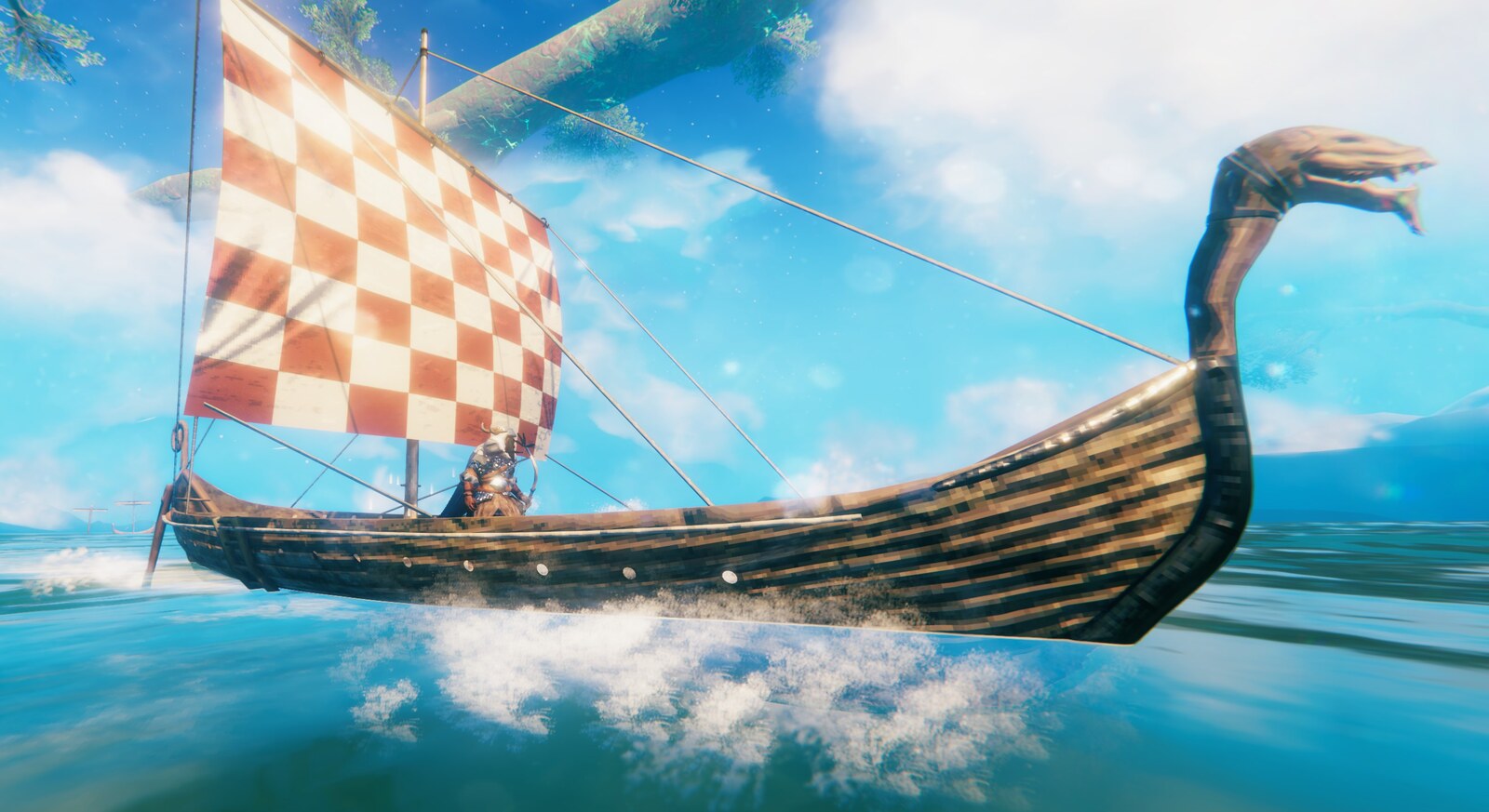
A Valheim mod that lets you name your ships, color their sails any color, and put your own images on them, shared with everyone on your server.
Features
- Customization Panel: Press
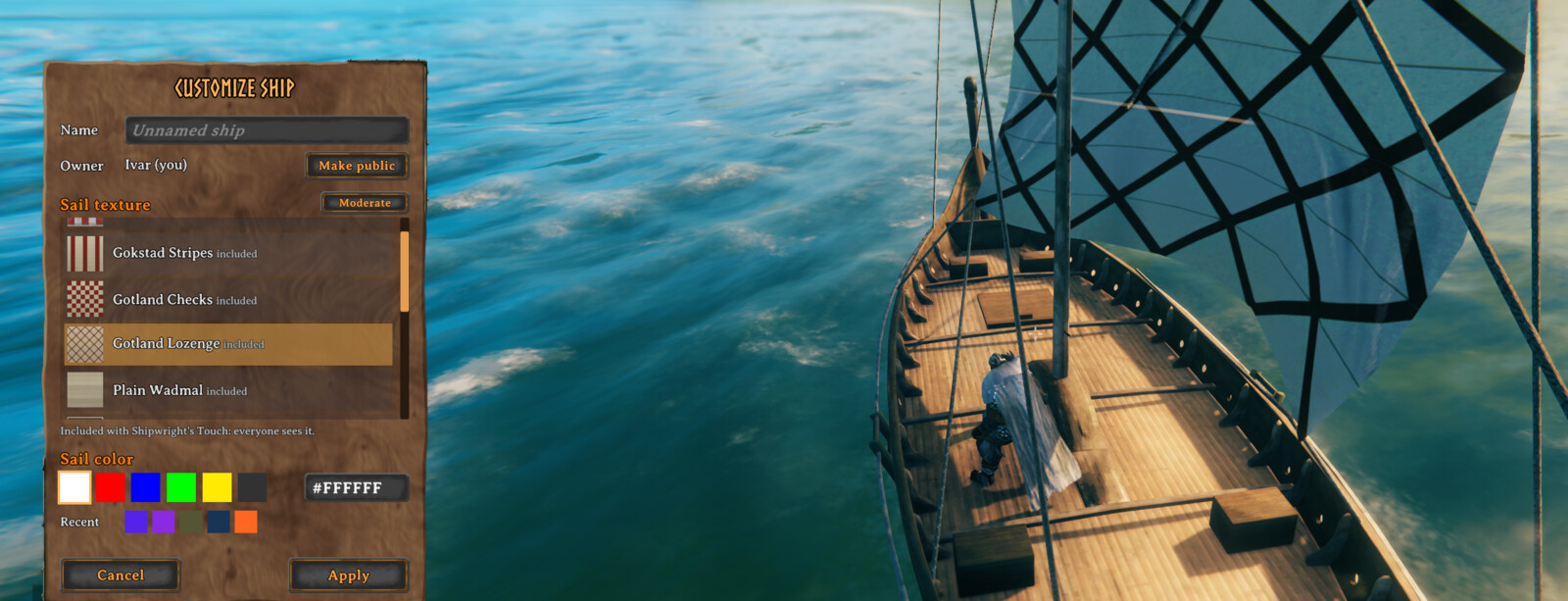
Left Shift + Ewhile looking at a ship (rudder, seats, mast, or hull) to open a panel where you name the ship, pick its sail color and sail texture, and choose who owns it. Changes preview live on the ship and are saved when you click Apply. - Any Sail Color: Pick a preset swatch or type any
#RRGGBBcolor. Your last few custom colors are kept as swatches for next time. PressEwhile placing a ship with your Hammer to cycle the presets before it's built. - Custom Sail Textures: Four historically inspired Viking Age sails are included, and you can add your own PNG or JPG images and choose them in the panel. The sail color tints the image; pick white to show it as-is.
- Sharing on Servers: On a server with this mod, a texture you put on a ship is shared with the server the first time you use it, so everyone sees it. Only a clean PNG copy of the picture is ever shared. Server owners decide whether players may share, set limits, and can require a moderator's approval first.
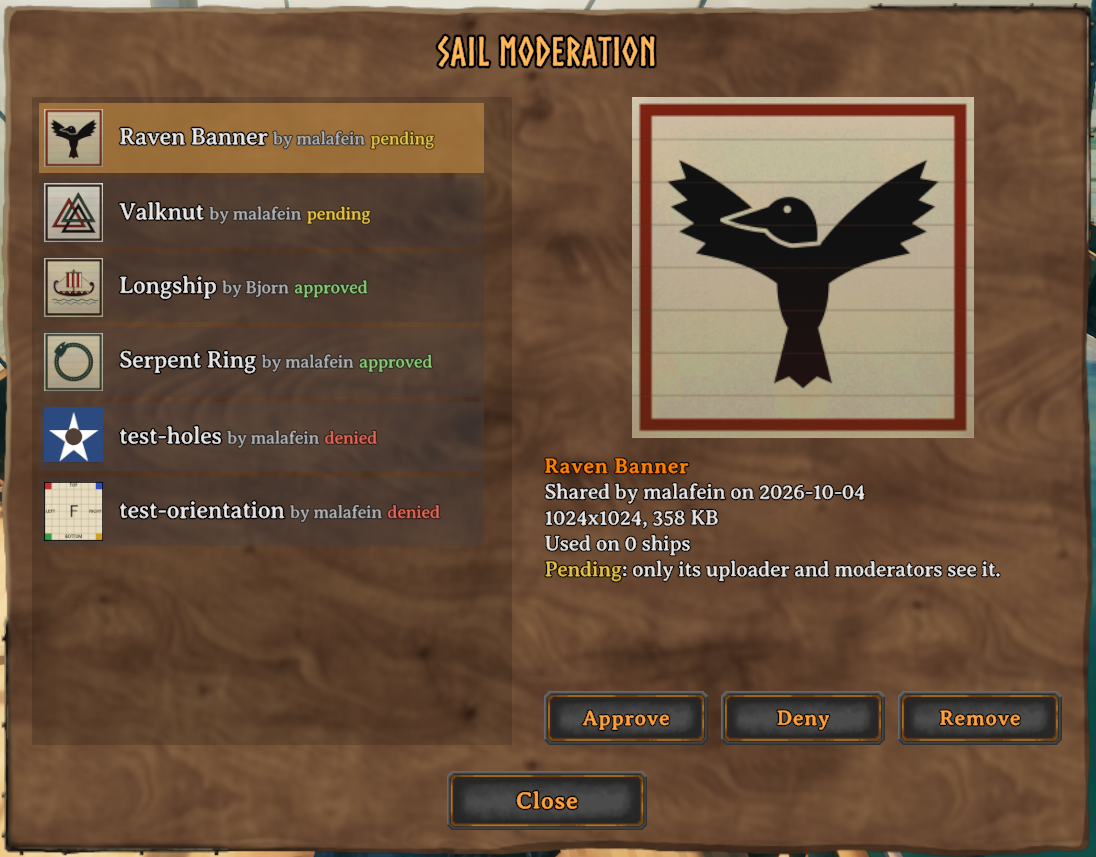
- Moderation: Server admins, and moderators they choose, review shared textures in an in-game panel: approve, deny, or remove them.
- Dynamic Hover Text: The ship's name is displayed in yellow at the top of the hover text for all ship parts, including storage containers.
- Builder Identity & Restrictions: When a ship is constructed, the builder is recorded as its owner. Only the owner can customize or deconstruct it; a ship made public can be customized by anyone. The owner's name is displayed in the hover text.
- Configurable Keybindings: Every keybinding can be changed in the config, and the hover text always shows the keys you have set.
- Mod Compatibility: Designed to work alongside popular mods like
QuickStackStore. Interaction prompts are disabled on containers to ensure no conflict with storage-specific features.
Installation
Thunderstore / r2modman (Recommended)
- Install via Thunderstore Mod Manager or r2modman.
-or- - Download the mod from Thunderstore, and follow the Manual Installation instructions below.
Nexus Mods / Vortex
- Install via Vortex Mod Manager.
-or- - Download the mod from Nexus Mods, and follow the Manual Installation instructions below.
Manual Installation
- Install BepInExPack Valheim.
- Download the latest release of Shipwright's Touch from GitHub.
- Extract the contents of the zip's
pluginsfolder (ShipwrightsTouch.dlland theShipwrightsTouch-Sailsfolder) into your<Valheim Install Folder>\BepInEx\pluginsdirectory.
On a dedicated server, install it the same way to share textures between players. Without the mod on the server, names and colors still work for everyone who has the mod, but custom textures show only to the player who chose them.
Compatibility: tested with Valheim 1.0.
Custom Sail Textures
Included sails
Four sails come with the mod, styled after surviving Viking Age sails, all woven wool sewn together from strips of cloth:
- Gokstad Stripes: white wool with sewn-on red stripes, after the sail remnants found with the Gokstad ship.
- Gotland Lozenge and Gotland Checks: diamond and chequered sails, as carved on the Gotland picture stones.
- Plain Wadmal: undyed wool (vaðmál), the everyday sailcloth.
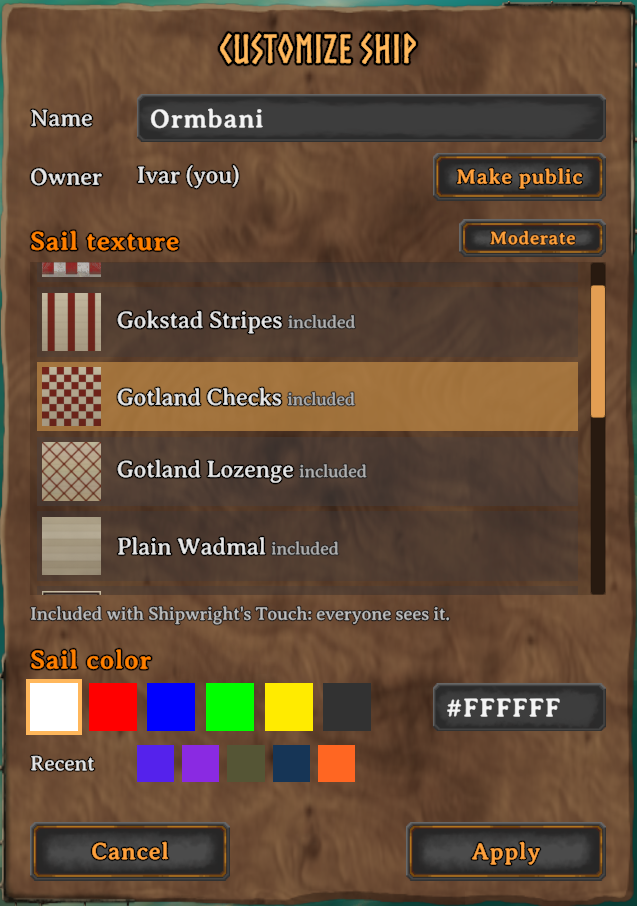
On a server with this mod they're the server's own textures: everyone sees them, no download or approval needed. Sail packs installed with a mod manager work the same way: any ShipwrightsTouch-Sails folder under BepInEx/plugins is used.
Your own sails
Put PNG or JPG images in BepInEx/config/ShipwrightsTouch/sails (the folder is created on first run) and pick them in the customization panel. Keep your own images here, not under plugins: mod managers replace a mod's plugin folder when it updates.
- The image is stretched to fill the sail, on every ship type. Square images work well.
- Up to 2048×2048 pixels and 4 MB. Servers may set lower limits for shared textures (1024×1024 and 2 MB by default, counted after conversion to PNG; see below).
- Transparent areas show as holes in the sail.
- The sail color tints the image: white shows it unchanged. Paint the background white or light if you want to recolor the sail with the sail color; an image with a colored background looks best with the sail color set to white.
- PNG and JPG images can both be shared. Before sharing, your game converts the image to a plain PNG holding only the picture: no camera location, no editor metadata, nothing else from the file. The server converts it again and only ever sends players its own copy.
- A converted PNG is often larger than the file you started with (about 1.5× for typical artwork, more for photos), and the server's size limit counts the converted size. The panel tells you before you share if it's over.
- Images are downloaded the first time a ship using them comes near, then cached in
BepInEx/config/ShipwrightsTouch/cache.
Each texture's status shows in the panel's list: shared (everyone sees it), pending (waiting for a moderator's approval; until then only you see it), denied (only you see it), or auto-denied (the server turned it away automatically because the file held more than image data; ask a moderator if you think that's a mistake). If a texture can't be shared, the panel says why.
Sharing settings
- ShareMyTextures: Set to
falseto keep your textures to yourself: they show only on your own screen. - ShowOtherPlayersTextures: Set to
falseto show other players' textures as the vanilla sail. The server's own textures still show. - MaxTransferKBPerSecond: A speed limit for sending textures, in KB per second: yours when you share one, the server's when it sends textures to players.
0(the default) sends as fast as the connection allows. The game already limits each connection to 150 KB/s, shared with world updates, so a limit only slows transfers down to leave the world more room. Choices:0,8,16,32,64or128; any other value counts as0.
Server Setup
A server's own textures go in its BepInEx/config/ShipwrightsTouch/sails folder; every player sees them, no approval needed. The server sends players converted copies, kept in BepInEx/config/ShipwrightsTouch/server-sails; your files are never changed. Textures shared by players are kept, converted, in BepInEx/config/ShipwrightsTouch/uploads.
The server and its players need the same version of the mod to share textures: with a mismatch, players get a notice and their textures show only for them. Upgrading from 1.2: on first start the server converts the textures players already shared and keeps the originals and the old index in uploads/pre-1.3.0. Ships keep their sails.
The [Server] settings apply when your game is the server (a dedicated server, or you hosting). While connected to a server with this mod, they show the server's values, and its admins can change them live from Configuration Manager.
- AllowCustomSailTextures: Set to
falseto turn custom textures off for everyone, including a player's own textures on their own screen. - AllowPlayerSailTextures: Set to
falseto stop new sharing. Textures approved earlier stay visible. - RequireApproval:
true(default) keeps a new texture visible only to its uploader until a moderator approves it. Whenfalse, it's shown to everyone right away; moderators can still deny it later. - MaxTextureFileKB: Largest texture a player may share, in KB, measured after conversion to PNG. Default
2048(servers set up with 1.2 keep their old value of1024until changed). This sets download time and the server's disk use; video memory depends only on the size in pixels. - MaxTextureSize: Largest width or height a player may share, in pixels. Default
1024. - MaxTexturesPerPlayer: How many textures each player may share, denied ones included (a moderator's Remove frees a slot). Default
10. - AutoDenyUnexpectedContent: Set to
trueto deny an upload automatically when the file held more than image data. The game never sends such files itself, so one comes from a modified game or was made by hand. Players only ever get the server's clean copy either way. Off by default; a moderator can approve an auto-denied texture.
Moderation
Admins (the server's adminlist.txt) can moderate, and so can moderators: players listed in the server's BepInEx/config/ShipwrightsTouch/moderators.txt, one player ID per line, written the same way as in adminlist.txt. Moderators get only sail moderation, not the admin console, kick, or ban. The file is created the first time the server checks it, and changes take effect within about 10 seconds, without a restart.
Moderators open the moderation panel with the OpenModeration key (unbound by default), with the Moderate button in the customization panel, or by pressing Left Shift + E on another player's ship that uses a shared texture. The panel lists every shared texture, pending ones first, with a full-size preview, who shared it, how many ships use it, and who last approved or denied it.
- Approve: everyone sees it.
- Deny: ships using it show the vanilla sail to everyone but its uploader, and it can't be shared again. Approving it later undoes this.
- Remove: deletes it from the server and frees the uploader's slot; it may be shared again.
The panel also flags an upload whose file held more than image data (unexpected content), and notes when the uploader's game converted it differently from the server (usually a Windows and Linux difference, harmless).
Uploaders only see a texture's status, never which moderator decided.
Configuration
The mod generates a configuration file at BepInEx/config/com.malafein.shipwrightstouch.cfg after the first run. Settings can also be changed in-game with a configuration manager such as shudnal's Configuration Manager.
General
- AssignBuilderIdentity: Set to
true(default) to assign your character as the owner when constructing a ship, restricting modifications to yourself. - AllowShipDeconstruction: Set to
trueto allow removing ships with the hammer tool. Off by default, and we suggest leaving it off: the hammer's remove action takes a ship apart in one click, even one you're sailing, and anything aboard that isn't in a container can be lost. Somewhere at the bottom of the sea lies a growing pile of iron nails. Don't add to it. - ScrollSensitivity: Mouse-wheel scroll speed in the panels' lists.
- CompressTextures:
true(default) stores custom sail textures compressed in video memory, like the game's own textures: about a quarter of the memory each, with slight artifacts on hard edges and smooth gradients. Turn it off for exact images if your graphics card has memory to spare.
Controls
- CustomizeShip: Open the customization panel for the ship you are looking at. Default
Left Shift + E. (Called RenameShip in 1.1.1 and earlier; your saved key carries over.) - ChangeSailColor: Quickly cycle the sail color presets of the ship you are looking at. Unbound by default.
- ChangeSailColorWhilePlacing: Cycle the sail color while placing a ship with the Hammer. Default
E. - OpenModeration: Open the moderation panel (moderators and admins only). Unbound by default.
Left and right Shift, Ctrl, and Alt are separate keys, as they are in the game. Plain E still works as normal on a ship: it takes the helm or sits you down.
If one of these keybindings is also bound to a game action, a warning is written to the BepInEx log (LogOutput.log) at startup and whenever a binding changes.
Technical Details
- Custom data is stored in ZDO keys:
custom_ship_name,custom_sail_style,shipwrightstouch.sail_color,shipwrightstouch.sail_texture,shipwrightstouch.builder_id, andshipwrightstouch.builder_name. - A ship stores only its texture's hash (SHA-256); the image itself travels from the server on demand, always as a PNG the server wrote itself. The server remembers every hash that stands for the same picture (the original file, its converted copy), so ships keep working whichever one they hold.
License & Development
This project is licensed under the GNU General Public License v3.0 (GPLv3). You are free to modify and redistribute this mod under the same license terms.
Development Note: This mod was primarily developed with the assistance of Google Antigravity, Gemini, and Claude. The source code is open to the community to learn from, modify, and improve.
CHANGELOG
Changelog
[1.4.0] - 2026-10-14
Safe Harbor: servers can now keep unattended ships safe from monsters and rescue capsized ones. Update the mod on your server and for every player at the same time; 1.3 and 1.4 can't share textures with each other.
New
- Safe Harbor: Two server options, off by default. EnemiesIgnoreUnoccupiedShips: monsters don't go after a ship with nobody aboard (one already attacking keeps at it until you deal with it). RescueCapsizedShips: a capsized ship stops taking damage at 10% of its health, and holding your interact key on its hull turns it upright.
- RequireMatchingMod: A server option that only lets players join with a matching version of the mod. Players already connected without it get a 10 second countdown, then are disconnected with their character saved. The Safe Harbor options turn it on, since they only work when every player has the mod.
Fixed
- Hover text on the hull: Looking at a ship's hull showed nothing; it now shows the ship's name, builder and prompts, like the rudder and the rest of the ship.
- Name box after rejoining: The customization panel no longer loses its name box, color code box and texture list scrollbar after you log out and join a world again in the same game session.
Changed
- The server settings are listed in a fixed order in Configuration Manager: sail textures first, then the mod requirement and Safe Harbor.
[1.3.0] - 2026-10-06
Safer texture sharing: only clean pictures ever reach other players. Update the mod on your server and for every player at the same time; 1.2 and 1.3 can't share textures with each other.
New
- Clean shared images: A texture is converted to a plain PNG before it's shared, by your game and again by the server, and players only ever receive the server's copy. Nothing but the picture leaves your computer or reaches anyone else's: no camera location, no editor metadata, no hidden data.
- JPG sharing: JPG images can now be shared too.
- Moderation flags: The moderation panel flags an upload whose file held more than image data. Servers can deny those automatically with the new
AutoDenyUnexpectedContentsetting (off by default); the uploader sees it as auto-denied and can ask a moderator to review it. - Transfer speed limit: The new
MaxTransferKBPerSecondsetting can slow texture transfers down to leave more room for world updates. Off by default.
Changes
- Size limit counts the converted PNG: A converted image is often larger than the original file (about 1.5× for typical artwork), so the default
MaxTextureFileKBis now 2048. Servers set up with 1.2 keep their value until changed. The panel shows the converted size when a texture is over the limit. - Upgrading a server: On first start, textures already shared are converted; the originals are kept in
uploads/pre-1.3.0, and ships keep their sails.
Fixes
- Stalled uploads: If an upload stops arriving, the server now says so right away, instead of the player waiting for a timeout.
[1.2.1] - 2026-10-05
Fixes
- Included sails missing with mod managers: r2modman and Thunderstore installed the four included sails without their folder, so the game never found them. Reinstalling or updating puts them back.
- Version mismatch notice: joining a server that runs a different version of Shipwright's Touch now tells you so, and whether the server's or yours is newer. Sail sharing stays off until they match, as before.
- Requires BepInExPack Valheim 5.4.2351.
[1.2.0] - 2026-10-05
Custom sail textures, any sail color, and a new customization panel. Install the mod on your server too if you want to share textures with other players.
New
- Customization Panel:
Left Shift + Eon a ship now opens a panel for its name, sail color, sail texture, and owner. Changes preview live on the ship and are saved when you click Apply. - Any Sail Color: Pick a preset or type any
#RRGGBBcolor. Your recent custom colors are kept as swatches. - Custom Sail Textures: Four historically inspired Viking Age sails are included. Add your own PNG or JPG images in
BepInEx/config/ShipwrightsTouch/sailsand choose them in the panel. The sail color tints the image. - Sail Packs: Any
ShipwrightsTouch-Sailsfolder underBepInEx/pluginsis used, so sail packs can be installed with a mod manager. - Sharing: On a server with this mod, a PNG texture you put on a ship is shared with the server, so everyone sees it. Server owners decide whether players may share, set size and count limits, and can require approval first. A server's own textures go in its
sailsfolder. - Moderation: Admins, and moderators listed in the server's
moderators.txt, approve, deny, or remove shared textures in an in-game moderation panel. - Public Ships: The panel can make your ship public, so anyone can customize it, or claim a public ship as yours.
- New Settings:
ShareMyTextures,ShowOtherPlayersTextures,CompressTextures,ScrollSensitivity, theOpenModerationkey, and the server's texture settings. See the README.
Changes
- RenameShip is now CustomizeShip: same default key (
Left Shift + E), and your saved key carries over. - ChangeSailColor is unbound by default for new installs, since the panel covers it. If you had it set, it stays set.
- Left and right Shift, Ctrl, and Alt are now separate keys, as they are in the game. The default shortcuts use the left-hand keys, so if you pressed the right-hand ones, rebind the shortcut or switch hands.
- Log messages now appear in the BepInEx log under the mod's name, and routine messages are no longer logged as warnings.
[1.1.1] - 2026-09-10
- Corrected documentation.
[1.1.0] - 2026-09-10
- Updated for the Valheim 1.0 release, which moved the game to Unity 6. Version 1.0.2 of this mod does not work with Valheim 1.0, so updating is required.
Changes
- New Sail Color Keys: Valheim 1.0 uses
Gfor its new radial menu, so sail coloring has moved. UseAlt + Ewhile looking at an existing ship, orEwhile placing a ship. Renaming is unchanged (Shift + E). - Configurable Keybindings: Renaming and both sail color actions can now be rebound in the new
Controlssection of the config. The hover text always shows the keys you have set. - Keybinding Conflict Warning: If one of these keybindings is also bound to a game action, a warning is written to the log.
Fixes
- Typing a capital
Ein chat while looking at a ship's hull or mast no longer opens the rename box.
[1.0.2] - 2026-03-22
Features
- Sail Coloring on Existing Ships: You can now change the sail color of an existing ship using
Shift + G. - Builder Identity & Restrictions: The mod now optionally (enabled by default) tracks who built a ship. If tracking is enabled, only the owner can deconstruct, rename, or recolor the ship. The owner's name is also displayed on the ship's HoverText.
[1.0.1] - 2025-12-26
- Updated README with instructions for changing sail color.
[1.0.0] - 2025-12-25
Initial Release of Valheim Boat Customizer.
Features
- Ship Naming: Rename your ships using
Shift + Ewhile looking at the rudder, seats, mast, or hull. - Universal Ship Header: The ship's name is dynamically displayed in yellow at the top of the hover text for all components (Cargo, Rudder, Mast, Hull).
- Sail Coloring: Support for custom sail styles synchronized via ZDO.
- Mod Compatibility: Precisely targeted interactions to avoid conflicts with container-specific mods like
QuickStackStore.
