
Please disclose if any significant portion of your mod was created using AI tools by adding the 'AI Generated' category. Failing to do so may result in the mod being removed from Thunderstore.

Fysik
Structural physics for building. Shape matters: arches carry load in compression, triangulated trusses stay rigid, cantilevers bend. Replaces vanilla support with a frame solver; overloaded pieces crack before they fall. Work in progress.
| Date uploaded | 4 days ago |
| Version | 0.1.3 |
| Download link | menezesbruno-Fysik-0.1.3.zip |
| Downloads | 30 |
| Dependency string | menezesbruno-Fysik-0.1.3 |
This mod requires the following mods to function

denikson-BepInExPack_Valheim
BepInEx pack for Valheim. Preconfigured with the correct entry point for mods and preferred defaults for the community.
Preferred version: 5.4.2351
ValheimModding-Jotunn
Jötunn (/ˈjɔːtʊn/, 'giant'), the Valheim Library was created with the goal of making the lives of mod developers easier. It enables you to create mods for Valheim using an abstracted API so you can focus on the actual content creation.
Preferred version: 2.30.2README
Fysik
Structural physics for Valheim building. In vanilla Valheim, a piece only cares about how far it is from the ground. Fysik replaces that with a force calculation in which the shape of your build matters, in the spirit of Poly Bridge and Bridge Constructor:
- Arches carry their load in compression and can span gaps that a flat beam cannot.
- Braces and triangles carry load along their length instead of bending: a diagonal under a balcony halves its stress.
- Cantilevers bend, and the longer they reach, the more they strain.
- An overloaded piece cracks before it falls: it turns red, shakes, creaks and sheds dust, giving you a few seconds to shore it up. Once something gives way, the collapse follows instantly.
- Building an arch works like the real thing: until the last stone closes it, an unfinished arch is just two cantilevers and needs scaffolding. Close it, remove the scaffolding, and it stands.
⚠ Before you install
Fysik is on from the start. As soon as a world loads, every building made by players is checked against the physics Fysik applies, and buildings that do not respect it will crack and fall, including bases you built before installing it. Back up your world first. We recommend starting a new world with Fysik, so everything you build is designed for it from the first post.
Buildings that come with the world (stone towers, abandoned houses, villages, ruins) are not simulated: they keep vanilla support, unless the server sets
Structure.WorldBuildings = Physics(see World buildings).
Status
Early access. Material values are still being calibrated. Back up your worlds before trying it.
Installation
Install with a mod manager (r2modman, Thunderstore Mod Manager) or manually:
- Install BepInExPack_Valheim and Jötunn.
- Copy
plugins/Fysik.dllintoBepInEx/plugins/Fysik/.
Fysik must be installed on the server and on every client, with exactly the same version (every player who owns part of a structure must calculate it exactly as the others do). Players without it cannot join a server that has it, and vice versa.
Existing player buildings follow the new rules as soon as the mod is enabled: back up your world,
and preferably start a new one. To look at an old base before letting it settle, set
Structure.Mode = Sandbox (nothing falls for lack of support) or DisplayOnly (vanilla decides).
Seeing the forces
- Hammer: aim at a piece. It is colored by stress, from blue (relaxed) through green and yellow to red (at its limit), and next to the crosshair you get its stress, e.g. Compression 72%, then its name, material and own weight, the weight it holds up (Holds 6.5 t) and, for posts, beams and logs, how hard they are squeezed or stretched (Squeezed 6.7 t). Aiming at a chest, torch or pile shows its name and weight. Light blue means the structure is still being calculated; magenta means it has no path to the ground at all; neutral grey means a world building that Fysik does not simulate (World building · not simulated).
- Placing a piece: the ghost is colored by the stress it would have once placed, with the value next to the crosshair (Preview: Bending 85%) and the same lines as the hammer, including what it would hold up. If it would push another piece past its limit, a red line names that piece. When vanilla says the spot is invalid, the ghost stays vanilla red.
- X-ray (F7): colors every piece within 40 m. Ctrl+F7 widens the radius by 10 m, up to 80 m, then back to 40 m.
- Cracking: a piece above 100% pulses red, shakes, creaks and sheds dust. You have
CrackWarningSeconds(5 s) to shore it up (add a post, a brace, finish the arch) before it falls. Once something gives way, everything that lost its support comes down with it at once, as debris that bursts on hitting the ground, like a building being imploded; whatever is left overloaded follows without warning. A piece left with no path to the ground at all (you removed its support) has nothing to shore up and falls at once, as in vanilla. - Furniture: beds, tables, smelters, hearths, portals and other pieces the game tags as objects
rather than structure weigh what they are made of (4 kg per piece of wood, 10 kg per stone, 4 kg
per metal bar, adjustable in the
Weightsettings): a smelter about 250 kg, a bed 32 kg, a chair 16 kg. Chests, workbenches, forges, torches, stone and wood piles and similar pieces that hold nothing up weigh the same way and load the pieces they rest on: a stone pile is 500 kg, a forge 120 kg, a chest 40 to 113 kg, a standing torch about 9 kg. Their load counts once they are placed; the ghost does not show it yet. They still need something to rest on and fall when the piece under them goes, as in vanilla. Fences, stake walls, carved statues and some stacks (fine wood, metal bars) count as structure and weigh their full volume.
World buildings
Stone towers, abandoned houses, villages, ruins, fortresses and everything else the game places in the world were designed for vanilla support, not for real forces. By default Fysik leaves them alone:
- Only what players build is simulated. World buildings keep vanilla support: they stand as the game built them, and if you break their base, the rest crumbles as in vanilla. Fysik never brings them down.
- They show in neutral grey with the hammer and the X-ray.
- A player build resting on a world building is held as if on rock. If that world building is destroyed, your build is recalculated and may fall.
To simulate world buildings too, the server sets Structure.WorldBuildings = Physics. They are then
calculated, colored and brought down like any player build. This changes the game: many of them do
not respect the physics and will crack and fall, for good, as soon as someone comes near.
A piece counts as a world building when no player placed it. Pieces spawned with console commands, or by mods that do not record a builder, count as world buildings too.
Building guide
The pictures below were computed with Fysik's own solver and the default materials, using the same pieces you build with. In game, pieces snap a little differently, so expect similar, not identical, numbers.
Squeeze, don't bend
A piece is far stronger squeezed or pulled along its length than bent across it. A post under a roof is squeezed and barely notices; a beam reaching out is bent, and the joint where it leaves its support carries the whole reach. The stress grows with the square of the length: half again as far out means more than twice the stress.
- With 4 m core wood logs and floors on top, a balcony 8 m out is comfortable (46%), 12 m out is just past the limit (101%) and 16 m out falls.
- A diagonal brace turns the bending into a squeeze: two 45° logs from the ground to the first joint bring the 12 m balcony back to 45%.
- The brace pushes back against whatever it stands on. Give the house a diagonal (or a solid wall), or the push bends its posts instead.
Arches
An arch turns the weight into a squeeze that follows its curve, so it spans far more than a flat beam. This bridge is 24 m long with 20 m clear underneath; hanging the deck from the arch takes it from 67% down to 43%.
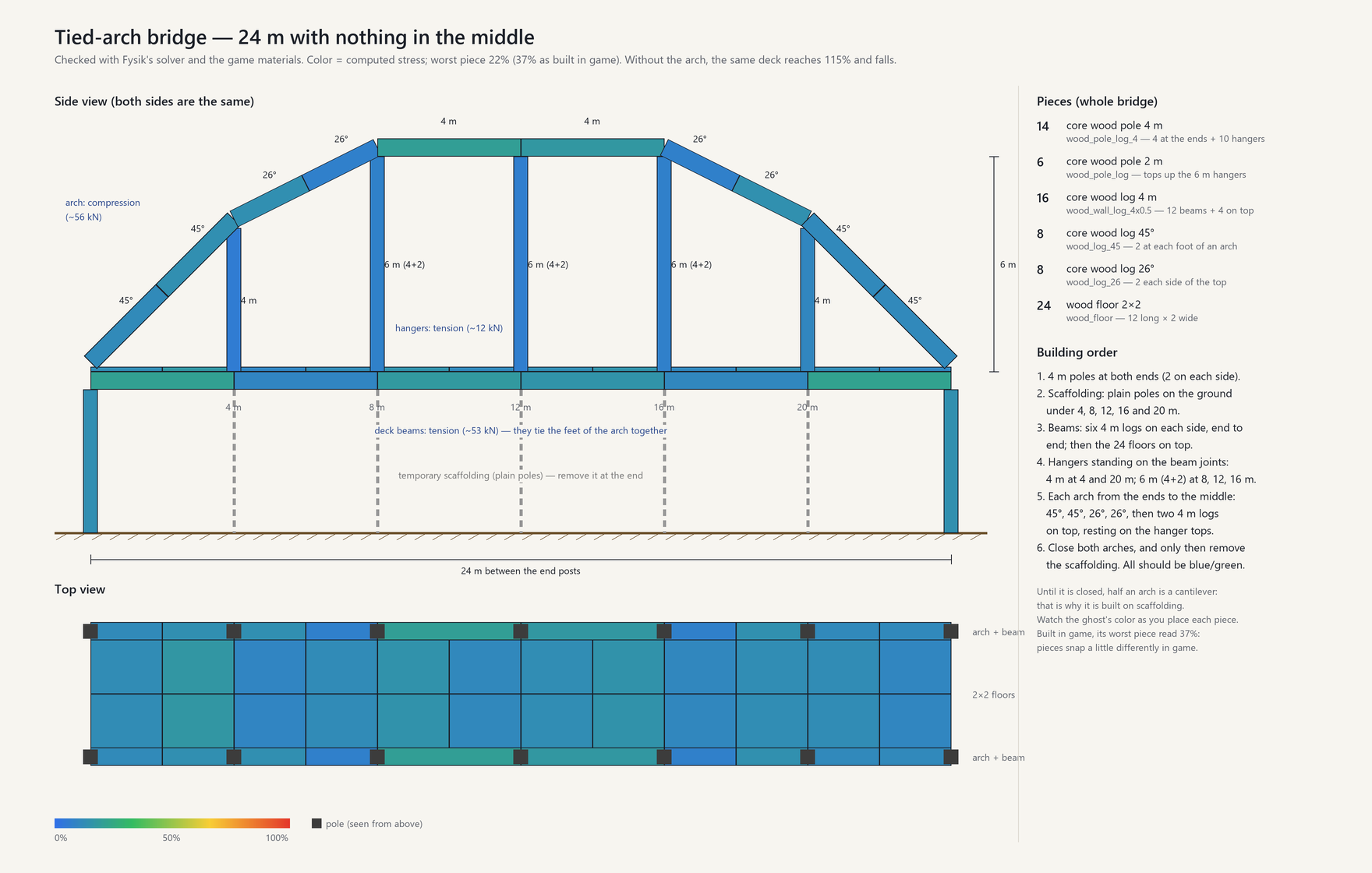
- Prop it while you build. Until the arches close, the hangers and half arches hang on the deck and the corner posts crack (118%). One plain pole under the middle of each side keeps everything below 38%; remove the poles once both arches are closed.
- Hold its feet. An arch pushes outwards where it lands. Here the deck beams tie the two feet together (in tension, about 46 kN); otherwise set the feet against the ground or a heavy wall.
- Hang the deck from it. Poles from the arch down to the deck (hangers) carry the deck in tension.
- Two posts per corner. A deck flexes, and a lone post glued under its end gets bent (87%); two posts 2 m apart hold it straight (24%).
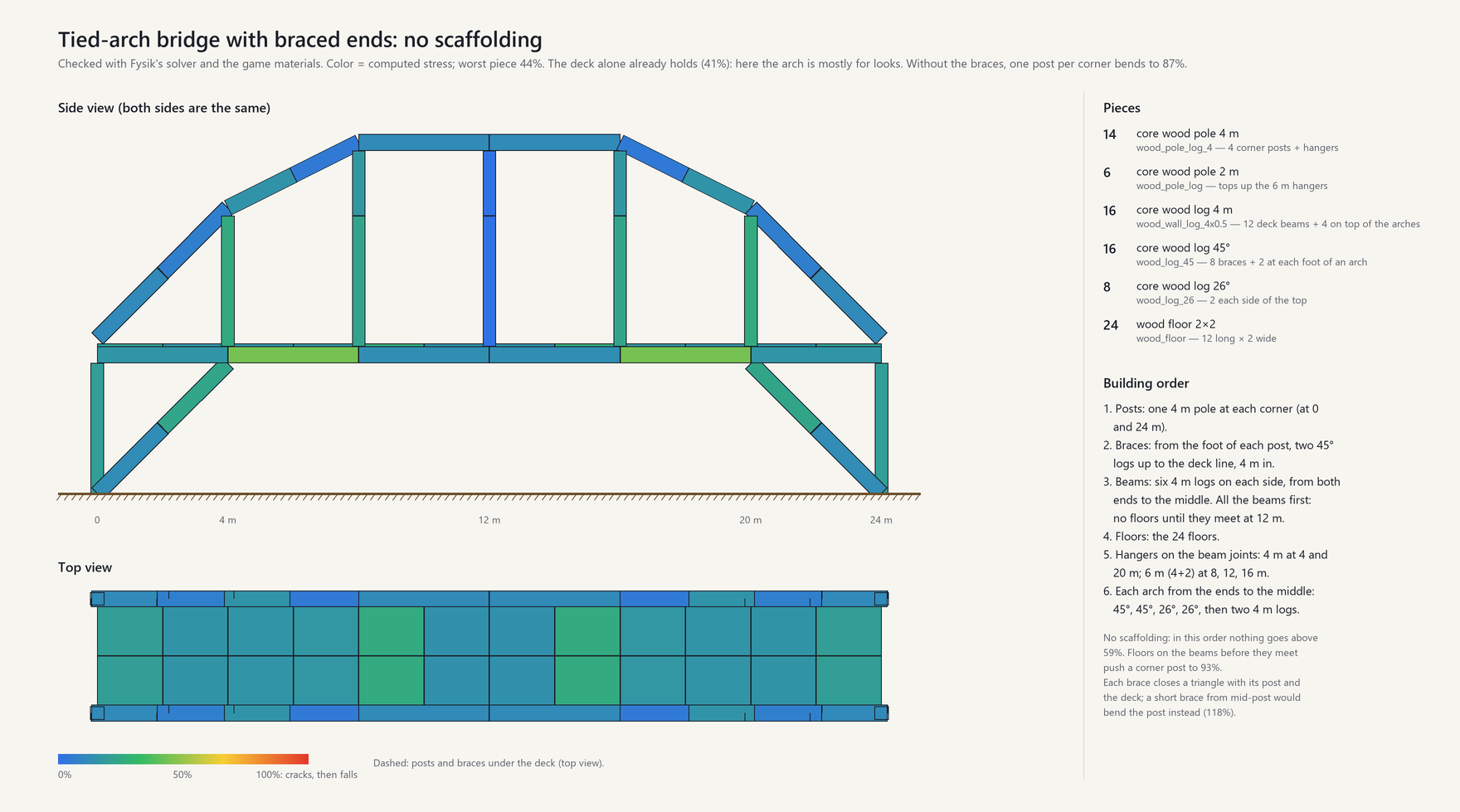
- Or brace the ends. Two 45° logs from the foot of each post up to the deck close a triangle, and the same bridge needs no scaffolding: nothing goes above 59% while it is built, as long as all the beams meet before the floors go on. The deck then holds on its own (41%), so the arch is for looks. A short brace from halfway up the post would bend the post instead (118%).
Wider gaps and boats
To leave more water free, put the structure under the deck and let stone take the ends. In the pictures, temporary props are dashed: build with them, then take them away.
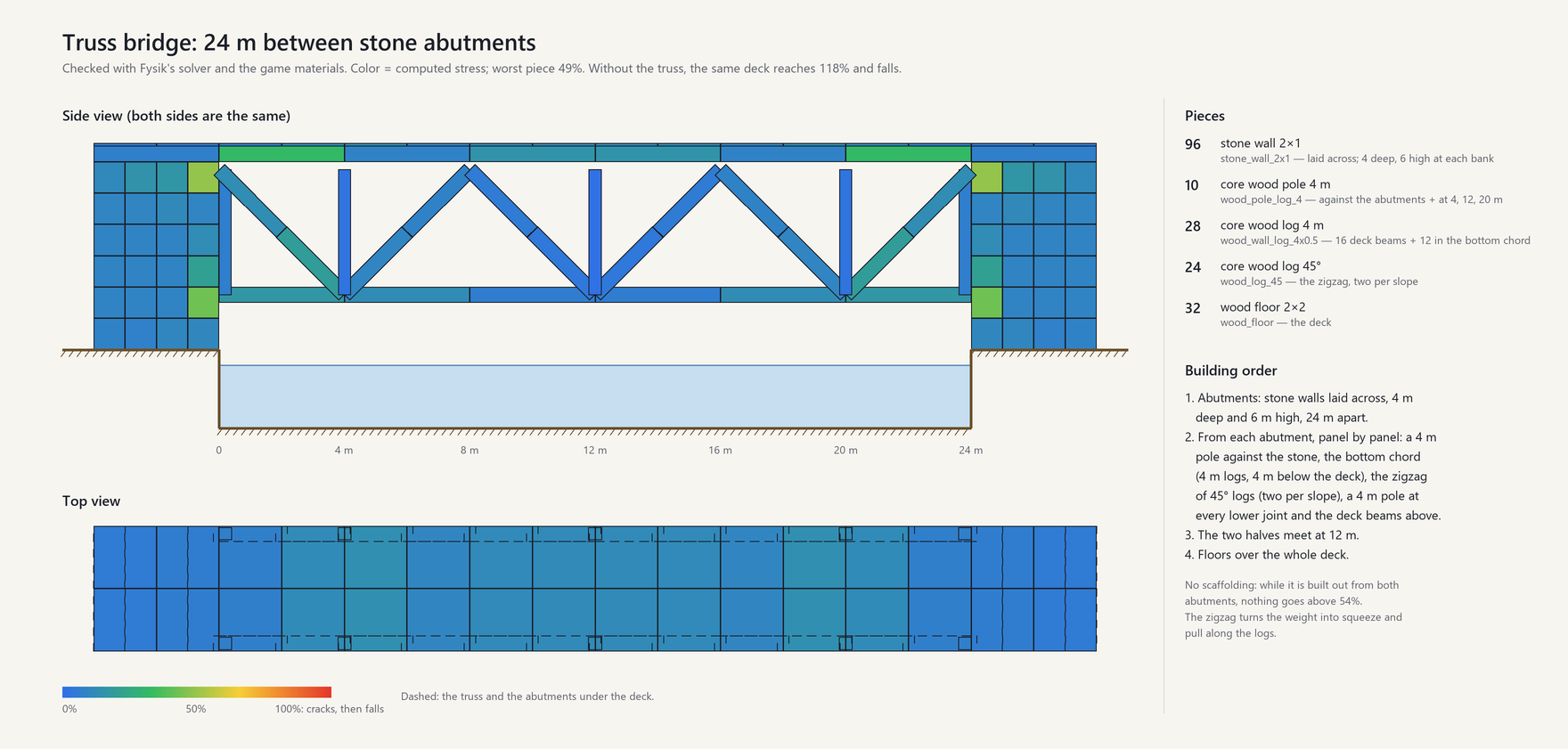
- Truss. A zigzag of 45° logs between the deck and a bottom chord 4 m below turns the weight into squeeze and pull along the logs: worst piece 49% between stone abutments 24 m apart, where the deck alone would reach 118% and fall. Build it out from both abutments, panel by panel: nothing goes above 54% on the way, so it needs no scaffolding.
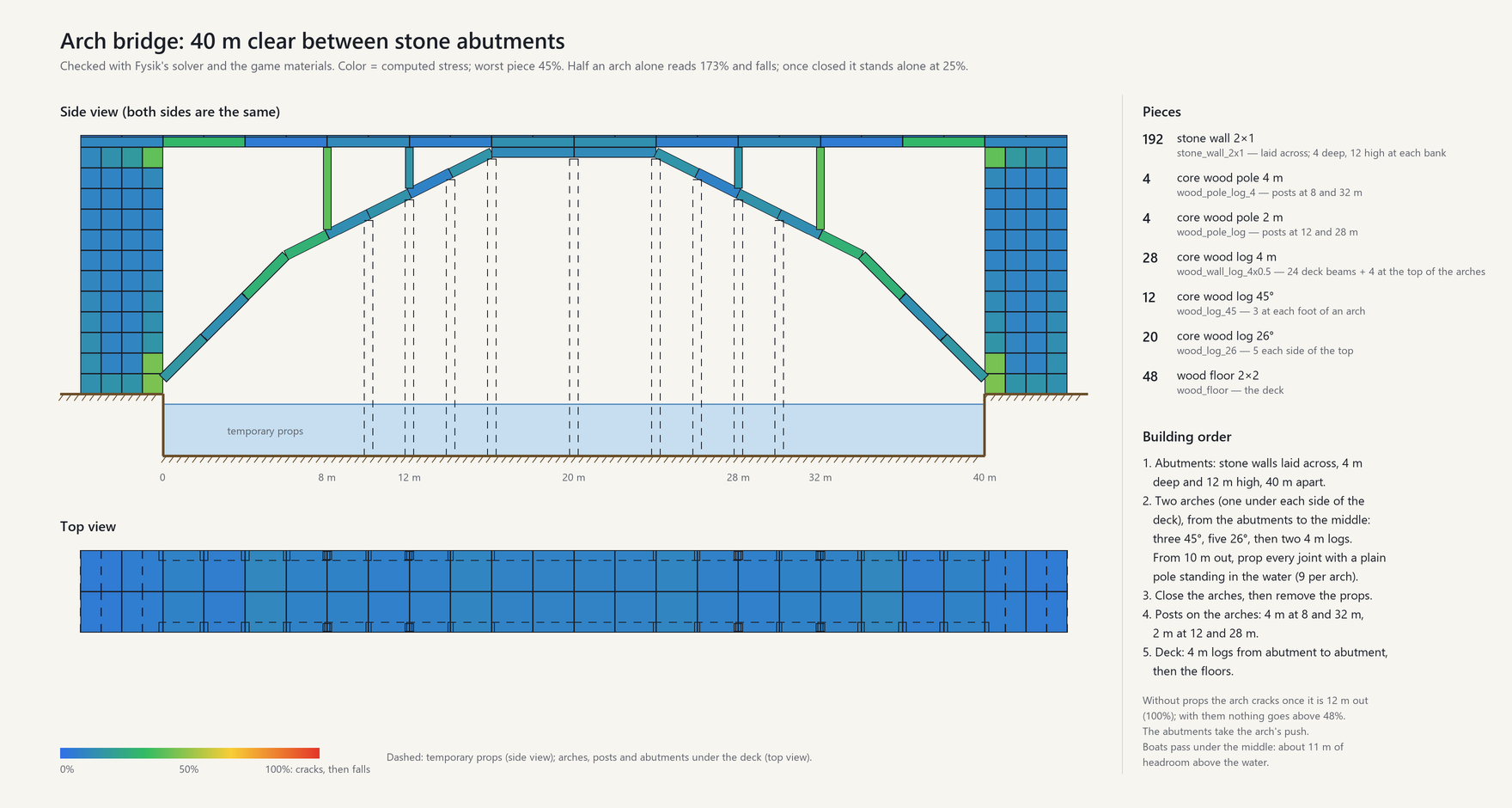
- Arch under the deck. With heavy stone abutments to push against, a wooden arch leaves 40 m of water clear, with about 11 m of headroom for boats in the middle: worst piece 45%. Without props the arch cracks once it is 12 m out; a plain pole standing in the water under every joint from 10 m out keeps it below 48%. Once closed it stands on its own (25%) and the props come out.
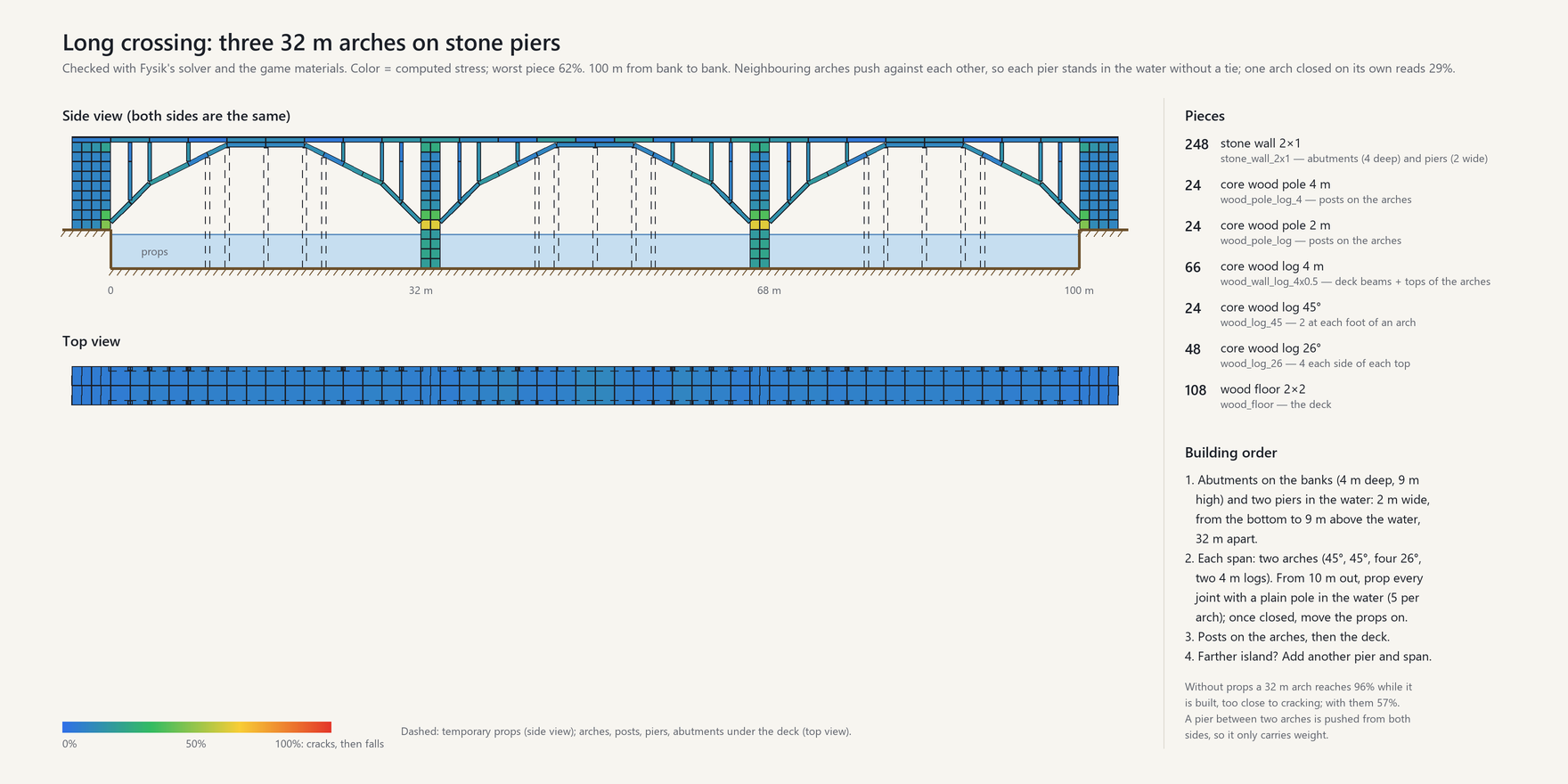
- Farther islands. Repeat the span on stone piers standing in the water. Between two arches a pier is pushed from both sides and only carries weight: three 32 m arches cross 100 m at 62%. Prop each arch from 10 m out as it is built (it reaches 96% without), then move the props to the next span.
Stone bridges
Stone is strong squeezed and weak pulled. A pair of stone arches (stone_arch) closes 4 m; wider
arches are built out from the piers in steps and closed at the top with a pair of stone arches.
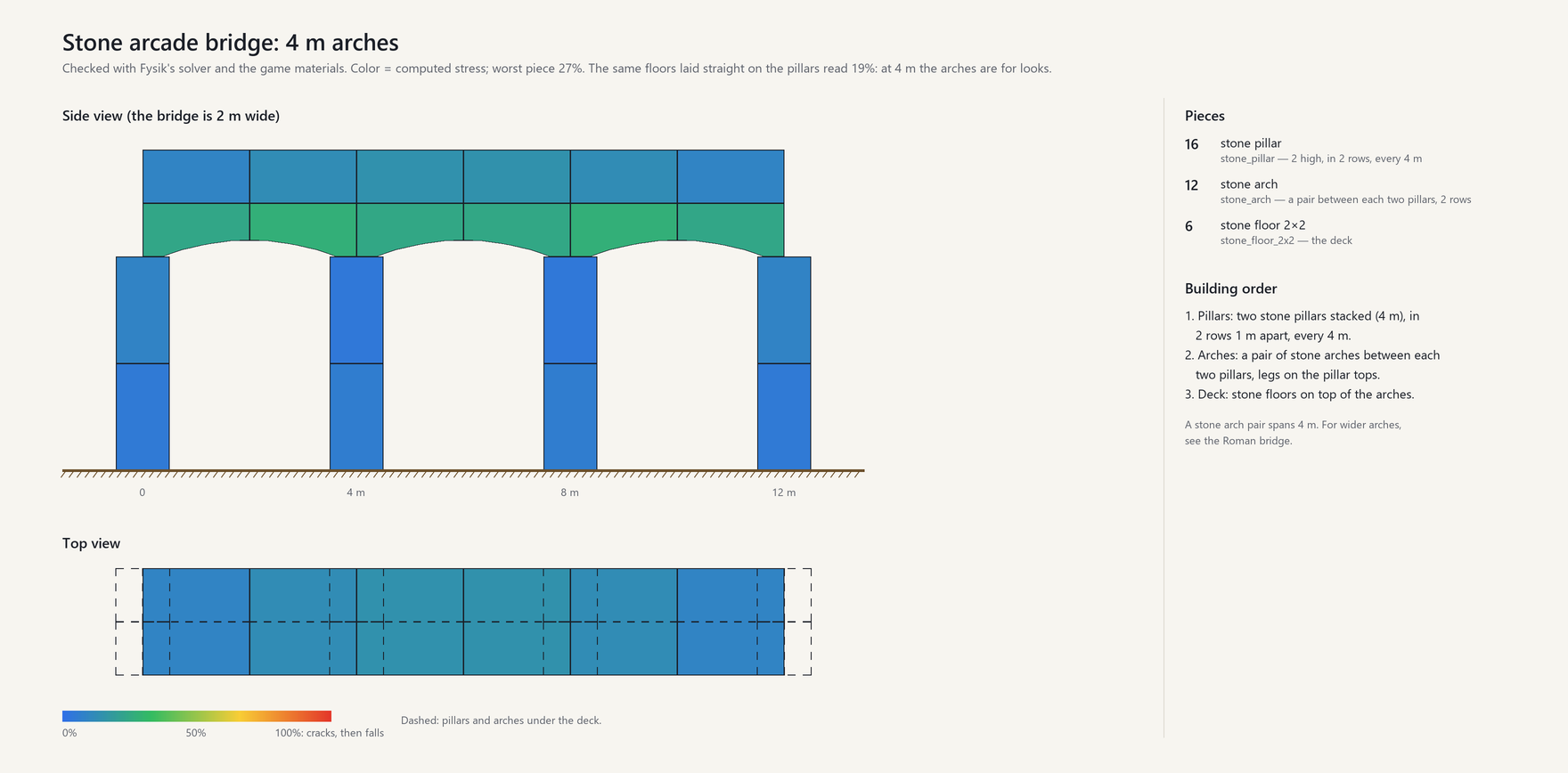
- Pillars every 4 m, a pair of stone arches between each two, stone floors on top: worst piece 23%. At this span the arches are mostly for looks: the same floors laid straight on the pillars hold too (22%). No scaffolding: the first stone arch of each pair stands on its pillar (17%) until the second one closes it.
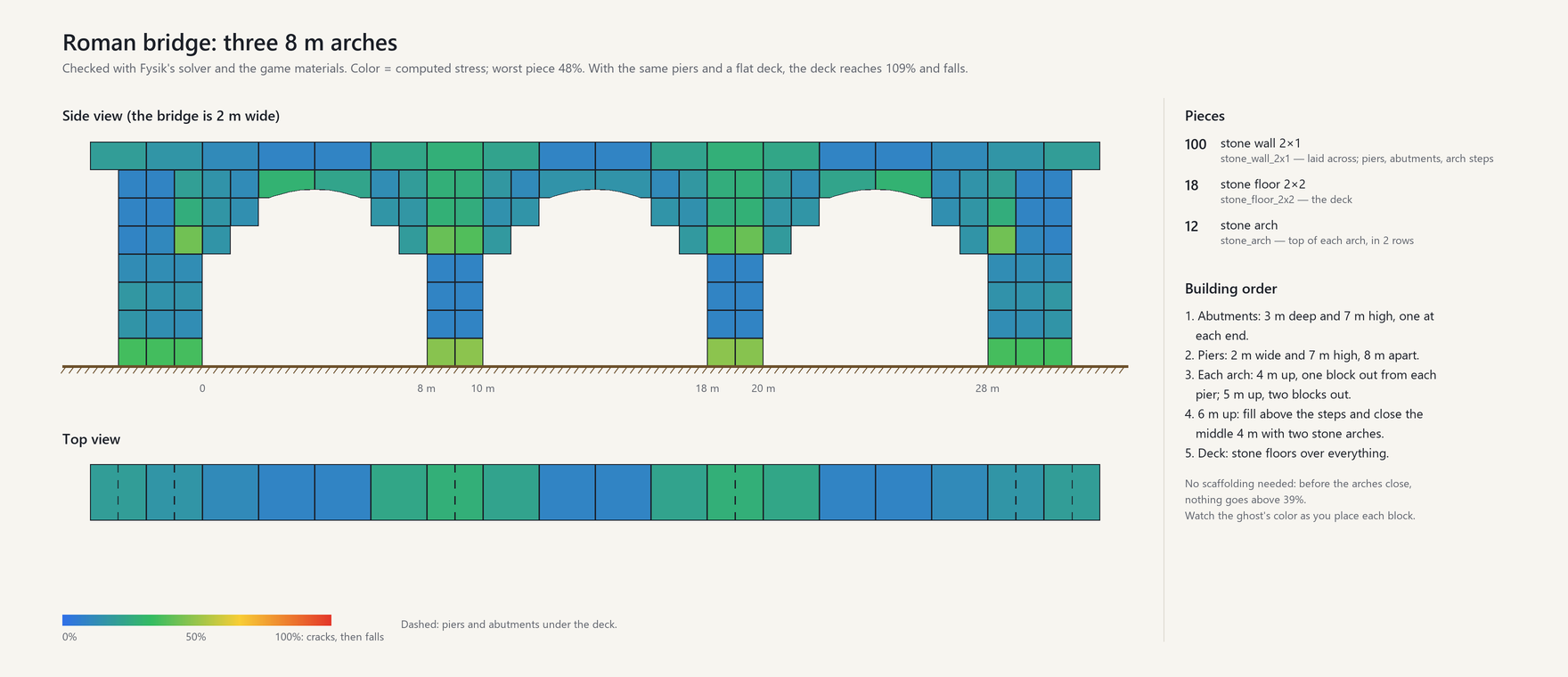
- With 8 m between the piers the arch does the work: worst piece 48%, while the same piers with a flat deck reach 122% and the deck falls.
- Each arch steps out 1 m and then 2 m from the piers and closes with two stone arches. Before the arches close nothing goes above 39%, so no scaffolding is needed.
Materials
- Stone is very strong squeezed and weak pulled: use it for walls, pillars and arches, not for beams or overhangs. Span an opening in a stone wall with an arch or a wooden beam.
- Core wood (logs) is stronger than wood; iron is strong in every direction.
- Long, thin pieces buckle: a slender post carries less than its material alone would allow.
Tips
- Watch the ghost's color before placing each piece, and check the whole building with the X-ray (F7) after big changes.
- When something cracks, you have a few seconds: put a post under it, add a brace, or remove what it carries (a stone pile is 500 kg).
- Badly damaged pieces (below half health) are weaker; repair them.
- Big bases: structures up to
Structure.MaxFrameBodiespieces (2000) get the full calculation. Larger ones use a simpler model that does not recognise arches; raise the limit (up to 5000) if you build arches into a big base. - Too hard or too easy? Ask your server admin about
Structure.Difficulty.
Roadmap
Next:
- Masonry: stone blocks that only hold by pressing on each other, interlocking walls, arches built on wooden centering
- Loads beyond self-weight: chest contents, snow on roofs
Later:
- Calibration with player builds (feedback welcome)
- Faster recalculation for very large bases
- Translations into every language Valheim supports
- A website to plan and test a build in the browser with the same solver
Configuration
BepInEx/config/menezesbruno.fysik.cfg. Settings marked server are enforced by the server and
synced to every client; they can also be edited in game with a configuration manager (F1).
| Section | Setting | Default | Range | Description |
|---|---|---|---|---|
| Structure | Mode (server) | Physics | Physics, DisplayOnly, Sandbox | Physics: Fysik decides what falls. DisplayOnly: vanilla decides, Fysik only shows. Sandbox: nothing falls for lack of support. |
| Structure | WorldBuildings (server) | Vanilla | Vanilla, Physics | Buildings that come with the world (stone towers, abandoned houses, villages, ruins). Vanilla: they keep vanilla support, are not simulated and show in grey; player builds rest on them as on rock. Physics: simulated like player builds. Warning: many were not built for real forces and will crack and fall when players come near, changing the game. |
| Failure | CrackWarningSeconds (server) | 5 | 0–60 | Seconds an overloaded piece stays cracked before it falls. |
| Failure | DamageWeakens (server) | on | Pieces below half health are weaker, down to 25% strength at the brink of breaking; rain wear alone never weakens them. Off: damage never changes strength. | |
| Structure | Difficulty (server) | Normal | Relaxed, Normal, Strict | Relaxed: materials 50% stronger (longer spans and cantilevers). Strict: 30% weaker. |
| Structure | MaxFrameBodies (server) | 2000 | 500–5000 | Largest structure solved with the full frame analysis; bigger ones use a simplified model that does not recognise arches. Higher values take longer to update (about 0.5 s for 2000 pieces, 2 s for 5000). |
| Material.<type> | Density, CompressiveStrength, TensileStrength, ShearStrength, BucklingSlenderness (server) | per material | Density (kg/m³) gives structural pieces their weight; strengths in MPa. Stone is strong in compression and weak in tension. Objects weigh their materials instead (see Weight). | |
| Weight | Wood, Stone, MetalBar, Nail (server) | 4, 10, 4, 0.1 | 0–1000 | Kilograms per item used to build an object (furniture, crafting stations, chests, torches, piles); objects weigh their materials, not their volume. |
| Weight | PerItemWeight (server) | 2 | 0–100 | Kilograms per unit of the game's item weight, for every other material in an object's recipe. |
| Display | HammerInfo | on | Stress color, value, weight and weight held on the piece under the hammer. | |
| Display | PlacementPreview | on | Predicted stress and weight held on the piece being placed. | |
| Display | CollapseAnimation | on | Falling pieces come down as debris and burst on impact (off: they shatter in place, as in vanilla). | |
| Display | XRayKey | F7 | Toggles the X-ray view. | |
| Display | XRayRadius | 40 | 40–80 | X-ray radius, metres. |
| Display | XRayRadiusKey | Ctrl+F7 | Widens the X-ray radius by 10 m (after 80 m, back to 40 m). | |
| Performance | FrameBudgetMs | 1.5 | 0.25–10 | Time per frame spent on calculations. |
| Performance | BackgroundSolver | on | Solve structures on a worker thread, without taking frame time. | |
| Debug | LogSolves | on | One log line per structure solved. | |
| Debug | LogGeometry | on | One log line per kind of piece: colliders, size, weight. | |
| Debug | DumpKey | Ctrl+F8 | Writes the structure under the hammer to BepInEx/fysik-dump.txt. |
The console command fysik stats, fysik recalc or fysik dump (F5; the game must be started with
-console) shows solver statistics, recalculates everything or writes the structure under the hammer
to BepInEx/fysik-dump.txt.
Compatibility
Fysik takes over structural integrity, so it is expected to conflict with other mods that change it,
such as NoBuildIntegrity, Forever Build or Balrond Better Build. Pieces added by other mods will use
conservative default material properties, with a warning in the log for each unknown material.
Their furniture and other objects weigh their recipe: Fysik knows the vanilla wood, stone, metal bars
and nails, and counts any other resource by its weight in the inventory (Weight.PerItemWeight).
Links
- Source code and issues: https://github.com/menezesbruno/Fysik
- License: MIT
CHANGELOG
Changelog
0.1.5: what holds a piece up
- The hammer says what a piece rests on: a new line, Rests on the ground, on every piece that touches something Fysik counts as ground, naming it: the ground, rock, a tree or a world building. These pieces are the foundations of a structure; a piece without the line holds only through others. The placement preview shows it too, so a foundation post tells you it really reaches the ground, and so do chests and other objects standing on the ground. A piece resting on a tree or a rock that can be mined falls if the tree is cut down or the rock mined away.
- Badly damaged pieces say how weak they are: below half health the hammer adds Damaged · 60% strength. Repairing them brings their strength back.
- Fixed a false shear in pieces where loads met exactly at their middle, such as a wall carrying the wall above it straight down to the ground: whether the two forces fell on the same side of the cut at the centre came down to rounding. A stack of 4×2 stone walls cracked at its base at about 32 m and now stands to about 100 m. The building guide's numbers do not change.
- New console command
fysik hash: aim at a structure and it prints the number of pieces, a fingerprint of the result and the most loaded piece. Two players looking at the same structure must see the same fingerprint; if they do not, their dumps show why. The dump shows the same line, gains a last column with what each piece rests on and lists every point where the structure touches the ground. - The mod page is shorter: how it works and a quick start come first, and the building guide, what weighs, server notes and the FAQ moved to the wiki.
0.1.4: players, carts, chests and snow
- Players weigh on what they stand, sit or lie on: 80 kg plus their inventory. A loaded cart weighs its materials plus its cargo, shared among the pieces under its wheels. A weak bridge creaks under a cart and gives way if the cart is too heavy or stops on it; keep moving and a bridge that is only just too weak lets you through. Whoever owns a player or a cart tells everyone which pieces it rests on, so every player calculates the same.
- What is inside a chest weighs 1 kg per unit of the game's item weight: 50 stones weigh 100 kg, 30 iron bars 360 kg, a reinforced chest full of stone about 2.4 t. Putting things in or taking them out recalculates the pieces under it, and aiming at a chest shows what it holds.
- Deep North snow weighs: a full layer is 150 kg per square metre of ground, on pieces left in the open. Roofs up to 30° steep hold 80% of it, 45° roofs 40%, and from 60° it slides off. Shovel it off, or walk across it, and its weight goes with it. Tarred roofs and the stave church pieces, which the game protects from heavy snow, hold none, nor does a world with the no heavy snow modifier. Vanilla's snow damage, which wore down exposed pieces by their distance to the ground whatever the build, is gone in Physics and Sandbox modes. The hammer shows the snow on a piece (Snow 340 kg).
- The crack warning now depends on how far past its limit a piece is: the full
CrackWarningSecondsup to 110%, half of it at 155%, none from twice the limit. Taking the load off in time (the cart rolls on, the snow is shoveled) still stops the crack. - Piles and stacks weigh what their items weigh in a chest: a stone pile went from 500 kg to 100 kg, a wood stack from 200 kg to 100 kg, a fine wood stack from 1.6 t to 100 kg, and a stack of iron bars from 125 kg to 360 kg.
- New server settings in the
Weightsection:LiveLoads(on by default; off turns chest contents, players, carts and snow off together),Contents(kilograms per unit of item weight for stored items: inside chests, carts and inventories, and in piles and stacks),Player(body weight) andSnow(kilograms per square metre of a full layer; 0 turns snow weight off). - When only the loads on a structure change, it keeps its last result while the new one is calculated, so people walking around a big base do not leave it light blue.
- The dump has two new last columns: snow and moving loads on each piece, in kilograms.
- Numbers change: floors under full chests read higher (a reinforced chest full of stone adds 2.4 t), pieces under piles of stone and stacks of wood lower, pieces under stacks of metal bars higher, and in the Deep North roofs read higher as snow builds up. Look over storage rooms and wide roofs after updating.
0.1.3: what things weigh and what they hold
- Furniture, crafting stations, lighting, decor, portals and other pieces the game tags as objects now weigh what they are made of: 4 kg per piece of wood, 10 kg per stone, 4 kg per metal bar, 0.1 kg per nail and 2 kg per unit of item weight for the rest. Their colliders were counted as solid material before: a smelter went from about 50 t to 250 kg, a hearth from 17 t to 150 kg, a bed from 672 kg to 32 kg. Pieces tagged as structure (building, floor, wall, roof, architecture, stairs, doors, stacks) keep the weight of their volume, including fences, stake walls and carved statues.
- Chests, workbenches, forges, torches, stone and wood piles and other pieces that hold nothing up used to weigh nothing. They now weigh their materials the same way, as a load on the pieces they rest on, shared among them and the ground: a stone pile 500 kg, a forge 120 kg, a chest 40 to 113 kg, a standing torch about 9 kg. Placing, moving or removing one recalculates what holds it.
- Under the stress, the hammer now shows the piece's name, material and own weight, then a line with the weight it holds up, that is whatever rests on it and everything above (Holds 6.5 t on a post of a two-storey house), and for posts, beams and logs a line with how hard they are squeezed or stretched (Squeezed 6.7 t). The placement preview shows the same for the piece being placed, so a post slid under a beam says what it will take. Aiming at a chest, torch or pile shows its name and weight. The dump has two new last columns: the weight of objects resting on each piece and the weight it holds up.
- Fysik's text next to the crosshair has its own place now, in the game's font and size, clear of the game's piece health bar and hover text instead of mixed into them.
- New server settings in the
Weightsection: kilograms per wood item, stone item, metal bar and nail, and per unit of item weight for every other material. Changing them recalculates every structure. - Numbers change: pieces under hearths, beds and other heavy furniture read lower, and pieces holding piles, forges or chests read higher. A 500 kg stone pile on a wood floor laid on beams adds about 7 points. Look over floors and cantilevers that hold stone piles after updating.
0.1.2: joints that bend like beams
- The stiffness between a piece's centre and each joint now follows beam theory: it bends, not only shears. Thin pieces such as floors are no longer as stiff as logs, so a floor laid on beams leaves the load to the beams instead of turning yellow, and beams, posts and braces carry what they really carry.
- A joint now sits at the middle of the area where two pieces touch, instead of the point nearest to one piece's centre: a floor resting on a beam is held along its edge, not by one corner, and the result no longer depends on which piece was placed first.
- Numbers change: floors read lower, beams and posts higher. In the building guide, a balcony 12 m out is now just past the limit (101%) and the tied-arch bridge has two posts at each corner.
- New bridges in the building guide: the tied arch with braced ends (no scaffolding), a truss between stone abutments, a wooden arch leaving 40 m of water clear for boats, and a 100 m crossing on stone piers. Temporary props are drawn dashed, and each picture says whether the bridge needs them.
0.1.1: world buildings
- Buildings that come with the world (stone towers, abandoned houses, villages, ruins) no longer crack and fall when you come near: they keep vanilla support, are not simulated and show in neutral grey. Player builds resting on them are held as if on rock, and are recalculated if they are destroyed.
- New server setting
Structure.WorldBuildings:Vanilla(default) orPhysics, which simulates world buildings like player builds; many of them will then crack and fall.
0.1.0: first release (early access)
Fysik replaces Valheim's structural support with a force calculation. Back up your worlds.
- Each connected structure is solved as a 3D frame, up to
Structure.MaxFrameBodiespieces (2000 by default, 500 to 5000); larger ones use a simplified model that does not recognise arches. Arches work in compression, braces and triangles carry load along their length, cantilevers bend. - Stress is shown on the piece under the hammer (color and value, e.g. Compression 72%), on the placement ghost before you place it, and on every piece nearby with the X-ray (F7; Ctrl+F7 widens the radius from 40 m up to 80 m).
- An overloaded piece cracks (pulses red, shakes, creaks and sheds dust) for
Failure.CrackWarningSeconds(5 s) before it falls, leaving time to shore it up. A piece with no path to the ground falls at once. When a piece gives way, everything it held comes down with it, animated like an imploded building, and whatever is left overloaded follows without warning. - Chests, workbenches, torches and other pieces that hold nothing up add no weight, but need something to rest on and fall without it.
- Rocks, trees and terrain count as ground and are watched: cut the tree or mine the rock a structure rests on, and it is recalculated.
- Pieces below half health are weaker, down to 25% at the brink of breaking
(
Failure.DamageWeakens); rain wear alone never weakens a structure. - Server settings:
Structure.Mode(Physics, DisplayOnly or Sandbox),Structure.Difficulty(Relaxed, Normal or Strict) and the weight and strength of each material. - Multiplayer: the player near a structure calculates it, and the server calculates nothing. The server and every client must run exactly the same Fysik version.
- Nothing falls while a structure is still loading, nor (with Voxheim) before its terrain is ready.
- Structures are solved on a worker thread, without taking frame time.
- Console command
fysik stats | recalc | dump; Ctrl+F8 writes the structure under the hammer toBepInEx/fysik-dump.txt.
