
Please disclose if any significant portion of your mod was created using AI tools by adding the 'AI Generated' category. Failing to do so may result in the mod being removed from Thunderstore.
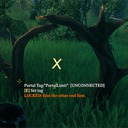
PortalLimit
Limits player-owned portals on Valheim servers and adds admin-configured discovery-locked portals.
By mistydays
| Date uploaded | 2 months ago |
| Version | 0.1.1 |
| Download link | mistydays-PortalLimit-0.1.1.zip |
| Downloads | 27 |
| Dependency string | mistydays-PortalLimit-0.1.1 |
This mod requires the following mods to function

denikson-BepInExPack_Valheim
BepInEx pack for Valheim. Preconfigured with the correct entry point for mods and preferred defaults for the community.
Preferred version: 5.4.2333README
PortalLimit
Server-enforced global portal limits and optional discovery-locked portals for Valheim servers.
PortalLimit lets server owners limit how many portals each player can own across the whole world, including unloaded zones. Admins can also mark special portal pairs so one entrance stays locked until each player discovers and uses the other side first.
Install
Thunderstore
Install the Thunderstore package on both the dedicated server and players.
The package includes:
PortalLimitServer.dll: runs only on the dedicated server.PortalLimitClient.dll: runs only on player clients.BepInEx/config/AzuAntiCheat_Whitelist/PortalLimitClient.dll: convenience copy for servers using AzuAntiCheat.
Manual dedicated server install
If installing manually, install:
PortalLimitServer.dll
to:
BepInEx/plugins/
Manual player/admin install
Install:
PortalLimitClient.dll
to:
BepInEx/plugins/
The server plugin enforces the portal limit. The client plugin adds the player /portals command, placement feedback, locked-portal visuals, hover text, and the admin UI.
AzuAntiCheat
If your server uses AzuAntiCheat, whitelist the exact PortalLimitClient.dll that players install. The Thunderstore package already includes a copy at this path.
Copy it to:
BepInEx/config/AzuAntiCheat_Whitelist/PortalLimitClient.dll
Regular Player Experience
Players can build and use normal Valheim portals as usual until they reach the server portal limit.
Players can type:
/portals
to see their current portal count and the server limit.
Counts are calculated server-side from saved portal ZDOs, so portals in unloaded zones still count.
The server also writes an admin-readable count export at:
BepInEx/config/PortalLimit/portal_counts.tsv
This report includes creator ID, saved creator name when available, portal count, and portal ZDO IDs. The Valheim world save remains the source of truth; the TSV is for audit/review.
If a portal is marked as a locked discovery portal, players must find and use the unlocked entrance before they can use the locked entrance.
Admin Usage
Admins can open the PortalLimit UI with:
/portallimit
or press F10.
Admins can also look at a portal and press E to edit that portal's PortalLimit settings.
The admin UI has two tabs:
Server Settings: global portal limit and discovery portal behavior.This Portal: settings for the portal the admin is looking at.
Discovery Portals
To create a discovery-locked portal pair:
- Look at the spawn-side portal.
- Open
This Portal. - Set the portal tag, for example
Bog Witch. - Choose
LOCKED ENTRANCE. - Choose marker color and marker text.
- Click
Apply.
Then configure the far-side portal:
- Look at the far-side portal.
- Use the same portal tag.
- Choose
UNLOCKED ENTRANCE. - Click
Apply.
Each player unlocks the route individually after using the unlocked entrance.
Config
The server creates:
BepInEx/config/keith.valheim.portallimit.server.cfg
Important settings:
MaxPortalsPerPlayer: maximum counted portals per player.0disables the limit.AdminBypass: lets Valheim admins exceed the portal limit.EnforceOnServer: removes newly placed portals that exceed the limit.PortalPrefabNames: comma-separated prefab names counted as portals. Leave empty to count every loaded prefab type that has aTeleportWorldcomponent.Discovery Portals.Enabled: enables discovery-locked portal behavior.Discovery Portals.ShowHoverText: shows lock/unlock text on portals.Discovery Portals.ShowWorldMarker: shows the portal marker text.Discovery Portals.SuppressLockedGlow: hides connected portal glow while locked.
Data Storage
Player discovery unlocks are stored on the server at:
BepInEx/config/PortalLimit/discovery_unlocks.txt
Global portal counts are exported on the server at:
BepInEx/config/PortalLimit/portal_counts.tsv
Existing Servers
Back up your world before installing.
Existing portals are not automatically deleted just because a player is already over the limit. The global limit applies when new portals are placed. Players who are already over the limit will need to remove portals before they can place more.
For a live server, consider installing with a high temporary limit first, confirming everything works, then lowering the limit after players have been warned.
Notes
- Normal portals work like normal Valheim portals unless an admin marks them as discovery-locked.
- Non-admin players cannot open or use the admin editor.
- Client and server DLLs should be updated together.
CHANGELOG
Changelog
0.1.4
- Set the default player portal limit to 10.
- Kept normal tagged portals close to vanilla Valheim behavior, including the orange connected swirl and normal teleport feel.
- Stopped blank-tag portals from connecting or teleporting players.
- Added live portal placement feedback such as
Portals placed: 2 / 10. - Added
/portalsregular-chat command for players to check their current portal count. - Added
/portallimitregular-chat command for admins to open the admin UI. - Added admin F5 commands for counts, portal lists, and server exports.
- Added configurable admin hold-
Eportal editing. TappingEstill opens Valheim's normal Set Tag prompt. - Added discovery-locked portals with
LOCKED ENTRANCE,UNLOCKED ENTRANCE, andNORMAL PORTALroles. - Prevented multiple locked discovery endpoints from using the same portal tag.
- Prevented multiple unlocked discovery endpoints from using the same portal tag.
- Added per-portal marker text options, including custom marker text.
- Added per-portal marker color presets and custom hex colors.
- Added per-portal player-facing hover text overrides.
- Added per-portal locked-glow behavior.
- Added a Portal Information tab with builder, built date, last-used info, unlock history, and world portal counts.
- Added server audit files for portal counts, placements, and discovery unlock history.
- Restricted portal removal so only the builder or an admin can remove a counted portal.
- Clarified that player chat commands go into regular in-game chat, not the F5/dev command panel.
- Updated contact information to the Discord invite.
0.1.3
- Added a first pass at restoring portal particles and lights when a locked portal becomes unlocked or is reset to normal.
- Prevented multiple locked or unlocked discovery endpoints from using the same portal tag.
- Clarified that
/portalsand/portallimitmust be typed into regular in-game chat, not the F5/dev command panel. - Replaced the README email contact with the Discord invite link.
0.1.2
- Updated the public README title and description to Portal Limit and Discovery.
- Moved discovery portal information closer to the top of the Thunderstore page.
- Added
FULL_README.mdfor downloaded config and server-owner details. - Added contact information for questions and suggestions.
- Kept the Thunderstore package ID as
PortalLimitso this uploads as an update to the existing package.
0.1.1
- Changed the default locked discovery portal text color to orange.
- Added the packaged icon image.
- Included both client and server DLLs in the Thunderstore package for public dedicated servers.
- Added server-side global portal counting across unloaded zones.
- Added
portal_counts.tsvfor admin-readable portal ownership/count review. - Hardened server RPC permissions for public servers.
- Fixed admin UI saving for locked/unlock popup message fields.
0.1.0
- Added server-authoritative portal limits per player.
- Added
/portalschat command so players can check their current portal count. - Added admin UI for changing server settings in game.
- Added admin-marked discovery portals with locked and unlock entrances.
- Added
UNLOCK ON OTHER SIDEmarker with per-portal color choices. - Added marker text choices for
UNLOCK ON OTHER SIDE,LOCKED, andX. - Added optional locked-portal glow suppression for clients with the plugin.
