
Please disclose if any significant portion of your mod was created using AI tools by adding the 'AI Generated' category. Failing to do so may result in the mod being removed from Thunderstore.

Portaler
Every portal connects to every portal. Pick your destination from a searchable, sortable list or the map, share favorites with the whole server, see the last built portals, auto-name them by biome, rename from the list and jump back with one click.
| Date uploaded | 2 weeks ago |
| Version | 1.0.0 |
| Download link | nfp007-Portaler-1.0.0.zip |
| Downloads | 62 |
| Dependency string | nfp007-Portaler-1.0.0 |
This mod requires the following mods to function

denikson-BepInExPack_Valheim
BepInEx pack for Valheim. Preconfigured with the correct entry point for mods and preferred defaults for the community.
Preferred version: 5.4.2351README
Portaler
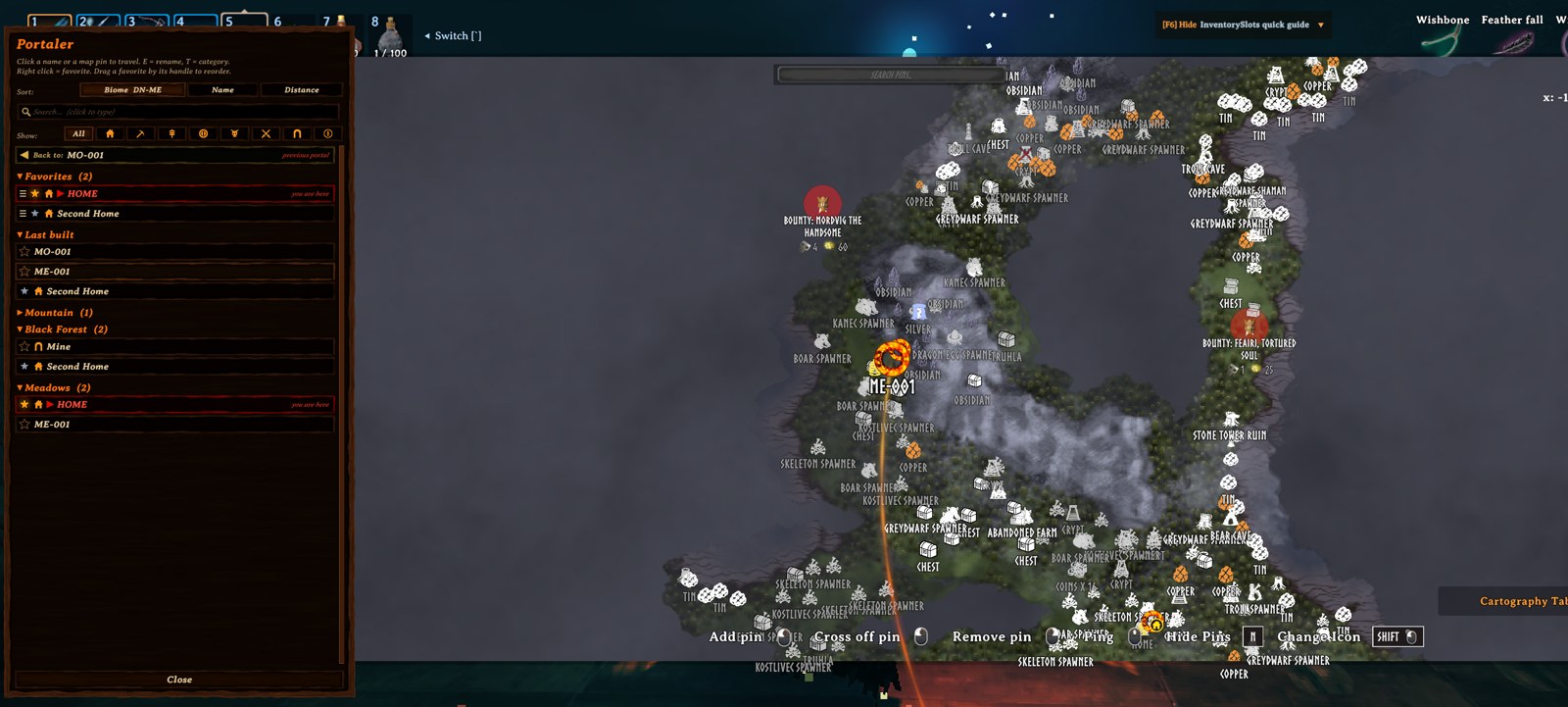
Every portal connects to every portal. Step into any portal and the map opens with a list of all portals on the server. Pick a name or click a pin and you're there. There's no pairing and no tag matching, and by default no item restrictions.
Built for servers that play together: favorites can be personal or shared with everyone, the newest portals show up for all players, and new portals name themselves after their biome (BF-007, MO-012). Find any portal in seconds with search, sorting and foldable biome groups, rename portals right from the list, and get home with the Back button.
Everything is synced through the server and kept with the world save, so it survives restarts and mod updates.
Source code, issues and ideas: github.com/nfp007/portaler
Features
1. Travel from any portal to any portal
- Walk into a portal: the big map opens with the portal list on the left.
- Click a name in the list, or a portal pin on the map, to travel.
- Hover a name and the map glides to that portal and makes its pin glow, so you see where you're going.
- Vanilla name pairing is switched off, so every portal is always active.
- The portal you stand in stays in the list, marked in red with "you are here", and cannot be selected.
2. Personal & shared favorites
- Right click a name: mine (silver star, only for this character), then shared (bigger glowing gold star, visible to the whole server), then off.
- Favorites are listed on top. Drag them by their handle into your own order (per character). New favorites go to the end.
- Anyone can add or remove a shared favorite. Everybody has the same rights.
3. Categories & filter
- Hover a name and press T to give the portal a category: Base, Mine, Farm, Trader, Boss, Danger, Dungeon or Explore.
- The category icon shows in the list and as a badge on the map pin. Categories are the same for everyone.
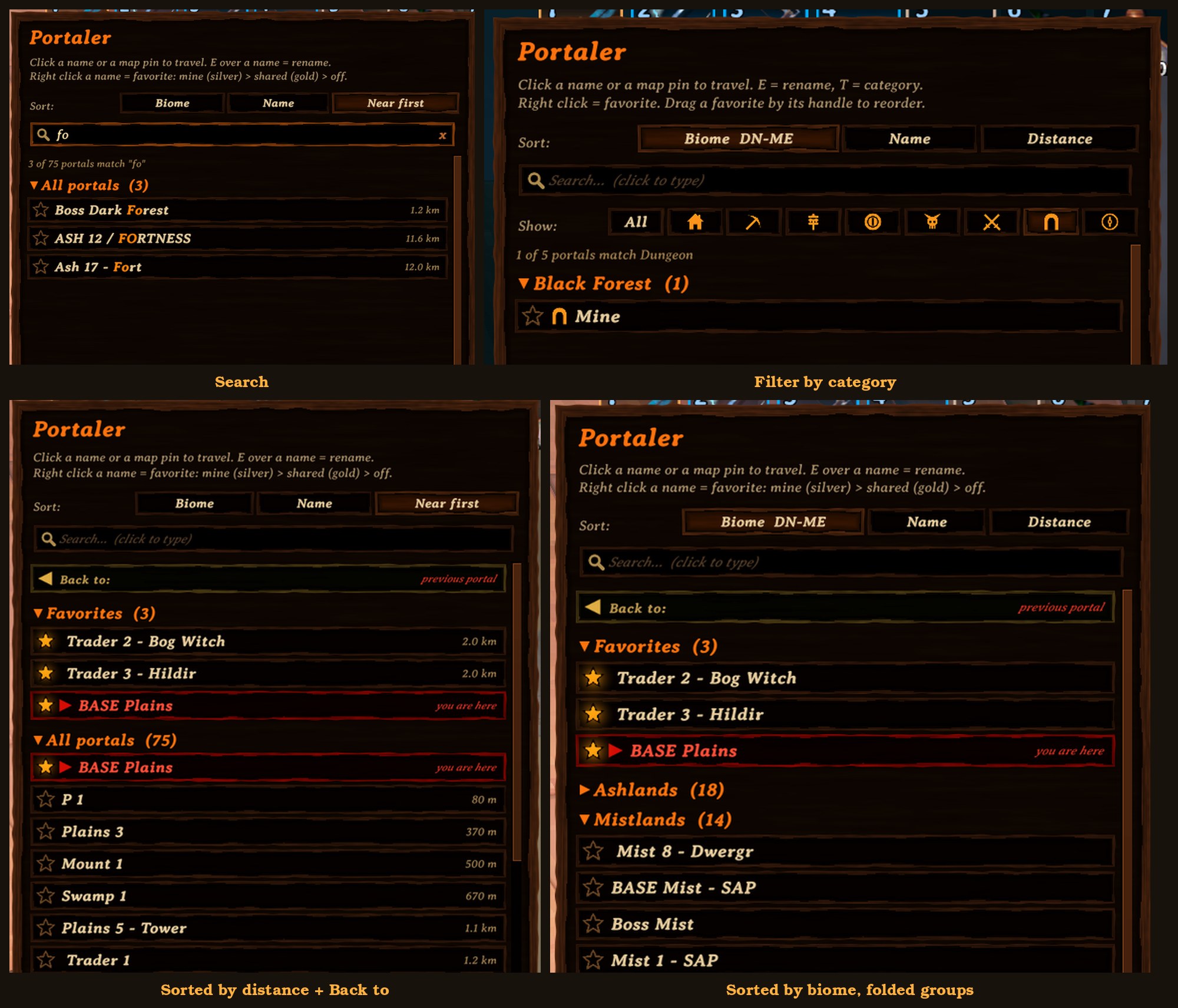
- One click on an icon in the Show: row lists only that category. Click it again (or All) to see everything.
4. Search
- Click the search box and type: only portals whose name contains the text are shown (any case), matching letters in gold.
- While typing, the game ignores your keys (no walking, the map stays open). Esc or x clears the search.
5. Sorting & foldable groups
- Biome (default): grouped by biome, Deep North first. Click again for Meadows first.
- Name: one list A to Z, or Z to A.
- Distance: nearest first (or farthest first), with the distance shown next to each name.
- Click a group title (a biome, Favorites, Last built) to fold or unfold it.
- Sort choice and folded groups are remembered (folded groups per character).
6. "Back to" and "Last built"
- Back to: the portal you last travelled from, at the top of the list. One click takes you back. Remembered per character.
- Last built: the 3 newest portals built by anyone on the server.
7. Automatic names & rename from the list
- New portals are named after their biome plus a number, for example
BF-007orMO-012. - Numbers keep counting up per biome and are never reused.
- Portals you name yourself, and existing portals, keep their names.
- Hover a name in the list and press E to rename that portal from anywhere in the world (up to 25 characters).
8. Map pins
- Every portal gets a fiery ring pin with its name on the map, with a small category badge.
- Pins from other mods (for example automatic pin mods) that sit on a portal are hidden, so each portal shows just one icon.
9. Server synced
- New, renamed and destroyed portals, categories and favorites show up for everybody within seconds.
- Everything is stored on the server, next to the world save, and survives restarts and mod updates.
10. Optional vanilla restrictions
- By default every item can travel, metals included.
- Prefer the game's own rules? Switch on
VanillaRestrictionson the server (see Configuration).
Controls (click to show)
| Action | How |
|---|---|
| Open the portal list | Walk into any portal |
| Travel | Left click a name in the list, or a portal pin on the map |
| Favorite: mine / shared / off | Right click a name (or click its star) |
| See a portal on the map | Hover its name for a moment |
| Rename a portal | Hover its name and press E, then Enter to save or Esc to cancel |
| Set a category | Hover its name and press T, click a category (Esc closes) |
| Show one category | Click its icon in the Show: row; click again or All for everything |
| Reorder favorites | Drag a favorite by its handle (the three lines on the left) |
| Search | Click the search box, type part of a name; Esc or x clears it |
| Go back | Click "Back to: ..." at the top of the list |
| Fold / unfold a group | Click the group title (biome, Favorites, Last built) |
| Change sorting | Click Biome, Name or Distance at the top of the list |
| Reverse sorting | Click the active sort button again |
| Scroll the list | Mouse wheel over the list |
| Close | Close button, Esc, or walk out of the portal |
Configuration (click to show)
Config file: BepInEx/config/nfp007.Portaler.cfg (created on first start). [Server] settings: only the server's (or the host's) value counts; it is sent to all players. All other settings are personal (each PC).
| Setting | Default | What it does |
|---|---|---|
[Controls] RenameKey |
E |
Key to rename the hovered portal. Any Unity key name, e.g. R, F2. |
[Controls] CategoryKey |
T |
Key to choose the hovered portal's category. |
[Map] HoverShowsMap |
true |
Hovering a name moves the map to that portal. |
[Map] HoverDelay |
0.4 |
Seconds the mouse must rest on a name before the map moves. |
[Map] HoverZoomMeters |
1500 |
How much of the world is shown around the portal (metres). The map only zooms in, never out. |
[Map] HoverReturn |
true |
When the mouse leaves the list, the map glides back to where it was. |
[Server] VanillaRestrictions |
false |
false = no restrictions, everything travels through every portal. true = the game's own rules: no metals/ores through the wooden portal, and the world modifiers "no portals" and "no portals during boss fights" apply. |
Everything else is set from inside the game:
| What | Where it is stored |
|---|---|
| Sort choice (per PC), folded groups and "Back to" portal (per character) | Portaler.prefs in Valheim's data folder (AppData\LocalLow\IronGate\Valheim) |
| Favorites and their order, categories, "Last built", name counters (per world) | <world>.portaler.txt next to the world save on the server |
- Keep
<world>.portaler.txttogether with your world backups. - Deleting it resets favorites and "Last built". Numbering then continues from the highest existing portal number.
Installation (click to show)
Portaler must be installed on the server and on every player, with the same version everywhere.
Players
- Install with a mod manager (Gale, r2modman, Thunderstore Mod Manager), or
- manually: copy
Portaler.dlltoBepInEx/plugins/Portaler/.
Dedicated server
- Copy
Portaler.dlltoBepInEx/plugins/Portaler/on the server and restart it.
Notes
- Do not run it together with other portal-list mods (for example PotalMap).
- Single player and self-hosted worlds work too: your game is then the server.
Dependencies (click to show)
- BepInExPack for Valheim 5.4.2351 or newer
Source code & feedback (click to show)
- Source code: github.com/nfp007/portaler
- Bugs and ideas: open an issue
- Building from source: see BUILDING.md
- License: MIT
CHANGELOG
Changelog
2.0.0
One-way links
- Link a portal to one destination: walk into it and you travel straight there, without the list, like the game's own portal pairs. Perfect for a direct road between two bases.
- Right click a name or a portal pin → Link… (or press L). A window in the middle of the screen shows From and To: walking into "From" takes you to "To". Change… picks another portal for either end, Swap turns the direction, and you choose both ways (default) or one way.
- Looking at a portal in the world: L links it, or removes its link (press twice).
- Linked portals show their destination's name floating above them, "Leads to: …" in their hover text, and "Name → Destination" in the list. From any other portal you can still travel to a linked portal. If a destination is destroyed, the link is dropped.
Portal colours
- Give any portal one of 8 colours (Ice, Green, Gold, Red, Purple, Teal, White, Pink) or keep the vanilla look: press C on a name, a pin or a portal in the world, or right click → Colour.
- The runes and the fire around the portal burn in its colour, the swirl in the middle takes a darker shade. The map pin gets a ring and the list row a mark in the same colour.
Right-click menu
- On every name and portal pin: travel, link, remove link, colour, favorite, category, rename. The title shows where the portal leads and where you are. Favorites are toggled with the star (or the menu).
- Link, colour, category and players windows open in the middle of the screen.
Other
- New settings:
[Controls] LinkKey(L),ColorKey(C),[World] FloatingNames,FloatingNameDistance. - The server must be updated too: links and colours are stored and shared by the server.
1.0.13
- Quick arrival (new, on by default,
[Travel] QuickArrival): trips through Portaler skip the game's fixed waits (2 s before moving, at least 8 s in total). You are moved as soon as the screen is dark and arrive as soon as the target area is loaded. Measured: 4-6 s instead of 8.6-10.5 s. Vanilla portals and dungeons are not changed; off automatically when Fast Teleport is installed. - Smoother list: no freeze the first time the map opens (it was up to 2 s; fonts, styles and the big panel are now prepared right after you spawn, the wooden boards are drawn on a background thread).
- No more short freezes from the board-image cache (it threw everything away when it was full; now only the oldest unused images go).
- The list sorts and groups once and reuses it, instead of several times every frame.
- New default block order for new characters: Back to, Players' last trips, Favorites, Last built, All portals.
- New setting
[Debug] PerfLog(off): writes Portaler's own time and memory use and the timing of every trip to the BepInEx log, for troubleshooting. - Nothing changed on the server side (updating it too keeps every machine on the same version).
1.0.11
- New screenshots: one large overview, and a small picture with every feature in the description.
1.0.10
- Updated mod description and README introduction to cover all current features.
1.0.9
- "Back to" can be dragged too, and so can the whole portal list (new title "All portals"): any block can go above or below all portals.
- While dragging, the lifted title says where it will land ("drop: before Favorites", "drop: at the end").
1.0.8
- "You are here" is now greyed out instead of red; "Back to" is golden and the newest one glows.
- "Back to" keeps your last 3 departure portals: show 1 2 3 in its title chooses how many are listed.
- "Last built": show 1-5 in its title (default 3).
- New group Players' last trips: the last portal each other player travelled to, shared through the server. Players: n of m opens a window to choose whom you follow (personal).
- Favorites, Players' last trips and Last built can be dragged by the handle left of their title into any order (per character).
- The server DLL must be updated too.
1.0.7
- Map preview reworked: close portals (up to 2 km) are framed together with extra room around the target; far targets are shown directly instead of a fast flight across the map.
- Calm glide (1 s, soft start and stop) to the preview and back.
- The preview stays 10 s after the mouse leaves the list.
- New settings
HoverMaxFitMeters,HoverMoveSeconds;HoverReturnDelayreplaced byHoverStaySeconds.
1.0.6
- Colours match Valheim's own panels: warm medium-brown wood instead of almost black. (A colour correction made everything far too dark; it is removed.)
1.0.5
- New screenshots on the mod page: the map with the fiery line and big category badges, and the category filter.
1.0.4
- While choosing a destination, portal pins, their names and the fiery line are drawn above all other pins and labels (they were covered by other mods' pins and names).
- Portal pins always at full brightness.
1.0.3
- Category badge on the map pin 20% bigger.
- Fixed: the previewed pin got small again right away. It now stays big as long as the fiery line is shown.
- Pin sizes are applied every frame, so hovering a pin on the map reacts smoothly.
1.0.2
- Category icon back in the lower right corner of the map pin, as a big round badge.
- Steady pin sizes: no more pulsing. The previewed portal's pin is bigger and stays big; a pin under the mouse grows a little.
- New settings:
PinSizePreview,PinSizeHover.
1.0.1
- Category icon now sits big inside the portal ring on the map (was too small to see).
- Map preview: a soft fiery line flows from your portal to the previewed one.
- Map preview stays 5 seconds (was 0.25) before gliding back, and does not glide back at all if you move or zoom the map yourself.
- New settings:
HoverReturnDelay,HoverLine. - README: every feature says what is shared with everybody and what is personal.
1.0.0
- First stable release.
- Hover a name: the map glides to that portal and its pin glows (delay, zoom and return configurable).
- Categories: press T over a name to choose Base, Mine, Farm, Trader, Boss, Danger, Dungeon or Explore. Icon in the list and as a badge on the map pin, shared with everybody.
- Category filter: one click on an icon shows only that category.
- Favorites: drag them into your own order (per character); new favorites go to the end.
- Configurable keys:
RenameKey(E) andCategoryKey(T).
0.5.3
- Mod page: three smaller screenshots (search, distance sorting, biome sorting) under the main one.
0.5.2
- Fixed: the "Back to" row did not show the portal name.
- Mod page links to the GitHub repository; new screenshots.
0.5.1
- New mod description and README: clearer intro, features in order of importance.
0.5.0
- Search box: click and type to filter the list by name; matches shown in gold. Esc or x clears it.
- "Back to" row: one click returns you to the portal you last travelled from (per character).
0.4.1
- Click a group title (biome, Favorites, Last built) to fold or unfold it. Saved per character, only on your PC.
0.4.0
- New server setting
VanillaRestrictions(default off): use the game's own portal rules (item restrictions, "no portals" world modifiers). - Fixed: the mouse wheel over the list also zoomed the map for a moment.
- Fixed: dragging the list's scrollbar also dragged the map underneath.
0.3.2
- Clearer help text in the list: right click a name to favorite it.
- New README with feature list, controls, configuration and installation.
0.3.1
- Fixed: portal names changed from the list were lost after restarting the world.
0.3.0
- Shared favorites: right click once = mine (silver star), twice = shared with everybody (bigger glowing gold star), third time = off.
- Shared favorites are listed first.
0.2.3
- Fixed: typing in the rename box did not work.
0.2.2
- Rename portals from the list: hover a name and press E.
0.2.1
- No more double icons: other mods' pins on a portal are hidden.
0.2.0
- Favorites, "Last built" and sorting are kept across restarts and mod updates.
- Server data is stored next to the world save.
- Released by nfp007.
0.1.3
- Fixed washed-out colours in game.
- Sorting by Biome, Name or Distance, each reversible. Distance shown in Distance mode.
0.1.2
- Wooden Valheim-style panel and name boards.
- New mod icon and fiery ring map pin with see-through centre.
- The portal you stand in stays in the list, marked "you are here".
0.1.1
- Bigger text, solid panel wide enough for 25-character names.
- Favorites (right click) and "Last built" group.
- Scrolling the list no longer zooms the map.
0.1.0
- First version: portal list when entering a portal, click a name or map pin to travel, automatic biome names, server sync.
