
Please disclose if any significant portion of your mod was created using AI tools by adding the 'AI Generated' category. Failing to do so may result in the mod being removed from Thunderstore.

ValheimPerformanceOptimizations
Rendering, logic, and loading time optimizations for both client and server versions of Valheim.
| Date uploaded | 2 weeks ago |
| Version | 2.1.0 |
| Download link | ontrigger-ValheimPerformanceOptimizations-2.1.0.zip |
| Downloads | 1175 |
| Dependency string | ontrigger-ValheimPerformanceOptimizations-2.1.0 |
README
ValheimPerformanceOptimizations
Rendering and logic optimizations for both client and server versions of Valheim.
VPO does not disable, throttle or change vanilla gameplay. You can install it on the client, the server, or both.
Introducing the Indirect renderer
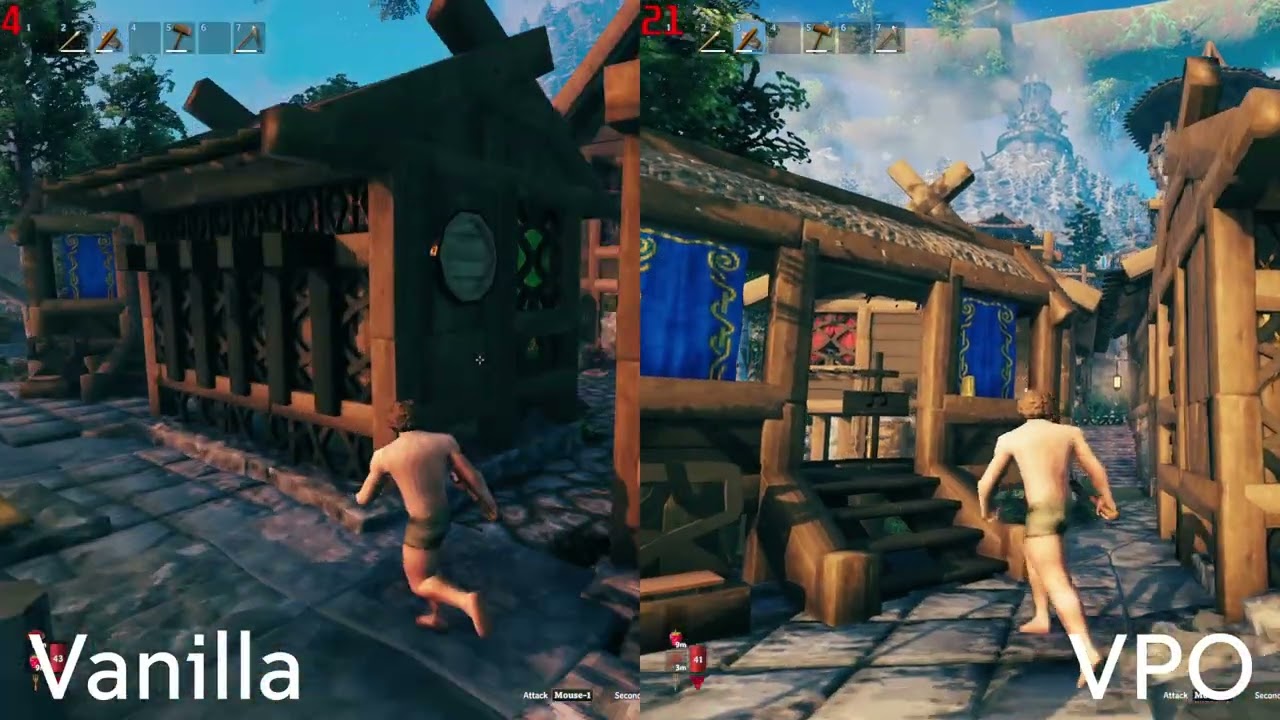
Version 2.0 adds a new way of rendering that takes work off the CPU:
- Much less CPU time spent preparing each frame, especially around thousands of building pieces
- Objects off screen cost the CPU almost nothing, because the GPU skips them on its own
If the CPU is what limits your FPS, this can raise it. If the GPU is the limit, or you are in one of the cases below, it may not.
It draws:
- Building pieces
- Trees, rocks and other destructibles
- Pickables, such as berry bushes and mushrooms
- Items lying on the ground
Everything else including modded content is drawn vanilla
Press F8 in game to switch the indirect renderer on and off. This lets you compare it against vanilla right where you are standing.
Limitations
The indirect renderer is not always faster than vanilla. Some scenes can run slower:
- Dense forests may see no gain, because the indirect renderer skips sorting objects front to back to keep the number of draw calls low.
- Bases with many shadow-casting lights get slower the more of those lights are active.
Press F8 to switch to vanilla rendering at any time if your FPS drops.
Other things to know:
- Some objects always stay on vanilla rendering: pieces showing snow, pieces that change their look at runtime, and objects using shaders the renderer does not support.
- Mods that change the materials or shaders of buildings, trees or items may not look right. If something looks wrong, turn the indirect renderer off and report it on GitHub.
How the indirect renderer works
Every frame, before Unity draws anything, it goes through each visible renderer and collects its data: its position, its mesh and materials, its lighting and so on. Unity repeats this for the camera and for every shadow view. With thousands of pieces, this collection step costs more CPU time than the drawing itself.
The indirect renderer skips this step. It uploads each object's data to the GPU once, when the object appears, and only updates it when the object moves. Skipping this collection is where most of the CPU savings come from.
Why point light shadows are slow
A point light, like a torch or a fire, casts shadows in every direction. To do that, the game draws the scene around it six times, once for each side of a cube. Each light with shadows multiplies the number of draw calls by six.
Unity checks on the CPU which objects each side of the cube can see, and only sends draw calls for those. The indirect renderer can not do that, because only the GPU knows which objects are visible. The CPU has to send a draw call for every kind of object, for every side of the cube, for every light, even when most of them end up drawing nothing.
That adds up fast. A base with many shadow-casting lights needs a huge number of draw calls, and sending them is slow. This is why such bases can run slower than vanilla.
Why dense forests can be slow
Unity sorts objects front to back before drawing them. When the closest objects are drawn first, the GPU can skip the pixels of everything hidden behind them.
The indirect renderer draws all copies of the same object, like every birch tree, in a single draw call. This keeps the number of draw calls low, but the trees are no longer drawn from nearest to farthest. The GPU ends up drawing many pixels that later get covered by trees in front of them.
In a dense forest, trees hide each other a lot, so this wasted work adds up and can eat the CPU savings.
Other optimizations
- Rewritten world object streaming for less overhead when moving through the world
- Burst-accelerated water and terrain generation
- Threaded terrain collision baking - almost entirely eliminated stuttering when loading new terrain
- Structural integrity caching - better performance in large bases
- Audiosource culling for distant looping sounds
- Culled light flicker updates for off-screen lights
- Time-sliced reflection probes
- Particle culling / GPU instancing improvements
- Faster server ownership handoff scans
- Optional physics step cap for denser bases
The full list of changes is in CHANGELOG.md.
Installation
- Unzip the VPO download.
- Copy the
BepInExfolder from the zip into your Valheim folder. - Copy the
valheim_Datafolder from the zip into your Valheim folder. - Start the game.
Updating from 1.x
Version 2.0 moved its files into BepInEx/plugins/VPO. Delete the old ValheimPerformanceOptimizations.dll,
ValheimPerformanceOptimizations.pdb and VPOBurst_* files from BepInEx/plugins before installing.
Configuration
The config is stored in BepInEx/config/dev.ontrigger.vpo.cfg. It is created the first time you start the game.
Most optimizations do not change gameplay, but some of them may cause compatibility issues with other mods.
Indirect Renderer
-
Enabled (default: on)
Draws objects with the indirect renderer. Turn it off to go back to vanilla rendering.
-
Toggle shortcut (default: F8)
Switches the indirect renderer on and off in game.
-
Minimum screen percentage (default: 0.1)
Skips objects that are smaller on screen than this percentage of the screen size. Higher values draw fewer tiny, far away objects. Set to 0 to draw everything.
General
-
Threaded terrain collision baking
Experimental: if enabled, terrain collision is generated in parallel, which reduces lag spikes when moving through the world. If you see terrain disappear, please report it on GitHub; disabling this option will likely fix the issue.
-
Max physics updates per frame
The engine can run physics many times per frame, which is often the most expensive part of Valheim. Lowering this (default 8, range 5–15) can significantly boost FPS in bases at the cost of less accurate physics.
Contributors
- ontrigger
- MSchmoecker
CHANGELOG
Changes in 2.2.0
- Fixed fish leaving duplicated copies behind when dropping them or toggling indirect rendering
- Faster Mistlands mist updates (roughly 6 ms down to 1.5 ms in testing)
- Improved perf in swamp by around 1ms
- ZNetScene object destruction is now time sliced (budget configurable via config, default 100)
- Faster creature spawning by about 3ms
Changes in 2.1.0
- Fixed building piece highlights being too dark
- Fixed stone floors and other building pieces not getting wet in the rain
- Possible fix for a phantom triangle casting shadows on DX11
- Improved compatibility with mods such as PlanBuild
- Fixed yellow mushrooms and potentially other items being invisible on item stands
Changes in 2.0.0
- Added the indirect renderer: building pieces, trees, rocks, pickables and dropped items are now culled and drawn on the GPU, which takes most of their rendering cost off the CPU.
- Press F8 to switch between the indirect renderer and vanilla rendering in game
- Reflection probes now draw building pieces through the indirect renderer
- Fixed lagspikes in ZoneSystem when vanilla wanted to unload a zone
- Character animations skip animator calls when the values have not changed
- Added character transform lookups
- Significantly reduced hitches caused by terrain
- Mod files moved to
BepInEx/plugins/VPO
Changes in 1.2.3
- Added Linux server support
- Fixed infinite loading when entering dungeons due to vanilla incorrectly destroying non owned zdos
Changes in 1.2.2
- Speculative fix for reflection probe flickering
Changes in 1.2.1
- Added Linux support
Changes in 1.2.0
- Improved GetZoneLocation performance; -10ms on Blue Hills
Changes in 1.1.0
- Added support for the Deep North update
Changes in 1.0.3
- Added compatibility with Badgers HD Terrain 2.0
Changes in 1.0.2
- New physics patch that saves ~50kb of allocations per frame
Changes in 1.0.1
- Fixed certain objects being erroneously marked as transparent, causing them to fall through the floor
Changes in 1.0.0
Major rewrite for current Valheim:
- Rewritten ZNetScene object streaming - no per-frame overhead when creating/destroying world objects when not needed
- Burst-accelerated water wave jobs - cheaper wave math for floaters, fish, and surface queries
- Burst terrain vertex color generation with fewer Color[] allocations
- Modernized threaded terrain collision baking - less hitching while exploring
- ZSFX optimizations for audiosources that keep playing while outside audible range
- Light flicker culling - skip expensive flicker updates for point lights outside the camera
- WearNTear support caching - slightly lower structural integrity CPU cost in large bases
- Time-sliced reflection renderer - render cubemap faces over multiple frames
- Prefab/particle cleanup - fire particles no longer render outside view frustum
- Faster server-side ZDO ownership release scans
- VisEquipment ZDO int caching and BinarySearchDictionary allocation fix
Changes in 0.7.6
- Fixed conflict with SharedMap
- Fixed pickable objects sometimes not visually appearing as regrown
- Fixed camps never respawning enemies within them
Changes in 0.7.5
- Jotunn is no longer required to use the mod
- Fixed more EffectArea errors
Changes in 0.7.4
- Fixed crazy spawnrates
- Fixed being unable to breed animals
- ValheimRaft compatibility (at the cost of performance)
- Fix errors after logging out/quitting
Changes in 0.7.3
- Another attempt at fixing the roof checks
Changes in 0.7.2
- Fixed the 'Collection was modified' error
- Potential fix for leaking roofs
Changes in 0.7.1
- Fixed snow storm particles appearing inside buildings
- Fixed being unable to sleep
- Fixed other related AOE effects not working
Changes in 0.7
- Optimizations for structural integrity
- New object pooling system for build pieces - less lag when entering bases
- New smoke rendering solution - less lag rendering smoke puffs
- Snow storms no longer tank fps
- Fixed grass not appearing in the main menu
- Fixed objects spawning at 0 0
Changes in 0.6.1
- Fixed an incompatibility with BetterWards causing mobs inside the ward radius to flee
- Fixed the GPU being invoked on the server causing an exception at startup
Changes in 0.6.0
- Optimized rendering of build pieces with straw materials
- Rewrote the threaded terrain collision baking to use all cores (enable it in the config)
- Fixed incompatibility with ValheimRAFT
- Fixed crash when only terrain collision baking was enabled
Changes in 0.5.2
- Fixed certain objects respawning upon relog
Changes in 0.5.1
- Fixed certain objects disappearing
Changes in 0.5.0
- Object pooling makes loading vegetation in new and old chunks much smoother
Changes in 0.4.2
- Fixed incompatibility with EpicLoot
Changes in 0.4.1
- Fixed optimized terrain disappearing upon relogging
Changes in 0.4.0
- Threaded terrain collision generation
- Threaded world loading
- Smoke rendering performance improvements
- Small memory allocation and performance improvements for chunk generation
Changes in 0.3.1
- Fixed multiple crashes caused by logging out and back in into any world
- Tiny performance improvement for comfort level calculation
Changes in 0.3.0
- First public release
