
Please disclose if any significant portion of your mod was created using AI tools by adding the 'AI Generated' category. Failing to do so may result in the mod being removed from Thunderstore.

OttoStash
Chests pull nearby items off the ground and out of your inventory. Per-chest rules, groups and favouriting.
| Date uploaded | 2 weeks ago |
| Version | 3.4.1 |
| Download link | potto007-OttoStash-3.4.1.zip |
| Downloads | 98 |
| Dependency string | potto007-OttoStash-3.4.1 |
This mod requires the following mods to function

denikson-BepInExPack_Valheim
BepInEx pack for Valheim. Preconfigured with the correct entry point for mods and preferred defaults for the community.
Preferred version: 5.4.2350README
OttoStash
Updated for Valheim 1.0
Version 3.4.1, built and Harmony-checked against Valheim 1.0.16.
Maintainer: Paul Otto
Coming from AzuAutoStore? Your settings carry over. On first run OttoStash looks
for Azumatt.AzuAutoStore.cfg and Azumatt.AzuAutoStore.yml and copies them into its
own potto007.OttoStash.cfg and potto007.OttoStash.yml. It never touches an
OttoStash file that already exists.
Two names changed with the rename:
- The console command is now
ottostashsearch, notazuautostoresearch. - The config files are now
potto007.OttoStash.cfgandpotto007.OttoStash.yml.
Description
This mod pulls nearby items from the ground into containers. Optionally, use a hotkey to store items in your inventory
into containers. WardIsLove compatible, HotBar items can be ignored (on by default), Quickslots can be
ignored (if turned on in the configuration!).
1. Need to know
ServerSync checks the version. A client running a different OttoStash version cannot join the server. A client without OttoStash can still join.
This mod uses ServerSync, if installed on the server and all clients, it will sync all configs to client
This mod uses a file watcher. If the configuration file is not changed with BepInEx Configuration manager, but changed in the file directly on the server, upon file save, it will sync the changes to all clients.
TL;DR
- Drop this mod in, start a world.
- Nearby dropped items are pulled into containers according to the YAML rules.
- Press
.to dump your inventory into nearby containers (respecting favorites and YAML rules). - Middle-click an item to store just that one.
- Hold
Yand click an item (or useottostashsearch) to find where you put something. - Edit
potto007.OttoStash.ymlto define per-container ranges and allowed/excluded items. - All configuration files are found in the
BepInEx/configfolder. Examples are found in the yml file.
Compatibility
- WardIsLove – fully compatible; wards can protect containers as usual.
- Quick Stack / sorting mods (e.g. QuickStackStore) – UI integration is ordered to avoid grabbing each other’s elements and double buttons.
- Backpack mods (Smoothbrain’s Backpacks, AdventureBackpack, etc.) – supports storing into backpacks and has options to globally disable storing to any backpack containers.
- ItemDrawers – supports both KG’s fork and the original Makail version for storing and searching.
Features
- Automatically store dropped resources into nearby containers within a configurable range
- Restrict specific items from being stored into containers by defining rules in the configuration file in
the
BepInEx/configfolder calledpotto007.OttoStash.yml - Toggle the storing of items via a keyboard shortcut for a configurable amount of seconds
- Store a single hovered item into nearby containers with a dedicated hotkey (Default: Mouse2 / Middle Click)
- Find where your items ended up: hold the Search key (Default: Y) and click an item, or use the
ottostashsearchcommand to ping the nearest container holding it and see how many exist. You can use/ottostashsearchin the chat window. Auto complete for the command is possible so you can type/azuautoand press tab to complete if you don't want to type it all out :D Favoriting from GoldenRevolverBy holding the Favoriting Key (default: Alt) or by using a new button, you can left click on an item to favorite it, or right click to favorite the slot it is in. This prevents the quick storing from player inventory from having the mod affect that item. No accidental storing something you didn't want. The favoriting state is shown with a custom colored border around the slot. If GoldenRevolver's mod is present, it will read his favoriting file and use that instead.
Designed to be server-friendly: runs on configurable intervals, chunks bulk transfers, and throttles ownership requests to avoid lag and race conditions.
Includes multiple protections against item loss and duplication, especially when teleporting, dying, or interacting with many containers.
FAQ
- Frequently asked questions will be added to the wiki tab of this mod as they are asked. Wiki tab is located at the top of this page.
2. Configuration (Collapsed due to length. Click to expand)
Available Configuration Options
1 - General
Lock Configuration [Synced with Server]
- If on, the configuration is locked and can be changed by server admins only.
- Default Value: On
Dont Store to Backpacks [Synced with Server]
- If on, items will not be stored in backpacks.
- Default Value: Off
Chests Pickup From Ground [Synced with Server]
- If on, chests will pick up items from the ground if they are in range. If off, chests will not begin their periodic
checks for items nearby. Reloading zone or logging out might be required.
- Default Value: On
Must Have Existing Item To Pull [Synced with Server]
- If on, the chest must already have the item in its inventory to pull it from the world or player into the chest.
- Default Value: On
Player Range [Synced with Server]
- The maximum distance from the player to store items in chests when the Store Shortcut is pressed. Follows storage
rules for allowed items.
- Default Value: 5
Fallback Range [Synced with Server]
- The range to use if the container has no range set in the yml file. This will be the fallback range for all
containers.
- Default Value: 10
Player Ignore Hotbar [Not Synced with Server]
- If on, the player's hotbar will not be stored when the Store Shortcut is pressed.
- Default Value: On
Player Ignore Quick Slots [Not Synced with Server]
- If on, the player's quick slots will not be stored when the Store Shortcut is pressed. (Requires Quick Slots mod, turn
on only if you need it!)
- Default Value: Off
Ping VFX [Synced with Server]
- The VFX to play when a chest is pinged. Leave blank to disable and only highlight the chest. (Full prefab
list: https://valheim-modding.github.io/Jotunn/data/prefabs/prefab-list.html)
- Default Value: vfx_Potion_health_medium
Highlight Containers [Not Synced with Server]
- If on, the containers will be highlighted when something is stored in them. If off, the containers will not be
highlighted if something is stored in them.
- Default Value: On
Ping Containers [Not Synced with Server]
- If on, the containers will be pinged with the Ping VFX when something is stored in them. If off, the containers will
not be pinged if something is stored in them.
- Default Value: On
Seconds To Wait Before Storing [Synced with Server]
- The number of seconds to wait before storing items into chests nearby automatically after you have pressed your hotkey
to pause.
- Default Value: 10
IntervalSeconds [Synced with Server]
- The number of seconds that must pass before the chest will do an automatic check for items nearby, WARNING: Reducing
this will decrease performance!
- Default Value: 10
1.5 - Fish
Fish Suction [Synced with Server]
- Allow auto-storing fish that are still in water, as in boat netting. Off requires fish to be out of the water. On
skips that check.
- Default Value: Off
2 - Shortcuts
Store Single Item Shortcut [Not Synced with Server]
- Keyboard shortcut/Hotkey to store a single item that you click from your inventory into nearby containers.
- Default Value: Mouse2
Store Shortcut [Not Synced with Server]
- Keyboard shortcut/Hotkey to store your inventory into nearby containers.
- Default Value: Period
Pause Shortcut [Not Synced with Server]
- Keyboard shortcut/Hotkey to temporarily stop storing items into chests nearby automatically. Does not override the
player hotkey store.
- Default Value: Period + LeftShift
SearchModifierKeybind [Not Synced with Server]
- While holding this, you can search nearby chests for the prefab you clicked in your inventory.
- Default Value: Y
3 - Favoriting
BorderColorFavoritedItem [Not Synced with Server]
- Color of the border for slots containing favorited items.
- Default Value: FFD800FF
BorderColorFavoritedItemOnFavoritedSlot [Not Synced with Server]
- Color of the border of a favorited slot that also contains a favorited item.
- Default Value: 80AC80FF
BorderColorFavoritedSlot [Not Synced with Server]
- Color of the border for favorited slots.
- Default Value: 0080FFFF
DisplayTooltipHint [Not Synced with Server]
- Whether to add additional info the item tooltip of a favorited or trash flagged item.
- Default Value: true
FavoritingModifierKeybind1 [Not Synced with Server]
- While holding this, left clicking on items or right clicking on slots favorites them, disallowing storing Identical to
FavoritingModifierKeybind2.
- Default Value: Z
FavoritingModifierKeybind2 [Not Synced with Server]
- While holding this, left clicking on items or right clicking on slots favorites them, disallowing storing Identical to
FavoritingModifierKeybind1.
- Default Value: Z
FavoritedItemTooltip [Not Synced with Server]
-
- Default Value: Item is favorited and will not be stored
FavoritedSlotTooltip [Not Synced with Server]
-
- Default Value: Slot is favorited and will not be stored
ItemOnFavoritedSlotTooltip [Not Synced with Server]
-
- Default Value: Item & Slot are favorited and will not be stored
Installation Instructions
Manual Installation
Note: (Manual installation is likely how you have to do this on a server, make sure BepInEx is installed on the server correctly)
- Download the latest release of BepInEx.
- Extract the contents of the zip file to your game's root folder.
- Download the latest release of OttoStash from Thunderstore.io.
- Extract the contents of the zip file to the
BepInEx/pluginsfolder. - Launch the game.
Installation through r2modman or Thunderstore Mod Manager
-
Install r2modman or Thunderstore Mod Manager.
For r2modman, you can also install it through the Thunderstore site.

For Thunderstore Mod Manager, you can also install it through the Overwolf app store

-
Open the Mod Manager and search for "OttoStash" under the Online tab. The image below shows VikingShip as an example, but it was easier to reuse the image. Type OttoStash.

- Click the Download button to install the mod.
- Launch the game.
Example: make a chest that only ever pulls Food & Potions:
piece_chest:
  range: 10
  exclude:
    - All
  includeOverride:
    - Food
    - Potion
Example YAML
# Below you can find example groups. Groups are used to exclude or includeOverride quickly. They are reusable lists!
# Please note that some of these groups/container limitations are kinda pointless but are here for example.
# Make sure to follow the format of the example below. If you have any questions, please ask in my discord.

# Full vanilla prefab name list: https://valheim-modding.github.io/Jotunn/data/prefabs/prefab-list.html
# Item prefab name list: https://valheim-modding.github.io/Jotunn/data/objects/item-list.html

# There are several predefined groups set up for you that are not listed. You can use these just like you would any group you create yourself.
# These are the "All", "Food", "Potion", "Fish", "Swords", "Bows", "Crossbows", "Axes", "Clubs", "Knives", "Pickaxes", "Polearms", "Spears", "Equipment", "Boss Trophy", "Trophy", "Crops", "Seeds", "Ores", "Metals", and "Woods" groups.
# The criteria for these groups are as follows:
# groups:
#   Food:
#     - Criteria: Both of the following properties must have a value greater than 0.0 on the sharedData property of the ItemDrop script:
#         - food
#         - foodStamina
#   Potion:
#     - Criteria: The following properties must meet the specified conditions on the sharedData property of the ItemDrop script:
#         - 'food' > 0.0
#         - 'foodStamina' == 0.0
#         - Any status effect names/categories contain "potion"
#   Fish:
#     - itemType: Fish
#   Swords, Bows, Crossbows, Axes, Clubs, Knives, Pickaxes, Polearms, Spears:
#     - itemType: OneHandedWeapon, TwoHandedWeapon, TwoHandedWeaponLeft, Bow
#     - Criteria: Items in these groups have a specific skillType on the sharedData property of the ItemDrop script. Each group corresponds to the skillType as follows:
#         - Swords: skillType == Skills.SkillType.Swords
#         - Bows: skillType == Skills.SkillType.Bows
#         - Crossbows: skillType == Skills.SkillType.Crossbows
#         - Axes: skillType == Skills.SkillType.Axes
#         - Clubs: skillType == Skills.SkillType.Clubs
#         - Knives: skillType == Skills.SkillType.Knives
#         - Pickaxes: skillType == Skills.SkillType.Pickaxes
#         - Polearms: skillType == Skills.SkillType.Polearms
#         - Spears: skillType == Skills.SkillType.Spears
#            Example:   An item with itemType set to OneHandedWeapon and skillType set to Skills.SkillType.Swords would belong to the Swords group.
#   Armor:
#     - itemType: Chest, Legs, Shoulder, Helmet
#   Equipment:
#     - itemType: Torch, Bow, OneHandedWeapon, TwoHandedWeapon, TwoHandedWeaponLeft, Helmet, Chest, Legs, Shoulder, Utility, Shield
#   Weapons:
#     - itemType: OneHandedWeapon, TwoHandedWeapon, TwoHandedWeaponLeft, Bows, Swords, Crossbows, Axes, Clubs, Knives, Pickaxes, Polearms, Spears
#   Shield:
#     - itemType: Shield
#   Round Shield:
#     - itemType: Shield
#     - Criteria: sharedData.m_timedBlockBonus > 0.0 "round"
#   Tower Shield:
#     - itemType: Shield
#     - Criteria: sharedData.m_timedBlockBonus <= 0.0 "tower"
#   Chest:
#     - itemType: Chest
#   Legs:
#     - itemType: Legs
#   Shoulder:
#     - itemType: Shoulder
#   Helmet:
#     - itemType: Helmet
#   Utility:
#     - itemType: Utility
#   Trinket:
#     - itemType: Trinket
#   Ammo:
#     - itemType: Ammo
#   Arrows:
#     - itemType: Ammo
#     - Criteria: sharedData.m_ammoType == "$ammo_arrows"
#   Bolts:
#     - itemType: Ammo
#     - Criteria: sharedData.m_ammoType == "$ammo_bolts"
#   ElementalMagic:
#     - itemType: ElementalMagic
#   BloodMagic:
#     - itemType: BloodMagic
#   Boss Trophy:
#     - itemType: Trophy
#     - Criteria: sharedData.m_name ends with any of the following boss names:
#         - eikthyr, elder, bonemass, dragonqueen, goblinking, SeekerQueen
#   Trophy:
#     - itemType: Trophy
#     - Criteria: sharedData.m_name does not end with any boss names
#   Crops:
#     - itemType: Material
#     - Criteria: Can be cultivated and grown into a pickable object with an amount greater than 1
#   Seeds:
#     - itemType: Material
#     - Criteria: Can be cultivated and grown into a pickable object with an amount equal to 1
#   Ores:
#     - itemType: Material
#     - Criteria: Can be processed by any of the following smelters:
#         - smelter
#         - blastfurnace
#   Metals:
#     - itemType: Material
#     - Criteria: Is the result of processing an ore in any of the following smelters:
#         - smelter
#         - blastfurnace
#   Woods:
#     - itemType: Material
#     - Criteria: Can be processed by the charcoal_kiln smelter
#   All:
#     - Criteria: Item has an ItemDrop script and all needed fields are populated. (all items)


groups:
  BronzeGear: # Group name
    - ArmorBronzeChest # Item prefab name, note that this is case sensitive and must be the prefab name
    - ArmorBronzeLegs
    - ArmorBronzeHelmet
  Tier 2 Items:
    - Bronze
    - PickaxeBronze
    - ArmorBronzeChest
    - ArmorBronzeLegs


# By default, if you don't specify a container below, it will be considered as you want to allow storing all objects into it.
# If you are having issues with a container, please make sure you have the full prefab name of the container. Additionally, make sure you have range and exclude or includeOverride set up correctly.
# Worst case you can define a container like this. This will allow everything to be pulled from the container within a range of 30.
# rk_barrel:
#   range: 30
#  includeOverride: []

## Please note that the below containers are just examples. You can add as many containers as you want.
## If you want to add a new container, just copy and paste the below example and change the name of the container to the prefab name of the container you want to add.
## The values are set up to include everything by using the includeOverride (aside from things that aren't really a part of vanilla recipes, like Swords or Bows).
## This is to give you examples on how it's done, but still allow everything to be stored into the container.

Player_tombstone: # This is to exclude the tombstone from randomly picking up items that fall near it.
  range: 10
  exclude:
    - All

Player: # This is to exclude backpacks from randomly storing items into them.
  range: 10
  exclude:
    - All

piece_chest:
  range: 10 # This is the range that the container will store items. This overrides the global range set in the config.
  exclude: # Exclude these items from being able to be stored into the container
    #- Food # Exclude all in group
    - PickaxeBronze # Allow prefab names as well, in this case we will use something that isn't a food
  includeOverride:
    # - Food # This would not work, you cannot includeOverride a group that is excluded. You can only override prefabs from that group.
    - PickaxeBronze # You can however, be weird, and override a prefab name you have excluded.

# It's highly unlikely that you will need the armor, swords, bows, etc. groups below. These are just in case you want to use them.
# They were also easy ways for me to show you how to use the groups without actually excluding something you might want to always pull by default.

piece_chest_wood:
  range: 10
  exclude:
    - Swords # Exclude all in group
    - Tier 2 Items # Exclude all in group
    - Bows # Exclude all in group
  includeOverride: # If the item is in the groups above, say, you were using a predefined group but want to override just one item to be ignored and allow pulling it
    - BowFineWood
    - Wood
    - Bronze
    - PickaxeBronze
    - ArmorBronzeChest
    - ArmorBronzeLegs

piece_chest_private:
  range: 10
  exclude:
    - All # Exclude everything

piece_chest_blackmetal:
  range: 10
  exclude:
    - Swords # Exclude all in group
    - Tier 2 Items # Exclude all in group
    - Bows # Exclude all in group
  includeOverride: # If the item is in the groups above, say, you were using a predefined group but want to override just one item to be ignored and allow storing it
    - BowFineWood
    - Wood
    - Bronze

rk_cabinet: # rk_ is typically the prefix for containers coming from RockerKitten's mods
  range: 10
  exclude:
    - Food
  includeOverride:
    - Food

rk_cabinet2:
  range: 10
  exclude:
    - Food
  includeOverride:
    - Food

rk_barrel:
  range: 10
  exclude:
    - Armor
    - Swords

rk_barrel2:
  range: 10
  exclude:
    - Armor
    - Swords

rk_crate:
  range: 10
  exclude:
    - Armor
    - Swords

rk_crate2:
  range: 10
  exclude:
    - Armor
    - Swords
Version Information
The full release history lives in CHANGELOG.md, and it renders on the Changelog tab of the Thunderstore package page.
Credits
OttoStash is maintained by Paul Otto.
CHANGELOG
Changelog
Versions 3.0.11 and below are AzuAutoStore's release history, kept below exactly as Azumatt wrote it.
3.6.3
- Republished 3.6.2 under a new version number. Nothing else changed.
3.6.2
- Rebuilt against Valheim 1.0.20. Every Harmony patch target still resolves in this build, and nothing else changed.
3.6.1
- Rewrote the README and this changelog. The code is unchanged from 3.6.0, but a server and its clients still have to run the same version, so update them together.
3.6.0
This release brings Recycle_N_Reclaim's reclaiming and AzuCraftyBoxes' crafting from chests into OttoStash.
Setting names
- Every section and setting now uses the PascalCase spelling the new sections use. The
numbered sections lose their numbers, so
1 - Generalis nowGeneral,1.5 - FishisFish,2 - ShortcutsisShortcuts,3 - FavoritingisFavoritingand4 - Armor StandsisArmorStands. Keys lose their spaces, soPlayer Rangeis nowPlayerRange. - Your values carry over. On the first run OttoStash renames the settings in
potto007.OttoStash.cfgbefore it reads them, and a config carried over from AzuAutoStore goes through the same rename. The file is backed up first and put back if the rename fails. - If you ran 3.2.0, your config may hold a setting under both spellings, and OttoStash keeps the spaced one that 3.2.1 through 3.5.1 wrote.
Reclaiming, from Recycle_N_Reclaim
- A Reclaim tab at every crafting station turns items back into their resources at
RecyclingRate, and an item that cannot be reclaimed says why.Ctrl+Zundoes the last reclaim within 20 seconds. - Reclaim All on an open container, inventory discard with
Deletewhile dragging, and trash marking: holdX, click slots, then middle-click to discard them all. Discard and bulk trash are admin-only by default. ShowRecycleYieldInTooltipadds the reclaim yield to item tooltips.- Epic Loot enchanting materials and Jewelcrafting gems come back too.
potto007.OttoStash.Reclaim.ymlholds the reclaim rules, in Recycle_N_Reclaim's exclude-list format.- Coming from Recycle_N_Reclaim: on the first run, its settings are copied into the new
Reclaim,ReclaimUI,Discard,TrashandReclaimDebugsections ofpotto007.OttoStash.cfg, and its exclude lists topotto007.OttoStash.Reclaim.yml. While Recycle_N_Reclaim is still installed, OttoStash leaves reclaiming and trash marking to it and copies its settings and exclude lists again on every start, so a reclaim setting changed in OttoStash is overwritten until Recycle_N_Reclaim is removed. - Changes from Recycle_N_Reclaim 1.4.5:
- Trash marking works again. On Valheim 1.0 the click picked the item up before Recycle_N_Reclaim could mark the slot, so nothing was ever marked.
- Discarding with
Deletenow clears the drag. Before, pressingDeleteagain with nothing dragged could discard the same amount from that stack a second time. - Bulk trashing obeys
Discard.LockToAdminandDiscard.Enabled. It used to return resources even where inventory discard was locked to admins. - Two identical Jewelcrafting gems on one item come back as two gems. They used to fail.
- Discarded resources that do not fit in your inventory and drop to the ground are now separate items, where they used to be one item shared between the drops.
ReclaimTabEnabled(formerlyEnableExperimentalCraftingTabUI) also hides the tab the first time it would appear.- Trash marks last only while the modifier is held, which is how they effectively behaved already, and they are no longer written to a per-player file.
- Middle-click with the trash modifier held no longer stores the hovered item as well.
- There is no Auga support and no extra version handshake, so a client without OttoStash can still join a server that has it.
- Fixed: coming from AzuAutoStore, the first run overwrote the carried-over settings with defaults. OttoStash now reads them after the copy.
- The reclaim features are translated into Chinese, French, German, Japanese, Korean, Russian and Spanish.
Crafting from chests, from AzuCraftyBoxes
- Crafting and building take the materials you lack from containers within
PullRange, kg drawers, and the backpacks and gem bags you carry. Requirement lists showhave/need, and the build menu shows how many of a piece you can build. - A
pull:block on a container or crafting station inpotto007.OttoStash.ymlkeeps items from being pulled, separately from the store rules. LeaveOneItem, a personal on/off hotkey (Alt+O) with a status icon, and Epic Loot's enchanting table drawing from the chests.- Coming from AzuCraftyBoxes: on the first run, its settings are copied into the new
CraftFromChestssection and its container rules are merged intopotto007.OttoStash.ymlas pull blocks. While AzuCraftyBoxes, CraftFromContainers or CFCMod is installed, OttoStash leaves crafting from chests to it. - Changes from AzuCraftyBoxes 1.8.19:
- Use-to-fill on smelters, kilns, fires, ovens, fermenters, shield generators and ballistas is left out, because OttoFuel already covers those.
- Spending obeys the pull rules. An excluded item used to be counted out and spent anyway.
- A one-ingredient recipe spends from the chests only when the craft succeeds, and only for that recipe.
- Taking from a chest claims its ownership first, so the change is saved.
3.5.1
- Rebuilt against Valheim 1.0.17. Every Harmony patch target still resolves in this build, and nothing else changed.
3.5.0
- Armor stands open a panel. Use on a stand shows your inventory beside the stand's
slots, drawn as a figure, where you can drag gear on or off, Ctrl-click to move it in
one go, or use Take All to empty the stand into your bag. Nothing is thrown on the
ground any more, and the hotbar keys still attach the vanilla way.
Armor Stand Panelturns the panel off.
3.4.1
- Backpacks now take the last unit of a stack from the store hotkey. The bulk path used to stop one short, while the single-item path did not.
- An item favorited both by name and by slot now gets its own tooltip text. That branch could never be reached before.
- The Makail drawer refusal message names the item again.
- Internal: the code is reorganised into feature classes under
Storing/andFavoriting/, the four store targets share one item filter, and the Debug configuration builds again.
3.4.0
Multiplayer fixes, written fresh for this release.
- Chests that were already loaded when you spawn become autostore targets straight away, so you no longer have to open each one after joining a server.
- The pause toggle applies once per chest, even when the game initialises a chest more than once.
- A container carried by another player or a creature is never treated as a chest, so pressing the store hotkey near another player no longer blanks their screen.
- The store hotkey, single-item store and ground pickup leave a chest alone while another player has it open, and OttoStash never takes that chest over. Chests are always released after a store, even if something goes wrong partway through.
- The store hotkey and single-item store now run in one pass, in one frame, and report a single "Stored N items" total.
- A chest only glows when something actually went into it.
- A stack now tops up a chest that has room for less than half of it. Before, that chest was skipped and the whole stack stayed with you.
- Adds an off-runtime unit test suite under
tests/that covers the store pass, the chest rules, the pause handler and the stack moves.
3.3.2
- Rebuilt against Valheim 1.0.16. Every Harmony patch target still resolves in this build, and nothing else changed.
v3.3.1
- Rebuilt against Valheim 1.0.15. Every Harmony patch target still resolves in this build, and nothing else changed.
v3.3.0
- Update the server first, or the server and clients together, because a server still on 3.2.1 disconnects clients running 3.3.0.
- Drops the custom version handshake, so ServerSync's version check decides who can join, the same way it does for OttoPay. A client without OttoStash can join a server that runs it, and a client running a different OttoStash version is still turned away.
- Rebuilt against Valheim 1.0.14. Every Harmony patch target still resolves in this build, and nothing else changed.
v3.2.1
- If you ran 3.2.0, check your settings, because a value you changed under 3.2.0 is back
at its default. Setting names go back to the 3.1.3 spelling, such as
1 - GeneralandPlayer Range, so a config from 3.1.3 or earlier loads with its values. - Drops the Ottomation_ModLib and Jotunn dependencies that 3.2.0 added, so OttoStash needs only BepInEx again.
- Keeps the favoriting tooltip text from 3.2.0, which has no apostrophe, and the README corrections.
v3.2.0
- Depends on Ottomation_ModLib 1.16.0, which brings Jotunn with it. OttoStash uses the
library for its config handling and keeps ServerSync for syncing settings, so
LockConfigurationworks as before. - Config names follow the Ottomation series spelling. The numbered sections lose their
numbers, so
1 - Generalis nowGeneral,1.5 - Fishis nowFish,2 - Shortcutsis nowShortcutsand3 - Favoritingis nowFavoriting. Keys lose their spaces, soPlayer Rangeis nowPlayerRange. Configuration Manager lists the sections in the same order as before, unless its sort-by-name option is on. - Your values carry over. On first load the library renames your config in place before OttoStash reads it, and a config carried over from AzuAutoStore goes through the same rename.
- The README config list now matches the file. It gains
DontStoreToBackpacksandChestsPickupFromGround, which it never listed, andFishSuctionnow describes what the setting actually does. - The config file starts with an
_Authorsection, the same as the rest of the Ottomation series. - The three favoriting tooltips now say "will not be stored" in place of "won't be
stored", because BepInEx saved the apostrophe as
\', which broke TOML formatters and syntax colors. A tooltip still on the old default changes to the new text, and a tooltip you wrote yourself stays as it is.
v3.1.3
Fixes chests not opening in 3.1.1 and 3.1.2.
The container patch answered Container.RPC_RequestOpen with an RPC named
OpenRespons, a misspelling that Valheim 1.0 corrected to RPC_OpenResponse. Because
the patch suppresses the vanilla handler, the reply it sent went to an RPC that no
longer exists, the client never received the grant, and the chest stayed shut. The log
showed only Failed to find rpc method -1556840686, at warning level.
An RPC name is a string hashed at run time, so a stale one compiles, patches and runs
without complaint. Every RPC name in the mod was checked against the 1.0 registration
list, and this was the only stale one. The sibling stack patch already used the current
RPC_StackResponse.
v3.1.2
- Rewrote the
Inventory.StackAlltranspiler so it no longer depends on the vanilla method's local variable layout. It stored through local slot 3 and dropped the list constructor, which only held while those slots stayed put, and Valheim 1.0 renumbered them. The filter is now spliced onto the evaluation stack, where it cannot drift. - Favourite filtering during Stack All no longer assumes a local player exists.
v3.1.1
3.1.0 was effectively inert, and this release fixes the patch targets it could not
resolve. The mod logged that it loaded, then threw out of Harmony.PatchAll, which
aborted every remaining patch and the rest of Awake, so the file watcher, the border
sprite and the MultiUserChest setup never ran. Harmony resolves these targets by name at
run time, so the compiler cannot catch a stale one.
ItemDrop.ItemData.GetTooltipgained a trailingappendingparameter. The hint is now also suppressed while the game builds a nested tooltip, which would otherwise print it twice.Inventory.AddItem(ItemData, int, int, int)gainedskipValidPositionCheck, and three patches targeted the old four-parameter list.Inventory.Loadnow has two overloads, which made the target ambiguous, so it is pinned toLoad(ZPackage), the one containers call.- The tooltip patch no longer assumes a local player exists.
- The ItemDrawers and QuickStack patches only apply when those mods are loaded. Their targets are resolved by name, so without the mod they resolved to nothing and took the whole PatchAll down.
v3.1.0
- Renamed to OttoStash from AzuAutoStore 3.0.11.
- Ported to the Valheim 1.0 API. AzuAutoStore did not load at all on 1.0, because
ZRoutedRpc.Everybodybecame a constant and the bundled ServerSync threwMissingFieldExceptionin the plugin's static constructor.- Rebuilt ServerSync against the 1.0 assemblies.
InventoryGrid.Elementis now the top-levelInventoryElement, and it no longer carriesm_pos.InventoryGrid.OnRightClickandOnLeftClickbecameOnRightDownandOnLeftDown.- The private
Inventory.AddItemoverload gained acheatedparameter. UnityEngine.ImageConversionModulecannot be referenced from net48, because its metadata namesReadOnlySpan<byte>, which lives in the game's Mono mscorlib. Thebyte[]overload ofLoadImagestill exists, so OttoStash binds it once by reflection and drops the reference.
- The config files are now
potto007.OttoStash.cfgandpotto007.OttoStash.yml. Your AzuAutoStore files are copied across on the first run, and an OttoStash file that already exists is never touched. - The console command
azuautostoresearchis nowottostashsearch. - Rebuilt the project SDK-style, with a version-drift guard and a guard against repacking a version that is already tagged as published.
- New title banner and package icon.
AzuAutoStore release history
Version |
Update Notes |
|---|---|
| 3.0.11 | - Update KGItemDrawers API. - Chunked item adds to reduce some churn - Update README.md with much needed missing information. |
| 3.0.10 | - Add a new configuration option Fish Suction to 1.5 - Fish section. When on, this will allow your ships to autostore fish (like the old bug) just by being nearby. Some people like this way of "fishing" and have requested a configuration option to allow the behaviour again. To word it a bit differently: Allow auto-storing fish that are still in water (boat 'netting'). Off = require fish to be out of the water; On = ignore IsOutOfWater() check.- Add acceptable shortcut values to the hotkeys. Been getting a lot of requests for assistance for people that insist on changing this directly in the file. - Fix some more small issues with quality checks. - Prevent some item loss scenarios that could occur. - Throttle owner requests to only try if there isn't an owner already. (which could be the chest fighting your auto-pickup). Hopefully this fixes some issues. - Compatibility with the original ItemDrawers. This means this mod now supports both versions (Makail's and KG's)! - Update README and Example files with new predefined group: Trinket added in Call To Arms. |
| 3.0.9 | - Fix issues with storing items of different quality when a chest is full. - Fix small issue with ownership RPC. |
| 3.0.8 | - Don't allow autostoring of fish unless they are out of water, - Don't allow storing singlular items unless it's from the player's inventory. |
| 3.0.7 | - Possibly fix an issue with the single item storage that could cause all items in your inventory to be stored. Can't remember why I coded it the way I did. Might break something, just report it if it does please. |
| 3.0.6 | - Fix a few bugs when teleporting or being dead. - Fix item duplication (hopefully) |
| 3.0.5 | - Bug fixes and performance improvements. |
| 3.0.4 | - Fix for Bog Witch update. |
| 3.0.3 | - Remove treasure prefix check, instead check creator only. - Fix containers remaining in use after storing. |
| 3.0.2 | - Default exclude tombstones and the player (for backpack mods) in the yml file, updated example file to match on README. If you delete the yml it will regenerate with these defaults. If you don't have them, you can now find the examples in the mod description to add them manually if needed. - Ensure that the ping effect will destroy after the allotted time, correctly. |
| 3.0.1 | - Fix casting issue now that I moved to interfaces for the containers. |
| 3.0.0 | - When using the vanilla Place Stacks button or the open to place stacks feature, it now respects your favorited items/slots. - Integration with Smoothbrain's Backpacks & KG's ItemDrawers. You can now store to them. There is a configuration option added to prevent storing to any backpacks. Found in Section 1 called "Don't Store to Backpacks" Add in global config that prevents storing into chests from the ground when toggled off (Chests Pickup From Ground in Section 1). |
| 2.1.12 | - Fix logical issue in removing invalid containers that was causing valid ones to be removed. |
| 2.1.11 | - If toggle. |
| 2.1.10 | - Fix NRE that can occur when teleporting. |
| 2.1.9 | - Fix item loss issue with new feature. - New feature will now also tell you if the item you attempt to store is in nearby containers or not when Must Have Existing Item To Pull setting is on. |
| 2.1.8 | - Add in a configuration option/logic for a key that you can press (Default: Mouse2 a.k.a. Middle Click). This key, when pressed while hovering an inventory item, will store just that item into nearby containers. |
| 2.1.7 | - Recompile for Ashlands |
| 2.1.6 | - Even more compatibility with QuickStackStore. Creating our stuff after theirs now duplicated their element under mine. I destroy the dupe now. All is well. Their update also make sure to never grab our elements. WOOT |
| 2.1.5 | - Sup vikings. Fixed some issues found when this mod is installed next to QuickStackStore, we now for sure create our stuff after their mod so when they grab the first element...it's not ours! We also search for our element instead of assuming. - Additionally, fixed some issues that might cause NREs on world load. |
| 2.1.4 | - Salutations, Keyboard Warriors and Mouse Monarchs! It's me again, your friendly neighborhood coder (or car warranty guy if you're annoyed with me), armed with another hotfix update hotter than a graphics card in a marathon gaming session. A quirky bug where your beloved player character decided to take an unexpected permanent vacation when using AdventureBackpack alongside this mod was found. Since Goldenrevolver also had the same issue, he got me the fix as well. Shoutout to him. - But wait, there's more! I added a component that will reduce the amount of times a container is pinged. And because I know that nobody likes to be pinged over and over (looking at you, group chats), this feature has manners. It won't ping a container that's already felt the sweet ping of attention. That's one less issue to clutter your adventure. |
| 2.1.3 | - At this point, I should be the car warranty guy. It's me again, with a fix for another NRE caused by an optimization I made. |
| 2.1.2 | - Update ServerSync - Add a message for when you search for an item using the azuautostoresearch command. It will now tell you if something is/isn't found and how much of that something.- The search command can now be invoked simply by left clicking on an item in your inventory while holding down the SearchModifierKeybind found in the 2 - Shortcuts section. - Using the command or searching via an item in your inventory, it will now point you to the closest that contains the item you are looking for. - Now limit the searching of new items in the world causing the search to trigger in the next second...to those that are close to a container. - Add a configuration option in the 1 - General section to speed up the search interval should you wish to do that called IntervalSeconds. - Add some null checks in places they probably should have been to start with. - Probably fixed some other shit I don't remember. Example of the new Feature: 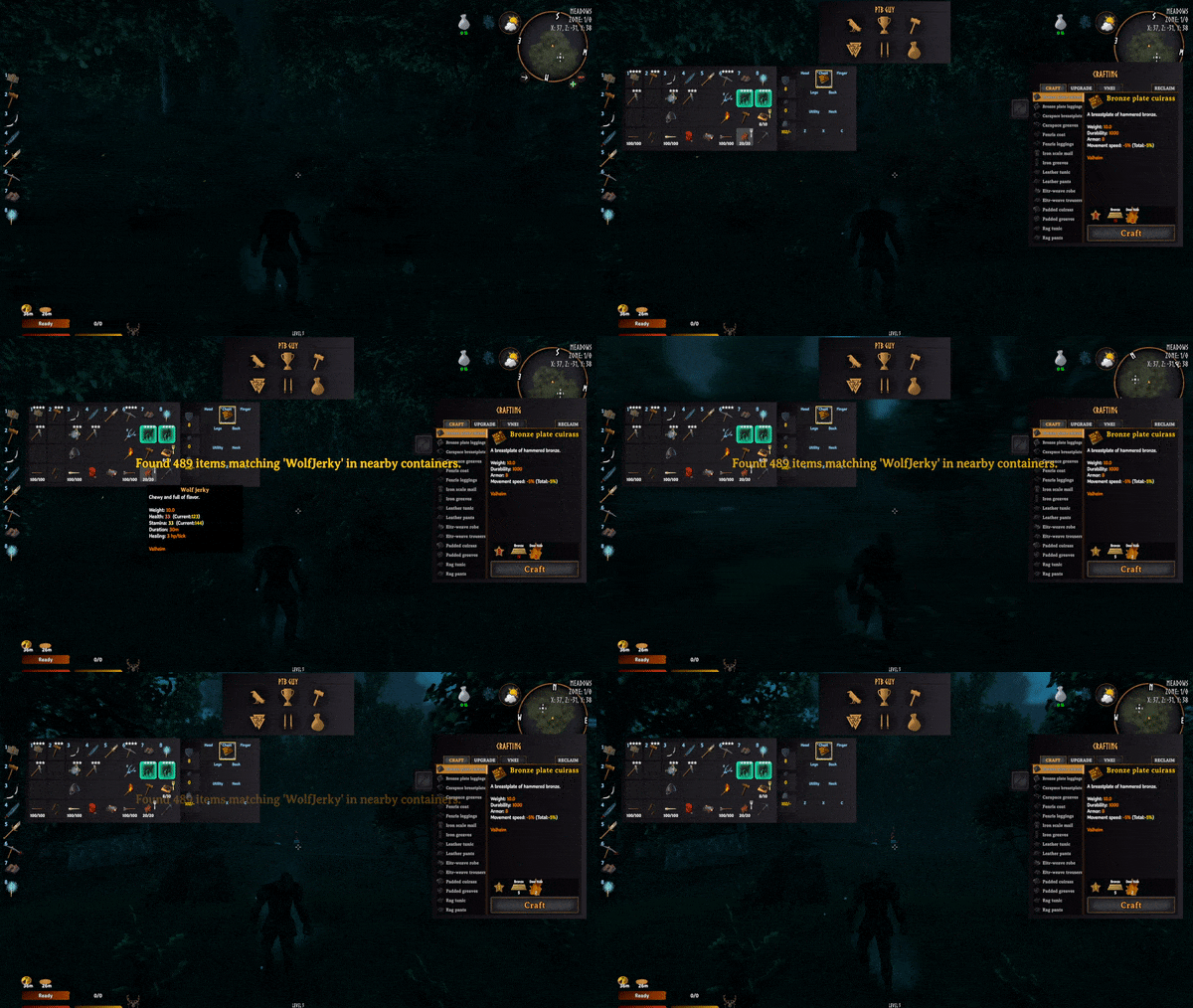 |
| 2.1.1 | - Fix NRE that can be thrown when a mob dies |
| 2.1.0 | - Performance improvements when storing things. It now checks more on an interval of 10 seconds. Though, if you throw out an item it will check within the next second. Also, reduced checks that might be a little expensive. - Add in Favoriting from Goldenrevolver By holding the Favoriting Key (default: Alt) or by using a new button, you can left click on an item to favorite it, or right click to favorite the slot it is in. This prevents most features of this mod from affecting it. No accidental quick stacking, sorting, storing or trashing. The favoriting state is shown with a custom colored border around the slot. None of the configuration options related to favoriting are synced with the server. |
| 2.0.3 | - Revert a small bit of code that fixes an issue. The issue is that some items were not being added to the correct groups as expected. - Add ElementalMagic and BloodMagic predefined categories |
| 2.0.2 | - Fix Potion criteria - Fix Equipment category to include more items like it originally should have. - Add more predefined groups. I added the following Armor, Equipment, Weapons, Shield, Chest, Legs, Shoulder, Helmet, Utility, Ammo, Arrows, and Bolts. - A file will now be created next to the dll called PredefinedGroups.txt which will contain all of the current items in the predefined groups (modded and vanilla, populates when you go into a server/world) |
| 2.0.1 | - Fix some item deletion, add ability to pause the execution of storing items (LeftShift + Period by default and 10 second wait by default) - If the pausing feature doesn't work like intended, I have code queued up to potentially fix the issue. Please report bugs |
| 2.0.0 | - MAJOR VERSION UPDATE- Everything about the configuration has changed. Please delete your old config file and boot the game once with this mod installed to get a clean one. - Move as many of the configuration options that make sense to YAML configuration. Please read the mod page for details on where to find and read the file for how to use. Ask questions if you need to in my discord. As frequent questions are asked, they will be added to the wiki tab for this mod. Read the FAQ section on the mod page for more details on that. - If you have used AzuCraftyBoxes in the past, the configuration is pretty much the same! Works the same, just in reverse (because we are storing things!) - Main difference between this and AzuCraftyBoxes configurations is that the range can be set in the yaml per container. - TLDR; This update breaks shit because it's a major change, if you are using the mod, delete everything (configuration file and dll). Start over. Read the mod page you lazy person...or figure it out on your own if you're not a smoothbrain |
| 1.1.5 | - Update for Valheim's latest version. |
| 1.1.4 | - Small update to fix an error on server connection |
| 1.1.3 | - Hildir Update |
| 1.1.2 | - Updated for Valheim 0.216.9 |
| 1.0.2 | - Fixes that I can't remember. ALo helped find the bugs - Added a new config option to allow you to disable the chest highlight - Prevent typing your hotkey while any UI is open so you don't store your items in the chest by accident |
| 1.0.1 | - AmmoNonEquipable item type missing fixed |
| 1.0.0 | - Initial Release |
