
Please disclose if any significant portion of your mod was created using AI tools by adding the 'AI Generated' category. Failing to do so may result in the mod being removed from Thunderstore.

SearchEverything
Search crafting recipes and chests, and find items in nearby chests with a quick-search window that marks where they are.
| Date uploaded | a week ago |
| Version | 1.0.0 |
| Download link | s992-SearchEverything-1.0.0.zip |
| Downloads | 88 |
| Dependency string | s992-SearchEverything-1.0.0 |
This mod requires the following mods to function

denikson-BepInExPack_Valheim
BepInEx pack for Valheim. Preconfigured with the correct entry point for mods and preferred defaults for the community.
Preferred version: 5.4.2351README
SearchEverything
ai usage disclaimer
with the exception of this readme, everything in this repo is ai-generated.
description
this mod adds search functionality to the crafting and storage UIs as well as a "global" (read: nearby chests) search UI to help find which chest you stuffed something into.
usage
crafting
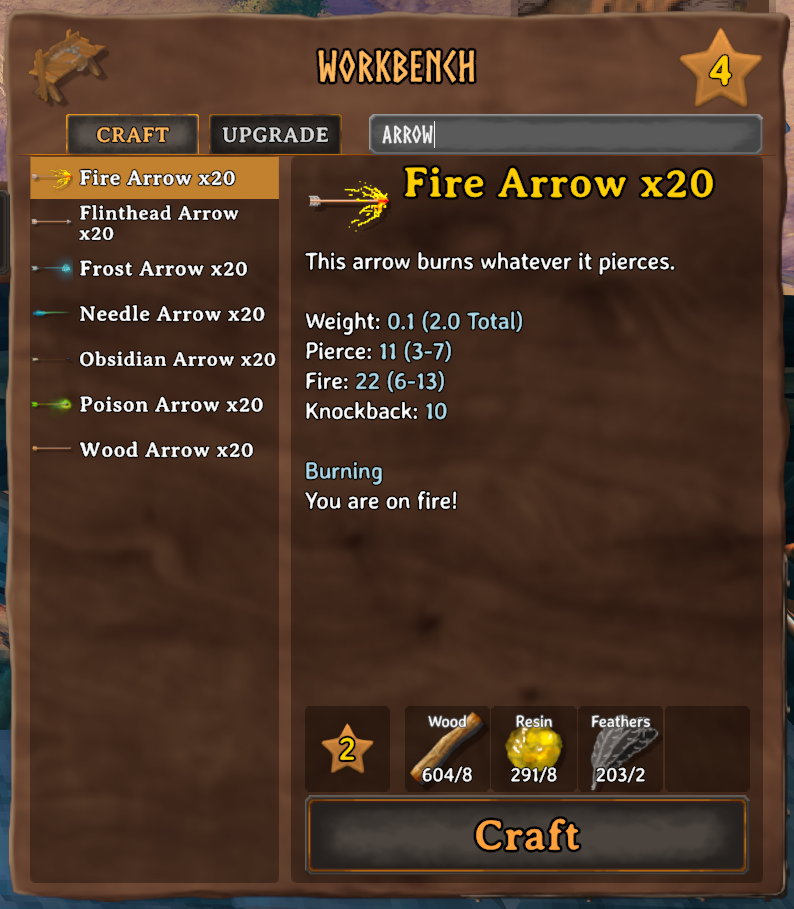
a search input is available in the top right of the crafting UI. typing into it will filter recipes by name and ingredient.
storage
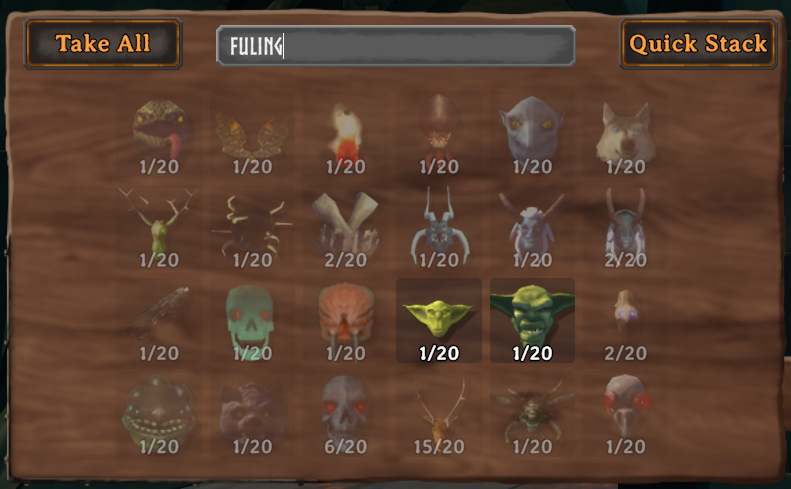
a search input is available in the top of the storage UI. typing into it will dim icons for items that don't match the filter.
global search
pressing Ctrl+K (Open key) will present a UI displaying the contents of chests near you:
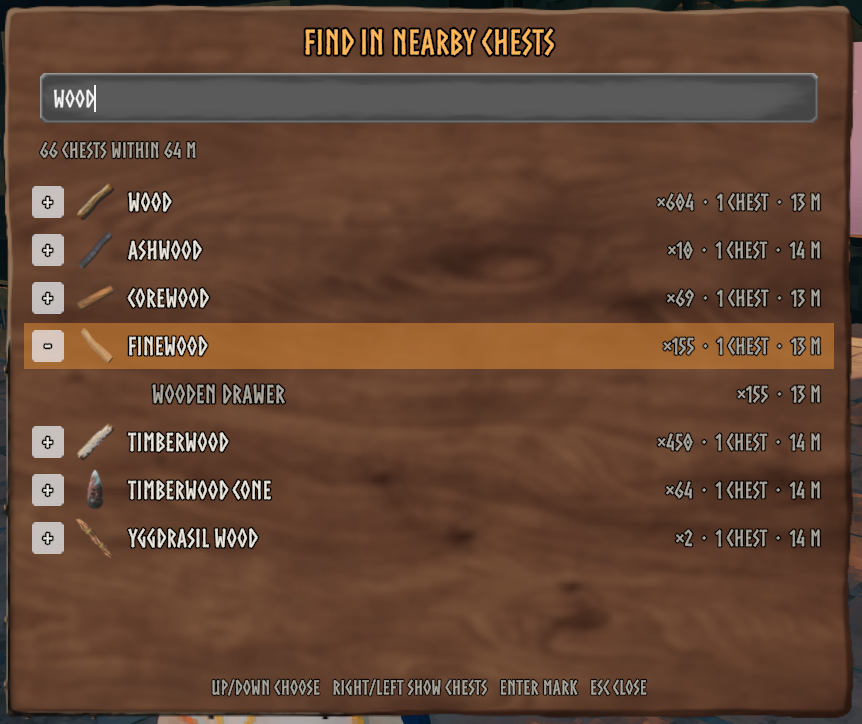
selecting an item will highlight the containing chest by placing a temporary icon above the chest. the icon is cleared when you interact with the chest, clear the icon manually (Ctrl+Shift+K (Dismiss key)), or when the icon expires (60 seconds default, configurable in Marker duration).
settings
settings are configurable via editing the settings file directly (BepInEx/config/s992.SearchEverything.cfg) or via a configuration manager.
these are the default settings:
[1. Recipes]

## A search box next to the Craft and Upgrade tabs filters the recipe list. Matches the item's name, its ingredients and its type (bow, helmet, food...).
# Setting type: Boolean
# Default value: true
Recipe search = true

[2. Chests]

## A search box at the top of an open chest. Items that don't match fade out, in the chest and in your inventory.
# Setting type: Boolean
# Default value: true
Chest search = true

## How visible items that don't match the chest search stay (0 = hidden, 1 = not faded).
# Setting type: Single
# Default value: 0.25
# Acceptable value range: From 0 to 1
Faded opacity = 0.25

[3. Nearby chests]

## A search window for everything in nearby chests. Picking a result marks the chests that hold it.
# Setting type: Boolean
# Default value: true
Nearby search = true

## Opens the nearby search, in the world or in the inventory. Escape closes it. The game doesn't act on this key while it opens the search (e.g. debug mode's K, which kills nearby enemies).
# Setting type: KeyboardShortcut
# Default value: K + LeftControl
Open key = K + LeftControl

## Shows a button above your inventory that opens the nearby search.
# Setting type: Boolean
# Default value: true
Inventory button = true

## Chests within this many metres of the camera are searched. Chests further than the game keeps loaded (128 m from you on the default simulation distance) can't be seen; the window's status line says when that applies.
# Setting type: Int32
# Default value: 64
# Acceptable value range: From 5 to 250
Range = 64

## Carts and ships count as chests.
# Setting type: Boolean
# Default value: true
Carts and ships = true

[4. Markers]

## Seconds a chest stays marked. A marker also goes away when you open its chest. 0: until opened or dismissed.
# Setting type: Int32
# Default value: 60
# Acceptable value range: From 0 to 600
Marker duration = 60

## Removes every marker.
# Setting type: KeyboardShortcut
# Default value: K + LeftShift + LeftControl
Dismiss key = K + LeftShift + LeftControl

[5. Diagnostics]

## Writes where the search boxes were placed, and the panels around them, to the BepInEx log. Useful when a box overlaps something.
# Setting type: Boolean
# Default value: false
Log UI layout = false
CHANGELOG
Changelog
This changelog is written by Claude, an AI assistant, from the project's commit history.
1.0.1
- Fixed the nearby-chest search window failing ("Error in the nearby search", then turning itself off) when opened after logging out and loading a world again in the same game session.
1.0.0
- Initial release: a search box on the crafting panel filters recipes by name, ingredient or item type (such as "helmet" or "food"), and a search box in place of an open chest's name fades the items that don't match, in the chest and the inventory.
- A nearby-chest search window (Ctrl+K, or a button above the inventory) lists matching items and the chests holding them within 64 m of the camera, including carts and ships. Picking one marks its chests on screen, through walls, with their distance.
- Markers go away when their chest is opened, after 60 seconds, or with Ctrl+Shift+K. Keys, range, timings and each feature can be changed in the config.
- Typing in a search box doesn't move the player, the camera or trigger game keys, and Ctrl+K doesn't count as K for debug mode's keys.
- Read-only: the mod doesn't move items and doesn't need any other mod.
