Please disclose if any significant portion of your mod was created using AI tools by adding the 'AI Generated' category. Failing to do so may result in the mod being removed from Thunderstore.

SeneaL API
Public API for Valheim UI mods: notices, dialogs and HUD elements, with a bridge that routes the game's own windows to any UI that registers as a provider.
| Date uploaded | a day ago |
| Version | 1.0.0 |
| Download link | seneaL-SeneaL_API-1.0.0.zip |
| Downloads | 1801 |
| Dependency string | seneaL-SeneaL_API-1.0.0 |
This mod requires the following mods to function

denikson-BepInExPack_Valheim
BepInEx pack for Valheim. Preconfigured and includes unstripped Unity DLLs.
Preferred version: 5.4.2202README
SeneaL API


Pages: Thunderstore · Hexium
Provider: SeneaL UI (Thunderstore · Nexus Mods · Hexium).
A small public library for Valheim UI mods, and a bridge that sends the game's own windows to whatever UI mod you run.
- For players: install it together with a UI mod that supports it (SeneaL UI). Mods that show the game's standard messages and windows then look the same as the rest of your interface. Without such a UI mod nothing changes: every request falls back to the vanilla window.
- For modders: one place to show notices, ask the player a question and register your HUD elements, with no dependency on a specific UI mod.
- For UI authors: register one provider per feature and you receive every request, from the API and from the game's own calls.
How it works
your mod ── Notices.Show / Dialogs.Confirm / HudElements.Add ──┐
                                                               ├─► provider (a UI mod) ─► its own window
game / any mod ── MessageHud.ShowMessage, UnifiedPopup.Push ───┘            │
                  TextInput.RequestText  (bridge)                          └─ declines or missing ─► vanilla window
All calls run on the Unity main thread.
Using it from your mod
Add a soft dependency and keep every API call in a method that runs only when the API is loaded:
[BepInDependency("seneaL.valheim.api", BepInDependency.DependencyFlags.SoftDependency)]
public class MyMod : BaseUnityPlugin
{
    private static bool HasApi => BepInEx.Bootstrap.Chainloader.PluginInfos.ContainsKey("seneaL.valheim.api");

    public static void Hello()
    {
        if (HasApi)
            ShowWithApi("Hello");
        else
            Player.m_localPlayer?.Message(MessageHud.MessageType.TopLeft, "Hello");
    }

    private static void ShowWithApi(string text) => SeneaL.API.Notices.Show(text);
}
If you only use the game's own methods you need nothing: the bridge already routes them.
Quick start: a complete mod
One file, one soft dependency, all four features. Everything that touches SeneaL.API sits in a separate class, so the mod loads and works when the API is not installed.
using BepInEx;
using UnityEngine;
using BepInEx.Bootstrap;

[BepInPlugin("my.mod.guid", "My Mod", "1.0.0")]
[BepInDependency("seneaL.valheim.api", BepInDependency.DependencyFlags.SoftDependency)]
public class MyMod : BaseUnityPlugin
{
    public static bool HasApi => Chainloader.PluginInfos.ContainsKey("seneaL.valheim.api");

    private void Start()
    {
        if (HasApi)
            ApiPart.Register();
    }

    private void Update()
    {
        if (HasApi && Input.GetKeyDown(KeyCode.F9))
            ApiPart.Ask();
    }
}

internal static class ApiPart
{
    private const string Owner = "my.mod.guid";

    public static void Register()
    {
        if (Api.Has("slots"))
            CustomSlots.Add(Owner, new SlotDef("charm") { Title = "Charm", Mode = SlotMode.Stored });

        if (Api.Has("notices"))
            Notices.Show("My Mod is ready", NoticeKind.TopLeft);
    }

    public static void Ask()
    {
        Dialogs.Confirm("Reset the counter?", "The value will be lost.", yes: () => Notices.Show("Counter reset", NoticeKind.Center));
    }
}
using SeneaL.API; goes at the top of the file that uses these types. Api.Has(...) is true only when the feature exists in the installed API version, so it also protects you from an older API.
Notices
Notices.Show("$msg_example", NoticeKind.Center);
Notices.Show("Picked up", NoticeKind.TopLeft, amount: 3, icon: sprite);
Notices.Unlock(icon, "Title", "Description");
Notices.Biome("Meadows", stinger: true);
Notices.Shown += notice => { };
Notice.Text is localised, Notice.Raw is what was passed, Notice.Vanilla is true when it came from a game call.
Dialogs
Dialogs.Confirm("Delete?", "This cannot be undone.", yes: () => Delete());
Dialogs.Message("Done", "Saved.");
Dialogs.Input("Name", "current", submit: name => Rename(name), validate: s => s.Length > 0);
Each call returns the dialog. IsOpen is false when the vanilla window owns it, and Close() closes it.
More than two answers: Dialogs.Choose takes up to four buttons. The first Primary button is the main one, CancelIndex (the last button by default, -1 = none) is what Esc picks. Set Centered = true on any dialog to center its text.
var d = Dialogs.Choose("Friend request", "Ragnar wants to be your friend.",
    new DialogButton("Accept", Accept, primary: true),
    new DialogButton("Decline", Decline),
    new DialogButton("Later", Later));

d.Centered = true;
d.CancelIndex = 2;
Without a provider (or with one that does not know DialogKind.Choice) the game's yes / no window shows the first two buttons (one button: the game's warning window). Probe with Api.Has("dialogs.choice"). A dialog provider gets ChoiceDialog with Buttons and answers with Choose(index) or Cancel(); a provider that cannot draw it returns false from Show.
HUD elements
var element = HudElements.Add("my.mod.guid", "timer", "Timer", timerRect);
HudElements.Remove(element);
A full example: a small counter that you build yourself and hand to the UI.
using TMPro;
using UnityEngine;
using UnityEngine.UI;

internal static class KillCounter
{
    private static TextMeshProUGUI _text;
    private static HudElement _element;
    private static int _kills;

    public static void Create()
    {
        var root = new GameObject("MyKillCounter", typeof(RectTransform)).GetComponent<RectTransform>();

        root.SetParent(Hud.instance.m_rootObject.transform, false);
        root.anchorMin = root.anchorMax = root.pivot = new Vector2(0f, 1f);
        root.anchoredPosition = new Vector2(40f, -200f);
        root.sizeDelta = new Vector2(180f, 36f);

        root.gameObject.AddComponent<Image>().color = new Color(0f, 0f, 0f, .45f);

        var label = new GameObject("Text", typeof(RectTransform)).GetComponent<RectTransform>();

        label.SetParent(root, false);
        label.anchorMin = Vector2.zero;
        label.anchorMax = Vector2.one;
        label.offsetMin = label.offsetMax = Vector2.zero;

        _text = label.gameObject.AddComponent<TextMeshProUGUI>();
        _text.alignment = TextAlignmentOptions.Center;
        _text.fontSize = 18f;
        _text.raycastTarget = false;

        _element = HudElements.Add("my.mod.guid", "kills", "Kill counter", root);

        Refresh();
    }

    public static void Add()
    {
        _kills++;

        Refresh();
    }

    private static void Refresh() => _text.text = "Kills: " + _kills;
}
Without SeneaL UI the counter simply sits where you put it. With it the player finds "Kill counter" (tagged as coming from a mod) in the HUD editor and can move, scale, fade, attach and hide it.
A UI provider can then move, resize, fade and attach the element and keep its place in the player's profile. The element keeps living in your hierarchy: the provider only changes its position, scale and alpha. Set element.Busy = true while something is going on in it, so that an "auto-hide when idle" setting does not hide it at that moment. Use HudElements.Remove when the element goes away; a destroyed RectTransform is dropped by itself. element.Placed is true while the player has placed the element by hand in the HUD editor: if your mod positions the element itself (for example next to the minimap), skip that while Placed is true so the player's place wins. HudElements.Find(owner, id) returns an element you or somebody else registered. Probe with Api.Has("hud.placed").
Theme
Build your own window or HUD piece from the look of the installed UI mod: its fonts, its panel, button, field, row and tab sprites and its colors. Without a theme provider every call returns nothing, so keep your own look as the fallback.
var sprite = Themes.Sprite(ThemePart.Window);

if (sprite != null) {
    image.sprite = sprite;
    image.type = Image.Type.Sliced;
    canvasScaler.referencePixelsPerUnit = Themes.PixelsPerUnit;
}

var font = Themes.Font(ThemeFont.Body);

if (Themes.TryColor(ThemeColor.Accent, out var accent))
    title.color = accent;

Themes.Changed += Rebuild;
Parts: Window, Inner, Card, Button, ButtonHover, Primary, PrimaryHover, Field, FieldFocus, Row, RowHover, RowOn, Tab, TabHover, TabOn, Track, Chip, Separator. Fonts: Body, Strong, Title. Colors: Text, Muted, Accent, Good, Bad, Warn, OnPrimary (text on a Primary button), Shade (dim behind a window). Sprites are 9-sliced: set Image.type = Sliced and give the canvas the provider's PixelsPerUnit (or set Image.pixelsPerUnitMultiplier to match), otherwise the corners come out twice as big or too small. Themes.Changed fires when the provider or its look changes. Probe with Api.Has("theme"). Themes.Icon("map-pin") returns an icon by its Phosphor name (white, tint it with Image.color), feature theme.icons.
Mod settings
Show your BepInEx settings in the UI mod's own settings window (SeneaL UI: F7). Keys (KeyboardShortcut) go to its key list with clash warnings, the rest (bool, enum, numbers with an AcceptableValueRange) to its mods page under your mod's name. The entries stay yours: the UI only reads and writes Entry.BoxedValue.
ModSettings.Add("my.mod.guid", "My Mod", openKey, () => Loc("Open the window"));
var s = ModSettings.Add("my.mod.guid", "My Mod", mode, () => Loc("Mode"), () => Loc("What the mode does"));
s.Options = () => new[] { Loc("Off"), Loc("Push to talk"), Loc("Open") };
s.Visible = () => serverAllowsIt;
s.Hold = true;
Label, Tip and Options are functions so they follow the game language. Hold marks a key that is held (no clash warning). ModSettings.Changed fires when entries come or go; call ModSettings.Refresh() after your labels change. Probe with Api.Has("settings").
Slots
Add your own inventory slots next to the equipment. The UI draws them, stores the items with the character and handles drag and drop, and you decide what fits and what happens when an item comes or goes.
var slot = CustomSlots.Add("my.mod.guid", new SlotDef("ring3")
{
    Title = "Third ring",
    Hint = "A ring from My Mod.",
    IconName = "diamond",
    Mode = SlotMode.Worn,
    Place = SlotPlace.Doll,
    EquipTime = -1f,
    Order = 10,
    Accepts = item => item.m_shared.m_name == "$item_my_ring",
    Visible = () => MyMod.RingsUnlocked,
    Changed = change => MyMod.Refresh(change.Old, change.New)
});

var worn = CustomSlots.Get("my.mod.guid", "ring3");
CustomSlots.Set("my.mod.guid", "ring3", null);
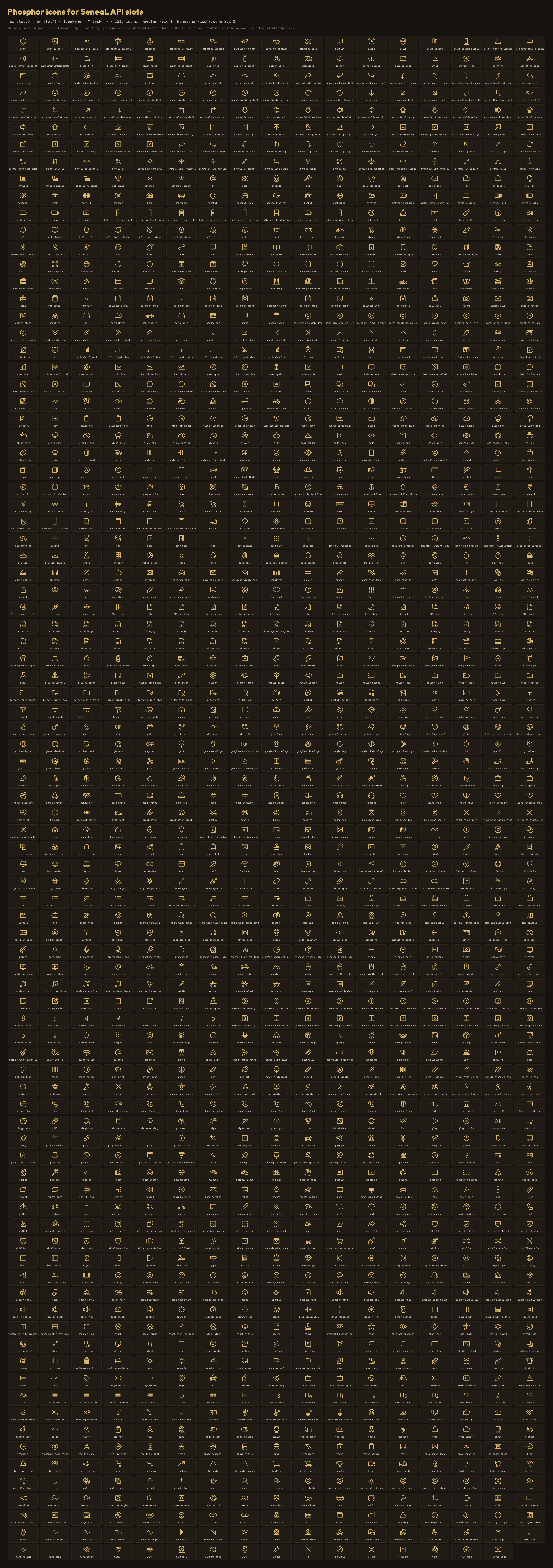
IconName: the picture of the empty slot, by the name of a Phosphor icon (regular weight), for example"diamond","flask","sword","shield-chevron"; all 1512 icons are built into the UI and shown in one picture, so you ship nothing. Copy the name from the site (ph-and.svgare ignored).Icontakes your ownSpriteinstead and wins overIconName. Without either, the UI guesses from the id and title (ring, neck, bag, quiver) and otherwise draws a spark. An unknown name keeps the default and is logged. Probe withApi.Has("slots.icon").Stored: the slot only holds the item, you read it withGetand act on it yourself.Worn: the item counts as equipped while it sits in the slot:m_equippedis set and its equip status effect and effects are played and removed by the host. Extra effects (visuals, stats) are yours, inChanged.- Using an item the slot accepts (right click in the inventory, a hotbar key, the gamepad) puts it into the slot instead of letting the game equip it: an empty accepting slot first, otherwise it swaps with the item in the first accepting slot.
Wornslots take every accepted item this way,Storedslots only items the game could equip. SetEquipOnUse = falseto keep the game's own use for that slot. KeepAcceptsnarrow: a slot that accepts everyUtilityitem also takes the belts. Probe withApi.Has("slots.use"). EquipTime: how long putting an item into aWornslot or taking it out takes when the player does it (right click, hotbar key, gamepad, drag and drop).-1(the default) uses the item's ownm_equipDuration, like the game does for armor;0is instant; a positive value is that many seconds. The game's own equip bar, animation and cancel are used.CustomSlots.Setis always instant. Probe withApi.Has("slots.time").Place: where the UI draws the slot.Auto(the default) putsStoredandWornslots into the Mod slots row under the equipment andLinkedslots onto free places of the equipment block;Rowalways uses the row;Dollputs the slot onto a free place of the equipment block, which grows wider when it needs more places; slots that do not fit on the screen stay in the row. The player can override this in the UI settings. Probe withApi.Has("slots.place").- A
Wornitem keeps its equip status effect while the game equips and unequips its own items, also when a vanilla item carries the same effect. Changedruns for every fill, empty and swap, and once for each item that is already in a slot when the character loads, so one handler covers both.- Slots belong to the local player. Up to 16 slots are shown, ordered by
Order; a slot keeps its place in the row between sessions. If a slot is removed or its mod is gone, the item goes back to the inventory. - The items live in a separate inventory kept in the character data, not in the main grid: they are not counted in the carry weight, and they go into the grave when the character dies.
Linked slots and AzuEPI
Pick Worn, not Linked, for a new equipment slot of your own (a ring, an amulet). Linked adds no slot to the character: it shows an item that the game or another mod already equips, and putting an item into it calls the game's EquipItem. A ring with the item type Utility then goes into the belt slot and takes the belt off.
A Linked slot does not store an item: it shows an item that lives elsewhere, normally in the player's inventory, and you tell the API how to find it. Putting an item into the slot equips it through the game, taking it out unequips it, and Changed fires whenever the item in it changes.
CustomSlots.Add("my.mod.guid", new SlotDef("tome")
{
    Title = "Tome",
    Mode = SlotMode.Linked,
    Source = player => player.GetInventory().GetEquippedItems().Find(i => i.m_shared.m_name == "$item_my_tome"),
    Accepts = item => item.m_shared.m_name == "$item_my_tome"
});
If Azumatt's AzuEPI is installed, SeneaL API reads the equipment slots that other mods add through AzuEPI.API.AddSlot once a second and mirrors each of them as a Linked slot owned by Azumatt.AzuExtendedPlayerInventory. AzuEPI keeps deciding what fits and what is equipped; a UI provider only shows the slot and moves the item. This needs nothing from the mod that calls AddSlot. Bridge / AzuEPI in the config turns it off.
A UI provider that hands the inventory over to AzuEPI sets CustomSlots.AzuManaged = true: the bridge stops mirroring, mirrored slots are removed, and the stub patcher only forwards AddSlot to the real AzuEPI instead of emulating it, so that AzuEPI itself shows those slots.
A mod that embeds the AzuEPI API stub into its own dll (the stub methods do nothing, so it never reaches AzuEPI) is handled by a small patcher that ships with this mod in BepInEx/patchers/SeneaL-API. It loads before every plugin, finds the embedded AzuEPI.API and AzuExtendedPlayerInventory.API types in any assembly that is loaded and routes IsLoaded, AddSlot (all four overloads) and RemoveSlot here:
IsLoaded()answerstruewhen the real AzuEPI or SeneaL UI is installed,falseotherwise (the mod keeps its own fallback).AddSlotgoes to the real AzuEPI when it is installed (and is then mirrored like any other of its slots), and becomes aLinkedslot owned byAzuEPI.emulatedotherwise. Two mods that add the same slot name share one slot, like in AzuEPI.- Mods the UI mod already supports itself are left alone, so that their behaviour does not change:
Bridge / AzuEPIStubIgnorelists their assembly names (Jewelcrafting, BowsBeforeHoes, BetterArchery, AdventureBackpacks and EpicLoot by default; a config that still holds an older default list is moved to this one). Remove a name to route that mod too.Bridge / AzuEPIStubs = falseturns the patcher off. Both need a game restart.
The patcher file is part of the package; a manual install must copy it as well.
Writing a provider
public sealed class MyNotices : NoticeProvider
{
    public override bool Show(Notice notice)
    {
        return true;
    }
}

Notices.Register("my.ui.guid", new MyNotices());
Return true when you showed it and false to let the vanilla window handle it. A notice you showed is written to the game's message log for you; set notice.Log = false first if you write your own log line. Registration: highest priority wins, ties go to the latest, Unregister(owner) falls back to the previous provider, registering the same owner again replaces its entry. Dialogs that were open in a provider that goes away are shown again by the next provider, or by the vanilla window. DialogProvider also gets Hide, called when a dialog closes; HudProvider gets Added and Removed, and receives every element that was registered before it.
A SlotProvider stores the items: Added and Removed tell it about the slots, Get and Set read and fill them, and it reports changes with CustomSlots.Report.
Provider examples
A dialog provider: draw your own window, call the dialog's own methods when the player answers.
public sealed class MyDialogs : DialogProvider
{
    public override bool Show(Dialog dialog)
    {
        var window = MyWindow.Create(dialog.Title, dialog.Text);

        switch (dialog)
        {
            case ConfirmDialog confirm:
                window.AddButton(confirm.YesText ?? "Yes", confirm.Yes);
                window.AddButton(confirm.NoText ?? "No", confirm.No);

                break;
            case MessageDialog message:
                window.AddButton(message.OkText ?? "OK", message.Ok);

                break;
            case InputDialog input:
                window.AddField(input.Value, input.Placeholder, input.CharLimit, text =>
                {
                    if (input.IsValid(text))
                        input.Submit(text);
                });
                window.AddButton("Cancel", input.Cancel);

                break;
        }

        return true;
    }

    public override void Hide(Dialog dialog) => MyWindow.CloseFor(dialog);
}

Dialogs.Register("my.ui.guid", new MyDialogs(), priority: 10);
A HUD provider: you get every element, now and later, and move it as you like. The element stays a normal Unity object in the owner's hierarchy.
public sealed class MyHud : HudProvider
{
    public override void Added(HudElement element)
    {
        MyEditor.Track(element.Key, element.Title, element.Rect);
    }

    public override void Removed(HudElement element)
    {
        MyEditor.Forget(element.Key);
    }
}

HudElements.Register("my.ui.guid", new MyHud());
A theme provider: hand out what you have, return null / false for the rest. Call Themes.Refresh() when your look changes.
public sealed class MyTheme : ThemeProvider
{
    public override float PixelsPerUnit => 50f;

    public override Sprite Sprite(ThemePart part) => part == ThemePart.Window ? MySkin.Panel : null;

    public override TMP_FontAsset Font(ThemeFont font) => MyFonts.Regular;

    public override bool TryColor(ThemeColor color, out Color value)
    {
        value = color == ThemeColor.Accent ? MyColors.Gold : Color.white;

        return color == ThemeColor.Accent || color == ThemeColor.Text;
    }
}

Themes.Register("my.ui.guid", new MyTheme());
A slot provider: keep the items, tell the API when something changes.
public sealed class MySlots : SlotProvider
{
    private readonly Dictionary<string, ItemDrop.ItemData> _items = new Dictionary<string, ItemDrop.ItemData>();

    public override void Added(SlotDef slot) => MyBar.AddCell(slot);

    public override void Removed(SlotDef slot)
    {
        _items.Remove(slot.Key);

        MyBar.RemoveCell(slot);
    }

    public override ItemDrop.ItemData Get(SlotDef slot)
    {
        _items.TryGetValue(slot.Key, out var item);

        return item;
    }

    public override bool Set(SlotDef slot, ItemDrop.ItemData item)
    {
        if (item != null && !slot.Allows(item))
            return false;

        _items.TryGetValue(slot.Key, out var old);

        _items[slot.Key] = item;

        CustomSlots.Report(new SlotChange(slot, old, item));

        return true;
    }
}

CustomSlots.Register("my.ui.guid", new MySlots());
Common mistakes
- Calling
SeneaL.APItypes from a method of your main class when the API is optional: the type is resolved when the method is compiled to native code, and a missing assembly throws. Keep all API calls in a separate class, as in the quick start. - Using
Notices.Showfrom a thread other than Unity's main thread. - Forgetting
Visibleon a slot that should only exist at some point: an always-visible slot stays in the row. - Expecting
Acceptsto stop the player taking the item out: it only decides what may be put in. - Registering a provider before the objects it needs exist: providers receive earlier HUD elements and slots when they register, so register in
Start, not inAwake.
Use Api.Has("notices"), Api.Has("dialogs"), Api.Has("hud"), Api.Has("slots"), Api.Has("slots.linked"), Api.Has("azuepi"), Api.Has("hud.placed"), Api.Has("slots.use"), Api.Has("slots.time"), Api.Has("slots.place") and Api.Contract to probe the version.
Config
Bridge / Notices and Bridge / Dialogs turn the bridge for the game's own calls off. Debug / Verbose logs every routed request.
Version history
- 1.0.0 first version: notices, dialogs, HUD elements and the bridge.
CHANGELOG
1.0.1
- Linked slots:
SlotDef.PutandSlotDef.Take(Func<Player, ItemData, bool>) let a mod store and take out the item itself instead of the game'sEquipItem/UnequipItem, for cells that hold items without wearing them (potions, keys, a mod's own storage cells). Without them a Linked slot works as before. Featureslots.handlers.
1.0.0
-
Mod settings:
ModSettings.Addputs another mod's BepInEx entries into the UI mod's settings window (keys into its key list with clash warnings, switches, choices and sliders into its mods page); labels, tips and choice names are functions so they follow the language. Featuresettings. -
Theme:
Themes.Icon(name)returns an icon by its Phosphor name. Featuretheme.icons. -
Dialogs:
Dialogs.Chooseopens a dialog with up to four buttons (DialogButton: text, click, primary),CancelIndexsets what Esc picks;Dialog.Centeredcenters the text of any dialog. Without a provider the game's yes / no window takes the first two buttons. Featuredialogs.choice. -
Theme:
Themeshands out the installed UI mod's fonts, 9-sliced sprites (window, card, button, field, row, tab, track, chip) and colors, so another mod can build its own window that looks like the rest of the interface; without a provider every call returns nothing and the mod keeps its own look. Featuretheme.
First version.
New:
- Notices: show top-left, center, unlock and biome banners through
Notices, with a vanilla fallback when no UI provider is registered. - Dialogs: confirm, message and text input windows through
Dialogs, with a vanilla fallback. - HUD elements: any mod can register a
RectTransformwithHudElementsso a UI provider can move, resize and style it. - Providers: a UI mod registers one provider per feature; dialogs open in a provider that goes away are shown again by the next one or by the vanilla window, and dialogs left over from the previous scene are dropped.
- Slots: mods add their own inventory slots with
CustomSlots(Stored or Worn, with an accept check, visibility, order and a change callback); the UI provider stores, draws and persists them. - Linked slots:
SlotMode.Linkedwith aSourceshows an item that lives somewhere else (usually the inventory) in a slot; putting an item in equips it through the game (an item already in the slot is unequipped first, so the new one takes that slot), emptying the slot unequips it, andChangedfires when the item changes. Contract 2. - AzuEPI bridge: when Azumatt's AzuEPI is installed, the equipment slots other mods add through its API are mirrored as Linked slots, so a UI provider shows them next to the slots of this API. AzuEPI keeps running them.
Bridge / AzuEPIturns it off. - AzuEPI API stubs: a small patcher (
BepInEx/patchers/SeneaL-API) loads before the plugins and routes the AzuEPI API stub that some mods carry inside their own dll (all its methods do nothing, so such a mod never reaches AzuEPI) to this API.IsLoaded()answers true when AzuEPI or SeneaL UI is installed,AddSlotgoes to the real AzuEPI if it is installed and is emulated as a Linked slot (merged by name, like AzuEPI does) otherwise. Mods the UI mod already supports itself (Jewelcrafting, BowsBeforeHoes, BetterArchery, EpicLoot and AdventureBackpacks) are left alone by default:Bridge / AzuEPIStubIgnore;Bridge / AzuEPIStubsturns it off. Needs a game restart. A slot that reaches this API through AzuEPI or a stub carries the name of the mod that added it inSlotDef.Origin. - HUD placement:
HudElement.Placedis set by the UI provider while the player has put the element at a place of their own, so a mod that moves its element itself can leave it alone then;HudElements.Find(owner, id)returns one element. Featurehud.placed. - Slot origin: the API now notes which mod adds a slot at the moment of the
AddSlotcall (a hook on the real AzuEPI API and the stub calls), soSlotDef.Originnames the right mod even when the mod passes a prefab name instead of functions or keeps its functions in a helper dll. CustomSlots.AzuManaged: a UI provider that gives the inventory to AzuEPI turns the AzuEPI mirroring and the stub emulation off, so AzuEPI shows the slots of other mods itself.- Slots:
SlotDef.IconNamenames a Phosphor icon (regular weight, e.g."flask") for the empty slot; the UI provider draws it,Icon(a Sprite) still wins. Featureslots.icon. - Slots: using an item that a mod slot accepts (right click, hotbar key, gamepad) puts it into that slot instead of the game's own equipment slot (a ring of type
Utilityused to replace the belt).SlotDef.EquipOnUse = falsekeeps the game's use. Featureslots.use. The README says when to pickWornand whenLinked. - Slots:
SlotDef.EquipTime(Worn slots wait for the game's equip bar: the item's own time by default, 0 for instant, or seconds) andSlotDef.Place(Auto,RoworDoll: the slot can sit on the equipment block instead of the Mod slots row). Featuresslots.timeandslots.place. - Bridge: the game's own
MessageHud,UnifiedPopupandTextInputcalls are routed to the registered providers, so every mod that uses the vanilla windows gets the provider's look. Each bridge can be turned off in the config.
Fixed:
- Dialogs: the text input and popup bridge runs after other mods' prefixes and stays out when one of them already took the call over (XPortal opens its own portal window from
TextInput.RequestText; a second, empty name window used to open over it).