
Please disclose if any significant portion of your mod was created using AI tools by adding the 'AI Generated' category. Failing to do so may result in the mod being removed from Thunderstore.

SeneaL UI
Complete Valheim UI redesign: HUD, inventory with equipment and quick slots, chests, crafting, build menu, world map, character windows, in-game settings. The server sets the gameplay rules.
| Date uploaded | 12 hours ago |
| Version | 1.1.7 |
| Download link | seneaL-SeneaL_UI-1.1.7.zip |
| Downloads | 730 |
| Dependency string | seneaL-SeneaL_UI-1.1.7 |
This mod requires the following mods to function

denikson-BepInExPack_Valheim
BepInEx pack for Valheim. Preconfigured and includes unstripped Unity DLLs.
Preferred version: 5.4.2202README
SeneaL UI
The Valheim interface, redrawn from the ground up. One mod replaces the HUD, inventory, chests, crafting, build menu, world map, character windows, Escape menu and game settings with a single hand-drawn style — and adds the things the vanilla UI never had: food slots, action slots with their own keys, key slots and a coin wallet, an equipment column, a compass, slot locks, crafting from nearby chests, an expandable inventory and a real settings window.
The interface is drawn on the client; the settings that change gameplay need the server's say-so — it runs the mod and sets the limits, or they switch themselves off (see Server rules). Vanilla game logic is never touched — the mod draws over it, so you can switch any element (or the whole mod) back to vanilla at any time.
Languages: English · Русский · Українська · Deutsch · Français · Español · Português (Brasil) · Čeština · Slovenčina · Türkçe · 简体中文 · 한국어 Discord: discord.gg/VgjRW6Jwdw — bug reports, ideas, previews of the next version.
Latest patch
| English | Русский |
|---|---|
 |
 |
At a glance
 |
 |
 |
 |
 |
 |
 |
 |
- Everything in one style — panels, icons, fonts and tooltips are drawn by the mod itself; nothing is a recolored vanilla texture.
- Adds, not just repaints — food slots, action slots, key slots and a coin wallet, equipment column, compass, slot locks, chest transfers, crafting from chests, 32–64 inventory slots, trash slot, tombstone recovery, a settings window for every installed mod.
- Yours to shape — every element can be turned off, resized or made more transparent from an in-game settings window; the layout follows any resolution and GUI scale.
- Light — about 0.1 ms per frame with the inventory open; heavy work is done once at spawn, redraws happen only when something changes.
- Plays well with others — AdventureBackpacks, BetterArchery, EpicLoot, Valheim Enchantment System, AzuEPI, RunicStorage, Quick Stack Store, AzuAutoStore and more are supported explicitly (see Mod support).
HUD
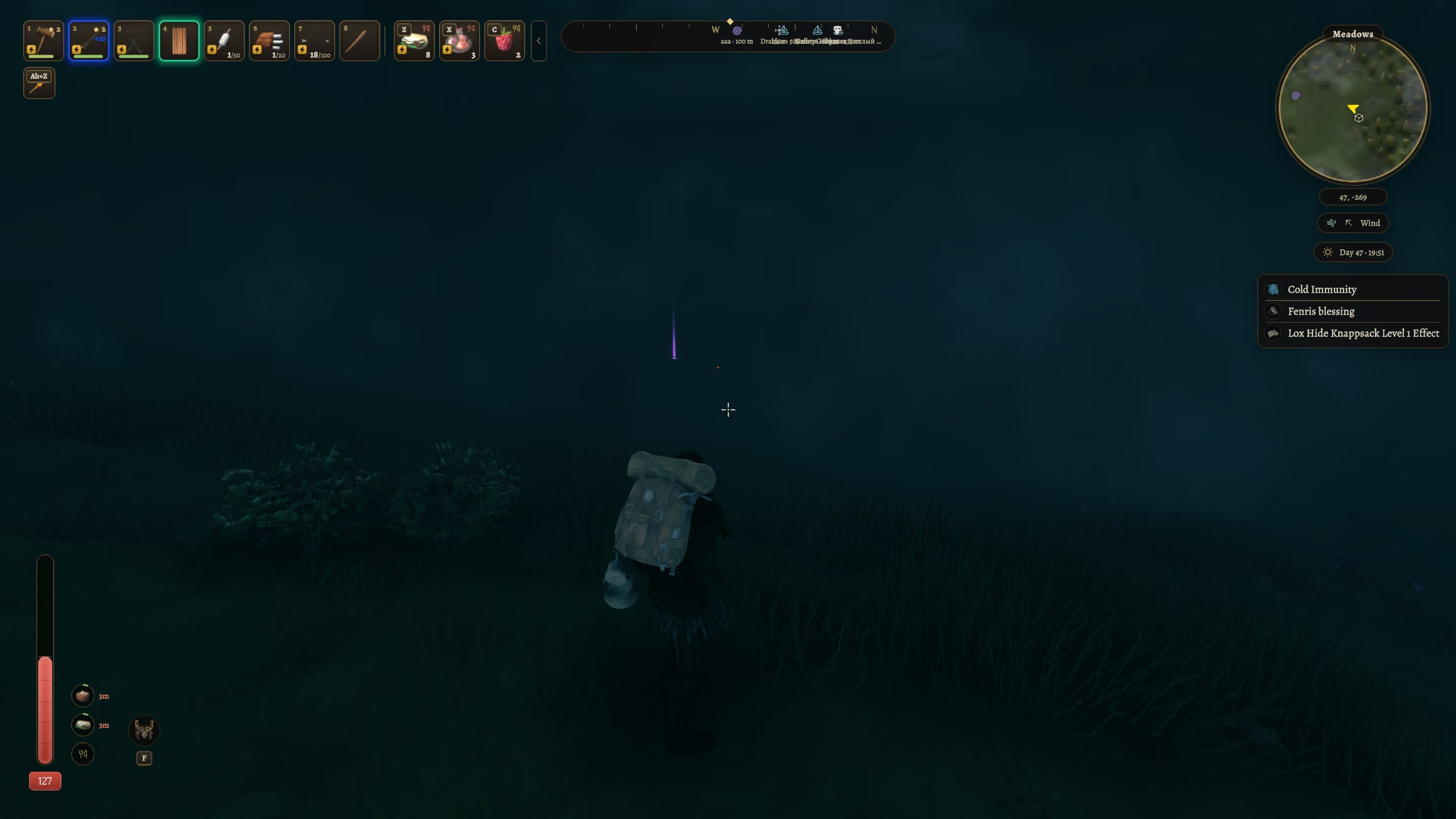
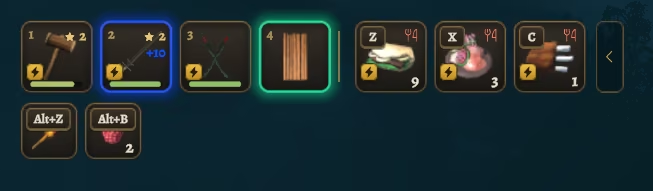
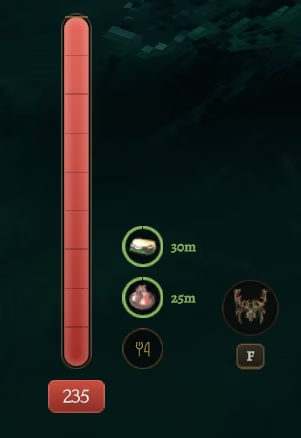
- Hotbar with eight slots and up to six food slots — eat with
Z/X/C(and three more keys of your choice), no inventory needed. The bar collapses with one key; set the count to 0 and the food slots disappear from the HUD and the inventory. - Action slots — up to eight slots for any item (a weapon, a tool, a mead, food) with their own keys (
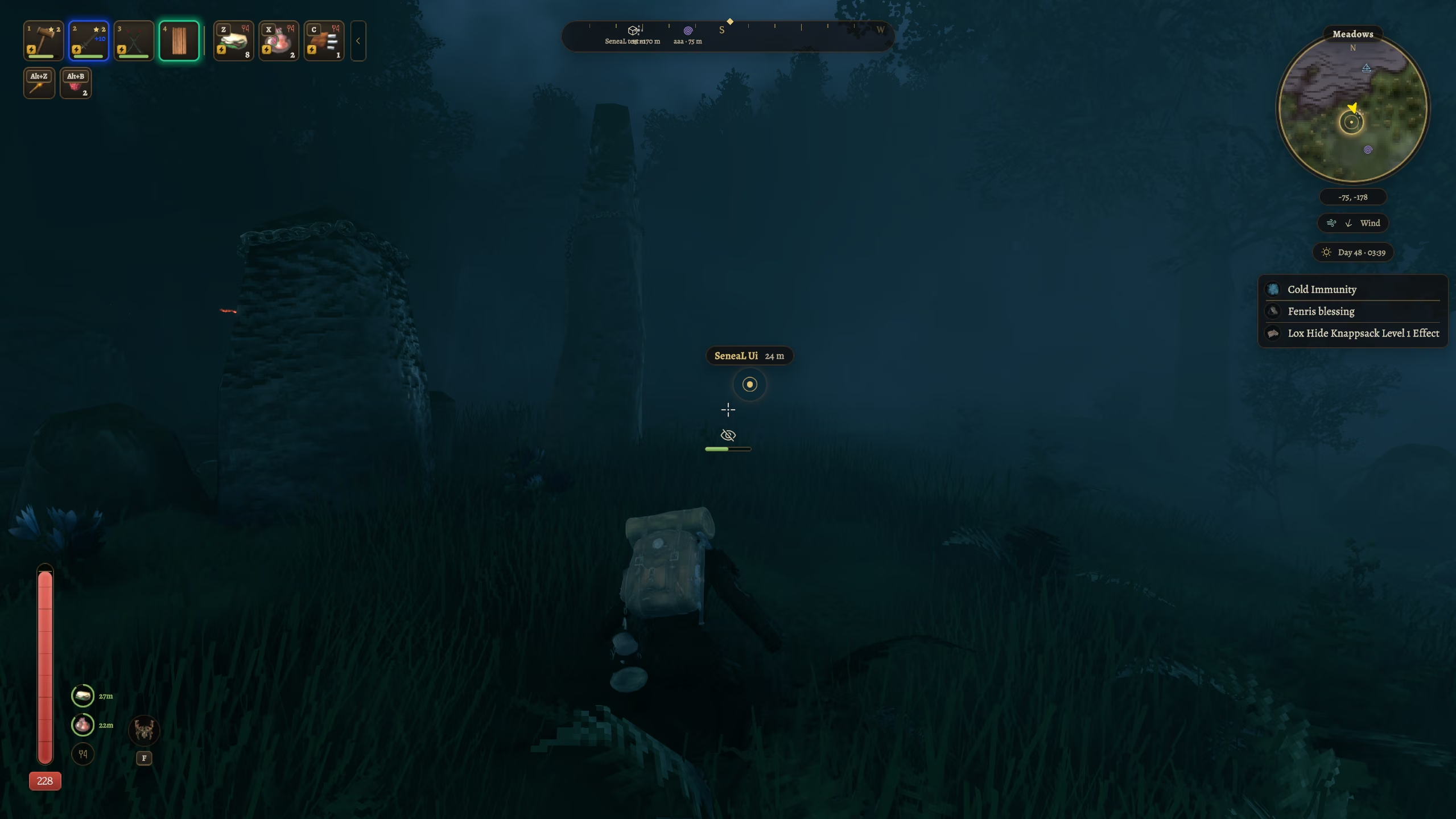
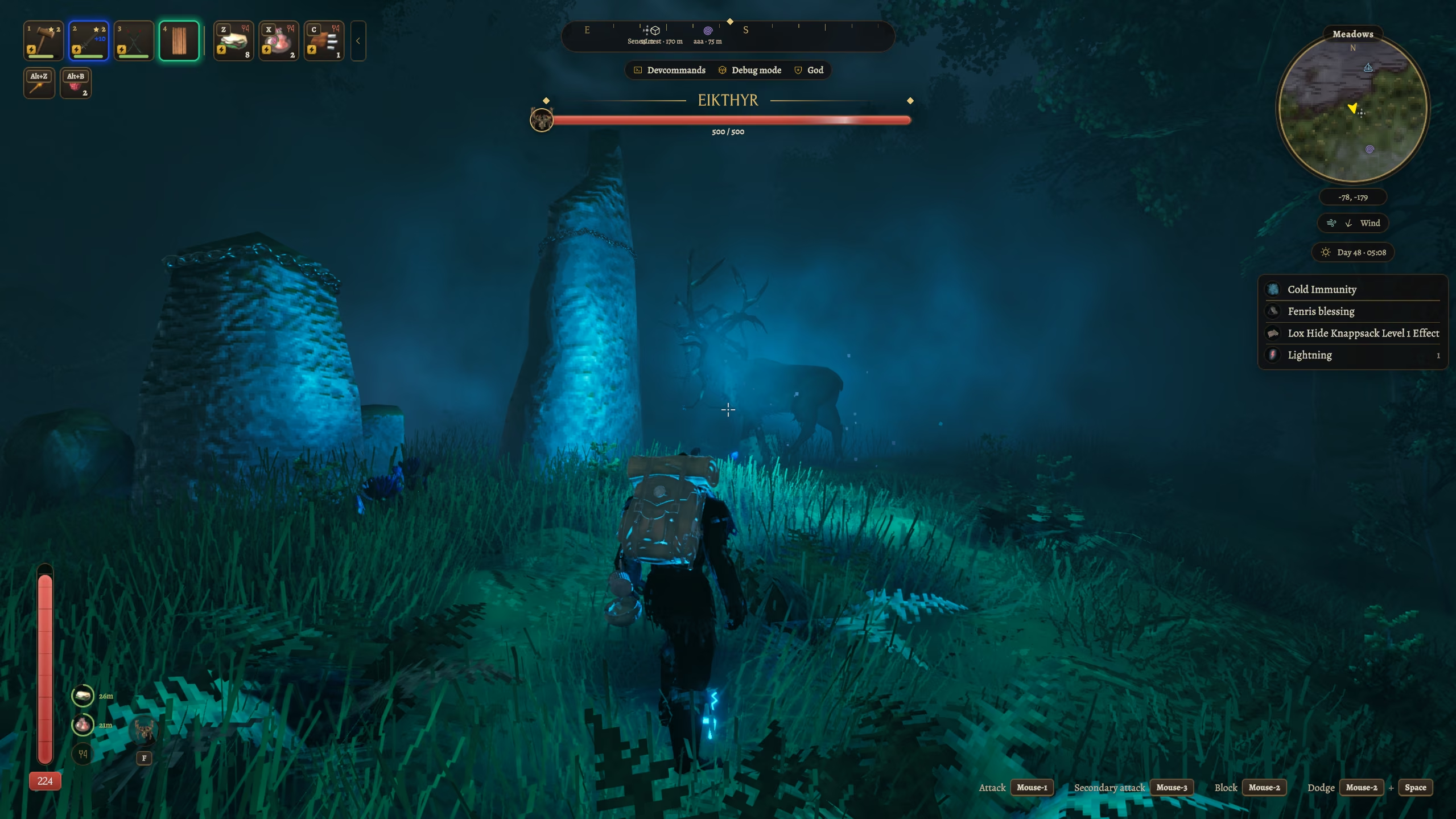
Alt+Z/X/C/V/B/N/1/2by default), shown as a small row under the hotbar. - Round minimap with biome, wind, day and time pills. Status effects as pills with timers, on the left or under the minimap — conditions from the world (sheltered, rested, wet, cold) and the other effects in two capsules.
- Health column with food timers and the guardian power; stamina and eitr bars with notches, upgrade flashes and a low-health vignette.
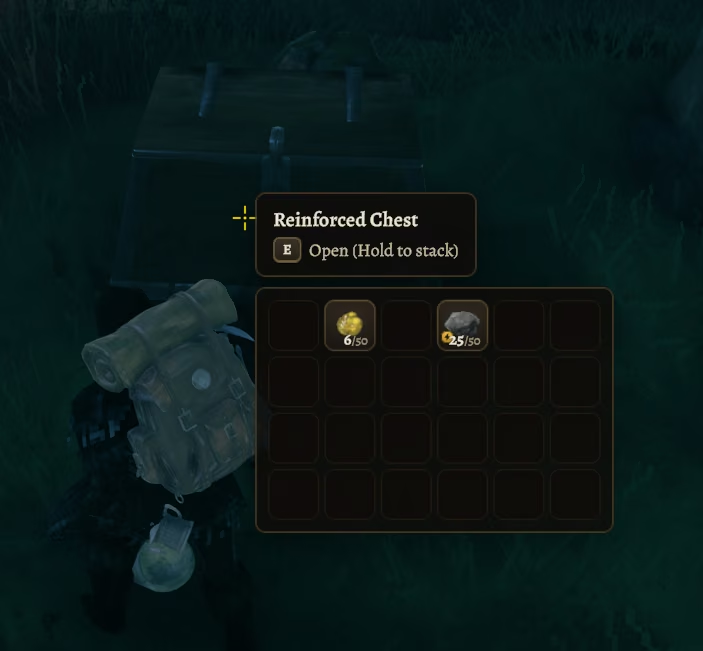
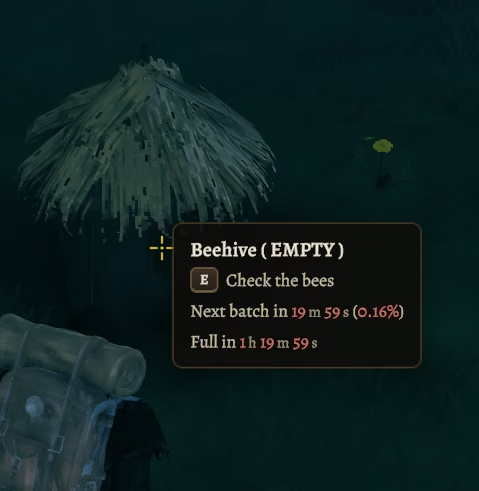
- Crosshair and hover text in a glass panel with keycaps and timers: plants, picked bushes, fermenters, cooking stations, smelters, beehives and bird nests (next batch and when it is full). Chest preview — look at a chest to see what is inside without opening it.
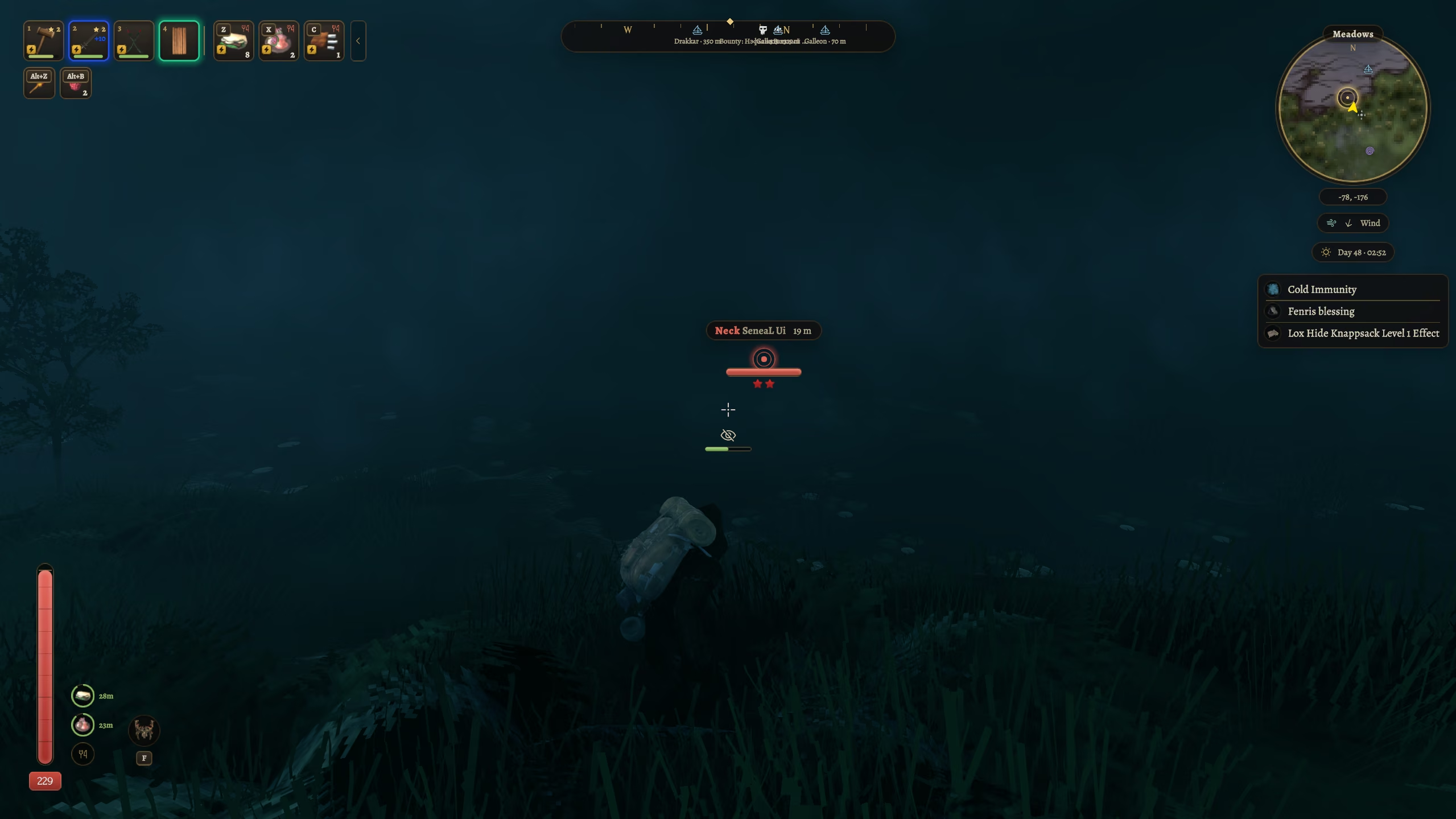
- Notifications (pickups, unlocks, day and biome banners), key hints, the selected build piece, stealth / stagger / piece-health indicators; creature health bars in the boss panel style (name between gold rules, hit trail and flash, optional health or percentage).
- Boss panel under the compass: a card per boss with its trophy, stars and health bar, with the health (1300 / 1500), the percentage or nothing under it (
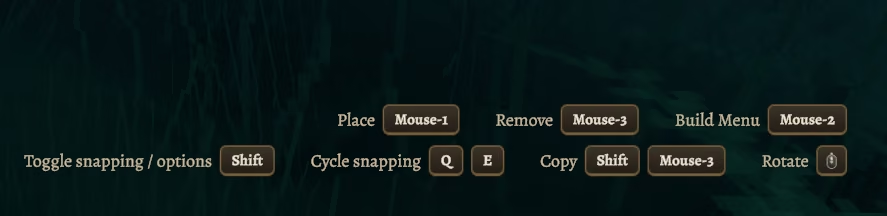
[HUD] BossHealth); several bosses stack (the closest large, up to four and +N), with a slide-in, a hit flash, a damage trail that catches up and a low-health pulse. - Radial wheel (emotes, hotbar, build) in mod colors and fonts: dark wood segments, a gold frame on the selected one; the game's own wheel logic and gamepad control stay.
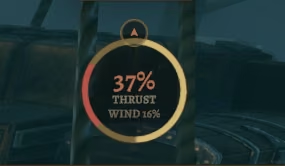
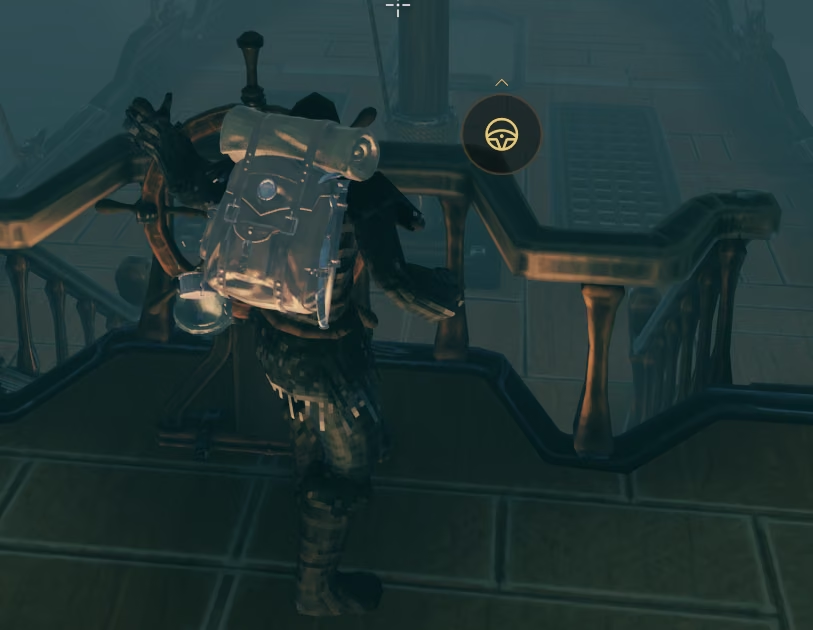
- Ship HUD: helm with a rudder arc and speed chevrons, a wind ring coloured by zones with the sail's real thrust (how hard it pushes the ship forward, 100% = best course in full wind) and the wind strength and a bow marker, ship markers on both maps.
- Chat in the mod's style, a raid card under the compass with the time left, off-screen pings as arrows on the screen edge, and the mod's own brass cursor (system size or 24–64 px; the game cursor is one switch away).
- Pings from the world:
Alt+ middle mouse button (rebindable) pings the spot under the crosshair without opening the map, at its real height (a rooftop is pinged on the roof). A ping on a creature sticks above it, names it and is coloured by who it is — red for hostile, green for tamed creatures and players, blue for neutral animals; the ping lasts 5–30 s as you set it. - Key hints with a dark outline and shadow so they stay readable on snow, the save icon in the mod's style in the top left corner and a health bar that dims the part food that has run down can no longer give.
- Hide what you do not need: key hints, the build panel, stealth and stagger indicators, the boss panel, the cheat indicator, ship controls and the compass can be set to Hidden (not only Mod or Vanilla); the essential parts cannot be hidden.
- A cheat / debug indicator (devcommands, debugmode, nocost, fly, ghost, god) and a bolt badge on items spawned via console.
 |
 |
 |
|
 |
 |
 |
 |
 |
 |
Compass

A strip at the top of the screen with the cardinal points, a tick every 15° and your map pins with the distance to each — nearest first, fading with range. Show all pins, none, or only the ones you mark for the compass in the pin dialog; pin names on the strip are optional. Own size and on/off switch like every other element.
Escape menu
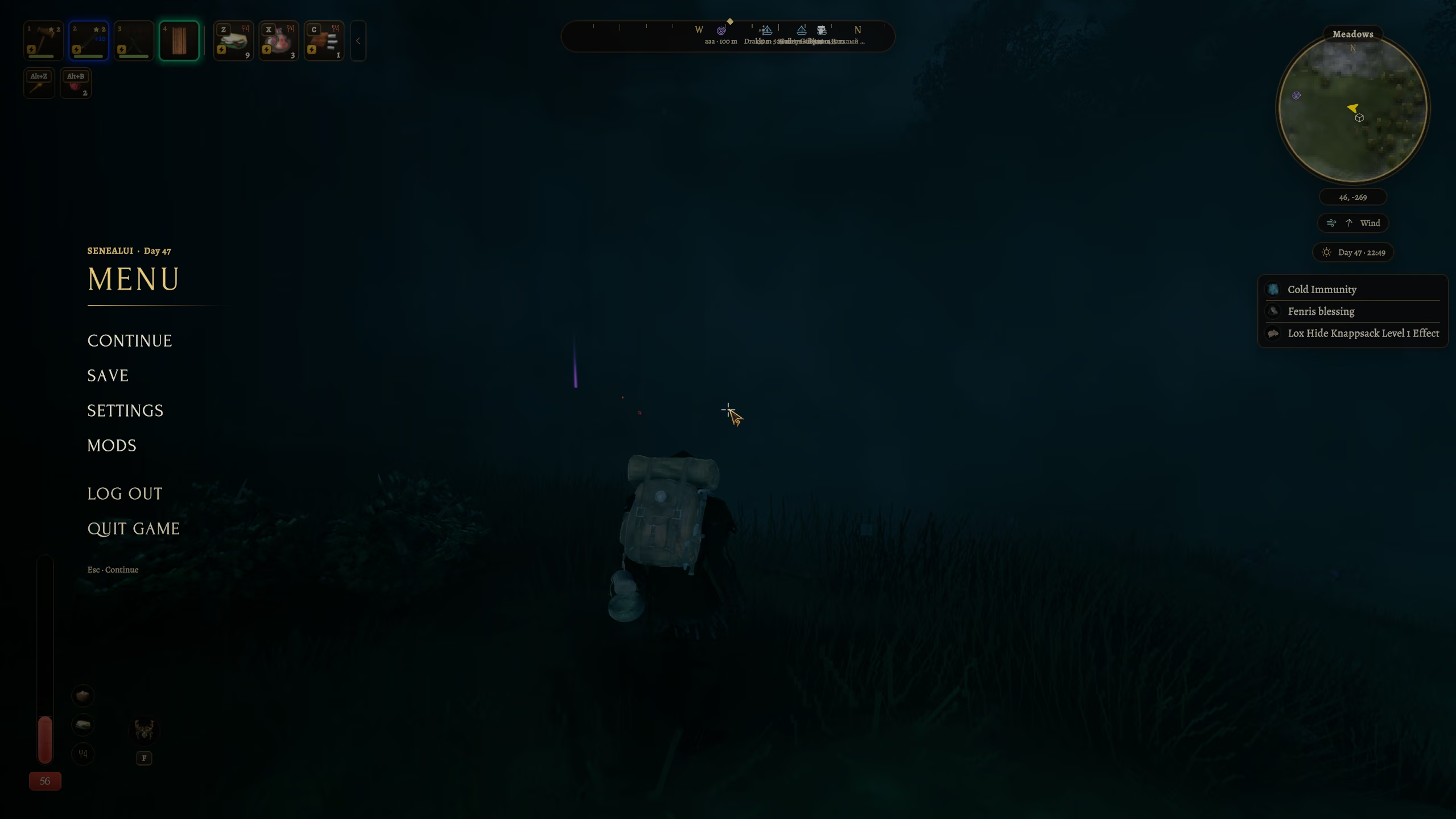
Esc opens a full-screen pause instead of the wooden board: the world dims, the entries rise on the left with the world name, the day and the last save; Log out and Quit ask beside them in the same voice. The game's own Settings window opens in the mod's style — text tabs, switches, slim sliders, our fonts — with all of its vanilla logic intact.
Inventory
- The vanilla grid, re-skinned in place — drag & drop, stacks and splitting work exactly as before.
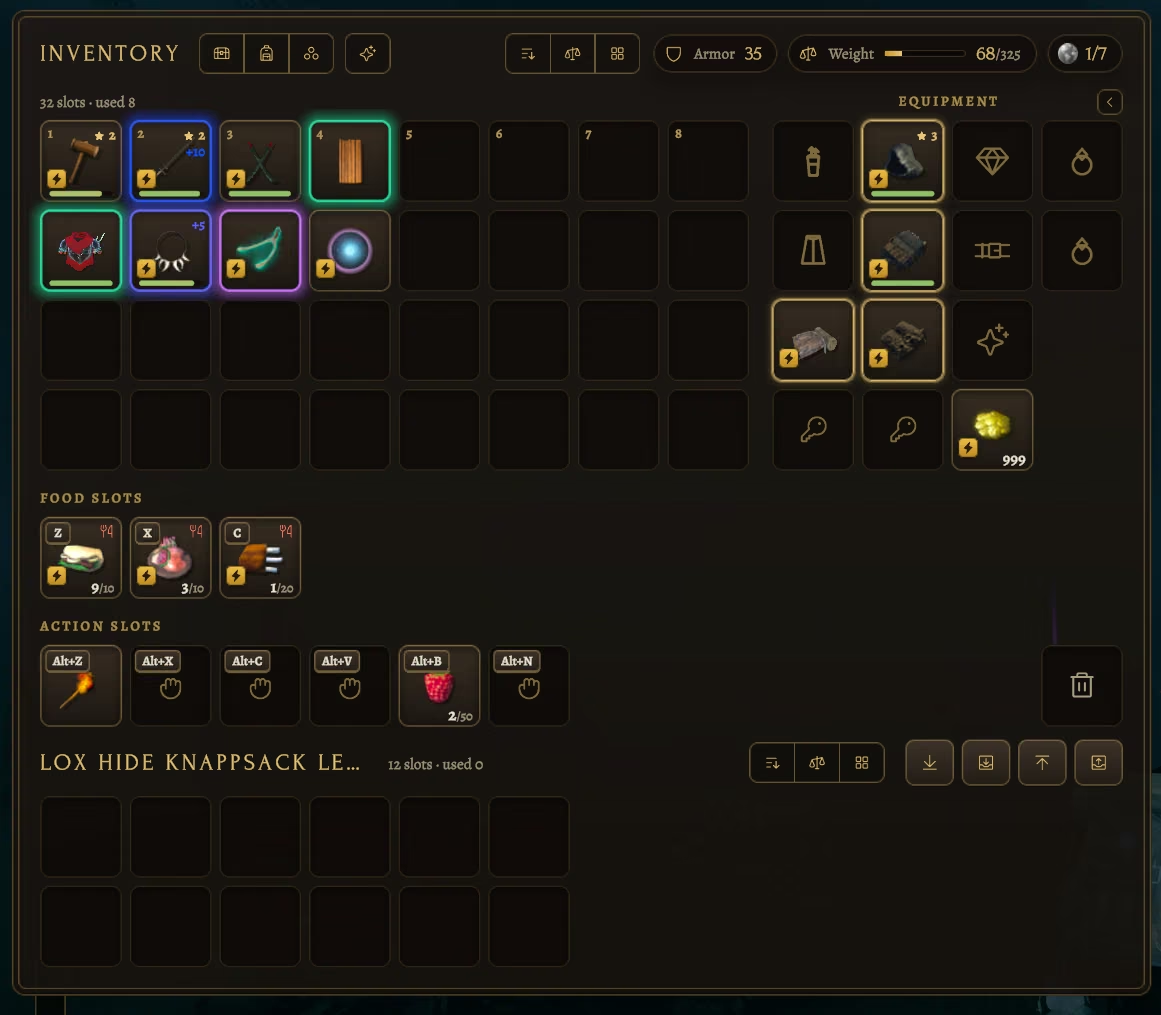
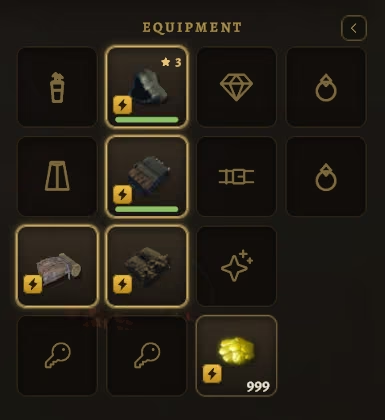
- Equipment column: Head / Cape / Chest / Belt / Legs / Trinket / Charm (the Demister and the Wishbone, both at once if you like — the slot splits in two and fans out on hover), plus Quiver, Backpack and two Ring slots when the mods that add them are installed; rings and Jewelcrafting jewelry get their own column to the right of the doll. The doll sits on the same grid as the inventory rows with the key and wallet slots as its fourth row, and slides away with them (and back) by the arrow next to its title; the trash is always the last cell of the last row.
- Food and action slots live in the inventory too, right under its columns: food slots (0–6) and action slots (0–6), with short titles you can switch off; under the equipment sit key slots for dungeon and door keys (0–2) and a coin wallet with no stack limit — coins go into the grave in stacks of 999 and gather back when you take them. A coin can weigh as in the game, 0.05 or 0.01 (
[Inventory] CoinWeight). - Sort by name, weight or category. Slot locks (
Alt+ LMB): a locked cell is never touched by sorting, pickups, bulk transfers or quick-stack mods. Locks are stored in the character and in the chest itself, so they sync between players. - Expandable inventory: any size from 32 (vanilla) to 64 slots with one slider, on top of the rows bought from Haldor. Shrinking it drops the extra items on the ground — nothing disappears silently. A panel taller than the screen scales down; when it covers the bottom HUD, the bars fade out of the way.
- Trash slot always in the last cell of the last row (bottom right corner), where nothing lands by accident: drop an item on it or hover it and press
Delete, with a confirmation you can switch off — or turn the trash off completely. - Tombstone recovery: picking up your grave puts everything back where it was — armor re-equipped, food in the quick slots, arrows in the quiver, the rest in the same cells, locked ones included. The tombstone hover preview shows each of those sections separately.
- Split dialog with a slider and keyboard entry that never swallows a digit.
- Gamepad: a gold focus frame glides over every cell on screen (inventory, slots, equipment, trash, chest, backpack) with the D-pad or the left stick. A takes and places, LT+A splits, RT+A drops, X uses, LT+X moves to or from the chest, L3 locks, R3 sorts, LT+Y trashes, LT+LB / LT+RB put all / take all, LT+D-pad quick stacks and restocks; RB takes the frame to the crafting panel (recipes, categories, A crafts, L3+A ×5), and the build menu, F7, F1, the character windows, the dialogs and the map pin window have it too (A presses, D-pad moves sliders, B closes the top window); food and action slots are groups in the radial wheel (
[HUD] RadialSlots); the hint bar shows Xbox, PlayStation or Switch buttons, named after the game's controller layout (Default / Alternative 1 / 2) and Swap triggers; every hint of the mod (HUD key hints, map, tooltips) switches to the gamepad as soon as it is used. - Tooltips of our own: category, stats as rows with values, key hints, a mod line for items from other mods; long tooltips split into columns by section; the adrenaline effect of trinkets is grouped under its own header.
- Select several items: hold
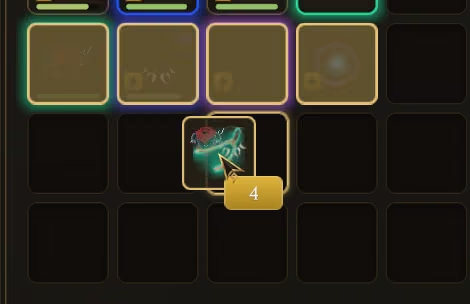
Ctrl+ left mouse button on an item or drag over an area, then take one and all of them follow the cursor and drop into a chest, the backpack, the trash, outside or another place of the same inventory (the group keeps its shape). A quickCtrl+ click still moves one item;Shift+ click splits a stack. - Equip queue: items being put on or waiting in the equip queue get a small numbered badge (1 is the one being put on now); the piece you replace goes to the cell the new one came from.
 |
 |
 |
Chests
- Put all / Put similar and Take all / Take similar buttons and hotkeys, a slot summary, per-cell locks.
- A Crafting toggle in the chest header excludes that chest from crafting stations.
- Chests dock next to the inventory; with a backpack on, the backpack appears as its own section under your slots, so you can drag between chest, inventory and backpack.
Crafting
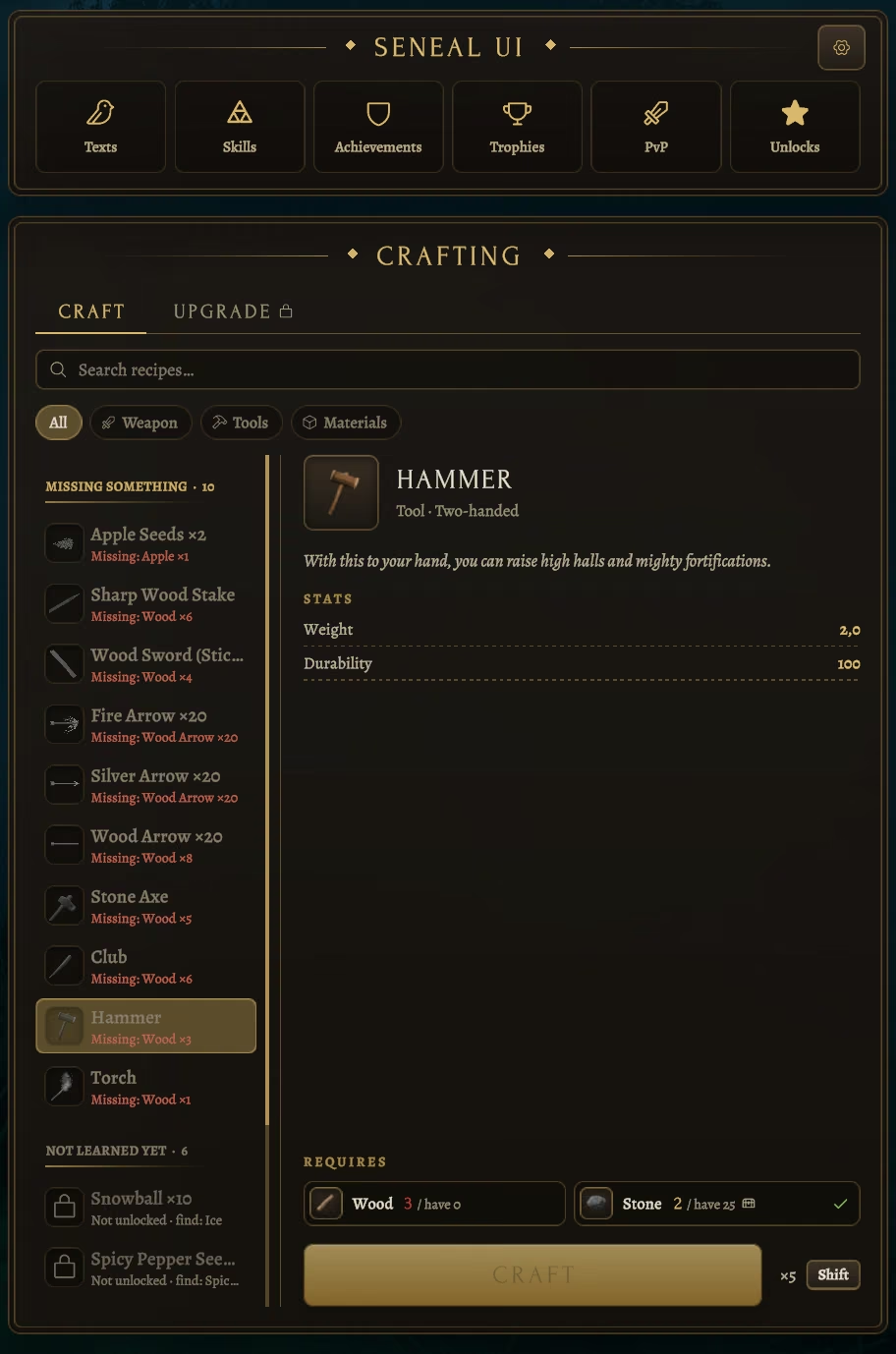
- Craft / Upgrade panel with the station header (level, extensions), search (
Ctrl+F, also by the English or prefab name), All / Unlocked / Available filters — All lists every recipe in the game with the station it needs. - Categories (Weapons / Armor / Tools / Food / Materials), the reason a recipe is unavailable, a now → after stat comparison for upgrades, resource chips in an even grid with the required station as a small tag on the header, a progress button and
×Ncrafting withShift. Hover an ingredient to see its icon, how many you have and in which chests. - Hundreds of recipes open instantly — the list is virtualized and built without vanilla prefabs.
Crafting from nearby chests
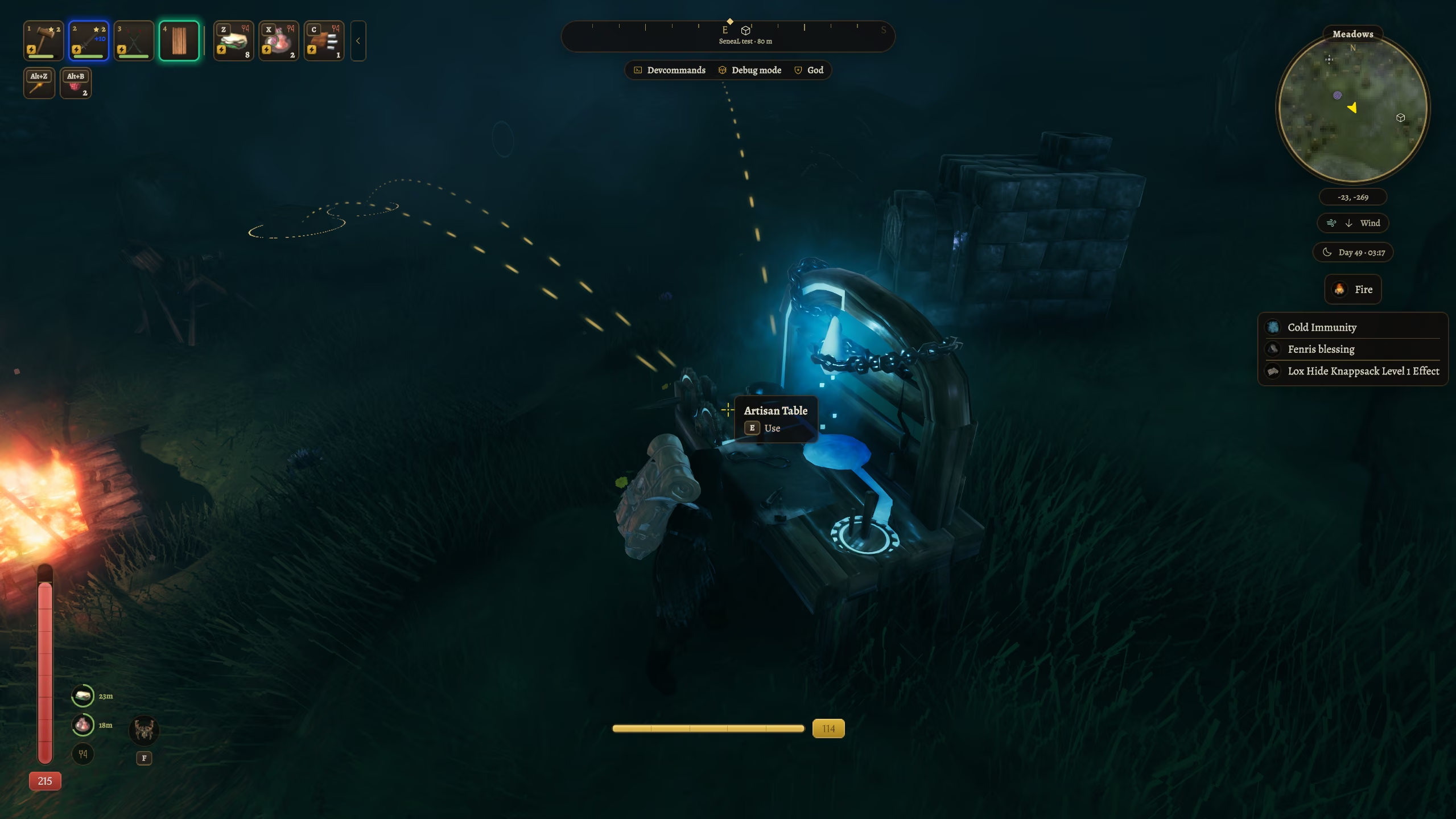
Crafting and upgrading count and take materials from chests within 1–100 m of the station (15 m by default), inventory first. Building has its own switch and range, measured from you (30 m by default). Look at a station and glowing trails show the chests it draws from; any chest can be excluded with the Crafting button in its header.
Furnaces, fires and torches
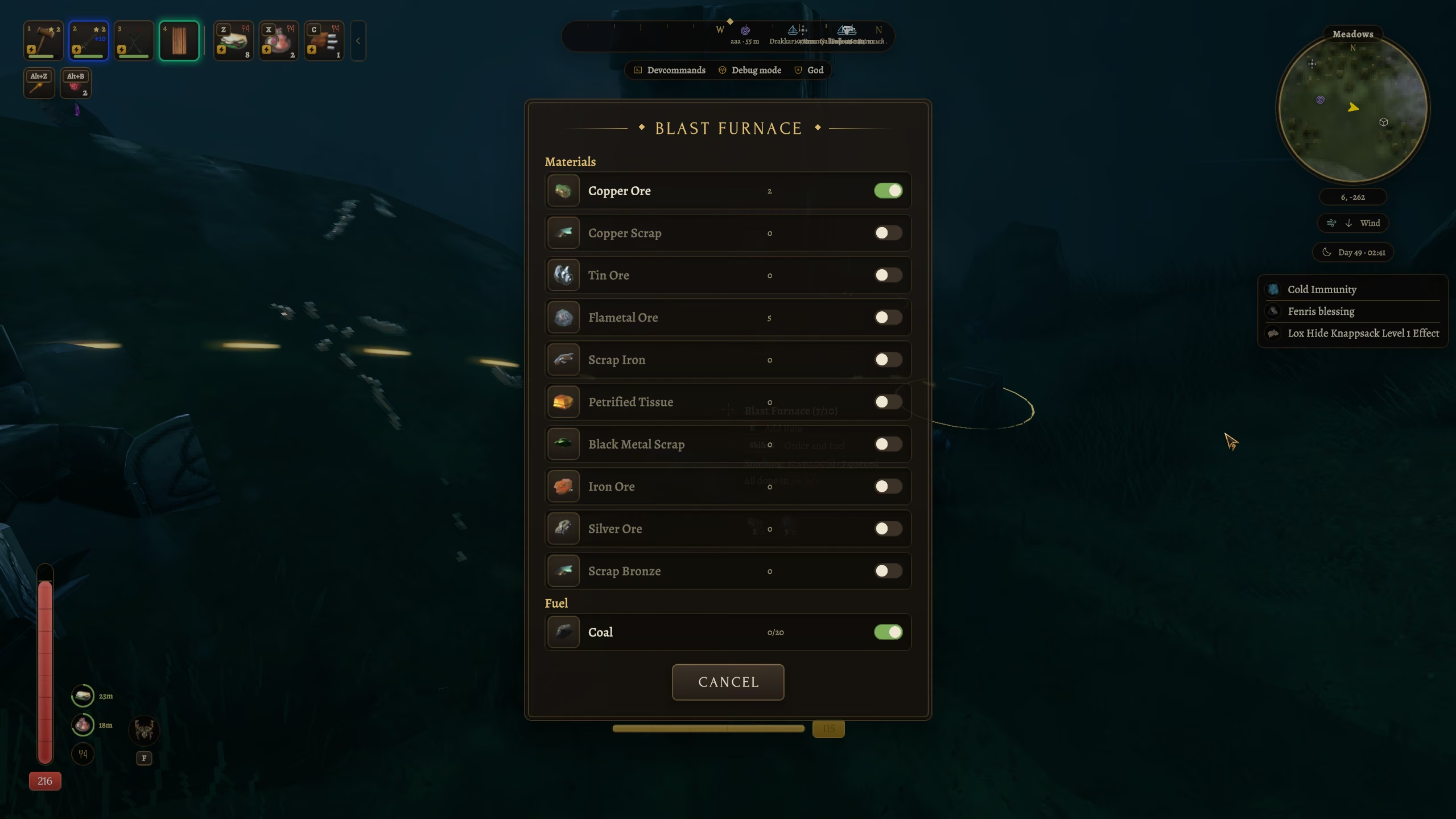
Hold the smelter key (Shift by default) with the use key on a furnace, kiln, fire, torch or oven and its window opens: the ore it takes in the order you drag them, and the fuel, each with a switch and the count in the building, in your bag and in nearby chests. Switched-on buildings top themselves up every second and a half from the bag and nearby chests within about 40 m of you — no key needed ([Crafting] SmelterAuto); locked slots are never touched. Without the window, the use key on the building takes one ore or fuel the same way.
Build menu
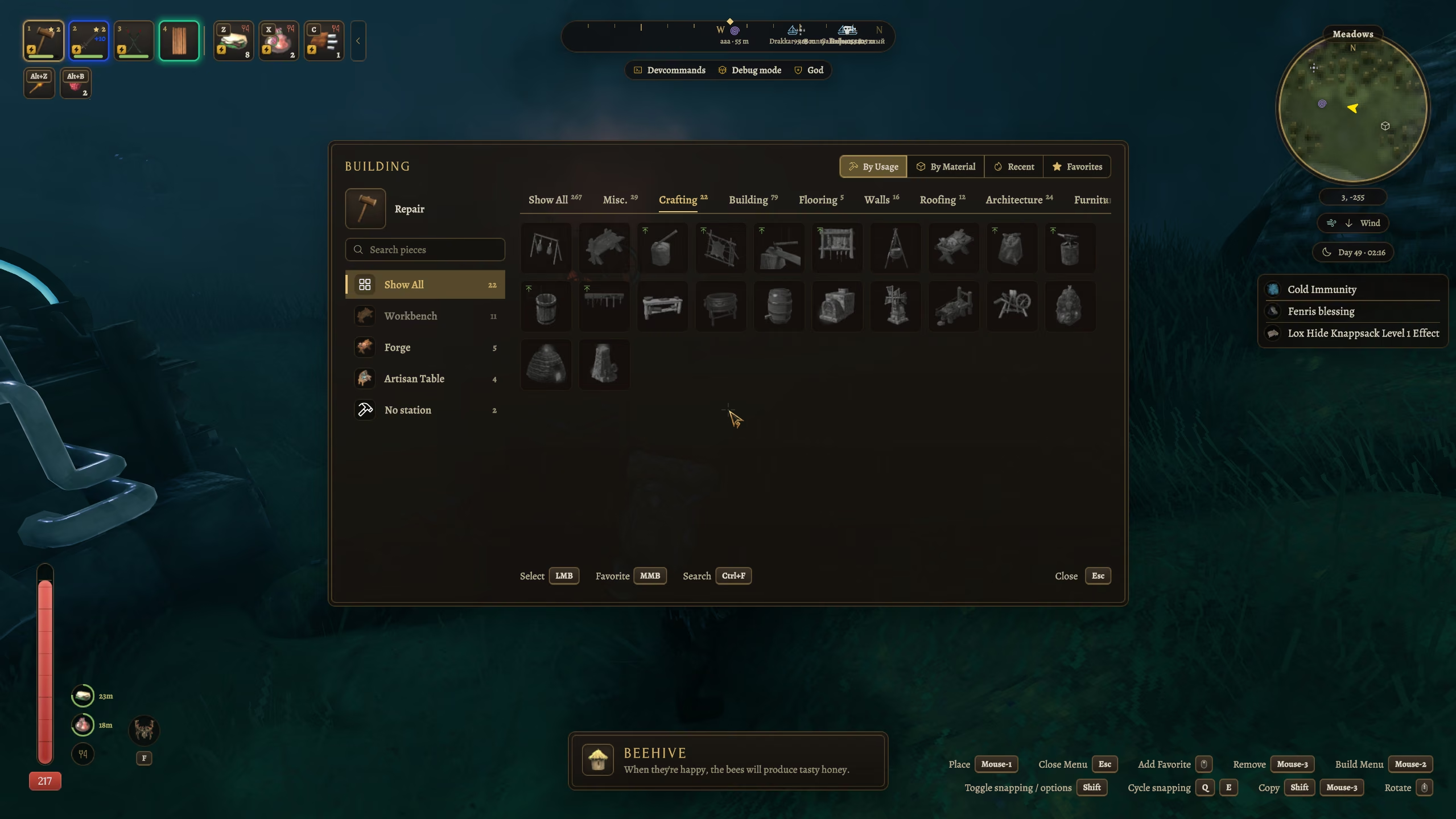
Sorted by usage, material, recent or favorites (MMB), with categories and search by name, English name or prefab. Recent only lists pieces you actually placed; tools without categories (hoe, cultivator) get a full-width grid; the piece panel names the mod a piece comes from.
World map
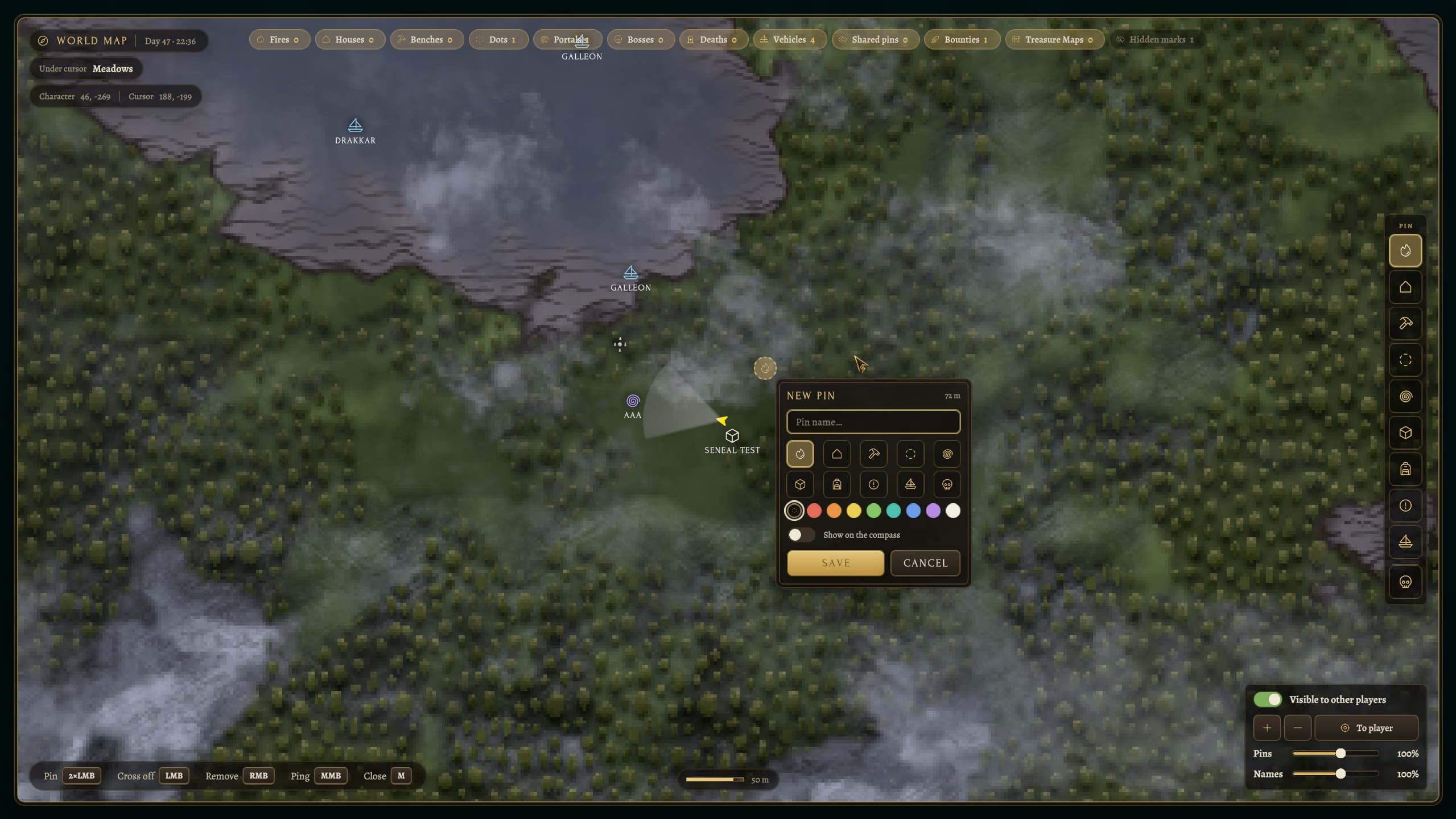
A framed map with smooth / fast / instant zoom and up to 4× closer zoom-in than vanilla. Pin filters with counts, pin tools, a new / edit pin dialog (icon, name, compass mark), a public-position switch, restyled pins and pings on both maps. Pins are a clean icon on a soft shadow or a round plate ([Map] PinStyle), in eight colours of your choice, with names sized apart from the icons. Pins that overlap merge into one numbered marker: its list shows them nearest first, and a click on a name flies the map to that pin, a right click removes it; optional world coordinates. Four extra pin types — ore, chest, danger, ship — that stay vanilla-compatible: players without the mod see a plain dot.
Character windows
Texts / Skills / Achievements / Trophies / PvP / Unlocks tabs and the four dialogs behind them, in one style with the rest.
Unlocks keeps the whole history of what the character discovered: every new recipe, building and material with its icon, the item whose pickup unlocked it, the crafting station and level, the in-game day and time and the real date and time. Entries of one kind within 10 minutes fold into one row, a recipe opens to show what it needs and can be found in the crafting panel, and there are filters and a search. The tab counts new entries; the history is stored per character.
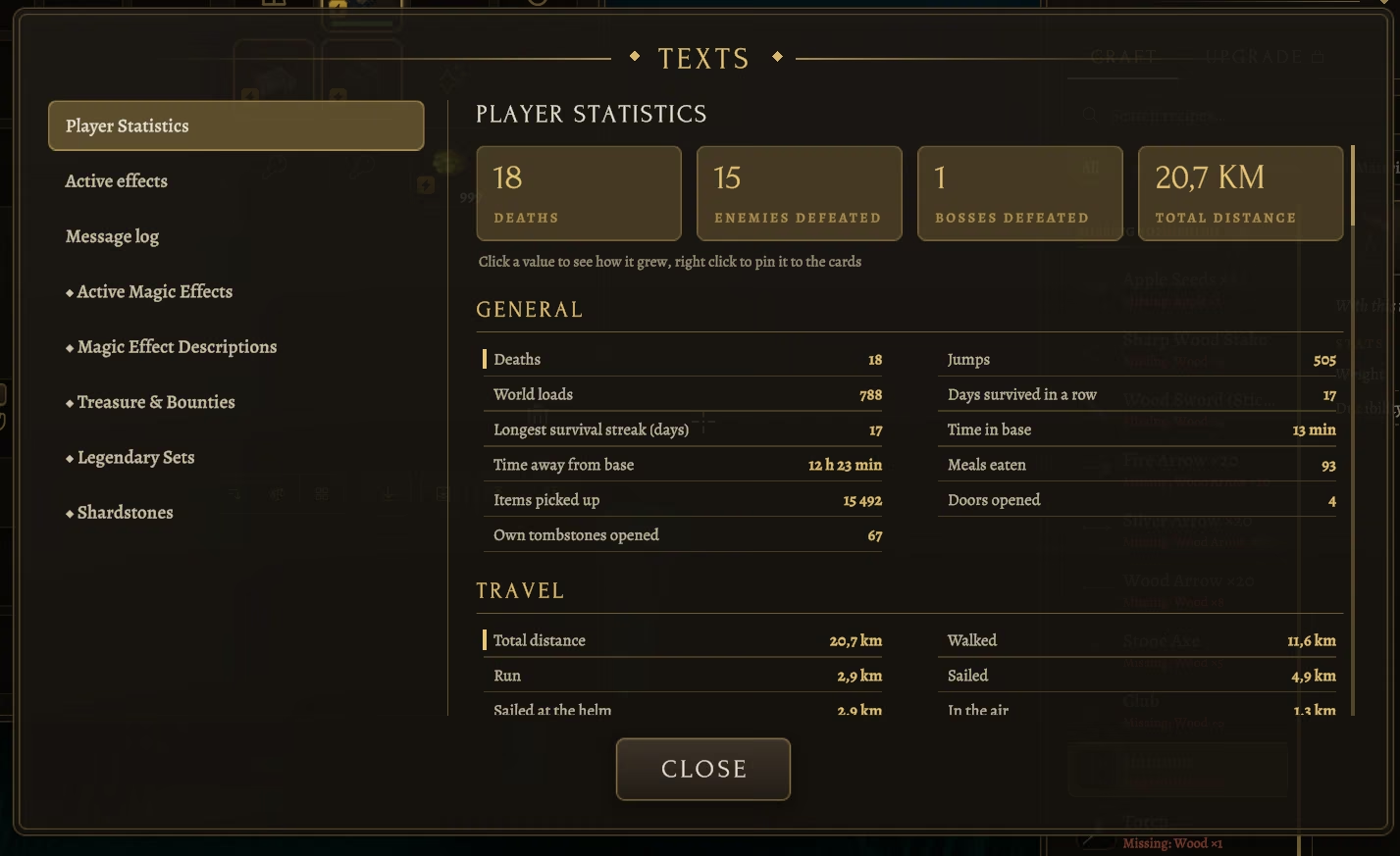
Statistics is the first page of the Texts window: four summary cards and readable sections in two columns (general, travel, combat, crafting, building, gathering, exploration, causes of death, enemies, found and crafted items, time in worlds) instead of the game's raw list. The game only stores current totals, so the mod keeps its own history per character: a record when the page opens and after every hour of play. Click a value to see its progress (last hour, day, week, since the first record) and a graph; right click a value to pin it to the cards at the top (up to eight).
The pages of EpicLoot's Compendium (magic effects, descriptions, treasure and bounties, sets, shardstones) are drawn in the same style, with a search field.
Settings window
Open it with the gear on the character tabs or F7:
-
Panel transparency (0 = solid, 8 % = design value, up to 60 %) and a global scale.
-
A size slider for every element and window — fonts scale with them.
-
Every element can be switched off separately; a disabled element shows the vanilla one.
-
Mod / Vanilla / Hidden for every element (only the safe ones can be hidden), a gamepad highlight strength slider and a slider for the yellow tint the game lays over the active panel.
-
Language picker with flags, the translator's name and how much of the file is translated.
-
Inventory size, food / action / key slot counts, the wallet, trash confirmation, crafting-from-chests ranges and trails, compass pins, map zoom, status-effect side, minimap on/off, all hotkeys (rebindable in place), and a debug mode with the mod's own timings on screen and in the log.
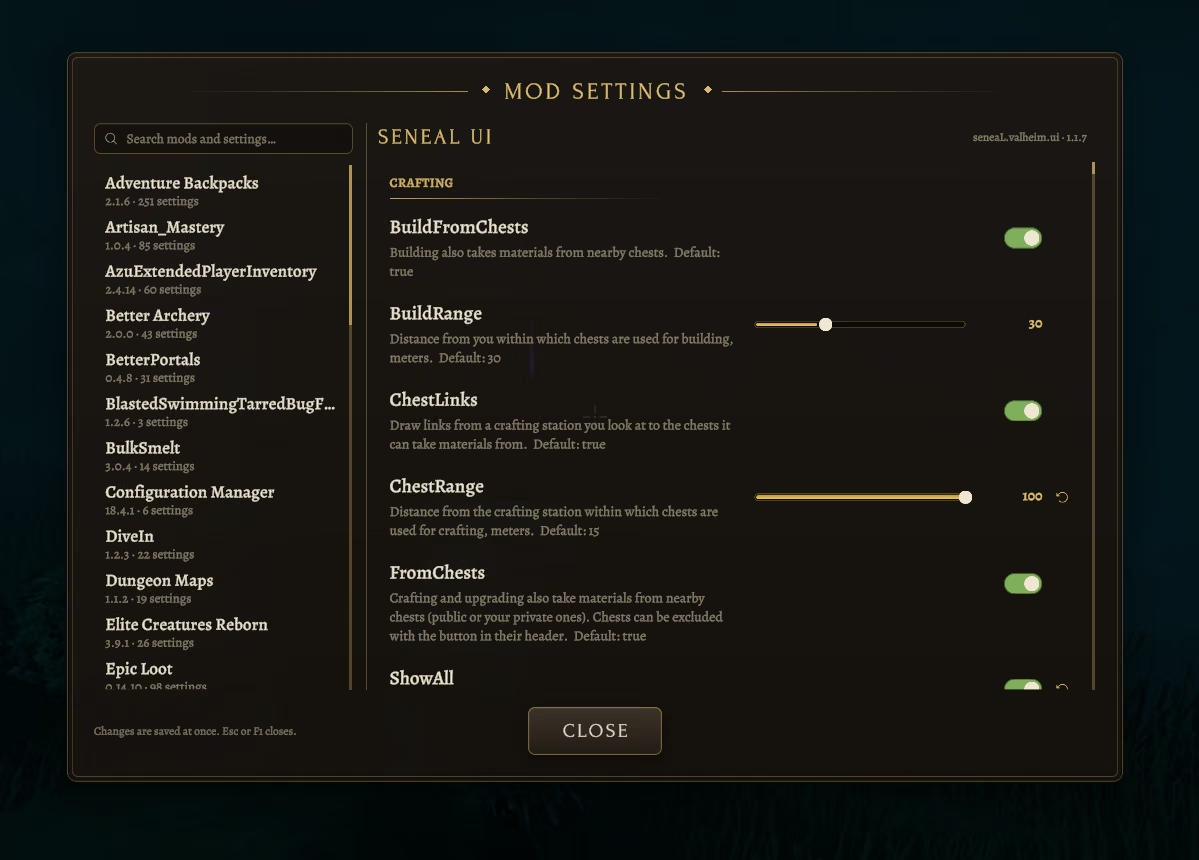
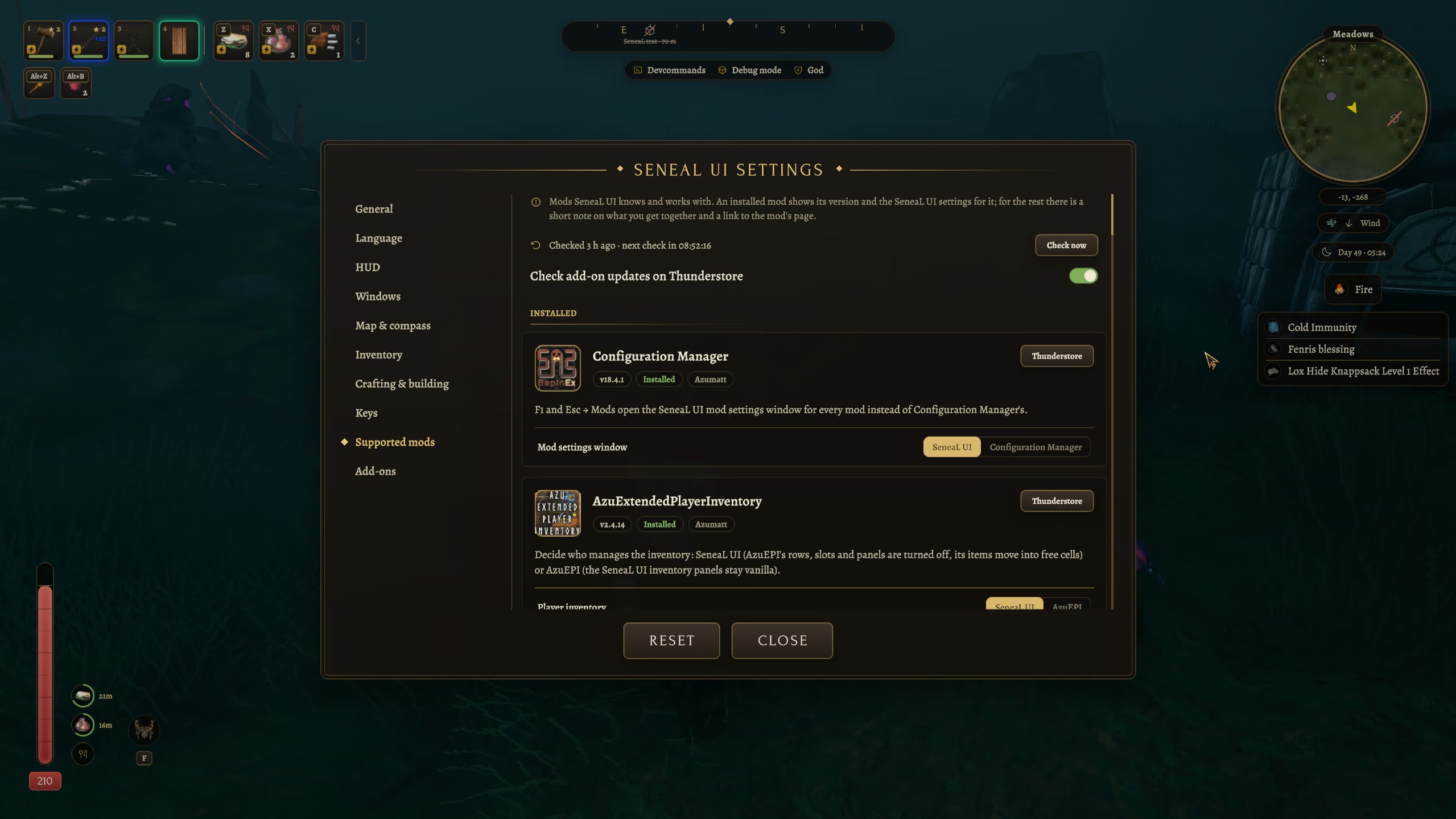
Mod settings (F1, or Esc → Mods): one window in the mod's style for the settings of every installed mod — switches, sliders, choices, key capture and text fields, the description and default of each setting, reset to default and search across mods. With Configuration Manager installed its own window stays closed on F1; [General] ModSettingsWindow switches back to it.
The window has a size slider (Ctrl + mouse wheel over it also zooms it) and is enlarged by itself on screens taller than 1440 px; it is prepared invisibly a few seconds after you enter the world, so the first opening does not stall.
Add-ons (F7 → Add-ons): small separate mods for SeneaL UI that you install next to it like any other mod. Every add-on is a card: name, version and whether it is installed, a button to its store page, a short description, a legend of what it draws, a line when the server limits it, and its settings. Add-ons from other authors can use the same tab; they are marked Third-party and their store buttons only open Thunderstore or Nexus Mods pages. The server can limit or forbid add-ons (see Server rules). The tab asks Thunderstore for the listed add-ons (only those, while the tab is open, at most every 12 hours) and shows their icons, the latest version, an Update button and a warning when an add-on needs a newer SeneaL UI; a countdown shows the next check, Check now runs it at once, [General] AddonUpdates turns it off.
| Add-on | What it does |
|---|---|
| SeneaL UI Radar | Creatures on the minimap and the world map: monsters are red dots (brighter with a ping while they hunt), big dangerous ones (500+ health: trolls, abominations, starred elites) red diamonds, bosses a gold badge with a star, traders a coin badge, peaceful NPCs such as the Dvergr blue, tamed creatures green, animals pale, fish (optional) small blue fish. Point at one on the world map for a card with its trophy, health, stars, state and distance. Its cost shows as addon.radar in the debug timings; servers can limit it with [Server] Radar, MaxRadarRange and RadarMonsters. |
| BetterMap SeneaL Compatibility (by Ainzworth, third-party) | BetterMap pins, category filters with counts and a manual pin toolbar on this mod's world map; repairs shifted pin categories. Needs BetterMap. |
| SeneaL HUD Layout (by cjayride, third-party) | Another HUD layout: hotbar bottom left, health and food above it, compass on top, Passive Powers next to the food; optional health numbers and bars. |
Mod support
F7 → Supported mods lists every mod below as a card: installed ones first, with their version and the SeneaL UI settings for them; the rest with a short note, the latest version and icon from Thunderstore (the same check as the Add-ons tab) and a button to their page.
| Mod | What SeneaL UI does with it |
|---|---|
| AdventureBackpacks | A Backpack slot on the equipment doll — and the cape stays on: with a backpack worn the cape moves to our own shoulder slot and keeps its armor, resistances, status effect, movement modifiers and wear; it is drawn on the character and synced to other players. The backpack is drawn as a section under your own slots whenever the inventory is open — with Tab, at stations and with chests — so you can drag between all three; sorting, transfer buttons and hotkeys work in it. |
| BetterArchery | A Quiver slot on the doll; while a quiver is worn, three arrow cells appear under the quick slots with the mod's hold key + 1/2/3 labels and switching shows a notification. The quiver rows stay in one grave with everything else and return to their cells. Conflicting patches of the mod (inventory size, empty-slot search, grid layout) are replaced by ours. |
| BowsBeforeHoes | The worn quiver takes the Quiver slot on the doll (when BetterArchery is not installed); its arrows get their own row under the quick slots (drag in and out, right click or Shift + 1–6 picks the arrows to shoot; only arrows and bolts go in) and a row on the HUD next to the action slots with the chosen arrows in gold, in place of the mod's own bar. BowsBeforeHoes 1.3.14 and Backpacks 1.3.8 do not start on the current game version; the support switches on only when they do. |
| EpicLoot | Two Ring slots in a column to the right of the doll (Silver Ring, Gold Ruby Ring, Andvaranaut) — rings no longer compete with the belt, both wear at once and both sets of effects apply. Rarity-colored frames on every slot; tooltips with the enchanted name, magic effects in the rarity color with descriptions and value ranges, sockets, rarity and effect count. The socket grid opens as a section under the inventory. The Enchanting Table and its result / augment dialogs are re-skinned in place — the mod's logic and layout are untouched, so its updates keep working — and the table counts and spends materials from nearby chests like every other station. Bounties and treasure maps on the map: Bounties / Treasure maps chips in the filter row, gold areas; the mod also repairs EpicLoot's map toggles, which crash on the current game version and left the map without bounty pins. Abilities (the Heimdall set and others) sit next to the Forsaken power in mod style, with their key and cooldown. |
| Artisan Mastery | The galleon's Navigation Mark joins the Vehicles pins on the map and compass; drifting shipwrecks and crates show on the compass with the mod's icons; with the anchor down the ship HUD shows an anchor instead of the helm. Hover texts of its cannons, upgrade table, crane, spyglass, boarding ropes and ship holds get a proper title; ship holds and wreck crates open in our chest panel; its tooltip lines and status effects appear in our tooltips and effect panel; the Miner's dual pickaxes (and every pickaxe) sit under a new Pickaxes chip in crafting. |
| RunicStorage | Quick stack / restock / consolidate as icon buttons in the inventory header with the mod's hotkeys in tooltips. Quick stack, store all and consolidate never take food from the quick slots, arrows from the quiver or anything from a locked cell. |
| Quick Stack Store (Goldenrevolver) | Quick stack, store all and sort leave the equipment and quick rows, the quiver and locked cells alone; restock still refills the quick slots. Its floating buttons and trash can are hidden; the inventory header's To chests and Restock buttons run its own quick stack and restock. |
| AzuAutoStore | Auto-store to chests and item drawers never takes anything out of the equipment and quick rows, the quiver or a locked cell. |
| RunicCrafting | Both mods craft from nearby chests — SeneaL UI takes priority: its crafting and building patches are removed at startup and our rules apply (range, per-chest exclusion, trails). Its cooking, refuel and area-repair features keep working. To hand crafting back to Runic Crafting, set [Crafting] FromChests and BuildFromChests to false and restart. |
| Valheim Recycle | Its Recycle tab joins the crafting panel next to Craft and Upgrade: the items you carry, what each gives back as green +N chips, and a Lower the level / Recycle button. Its rules stay its own; F7 → Supported mods sets how much comes back (100% by default) and whether worn and hotbar items are listed. |
| RepairRequiresMaterials | The repair button tooltip shows which item will be repaired (1 of 3) and the material cost against what you have; RMB cycles the item. |
| MoreUpgrades | Item quality is shown as ★N on the slot, so any number of upgrade levels is readable. |
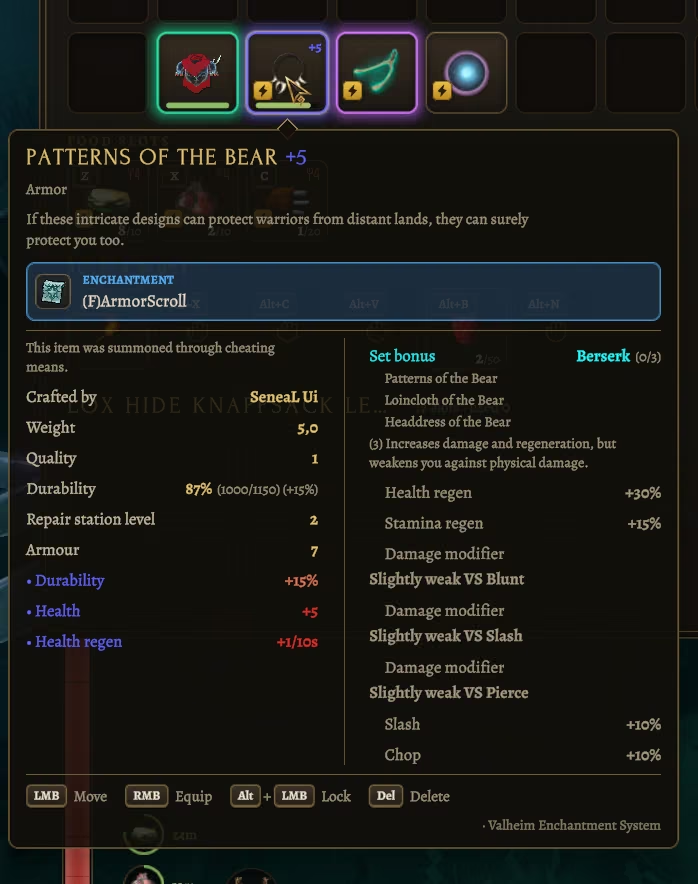
| Valheim Enchantment System | The enchant level is drawn on every slot — inventory, chests, hotbar, quick and action slots — as +N in the level's colour with a frame of the same colour, instead of its glowing overlay (F7 → Supported mods switches it back). Tooltips, the crafting list and its details show +N; sorting puts the higher level first. An enchantment button sits in the inventory header, because its own button hides under the crafting panel; the enchantment window is a mod-style panel in place of the crafting panel (item and next level, scroll, blessed switch, chance with breakdown); its guide is a mod-style dialog with tabs and search, its announcements are a rune seal under the compass in the colour of the new level, drawn above the open inventory (the level rolls in under the seal, a failure cracks it; your own attempts always show it, and your own enchantment from +8 flashes the screen edges, red on a failure — F7 → Supported mods can turn the flash off). A right-click on a scroll combines a ready cross of five scrolls (VES's outline is shown on the cell) or opens the enchanting window. F7 → Supported mods switches each part back. |
| AzuEPI (AzuExtendedPlayerInventory) | F7 → Supported mods → Player inventory decides who manages the inventory. On (default): this mod does, and AzuEPI's rows, slots, quick bar, vanity, loadouts and stats panel are switched off while its version check and console commands keep working; items from its rows move into free cells and are never dropped. Off: AzuEPI manages the inventory and this mod's inventory, chest, crafting and tab panels stay vanilla. Applies the next time you enter a world. |
| Configuration Manager | F1 and Esc → Mods open the mod's own settings window for all mods instead; [General] ModSettingsWindow = ConfigurationManager gives it back. |
| PlantEasily | Area pickup of this mod replaces its bulk harvest (its planting grid and replanting keep working); F7 → Supported mods switches it back. |
| Plant Everything / Valharvest | Plant and bush timers are drawn by this mod as one line in the hover panel instead of theirs; F7 → Supported mods switches it back. |
| Jewelcrafting | The gemcutters table gets its Sockets tab in the crafting panel (sockets of the item, chance, cost, Add socket, Sockets button) and the gem window is drawn in the mod's style; the window also opens with the use key over an inventory item. The synergy count sits in the inventory header as a chip. Jewelcrafting is not compatible with EpicLoot (its own restriction). |
| Magic Supremacy | The worn tome sits next to the belt in the same cell (split diagonally, fans out on hover); drop it on the belt cell or right-click to wear it. Inspiration (points and progress to the next point) is a circle next to the HUD abilities, and the mod's own icon and its effects-list row are hidden ([Mods] MagicInspiration). With Path of Valheiman's second-belt talent the second belt keeps that cell and the tome stays in the bag grid. |
| Balrond Runeforging | Item rarity is drawn as a coloured slot frame, the tooltip name takes the rarity colour or the custom name of a legendary item, and the rarity symbols no longer replace the description. Its Improve tab joins the crafting panel next to Craft, Upgrade and Recycle (items, stats now and after, cost, button with progress); with chest crafting on, materials are taken from nearby chests too. The Runeforging skill shows its real name and description in the skills window. |
| Path of Valheiman | Its doubled-food talent shows a gold ×2 badge on the food circle; its level badge fades out with the HUD while a window is open. The extra inventory rows of its talents join the main grid. Its item rarity is drawn as a coloured slot frame and name ([Mods] PovRarity); chest crafting runs through this mod or through its own talent ([Mods] PovChests). With [Mods] PovProgression (on by default) this mod's chest crafting and building open with its From Nearby Chests talent (its chest reach) and area pickup with Mass Gathering (its radius). Both belts of its two-belt talent share the one belt slot split diagonally and fan out on hover, each with its own tooltip, thrown weapons in flight are dimmed, the no-portal badge, build costs and the skills window follow its talents and settings. |
| InputTweaks | Works with this mod's inventory: its drag, smear and stack moves see only the cells this mod shows, and its cell list is rebuilt when the inventory changes size (no more errors on finishing a drag). |
| EliteCreaturesReborn | Mutation line and stars on enemy nameplates take our caption style and star icon; mutation colors are kept. |
| OdinHorse | The vanilla mount HUD is restyled (name, health and stamina tracks); horse interaction keys are shown as physical keys. |
| LongshipUpgrades and other piece mods | Requirement lines in hover texts become our requirement chips with item icons; hover and build panels name the mod the object comes from. |
Items spawned via console get a bolt badge; tooltips and hover panels of modded items carry a small · ModName line.
Other UI mods: better disabled — two mods drawing the same interface is unpredictable. If you try one anyway, tell us how it went and the table above grows. Gameplay mods (MultiUserChest, Jotunn content mods, DungeonMaps, …) work: the mod does not change game logic, only draws over it. Crafting from chests works with any chest mod that keeps vanilla containers, including recipes that accept any one of several ingredients (cleaning fish, feasts).
Hotkeys of mods that read the keyboard directly (not through the game's input) can still fire while you type in a search box — SeneaL UI blocks its own and the game's keys, but cannot block those.
Install
On every player's game. Also on the server if you want it to set the rules — see Server rules below.
Works with r2modman / Thunderstore Mod Manager. By hand: put SeneaL-UI.dll together with the Languages/ folder into BepInEx/plugins/SeneaL-UI/. Fonts and icons are embedded; fonts are extracted to BepInEx/cache/SeneaLUI/ on first run.
Before you remove the mod
The mod keeps your equipment, food and action slots, keys, the wallet and the extra inventory rows in extra rows of the character's inventory. The plain game does not have those rows, so if you load the character without the mod it cannot show what is in them.
- Since 1.1.7
[Inventory] SaveCompat(on by default) writes those items into free cells of the ordinary inventory grid every time the character is saved, and puts them back when this mod loads the character. Equipped items stay equipped. - That only works while the ordinary 8 × 4 grid has free cells. If your bag is full, or you use more inventory slots than the game's own, some items cannot be moved and will be hidden without the mod (they come back when you install it again).
- Before you remove the mod for good, unequip your gear, empty a few cells in the bag and save (log out) once with the mod still installed.
- A character saved by an older version of the mod has no such copy: install the mod again to get those items back.
Server rules
The mod can now also be installed on the server, and what a client is allowed to do depends on what it finds there.
The server runs the mod. It decides how far the gameplay-affecting options may go and pushes those limits to every player that joins. A client keeps its own preferences but is never allowed past them.
The server does not run the mod. Every gameplay-affecting feature switches itself off and the inventory stays vanilla: no bigger inventory, no crafting or building out of nearby chests, no quick stack or restock at range, no locked recipes in the list. The server never agreed to any of it, so the mod does not hand it out. Everything visual — the whole interface, in other words — keeps working exactly as before.
Single player is your own game and is never limited.
Hosting from the game (Start server in the world list): the host gets an F7 → Server tab with every rule below as switches and sliders. A change goes to the players at once — no restart.
Put SeneaL-UI.dll into the server's BepInEx/plugins/. On a dedicated server the interface is
never built — only the rule exchange runs — so it costs nothing. The Languages/ folder is not
needed there.
Limits live in [Server] in BepInEx/config/seneaL.valheim.ui.cfg on the server, and are
re-sent to everyone as soon as you edit them, without a restart:
| Key | Default | Meaning |
|---|---|---|
[Server] Enforce |
true |
push the rules at all; false = every player keeps their own settings |
[Server] MaxSlots |
32 |
largest main inventory a player may set (32 = vanilla, up to 64) |
[Server] AllowCraftFromChests |
true |
crafting and upgrading may take materials from chests |
[Server] MaxCraftRange |
15 |
longest crafting chest range, meters |
[Server] AllowBuildFromChests |
true |
building may take materials from chests |
[Server] MaxBuildRange |
30 |
longest building chest range, meters |
[Server] AllowQuickStack |
true |
quick stack and restock may reach into nearby chests (consolidate is local and always allowed) |
[Server] MaxQuickStackRange |
10 |
longest quick stack / restock range, meters |
[Server] AllowShowAllRecipes |
true |
the crafting list may show recipes that are not unlocked yet |
[Server] AllowAreaPickup |
true |
picking up everything around the target with one press |
[Server] MaxAreaPickupRadius |
5 |
largest area pickup radius, meters |
[Server] MaxQuickSlots |
3 |
most food slots a player may have (3–6; a player can always use fewer, down to 0) |
[Server] MaxActionSlots |
6 |
most action slots a player may have (0 = none); caps each player's [Inventory] ActionSlotCount |
[Server] AllowKeySlots |
true |
the slots for dungeon and door keys |
[Server] AllowWallet |
true |
the coin wallet with no stack limit |
[Server] AllowCoinWeight |
true |
players may make coins lighter ([Inventory] CoinWeight) |
[Server] VerifyClients |
Restrict |
build check: the server sends a one-time number with its rules, the client answers with the SHA-256 of its SeneaL-UI.dll signed with it. Restrict = a changed, older or unknown build (or no answer in 15 s) gets the vanilla limits; Kick = disconnect; Off = no check. Needs Enforce |
[Server] AllowedBuilds |
empty | extra DLL hashes to accept besides the server's own (comma-separated); the server log prints the hash of every rejected player |
[Server] AllowForeignPatches |
true |
accept players whose other mods patch SeneaL UI with Harmony; they are listed in the server log either way |
[Server] Radar |
On |
SeneaL UI Radar add-on: On = creatures on the minimap and the world map; MinimapOnly = only on the minimap; Off = the radar shows nothing |
[Server] MaxRadarRange |
200 |
longest radar range a player may set, meters (10–200) |
[Server] RadarMonsters |
true |
the radar may show hostile monsters and bosses; false = only animals, tamed creatures, traders and peaceful NPCs |
[Server] DeniedAddons |
empty | add-ons (plugin ids, comma-separated, e.g. seneaL.valheim.ui.radar) a player may not use; such a player fails the build check (VerifyClients decides what happens) |
[Server] CheckAddonBuilds |
true |
a player's copy of an add-on the server also has must be the same build (SHA-256) or listed in AllowedAddonBuilds |
[Server] AllowedAddonBuilds |
empty | extra add-on DLL hashes to accept; the server log prints the hash of every rejected add-on |
The same [Server] section works when you host from the game client and open the world to
friends — it applies to you as well, so the host plays by the same rules.
In the settings window a line at the top says which of the three cases you are in, and every option the server decides is greyed out and unclickable at the value it allows; the quick stack and restock buttons grey out the same way. If a player's inventory was larger than the server allows, the slots that disappear are emptied onto the ground, exactly as when the size is lowered by hand.
This is a rule the mod obeys, not an anti-cheat: Valheim keeps the player inventory on the client,
so a server cannot verify it. It stops anyone installing this mod and helping themselves, and with
VerifyClients it stops outdated and edited builds; it does not stop a determined cheater.
Config
BepInEx/config/seneaL.valheim.ui.cfg — everything is also in the in-game settings window and live-switchable with Configuration Manager.
| Key | Meaning |
|---|---|
[General] CustomUI |
false = vanilla interface |
[General] Transparency / Scale / SettingsKey |
panel transparency, global size, settings hotkey (F7) |
[General] Language |
interface language file code (en, ru, …); empty = follow the game language |
[General] Cursor / CursorSize |
the mod's brass cursor or the game one; its size (0 = system size, 24–64 px) |
[General] ModSettingsWindow / [Keys] ModSettings |
window for the settings of all mods (SeneaL / ConfigurationManager), its key (F1) |
[General] MenuClickClose |
a click on the empty space of the Esc menu closes it (off, as in vanilla) |
[General] CenterWindows / WindowGap |
on wide screens lay the inventory, crafting / chest and character tabs out from the center; gap between them |
[Elements] <Name> |
on/off per element: Hotbar, StatusEffects, Minimap, Health, Stamina, Crosshair, KeyHints, Notifications, BuildPanel, BuildMenu, CenterIndicators, EnemyBars, DebugStatus, ShipHud, Compass, Inventory, Container, Crafting, CharacterTabs, InventoryHints, Dialogs, WorldMap, Tooltips, PauseMenu |
[Sizes] <Name> |
size 0.5–2 per element / window |
[HUD] QuickSlots / ToggleQuickSlots / HoverPanel |
quick slots, their hotkey (H), hover text panel |
[HUD] ActionSlots / StatusSplit |
action slots under the hotbar; conditions and effects in two capsules |
[HUD] HideEmptySlots |
empty hotbar, food and action slots fade out and the bar closes up (off by default) |
[HUD] RadialSlots |
food and action slots as two more groups in the radial wheel (gamepad) |
[HUD] EnemyHealth |
under creature health bars: nothing, the health or the percentage |
[HUD] StatusRight / HideMinimap / AlertFlash |
status effects under the minimap; hide the minimap entirely; low-health vignette and empty-stamina flash |
[HUD] HealthCapacity |
the health bar is as tall as your maximum health (about 48 px up to 460 px); off = a fixed bar |
[HUD] BossHealth |
what the boss panel writes under each health bar: Hidden / Values / Percent |
[HUD] CompassPins / CompassNames |
which pins the compass shows (All / Marked / None); pin names on the strip |
[Map] PinStyle / PinScale / NameScale / Clusters / Coordinates |
pin look (Icon / Plate), icon size, name size, merging of overlapping pins, world coordinates under the cursor and in pin tooltips |
[Map] Zoom / ZoomIn |
zoom animation (Smooth / Fast / Instant); extra zoom-in ×1–4 over the vanilla limit |
[Inventory] Slots |
main inventory size, 32 (vanilla) to 64 slots, on top of Haldor's rows |
[HUD] EnemyNames / EnemyNameScale / EnemyNameBack / EnemyNameDecor |
creature name above its health bar: show, size, dark plate, gold rules and diamonds |
[Map] LiveShips / LiveCarts / LivePortals |
ships, carts and portals appear and move by themselves on the map, minimap and compass; the Vehicles and portal filter chips hide them, a right click hides one |
[Crafting] SmelterFeed / SmelterFuel / SmelterMenu, [Keys] SmelterMenu, [HUD] SmelterHover, [Mods] OttoFuel |
smelters, fires and torches feed themselves from your bag and nearby chests once switched on for that building; hold the key with use to open its window; hover shows what is inside |
[HUD] TargetHealth |
health of the tree or rock under the crosshair (off by default) |
[Map] PlayerCoordinates / [HUD] MinimapCoordinates |
your coordinates on the world map and under the minimap (off by default) |
[Inventory] SaveCompat |
on: items in the extra rows are saved into free cells of the ordinary grid, so removing the mod does not hide them |
[Debug] CellNumbers |
debug: the grid position and index on every slot |
[Inventory] ShiftSelect |
Hold Ctrl + left mouse button on an item, or drag over an area, to select items (a quick Ctrl + click still moves one, Shift + click splits a stack); take one and all follow the cursor to a chest, backpack, trash or outside |
[Map] Filters |
map filters you switched off, saved automatically |
[Inventory] SortHotbar / TransferHotbar / QuickSlot1..6 |
sorting / transfer include the hotbar row; quick slot keys |
[Inventory] QuickSlotCount / ActionSlotCount / ActionSlot1..6 |
food slots (0–6, 0 = off), action slots (0–6, 0 = off) and their keys |
[Inventory] Equipment / SlotLabels |
equipment block with keys and wallet (the arrow toggles it); titles above the food and action rows |
[Inventory] KeySlotCount / Wallet / SlotKeys |
key slots (0–2), coin wallet, key labels on quick and action slots |
[Inventory] CoinWeight |
weight of one coin: Vanilla / Light (0.05) / Feather (0.01), only your own carry weight |
[Inventory] PickupOrder / StackMax |
where picked up items land (Vanilla / TopDown / UnderHotbar); stack size next to the amount in cells |
[Harvest] AreaPickup / AreaRadius / AreaSameOnly / [Keys] AreaPickup |
pick up everything around the target (hold Left Shift with the use key) |
[Inventory] Trash / [Inventory] ConfirmTrash / [Keys] Trash |
trash slot and key on/off; confirmation before deleting; delete-under-cursor key (Delete) |
[Keys] LockSlot / Search |
slot lock modifier (LeftAlt), search hotkey (Ctrl + F) — every key is rebindable in the settings window |
[Keys] PutAll / PutSimilar / TakeAll / TakeSimilar |
chest transfer hotkeys, empty by default |
[Crafting] ShowAll |
recipe list filter |
[Crafting] FromChests / ChestRange / ChestLinks |
crafting and upgrading take materials from chests within 1–100 m of the station (on, 15 m); trails to those chests |
[Crafting] BuildFromChests / BuildRange |
building takes materials from chests within 1–100 m of you (on, 30 m) |
[Mods] AzuEPI / VesCells / VesWindow / VesGuide / VesNotices / VesFlash / PlantEasily / PlantTimers / RunicCrafting / RunicStorage / PovChests / PovRarity / PovProgression |
per-mod switches between this mod's look and the other mod's own (see Mod support) |
[Keys] PingAtCrosshair / [Map] PingTime |
ping the spot or creature under the crosshair (Alt + middle mouse); how long a ping lasts, 5–30 s |
[HUD] CompassRange / CompassChecked |
farthest pin shown on the compass; crossed-out pins on the compass |
[Crafting] SmelterAuto |
switched-on furnaces, kilns, fires, torches and ovens top themselves up from your bag and nearby chests; locked slots are never touched |
[Elements] <Name>Hidden |
Hidden for the elements that may be hidden (key hints, build panel, stealth and stagger indicators, boss panel, cheat indicator, ship controls, compass) |
[Inventory] TooltipKeys / StatsPinned |
key hints at the bottom of item tooltips; the Statistics values pinned as cards |
[Inventory] PadHighlight / PadGroupGlow |
gamepad highlight strength; the yellow tint of the active panel |
[Debug] Profile |
timings overlay + log |
Translations
| Language | Translator | Translated (1.1.7) |
|---|---|---|
| English | seneaL | 100 % |
| Русский | seneaL | 100 % |
| Українська | codore | 100 % |
| Deutsch | Nemix | 87 % |
| Français | CrakS | 100 % |
| Español | josefrijolito, aeolux | 62 % |
| Português (Brasil) | padilha_victor | 100 % |
| Čeština | cominqo | 100 % |
| Slovenčina | cominqo | 100 % |
| Türkçe | .madfox | 100 % |
| 简体中文 | nonedm | 62 % |
| 한국어 | Bihyang | 51 % |
Languages below 100 % still miss some of the newest 1.1.7 lines, which show in English — translations and corrections are welcome on Discord.
Strings live in Languages/ next to SeneaL-UI.dll, one file per language: xx.txt (UTF-8, Key = text) plus an optional xx.png flag (40×28). To add a language, copy en.txt to de.txt, translate the values and set the header: name (the language's own name), game (the game language it follows automatically, e.g. German), plural (en, slavic or czech) and author (shown under the language picker together with how much of the file is translated). A key that is missing or left empty falls back to English, so a partial file is fine. Send finished files on Discord — they ship with the next release and are credited here.
Performance
Measured with the built-in debug mode at 2560×1440, ~230 FPS, with every recipe and build piece unlocked:
- HUD in the world: ≈0.075 ms/frame (spikes ≈0.3 ms).
- Inventory open with a chest or crafting: ≈0.11–0.28 ms/frame. World map: ≈0.11 ms/frame.
- The heavy work (grid adoption, recipe list, piece cells, font atlases, procedural textures) is done once at character spawn while the UI is hidden; the first open costs at most ≈2 ms extra.
- Redraws happen only when data changes. With a ≈4 ms game frame that is ≈2 % of frame time in the world and ≈3–6 % with the inventory open.
Known limitations
- A few things are still vanilla-styled: achievement details, EpicLoot's socket prompts.
- Enemy bars already on screen keep our style if the element is switched off; new ones appear vanilla.
Changelog
The full history is in CHANGELOG.md. Recent releases:
- 1.1.7 — inventory on one grid with keys and wallet under the equipment, food slots and up to 6 action slots, the Unlocks history tab, a rebuilt Statistics page with history, graphs and pinned cards, EpicLoot Compendium pages in the mod's style, pings from the world (on a place and on a creature), equip queue badges, selecting and dropping groups of items, furnaces, fires and torches that refill themselves, Mod / Vanilla / Hidden for HUD elements, a gamepad pass (build menu, hotbar, buttons, highlight strength), portal hover text with the connection state, a compass pin distance slider, a size slider for the mod settings window, Magic Supremacy, Balrond Runeforging and Jewelcrafting support, ships, carts and portals moving on the map.
- 1.1.6 — Valheim Enchantment System and AzuEPI support, action slots, key slots and a coin wallet, conditions and effects in two capsules, beehive and bird nest timers, ingredient icons in crafting, translations complete for 11 languages; bug fixes from the feedback channel: equipment lost when stacking into chests with ValheimPlus, HUD collapsing after rejoining, custom pin icons lost after a restart, removable death markers of other mods, straight player arrow, build info above the build menu, map filters, lock badge, skills progress, long values in crafting and game settings, compass next to the quick-slot panel, wind ring showing where the sails catch the wind, trash back inside the inventory with an off switch, map switch and zoom buttons, arrow following the character, scrolling for big chests, stacked food with Fatty, dragging armor keeps the equip time, build check for server players, brass cursor, mod settings window, SeneaL chat, raid bar, off-screen ping arrows.
- 1.1.5 — up to six food quick slots with rings and jewelry in their own column, trash as its own block, pickup order, pick up around, keys for nearby chests, Forsaken power cooldown, one status-effect panel, notification capsules by kind, new icons, Artisan Mastery support, chest stacking fixed for the latest Valheim.
- 1.1.4 "Haugr" — server rules, trader store and Epic Loot trader panels, grouped notifications, timers on hover, console and statistics, build menu and crafting redone, the grave picks itself up, three new languages, new mod support.
- 1.1.3 "Leiðarsteinn" — compass, full-screen Escape menu, skinned game settings, five new languages, quick-stack protection, tooltip layout, split dialog, one look for every input.
- 1.1.2 "Bót" — Linux fix, EpicLoot enchanting table crafts from chests, faster chests, multi-column tooltips.
- 1.1.1 "Hringr" — EpicLoot ring slots, cape and backpack together, building from chests, inventory slider, centered windows.
- 1.1.0 "Kaupang" — translations, crafting from chests, expandable inventory, trash slot, ship HUD, backpack and EpicLoot support.
- 1.0.0 — the first release: HUD, inventory, chests, crafting, build menu, map, character windows, settings.
About
AI is used in this project solely as an assistant tool (code autocompletion via .dll). AI is NOT the foundation or driving creative force behind this project — all concepts, design decisions, and implementation are entirely the work of the mod author.
Note: The system also automatically collects and aggregates documentation from readme.md, readme.bbcode, changelog.md, and changelog.bbcode files.
Questions, bugs, ideas — discord.gg/VgjRW6Jwdw. If you need the icons, colors or fonts for your own project, ask there and I will put them together.
Icons: Phosphor Icons (MIT License, © 2023 Phosphor Icons), adapted for the mod.
