
Please disclose if any significant portion of your mod was created using AI tools by adding the 'AI Generated' category. Failing to do so may result in the mod being removed from Thunderstore.

Hugins Desk Configuration Manager
Spotlight command launcher and inline mod-setting editor, with fuzzy completion, command arguments and PoV attribute shorthand. Also includes browser tabs, config profiles and an in-game console.
| Date uploaded | 3 days ago |
| Version | 0.8.1 |
| Download link | treextr-Hugins_Desk_Configuration_Manager-0.8.1.zip |
| Downloads | 304 |
| Dependency string | treextr-Hugins_Desk_Configuration_Manager-0.8.1 |
This mod requires the following mods to function

denikson-BepInExPack_Valheim
BepInEx pack for Valheim. Preconfigured with the correct entry point for mods and preferred defaults for the community.
Preferred version: 5.4.2350
shudnal-ConditionalConfigSync
Shared config synchronization and server policy library for Valheim mods. Installed as a dependency and compatible with Jotunn and ServerSync.
Preferred version: 1.0.5
ValheimModding-YamlDotNet
Shared version 16.3.0 of YamlDotNet from Antoine Aubry and contributors, net47 package for use in Valheim mods. Maintained by the ValheimModding team.
Preferred version: 16.3.0
ValheimModding-JsonDotNET
Shared version 13.0.3 of Json.NET from Newtonsoft, net45 package for use in Valheim mods. Maintained by the ValheimModding team.
Preferred version: 13.0.3README
Join the TRXTR Discord — support, feedback and updates.
Hugin's Desk — Configuration Manager
Your command launcher and mod settings, one shortcut away.
Hugin's Desk brings Spotlight search, browser-style mod tabs and config profiles into Valheim. Find a command, run it with its arguments or jump straight to a mod setting from a compact keyboard-driven launcher.
Press F1 for the full workspace, or Backtick / ё for Spotlight while playing. Your workspace picks up where you left off, even after restarting Valheim.
Spotlight — your command launcher for Valheim
Press one key. Type what you need. Hit Enter. Spotlight brings vanilla commands, registered commands from your installed mods and mod settings into a single search, right inside the game.
Open it with Backtick / ё and type in English. Search by command name, description, mod name or setting section. Suggestions update as you type, with fuzzy matching for partial names and small typos. Enter runs the selected command and returns you to the game, or opens an inline value editor inside Spotlight.
- Keep the arguments you type. Numbers stay attached to suggested commands; matching a command name preserves its following positional arguments.
- Find settings across your mods. Search includes advanced entries, respecting the mod author's visibility settings. Edit the value right inside Spotlight and press Enter or Save. Server locks, allowed values and ranges remain respected.
- See where a result comes from. Source labels distinguish Valheim and mod commands; mod results show their package icon, with a monogram when an icon is unavailable.
- Stay on the keyboard. Navigate suggestions, recall previous commands and complete a result without reaching for the mouse. A compact help bubble keeps the controls beside the search.
| Type | Spotlight result |
|---|---|
fly 20 |
Run fly 20, with the numeric argument retained |
spaw Wood 10 |
Suggest spawn Wood 10, preserving the item and quantity |
| A setting name, description, section or mod name | Find matching settings and edit them inside Spotlight |
| Control | Action |
|---|---|
| Backtick / ё | Open Spotlight |
| ↓ / ↑ | Select a result |
| ↑ above the first result | Recall previous commands |
| ↓ in history | Move toward the newest command, then restore your draft |
| Tab | Complete the selected result |
| Enter | Run a command or edit a setting |
| Esc / Backtick | Close Spotlight |
PoV attribute shorthand. With a compatible Path of Valheiman installed, type +500 hea for +500 maximum health, +20% hea for 20% increased maximum health, or x1.5 hea for a 1.5× maximum-health multiplier. Tab completes the selected result into an executable hd_pov_affix command. These use PoV’s existing session affixes; hd_pov_affix list lists them and hd_pov_affix remove <index> removes one. Unsupported forms and retired attributes are excluded. No PoV files are modified.
Spotlight shares persistent command history with the integrated console and initializes devcommands automatically. Commands retain the game's server permissions. Chat, the native console and focused text/keybind editors keep their normal input.
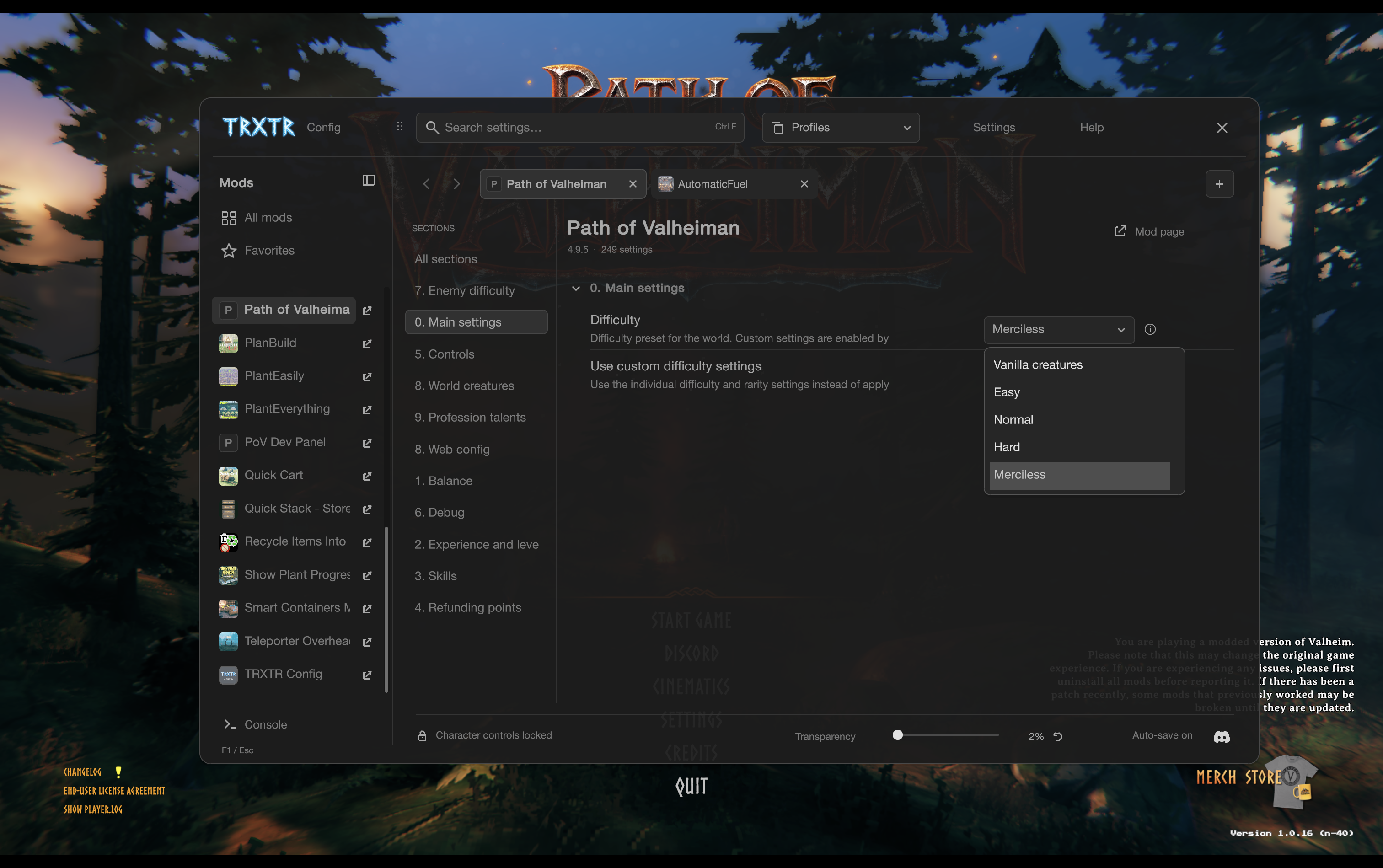
Screenshots show the interface under its previous name, TRXTR Config.
A workspace that remembers you
Open mods in browser-style tabs and arrange them however you like. Keep different mods side by side, or open multiple sections of the same mod in separate tabs.
Your tabs, their order, searches, selected sections and scroll positions are remembered between sessions. Close the game today and return to the same workspace tomorrow.
- Familiar browser controls: new tabs, close and reopen, tab cycling, numbered shortcuts, back and forward.
- Mouse and trackpad support: middle-click to open or close tabs, drag to reorder, side buttons for history and horizontal scrolling for navigation where supported.
- Clear navigation: mod icons, vertical settings sections and collapsible groups. Collapse the mod list to a slim icon column when you want more space.
Find it. Change it. Keep it handy.
- Search across your mods by name, setting, section, description or value. Selecting matching sidebar mods keeps your query, including when opening a result in a new tab.
- Favorites keep the settings you use most within easy reach.
- Useful filters help you find changed settings, keybinds and advanced options.
- Undo and redo let you step back through setting edits with Ctrl+Z and Ctrl+Y.
- Reset controls restore a single setting or the visible settings of a mod to their defaults.
- Descriptions on demand: click the small ⓘ beside a field for its explanation, range and default value.
- Comfortable editing: toggles, sliders, precise value entry, dropdowns, keybinds and a detailed editor for more complex settings.
Config profiles, right in the game
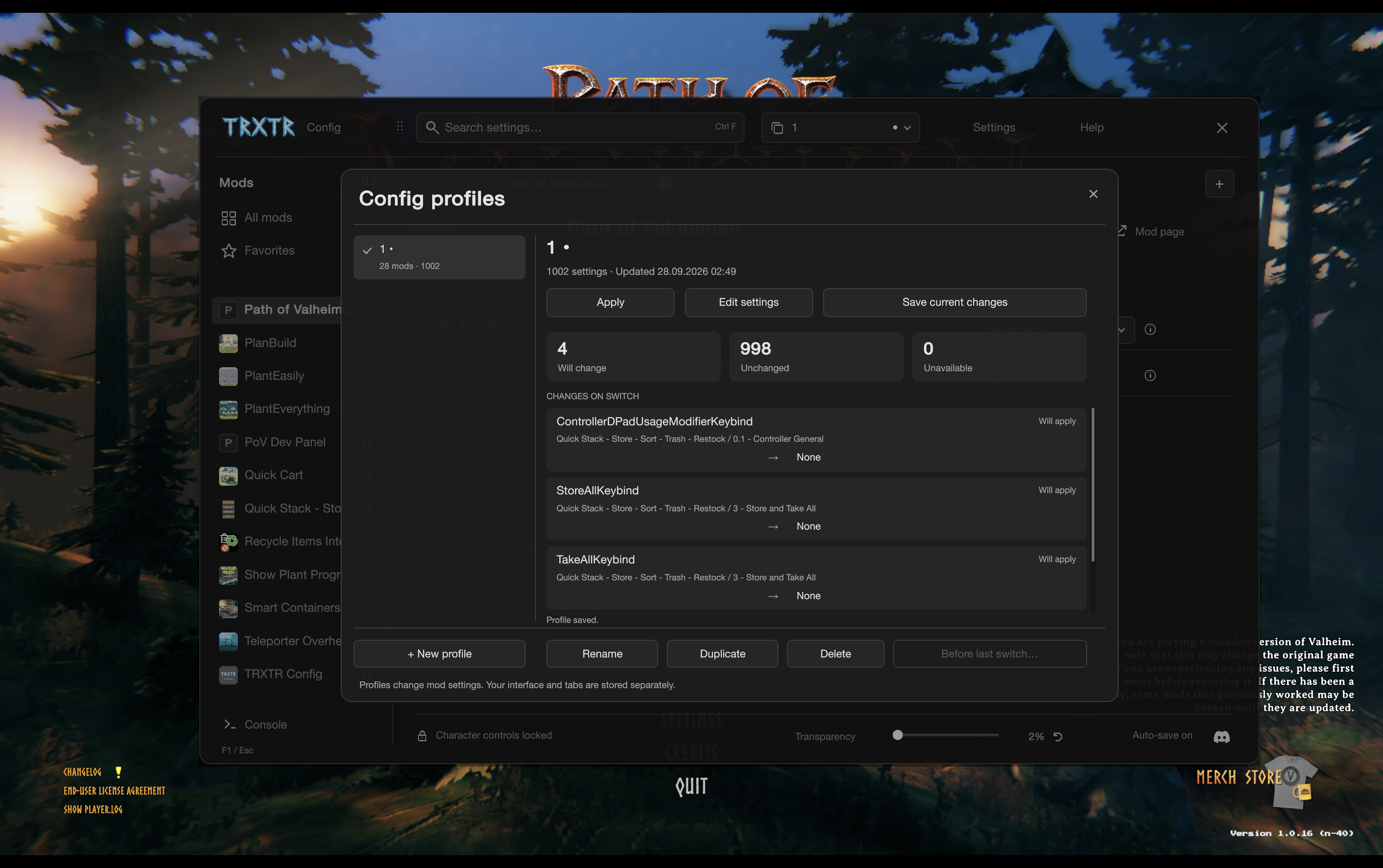
Keep different sets of mod settings for different ways to play. Create a building setup, a harder adventure or a profile for testing, then switch from the selector at the top of the window.
Create, rename, duplicate, edit and delete profiles without leaving Valheim. See what will change before applying one. Save your edits when you are happy with them; the manager prompts you about unsaved profile changes before switching away.
Need to go back? Restore the settings from before the last switch. Your tabs and window preferences stay separate from your config profiles.
In-game console
Open the built-in game console to run Valheim and mod commands alongside your settings. Command suggestions, descriptions, completion, output and history are all in one place. Your command draft and history are remembered too.
Enter runs a command; Ctrl+Enter runs it and closes Hugin’s Desk. Tab completes it, and ↑ / ↓ browse your command history while keeping the input focused. Reopening the configuration window with the console open focuses its input automatically. On the first console opening per game session, devcommands is applied automatically unless already enabled. Opening this drawer enables Valheim's console for the current game session; no -console launch option is needed. Developer commands from this drawer work after the automatic devcommands initialization, without a separate confirmcheats step. Commands follow the game's normal permissions. Valheim restricts commands such as fly to the host/local world unless a server mod provides permission.
Make it feel right
- Minimal graphite design with soft corners and a compact layout.
- Live transparency control in the main window, plus interface scaling and compact rows.
- Move the window by dragging any empty background area. Its position is remembered.
- Click outside to return to the game, or close with F1 / Esc. Character controls are blocked while you work by default.
- Mod page shortcuts lead to available Thunderstore, Nexus or Hexium pages, with a search option when a direct link is unavailable.
- English and Russian interface, with an organized in-game Help guide for features and shortcuts.
- A config file editor for the times you need to work with a file directly.
Shortcuts you already know
| Action | Shortcut |
|---|---|
| Open / close the manager | F1 |
| Open Spotlight | Backtick / ё |
| Close the current panel | Esc |
| Find a setting | Ctrl+F |
| New tab / close tab / reopen closed tab | Ctrl+T / Ctrl+W / Ctrl+Shift+T |
| Next / previous tab | Ctrl+Tab / Ctrl+Shift+Tab |
| Select a tab | Ctrl+1–9; 9 selects the last tab |
| Open a mod in a background tab | Middle-click or Ctrl+click; add Shift to switch to it |
| Close / reorder a tab | Middle-click / drag its title |
| Back / forward | Alt+← / Alt+→, navigation buttons or mouse side buttons |
| Undo / redo a setting edit | Ctrl+Z / Ctrl+Y or Ctrl+Shift+Z |
| Open the in-game console | Ctrl + Backtick |
| Detailed setting editor | Right-click the setting name |
On Mac, ⌘ also works for search, new/close/reopen tabs, numbered tabs, undo/redo and the in-game console. Use ⌘[ / ⌘] for back and forward. Tab cycling uses Ctrl. The Help button has the full guide.
Get started
- Install Hugin's Desk and its required dependencies with your mod manager.
- Disable your previous configuration manager so only one is active.
- Start Valheim and press F1.
Ordinary setting edits apply immediately; some mods require a restart. Server-controlled settings remain protected. Config profiles change settings, not which mods are installed. Switching a profile clears the individual edit history; use Before last switch to restore the previous setup. The world can keep running while the manager is open.
Credits
Based on ConfigurationManager by shudnal, with thanks to the upstream contributors. Hugin's Desk is an independent project; Path of Valheiman is not required.
Pause while configuring
In Settings, enable Pause when opened to pause the game automatically while Hugin’s Desk is open. Closing the window resumes a pause started by Hugin’s Desk; a pause from the game menu is preserved. Changes take effect immediately and are saved for future launches. Available only when Valheim permits pausing. The checkbox is off by default.
The console command list shows all registered game and mod commands when the input is empty. Scroll the right-hand list to see more; typing filters by command name or description. Suggested first arguments also scroll without a six-result limit. Listing a command does not grant permission to execute it.
CHANGELOG
0.8.1
- Keep the active settings search when selecting mods in the sidebar, including repeated selections and opening matching mods in new/background tabs.
- Preserve explicit search clearing, navigation history and independent searches in existing tabs.
0.8.0
- Edit mod settings directly inside Spotlight, with Enter/Save, converter support, allowed values/ranges, fresh server-lock checks and external-change protection.
- Complete command arguments using registered option providers, correcting partial names/typos without losing subsequent arguments.
- Add optional PoV session-affix commands and shorthand: +500 hea, +20% hea and x1.5 hea distinguish units, increased percent and multiplicative factors. Uses existing PoV APIs without changing its files.
0.7.1
- Feature Spotlight at the top of the README with command examples, settings search, mod provenance and keyboard controls.
- Update the package description to make Spotlight discoverable in mod-manager listings. Gameplay behavior is unchanged from 0.7.0.
0.7.0
- Add a standalone Spotlight palette on ` / ё with the existing graphite Hugin’s Desk design and a nearby keyboard help bubble.
- Search all registered vanilla/mod commands and author-visible mod settings, including advanced entries, with fuzzy suggestions and mod labels/icons.
- Preserve numeric and positional command arguments, use shared command history, and open matching settings in the existing editor.
- Support arrow navigation, history above the first result, Tab completion, Enter execution/opening and Esc dismissal with cursor/input restoration.
0.6.8
- Restore developer commands in the integrated console after automatic devcommands, without a separate confirmcheats step.
- Scope compatibility to commands executed by Hugin’s Desk; retain native command handlers, cheat bookkeeping and server permissions.
- Restore the native confirmation behavior after completion or errors.
0.6.7
- Enable the native console for this game session when opening the integrated console, including ordinary r2modman launches without -console.
- Wait for a loaded player/world before initializing devcommands and record initialization only after it is enabled.
- Show an actionable explanation when Valheim requires confirmcheats, without automatically confirming character cheat status.
- Explain native multiplayer restrictions for rejected developer commands; preserve game and server permission checks.
0.6.6
- List all registered game/mod commands with scrolling instead of truncating to six or excluding commands based on the current context.
- Keep name/description filtering and first-argument completions without truncation; render visible rows only. Command execution retains normal game permissions.
0.6.5
- Add the Pause when opened checkbox to Settings, backed by the existing persistent Valheim/Pause game preference.
- Apply pause preference changes immediately while the window is open, preserving existing game-menu pauses.
0.6.4
- Restore console input focus when reopening the configuration window with its console open.
- Execute devcommands once on the first available console opening per game process, without toggling an already enabled state off or bypassing normal command permission checks.
- Keep the input focused and restore its caret after Up/Down history navigation.
- Ctrl+Enter executes the command and closes Hugin's Desk. Enter keeps the window open.
0.6.3 — Hugin's Desk
-
Rename the addon to Hugin's Desk — Configuration Manager. Existing settings, profiles, favorites and tabs carry over.
-
Use the selected raven CFG icon for the mod package and a compact, single-line header alongside Hugin's Desk.
-
Include the corresponding source with the release package.
0.6.2
- Click outside the manager and its open editors to close the overlay and return to the game. The closing click is consumed until release. Active drags and browser side buttons keep their existing behavior.
- Add outside-click instructions to English/Russian Help.
- Rewrite the Thunderstore README around player features, add Discord at the top and two user-provided game screenshots (main settings first, profiles second). Technical notes move to docs/DEVELOPMENT.md.
0.6.1
- Repair window dragging with dedicated pointer capture. Drag free background anywhere in the main window; controls, disabled fields, browser tabs and scrollbars are excluded.
- Keep the original grab offset, ignore tiny click jitter, clamp to the display and persist the position on release/close/focus loss. Release capture on focus loss, scale changes and missing mouse-up events.
- Defer header double/triple-click resets to Layout so GUI.Window cannot overwrite the new position. Update Russian/English Help.
0.6.0 — Config profiles
- Compact header switcher, persistent profile manager, create/rename/duplicate/delete and live editing with explicit snapshot save.
- Saved/current difference preview, dirty indicator, save/discard prompt on switching, per-field apply outcomes and pre-switch recovery.
- Stable GUID/section/key identities, TOML converters, allowed-range/type validation and permission/conflict rechecks at each write. Unavailable mod values are kept for later.
- Atomic local storage with backup recovery, bounded data, no filename-derived profile names and no silent replacement of corrupt libraries. No automatic startup application.
- One config-file flush per changed mod file, preserving each mod's original save policy. UI layout preferences remain outside profiles.
- Profiles topic in Russian/English Help and shared-code gallery scenes for the new interface.
0.5.5 — Compact header branding
- Reduced the TRXTR wordmark from 168×56 to 108×36 logical pixels, preserving its proportions and transparent source asset.
- Moved the Config caption closer, reduced it to 16px and softened its contrast to match the header controls.
0.5.4 — Undo, redo and a readable guide
- Ctrl/Command+Z undoes setting edits; Ctrl/Command+Y and Ctrl/Command+Shift+Z redo. Each key event is consumed once and applied on Layout. Text editing, popups, key capture and active drags keep their input.
- Separate clicks on the same setting are now separate history steps. Live slider updates and continuous typing are grouped by interaction. Up to 100 steps, redo branching, no-op gesture removal and fresh permission/conflict checks.
- Rebuilt Help with seven topics, a fixed navigation column, aligned action descriptions, individual keycaps and scrollable content. Russian and English, wheel/keyboard scrolling and explicit close controls.
- Clicking free space or a slider releases text focus so setting undo is reachable after editing.
0.5.3 — TRXTR Config
- Rename the product, plugin display name, menu caption and saved own-tab titles to TRXTR Config. Keep existing GUID, config/workspace paths and DLL identity for a seamless upgrade.
- Add a cyan luminous TRXTR rune wordmark in the header, transparent and cached once. Include its reusable high-resolution master separately from the addon.
- Add the Discord icon in the lower right, opening the owner's published invite only when clicked. The destination is configurable in Community → Discord URL; supported HTTPS invite/channel formats are checked before opening.
- Remove the config-manager entry from the startup main menu; F1 remains available. Existing pause-menu preference is retained.
- Refresh the package icon. Embed only a 504×168 wordmark and 96×96 Discord glyph, with source/notice files included. 183 executable checks pass.
0.5.2
- Drag any free header area to move the window. Search and buttons are excluded; save position on release, close or focus loss, and clamp it to the display.
- Replace automatic field-description tooltips with an always-visible ⓘ button. The bounded information panel wraps and scrolls long text; close with Esc, × or outside click.
- Move per-mod sections to a vertical column beside the mod list, with an explicit All sections item and independent scrolling.
- Collapse the mod list to package icons. Persist this preference and each tab’s section-list scroll, including browser history; preserve existing workspace files.
- Adapt content, browser strip and console to both sidebar widths. Add navigation geometry, input boundary, workspace migration and persistence checks (173 total).
0.5.1
- Fix missing text on macOS by probing only installed font families, with glyph validation and a built-in fallback.
- Render icon lines with cached local alpha masks; no rotated GUI matrices inside scaled windows or clips.
- Convert authored sRGB shape tints for the game’s linear-color renderer.
- Add 16 font-selection and diagonal-mask regression assertions.
0.5.0
- Adopt the selected neutral graphite palette with moderate rounded corners, quiet selection states, checkboxes, rounded fields and sliders. Remove the mint accent and decorative artwork.
- Add a small transparency slider in the main footer: 0–80%, default 12%, percent readout and reset. Native labels, icons, controls, tooltips and auxiliary editors share the opacity.
- Preview changes while dragging; save once after release/keyboard change/reset and flush pending changes on close, scene change, disable, destroy or focus loss. Clamp malformed preference values, retain dirty state after failed writes, and support arrows/Home/End.
- Draw actual rounded outlines instead of stacking full fills, preserving overlay transparency. Keep rendering procedural; no background blur, offscreen compositor or bitmap pack added.
- Add browser tabs with per-tab navigation history, independent filters/sections/scroll, duplicate/background tabs, reorder/reopen, keyboard/thumb-button/trackpad controls and persistent atomic workspace storage with backup recovery.
- Add a console drawer with completion, command descriptions, native permission-checked execution, bounded output and persisted input history/draft.
- Load installed package icons as cached 64px thumbnails; add per-mod source menus, exact metadata/API matching and labelled search fallbacks.
- 129 .NET checks plus 19 offline component previews. Game runtime acceptance remains pending.
0.4.0
- Rewrite the visual layer as a flat charcoal/mint interface: sans-serif type, thin separators, line icons and compact controls. No wood, metal, ornament or image atlas.
- Give the mod list the full sidebar height and enlarge the readable label column. Keep search, tabs, sections, typed fields, favorites, help, history and F1.
- Restyle dropdowns, tooltips, confirmation/help windows, the detailed editor and file editor. Cached 16×16 generated surfaces support legacy/custom drawers.
- Remove all embedded PNG UI resources; cache text-style keys without per-label string concatenation and draw line icons without delegate allocations.
- Build with the .NET SDK and validate shared presentation commands offline. In-game performance and visual acceptance remain to be checked.
0.3.0 — custom renderer preview
- Replaced the main GUILayout-driven window with fixed coordinates measured from the approved reference and a uniform scale for the whole window.
- Added engine-independent C# components under src/Presentation: layered shell, tabs, sections, rows, switches, ranges, fields, dialogs and tiled editor frames.
- Added a thin game adapter for texture blits, text, clips, text entry, pointer capture, focus and scrollbars. No Unity Editor, scene, prefab, asset bundle or browser is needed to build or run the addon.
- Restored separate heading/body fonts, exact-size ornament/icon layers, round slider clipping and original row/field proportions.
- Moved extra filters, undo/redo, language, scaling and file access into Tools; kept the reference sidebar proportions.
- Added in-row scalar editing and stable drafts, guarded direct controls, choice popup, key capture, visible-row culling and separate editors for complex/custom fields.
- Preserved the existing setting API, favorites, search, permissions, history and game input/cursor hooks.
- Added 103 engine-free assertions and 11 shared-component visual export scenes. In-game acceptance of the new adapter is still pending; these exports are not game screenshots.
0.2.0
- Replaced the prototype palette interface with the approved Valheim Native component artwork embedded in the runtime assembly.
- Added native navigation, category tabs, collapsible rows, readable help, options and reset confirmation overlays.
- Added redo, native typed controls, buffered numeric/color input and exact wide-integer/enum support.
- Added visible-row rendering, responsive geometry, auxiliary-window styling and lifecycle cleanup.
- Preserved compatibility metadata, synchronization checks and existing input/cursor hooks; rechecked lock state for writes, reset and undo/redo.
- Added Unity fixture tests and install/source packaging. Multiplayer and full in-game acceptance remain pending.
