
Please disclose if any significant portion of your mod was created using AI tools by adding the 'AI Generated' category. Failing to do so may result in the mod being removed from Thunderstore.

NoMapDiscordAdditions
Large-map capture to Discord/clipboard, plus a multi-table MAP COMPILE mode that stitches every cartography table you visit into a single high-res PNG. Server-synced settings, per-pin distance/bearing labels, clean shots with all UI overlays hidden.
| Date uploaded | 2 weeks ago |
| Version | 1.1.1 |
| Download link | virtualbjorn-NoMapDiscordAdditions-1.1.1.zip |
| Downloads | 77 |
| Dependency string | virtualbjorn-NoMapDiscordAdditions-1.1.1 |
This mod requires the following mods to function

denikson-BepInExPack_Valheim
BepInEx pack for Valheim. Preconfigured with the correct entry point for mods and preferred defaults for the community.
Preferred version: 5.4.2333
ValheimModding-JsonDotNET
Shared version 13.0.3 of Json.NET from Newtonsoft, net45 package for use in Valheim mods. Maintained by the ValheimModding team.
Preferred version: 13.0.4
ValheimModding-Jotunn
Jötunn (/ˈjɔːtʊn/, 'giant'), the Valheim Library was created with the goal of making the lives of mod developers easier. It enables you to create mods for Valheim using an abstracted API so you can focus on the actual content creation.
Preferred version: 2.29.0
ZenDragon-ZenMap
Nomap, show map at the cartography table. Copy the map to parchment and take it with you. Attach pins to Signs. The viewable map area is based on the table's position in the world. Ships, carts, mounts, bonfires, and tombstones are auto-tracked.
Preferred version: 1.8.0README
NoMapDiscordAdditions
Two map workflows on Valheim's large map:
- SEND MAP / COPY MAP — capture the visible map and either post it to a Discord webhook or paste it directly into Discord, Slack, or an image editor.
- MAP COMPILE — visit cartography tables one by one and stitch every reading into a single high-resolution PNG you can save, copy, or send to Discord.
Cartography-table pins are decorated with distance/bearing-from-spawn captions baked into the captured image, and every potentially-noisy setting (message templates, pin labels, output format) can be server-synced so a host enforces the same look for everyone.
SEND MAP / COPY MAP
The bottom-right of the large map gets a Show Biome Text toggle, a SEND MAP button (default F10), and a COPY MAP button (default F11).
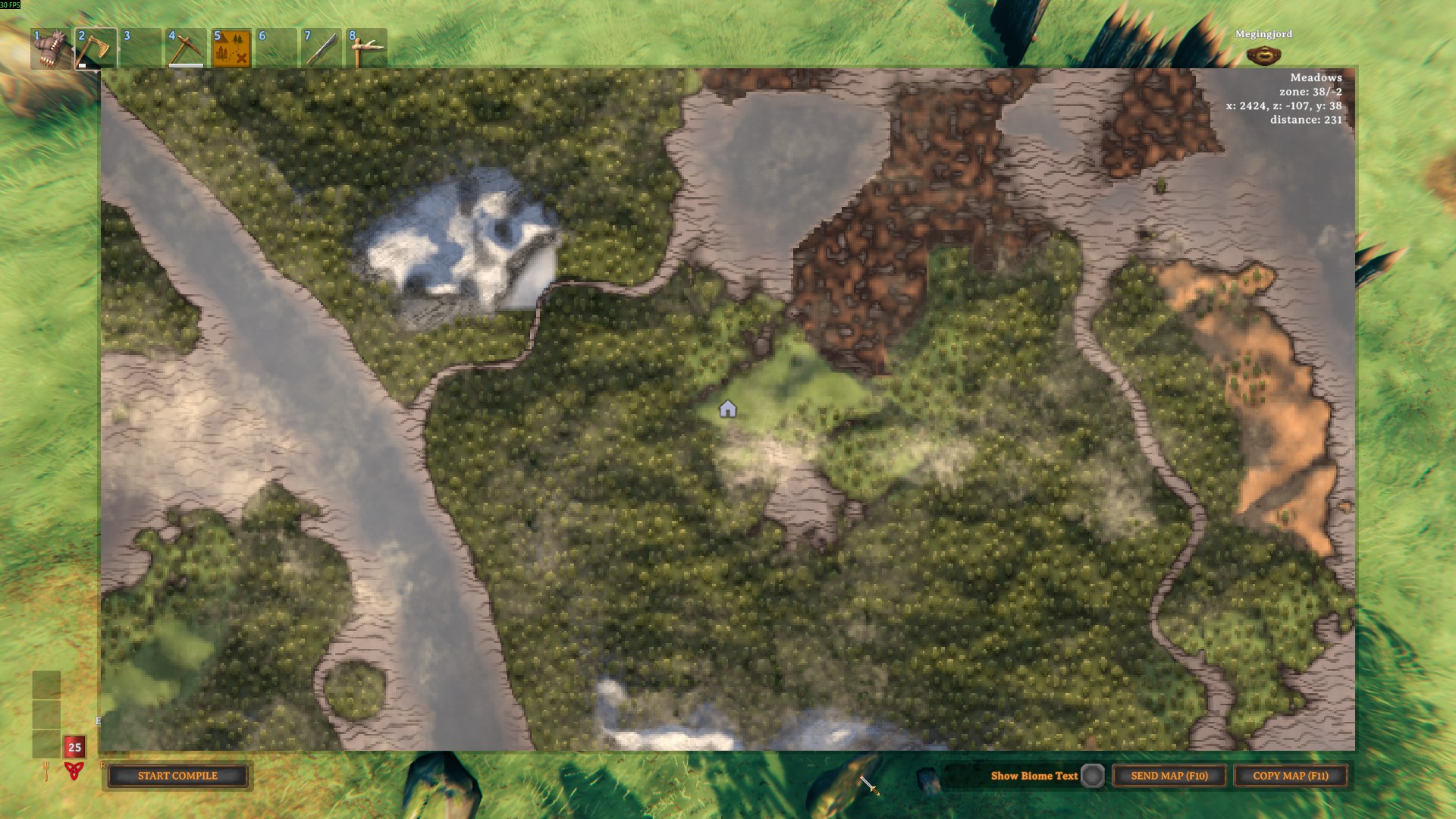
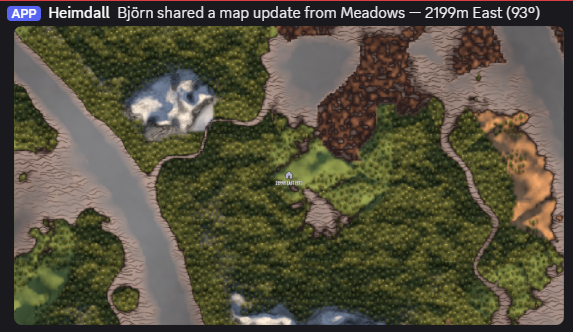
- SEND MAP posts the capture to your Discord webhook with a configurable message template — encoded as JPEG or IndexedPNG per the
Output.Output Formatconfig (see Output format) - COPY MAP writes the PNG to the system clipboard at full resolution (capped at 8192px on the long edge) — paste straight into Discord, Slack, or an image editor
- The bound hotkey is shown in each button label (
SEND MAP (F10)/COPY MAP (F11)) and updates automatically when the keys are re-bound - The SEND MAP button is hidden until a webhook URL is available (locally or server-pushed); COPY MAP is always available
- Captures hide every UI overlay (panels, buttons, hints, hotbar) — only the map and (optionally) the biome label remain
PlayerandDeathpins are hidden in the capture by default (they're session-scoped and the compile composite already excludes them). Hold Left CTRL at SEND / COPY click time to opt out for one-off shares (live deaths, party positions)
| Discord post | Spoiler-tagged |
|---|---|
 |
 |
MAP COMPILE
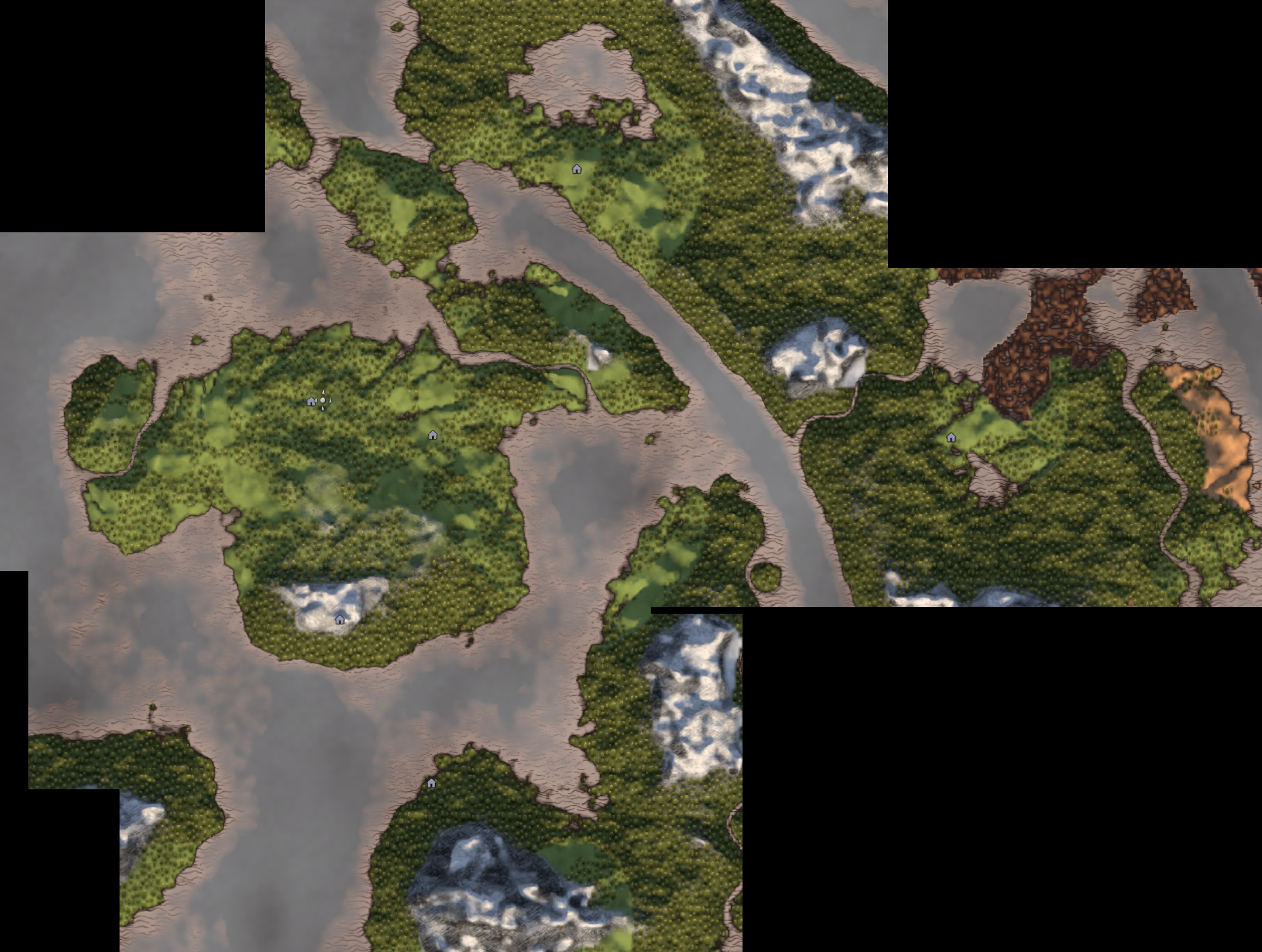
A second panel appears on the bottom-left of the large map. The intent: walk between cartography tables, add each reading as a tile, and on COMPILE the mod composites every tile into a single PNG that preserves world coordinates. The session is never lost when you save/copy/send — pause your mapping adventure and resume it at the next table or after a restart.
Idle — START COMPILE / RESUME COMPILE (N) |
Compiling — ADD TILE (N) / REMOVE TILE / COMPILE (N) / SHARE (N) / CANCEL / CLEAR |
|---|---|
|
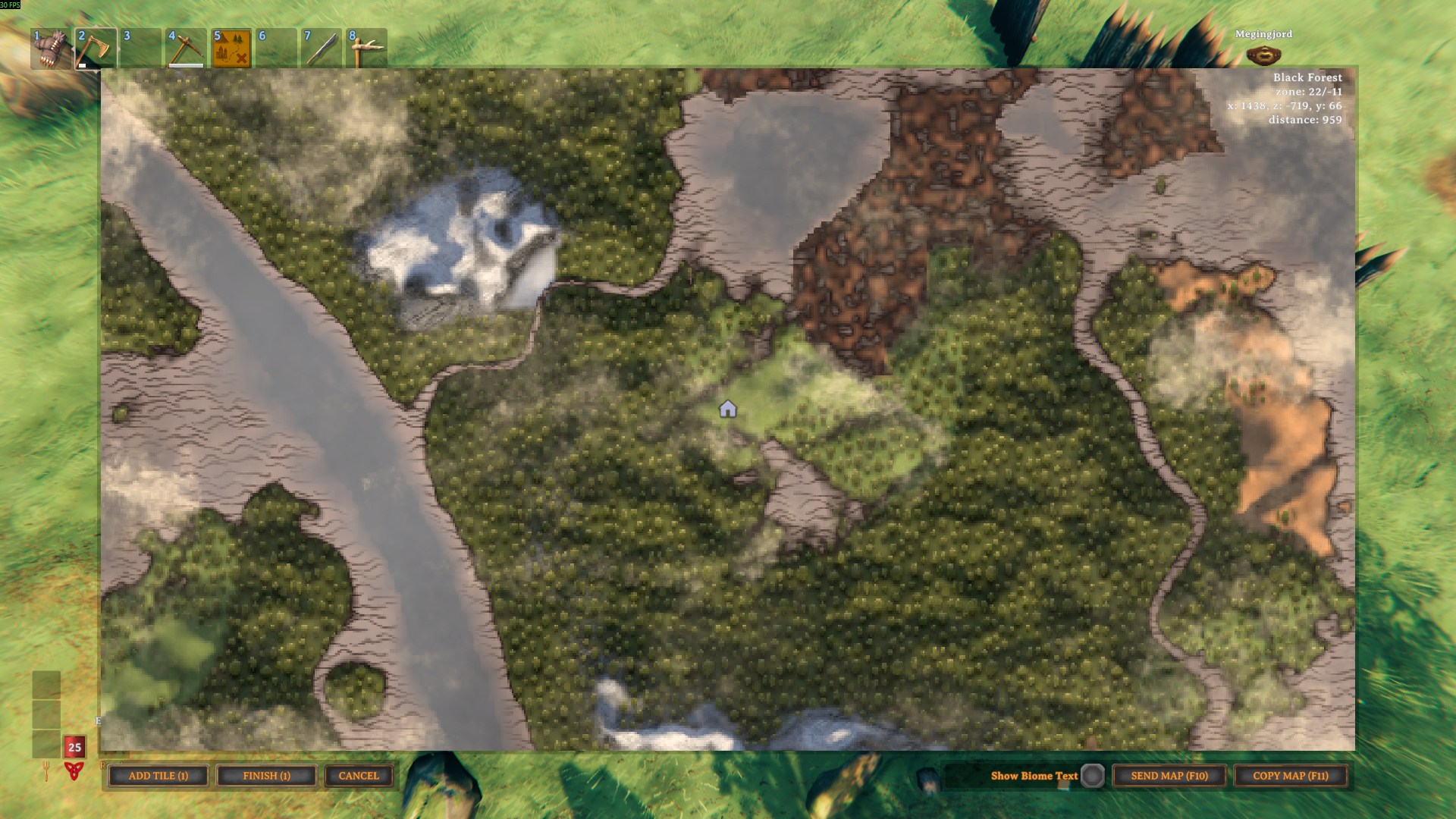 |
- ADD TILE is enabled only when the map was opened at a cartography table (no
M-key adds, no portable map items) - Re-adding within ~8m of an existing tile replaces that tile in place — re-shoot a table without ending up with duplicates
- REMOVE TILE appears next to ADD TILE when you're standing at a table whose tile is already in the session — deletes just that one tile and its PNG, leaving the rest of the session untouched. Stays greyed out and labelled
REMOVE (L-CTRL)until you hold Left CTRL, so a misclick next toUPDATE TILEcan't silently wipe a hard-won tile - The session is saved to disk after every add, scoped to the current world + character. If you crash, disconnect, or just go on an adventure, click RESUME COMPILE (N) the next time you open the map
- CLEAR wipes the whole session — every in-memory tile and the on-disk session folder — and drops you back to idle. It sits next to CANCEL but stays greyed out and labelled
CLEAR (L-CTRL)until you hold Left CTRL, so this destructive reset can't be hit by accident. Also offered next to RESUME COMPILE (N) in idle to discard a saved session without resuming it - COMPILE opens the result panel:
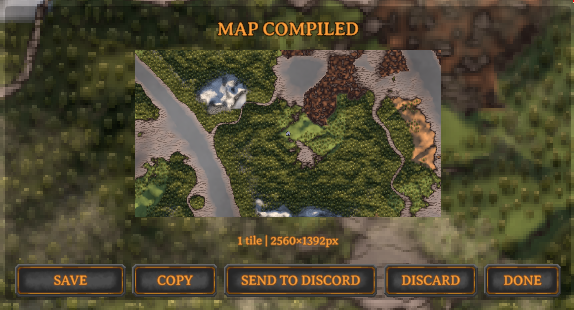
- SAVE writes a full native-resolution image to disk — it recomposes so the sharpest tile maps 1:1 and no tile is downscaled below what it was captured at (a 2000×500 capture stays 2000×500 in its region), giving you a zoomable, editable map. Capped at 8192px on the longest axis. The format follows
Output.Output Format(JPEG or IndexedPNG — see Output format); the status line reports dimensions, format and encoded size (e.g.Saved 7234×4521px JPEG q88 3.4 MB native resolution), and the filename includes the dimensions. The button then morphs into COPY DIR so a second click puts the containing folder on the clipboard - COPY writes a JPEG to the clipboard at the preview size (4096px cap on the long edge)
- SEND TO DISCORD posts the composed image with the compile message template (
{player},{tileCount}placeholders), encoded perOutput.Output Format— status updates toSent to Discord./Send failed — see log.when the request finishes - SAVE / COPY / SEND / DONE are all non-destructive — your session is kept on disk and stays resumable. DONE drops you back into compile mode with every tile intact so you can keep adding tables. Only DISCARD (or CANCEL while compiling) deletes the session
- Closing the map while the result panel is open doesn't strand the session — on the next map open you get a RESUME COMPILE (N) button that drops you straight back into compile mode with every tile intact (it does not reopen the result panel; the transient compiled PNG is discarded — just click COMPILE again when you want a fresh result)
Sharing tiles between players
In a no-map world each player only reveals the area around the tables they visit. SHARE lets a group pool coverage:
- SHARE (N) (shows EXPORT (N) if no webhook is set) exports every tile in your session as an individual PNG with its world rectangle embedded in the image itself. With a webhook configured the tiles are posted to Discord (one per message); copies are always saved to
BepInEx/config/NoMapDiscordAdditions/compile-share/out/<world>/so you can drag them in manually. - To receive: save the PNGs a teammate shared into
BepInEx/config/NoMapDiscordAdditions/compile-share/incoming. The next time you open the large map during a compile session, tiles for your current world are merged into your active session automatically — then COMPILE composites yours and theirs together. (A Discord webhook is send-only, so import is folder-based rather than read back from Discord.) - Re-importing or re-sharing the same tile updates it in place; tiles for a different world are skipped. Handled files move into
incoming/processedorincoming/ignored. - Tile sharing can be turned off entirely with
Map Compile.Enable Map Sharing(server-synced) — the SHARE/EXPORT button disappears and nothing is auto-imported, so compile mode stays purely local.
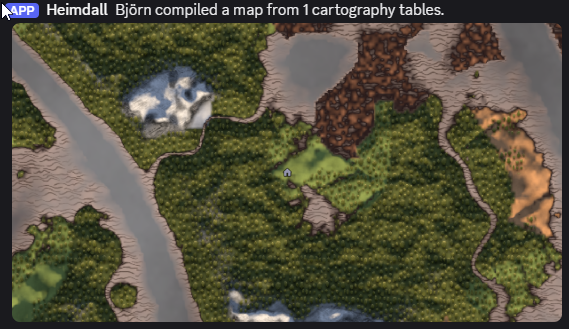
| Composed PNG (4 tables stitched) | Sent to Discord | Spoiler-tagged |
|---|---|---|
 |
 |
 |
Cartography-table pin labels
Every visible cartography-table pin in a capture is decorated with {distance}m {Direction} ({bearing}°) — e.g. 1240m NorthEast (45°). Labels render only during the capture, never in the live UI, and respect Valheim's icon filters, viewport, and shared-map fade. The Discord message template gets a matching {spawnDir} placeholder; if your map is opened via the M key (no table involved), {spawnDir} falls back to the player's current position so Discord captures always include a direction.
Naming a table
A table can carry a human-readable name that flows into the Discord message ({table} placeholder) and the compiled-map captions ({name} — {distance}m {Direction}). There's no separate naming UI — the mod reads the closest named map pin sitting on the table (within ~8m):
- ZenMap auto-pins every cartography table with the vanilla "house" icon. Rename that pin and you've named the table.
- Or drop a Town pin on the table and name that.
Leave the pin unnamed and nothing changes — captions and messages fall back to just the direction, exactly as before. The name is captured the moment you add a tile in MAP COMPILE and stored in the session, so it stays correct even when the table is far away or unloaded at compile time.
Map styles
Map Style.Style (client-only) replaces the live in-game map look with a stylized render for SEND / COPY captures and MAP COMPILE tiles, reconstructed from Valheim's own map data — explored areas show full detail, unexplored areas stay fogged. Five settings:
- None (default) — the normal in-game map look (no styling)
- Old Map — aged-parchment chart: biome wash, Perlin grain, height-contour and biome-edge lines (a faithful reimplementation of ASpy's MapPrinter
GenerateOldMaplook) - Chart — flat topographic chart, contour and biome-edge lines, no parchment grain
- Topographical — shaded-relief terrain with hillshading, contours and biome-edge lines
- Satellite — naturalistic shaded terrain, no line work
MAP COMPILE tiles render through the same pipeline at tile resolution and the composite stitches stylized terrain together. The per-pixel passes run on a background thread so the game doesn't stall during a capture. The full pipeline (biome wash, contours, hillshade, fog smoothing) renders at the native on-screen map size — the styled output is intrinsically low-frequency so this is visually indistinguishable from a full-resolution render while keeping SEND/COPY responsive.
Output format
Output.Output Format drives the on-disk format for compile SAVE and the wire format for every SEND TO DISCORD capture (single SEND or compile SEND). The file extension follows the format (.jpg / .png).
- JPEG (default) — 24bpp DCT at the configured quality. Smallest files (~5-8× smaller than a lossless PNG); pin captions stay readable at quality ~85 and above, below that the edges noticeably soften.
- IndexedPNG — 8bpp palette built via median-cut on a 15-bit colour histogram with Floyd-Steinberg dither at the configured colour count. Lossy in colour count only — no DCT ringing, so pin labels stay crisp. Maps quantize very well (~6 dominant biome colours), so 32-64 is usually indistinguishable from a full-colour PNG while being ~5× smaller.
COPY MAP clipboard output always uses JPEG (regardless of this setting) — indexed-PNG palette quantization on an 8192² image takes multiple seconds on the main thread, long enough that the COPY button looks frozen.
Configuration
Discord
| Key | Notes |
|---|---|
Discord.Webhook URL |
Discord incoming webhook. Server-synced so sending works for every client; hidden from the in-game ConfigurationManager window so non-admin players can't read a server-pushed URL from the settings UI. |
Discord.Message Template |
Supports {player}, {biome}, {spawnDir} (e.g. — 1240m NorthEast (45°)), and {table} (the cartography table's name — see below). When {spawnDir} or {table} is missing from the template it is appended automatically. Server-synced. |
Discord.Spoiler Image Data |
Tag attachments as Discord spoilers; default false. Server-synced. |
Discord.Hide Clouds |
Strip the cloud overlay before capture; default true. Server-synced. |
Discord.Show Biome In Capture |
Include biome label in captured map images; default false. Client-only — also toggled via the Show Biome Text toggle on the map. |
Output
| Key | Notes |
|---|---|
Output.Output Format |
JPEG (default) or IndexedPNG. Drives the on-disk format for compile SAVE and the wire format for every SEND TO DISCORD capture. Client-only. See Output format. |
Output.JPEG Quality |
50-100, default 88. JPEG encoder quality used when Output Format = JPEG and for COPY MAP (which is always JPEG). 88 keeps pin captions readable; values below 80 noticeably blur text. Client-only. |
Output.Indexed PNG Colours |
16-256, default 64. Palette size for the indexed-PNG encoder. 32-64 is usually indistinguishable from full colour for maps; 128-256 if you have Map Style on and gradient shading is banding. Client-only. |
General
| Key | Notes |
|---|---|
General.Normalize Capture Lighting |
Render the map at fixed neutral-noon lighting so tiles captured at different times of day (or in different biomes) don't produce dark/light seams in a compiled map; default true. Client-only. |
General.Enable Logs |
Print info/warning messages to the BepInEx console and Player.log; default false. Turn on if you need to investigate a problem. |
Map Style
| Key | Notes |
|---|---|
Map Style.Style |
Stylized rendering for SEND / COPY captures and MAP COMPILE tiles, reconstructed from Valheim's own map data. None (default), OldMap, Chart, Topographical, Satellite — see Map styles above. Client-only. |
Map Compile
| Key | Notes |
|---|---|
Map Compile.Compile Message Template |
Discord message used by SEND TO DISCORD in the compile result panel. Supports {player}, {tileCount}. Default "{player} compiled a map from {tileCount} cartography tables." Server-synced. |
Map Compile.Enable Map Sharing |
Master toggle for cross-player tile sharing; default true. When off, the SHARE/EXPORT button is hidden and the compile-share/incoming folder is no longer auto-imported — compile mode stays purely local. A server can disable sharing for everyone. Server-synced. |
Map Compile.Share Message Template |
Discord message sent once (with the first attachment) by SHARE TILES. Supports {player}, {tileCount}. Default points teammates at the compile-share/incoming folder. Server-synced. |
Pin Label
| Key | Notes |
|---|---|
Pin Label.Enabled |
Master toggle for the per-pin labels baked into the screenshot; default true. Server-synced. |
Pin Label.Include Distance |
Prepend the distance (1240m NorthEast (45°) vs NorthEast (45°)); default false. Server-synced. |
Pin Label.Include Direction from Spawn |
Include the compass direction/bearing from spawn (NorthEast (45°)); default false. If both distance and direction are off, no label is drawn. Server-synced. |
Pin Label.Include Map Item Sources |
Also show the spawn label when the map is opened from a portable map item (e.g. ZenMap parchment), not just from a cartography table; default false. Server-synced. |
Pin Label.Show on Compile Mode |
Whether the captions are stamped onto the MAP COMPILE composite — one per cartography table, drawn on top with an outline (still gated by Pin Label.Enabled); default true. Disable for label-free compiled maps without affecting plain COPY/SEND. Server-synced. |
Controls
| Key | Notes |
|---|---|
Controls.Send Key |
SEND MAP hotkey while the large map is open; default F10. |
Controls.Copy Key |
COPY MAP hotkey while the large map is open; default F11. |
Server behavior
Config sync is handled by Jotunn's SynchronizationManager (Jotunn is a required dependency). On connect, the server pushes its value for every synced setting to all clients, the entry is locked client-side, and each client's local value is cached and restored on disconnect. There is no separate ServerSync install or RPC protocol version to keep in step.
These settings are server-synced (a host enforces one look for everyone):
Discord.Spoiler Image DataDiscord.Hide CloudsDiscord.Message TemplateDiscord.Webhook URL— synced so sending works for everyone, but hidden from the in-game ConfigurationManager window so non-admin players can't read it from the settings UIMap Compile.Compile Message TemplateMap Compile.Enable Map SharingMap Compile.Share Message TemplatePin Label.EnabledPin Label.Include DistancePin Label.Include Direction from SpawnPin Label.Include Map Item SourcesPin Label.Show on Compile Mode
The Output.* settings, Map Style.Style, Show Biome In Capture, Normalize Capture Lighting, Enable Logs, and hotkey bindings are always local to each client (bound synced: false) — output format and styling are personal preferences, and forcing one client's encoder choice on the whole party would be noisy.
Dependencies
- BepInEx Pack for Valheim 5.4.2333 (declared in the manifest)
- JsonDotNET 13.0.4 (declared in the manifest) — used to persist compile sessions to disk
- Jotunn 2.29.0 (declared in the manifest) — provides the server-authoritative config sync (
SynchronizationManager). ZenMap already depends on Jotunn, so most setups already have it - ZenMap ≥ 1.7.8 (declared in the manifest) — required for MAP COMPILE. Recent ZenMap also fixes a
Graphics.CopyTexturesize-mismatch error on expanded worlds (e.g. a 4× map); update ZenMap if you see that error
Support & questions
Found a bug, have a question, or want to request a feature? Reach me as virtualbjorn on either of the Valheim modding Discord servers:
- OdinPlus — https://discord.gg/mbkPcvu9ax
- ValheimModding — https://discord.gg/MJWtxQs
Ping virtualbjorn in the relevant modding/support channel and include your BepInEx/LogOutput.log if you're reporting an issue. You can also open an issue on the GitHub repo.
CHANGELOG
Changelog
1.2.0
Map Compile — pick which pins land on the composite (new)
- Added a
PINSbutton to the compile panel (between the capture controls andCOMPILE). It opens an INCLUDE PINS overlay — a wrapping grid of every distinct pin icon that actually falls inside your captured tiles, each a clickable thumbnail. Turn a kind off and the nextCOMPILEskips every pin drawing that icon; turn it back on to restore it.ALL/NONEtoggle the whole set,DONE(or clicking the dimmed backdrop) closes- Pins are grouped by the sprite they actually draw with, so vanilla kinds and mod-added pins (each mod ships its own sprite) get their own rows automatically — no hardcoded list to fall out of date
- The list only shows pins that land inside a captured tile, so it mirrors exactly what the composite would stamp; a pin in an un-mapped region never clutters it
- Default is everything-included — a kind is only hidden once you explicitly turn it off, so a pin type that first appears after you last opened the panel is included automatically
- The selection is persisted with the compile session (written into the session index) and restored on
RESUME COMPILE, so it survives a logoff. It resets to all-included onSTART/CLEAR ALL/DISCARD. ThePINSbutton label shows the hidden count (PINS (3 off)) so you can tell pins are held back without opening the panel
- The bed / spawn pin is now kept off the composite entirely (and out of the
PINSlisting) — it marks your spawn, not a wayfinding feature. The always-onstarttemple landmark is unaffected: it still composites, just isn't offered as aPINStoggle (it's a landmark, not a choice)
Map Compile — panel button reorganization
- Folded the old
CANCEL+CLEARbuttons into a singleEXITbutton: a tap suspends the session (kept on disk,RESUMEany time); hold Left CTRL and it morphs to a redCLEAR ALL (L-CTRL)that wipes the whole session. One button, the panel's consistent "L-CTRL = destructive variant" rule - Folded the standalone
REMOVE TILEbutton intoUPDATE TILE: at a table whose tile is already in the session, a tap re-captures (UPDATE TILE) and holding Left CTRL morphs it to a redREMOVE TILEthat deletes just that tile. The destructive variant on every button now reads in red so the danger is obvious at a glance - The standalone
CLEARbutton now only appears in the idle / resume-review layouts (where there's noEXITto fold it into)
Map Compile — pin rendering fixes
- Uniform pin sizing. Compile pins are now sized from Valheim's stable size formula (
m_pinSizeLarge× doubleSize) instead of each pin's live on-screen rect. The live rect only exists for pins inside the current viewport (Valheim destroys off-screen pin markers) and mods like ZenMap rescale on-screen ones by zoom — so two identical pins came out different sizes depending on which happened to be on-screen whenCOMPILEran. The new path is position- and zoom-independent, so same-kind pins are uniform - Correct pin size on single-tile compiles. Pin icons and captions now scale relative to a single tile (= one live-map view) rather than the whole composite. The old constant
0.25×icon multiplier + 4096-px font anchor baked in an implicit "~4 tiles across" assumption that shrank pins ~4× on a single-tile compile; pins/captions now render at their familiar live-map size for any tile count - No more stretched pin icons. Non-square pin sprites (e.g. the trader pouch) are now letterboxed to their native aspect ratio instead of being stretched to fill the square marker box — matching Valheim's
Image.preserveAspect - Off-screen pins keep their ZenMap color. Pins on already-captured-but-off-screen tiles have no live UI element, so their color used to fall back to white — erasing ZenMap's boss-orange / private-peach tinting across most of the composite. The compositor now asks ZenMap's own
AdjustPinColorfor the hue it would have assigned, falling back to the vanilla white / shared-grey default only when ZenMap is absent or its pin coloring is off
Capture — color-correct pin compositing (SEND / COPY and compile)
- Pin icons are now composited in linear color space on Linear-color-space projects (which Valheim is), matching how the GPU blends the live map. The CPU blit previously alpha-blended directly on sRGB bytes, which over-brightened translucent pins (shared / other-player pins are drawn at ~80% alpha) — the "washed-out pin" look against the live map. Opaque pins were already correct; this fixes the translucent ones. Gamma-space projects keep the original byte math (the GPU blends in gamma there too)
Compatibility
- Bumped the ZenMap dependency floor to
1.8.0
1.1.1
Map Compile
- Added a
REMOVE TILEbutton to the compile panel — wipes the tile belonging to the cartography table you're currently standing at, deleting its PNG and updating the session index. Mirrors the dedup-by-table-position rule the existingUPDATE TILEuses, so it always acts on the same tileUPDATE TILEwould replace. Lets you undo a tile capture without wiping the whole session viaCLEAR - The button only appears when you're at a table whose tile is already in the session (it pairs with
UPDATE TILE); placed next to it in the panel so the trio at the current table —UPDATE TILE,REMOVE TILE,COMPILE— read together. Greyed out and labelledREMOVE (L-CTRL)until you hold Left CTRL, so a misclick onUPDATE TILE's neighbour can't silently wipe a hard-won tile
1.1.0
Output format (new — applies to SAVE and SEND TO DISCORD)
- New
Outputconfig section with three settings:Output.Output Format—JPEG(default) orIndexedPNG. Drives the on-disk format for the compile result-panel SAVE button and the wire format for SEND TO DISCORD captures and compile sends. The file extension follows the format (.jpg/.png) so the on-disk filename matches the actual bytesOutput.JPEG Quality— 50-100, default88. Quality for the JPEG path; 88 keeps pin captions readable, below ~80 noticeably softens label edgesOutput.Indexed PNG Colours— 16-256, default64. Palette size for the indexed-PNG encoder. Maps quantize very well (~6 dominant biome colours) so 32-64 is usually indistinguishable from a full-colour PNG while being ~5× smaller; raise to 128-256 ifMap Styleis enabled and the gradient shading is banding
- New indexed-PNG encoder — 8bpp palette built via median-cut on a 15-bit histogram with Floyd-Steinberg dither. Keeps pin-label edges crisp (no DCT ringing) while delivering JPEG-class compression for typical maps
- COPY MAP clipboard output always emits JPEG (regardless of the Output Format) — indexed-PNG palette quantization on an 8192² image takes multiple seconds on the main thread, long enough that the COPY button looks frozen; JPEG encodes the same image in well under a second. The shared
Output.JPEG Qualitycontrols both paths so a tuned value carries over - SAVE status line now reports format, encoded size, and dimensions (
Saved 7234×4521px JPEG q88 3.4 MB native resolution) so format A/B testing doesn't require opening the file - SEND TO DISCORD compile send now updates the result-panel status with success/failure when the request finishes — previously the panel was stuck on
Sending to Discord...forever
Removed configs (replaced by the new pipeline)
- Removed
General.Capture Method— texture capture is the only path now, and it now handles everything the screen-capture path used to. Compile tile capture follows the same simplification (texture-only) - Removed
General.Capture Super Size— implicit; the texture capture path now sizes off the on-screen map rect and scales up to the longest-edge cap automatically - Removed
Controls.Copy Full Resolution Modifier— COPY MAP now always captures at full resolution (capped at 8192 px on the longest edge). The CTRL modifier's purpose was raising the cap above the Discord-safe one; that cap is gone, so the modifier has nothing to gate - Removed
Discord.Send Max Dimension— replaced by the Output Format encoder. SEND now sizes the capture at the longest-edge cap and relies on JPEG / indexed-PNG compression to stay under Discord's 10 MB attachment limit (a typical capture lands ~2-5 MB at JPEG q88) - Removed
Map Compile.Max Output Dimension— preview/COPY/SEND use a hardcoded 4096 px cap (keeps recodes snappy at compose time); SAVE goes up to 8192 via the existing native path. The previous setting only ever clamped the preview, so its absence doesn't change SAVE behaviour
Renamed
Controls.Screenshot Key→Controls.Send Key(BepInEx won't migrate the binding — players who rebound this will need to re-set it)
Default change
Map Style.Styledefault flipped fromTopographicalback toNone. The full styled pipeline (biome wash, contours, hillshade, fog smoothing) was rendering at the full 8192² capture size every send/copy, which froze the SEND button for 30+ seconds on a large explored map. Style rendering now runs at native screen resolution (the styled output is intrinsically low-frequency, so a 2K-class internal render is visually indistinguishable from 8K), and the default ships off so first-run captures stay snappy
Capture pin handling (live SEND / COPY)
- New
PinCaptureFilterruns for the duration of each SEND / COPY texture-capture frame:- Hides
PlayerandDeathpins for the capture — these are session-scoped and the compile path already excludes them, so SEND/COPY now matches compile behaviour out of the box. Hold LEFT CTRL at SEND / COPY click time to opt out for one-off shares (deaths, party positions) - Strips TMP rich-text tags from boss / location captions (
<color=orange>THE ELDER</color>→The Elder) so localized styling doesn't leak into the captured image - Force-shows every named pin's caption GameObject for the capture frame — vanilla
UpdatePinshides captions past them_showNamesZoomthreshold, so a zoomed-out screenshot previously missed every pin name. Caption state is restored immediately after the capture - Survives ZenMap's per-frame
ShowLabel(IsCursorOver || IsLabelTogglePressed)postfix via a[HarmonyAfter("ZenDragon.ZenMap")]patch that re-activates the captions every frame between Apply and Restore
- Hides
- Texture-capture path now blits the pin name root (
Minimap.m_pinNameRootLarge) in addition to the icon root — captions appear in texture-mode captures too, matching what the old screen-capture path got via the back buffer - Pin captions in the live capture and the compile composite render with a one-pass SDF outline (wider sample band painted black under the white face) — readable over snow plains, swamp, and other busy biomes without the per-offset stamp passes the previous outline did
Map Compile
- Pin icons in the composite now read from each pin's live UI
Image.spriteandImage.color(withpin.m_icon/Minimap.GetSprite(type)as fallbacks). Sprite swaps from mods, discovered-location pins, and boss head outlines now reflect in the composite — previously the compositor pulled the original asset (e.g. orange filled boss head) instead of what the player actually saw - Pin names are now localized + rich-text-stripped before stamping. Boss / location pins stored as
$enemy_gdkingtokens render asThe Elder(etc.) on the composite, with no leftover style tags - Pin captions sample their font size +
FontStylesfromMinimap.m_pinNamePrefabso compile captions look identical to live-map captions (same absolute pixel size, same italic/smallcaps if vanilla uses them) instead of the previous hardcoded scale - Pin sizing now applies a 0.25× scale on top of the composite/screen px-per-px ratio so pins read as discrete markers at composite resolution — pixel-proportional sizing made them feel oversized when the composite spanned many tables' worth of world
- Per-tile pin cull: pins whose world position falls in the black gaps between non-adjacent captured tiles are no longer stamped on the composite. The outer bounding-rect cull (rectangle containing every tile) used to draw pins on those "no data" regions
- Compositor seam fix: removed the 1-pixel-wide tile-boundary averaging. The floor/ceil destination math leaves a 1-pixel overlap column at every adjacent-tile boundary; averaging both tiles' edge pixels there produced a visibly different colour from the un-averaged interior columns, lighting up as faint vertical/horizontal seams on the composite. First-paint pixel wins now, so the boundary reads as a continuation of whichever tile got there first
Capture lighting
General.Normalize Capture Lightingnow uses fixed neutral-noon values (Meadows-tuned ambient/sun/fog) instead of reading per-biomem_currentEnvday colours. The previous behaviour gave consecutive compile tiles different brightness depending on which biome the player was standing in when each tile was captured — fixed values give every tile the same lighting, which is what "normalize" is supposed to do
Compatibility
- Bumped the ZenMap dependency floor to
1.7.8
1.0.9
Map Style (new)
- Added
Map Style.Style(client-only) — optional stylized rendering for SEND / COPY captures, reconstructed from Valheim's own map data so explored areas show detail while unexplored stay fogged. Four modes:- Old Map — aged-parchment chart with biome wash, Perlin grain, height-contour and biome-edge lines (a faithful reimplementation of ASpy's MapPrinter
GenerateOldMappipeline that reads directly fromMinimapinstead of rescanning the world) - Chart — flat topographic chart with contour and biome-edge lines, no parchment grain
- Topographical — shaded-relief terrain with hillshading, contours and biome-edge lines (default)
- Satellite — naturalistic shaded terrain, no line work
None(or removing the entry) keeps the normal in-game map look
- Old Map — aged-parchment chart with biome wash, Perlin grain, height-contour and biome-edge lines (a faithful reimplementation of ASpy's MapPrinter
- A selected Map Style forces the texture-capture path for that capture (the screen-capture path screenshots the unstyled live map, so styling has to go through the offscreen render). Capture Method config is unchanged for
None - MAP COMPILE tiles also style when
Map Style.Styleis non-None— each tile renders through the same pipeline at tile resolution and the composite stitches stylized terrain. Per-tile cap of1536pxon the longest internal render edge keeps ADD TILE responsive (~7× cheaper than rendering at the full 4K tile size); the GPU bilinear blit to tile resolution is visually indistinguishable for the intrinsically low-frequency styled output - Render runs on a background thread — the per-pixel passes (biome blur, shallow-water field, hillshade, contour and biome-edge lines, final smoothing) would otherwise stall the game for a noticeable fraction of a second on a 2048² map texture. Layer read-back and the final
Texture2Dupload are on the main thread
Capture
- The texture-capture path's default output now matches the player's screen resolution (measured off the large-map image rect) instead of a fixed
1920×1080. SEND/COPY on a 1440p/4K screen produces noticeably sharper PNGs without needing CTRL+COPY; CTRL+COPY still upsizes to the 4096px full-resolution cap. Falls back to1920×1080when the rect can't be measured - SEND MAP and COPY MAP buttons now reflect in-flight state: while a capture is running, both buttons grey out and the one matching the current operation swaps its label to
SENDING.../COPYING.... Restores hotkey labels and interactability when the capture finishes — useful since a styled or full-resolution capture can take noticeable wall time, and the previous silent button would let the player queue duplicate clicks
Map Compile
- ADD TILE mirrors the same busy treatment — while a tile capture is in flight (including the styled-render path, which can take hundreds of ms per tile) the whole compile panel greys out and ADD TILE shows
CAPTURING TILE.... Re-entry guard at the click handler too, so a button event queued before the layout refresh can't kick off a parallel capture - A center-screen message announces the capture (
Capturing tile...orRendering styled tile...when a Map Style is active) so there's an immediate response even before the button label updates
1.0.8
Map Compile
- Map compile now honours the global
Capture Methodconfig. Compile tiles use screen capture by default (matching SEND/COPY), with texture capture still available as the alternative. Brings compile in line with the rest of the mod's capture pipeline — one switch governs every capture - Screen-capture compile tiles crop to the clamped-uv sub-rect of the visible map so each tile's PNG aligns exactly with the world rect recorded for it. No black bars from zoom-past-the-world-edge bleed into adjacent tiles in the composite
- Texture-capture compile tiles now render at a 4K-class longest edge sized to the clamped-uv aspect ratio (was a fixed 1920×1080). Matches the per-tile detail of CTRL+COPY full-res and avoids spending pixels on the long axis when the clamped-uv is near-square
Capture lighting
Normalize Capture Lightingnow applies to every capture path (texture and screen, SEND/COPY and compile). Previously it only affected the texture path; flipping it on now also keeps screen-capture SEND/COPY and compile tiles noon-lit so mixed-mode sessions stay visually consistent. Disable to have all captures reflect the live time of day
Fixes
- Fixed compile texture-capture tiles showing horizontally-stretched pin icons when the large map was zoomed out past the world edge. Terrain rendered at clamped uv but pins were laid out from the raw
uvRect, so icons got stretched/shifted in the captured PNG. The blit now remaps icon positions and sizes through the raw→clamped uv mapping; identity when zoom stays inside [0,1] so framed captures are bit-for-bit unchanged
Compatibility
- Bumped the ZenMap dependency floor to
1.7.6
1.0.7
Server config sync — now via Jotunn
- Replaced the custom RPC sync and the optional ServerSync compatibility shim with Jotunn's
SynchronizationManager. Server-synced settings now sync through Jotunn's standard, well-tested path: the server's value is pushed to clients, the entry is locked client-side, and the client's local value is cached and restored on disconnect. No protocol version to keep in step anymore - Jotunn is now a required dependency (
ValheimModding-Jotunn-2.29.0). ZenMap (already required) depends on Jotunn too, so most setups already have it - ServerSync is no longer used — remove any
Discord.Lock Configurationexpectations; locking is handled by Jotunn's admin-only mechanism instead
Map Compile
- Added a
CLEARbutton to the compile panel — wipes the whole session (in-memory tiles and the on-disk session folder) and returns to idle. Shown while compiling and when a saved session is resumable. Stays greyed out and labelledCLEAR (L-CTRL)unless Left CTRL is held, so a destructive wipe can't be hit by accident next toCANCEL
Fixes
- Fixed compile tiles captured from a ZenMap table at full reveal radius being wrongly flagged partial and demoted by the compositor (so they could be overwritten by other tiles' fog). ZenMap reveals a circular disc, which the per-pixel rectangle test can never fully satisfy; compile now trusts ZenMap's own reveal-completeness ratio when ZenMap is the reveal source, and falls back to Valheim's per-pixel
m_exploredtest only for vanilla walking exploration
Config defaults
Pin Label.Include Distancenow defaults tofalse(wastrue). Existing configs are unaffected — BepInEx never overwrites a saved value
Compatibility
- Bumped the ZenMap dependency floor to
1.7.4
1.0.6
Map Compile — resumable sessions & full-resolution save
- Compile sessions now survive
SAVE/COPY/SEND TO DISCORD/DONE— onlyDISCARD/CANCELdeletes a session.DONEreturns to compile mode with all tiles intact; sessions persist across restart (RESUME COMPILE (N)) SAVEnow writes a full native-resolution PNG — no Discord-safe downsample, sharpest tile maps 1:1, hard-capped at 8192px on the longest axis. Filename includes pixel dimensions; the status line reports native vs. clamp. Preview/COPY/SENDpayloads stay at the Discord-safe size- Renamed compile-mode
FINISH (N)→COMPILE (N)— produces a result without ending the session - Compiled-map captions now render in Valheim's in-game font (Averia Serif Libre SDF + outline) via a Unity TMP pass instead of a system serif
Map Compile — tile sharing (new)
- Added SHARE to the compile panel (EXPORT when no webhook is configured) — exports every session tile as a self-describing PNG with its world rect embedded in a standard
tEXtchunk (still a normal viewable image). With a webhook, tiles post to Discord one attachment per message; copies are always written tocompile-share/out/<world>/ - Auto-import: PNGs dropped in
compile-share/incomingare scanned when the large map opens during a compile session, merged into the active session, then moved toincoming/processedorincoming/ignored. Tiles dedup by stable identity (world + rect + capturer), so re-sharing updates in place instead of stacking - Added
Map Compile.Enable Map Sharingconfig (defaulttrue, server-synced) — off hides SHARE/EXPORT and disables auto-import - Added
Map Compile.Share Message Templateconfig (supports{player}/{tileCount}, server-synced)
Fixes
- Fixed compile mode getting stuck after a compile: closing and reopening the minimap with the result panel open left no result panel and no
START/RESUMEbutton. The session is now preserved across map close; reopening showsRESUME COMPILE (N)(re-COMPILEfor a fresh result panel)
Capture
- Added
Pin Label.Show on Compile Mode(defaulttrue, server-synced) — gates the "of Spawn" captions on the compiled map (still gated byPin Label.Enabled) without affecting plain COPY/SEND - MAP COMPILE captions are now stamped once onto the finished composite instead of baked per-tile — baked near-white captions lost to the per-tile chroma-pick wherever tiles overlapped. Drawn-on-top labels have a black outline for readability over any biome
- The screen/texture COPY/SEND paths still bake per-pin "of Spawn" captions when
Pin Label.Enabled; the texture path now rasterizes their TMP glyphs from the font atlas (SDF-aware), matching the screen path - Added
General.Normalize Capture Lighting(defaulttrue, client-only) — texture capture renders the map as if at noon, eliminating the dark/light seams between tiles captured at different times of day; the environment's day palette is applied for the offscreen pass and globals restored immediately after
Named cartography tables (new)
- Tables now carry a human-readable name, resolved from the closest named map pin sitting on the table (within ~8m). ZenMap auto-pins each table as the vanilla "house" icon — rename that pin (or drop a Town pin on the table) and the mod treats it as the table's name. No name set → behaves exactly as before
- Added a
{table}placeholder toDiscord.Message Template. Like{spawnDir}, it's substituted in place when present and auto-appended for legacy templates saved before it existed, so existing configs pick up the table name without manual edits - The table name is captured per tile when added and persisted in the compile session JSON, so it survives even when the table is far away/unloaded at compile time. Compiled-map captions now read
{pinName} — {dist}m {dir}(name, direction, or both — whichever is available), gated by the samePin Labelconfig
Compatibility
- Bumped the ZenMap dependency floor to
1.7.3— ≥1.7.3 self-heals theGraphics.CopyTexture called with mismatching texture sizeserror on expanded worlds (broke fog reset/explore-all and degraded compile tiles on older versions); updating ZenMap is the fix
1.0.5
- Repository moved to
github.com/codewithbjim/ValheimMods— updatedwebsite_urlin the manifest and all README image links to the new host
1.0.4
Map Compile (new)
- Added MAP COMPILE mode — stitch every cartography table you visit into one large PNG
- Bottom-left panel on the large map:
START COMPILE/RESUME COMPILE (N)(idle),ADD TILE (N)/FINISH (N)/CANCEL(active) ADD TILEis enabled only when the map was opened at a cartography table; tiles within ~8m of an existing tile replace it in place (lets you re-shoot a table without ending up with duplicates)- Per-world, per-player session persisted to disk after every add — a crash or disconnect mid-mapping doesn't lose progress
FINISHopens a result panel with a thumbnail and five actions: SAVE (writes PNG to disk; morphs into COPY DIR afterward to put the folder on the clipboard), COPY (clipboard), SEND TO DISCORD (uses webhook + compile message template), DISCARD, DONE- Added
Map Compile.Max Output Dimensionconfig (default2560, range512–8192, server-synced) — caps the longest pixel dimension of the composed PNG; default keeps even dense compositions under Discord's 10MB free-tier attachment limit - Added
Map Compile.Compile Message Templateconfig (default"{player} compiled a map from {tileCount} cartography tables.", server-synced) — supports{player}and{tileCount}placeholders
- Bottom-left panel on the large map:
Capture / clipboard
- Added
Discord.Send Max Dimensionconfig (default2560, range512–8192, server-synced) — caps every image sent to Discord or copied to the clipboard, keeping 4K / ultrawide captures under Discord's 10MB free-tier limit - Added
Controls.Copy Full Resolution Modifierconfig (defaultLeftControl) — hold while clicking COPY MAP (or COPY in the compile result panel) to raise the cap to4096for high-fidelity edits in an image editor MapCaptureTexture.CaptureMapnow accepts a custom output resolution; CTRL+COPY in texture-capture mode renders the shader at 4096×2304 fragments instead of upscaling a 1920×1080 captureShow Biome Texttoggle and the SEND/COPY buttons now share a single uniform row height with the new compile panel
Server sync / config
- More settings now flow through ServerSync and the built-in RPC sync:
Discord.Send Max Dimension,Discord.Message Template,Map Compile.Max Output Dimension,Map Compile.Compile Message Template,Pin Label.Include Distance,Pin Label.Include Map Item Sources - RPC protocol bumped to version
8— older clients/servers will silently fall back to local config if versions don't match - Renamed config section
Cartography Table Labels→Pin Label - Moved
Capture Super SizeandCapture MethodfromDiscordtoGeneral - Removed
UI.Button Alignmentconfig — capture buttons are now pinned bottom-right and the compile panel bottom-left, sharing one row at the bottom of the map
Logging / quality of life
- Added
General.Enable Logsconfig (defaultfalse) — silences info/warning messages from this mod in the BepInEx console and Player.log unless explicitly enabled - All internal logging routed through a single
ModLoghelper so the toggle catches every call site
1.0.3
- Added COPY MAP button beside SEND MAP — copies the captured PNG to the system clipboard (paste straight into Discord/Slack/etc.)
- Added
Controls.Copy Keyconfig (defaultF11) — clipboard-copy hotkey while the large map is open - Button labels now show the bound hotkey, e.g.
SEND MAP (F10)/COPY MAP (F11)— auto-update when the keys are re-bound - Added Cartography Table Labels: every visible cartography-table pin in the screenshot is decorated with a
{distance}m {Direction} ({bearing}°)caption (e.g.1240m NorthEast (45°)), baked into the captured image - Pin labels render only during capture, not every frame, and only for pins vanilla is currently rendering (icon-type filter, viewport, shared-map fade all respected)
- Added
Cartography Table Labels.Enabledconfig (defaulttrue, server-synced) — master switch for the per-pin labels - Renamed config section
Spawn Label→Cartography Table Labels - Removed
Use Full Direction Namesconfig — directions are now always spelled out (NorthEastinstead ofNE) - Removed
" of Spawn"suffix from labels (the bearing makes the reference implicit) {spawnDir}now falls back to the player's current position when the map is opened via theMkey (no cartography table or map item involved), so Discord captures always include a direction{spawnDir}is auto-appended to the Discord message when the placeholder is missing from a legacyMessage Templatevalue (BepInEx never overwrites existing config defaults)- Removed the Discord hint that was appended to the cartography-table hover prompt — the in-map buttons (now labeled with their hotkeys) make it discoverable
- Added Show Biome Text toggle to the capture container (cloned from Valheim's native SharedPanel toggle) — checks whether the biome label appears in captured images
- Added
Discord.Show Biome In Captureconfig (defaultfalse): client-only, also writable via the in-map toggle - Large-map canvas is now elevated to the top sort order during screen capture, preventing external HUD elements from overlapping the captured image
- Changed
UI.Button Alignmentdefault fromCentertoRight
1.0.2
- Renamed internal button class from
DiscordButtontoCaptureButton - Capture now hides all large-map UI overlays (panels, buttons, hints, etc.) except the map image and biome label, producing cleaner screenshots
- Added
UI.Button Alignmentconfig (Left,Center,Right) to reposition the capture button container without restarting - Server-managed webhook URL: when using the built-in RPC sync, the server pushes
Webhook URLto clients in memory only — it is never written to client config files
1.0.1
- Document and package release aligned with current mod behavior
- README: spaced config key names, screen capture as default, spoiler/cloud options, server-synced field list
- Capture UX: webhook required before the UI control is usable; minimap
ButtonUI hidden during capture for clean images - Hide clouds applies to both screen and texture capture paths
1.0.0
- Initial Thunderstore package setup
- Added single capture button flow (texture or screen based on config)
- Added texture capture fallback to screen capture
- Added server-authoritative config sync path
