Please disclose if any significant portion of your mod was created using AI tools by adding the 'AI Generated' category. Failing to do so may result in the mod being removed from Thunderstore.

SurtlingSkyfarer
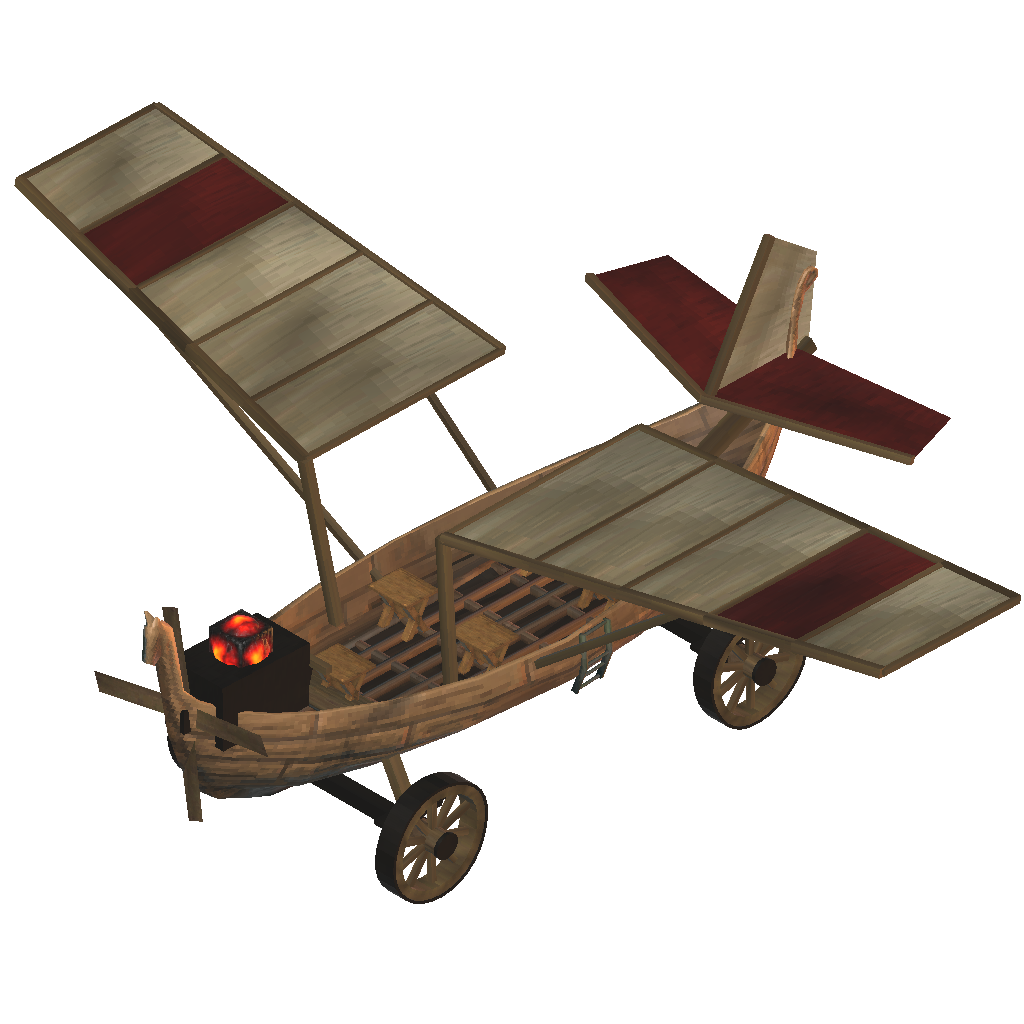
A Surtling-powered aircraft for one pilot and four passengers. Upgrade cargo to 30 slots, bind a wisp to clear mist ahead, reverse on water, and recover stuck planes. Configurable recipe, speed and optional durability.
| Date uploaded | 3 weeks ago |
| Version | 0.1.8 |
| Download link | wisedev-SurtlingSkyfarer-0.1.8.zip |
| Downloads | 848 |
| Dependency string | wisedev-SurtlingSkyfarer-0.1.8 |
This mod requires the following mods to function

ValheimModding-Jotunn
Jötunn (/ˈjɔːtʊn/, 'giant'), the Valheim Library was created with the goal of making the lives of mod developers easier. It enables you to create mods for Valheim using an abstracted API so you can focus on the actual content creation.
Preferred version: 2.30.2
denikson-BepInExPack_Valheim
BepInEx pack for Valheim. Preconfigured with the correct entry point for mods and preferred defaults for the community.
Preferred version: 5.4.2351README
Surtling Skyfarer
A wooden, Surtling-powered airplane for Valheim. Bring one pilot and four passengers, roll down a runway on wagon wheels, and carry supplies in a cargo chest upgradeable from 10 to 30 slots.
Current version: 0.1.8 · Download · Report a bug · View the in-game aircraft
New in 0.1.8: forward mist clearing, conventional flight
The bound wisp now clears a 35-metre radius, centred about 20 feet (6.1 metres) beyond the nose. The visible wisp stays on the plane; its clearing area follows the aircraft's heading to open the mist ahead before you reach it. Previously purchased wisp upgrades gain the new coverage automatically.
VTOL has been removed. Take off using normal forward flight. The mod no longer uses V, so Valheim's auto-pickup toggle works normally. Old VTOL config entries and saved hover flags are ignored; there is no hover mode to enable.
Cargo upgrades, water reverse, unstuck and the previous wing/streaming fixes remain. Durability is still off by default. Update every client and server together, preserving your edited config. This revised package keeps version 0.1.8: replace the DLL on every client and server even if 0.1.8 is already installed.
Features
- Wooden boat hull, cloth wings, glowing Surtling core, and a carved propeller.
- Five seats: one pilot and four passengers.
- Four wagon wheels with suspension, steering, brakes, and land/water reverse.
- Full loops, barrel rolls, and rudder control.
- Throttle stays set while someone remains seated or standing on deck. When everyone leaves, power cuts out and the plane slows and descends.
- 10 storage slots, upgradeable to 20 or 30 per aircraft. Cargo saves with the plane and drops when you dismantle it.
- Optional bound wisp clears a 35-metre radius ahead of the plane.
- A collision-checked unstuck action for parked aircraft.
- An indestructible-by-default hull, optional configurable durability, and unlimited core power. Collisions still apply; hammer dismantling remains available. The hull floats for water landings.
Requirements
Install these on every player's computer and on the server:
| Dependency | Tested version | Download and setup |
|---|---|---|
| BepInExPack Valheim | 5.4.2351 | BepInExPack Valheim |
| Jötunn, the Valheim Library | 2.30.2 | Jötunn |
| Surtling Skyfarer | 0.1.8 | GitHub releases |
Use the same Skyfarer version on all clients and the server. This release was tested with the Valheim l-1.0.21 client and l-1.0.21 dedicated server, both using Unity 6000.0.75f1.
The Skyfarer download contains the mod itself. Install BepInEx and Jötunn separately; their files are not bundled. The package manifest declares both dependencies for Thunderstore-compatible mod managers.
Installation
Manual installation
-
Close Valheim, or stop the dedicated server.
-
Install BepInExPack Valheim using its instructions for your operating system. Launch once through BepInEx so its folders are created, then close it.
-
Install Jötunn into the active
BepInEx/pluginsfolder. -
Download
SurtlingSkyfarer-0.1.8.zipfrom Releases. -
Extract its
BepInExfolder into the game or server folder. The mod DLL should end up at:BepInEx/plugins/Skyfarer/Wise.Skyfarer.dll -
Launch through your normal BepInEx-enabled method. On Linux, follow the BepInEx pack's game or dedicated-server launcher instructions.
If you download the standalone DLL instead, put it in the same folder above.
Keep one copy of Wise.Skyfarer.dll in your active plugin tree.
Mod-manager profiles
Install the two dependencies in your Valheim profile, then import the release
ZIP using the manager's local-mod import option. If local import is unavailable,
open the profile folder and copy the DLL into its BepInEx/plugins/Skyfarer
folder. Start the game through that modded profile.
Dedicated servers and AMP
The server needs all three components too. Stop it, install or enable its
BepInEx setup, and upload Jötunn and Skyfarer into its active
BepInEx/plugins folder. In AMP, use the instance's File Manager and restart
through its BepInEx-enabled launch method. The same Skyfarer DLL is used by
Windows and Linux clients and servers.
Updating an existing installation
Stop the server and close each player's game. Replace the existing
Wise.Skyfarer.dll, then restart everyone on the same version. Updating from
an earlier release to 0.1.8 does not require reinstalling BepInEx or Jötunn
when the tested versions above are already installed. Existing aircraft gain
the cargo chest when loaded.
Build the plane
Equip a hammer, stand near a workbench, and open Transport. Look for
Surtling Skyfarer, or type Skyfarer into the hammer menu's search field.
Your character must discover the recipe materials first.
| Material | Amount |
|---|---|
| Fine Wood | 80 |
| Copper | 25 |
| Deer Hide | 20 |
| Surtling Core | 8 |
Edit durability, health, recipe, and speed
Open BepInEx/plugins/Skyfarer/Skyfarer.cfg with any text editor before
starting the game or server. Keep it beside Wise.Skyfarer.dll:
[Aircraft]
DurabilityEnabled = false
MaxHealth = 1800
TopSpeed = 22
Recipe = FineWood:80,Copper:25,DeerHide:20,SurtlingCore:8
DurabilityEnabled = false keeps the plane immune to damage. Set it to true
to allow damage and destruction. MaxHealth sets its maximum health, from 1
to 1000000, with 1800 as the default. Use the hammer to repair damage.
Structural and roof-exposure wear remain disabled so flight needs no building
supports or roof. Changing the maximum preserves current health percentage;
disabling durability prevents further damage but does not heal existing damage.
Older config files automatically gain missing durability/health settings without
changing your existing values or comments. Any old VtolEnabled entry is unused
and can be removed; VTOL is no longer part of the mod.
TopSpeed is the powered target in metres per second, from 10 to 100.
It affects forward flight and wheel drive; reverse stays at 4 m/s. Dedicated
servers may struggle at 100 m/s; lower it if you notice lag or rubber-banding. Falling and
collisions can briefly exceed this target. Use a dot for decimal values.
Recipe accepts comma-separated item prefab names and amounts. You can
change quantities or substitute materials, for example
Wood:100,Iron:30,SurtlingCore:8. Names are case-sensitive. Use 1–16 distinct
items, each with 1–10000 units. Invalid recipes fall back to the defaults and
write a warning to the log. Characters still need to discover the materials.
Dismantling refunds use the currently configured recipe, including old planes.
Restart after edits. In multiplayer, edit the server's file: its settings are synchronized to clients through Jötunn. Local games use the local file. Settings apply to all Skyfarers, including existing ones. If the file is missing, the mod creates it with defaults. Preserve your edited file when updating.
Controls
| Input | Action |
|---|---|
| E on the front chair | Sit in the pilot seat |
| E on a rear chair | Ride as a passenger |
| Hold Shift / Ctrl | Raise / lower throttle |
| W / S | Pitch nose down / nose up |
| A / D | Roll in flight; steer wheels on land |
| Q / E while piloting | Rudder; also steers wheels on land |
| Hold R | Reverse on land or water, up to 4 m/s |
| Shift + E on the unoccupied helm | Open upgrades and unstuck services |
| Hold right mouse button | Wheel brakes / stop water reverse |
| Space | Leave the seat |
| E on the cargo chest | Open storage |
Space is the only manual pilot exit. E becomes rudder while piloting; attacking, dodging, and crouching do not eject the pilot.
- Take off: line up on open ground, increase throttle with Shift, then pull up with S as speed builds.
- Cruise: release Shift/Ctrl to hold throttle. Release the flight controls to hold the current attitude; there is no automatic leveling.
- Acrobatics: keep holding W/S for continuous loops, or A/D for rolls.
- Land: level the wings, lower the nose with W, reduce throttle with Ctrl, then brake with right mouse after touching down.
- Reverse: hold R on the ground or while floating. Releasing R resumes the selected throttle; brakes override reverse. R has no effect on thrust in the air.
- Park: lower throttle to zero. An empty aircraft cuts power automatically, and boarding it again leaves the engine off until throttle is raised.
These controls assume default game bindings. Throttle, pitch, roll, brakes, and dismount use their corresponding game actions; Q/E and R are dedicated keys. V remains Valheim's normal auto-pickup toggle.
Upgrades and unstuck
Upgrades: put the materials in the aircraft's cargo chest, close the chest, then stand near the unoccupied front chair and press Shift + E. Choose:
- Expand cargo: 20 Fine Wood + 10 Copper per expansion. The first gives 20 slots, the second 30. Each plane tracks its own upgrades.
- Bind Wisp: costs 1 Wisp. A visible wisp stays aboard while a 35-metre clearing radius is centred about 20 feet beyond the nose. It does not reveal the whole biome or map.
Upgrades and items in the added slots persist through travel, ownership changes and world saves. Upgrade materials are consumed and are not refunded when the plane is dismantled; the remaining cargo still drops normally. Close the menu with its Close button or Escape.
Unstuck: stop the engine, have everyone step off, open the same services menu and choose Unstuck. It searches 2.5–8 metres above the plane for room for the whole aircraft, levels it, and stops its motion. It refuses occupied or moving planes, blocked destinations and repeated use within ten seconds. It respects ward access. If no clear position is available, clear some branches or obstacles and try again. It does not retrieve already-missing aircraft.
Changes in 0.1.6
- Fix hammer dismantling by enabling removal on the aircraft prefab. Aim at the hull while everyone is off the plane and a workbench is in range. Normal ward protection still applies; cargo drops when the aircraft is dismantled.
- Add
Skyfarer.cfgbeside the DLL for custom recipes and powered top speed. - Keep the current recipe and 22 m/s speed as defaults.
See the changelog for earlier versions.
Testing and support
Version 0.1.5 was tested with Windows and Linux clients on a dedicated server with four people. Version 0.1.8 passed 195 gameplay regression checks, 43 feature checks, 25 separate-process reload checks, and 6 dedicated server startup/shutdown checks on Linux Valheim l-1.0.21. The wing rendering was also inspected in a game-rendered preview. A new multi-client flight and Windows runtime test have not been performed for this update.
If the plane is missing, check the hammer's Transport category, discovered
materials, and BepInEx/LogOutput.log. A successful load includes:
Loading [Surtling Skyfarer 0.1.8]
Skyfarer registered: 1 pilot, 4 passenger seats, 13.3 m wingspan.
For connection problems, compare Valheim and mod versions on every client and the server, and check for duplicate DLLs. Report bugs through GitHub Issues with versions, steps to reproduce, and relevant log excerpts. Remove server passwords and other personal information before posting logs.
Source and building
The C# source is in src/.
See Building from source
for the .NET SDK and local game references, and
Publishing
for recreating the GitHub/Thunderstore package.
Unofficial community mod, unaffiliated with Iron Gate. Each player needs their own installed copy of Valheim. Game assemblies, extracted game assets, dependency binaries, and development saves are not included in the mod package.
License
Copyright (C) 2026 alsocat and moderncanvas.
Surtling Skyfarer is free software under the GNU General Public License v3.0. You may fork, modify, and redistribute it, including as part of another mod, as long as you credit the original authors, link back to this repository, and release your modified source under the same license. Builds published without their source are not permitted.
CHANGELOG
Changelog
0.1.8
Revised after playtesting
- Remove VTOL completely: hover controls, the V-key binding, configuration option and HUD hints. V remains Valheim's auto-pickup toggle.
- Ignore legacy saved hover flags and obsolete
VtolEnabledconfig entries; all aircraft use conventional flight. - Increase the bound wisp's clearing radius from 25 to 35 metres and move its centre about 20 feet (6.1 metres) beyond the aircraft's nose. The visible wisp stays aboard.
- Apply expanded forward mist clearing automatically to existing wisp upgrades, including after world reloads.
- Preserve cargo upgrades, water reverse, unstuck, durability settings and the wing/streaming fixes.
Included features and fixes
- Separate front/back wing surfaces and use a cloth item material to address flashing and whitening.
- Synchronize cargo during physics as well as rendering to avoid lag at low frame rates.
- Stop hull/cargo distant streaming and suspend aircraft physics until terrain loads, protecting parked aircraft across area reloads.
- Add per-plane cargo upgrades: 10 → 20 → 30 slots, costing 20 Fine Wood and 10 Copper each. Expanded contents persist through streaming and saves.
- Bind one Wisp per plane for a native 35-metre mist-clearing effect centred about 20 feet beyond the nose.
- Enable R reverse and braking while floating on water.
- Add Shift + E at the unoccupied helm for upgrades and unstuck. Unstuck checks occupants, speed, wards, cooldown and destination clearance before lifting/levelling the plane.
- Keep existing recipes, speed, durability defaults, aircraft and cargo compatible. Update all clients and the server together.
0.1.7
- Add
DurabilityEnabled(default false) andMaxHealth(default 1800) to the adjacent config file. - Enable normal health damage, destruction, and hammer repairs when durability is on, including crash damage.
- Preserve each aircraft's health percentage when maximum health changes, including saved aircraft from earlier versions.
- Keep structural and roof-exposure wear disabled for flight. Disabling durability does not automatically repair damage.
- Synchronize durability and maximum health through Jötunn's server settings.
- Add missing durability entries to old configs without replacing custom recipe/speed values or comments.
0.1.6
- Fix hammer dismantling: explicitly enable removal instead of inheriting the Karve prohibition. Normal workbench, ward, and occupancy checks remain.
- Add a commented
Skyfarer.cfgbeside the DLL. Edit it before starting the game/server to change recipe materials, quantities, and powered top speed. - Synchronize server settings to multiplayer clients through Jötunn.
- Validate recipe entries and bound speed to 10–100 m/s; defaults remain unchanged.
0.1.5
- Pilot boarding transfers aircraft simulation ownership to the pilot.
- Prevent vanilla boat logic from handing aircraft ownership to passengers.
- Tolerate lagged seated-player positions and preserve authenticated heartbeat expiry for disconnected riders.
- Preserve valid boarding replies across ownership handoffs.
- Cut throttle when everyone leaves; riders standing on deck keep it running.
- Add a ten-slot cargo chest to new and existing aircraft, with persistent contents and drops on deliberate dismantling.
- Keep cargo ownership separate from aircraft ownership and preserve their link after world loading changes object IDs.
- Replace the recipe's Iron requirement with 25 Copper.
- Preserve the actual DLL build time in release ZIPs.
0.1.4
- Allow continuous pitch loops and barrel rolls.
- Map A/D to roll and Q/E to rudder.
- Make Space the only manual pilot exit.
- Add R for ground reverse and right mouse for wheel brakes.
0.1.3
- Add persistent throttle, adjusted with Shift/Ctrl.
- Map W to nose down and S to nose up.
0.1.2
- Add four wooden wagon wheels with suspension, steering, and braking.
0.1.1
- Make the aircraft indestructible while retaining collisions and deliberate hammer dismantling.
0.1.0
- Initial wooden aircraft with one pilot seat and four passenger seats.