
You are viewing a potentially older version of this package.
View all versions.
| Date uploaded | 2 years ago |
| Version | 1.2.3 |
| Download link | deezhizyu-VotV_RichPresence-1.2.3.zip |
| Downloads | 121 |
| Dependency string | deezhizyu-VotV_RichPresence-1.2.3 |
README
Discord Rich Presence mod for VotV
Installation
- Copy the contents of the
UE4SSfolder in the package intoVotV/Binaries/Win64or build latest version ofUE4SSfrom source. - Open archive and copy
VotV_RichPresencefolder into theVotV/Binaries/Win64/Modsdirectory. Its new path should beVotV/Binaries/Win64/Mods/VotV_RichPresence. - Copy
discord_game_sdk.dllfile intoVotV/Binaries/Win64. - Open
Mods/mods.txtand addVotV_RichPresence : 1afterBPModLoaderMod : 1line.
VotV/Binaries/Win64 should look like this:
VotV-Win64-Shipping.exeUE4SS.dllUE4SS-settings.inidwmapi.dlldiscord_game_sdk.dllMods/Mods/VotV_RichPresence
mods.txt should look like this:
CheatManagerEnablerMod : 0
ActorDumperMod : 0
ConsoleCommandsMod : 0
ConsoleEnablerMod : 0
SplitScreenMod : 0
LineTraceMod : 0
BPModLoaderMod : 1
VotV_RichPresence : 1

; Built-in keybinds, do not move up!
Keybinds : 1
Now you can run the game!
Compatibility
Compatible with VoidMod loader as it also uses UE4SS.
CHANGELOG
What's new?
1.2.4
- Fix description
1.2.1
- Updated UE4SS version, which includes bug fixes and improvements.
1.2.0
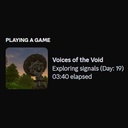
- Added days count. Example: Exploring signals (Day: 15).
- Added different icons for menu, tutorial and main game.
- Minor improvements.
