
You are viewing a potentially older version of this package.
View all versions.

FinapseX
Script Executor for Webfishing -TeamFishnet :3
| Date uploaded | 9 months ago |
| Version | 1.4.1 |
| Download link | TeamFishnet-FinapseX-1.4.1.zip |
| Downloads | 1003 |
| Dependency string | TeamFishnet-FinapseX-1.4.1 |
This mod requires the following mods to function


toes-Socks
Socks is a library to facilitate joy in Webfishing mod development
Preferred version: 0.2.1README
Finapse X
Realtime GD Script executor for Webfishing - brought to you by Team Fishnet :3
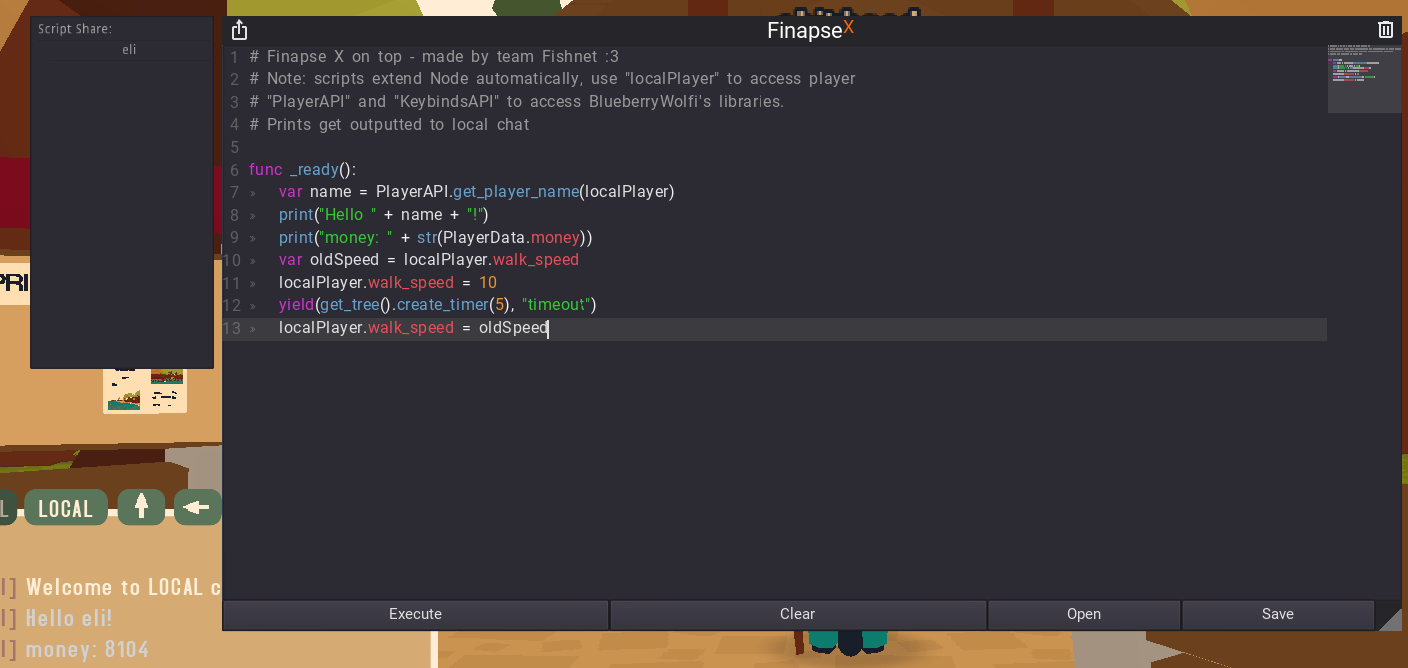
About
Lets you run scripts in-game without using the editor or recompiling mods for debugging, developing and other shenanigans
Features
- Visual Studio Code integration via extension (check changelog for details)
- send scripts to other Finapse X users with the Share (top left) button or the "-sendscript [name]" chat command
- customizable keybind to open and close (Default F1)
- totally original name and ui (rip Synapse)
- syntax highlighting and codemap (I wish CodeEdit was a 3.5 node)
- built-in
PlayerAPI,KeybindsAPIlibraries andlocalPlayervariable - open and save scripts as
.gdfiles - button to delete previously executed scripts (stop infinite loops!)
Requirements
CHANGELOG
1.4.1
- reverted changes from 1.4.0 due to bugs
1.3.5
- made script sharing enabled by default
- fixed script share gui not containing players or containing duplicate players
1.3.4
- partially switched over to Socks player API
- added a script share menu (top left) and
-sendscript [name]chat command to share scripts with other Finapse users easily
1.3.3
- reverted a change that caused executing new scripts to break processing on previously run scripts
1.3.2
- manifest changes for the VSCode extension tutorial
- changed
printcolor to be bright - added an
errorandwarnfunction (same as print but text is red and yellow) extends Nodenow gets stripped to add better VSCode support
1.3.1
- manifest updates
1.3.0
- Visual Studio Code support!!! Enable the websocket in the mod config (restart game for it to take effect), install the Finapse Xecute extension and start executing code with a button in the bottom left or by setting an action shortcut in your settings :3
added ai hate godot i hate godot i hate godot i hwait(seconds)function
1.2.6
- Added an icon.png and a homepage link for Tacklebox
- Fixed a bug replacing
printwithcustomPrntin places where it shouldn't (ty Aym) - Removed a line of code that spammed errors in the debug console (ty Kikin)
1.2.5
- Added a button to delete/stop all previously executed scripts
- Added more keywords to the syntax highlighting
- Clear button now adds
func _ready():automatically - Added an error message for parser errors in local chat
1.2.0
- Made the executor window resizable
- Added button to save code to a
.gdfile - Arranged the buttons a bit more neatly
1.1.0
- Added button to open
*.gdfiles in the editor - Made executor window draggable
loadstringfunction now strips starting and ending whitespaces- Fixed version formatting for TackleBox metadata
1.0.1
- Added BlueberryWolfi's Keybinds and Player libraries to use from inside script
- Made the keybind to open F1 and customizable in the settings
1.0.0
- Working execution in full script environment
- Added default
localPlayervariable
