
BigWalkVelocity
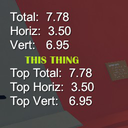
Displays the player's current and top velocity in Big Walk.
| Last updated | 2 months ago |
| Total downloads | 418 |
| Total rating | 0 |
| Categories | Mods |
| Dependency string | Sch1nni-BigWalkVelocity-1.1.0 |
| Dependants | 0 other packages depend on this package |
This mod requires the following mods to function

BepInEx-BepInExPack_IL2CPP
BepInEx pack for IL2CPP x64 Unity games. Preconfigured and ready to use.
Preferred version: 6.0.755README
Big Walk Velocity
A simple velocity display for Big Walk.
Displays your current movement speed and records your highest observed velocities.
Features
- Current total velocity
- Current horizontal velocity
- Current vertical velocity
- Recorded top total velocity
- Recorded top horizontal velocity
- Recorded top vertical velocity
- Detects externally imposed movement, such as being pushed or carried
- Toggleable in-game display
Controls
| Key | Action |
|---|---|
F8 |
Show/hide velocity display |
F7 |
Reset top speed values |
Both keys can be changed through the BepInEx configuration file.
Installation
Mod Manager
Install Big Walk Velocity through Thunderstore Mod Manager, r2modman, or another compatible mod manager.
BepInEx will be installed automatically as a dependency.
Manual Installation
-
Install BepInEx 6 IL2CPP for Big Walk.
-
Launch Big Walk once to allow BepInEx to perform its initial setup.
-
Place
BigWalkVelocity.dllin:BepInEx/plugins/BigWalkVelocity/ -
Launch Big Walk.
Big Walk uses Unity IL2CPP, so BepInEx 5 is not supported.
Configuration
After running the game once, the configuration can be found in:
BepInEx/config/
The default controls are:
F8— Toggle velocity displayF7— Reset top speed values
Notes
This is a client-side display mod. It does not modify the player's movement speed.
Source
Source code and issue tracker:
