

FXDSP
老实铺产线很枯燥吧?成为FX战士伊卡洛斯,进行物品杠杆交易、使用建筑币兑换建筑、获利资源接入工厂流水线,还有成就系统。Tired of laying production lines? Become FX Warrior Icarus: trade items with leverage, exchange Building Coins for buildings, feed profits into your factory, and unlock achievements.
| Last updated | 15 hours ago |
| Total downloads | 12 |
| Total rating | 1 |
| Categories | Quality of Life |
| Dependency string | SkyeDrem-FXDSP-1.0.0 |
| Dependants | 0 other packages depend on this package |
This mod requires the following mods to function


CommonAPI-DSPModSave
Library that allows to store mod save data separately from vanilla saves
Preferred version: 1.2.2
xiaoye97-LDBTool
Library that allows mods to add and edit Proto data. Also allows you to see Proto data, config ID's of mod Protos and change localized strings
Preferred version: 3.0.3README
FXDSP — DSP 交易系统 English version below: jump to English
伊卡洛斯,老实铺产线很枯燥吧!
现在,你可以化身韭卡洛斯,接入主脑交易平台,在戴森球计划中进行现货交易。
你可以满仓百倍杠杆梭哈短线擒龙,也可以耐心价值投资等待估值回归。技术足够好或者足够幸运,利用物流塔交付平台甚至可以让市场代替产线。特殊的建筑币还能双向兑换各种建筑,让交易平台成为你的建筑超市。
FX战士伊卡洛斯,祝你交易顺利!
开始第一笔交易
- 研究 交易系统 科技,解锁DSP交易平台,开户!
- 按 F8 或屏幕右上角按钮打开交易平台,选择交易物品。
- 从背包存入该物品,选择 仓位比例 和 杠杆。
- 预测上涨就 开多,预测下跌就 开空;之后可以主动平仓,结算本次盈亏。
- 将可用余额提取成同种物资(考虑游戏性平衡不同物资之间不能互相兑换),或者提取到绑定的交付平台直接接入工厂流水线。
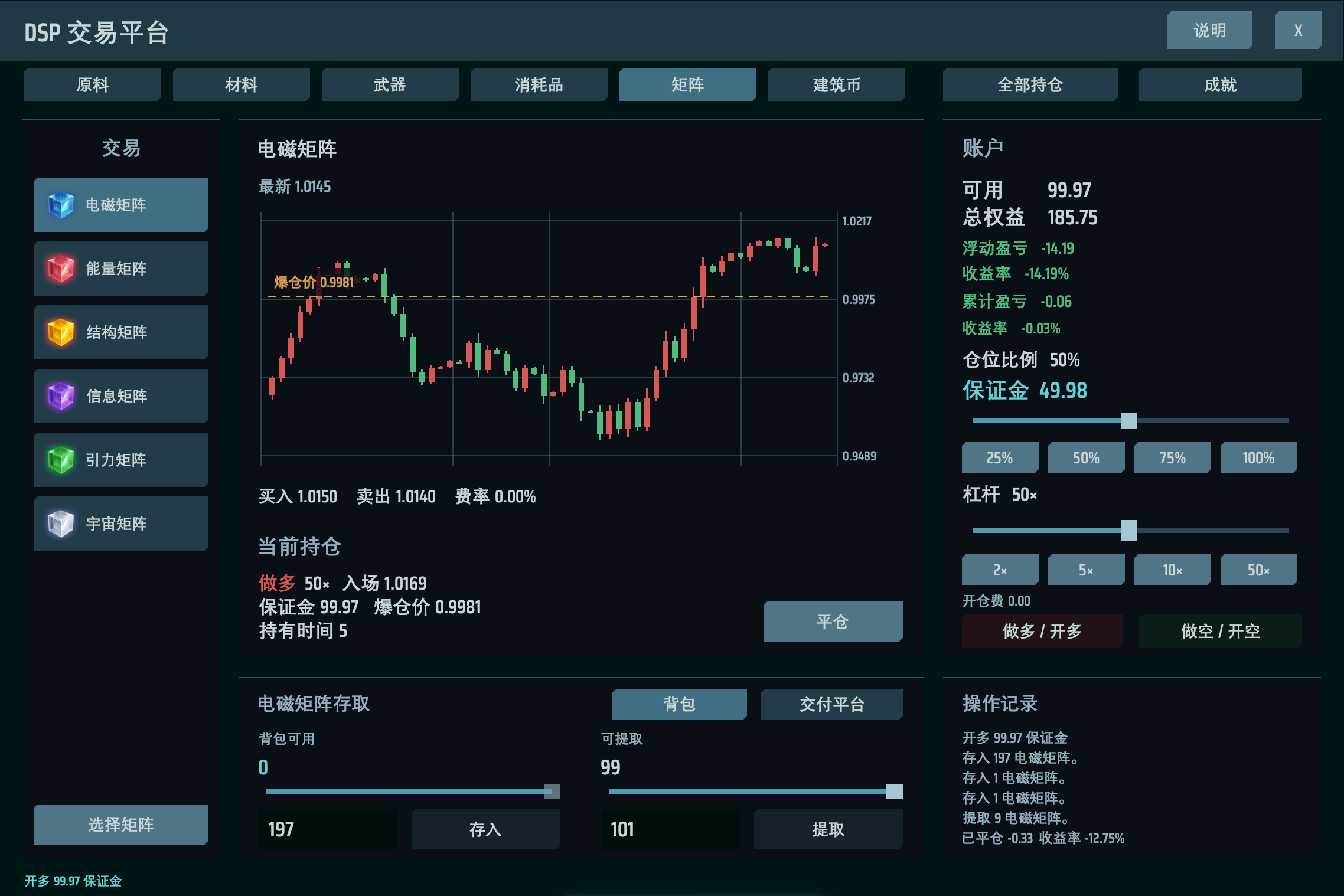
仓位、杠杆与爆仓
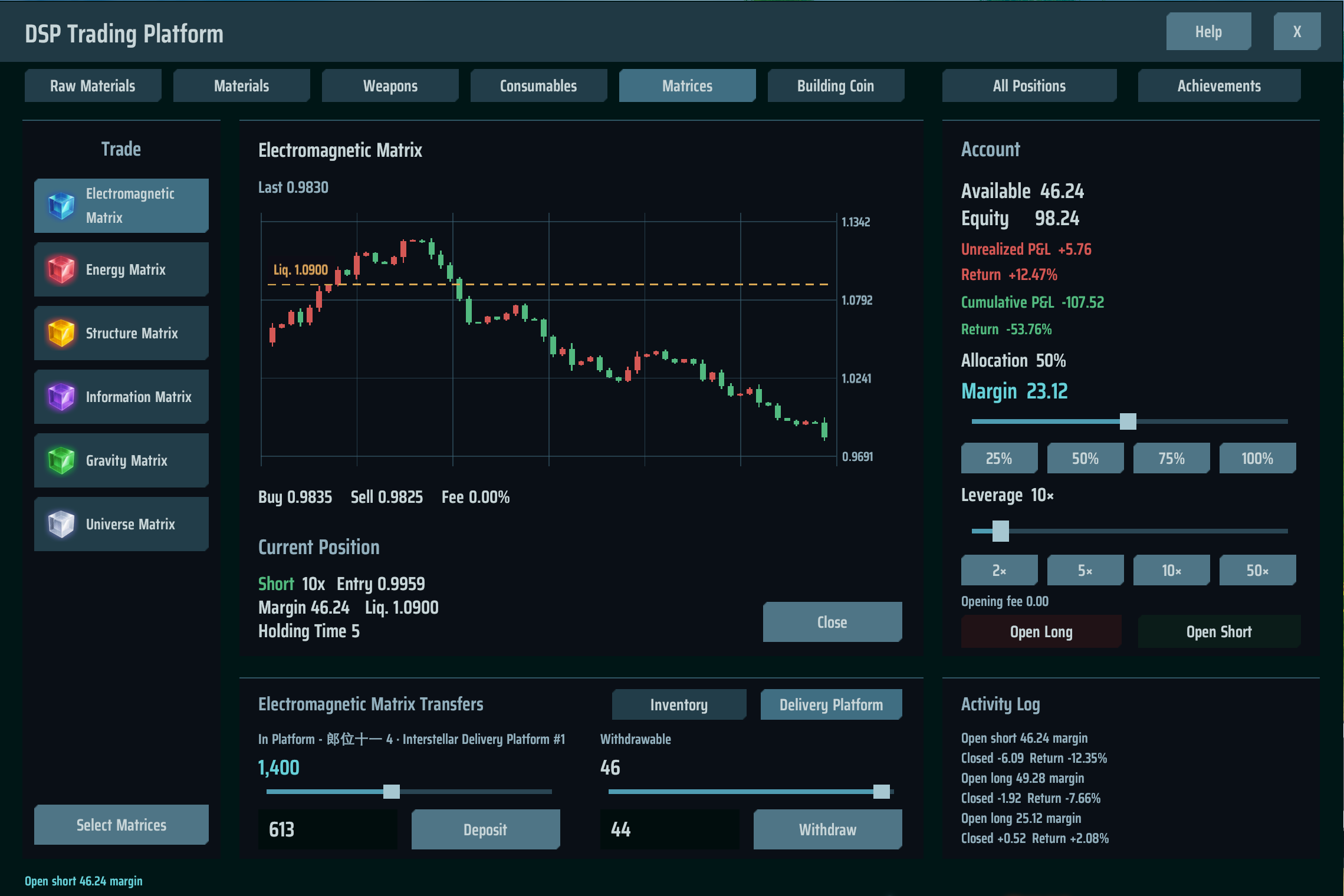
仓位比例决定这笔交易投入多少可用资金,杠杆 放大同一段价格变化带来的收益与亏损。支持1~100倍杠杆。
K线图显示行情、价格刻度和当前持仓的爆仓线。每个物品市场可以持有一笔做多或做空仓位,平仓后才能重新开仓。持有时间以经过的 K线数量显示。
- 浮动盈亏:持仓随行情变化的盈亏,收益率按浮动盈亏除以保证金计算。
- 累计盈亏:该物品账户的累计盈亏,收益率按累计盈亏除以净投入计算。净投入为总存入减总提取,非正时显示“—”。
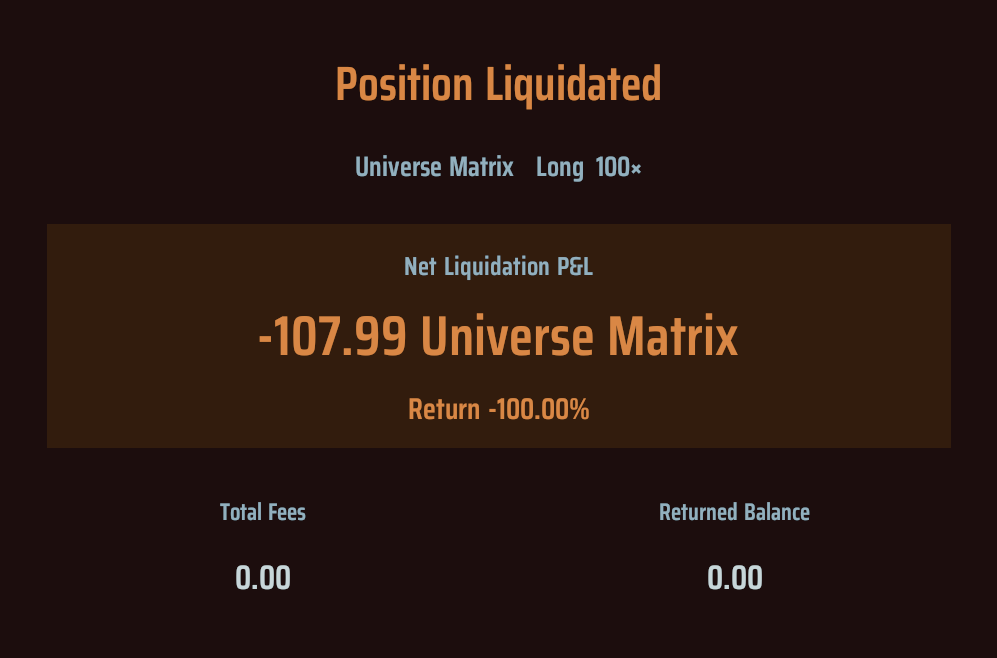
- 平仓结算:显示本次扣除开仓费和平仓费后的净盈亏与收益率。
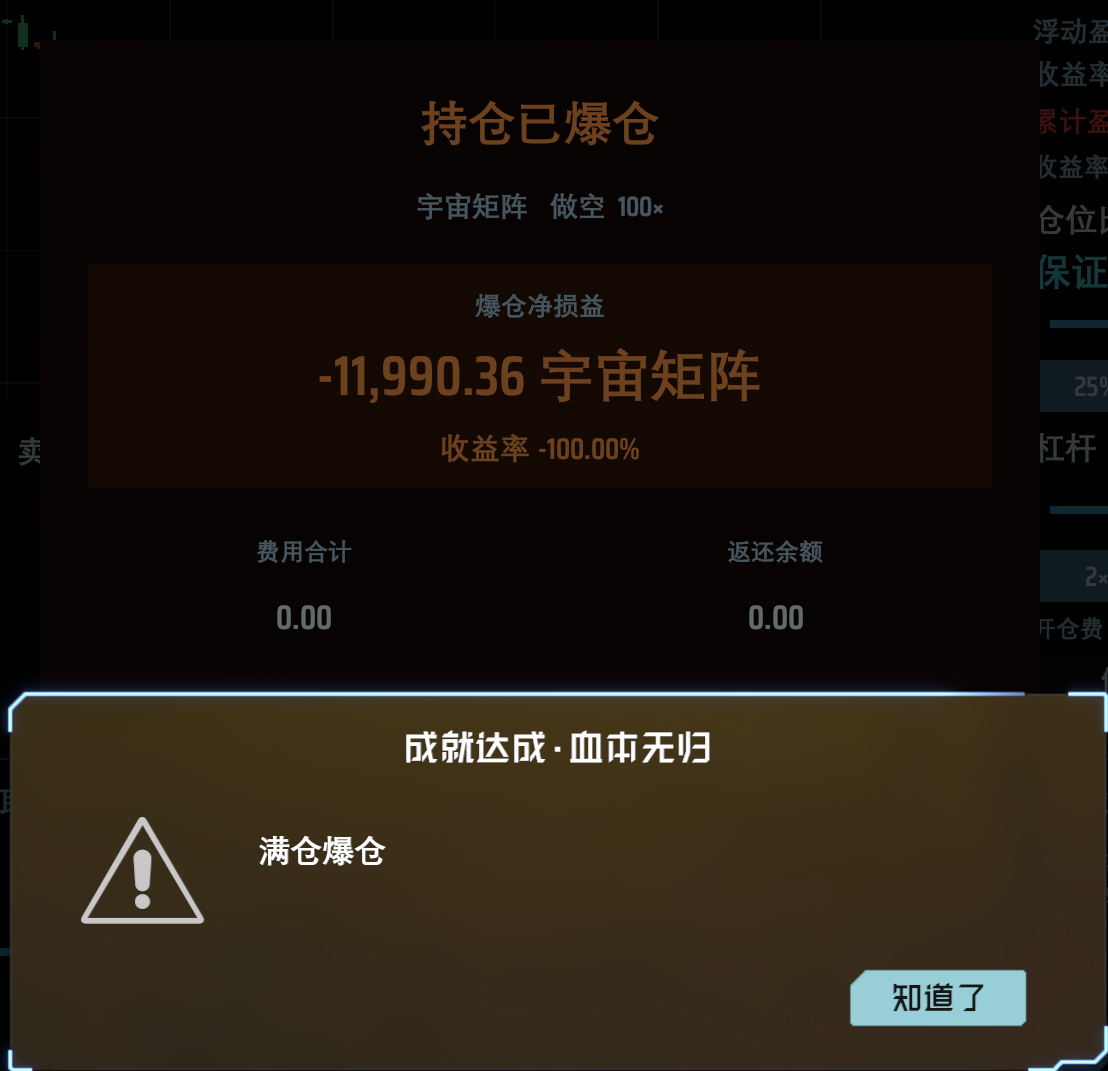
如果行情走错方向,亏损过大触及爆仓线,持仓会被强制平仓,并显示爆仓提示。学韭姐满仓满杠杆会非常刺激。
持仓小面板
屏幕右上角的紧凑持仓面板可随时查看各持仓品种的浮动盈亏和收益率,并直接平仓,不需要一直打开完整交易界面。
点击 “兑换” 可直达建筑币兑换界面,点击 “详情” 可打开全部持仓页面,逐项查看、平仓,或者一键全部平仓。

建筑币系统
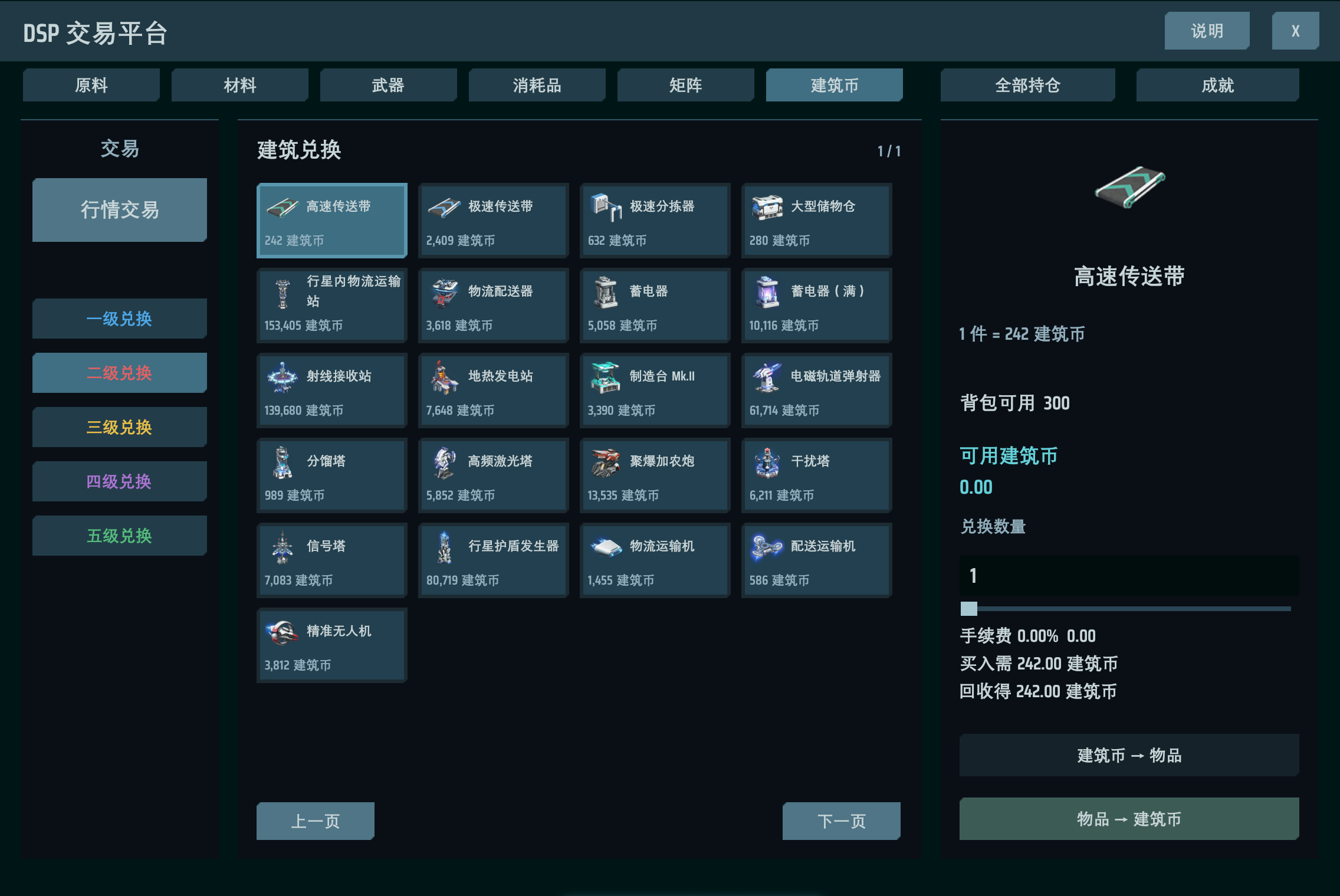
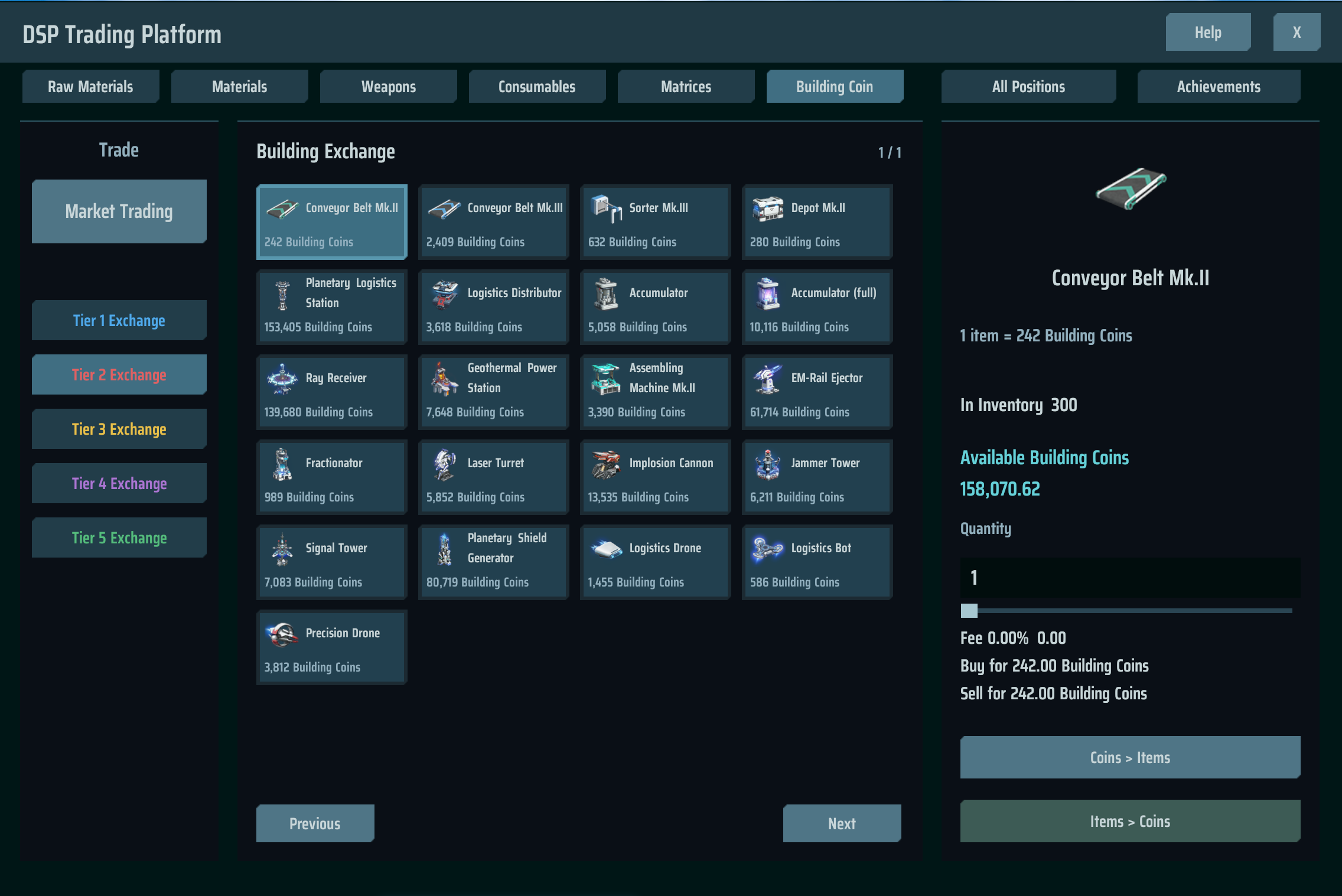
建筑币可按固定价格双向兑换 71 种建筑、地基、物流运输船和战斗舰船。可以用背包里的建筑换取建筑币,也可以用建筑币兑换需要的建筑直接存入背包,注意手续费。
如果你足够厉害或幸运,或许可以靠交易实现建筑自由。如果不想投机,或许也可以挑选性价比高的建筑量产赚取建筑币,再兑换其它建筑,作为简化的建筑超市。
建筑兑换分五级,需要在升级中解锁对应科技才能解锁该等级的建筑兑换。
交易科技
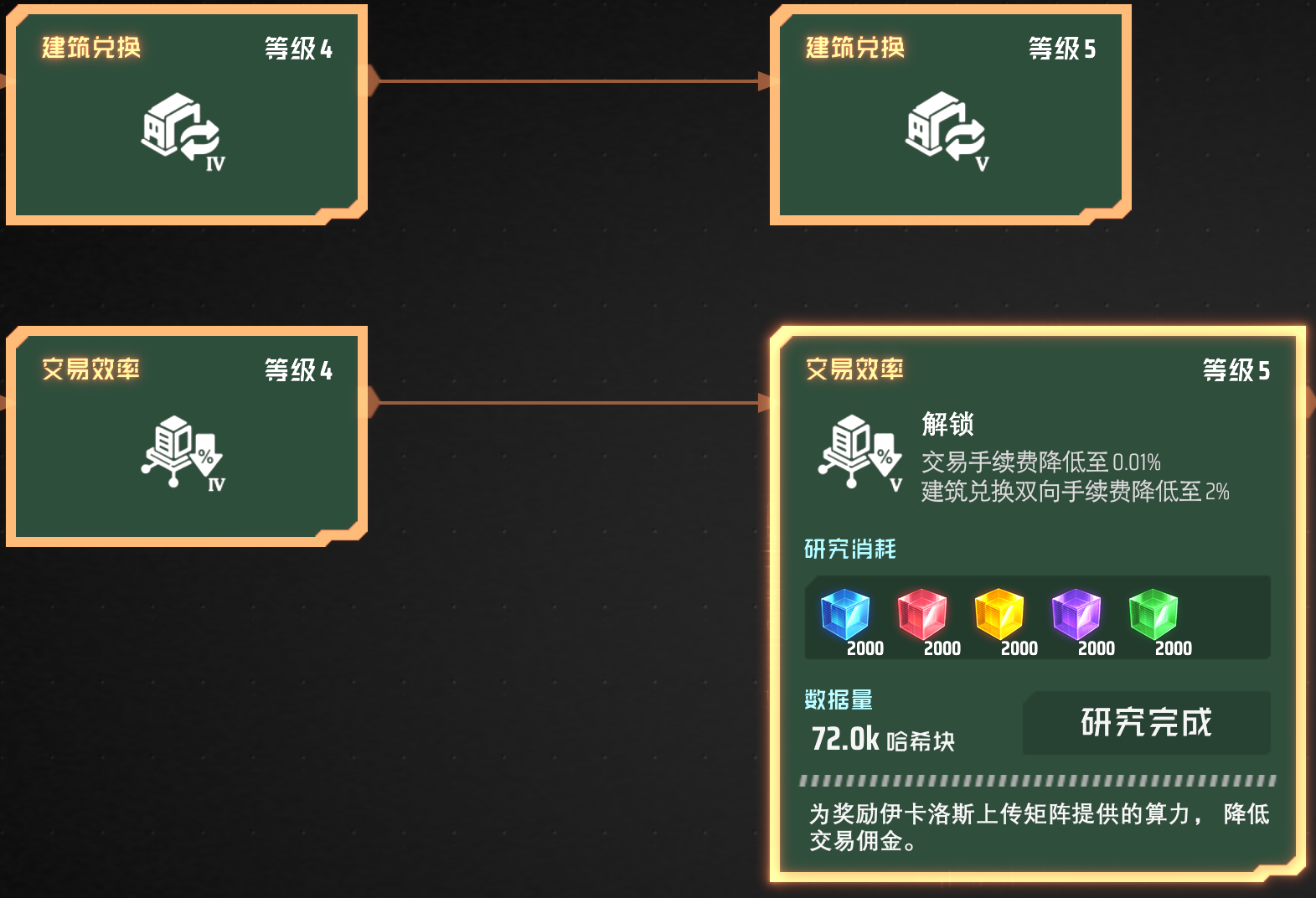
除前面提到的开户科技与建筑兑换科技,还有可降低手续费的升级科技。
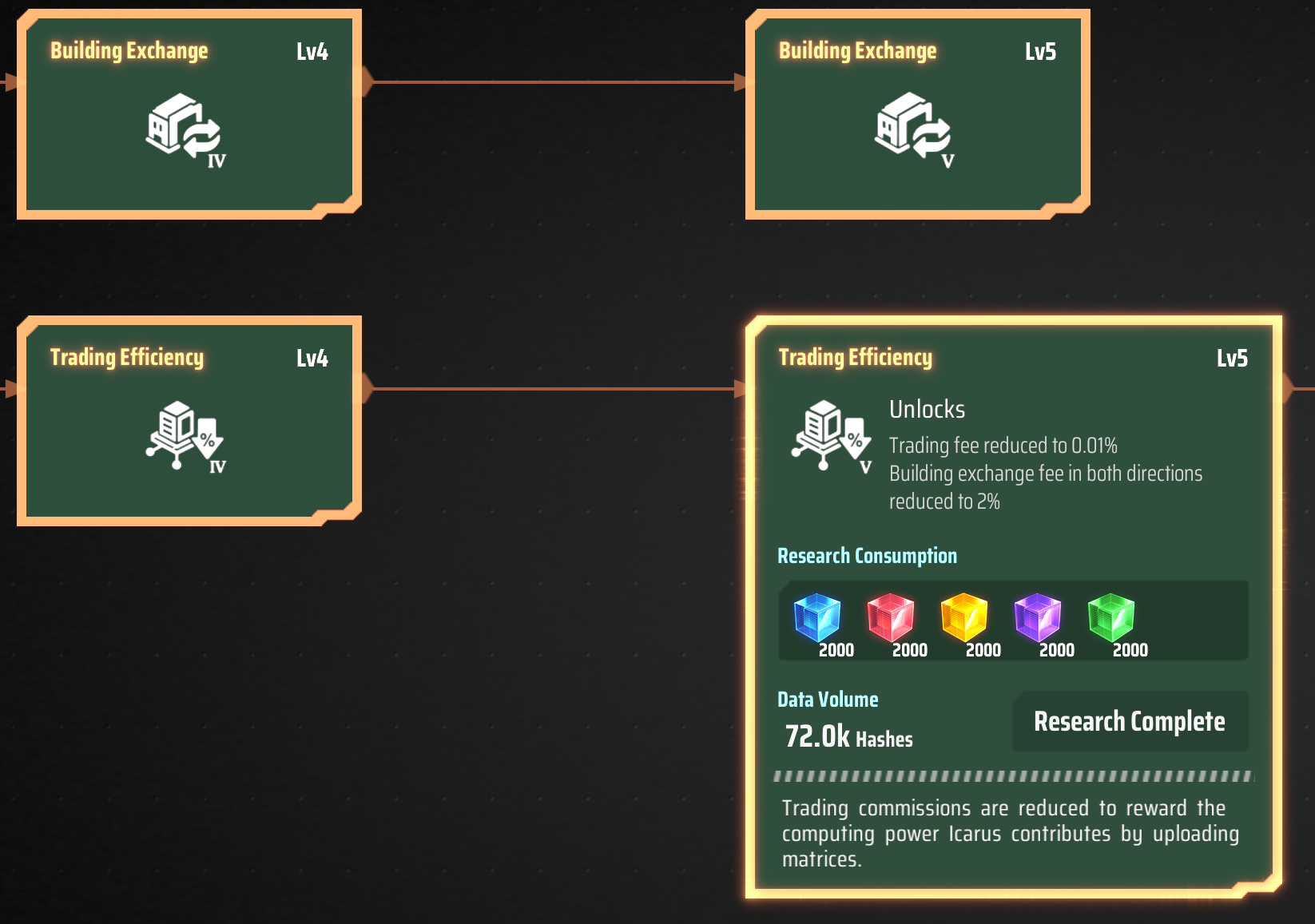
研究 “交易效率”,可以逐步降低交易和建筑兑换手续费,甚至完全免除。
物流塔交付平台
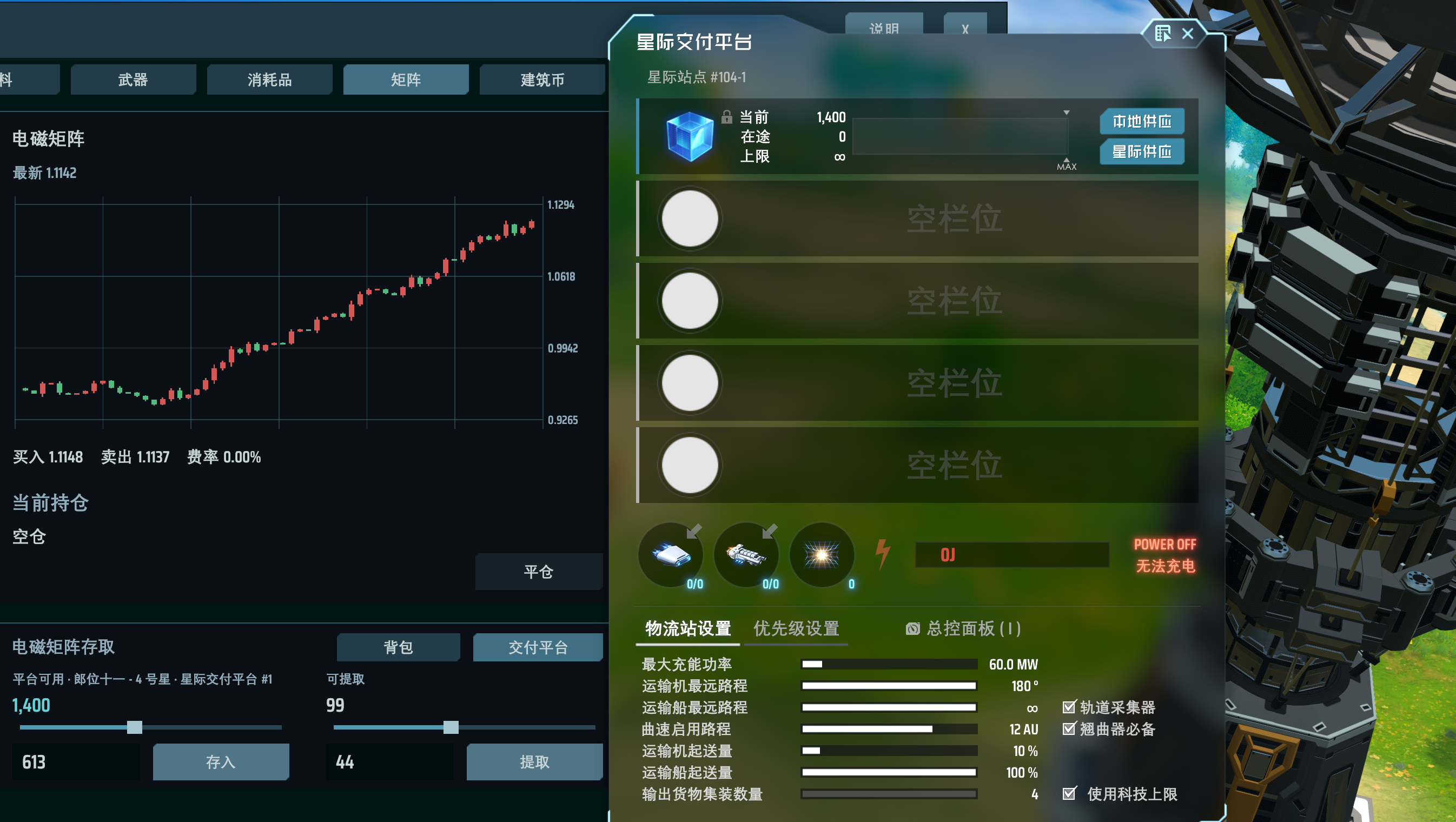
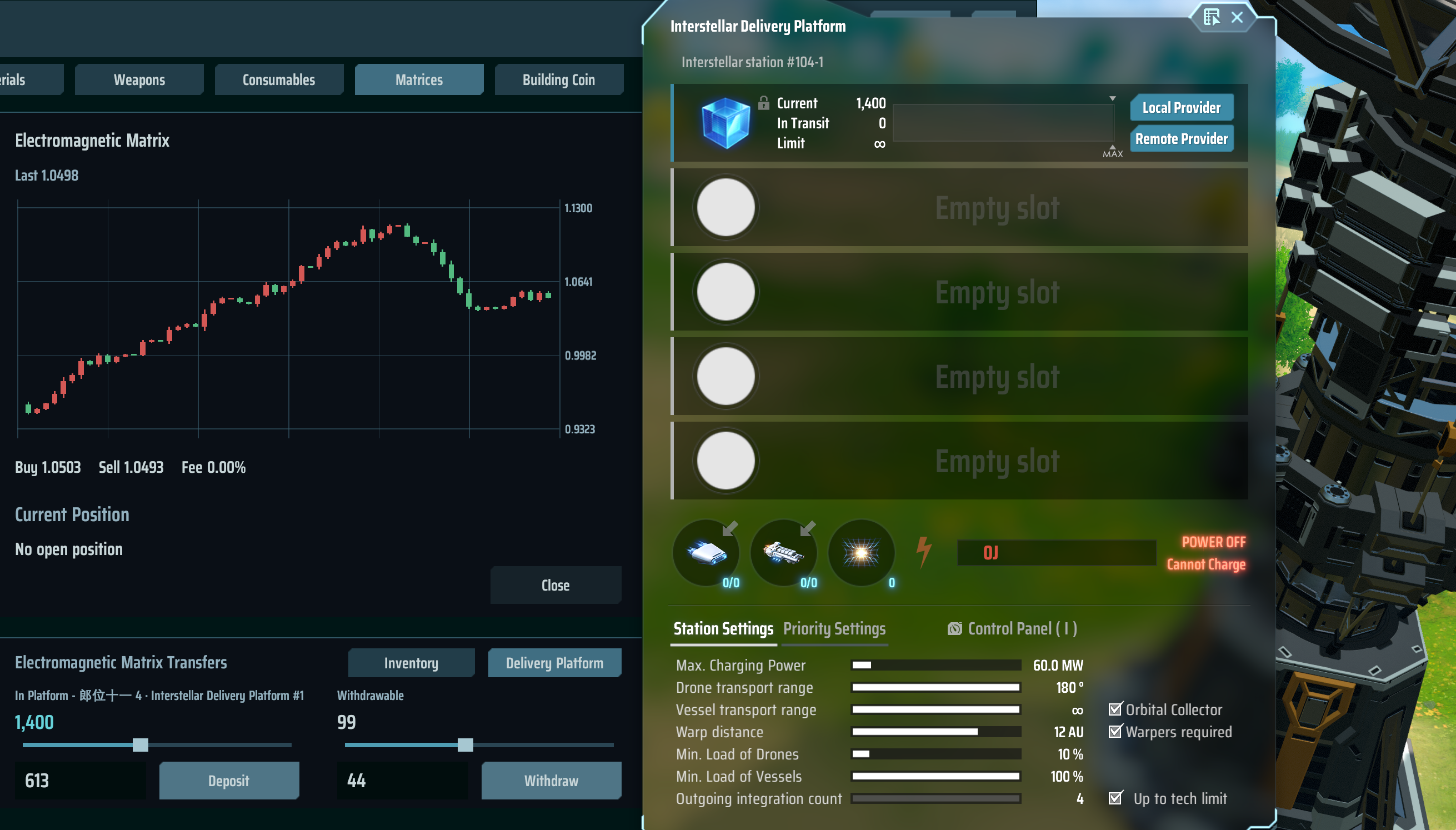
解锁原版对应物流科技后,可以在制造台制作两种物流塔交付平台。平台保留对应原版物流塔的槽位数量与物流功能,并拥有超级储存容量以应对大单交割,可以从平台存入物品和提取物品到平台。
在交付平台中设置物品就会自动绑定该物品的交易账户。每种物品只能绑定一个平台,重复设置会提示已有绑定(翘曲器除外)。
成就系统
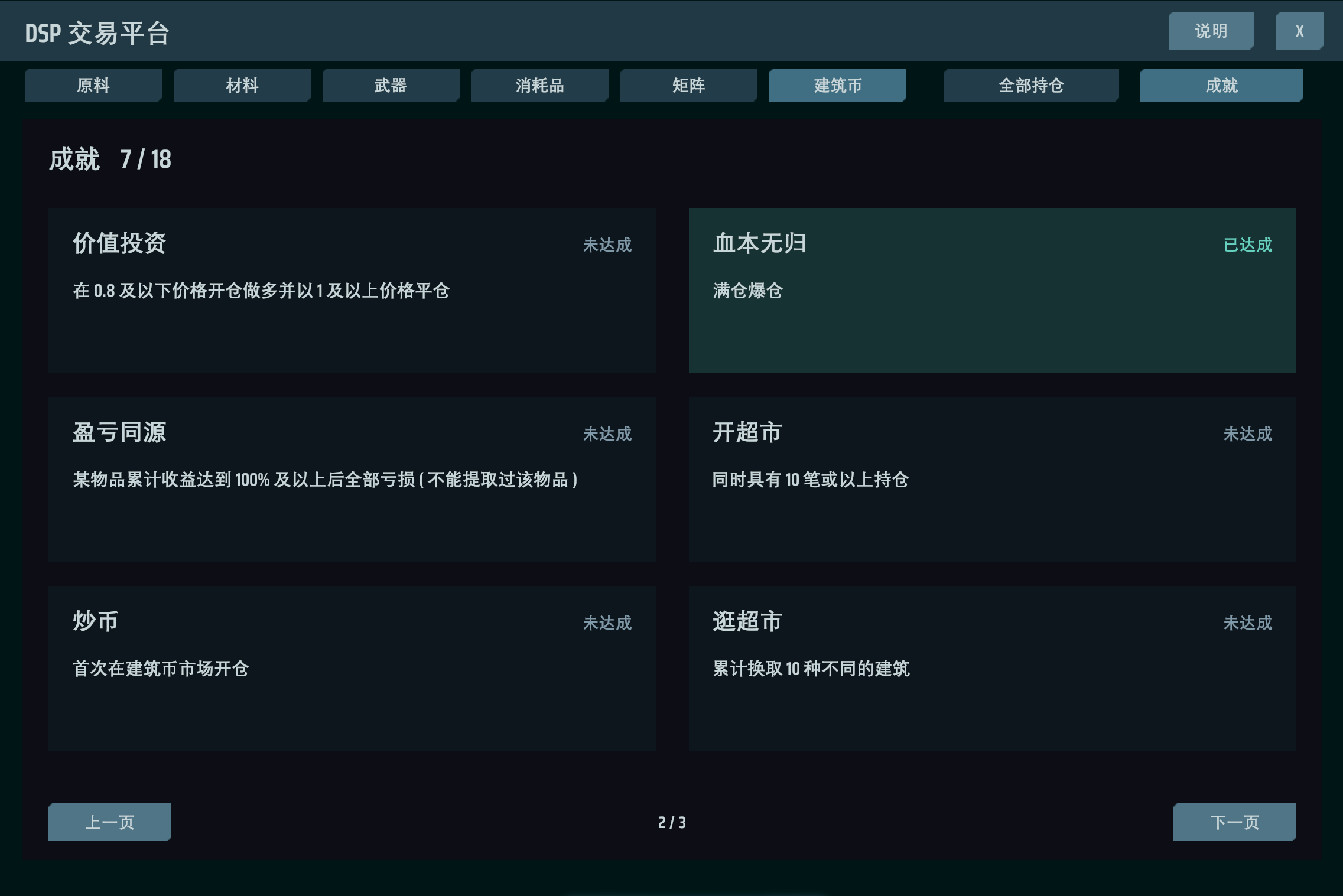
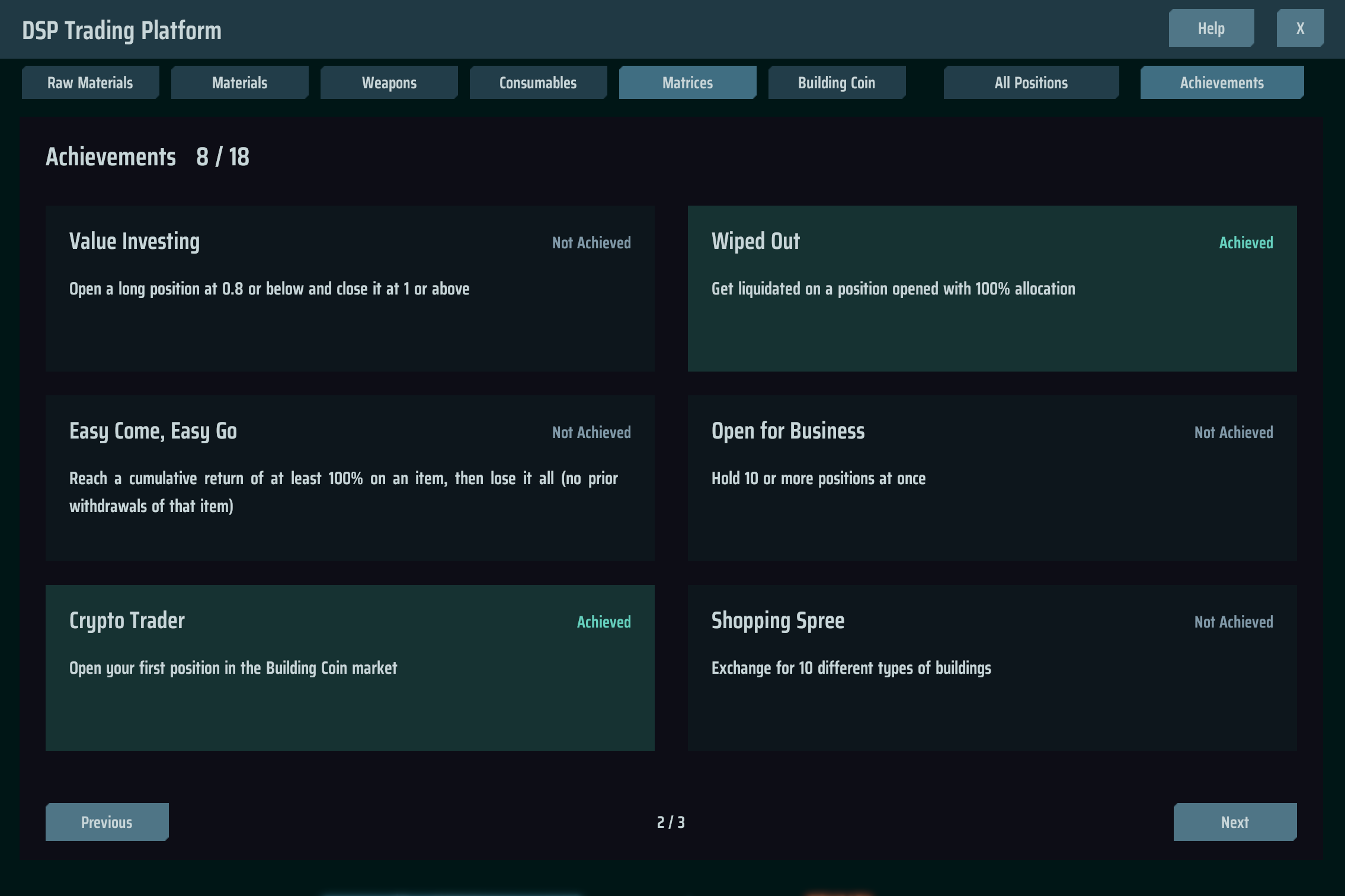
平台内有独立的交易成就页面,达成后弹窗提示。欢迎来B站视频评论区提供好玩的成就想法。
安装
推荐使用 r2modman / Thunderstore Mod Manager 安装 FXDSP,并同时安装依赖:
手动安装时,先安装以上依赖,再把压缩包中的 plugins/FXDSP 复制到游戏或配置文件夹的 BepInEx/plugins/FXDSP,然后完整重启游戏。目录内应同时包含 FXDSP.dll 和 FXDSP.DeliveryBootstrap.dll。
存档与兼容性
交易账户、交付扩展库存和成就进度由 DSPModSave 保存。备份或传递存档时,请同时保留游戏存档和对应的 .moddsv 旁档;存档中存在交付平台时,应保留本 Mod 再读取。
物品/配方 ID 为 11702、11703,科技 ID 为 1951、7701~7705、7801~7806;与占用相同 ID 的 Mod 不能共存。建筑兑换使用原版固定目录,不会自动给其它 Mod 的建筑定价。多人账户与库存同步尚未实现。
内置本地异常检测兼容开关,默认开启,用于兼容 Mod 玩法下的成就与上传判定。启用期间对本地异常检测全局生效,旧异常记录仍保留,沙盒与账号资格条件沿用原版。可在 BepInEx/config/dspfx.mod.cfg 的 [Compatibility] 中将 BypassAbnormalityChecks 设为 false 恢复检测。
开发与反馈
源码和构建说明:GitHub · SkyeDrem/Mod — FXDSP。
可至 B站@SkyeDrem mod宣传片评论区反馈问题或提出建议。
FXDSP — DSP Trading System
Icarus, getting tired of laying down production lines?
Now you can become Icarus the degen trader, connect to the mainframe's trading platform, and try spot trading in Dyson Sphere Program.
Go all-in at 100x leverage to chase short-term rallies, or practice patient value investing while waiting for valuations to return to fair value. With enough skill or luck, logistics delivery platforms can even let the market take the place of production lines. Special Building Coins can also be exchanged both ways for a variety of buildings, turning the trading platform into your own building supermarket.
Good luck, FX Warrior Icarus!
Your first trade
- Research Trading System to unlock the DSP trading platform and open your account!
- Press F8 or use the button in the top-right corner to open the platform and choose an item to trade.
- Deposit that item from your backpack, then choose your allocation and leverage.
- Open long if you expect a rise, or short if you expect a fall. You can then close the position to settle its profit or loss.
- Withdraw available funds as the same item (different items cannot be exchanged for one another for gameplay balance), or withdraw into a bound delivery platform to feed your production lines directly.
Allocation, leverage and liquidation
Allocation determines how much of your available funds goes into a trade. Leverage magnifies both gains and losses from the same price move. Leverage ranges from 1x to 100x.
The candlestick chart shows prices, price levels and the current position's liquidation line. Each item market supports one long or short position at a time; close it before opening another. Holding time is displayed as the number of elapsed candlesticks.
- Unrealized P&L changes with the market while a position is open. Its return is unrealized P&L divided by margin.
- Cumulative P&L is the item's cumulative account result. Its return is cumulative P&L divided by net deposits: total deposits minus total withdrawals. Non-positive net deposits display “—”.
- Settlement shows the trade's net profit or loss and return after both opening and closing fees.
If the market moves against you and losses reach the liquidation line, the position is forcibly closed and a liquidation notification appears. Going all-in at maximum leverage like Kurumi makes for a real thrill.
Compact positions HUD
The compact panel in the top-right corner shows each open position's unrealized P&L and return, with a direct close button, so you do not have to keep the full trading window open.
Use Exchange to jump to Building Coin exchange or Details to open the portfolio page, where you can inspect and close positions individually or close them all at once.

Building Coin system
Building Coins can be exchanged both ways at fixed prices for 71 types of buildings, foundations, logistics vessels and combat craft. Exchange buildings from your backpack for coins, or spend coins to receive the buildings you need directly into your backpack. Keep an eye on the fees.
With enough skill or luck, trading might bring you building freedom. If you prefer not to speculate, you can mass-produce a cost-effective building, sell it for coins, and exchange them for other buildings, using the system as a simplified building supermarket.
Building exchange has five tiers. Research the corresponding technology in the Upgrades tab to unlock each tier.
Trading research
Alongside the account-opening and building exchange technologies mentioned above, upgrade technologies can reduce your fees.
Research Trading Efficiency to progressively reduce trading and building exchange fees, potentially eliminating them entirely.
Logistics delivery platforms
After unlocking the corresponding vanilla logistics technology, you can craft two types of logistics delivery platforms in an assembler. They retain the slot count and logistics functions of their original stations, with enormous storage capacity for large deliveries. You can deposit items from a platform into your account or withdraw account items into the platform.
Configure an item in a delivery platform to bind its trading account automatically. Each item can be bound to only one platform. Duplicate assignments show the existing binding; Space Warpers are exempt.
Achievements
The platform has its own trading achievement page, with notifications when achievements are completed. Suggestions for fun new achievements are welcome in the comments on the bilibili video.
Installation
Install FXDSP with r2modman or Thunderstore Mod Manager and include its dependencies:
For manual installation, install those dependencies first, then copy plugins/FXDSP from the archive into BepInEx/plugins/FXDSP in the game or profile folder. Both FXDSP.dll and FXDSP.DeliveryBootstrap.dll must be present. Restart the game completely.
Saves and compatibility
DSPModSave stores trading accounts, expanded delivery inventory and achievement progress. Keep game saves together with their matching .moddsv sidecars when backing up or sharing them. Keep this mod installed when loading saves containing delivery platforms.
Reserved item/recipe IDs are 11702, 11703; technology IDs are 1951, 7701–7705, 7801–7806. Mods using the same IDs conflict. Building exchange uses a fixed vanilla catalog and does not automatically price other mods' buildings. Multiplayer account and inventory synchronization is not implemented.
A built-in local abnormality bypass is enabled by default to support achievement and upload eligibility in modded play. It applies globally to local abnormality detection while enabled. Existing evidence is retained, and vanilla sandbox and account eligibility conditions still apply. Set BypassAbnormalityChecks = false under [Compatibility] in BepInEx/config/dspfx.mod.cfg to restore native checks.
Development and feedback
Source code and build instructions: GitHub · SkyeDrem/Mod — FXDSP.
For bug reports or suggestions, please leave a comment on the mod's promotional video on bilibili @SkyeDrem.
