

InterstellarLogisticsOpt
Staggers interstellar logistics scheduling to reduce CPU load / 相位分散星际物流调度,降低 CPU 开销
| Last updated | 2 weeks ago |
| Total downloads | 2978 |
| Total rating | 1 |
| Categories | Optimization |
| Dependency string | fyyy-InterstellarLogisticsOpt-1.2.3 |
| Dependants | 0 other packages depend on this package |
This mod requires the following mods to function


soarqin-UXAssist
Some functions and patches for better user experience / 一些提升用户体验的功能和补丁
Preferred version: 1.6.0README
InterstellarLogisticsOpt
中文看我
减少星际运输塔寻找供需配对、决定派船时的 CPU 开销,适合物流塔较多的大型存档。已在游戏 0.10.35.29145 上完成离线兼容性验证,需要安装 UXAssist 1.6.0 或更高版本。
使用
在游戏内 UXAssist 的「星际物流优化」页调整,设置从下一次模拟更新开始生效,无需重新读档。
| 设置 | 默认值 | 作用 |
|---|---|---|
Enabled |
true |
开启优化;关闭后使用原版调度 |
AmortizeFactor |
1 |
调度间隔系数,范围 1 至 30。设为 N 时,派船检查频率降为原版的 1/N;1 保持原版频率 |
系数作用于全部航线,包括塔对塔、行星、恒星和物流分组。设为 5 时,检查频率为原版的 1/5,原本每 10、30、60 tick 执行的检查,改为每 50、150、300 tick 执行。这里的 tick 是模拟更新次数。
优化了什么
本塔供需不足时,游戏仍可能需要维护对端的优先级锁。mod 会省去没有作用的库存读取和重复锁刷新,保留必要的锁维护和配对游标更新。这项优化在系数 1 时也生效。
系数大于 1 时,按塔编号把派船检查错开到不同 tick。每座塔按自己的固定相位执行检查,减少同一 tick 集中处理大量塔的情况。
使用时留意
系数越大,派船响应越慢,也可能限制物流吞吐。例如在 60 UPS、系数 5 下,一座忽略优先航线的塔,每分钟最多通过普通调度新派出 12 艘船;其他塔送取货和返程装货另算。航程较短时,更容易受到这个限制。
相位分散会改变不同塔之间的检查顺序,较长的检查间隔也可能让优先级锁在下次检查前失效。因此,系数大于 1 时,以部分优先级准确性和响应速度换取性能,不能保证严格遵循原版的跨塔优先级顺序。
单座塔的配对检查一次完成,各塔的工作量也不相同,因此相位分散不能保证消除所有尖峰。CPU 开销和 UPS 不会按系数等比例变化,调大系数后也要留意生产和实际送货量。
性能截图
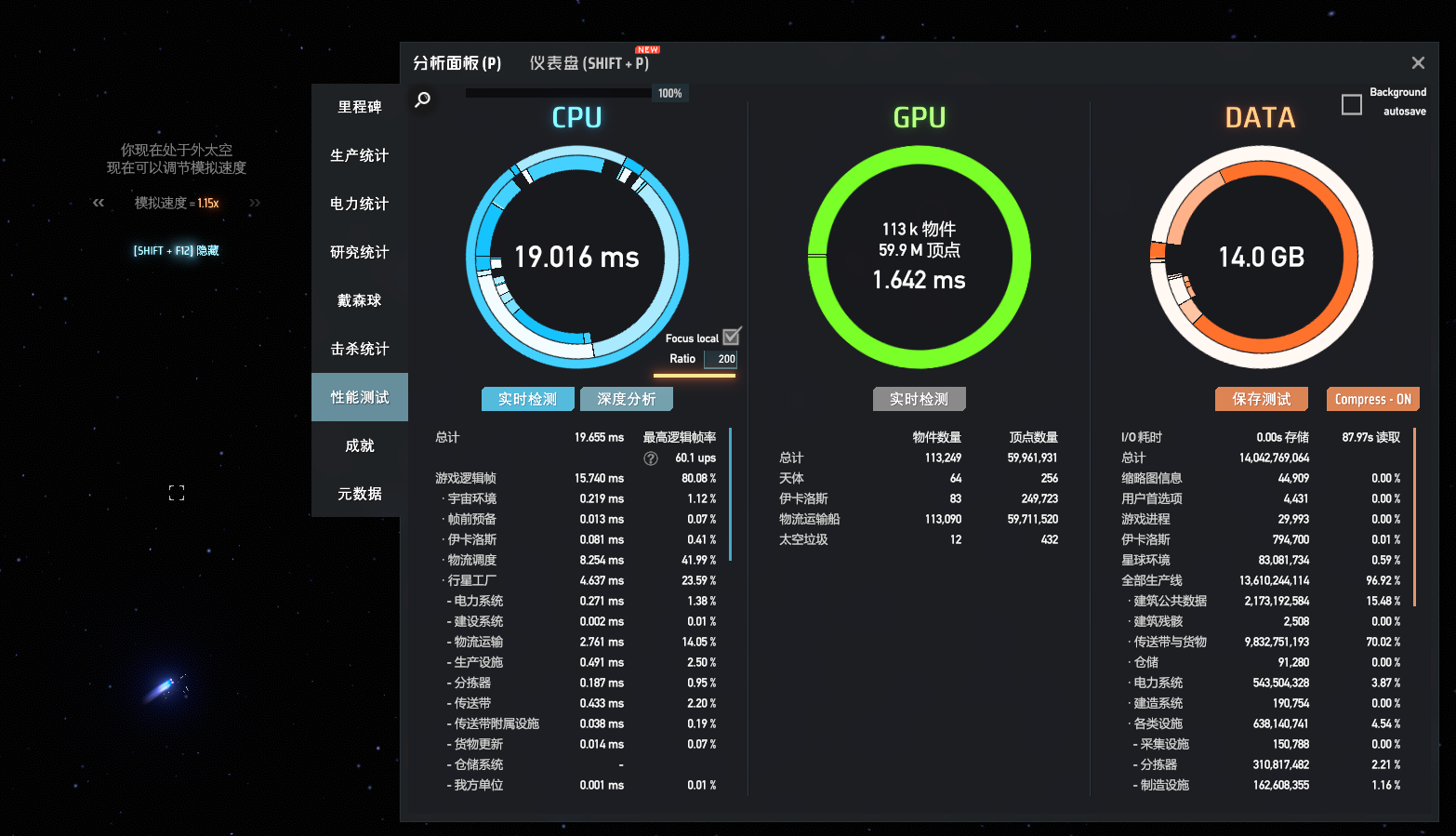
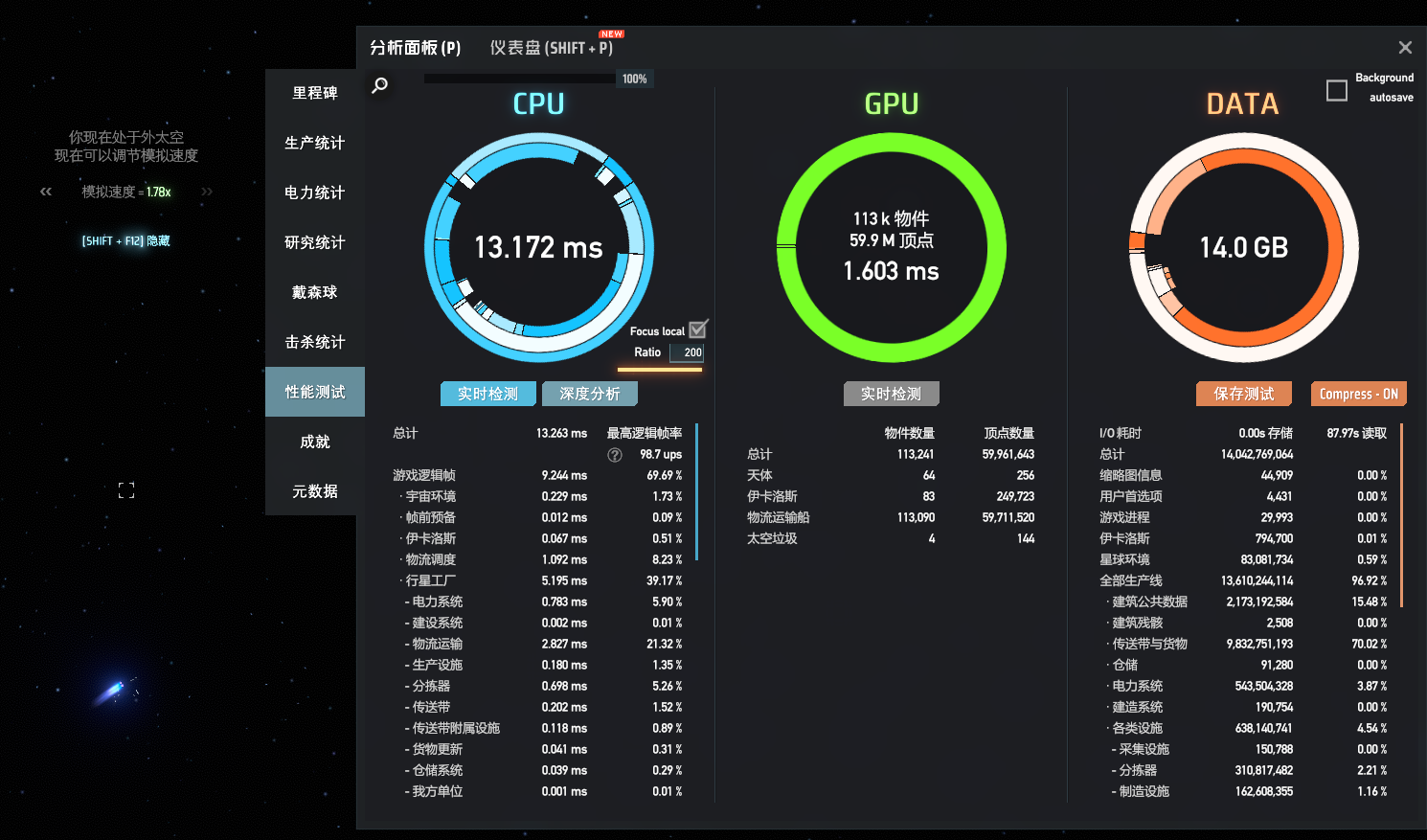
两张图的 SampleAndHoldSim Ratio 均为 200,按关闭和开启优化的顺序展示,开启时系数为 5。
| 面板读数 | 关闭 | 开启,系数 5 |
|---|---|---|
| CPU 圆环 | 19.708 ms | 12.354 ms |
| 物流调度 | 8.414 ms | 0.066 ms |
具体效果随存档、系数和其他 mod 设置变化。
关闭:
开启,系数 5:
README
Reduces the CPU time spent matching supply and demand and dispatching interstellar ships in large saves. Offline compatibility checks pass on game 0.10.35.29145. Requires UXAssist 1.6.0 or later.
Usage
Change settings in the InterstellarLogisticsOpt tab of UXAssist. Settings take effect on the next simulation tick without reloading the save.
| Setting | Default | Effect |
|---|---|---|
Enabled |
true |
Enable optimization; turning it off restores native dispatch |
AmortizeFactor |
1 |
Dispatch interval multiplier, from 1 to 30. At N, dispatch checks run at 1/N of their native frequency; 1 keeps the native frequency |
The factor applies to all routes, including station, planet, star and logistics-group priorities. Factor 5 runs checks at 1/5 of their native frequency: every 50, 150 or 300 ticks instead of every 10, 30 or 60. These are simulation ticks.
What it changes
A station with insufficient supply or demand may still need to maintain another station's priority locks. The mod skips inventory reads and repeated lock refreshes that would have no effect, while keeping required lock updates and pair-cursor advancement. This also works at factor 1.
At factors above 1, station IDs stagger dispatch checks across ticks. Each station runs at its own fixed phase, spreading station visits over time.
Things to consider
Higher factors delay dispatch and may limit throughput. At 60 UPS and factor 5, a station set to ignore priority routes can launch at most 12 new ships per minute through ordinary dispatch. Deliveries and pickups by other stations, and return loading, are separate. Short routes are more likely to reach this limit.
Staggering changes the order of checks between stations, and longer intervals can let priority locks expire before the next check. Factors above 1 therefore trade some priority fidelity and responsiveness for performance; they do not preserve strict native priority order across stations.
A single station's pair scan runs in one call, and stations have different workloads, so staggering cannot eliminate every spike. CPU time and UPS do not scale directly with the factor; check production and actual deliveries after increasing it.
Performance screenshots
Both screenshots use a SampleAndHoldSim Ratio of 200. They show the mod disabled, then enabled at factor 5.
| Panel reading | Disabled | Enabled, factor 5 |
|---|---|---|
| CPU ring | 19.708 ms | 12.354 ms |
| Logistics scheduling | 8.414 ms | 0.066 ms |
Results depend on the save, factor and other mod settings.
Disabled:
Enabled, factor 5:
