

CombatPanel
Standalone GTFO combat panel: an in-level damage/share, friendly-fire and accuracy table, plus a post-run influence board scoring every player out of 100 on ten weighted metrics. Ranks, sentences, supply and scan efficiency. BepInEx only.
| Last updated | 7 hours ago |
| Total downloads | 30 |
| Total rating | 0 |
| Categories | Client Mods |
| Dependency string | HawChow-CombatPanel-1.12.1 |
| Dependants | 0 other packages depend on this package |
This mod requires the following mods to function

BepInEx-BepInExPack_GTFO
BepInEx pack for GTFO. Preconfigured and includes Unity Base DLLs.
Preferred version: 3.2.3README
CombatPanel 1.12.1
Standalone GTFO BepInEx IL2CPP combat statistics. Only dependency: BepInEx-BepInExPack_GTFO-3.2.3.
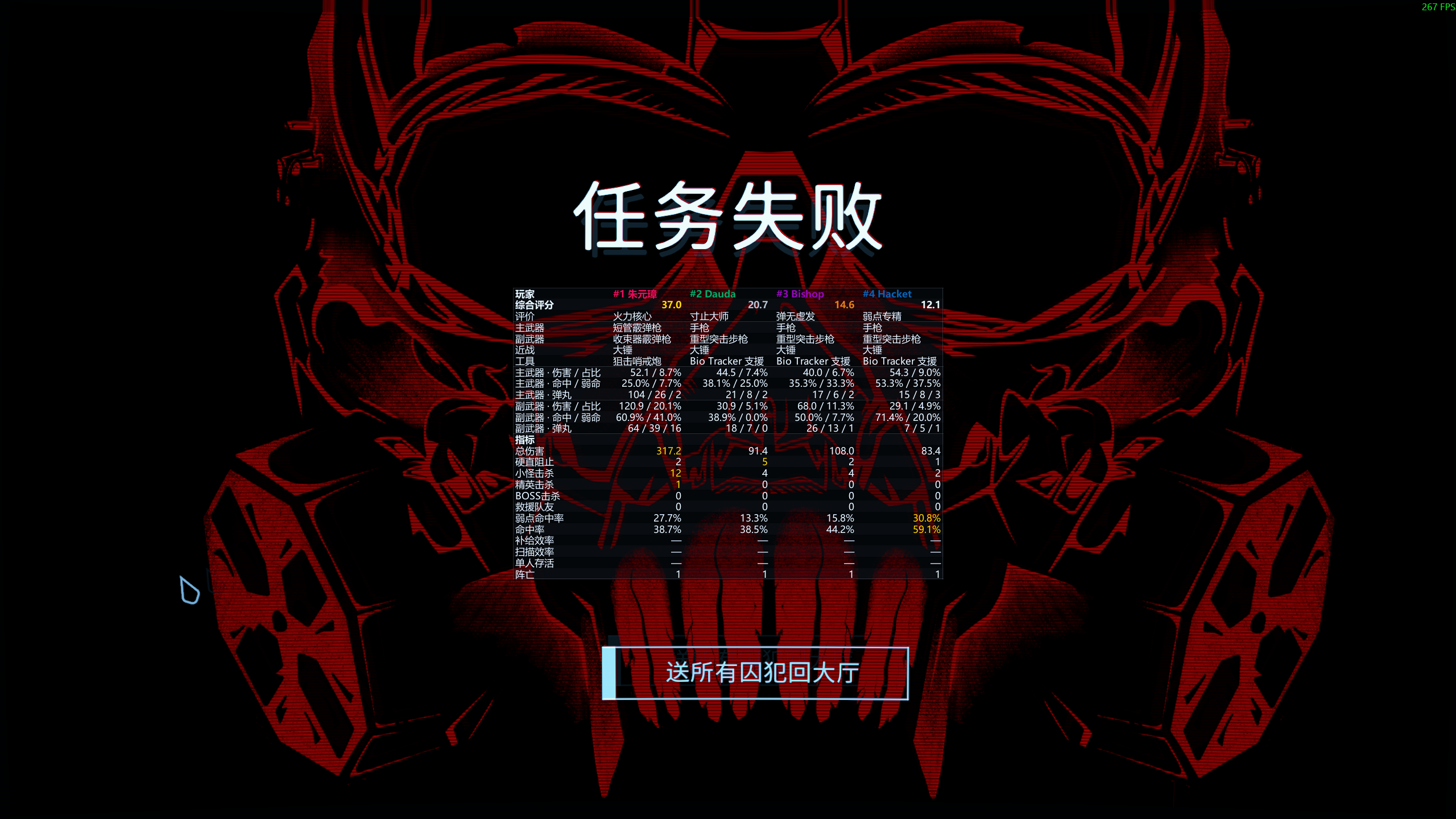
One plugin, both halves of the run. During an expedition it draws a native-looking table: each player's damage and its share, friendly fire, hit and weakspot rates and pellets. After the run — success or failure — it replaces the vanilla recap with an influence board whose rows are fields and whose columns are players, ranked by a score out of 100, with a place, a sentence, the four gear slots and ten scored metrics each: total damage, stagger interrupts, kills by weight class, revives, weakspot rate, hit rate, supply efficiency, scan efficiency, lone survivor and deaths. Team help leads the default weights, so the squad's most useful member outranks its best shooter, and a player who contributed nothing wears the 「战地游客」 / "Battlefield tourist" sentence. Everything is read from the game's own events, and anything that cannot be read shows — instead of a guess.
Feedback: qingju.me | Voice channel: Xiaoheihe voice — both also at the end of this page.
HUD
Native-looking table during an expedition, all columns shown by default, F8 to toggle:
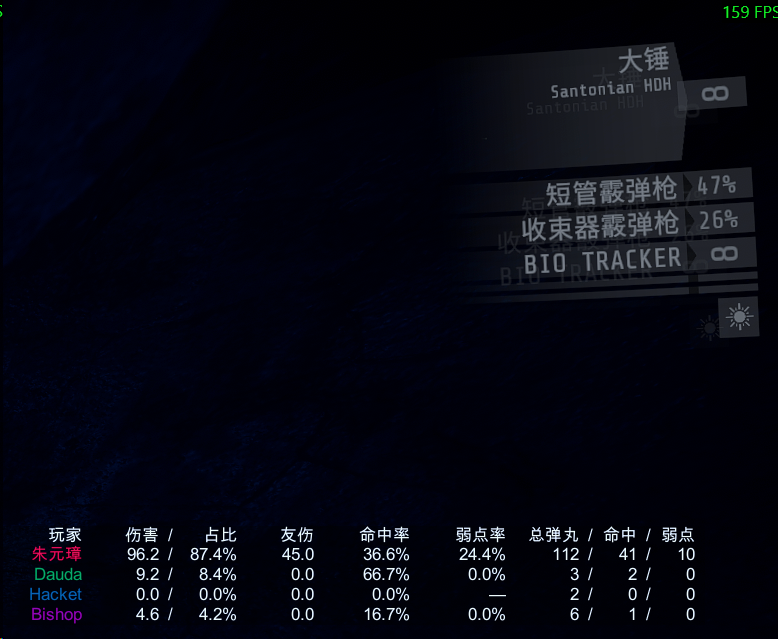
Player | Damage Share | Friendly fire | Accuracy | Weakspot rate | Pellets total hit weak
Values inside a merged column sit side by side, one space apart and with no slash between them: Damage/Share reads 1,234.6 32.1%, Pellets read 120 45 12 in total / hit / weakspot order.
Share is that row's weapon enemy damage divided by the expedition's observed team enemy damage (the settlement board's weapon rows work the same way), excluding friendly fire. A player's own Total damage also contains damage their tool dealt (a sentry gun, for instance), so the two guns' shares can add up to less than that total's share. With zero team damage or unavailable non-host team totals, the share part shows —.
Player names use their in-game color and are limited to six text elements. All other text is white; all fields are right-aligned.
Merged columns align field by field
Both the header and the values of a merged column are split into separate fields, each with its own slot, and each field is right-aligned inside its slot. The numbers of a merged column therefore line up vertically from row to row instead of the whole group being pushed around by the longest value. No slash is drawn between the fields: they are held apart by a gap that is a fraction of the glyph size (and shrinks further with the density), which is what keeps 伤害 占比 and 总弹丸 命中 弱点 narrow. The pellet header qualifies "total" only, which is two characters narrower, and a row with no data shows a single — right-aligned in the last slot.
Column spacing (1.8.2)
The space surrounding every cell was cut by more than a third. The whitespace between two neighbouring columns is the padding of both cells plus the gap between them, and it went from 1.067em to 0.625em (PaddingFactor 0.45 → 0.27, GapFactor 0.55 → 0.30, in ems of the glyph size, so all three density levels follow). The four column floors whose header is the widest thing they hold came down with it — friendly fire 3.4 → 2.65em, accuracy and weakspot 4.6 → 3.05em, damage/share 7.0 → 6.0em — and a floor is only a minimum, so a smaller one can never truncate a value: the column still grows to whatever its widest cell measures.
The 总弹丸 命中 弱点 triplet keeps the spacing that was called "about right": its field gap factor is still exactly 0.60 and its column floor is still 6.8em.
Placement: window pixels, zero parallax
The table is drawn with IMGUI in window pixels. IMGUI is composited after every camera and every canvas, and is positioned only against the window, so the table inherits no view motion, no HUD motion and no HUD parallax: nothing in the game can move it, and only a configuration change relocates it. It is also clamped to the window, so no column can be cut off by a screen edge or a parent canvas.
Earlier versions could not have both properties. 1.2.0 converted a screen rectangle through a camera that does not render the HUD canvas (the table was displaced and skewed); 1.3.0 used a canvas of the mod's own that produced no pixels at all; 1.4.0 placed the table inside the game's HUD hierarchy, which renders but sways with the player and clipped its right-hand columns. No reference mod for this game creates its own canvas — they all live in the HUD hierarchy and therefore all inherit that sway.
- Glyph size is a reference size at 1080p scaled by the window height and the density, so the table looks the same at any resolution.
- Chinese text uses a system font (
Microsoft YaHei UI→Microsoft YaHei→SimHei→SimSun), because IMGUI's built-in font has no CJK glyphs. - A column is as wide as its widest cell, measured with the very font atlas IMGUI draws with, never below a per-column floor. Headers and values share one cell box, so their right edges line up by construction; cells cannot overlap.
- Drawing happens on the repaint pass only and input is never touched, so the table cannot swallow a click.
The result screens: the influence board (1.12.1)
Success and failure use a dark influence matrix: rows are fields, columns are players, ordered by a score out of 100 (one decimal). Names, scores, gear and metrics are grouped with weight and thin section rules; numeric cells share a right edge. Multi-value cells use fully measured / separators. Fresh configurations split kill tiers by default; saved settings are preserved, and merged kills carry tier labels too.
| Row | Content |
|---|---|
#1 name |
Place and player name, in the player's in-game colour |
| Score | 0-100 only; podium colours distinguish place, with no medal words |
| Rating | A three to six word sentence, unique across the board |
| Primary / Secondary / Melee / Tool | The four gear slots; a support tool is marked support |
| Primary damage share | That weapon's enemy damage, and its share of the squad's enemy damage |
| Primary hit weak | That weapon's hit rate and weakspot rate |
| Primary pellets | That weapon's fired / hit / weakspot pellet counts |
| (the same three rows for the secondary) | |
| —— metrics, by weight —— | Separator |
| The ten metrics | Below |
The player's own field is one row, not two: the first row is the place and the name, the second is the score, the third is the sentence, and only then come the four gear slots and the two weapons' figures. (1.9.0 printed the name twice, on a rank strip and again on a row of its own; the duplicate is gone.) The descriptive block is therefore thirteen rows, and with the separator and the ten metrics the board is 24 rows, or 26 with the kill tiers split.
The ten metrics, in descending weight. The squad's outright leader in a metric has its cell tinted gold; a tie tints nobody.
| Metric | What it reads | Weight | Normalised |
|---|---|---|---|
| Total damage | Enemy damage dealt | 1.1 | value / squad max |
| Stagger | the number of attacks interrupted (no longer accumulated damage): the hit landed while the enemy's attack was under way and not yet finished with a Light/Heavy react. A melee push that breaks an attack counts too, since a push deals no damage and is judged on the attack state alone. A kill is never an interrupt: the reacts that report a death are rejected, and so is any blow that takes the last of the enemy's health. The same enemy counts once per frame |
1.2 | value / squad max |
| Kills | minor <120 / elite 120-999 / boss >=1000, graded from the enemy's own HealthMax so a modded enemy is graded by what it is |
0.9 | weighted value (minor 0.5 / elite 1.0 / boss 1.5) / squad max |
| Revives | the reviver of Interact_Revive.TriggerInteractionAction |
1.5 | value / squad max |
| Weakspot rate | weakspot pellets / hit pellets | 0.7 | the rate itself, 0-1 |
| Hit rate | hit pellets / fired pellets | 0.6 | the rate itself, 0-1 |
| Supply efficiency | the arithmetic mean of effective / intended over every use, credited to the player who used the pack; pickups never enter the denominator and an overflowing use counts as 0% |
1.4 | the rate itself, 0-1 |
| Scan efficiency | enemies revealed for the first time / sweeps made; a repeat sweep of an already revealed enemy adds nothing for anybody | 1.3 | display: enemies/attempt; scoring: clamped 0-1 |
| Lone survivor | was once the last one standing (not counted on a failure) | 0.9 | value / squad max |
| Deaths | times downed | 0.7 | reverse: 1 - value / squad max |
Default weights, in that order (Scoring/Weights): 1.1,1.2,0.9,1.5,0.7,0.6,1.4,1.3,0.9,0.7. Team help leads: revives, supplies and scans outweigh raw firepower, so the squad's most useful member tops the board rather than its best shooter. Any ten non-negative numbers are accepted.
Score = 100 * sum(weight * role factor * normalised) / sum(weight * role factor), clamped into [0, 100]. When the whole squad ties, the metric awards no gold and normalises to zero, so the score cannot blow up.
The sentence runs from the top of the board down and no two players wear the same one. A player takes the metric they lead the squad in outright that they contributed most to; when somebody above them already wears that sentence they step down their own list to the next one still free, so a player who leads nothing still ends up with a sentence of their own instead of sharing the neutral title with everyone else. A player whose displayed score is exactly 0.0 always wears Battlefield tourist, and that one sentence is deliberately repeatable. The full table is: total damage = Firepower core, stagger = Interrupter, minor kills = Sweeper, elite kills = Giant hunter, boss kills = Dragonslayer, weakspot = Weakspot adept, hit rate = Dead eye, revives = Lifesaver, supply = Quartermaster, scan = Scout, lone survivor = Last stand, deaths = Survivor.
Support kits are lifted. A player whose class tool name (case insensitive substring) matches Scoring/SupportToolNames (default Bio Tracker,生物追踪仪,Glue Gun,Lock Melter,C-Foam) gets SupportRoleFirepowerBonus (default 1.25) on the fighting metrics and SupportRoleUtilityBonus (default 1.25) on the support ones. Set either to 1.0 to switch it off.
The vanilla blocks the board replaces are moved off the page and then switched off, re-applied on every frame the page is up. Deactivating alone is not enough: both result pages animate their content in over several seconds and switch it back on as they go, which is why the artifact inventory kept coming back — the same problem StatDisplay documents in Patches/PagePatches.cs (// HACK - Want to set inactive, but it blinks in...) and works around the same way, by moving the element out of the page. On the success screen the artifact inventory, its summary line, the checkpoint usage and the four prisoner report cards (with the anchors they hang on) all go; on the failure screen the artifact inventory and its summary line. Results/HideVanillaSuccessBlocks and Results/HideVanillaFailBlocks put them back without recompiling. No vanilla text object is written into and no report card's text is ever touched.
The failure board does not disappear when title measurement fails. It prefers the title bounds plus a 16px gap. Unavailable geometry uses an explicitly logged fallback at 34% of screen height plus 16px, below the title in the supplied 2560x1440 capture, not a measured edge. Known inactive or transparent headings still delay rendering; missing/unreadable components degrade rather than permanently hiding statistics. Known alpha still controls the whole board. The log reports each gate/fallback state once; transition timing requires gameplay evidence.
Results/ShowImpactBoard = false falls back to the plain per-weapon table.
Three things only the real game can settle (all guarded, all logged on first fire)
- Human scans count rising tagging edges, and the reveal ledger is shared by the whole squad: an enemy one player has already revealed is never a first mark again for anybody, whoever sweeps it. A repeat sweep only adds to the sweep count, so repeating another player's targets lowers the efficiency instead of raising it. Bot scans are attributed from the bot's own scan action instead:
EnemyScanner.BotTagis static and has exactly one caller,Player.PlayerBotActionUseEnemyScanner.UpdateStateScan()(a private instance method whosem_agentis that bot), so the plugin hooks that action, publishes its owner for as long as it runs and clears it on return. The one-metre proximity rule survives only as a fallback when that read fails, and it now reports how many tracker-carrying bots it saw and how close the nearest was instead of failing silently. Callback bursts are still grouped by game tag duration and bot figures still carry~, because the static callback itself has no owner. Native list timing, cross-player de-duplication and the new attribution hook still need gameplay evidence. - A melee push never damages the enemy and never reaches the melee damage hook: it travels its own path (
Dam_SyncedDamageBase.PushDamage->Dam_EnemyDamageBase.ReceivePushDamage). The hook therefore sits on the push entry point and reads the enemy's attack state before the game processes the push, so a push that breaks an attack under way counts as one interrupt; the same enemy counts once per frame. Whether pushes fire as expected in real fights still needs gameplay evidence. - Supply efficiency is measured per use and averaged: ammo reads the pack's own storage around
PlayerAmmoStorage.PickupAmmo, health reads the target's health aroundReceiveAddHealth, and a remote sender is resolved throughSNet.Replication.TryGetLastSender. Self-use counts, pickups never enter the denominator, and a use whose amounts cannot be read is skipped rather than guessed.
Language
General/Language accepts zh (default) and en, plus spellings such as zh-CN, cn and English; anything unrecognized falls back to Chinese. Column headers, result headings and statistic labels all follow it.
Density
General/Density accepts compact (default), normal and spacious. Each level scales row height, cell padding and column gap, and acts as a glyph-size factor:
| Value | Row height | Cell padding | Gap | Font |
|---|---|---|---|---|
compact (default) |
x0.80 | x0.88 | x0.50 | x0.90 |
normal |
x1.00 | x1.00 | x1.00 | x1.00 |
spacious |
x1.30 | x1.12 | x1.25 | x1.10 |
Which fields are shown
The [Columns] section toggles each data column: ShowDamage, ShowFriendlyFire, ShowAccuracy, ShowWeakspot, ShowProjectiles. The player name is the row label and is always drawn. A hidden column contributes neither width nor header, so the table immediately becomes narrower.
Position and size
The table hangs under the native flashlight icon in the right-hand gear column. The icon's screen rectangle is measured through the HUD's own camera, sampled every 0.25 s until it holds still for a second (the HUD animates while a level loads, and a single sample on the first frame lands hundreds of pixels away - that is exactly what earlier versions got wrong), and then frozen: the table is placed against it and never sampled again, so it follows the icon at any resolution without inheriting any motion. It is re-sampled only on a hot reload or a resolution change, and it is clamped to the window so every column is always visible.
[Layout] AnchorToFlashlight = false falls back to PositionX/PositionY, a fraction of the window where a negative value measures from the right/bottom edge. OffsetX/OffsetY is a pixel nudge on the final position, FontSize is the glyph size at 1080p, and [Results] OffsetX/OffsetY moves the result table. All of it is hot reloadable, so position and size can be tuned without leaving the game.
Config hot reload
The plugin watches its own config file. Edit and save BepInEx/config/HawChow.GTFOCombatPanel.cfg while playing and it applies about 0.3 seconds later: language, density, column toggles, font size and position all recompute without restarting the game. Each reload logs:
[HOTRELOAD] config reloaded; language=...; density=...; columns=...; the table is rebuilt and repositioned from the new settings.
BepInEx 6 does not watch config files itself, so the plugin uses a FileSystemWatcher and performs the reload and every Unity object touch on the main thread. Windows' FileSystemWatcher occasionally misses an event; saving the file again applies it.
Statistics
Actual gun/shotgun Fire and pellet ray casts are tracked for the local player and host-controlled bots. Penetration contacts count once per pellet. Accuracy is hits/fired pellets; weakspot rate is weakspot hits/hit pellets, matching Hikaria. Friendly fire does not improve enemy hit rate.
Remote-human host statistics are vanilla-network estimates, marked ~; the original damage packets have no unique pellet ID. Non-host clients only show their own observable data. Damage is actual health lost; source-less explosions are not attributed. Per-weapon damage for unmodded remote players may be misattributed during quick weapon switches.
Results
The success and the failure screen both get the influence board, drawn on top of the page in window pixels, so the vanilla report cards are never rewritten or repositioned. Results/ShowImpactBoard = false falls back to the older per-weapon table instead: a Player/TOTAL line followed by one line per weapon, each carrying damage/share, friendly fire, hit rate, weakspot rate and the pellet triple. Either way the table is scaled down and clamped if it would outgrow the window.
New expeditions reset counters; completion, failure and checkpoint retries retain them.
Verified for 1.12.1: installed-Interop compilation at 0 warnings / 0 errors and 454 regression assertions, including a failed expedition no longer scoring the hidden last-one-standing row, cross-player scan de-duplication, push interrupts, count-based staggering, per-use supply efficiency, the repeatable zero-score sentence and the published default weights. Confirmed in gameplay on 2026-10-14 from a live session log plus a 2560x1440 capture: the failure board really does draw under the vanilla 任务失败 heading (influence board 5 columns x 26 rows (4 players), 757x513 px at (902,506)), the heading could not be measured there (menuCamera=False, rect=(0,0,0,0)) so the logged screen-space fallback is what placed it, and native CJK font creation succeeded (table font: 'Microsoft YaHei UI' loaded from the operating system (CJK capable)). Still unverified: the new bot-scan attribution hook (watch for [DIAG] bot scan action observed and [DIAG] bot tag credited), cross-player mark de-duplication, and failure-page alpha synchronisation.
Feedback
Bug reports, feature requests and anything else: https://qingju.me
- Voice channel for playing together: Xiaoheihe voice
