

ForgeSkin
Applies ForgeSkin packs: weapon skins (textures, attachments, live ammo screens, animated layers, sights, whole-gun models), character models for you, your bots and other players, and a weapon inspect key.
| Date uploaded | 5 days ago |
| Version | 1.0.3 |
| Download link | NAinfini-ForgeSkin-1.0.3.zip |
| Downloads | 162 |
| Dependency string | NAinfini-ForgeSkin-1.0.3 |
This mod requires the following mods to function

BepInEx-BepInExPack_GTFO
BepInEx pack for GTFO. Preconfigured and includes Unity Base DLLs.
Preferred version: 3.2.4
NAinfini-ForgeCore
Public GTFO mod foundation: asset bundles, logging, settings, pools, networking, input leases, local saves and calls into the game's own systems.
Preferred version: 1.0.4README
ForgeSkin
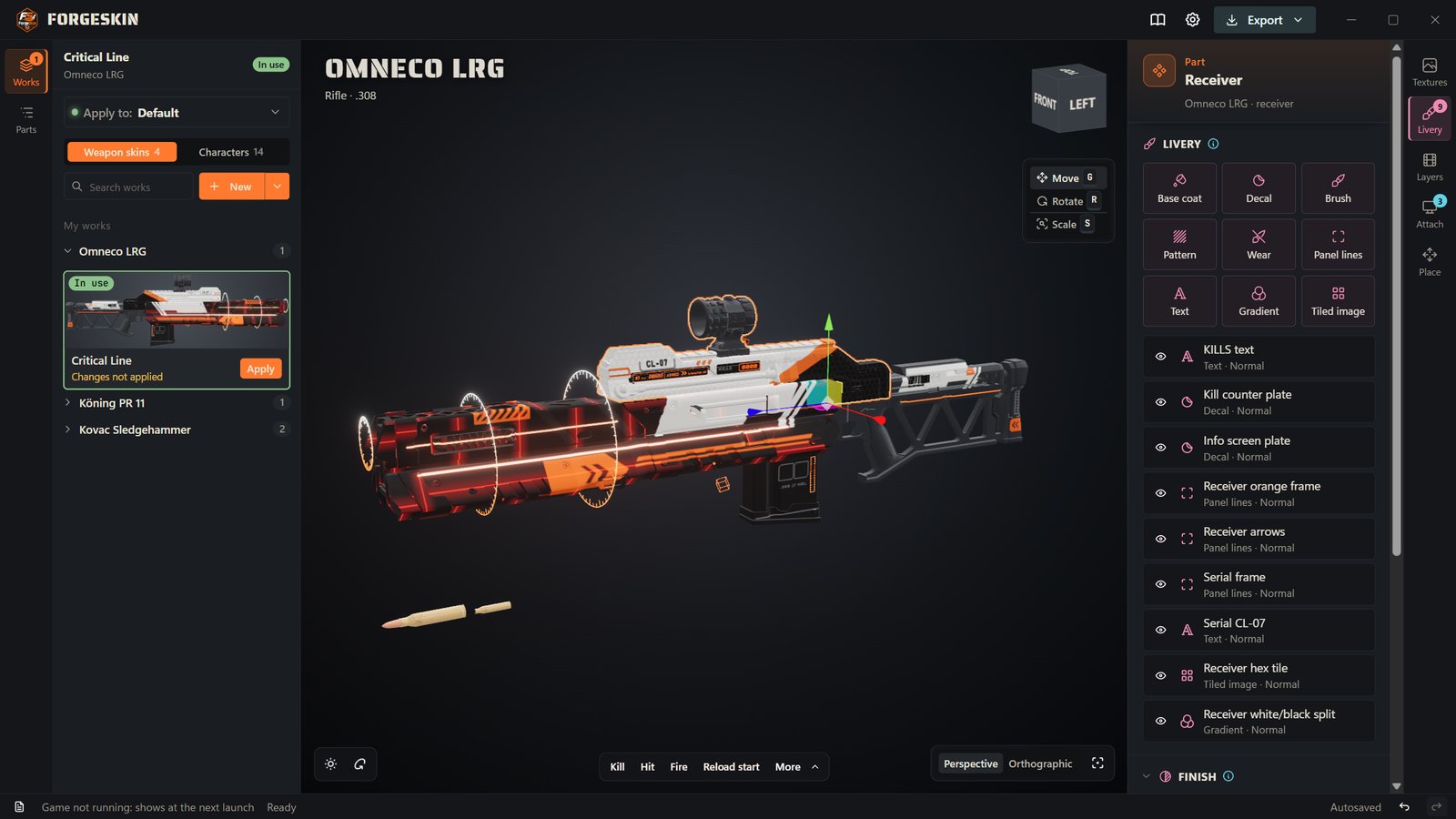
- Skin editor (Windows): download the installer (
Setup.exe) from https://github.com/NAinfini/GTFO-Forge-Mods/releases/latest - Source code: https://github.com/NAinfini/GTFO-Forge-Mods
- Skins: each skin is its own mod. Install skin mods from Thunderstore, or make your own with the editor.
皮肤编辑器(Windows)下载:https://github.com/NAinfini/GTFO-Forge-Mods/releases/latest 里的安装包 Setup.exe。源码:https://github.com/NAinfini/GTFO-Forge-Mods。
皮肤是单独的模组:在 Thunderstore 上装,或用编辑器自己做。
Applies ForgeSkin weapon skins to your own gear in GTFO: replaced textures and materials, models mounted on the gun, live screens (ammo, kills, damage dealt and taken, accuracy, health, infection — as digits or a bar), animated layers, flashes and sounds played on game events (kill, hit, miss, fire, reload, aim, low ammo, empty, going down, revived, ...; several sounds on one event play one at random, and kills can have their own sounds per enemy), and a custom part layout. Skins can also hang charms on a cord or chain that sway with gravity and swing as you move (on the gun in your own hands), and replace the reticle in a holographic sight (up to three layers, seen when you aim down it). A skin can also swap one part, or the whole gun, for an imported model, move where the gun light's beam comes out with the model, and set a sight's lens, reticle and zoom.
Inspect your weapon: press the inspect key (I by default, under Forge mods on the game's key settings page) once, standing or crouching, with any gun in your hands to turn it over and look at it. Each kind of gun has several motions and every press plays one at random, never the same one twice in a row: pistols are turned over or tossed up and caught, show their sights or their muzzle, or slap their magazine home; the Shelling Arid 5 and S-49 also bring the magazine up to your eyes or pull the slide; revolvers spin on the finger (the Mastaba R66 swings its cylinder out, the Bataldo 3RB breaks open); rifles, shotguns, machine guns and snipers are turned in both hands or tossed over by the stock; compact guns also show their sights or slap their magazine home. Firing, aiming, reloading, sprinting, a menu or a hit ends it. Known issue: rifles, shotguns, machine guns and snipers are held badly while their right side is shown; a later version fixes it.
Character skins replace your whole character with an imported humanoid model. It moves with the game's own animations (walking, running, crouching, jumping, holding the gun, going down, being revived), its hair, skirt and ribbons swing as you move, and in first person you see the model's own arms; where you can be hit stays the original character's. The lobby figure wears it too. The model need not be a whole human: a creature without fingers, with one arm or with unlike sides works too. Only its hips need a bone; a part without one keeps its shape and moves with the part above it. You can also give another player a character with the SKINS button on their bar: you see their own pick first, else the character you chose for that player's slot, else the original; only you see it, and nothing is sent.
You normally don't install this by hand: skin mods made with the ForgeSkin editor list it as a dependency, so your mod manager installs it with them.
Please also update ForgeCore to 1.0.3 (请同时更新 ForgeCore 到 1.0.3). In multiplayer the host and every client need it: a client's kill counts, kill sounds and damage screens come from the host's ForgeCore. 联机时房主和每个客机都要更新:客机的击杀数、击杀音效和伤害屏来自房主的 ForgeCore。
Get skins, make skins
Forge provides the editor and this base mod; the skins themselves are mods their authors publish on Thunderstore.
- Get skins: find skin mods on Thunderstore and install them with your mod manager, like any other mod (they list ForgeSkin as a dependency), then pick them in the lobby with the SKINS button.
- Make or change skins: the ForgeSkin editor, for Windows. Download the installer (
Setup.exe; it tells you when a new version is out and updates when you click Update) or the portable zip from the latest release: https://github.com/NAinfini/GTFO-Forge-Mods/releases/latest. Its built-in tutorial (the book button) walks through a first gun skin and a character. - Share skins: in the editor, Export → Export as Thunderstore skin mod… makes a zip ready for Thunderstore; upload it there yourself. Teammates see your skin once they install that mod.
- A single skin file: a
.forgeskinsomeone sent you goes intoBepInEx/ForgeSkin/skins/of your profile. - Source: https://github.com/NAinfini/GTFO-Forge-Mods. Building the plugin and the editor from it (a BepInEx profile for the plugin, an online
first start for Electron): the Build section of
DEVELOPERS.md.
下载编辑器:https://github.com/NAinfini/GTFO-Forge-Mods/releases/latest (安装版 Setup.exe 启动时只检查有没有新版本,点「更新」才下载;也有免安装 zip)。
皮肤由作者各自发布在 Thunderstore,用模组管理器安装;自己做的皮肤在编辑器里点 导出 → 导出为 Thunderstore 皮肤模组…,
再自己上传到 Thunderstore。单个 .forgeskin 皮肤文件放进档案的 BepInEx/ForgeSkin/skins/。装好后在大厅点 SKINS 选用。
Screenshots
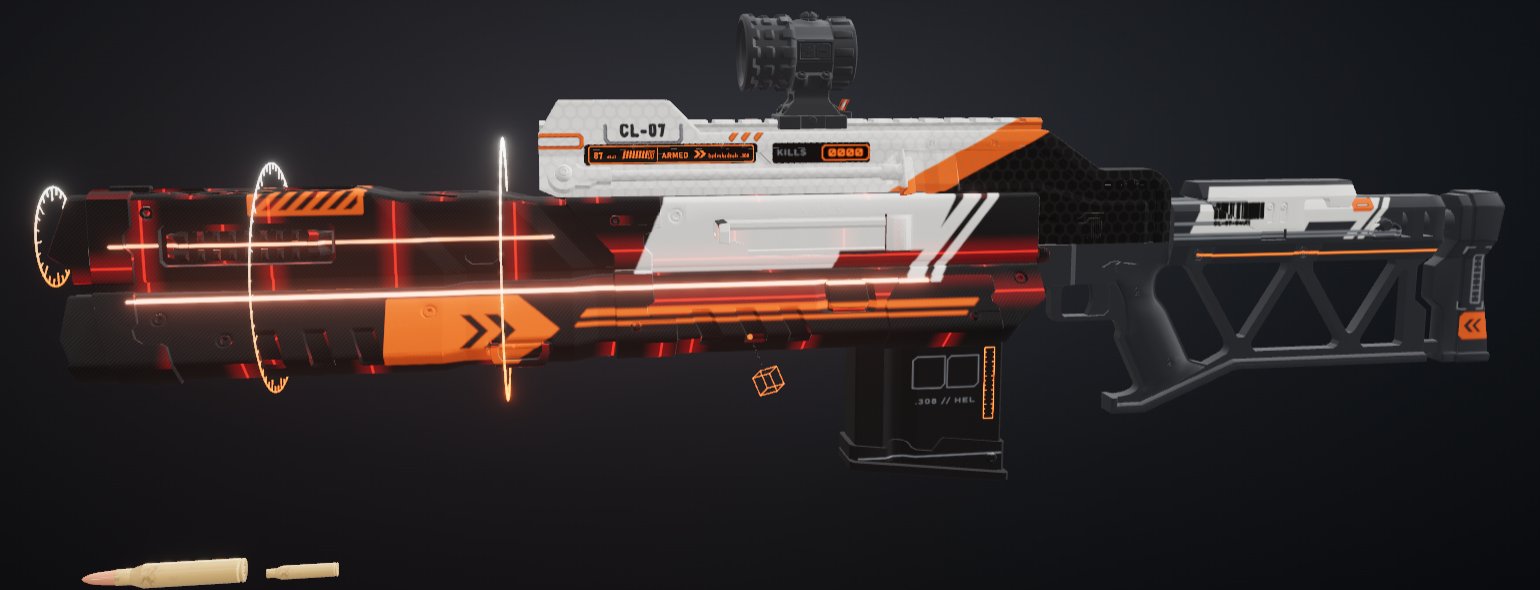
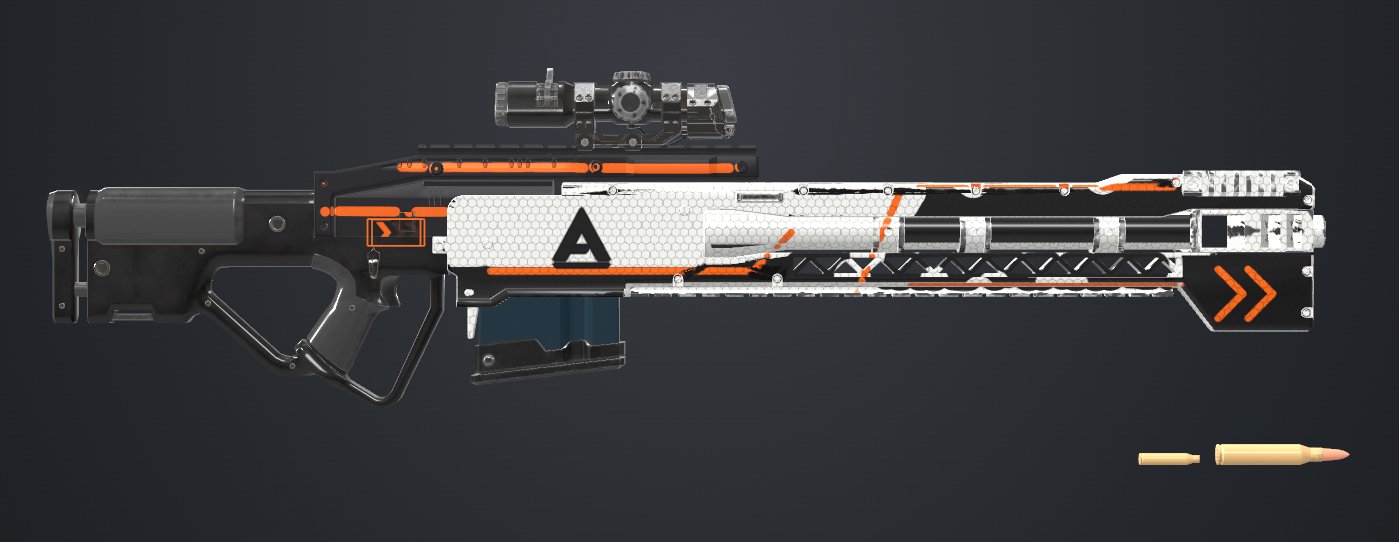
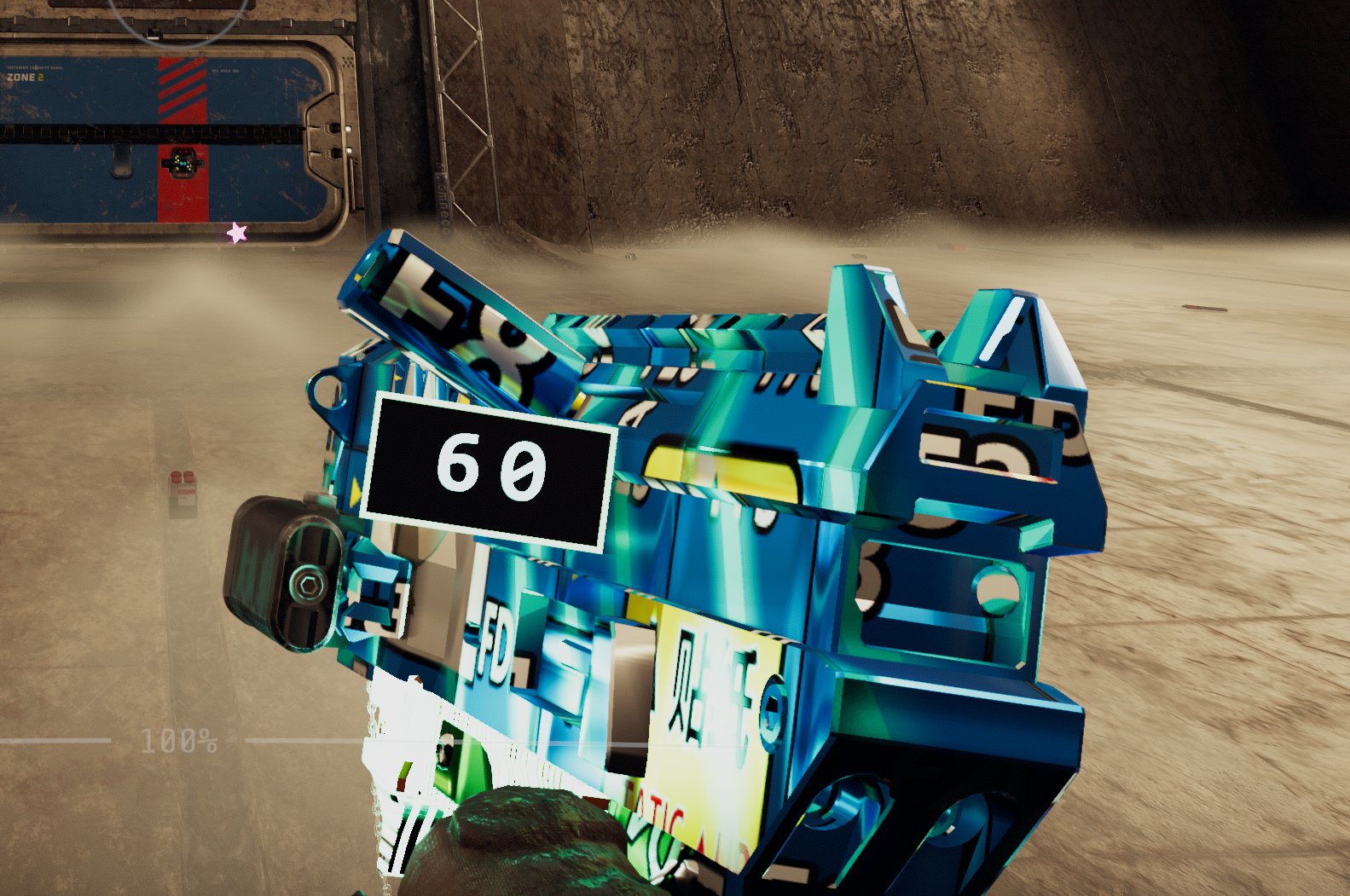
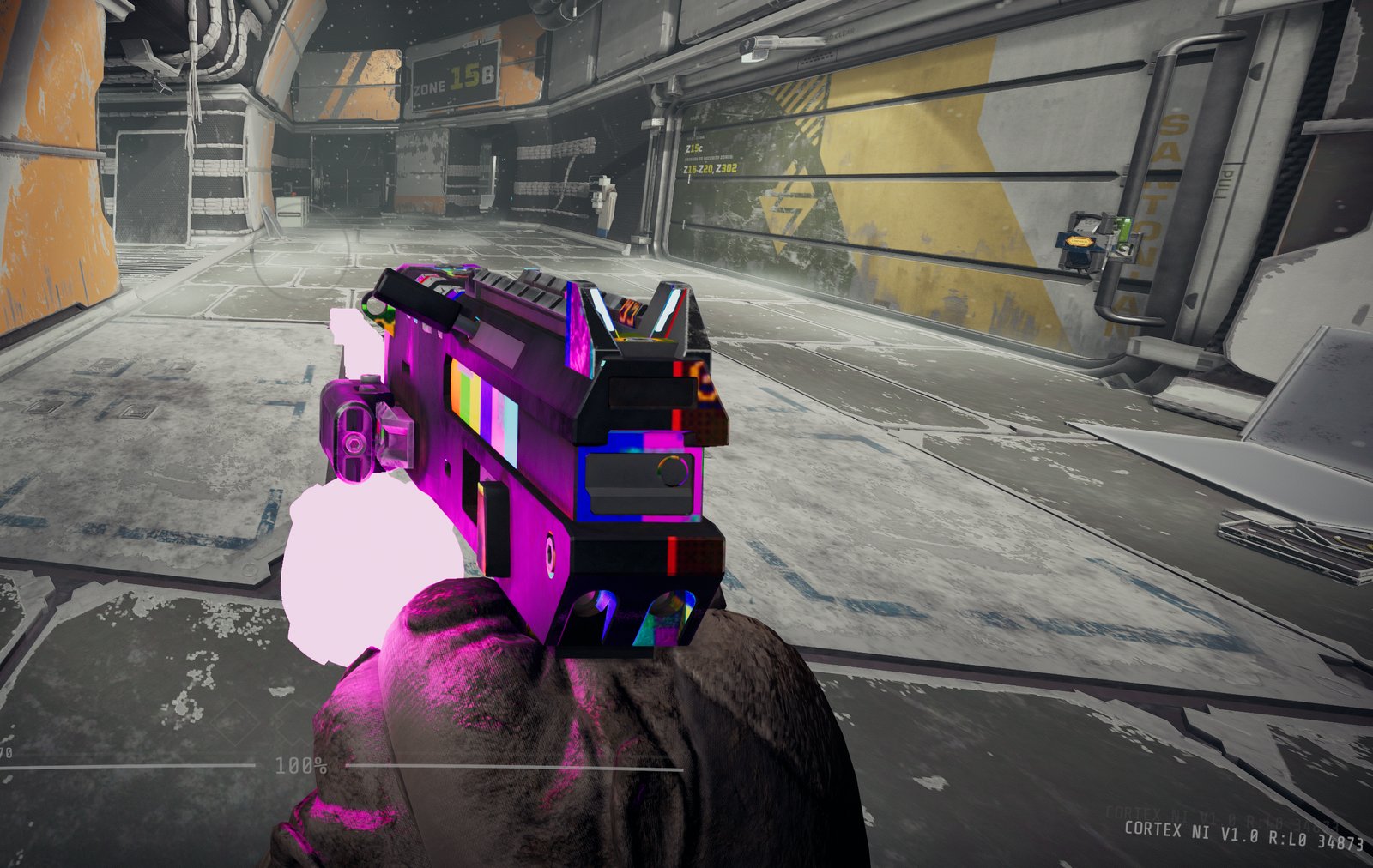
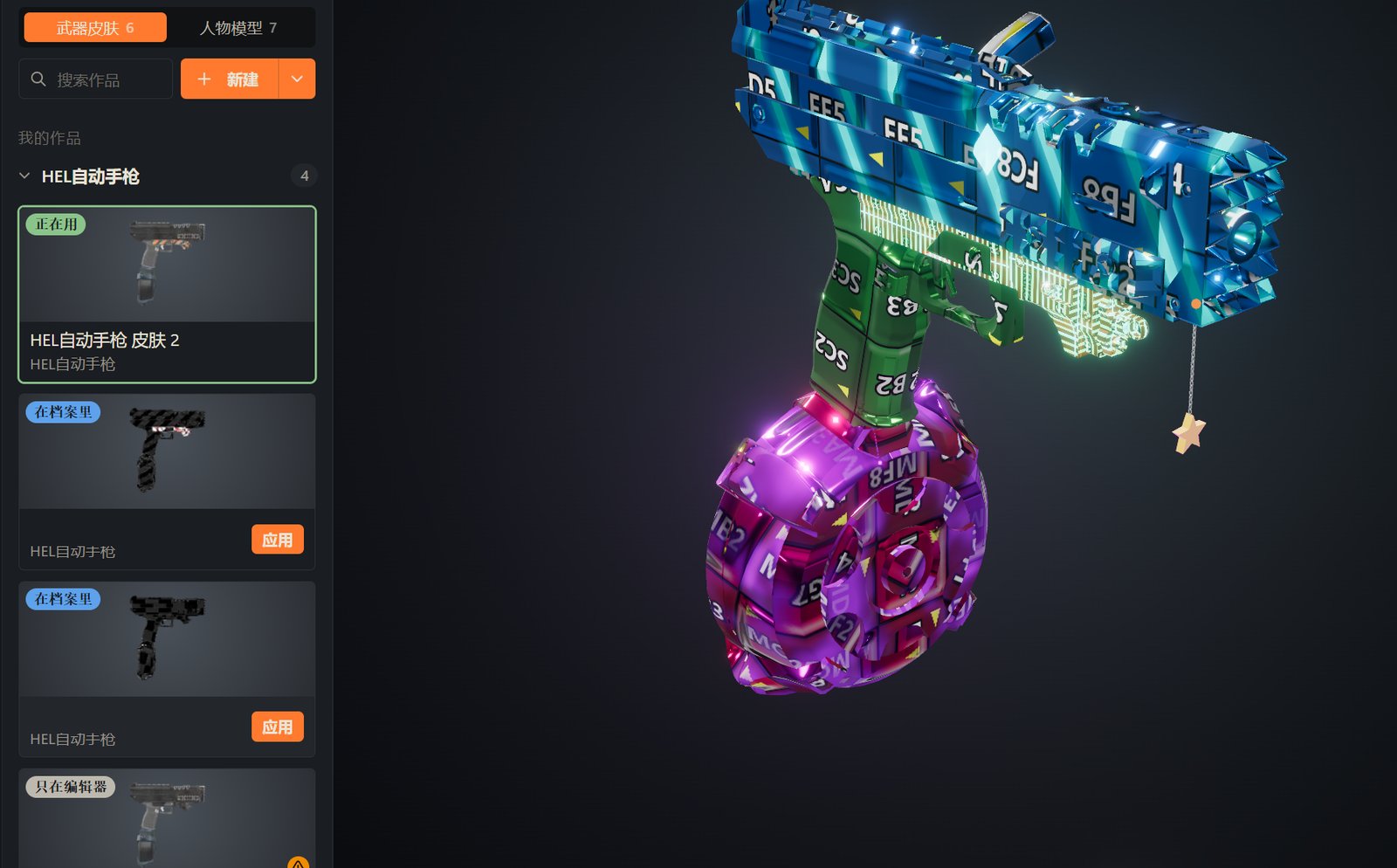
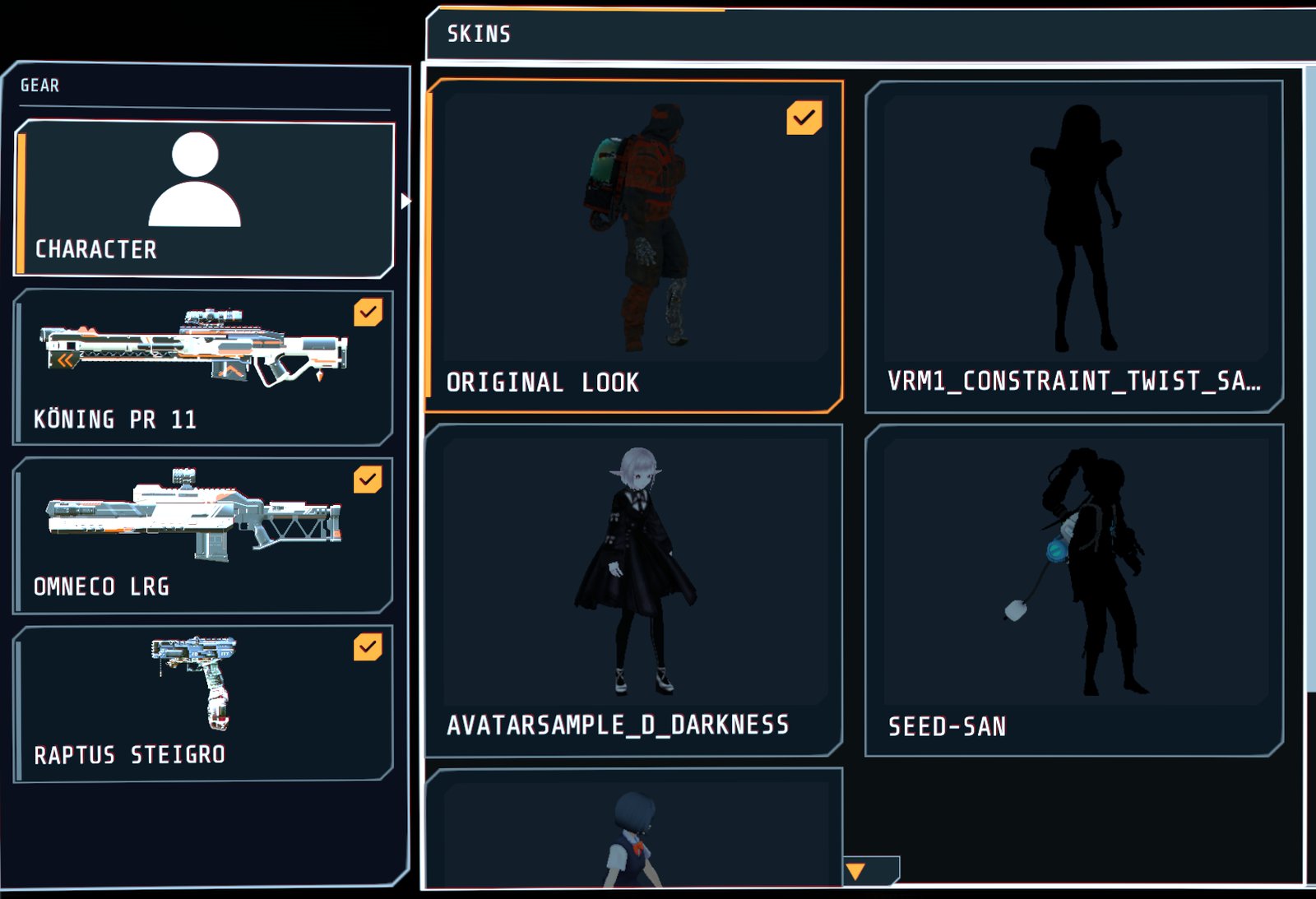
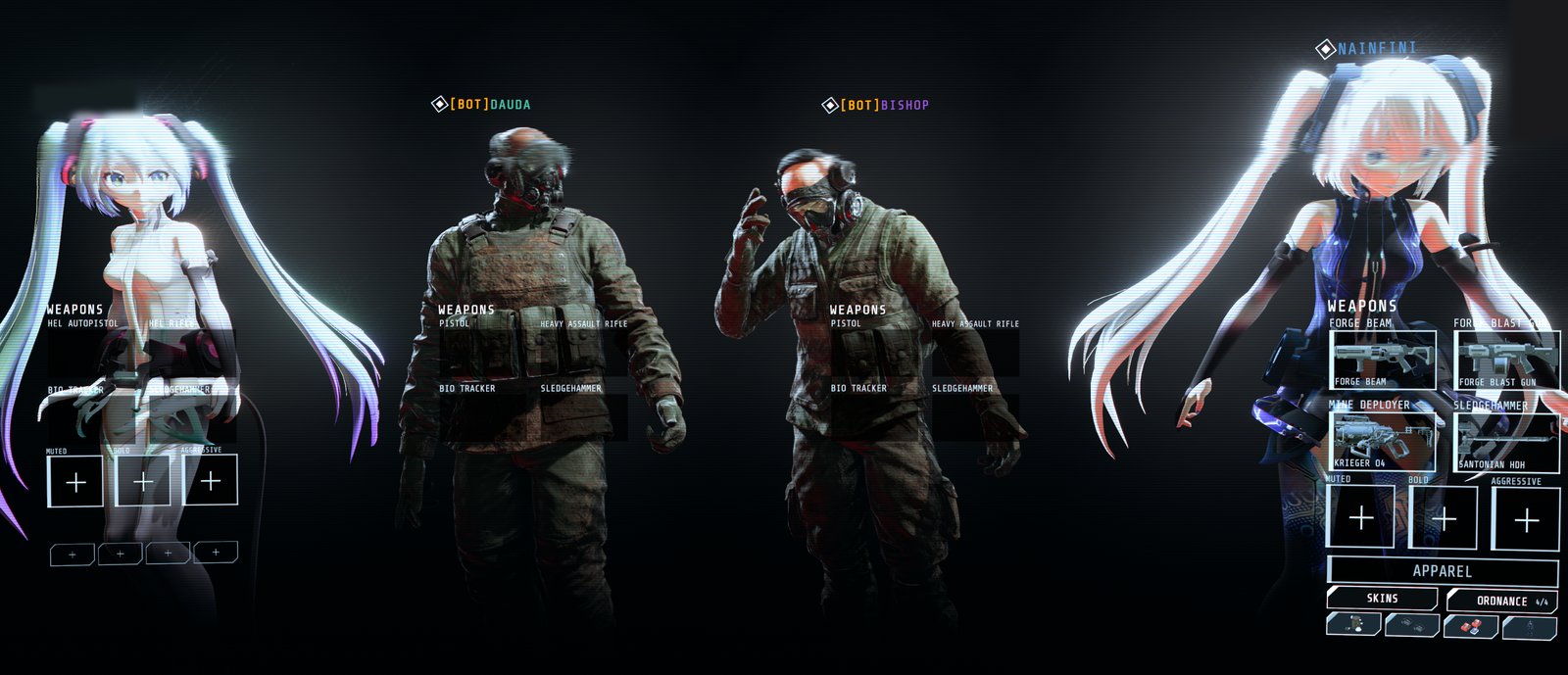
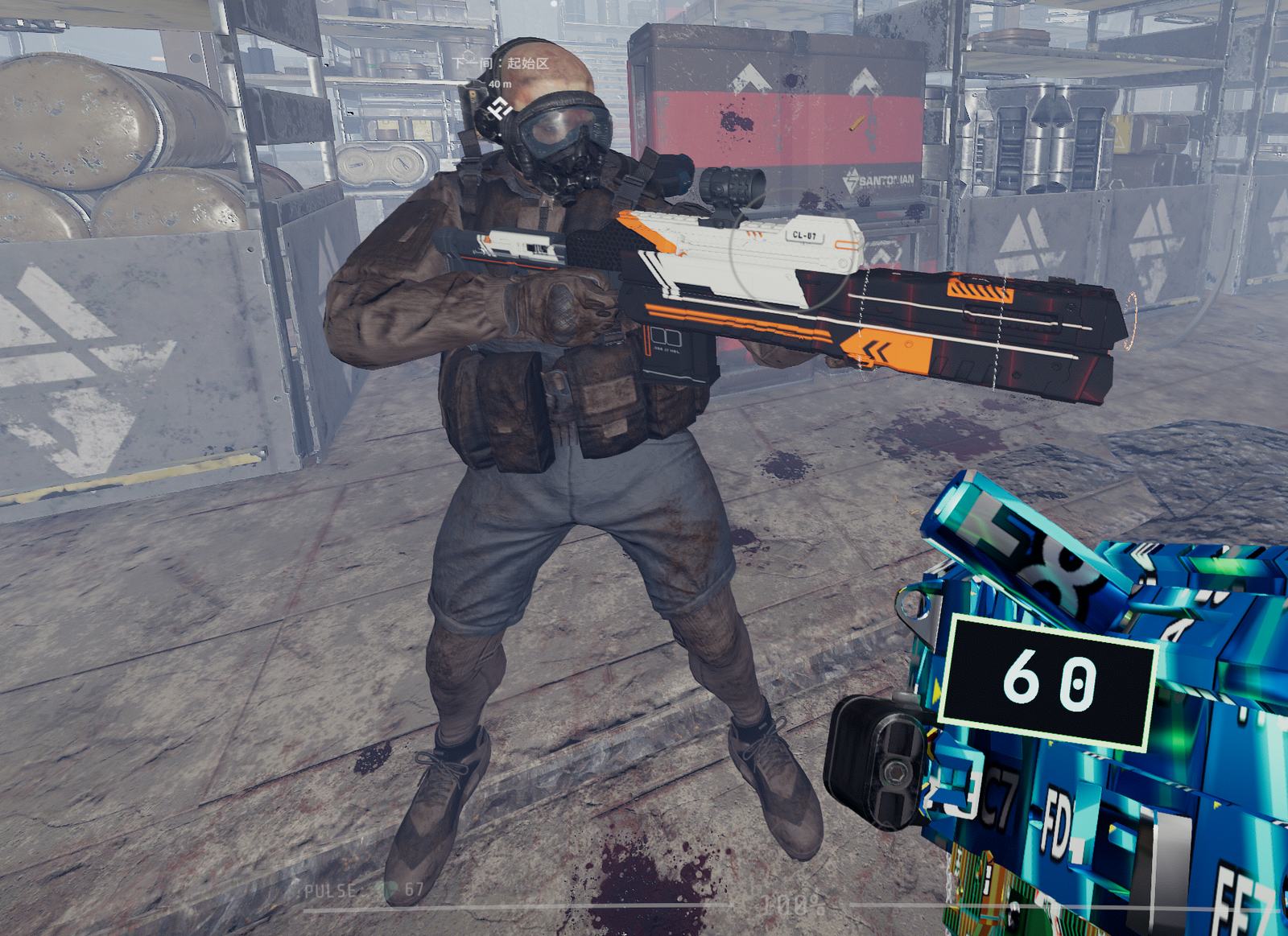
Your skins show on your gear: in your hands, on a sentry or mine you placed, on the magazines your gun drops, and on pickups lying in the level whose item has a skin (they keep it when you pick them up). Teammates who have the same skin mod installed see the character, skins, colours and adjustments you picked, and you see theirs; their skin's shot, wield and down/revive sounds play at their gun. A teammate's gear whose skin you don't have (or have in another version) keeps its original look, and the skin picker says which mod to install. Bots wear what the host picked for them; teammates' mines keep their original look.
In the lobby, the SKINS button opens the skin picker: choose a character and a
skin for each gear, or the original look (a gear with several skins installed lists them all, each with the preview picture
its author exported with it; a pack from an older editor shows none until it is exported again), and recolour the skin's
player colours with one of the author's colour schemes or a row of hues. Your choices are kept in BepInEx/config/ForgeSkin.choices.json and ForgeSkin.colours.json. Skin packs go in
BepInEx/ForgeSkin/skins. Skins installed by the editor of ForgeSkin 1.1.0 or earlier are still in
BepInEx/plugins/ForgeSkin/skins, which the game no longer reads: open the editor once and it moves them over (the game's log
says so while skins are left there).
Settings
BepInEx/config/ForgeSkin.cfg. Enabled, HologramShader and Toon are also behind the gear in the skin picker's title bar
(Show skins, Game hologram effect, toon rendering); a change there applies at once and is saved to this file.
| Setting | Default | Meaning |
|---|---|---|
Enabled |
true | Turn off to apply no skins (your picks and colours are kept) |
Development |
false | For skin mod authors: also reload skins whenever a skin mod in the plugins folder changes, and write every detail to BepInEx/ForgeSkin/forgeskin.log (the skins folder is always followed) |
Readback |
false | Write each gear's vanilla part poses to BepInEx/ForgeSkin/readback/ for troubleshooting |
HologramShader |
true | Draw holograms with the game's hologram shader; off uses a plain glow |
Toon |
Deferred | How a character's toon materials are drawn on your screen only: Deferred lit by the game and seen by the thermal sight, Forward a cleaner toon look the thermal sight does not see, Off like every other material |
Errors go to BepInEx/LogOutput.log, each with a code.
CHANGELOG
Changelog
1.0.3
Needs ForgeCore 1.0.4.
- Fixed: a skin no longer covers a free-standing holographic sight with an opaque lens; a vanilla lens only takes the skin's reticle, so you see through it again.
- Changed: changing skins stutters less: models and skin meshes are built over several frames, and skins are not released and rebuilt inside a level.
- Changed: there are no skins for every gear any more. A sight, magazine, light, lens or ammo change belongs to one gun's skin and shows on that gun alone; the same sight on another gun keeps its own look. A pack an older editor made for no gear, and an
active.jsonthat still listsglobalskins, are not worn and say so once in the log (skin-global-unsupported): open the work in the editor and make it a gun's skin. Nothing changes in what teammates exchange: such skins were never shared, so players on this version and on 1.0.2 still see each other's skins as before. - Logs: a
forgeskin.forgeplaced inBepInEx/pluginsitself or deeper than the mod's own folder (a mod zip unpacked with its top folder), and a skin pack lying in the plugins folder without a marker that lists it, are now named in the log with where they belong (skin-pack-misplaced) instead of being skipped without a word. - Logs: a teammate wearing a skin you don't have installed (
skin-look-missing) is now a warning instead of an error, and the log names the player instead of an ID number.
Editor, unreleased
Not a plugin version: the editor's version is set when it is released on GitHub.
- Changed: sights, magazines, lights, lenses and ammo are no longer offered as targets of their own; change them in the skin of the gun that carries them. Building a skin that names no gun, tool or item is refused with a message saying so.
- New: opening a work an older editor made for a sight, magazine, light, lens or ammo alone asks for the gun it goes on. The material changes that gun has are kept, attachments and part changes on a part it has too, and everything that does not fit is listed; the work moves to that gun and the old file goes to the Recycle Bin.
- Changed: a Skins export leaves out a pack that names no gun and says so in its report.
Editor 1.1.6
Not a plugin version: the editor's own release on GitHub. Comes with the ForgeSkin plugin 1.0.2 and ForgeCore 1.0.3 and installs them into your profile.
- New: replace a part. The first click on a part lists the pieces that can be swapped and a command to replace the whole part; what cannot be swapped is greyed out with the reason.
- New: the gun light's beam point is read from the game and can be dragged in the 3D view; it is saved with the part layout.
- New: swap a whole gun for one imported model, and a Sight page for the lens, reticle, magnification and aiming.
- New: installing the plugin keeps one copy each of ForgeCore and ForgeSkin where the mod manager keeps them; other copies go to the recycle bin with a notice. After installing, the editor reads the game's log and tells you in one sentence why a plugin was refused. A development build builds ForgeCore from source and no longer needs a ForgeCore package.
- Changed: no internal names are shown to the author (part ids, model file names, unnamed pieces are called by part name and number); long explanations move behind an i icon and empty lists say one line; the works list no longer cuts titles; the first tutorial picks the gear and creates the skin in one step and the left column goes straight to Parts or Steps after creating a skin or importing a character; long folder paths in Settings are cut in the middle; three English button labels that were cut off are shorter; the character view's action buttons sit at the bottom like the weapon view's.
- Fixed: importing a model onto the Buckland SBS III or the PDW (any part) turned the whole window black. These guns have two pieces of one name in a part, which the mount list showed twice; only the first of them can be moved, as in game, so the second is no longer listed.
- Fixed: undoing or redoing a charm out of the scene no longer fills the console with an error every frame.
1.0.2
Needs ForgeCore 1.0.3. In multiplayer the host and every client should update ForgeCore.
- Changed: a gun with a charm costs less each frame: the rope's mesh is written to the game in one copy instead of two calls into the game per vertex, and the cord's round sections are not recomputed with sine and cosine every frame. The charm moves as before.
- Fixed: a gun built while the game was drawing the weapon picture of the same gun could be taken for the picture's gun and miss its skin. The picture's gun is now told apart exactly.
- Logs: a character model with no bone for the upper chest or a shoulder, which many skeletons (most MMD models among them) do not have, no longer writes a warning; the bone above carries those parts, and the log notes it at info.
- New: skins for your bots. The host sees a SKINS button on each bot's bar and picks the character and the skin of each of its guns; everyone in the lobby sees the bot dressed that way.
- New: characters for other players, on your screen only. With a character pack installed, each other player's bar has a SKINS button where you pick the character you see them in. You see the character they picked themselves; if they picked none or do not have ForgeSkin, the one you chose for that player's slot; if you chose none, the original. The choice is kept on this machine by slot. Nothing is sent to anyone.
- New: hand shape and fingers. A gun skin can choose how each hand holds that gun (one of the game's own grips), and bend every finger joint by hand in the editor. The hand shape shows on your hands in first person; the finger bends show there and on your body in third person. A skin that sets them needs ForgeSkin 1.0.2 or later.
- New: character models that are not a whole human. A creature without fingers, with one arm or leg, or with unlike sides now works as a character skin: only its hips need a bone. A part without a bone keeps its shape and moves with the part above it, a hand whose arm is incomplete does not reach for the gun, and a model without both upper arms shows the game's own arms in first person. A pack made this way needs ForgeSkin 1.0.2 or later.
- New: sight reticles. A gun skin can replace the reticle in a holographic sight's lens, up to three picture layers, each with its own colour, strength, size, depth and on or off. Only you see it, when you aim down the sight. A skin with a reticle needs ForgeSkin 1.0.2 or later.
- New: inspect your weapon. Press the inspect key (I by default; change it under Forge mods on the game's key settings page) with a gun in your hands, skinned or not, to turn it over and look at it, then bring it back. Each kind of gun has several motions and each press plays one of them at random, never the same one twice in a row: pistols are turned over, or tossed up end over end, hanging a moment at the top, and caught with a little give in the hand; pistols, revolvers and compact guns also dip the muzzle to show the sights, and pistols and revolvers turn to show the muzzle at a slant; a gun with a magazine can have it slip out a little and get slapped home; the Shelling Arid 5 and S49 also drop the magazine into the other hand and bring it up before your eyes with its top round toward you, or pull the slide back a little to see the round in the chamber; revolvers spin twice on the finger, and the Mastaba R66 swings its cylinder out and spins it while the Bataldo 3RB breaks open, the other hand pushing from under the cylinder and letting go before it spins, each snapped shut with a flick of the wrist; rifles, shotguns, machine guns and snipers are turned in both hands, or held by the stock, panned across, tossed straight up and rolled over once, then turned to their other side; rifles and shotguns also pull the magazine out to look at it and slap it back, pull the charging handle back to show the round in the chamber, or are turned to look along the barrel, and pump shotguns rack the pump; machine guns drop the box magazine into the other hand and slap it back, pull the charging handle, or are panned slowly across the view; snipers pull the bolt back to show the round, look at the magazine, or bring the scope up close. The other hand's fingers pinch the slide, push the cylinder with the thumb, close round the magazine and slap it flat. A skin that hides a part a motion moves (the magazine, the slide, the cylinder) leaves that motion out for that gun. Firing, aiming, reloading, melee, using, sprinting, opening a menu or being hit ends it, and nothing you press is held back. Teammates see your wrist turn the gun. Known issue: rifles, shotguns, machine guns and snipers are held badly while their right side is shown; this is fixed in a later version.
- New: swap a whole gun. A skin can replace the entire gun with one imported model: the game's own parts are hidden and the four hold points are placed by rule. A skin that does this needs ForgeSkin 1.0.2 or later.
- New: sights. A gun skin can set a sight's lens (an imported mesh or a flat plane, in the look of a vanilla sight), its reticle and its magnification, which applies in your first-person view when you aim. A reticle layer that is switched off is now hidden in the lens instead of left faintly visible. A skin with a sight needs ForgeSkin 1.0.2 or later.
- New: the gun light follows the model. When a skin replaces the part the gun light sits on, the beam comes out of the light point the model gives it.
- New: skins can bring their own inspect moves. A skin pack can add inspect moves for its gun (or for every gun of a type), which join that gun's own moves while you wear the skin. Teammates with the same pack see them too. A pack whose inspect moves are broken is not loaded, and the log says why.
- Fixed: character models are now drawn with Forge's own shader, which fixes the strange glow when moving fast or inspecting a gun (Tda Miku Append TdaStyle's first-person arms took on the colour of the gun). Needs ForgeCore 1.0.3; the packs need no update. A skin pack whose metallic, smoothness or glow strength is not a finite number is now refused when it loads instead of reaching the shader.
- Fixed: the inspect key no longer needs a second press. A press made while the gun was not quite ready (just after a reload, a swap or a shot) is kept for half a second and plays as soon as the gun is free; one that never could is written to the log with the reason. Inspecting works while crouching too; when a press is refused, the log now lists why. A motion that cannot be framed for a gun in your hands (it would leave the gun out of view or bring it into your face) is dropped for that gun and another one plays on the same press, instead of nothing happening.
- Fixed: after joining a lobby that others were already in, everyone in it, you included, stood in their original look until someone changed a skin. Character skins now go on as soon as each figure appears.
- Fixed: on the loadout page opened from the menu during a level, your figure and your teammates' stood in their original look until you picked another character and back. The figures keep their characters while the page is closed, so they show them as soon as it opens.
- Changed: inspect feels like a hand holding a gun: every move has a little wind-up, follow-through and settle, the wrist stays inside what a wrist can do, and the other hand's fingers rest against the gun instead of going through it. Every kind of gun has three general moves plus its own, and melee weapons can be inspected too.
- Changed: inspect no longer jerks: finger movement is smoothed and played at 120 frames a second, a hold that cannot close around the gun is replaced for that part by the plain version (a line in the log), and the moves are worked out in the background once you pick the gun up, so the key plays at once.
- Changed: inspect grips: the charging handle is really pinched, a magazine is taken in a bottle grip (hand opens, moves, closes), and a hand that supports the gun wraps round it.
- Changed: a model imported into a skin can carry its own collision shapes (
COL_nodes) and parts that always turn to your camera (FACE_nodes). - Changed: less work every frame: finger poses skip joints with no bend, a held item is checked ten times a second, and the gun in a weapon picture is worked out once.
- Changed: ForgeSkin's glow uses one glow unit shared with the editor screens (needs ForgeCore 1.0.3).
1.0.1
Needs ForgeCore 1.0.2. In multiplayer the host and every client should update ForgeCore: a client's kills come from the host's ForgeCore.
- Fixed: on a client, kill and damage screens, kill sounds, Kill and Hit flashes and wear with kills counted nothing. They now show in the frame of your hit and are corrected when the host's result arrives (a kill that did not happen is taken off the screen); wear with kills follows the host's result only.
- Fixed: on a client, Miss flashes and the accuracy screen judged most hits as misses; they now follow your own shots, the same as on the host.
- Fixed: a teammate's character skin turned flat pink once the level started.
- Fixed: hologram rings on your gun (such as Critical Line's) were drawn in the middle of the screen while you danced or did another action seen from behind.
- Two skin packs with the same skin: the newer file is used, and the log says where both are.
1.0.0
First release on Thunderstore. Needs ForgeCore 1.0.1, which the mod manager installs with it. Skins are separate mods that depend on this one; install them from Thunderstore or make your own with the ForgeSkin editor.
- Weapon skins on your own gear: replaced textures and materials (precompressed in the pack, so a skin goes on without a stall), models mounted on the gun or replacing its parts, charms that swing on a rope or chain, live screens (ammo, kills, damage dealt and taken, accuracy, health, infection), animated layers, code effects drawn live, holograms, wear stages, and flashes and sounds on game events (kill, hit, miss, fire, reload, aim, low ammo, empty, going down, revived, ...; kill sounds per enemy).
- What you leave in the world wears your skin too: the sentry and mines you place, your gun's dropped magazines, and pickups whose item has a skin.
- Character skins: replace your whole character with an imported humanoid model. It moves with the game's own animations, the original character is hidden, and where you can be hit stays the original's. Hair, skirts and ribbons swing and rest against the body; in first person you see the model's own arms. Each player chooses how toon materials are drawn on their screen (
TooninForgeSkin.cfg). - The SKINS picker in the lobby (button or rebindable key, English and Chinese): gear and character slots, skin cards with the picture each pack carries, colour schemes and player colours, the adjust page for what a skin lets you change, and the settings behind the gear in its title bar.
- Teammates who have the same skin pack see the skin, colours and adjustments you picked, on your gear and your character, and you see theirs; gear whose skin they do not have shows its original look, and the picker says which Thunderstore mod to install. With ForgeReplay, replays show each player's skins.
- Skins come from skin mods in the plugins folder (a
forgeskin.forgefile lists their packs), from the skins folderBepInEx/ForgeSkin/skinsthe editor installs into (followed while the game runs), and from other plugins throughSkinPacks.Register. - Errors are written to
BepInEx/LogOutput.logwith a code each;BepInEx/ForgeSkin/forgeskin.logis what the editor reads after "Apply to game".
