
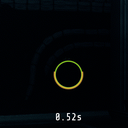
ReloadTimerPlus
A tactical reload timer for GTFO with ammo warning and reload sound cue. Supports hot-reloading, custom offsets, and synchronized circle animations.
By Zose
| Last updated | 4 months ago |
| Total downloads | 789 |
| Total rating | 0 |
| Categories | Client Mods |
| Dependency string | Zose-ReloadTimerPlus-1.1.0 |
| Dependants | 0 other packages depend on this package |
This mod requires the following mods to function

BepInEx-BepInExPack_GTFO
BepInEx pack for GTFO. Preconfigured and includes Unity Base DLLs.
Preferred version: 3.2.2README
ReloadTimerPlus
This mod replaces the generic reload process with a tactical, minimalist HUD positioned right below your crosshair, accompanied by customizable audio cues to notify you exactly when your weapon is ready to fire.
Features
- Reloading: Shows a countdown timer (e.g.,
1.25s) perfectly synced with the circle progress.- Note: Since the game's ammo refresh timing is calculated using a combination of base reload time and multipliers, the countdown circle may experience a slight desync during a weapon's first reload. The correct timing is then cached locally, ensuring all subsequent reloads are perfectly synchronized.
- Low Ammo: A persistent, jittering
RELOADwarning in red when magazine capacity is low (ammo count removed for a cleaner HUD). - Reload Sound Cue: Provides an auditory confirmation when your weapon is fully reloaded. You can select from built-in Wwise game sounds or import your own custom
.wavfiles. - Calibration Persistence: Automatically saves and loads reload timings for each weapon across different Rundowns (Supports MTFO, TheArchive, and Vanilla).
- Hot-Reload Support:
- Change settings in r2modman (Config Editor) and click Save to see the changes in-game immediately.
Configuration
- TextOffset: The vertical distance from the crosshair center. Default is
85. - EnableChargeCircleEffects: Toggles the display of the circular reload progress bar, the text countdown timer, and the scaling/green color effect when reload finishes. Default is
true. - ChargeUpColor: Custom color for the reload/charge-up circle. Default is
#00FF0080. - EnableLowAmmoWarning: Toggles the display of the low ammo "RELOAD" warning text. Default is
true. - LowAmmoThreshold: The ammo percentage (0.0 - 1.0) to trigger the "RELOAD" warning. Default is
0.35(35%).- (Note: For weapons with a magazine size of 20 or less, the threshold is fixed at
0.50(50%) for better visibility.)
- (Note: For weapons with a magazine size of 20 or less, the threshold is fixed at
- LowAmmoColor: Custom color for the "RELOAD" warning text. Default is
#FF000080. - ReloadSoundCue: Selects the sound event to play when a reload completes. Can be set to built-in sounds (e.g.,
HACKING_PUZZLE_CORRECT,BUTTONGENERICBLIPCONFIRM),Noneto disable, orCustomLocalFilefor custom audio. Default isHACKING_PUZZLE_CORRECT. - CustomSoundFileName: Only active when
ReloadSoundCueis set toCustomLocalFile. Defines the name of your custom.wavaudio file (e.g.,custom_reload.wav).- Note: Place your
.wavfile inside theBepInEx/config/Zose_ReloadTimerPlus/folder. Only.wavformat is supported.
- Note: Place your
