

MagicBullet
Silent Aim / Magic Bullet with forced headshots, target prediction, configurable targeting modes, FOV circle, target tracking line, and optional wall penetration for How to Fish. (Created with AI assistance).
| Last updated | a month ago |
| Total downloads | 23000 |
| Total rating | 2 |
| Categories | Mods |
| Dependency string | Caijue-MagicBullet-1.2.3 |
| Dependants | 0 other packages depend on this package |
This mod requires the following mods to function

BepInEx-BepInExPack
BepInEx pack for Mono Unity games. Preconfigured and ready to use.
Preferred version: 5.4.2305README
Magic Bullet
Silent Aim & Forced Headshots mod for How to Fish
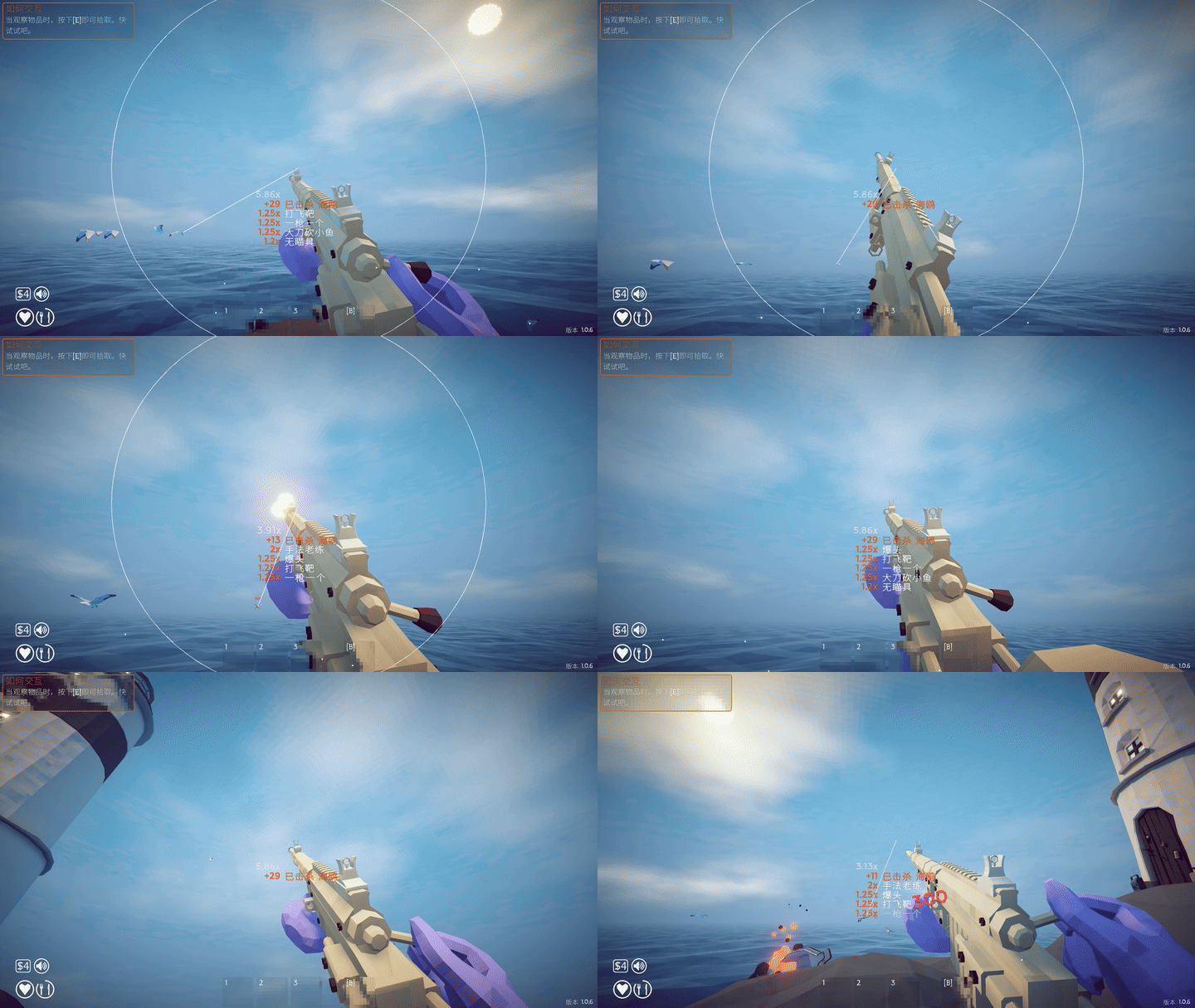
Magic Bullet redirects projectile velocity toward valid creature targets in real time without moving your camera or crosshair.
This mod was researched, developed, and packaged with AI assistance.
本 Mod 的逆向分析、代码实现与打包流程由 AI 辅助完成。
Gameplay Preview
Moving Target Tracking / 移动目标追踪
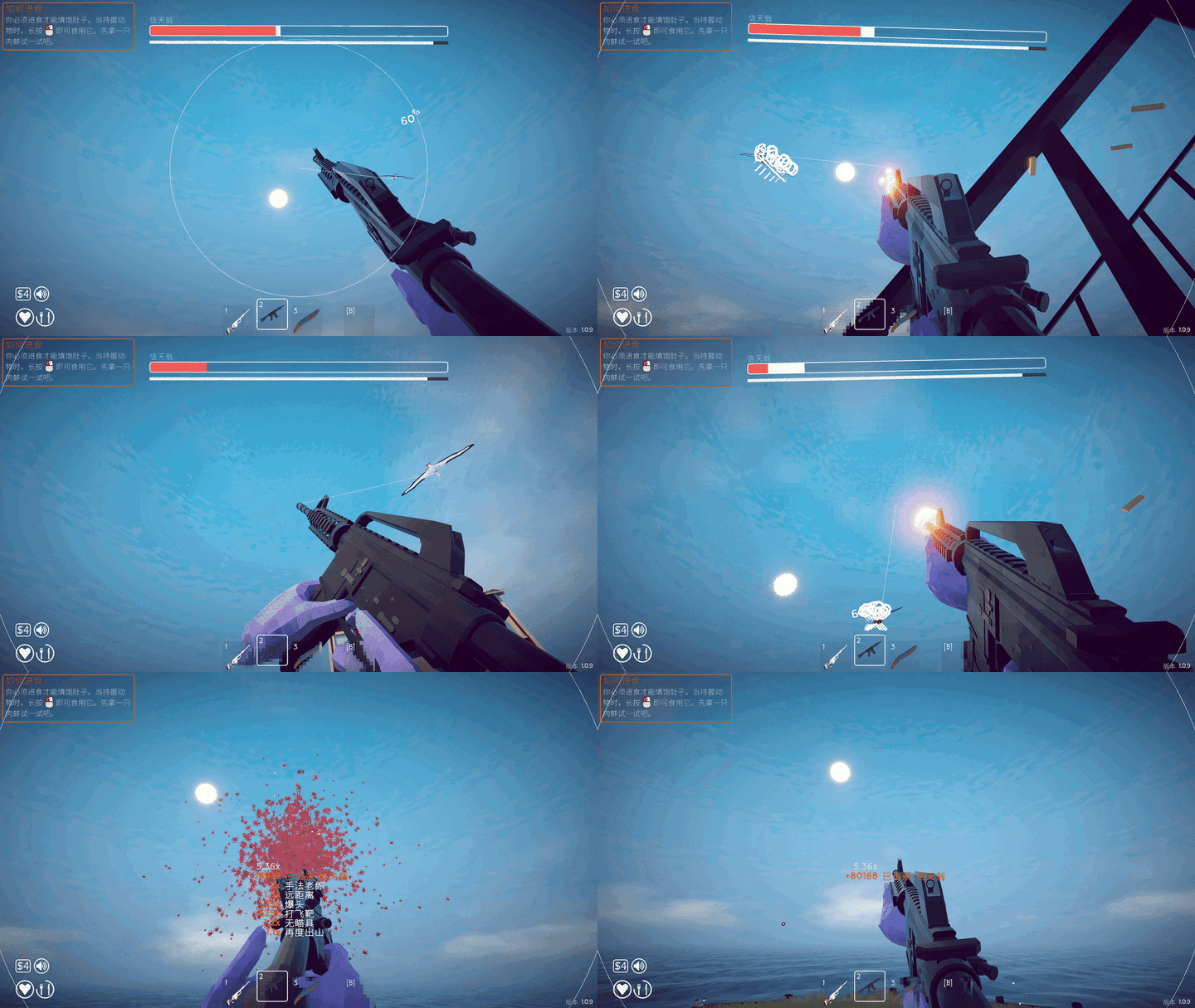
Albatross Targeting / 信天翁目标锁定
Features
- Silent Aim — Redirects real projectile velocity without camera snapping or view lock.
- Forced Headshots — While Magic Bullet is enabled, eligible ranged hits from the local player against supported creature targets can be promoted into the game's headshot region.
- Movement Prediction — Intercept prediction with ballistic gravity compensation for moving targets.
- Sticky Target — Retains the current target during continuous firing to prevent target jumping.
- Target Modes — Four selectable targeting strategies:
Crosshair,Nearest,LowestHealth, andBossPriority. - Target Filters — Fish, Birds, and Albatross can be enabled or disabled independently.
- Strict Target Safety — Players and teammates are never selected as Magic Bullet targets.
- Visuals — Optional on-screen FOV circle and target tracking line (clipped to screen bounds).
- Optional Wall Penetration — Allows authorized local-player Magic Bullet shots to pass through environmental obstacles.
- Projectile Ownership Isolation — NPC/Boss projectiles such as Albatross attacks are not redirected.
Controls
| Key | Action |
|---|---|
F8 |
Toggle Magic Bullet ON / OFF |
[ |
Decrease targeting FOV |
] |
Increase targeting FOV |
Target Modes
| Mode | Behavior |
|---|---|
Crosshair |
Targets the valid creature closest to the crosshair center within FOV (default). |
Nearest |
Targets the closest valid creature by 3D world distance. |
LowestHealth |
Targets the valid creature with the lowest remaining health. |
BossPriority |
Prioritizes boss targets. |
Line of Sight & Wall Penetration
RequireLineOfSight and WallPenetration are independent settings:
RequireLineOfSight = false— Targets behind obstacles may be acquired.WallPenetration = true— Authorized local Magic Bullet projectiles may pass environmental obstacles to reach the selected target.
Examples:
RequireLineOfSight = false+WallPenetration = false(Default): Targets behind obstacles can be locked, but projectiles are still stopped by obstacles.RequireLineOfSight = false+WallPenetration = true: Targets behind obstacles can be locked and authorized Magic Bullet projectiles will penetrate obstacles to reach them.RequireLineOfSight = true: Targets hidden behind obstacles cannot be acquired.
Note: WallPenetration does NOT globally disable collisions and does not affect NPC or remote-player projectiles.
Installation
Thunderstore Mod Manager / r2modman (Recommended)
- Install Magic Bullet through Thunderstore Mod Manager or r2modman.
- Ensure the BepInExPack dependency is installed.
- Launch the game using Start modded.
- Press
F8in-game to toggle Magic Bullet.
Manual Installation
- Install BepInEx 5.
- Place
HowToFishMagicBullet.dllin:BepInEx/plugins/HowToFishMagicBullet/ - Launch the game.
Configuration
The configuration file is generated after first launch at:
BepInEx/config/com.openai.howtofish.magicbullet.cfg
Important settings and their defaults:
[MagicBullet]
Enabled = true

[Targeting]
TargetMode = Crosshair
FOV = 35.0
MaxTargetDistance = 500.0
StickyTarget = true
RequireLineOfSight = false
WallPenetration = false

[Filtering]
TargetFish = true
TargetBirds = true
TargetAlbatross = true

[Visuals]
ShowFOVCircle = true
ShowTargetLine = true

[Diagnostics]
DebugLogging = false
📖 中文说明
Magic Bullet 是专为 How to Fish 开发的静默自瞄与强制爆头模组。
Magic Bullet 在开火时实时重定向子弹飞行速度矢量,将其引导至有效生物目标,全程无需转动或吸附玩家镜头与准星。
本 Mod 的逆向分析、代码实现与打包流程由 AI 辅助完成。
✨ 主要特性
- 静默自瞄 (Silent Aim) — 实时重定向真实子弹物理速度,绝不强行转动或锁定玩家视角。
- 强制爆头 (Forced Headshots) — 开启 Magic Bullet 期间,本地玩家对支持的生物目标造成的远程命中可直接进入游戏头部判定区域,触发爆头倍率。
- 移动预判 (Movement Prediction) — 针对移动目标进行多步提前量计算,并带有抛物线重力弹道补偿。
- 粘性锁定 (Sticky Target) — 连发射击时平滑保持当前锁定目标,防止多目标间准星跳动。
- 目标模式 (Target Modes) — 提供四种可选的目标筛选策略:
Crosshair(准星优先)、Nearest(距离优先)、LowestHealth(残血优先)和BossPriority(Boss 优先)。 - 生物过滤 (Target Filters) — 鱼类、飞鸟和信天翁 Boss 均可独立开启或关闭锁定。
- 严格目标安全 (Strict Target Safety) — 绝不锁定玩家或联机队友。
- 视觉显示 (Visuals) — 可选的屏幕中心 FOV 准星圆环与目标追踪连线(严格裁剪在屏幕可视范围内)。
- 可选穿墙 (Optional Wall Penetration) — 允许已授权的本地玩家 Magic Bullet 子弹穿透环境障碍物打击目标。
- 发射所有权隔离 (Projectile Ownership Isolation) — 信天翁投弹、鲸鱼喷火等 NPC/Boss 攻击不会被 Magic Bullet 误重定向。
🎮 快捷键操作
| 按键 | 功能说明 |
|---|---|
F8 |
开关 Magic Bullet 功能(开启 / 关闭) |
[ |
减小自瞄 FOV 角度 |
] |
增大自瞄 FOV 角度 |
🎯 目标模式
| 模式 | 行为说明 |
|---|---|
Crosshair |
优先锁定 FOV 范围内距离十字准星中心最近的有效生物(默认)。 |
Nearest |
优先锁定三维世界距离最近的有效生物。 |
LowestHealth |
优先锁定当前生命值最低的有效生物。 |
BossPriority |
优先锁定 Boss 目标。 |
🧱 视线检测与穿墙模式
RequireLineOfSight(视线检测)与 WallPenetration(穿墙模式)是两项独立的设置:
RequireLineOfSight = false— 允许锁定障碍物后的目标。WallPenetration = true— 允许经过授权的本地 Magic Bullet 子弹穿透环境障碍物以击中选定目标。
示例:
RequireLineOfSight = false+WallPenetration = false(默认):可以锁定墙后的目标,但子弹仍会被障碍物阻挡。RequireLineOfSight = false+WallPenetration = true:可以锁定墙后的目标,且授权的 Magic Bullet 子弹能够穿透障碍物击中目标。RequireLineOfSight = true:隐藏在障碍物后的目标将无法被锁定。
注意:WallPenetration 不会全局关闭物理碰撞,也不会影响 NPC、Boss 或远端其他玩家的子弹。
📦 安装方式
Thunderstore Mod Manager / r2modman(推荐)
- 通过 Thunderstore Mod Manager 或 r2modman 安装 Magic Bullet。
- 确保已安装 BepInExPack 前置依赖。
- 点击 Start modded 启动游戏。
- 在游戏内按
F8键即可开关 Magic Bullet。
手动安装
- 安装 BepInEx 5。
- 将
HowToFishMagicBullet.dll放入以下目录:BepInEx/plugins/HowToFishMagicBullet/ - 启动游戏。
⚙️ 配置文件
配置文件在首次启动游戏后自动生成于:
BepInEx/config/com.openai.howtofish.magicbullet.cfg
常用配置项及其默认值:
[MagicBullet]
Enabled = true

[Targeting]
TargetMode = Crosshair
FOV = 35.0
MaxTargetDistance = 500.0
StickyTarget = true
RequireLineOfSight = false
WallPenetration = false

[Filtering]
TargetFish = true
TargetBirds = true
TargetAlbatross = true

[Visuals]
ShowFOVCircle = true
ShowTargetLine = true

[Diagnostics]
DebugLogging = false
🔗 开源仓库与问题反馈 (Source / Issues)
GitHub Repository:
https://github.com/Caijue117/HowToFish-MagicBullet
