

SaveBackups
Automatic rolling backups of your save files, with a Backups tab in the Load Game screen. Restores mod data alongside the save, so a snapshot puts everything back together.
By hiccup
| Last updated | a month ago |
| Total downloads | 3243 |
| Total rating | 0 |
| Categories | Mods Tools Libraries |
| Dependency string | hiccup-SaveBackups-1.4.0 |
| Dependants | 0 other packages depend on this package |
This mod requires the following mods to function

BepInEx-BepInExPack
BepInEx pack for Mono Unity games. Preconfigured and ready to use.
Preferred version: 5.4.2305README
SaveBackups
Modded games break saves sometimes. This keeps rolling copies of yours and lets you put one back from inside the game.
A Backups button appears on the Save Info panel in the Load Game screen. It opens beside the save list and lays every backup out as a table: when it was taken, its name, the island, the money, the time played and how many mod files it carries. Each row has three buttons on the right, to edit, restore or delete that backup.

The money, island and playtime are read out of each backup file, so you can tell which one you actually want instead of guessing from a timestamp.
When backups happen
Automatically every time the game saves, which includes the five minute autosave, and again when you pick a save to load, so you always have the state you started a session with. You can also take one on demand with Back up now.
Identical saves are skipped, so sitting idle does not fill your history with copies of the same thing. That means the slots you keep hold genuinely different states.
Restoring is safe
Restoring takes a backup of the current file first, marked manual, so restoring is itself undoable. If you pick the wrong one you have not lost anything.
Manual backups are never deleted automatically. Only automatic ones rotate, keeping the newest few. This matters: if manual backups were pruned too, a handful of autosaves after something went wrong could quietly delete the good copy you were relying on.
The mod also refuses to back up or restore an empty file, since an empty save is what corruption usually looks like and copying it over your history would destroy the thing you need.
Mod data is included too
Some mods keep their own save data in a separate file. If only the vanilla save were rolled back, you would end up with a mismatched world: base state from the snapshot, mod state from now.
A snapshot therefore holds the save and any registered mod files together, and restores them as one unit. Rows carrying mod data are marked with a + and a count. Hover it to see exactly which mods are in that snapshot.
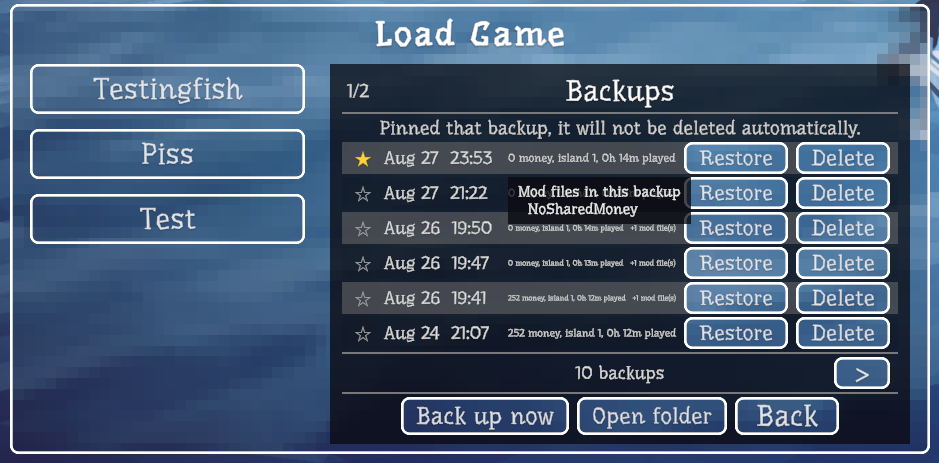
If you restore a snapshot whose mod is no longer installed, the save is restored anyway and the panel tells you which data was skipped.
Editing a backup
The pencil on a row opens that backup in a panel underneath the table. It shows the whole snapshot at once and lets you change most of it: the save name, the money, the current and furthest island, the motor, the boat skin, the difficulty, and whether the boat, radar, grill, final boss and ending are unlocked. Save changes writes it back, Cancel throws the edits away.
Saving is done carefully. The untouched original is kept beside the backup as save.txt.pre-edit, the new version is written to a temporary file and read back to prove it still parses, and only then does it take the original's place. If anything fails, nothing is overwritten and the panel says so. Only the fields shown in the panel are touched; the world items and the per-player records come through exactly as they were.
The same panel lists the mod files stored in that backup, with a bin button to remove one. That takes two clicks, and removes the file and the snapshot's record of it while leaving the rest of the backup alone.
Unlocked skins are not there, and that is deliberate. The game keeps them in its own local file rather than in the save, so they are shared by every save and are not part of a backup at all. There is nothing per backup to edit.
Keeping the ones that matter
Every row has a star. Click it and that backup is pinned to the top of the list and will never be deleted to make room, no matter how many autosaves pile up after it.

This is for the save you want to come back to: the run before a risky mod, or the state you know was good. Unstar it and it rejoins the normal rotation, and deleting it by hand still works as usual.
For mod authors
If your mod writes its own per save file, two lines make it part of every snapshot.
Add a soft dependency so your mod still runs without SaveBackups:
[BepInDependency("dazed.howtofish.savebackups", BepInDependency.DependencyFlags.SoftDependency)]
This attribute is worth adding even though the API no longer needs it. BepInEx starts plugins in plugin id order, so without it your mod may well start before this one.
Then register in Awake, returning the absolute path for a given save name, or null if that save has no file:
SaveBackups.Companions.Register(
    "yourmodid",
    "Your Mod Name",
    saveName => Path.Combine(
        Paths.ConfigPath,
        "YourMod",
        "Saves",
        SaveBackups.Companions.SanitiseSaveName(saveName) + ".json"));
The save name arrives exactly as the game stores it, punctuation and all. If you key your files by a cleaned up version of that name, call SaveBackups.Companions.SanitiseSaveName rather than writing the rule yourself, so your filenames always agree with the ones this mod looks for.
That is the whole integration. SaveBackups copies the file when it snapshots and writes it back when you restore, creating directories as needed. A missing file is normal and is not an error.
If you would rather not reference SaveBackups at all, every call works through reflection against the SaveBackups.Companions type. Check IsAvailable to confirm the type resolved before registering.
Where the files live
%USERPROFILE%\AppData\LocalLow\Dazed Games\How to Fish\SaveBackups\<save name>\<timestamp>\
    save.txt
    companion.<modid>.json
    snapshot.json
They are plain copies of the real files, so you can also just copy one back by hand if you prefer. Open folder in the menu takes you straight there.
Backups made before version 1.1.0 were single files rather than folders. Those are still listed and still restore, as save only snapshots. Nothing is migrated or rewritten.
Configuration
BepInEx/config/dazed.howtofish.savebackups.cfg
| Setting | Default | What it does |
|---|---|---|
BackupOnSave |
true | Back up on every save, including the autosave |
BackupOnLoad |
true | Back up when a save is selected to load |
SkipUnchanged |
true | Do not store a copy identical to the newest one |
MaxAutomaticBackups |
10 | Automatic backups kept per save. 0 keeps everything |
MaxPreRestoreBackups |
5 | Safety snapshots kept per save, taken automatically just before each restore. 0 keeps everything |
BackupsPerPage |
6 | Backups listed per page. Use the arrows at the bottom to reach older ones |
ButtonGap |
14 | Spacing between Delete, Load and Backups on the save info panel |
DeferCapture |
true | Copy files at the end of the frame so mod data is captured in step with the save |
Disk use is modest. Save files are small, and 10 backups of a save is still well under a megabyte.
Notes
Singleplayer and hosted saves both work, since these are the server save files. Only the host has them, so joining someone else's game has nothing to back up.
Nothing is overwritten without being copied first, and no game files are modified. Removing the mod leaves your saves exactly as they are, and the backup folder can be deleted freely.
