
LwfPactHistoryExporter
Export pact history from Lazy Witch's Factory as PNG or JPEG images.
| Last updated | 3 days ago |
| Total downloads | 8 |
| Total rating | 0 |
| Categories | Mods AI Generated |
| Dependency string | kusyua-LwfPactHistoryExporter-1.0.0 |
| Dependants | 0 other packages depend on this package |
This mod requires the following mods to function

BepInEx-BepInExPack
BepInEx pack for Mono Unity games. Preconfigured and ready to use.
Preferred version: 5.4.2305README
LWF Pact History Exporter
Export your Pact History from Lazy Witch's Factory as a PNG or JPEG image while keeping the game's pact-panel presentation.
What it does
The mod adds an Export button to the Pact History screen.
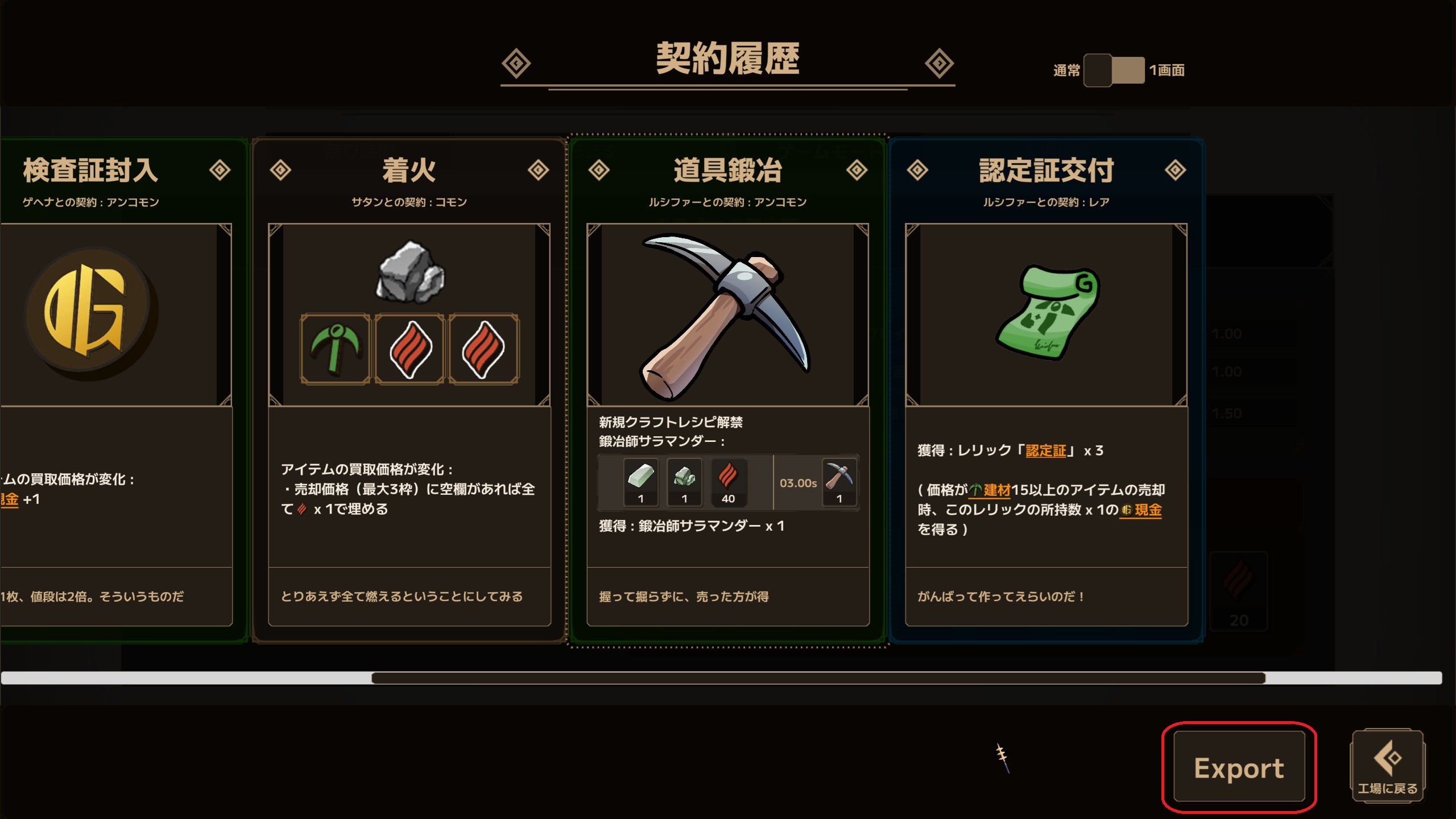
- Exports the pact history using the game's pact-panel presentation.
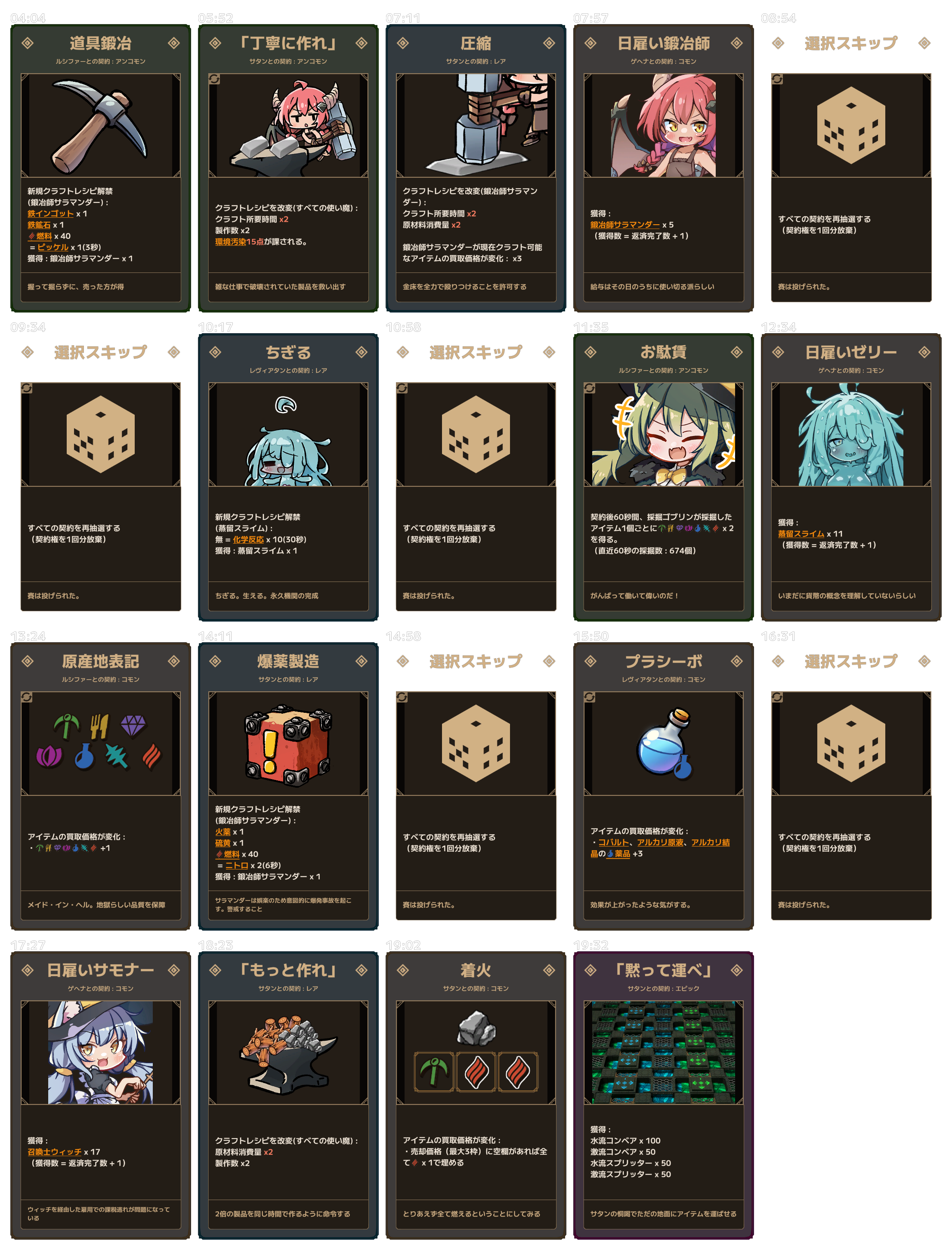
- Arranges up to five pact panels per row.
- Supports lossless PNG and smaller JPEG output.
- Shows when each pact was acquired during the run (when available).
- Automatically splits image output when a single texture would exceed the runtime limit.
Unavailable timestamps are displayed as —.
Example output
Exported images are saved under:
<GameDir>/PactHistoryExports/
Files are timestamped and begin with PactHistory_.
Installation
Thunderstore Mod Manager / r2modman
Install through a compatible Thunderstore mod manager. The required BepInExPack dependency is installed automatically.
Manual installation
Requires BepInEx 5.
- Install the Windows x64 version of BepInEx 5 into the folder
containing
LazyWitchsFactory.exe. - Place
LwfPactHistoryExporter.dllin:
<GameDir>/BepInEx/plugins/LwfPactHistoryExporter/
- Start the game.
If the plugin does not load, check BepInEx/LogOutput.log.
Configuration
After the mod has loaded once, BepInEx creates:
<GameDir>/BepInEx/config/io.github.kusyua.lwf.pacthistoryexporter.cfg
Useful settings:
| Setting | Default | Description |
|---|---|---|
IncludePactTimestamps |
true |
Show each pact's in-run acquisition time above its panel. |
Format |
png |
Output format: png, jpg, or jpeg. |
JpegQuality |
90 |
Initial JPEG quality from 1 to 100. |
JpegTargetSizeMiB |
8 |
Target JPEG size in MiB. 0 disables the target. This is not a guaranteed maximum. |
Compatibility
- Lazy Witch's Factory --- Steam, Windows x64
- BepInEx 5
- Tested with BepInEx
5.4.23.5and Unity6000.0.80f1on 2026-09-01. - Game updates may change private UI implementation details used by this mod and may require an update.
This mod does not redistribute extracted game assets or game assemblies. The screenshots only document the MOD's runtime behavior. This is an unofficial MOD and is not affiliated with or endorsed by the developer or publisher of Lazy Witch's Factory.
日本語
Lazy Witch's Factory の契約履歴を、ゲーム内の契約パネルに近い見た目のまま PNG / JPEG 画像として保存する MOD です。
できること
契約履歴画面に Export ボタンを追加します。
- 契約履歴をゲーム内の契約パネル表示を利用して画像化
- 1行あたり最大5枚の契約パネルを配置
- PNG / JPEG 出力に対応
- 各契約をそのランで取得した時刻も一緒に表示できます(取得時刻が利用できる場合)
- 出力画像がランタイムの単一テクスチャ上限を超える場合は、自動的に複数ファイルへ分割
取得時刻が利用できない場合は — と表示されます。
出力例
出力先:
<GameDir>/PactHistoryExports/
ファイル名にはタイムスタンプが付き、PactHistory_ から始まります。
インストール
Thunderstore Mod Manager / r2modman
対応するThunderstore系MOD Managerからインストールしてください。必要な BepInExPack依存関係も自動的に導入されます。
手動インストール
BepInEx 5 が必要です。
LazyWitchsFactory.exeのあるゲームフォルダへ Windows x64 版 BepInEx 5 を導入します。LwfPactHistoryExporter.dllを以下へ配置します。
<GameDir>/BepInEx/plugins/LwfPactHistoryExporter/
- ゲームを起動します。
MODが読み込まれない場合は BepInEx/LogOutput.log を確認してください。
設定
MODを一度読み込むと、BepInExによって以下の設定ファイルが作成されます。
<GameDir>/BepInEx/config/io.github.kusyua.lwf.pacthistoryexporter.cfg
主な設定:
| 設定 | 初期値 | 内容 |
|---|---|---|
IncludePactTimestamps |
true |
各契約のラン中の取得時刻をパネル上部に表示します。 |
Format |
png |
出力形式。png / jpg / jpeg を指定できます。 |
JpegQuality |
90 |
JPEGの初期品質(1~100)。 |
JpegTargetSizeMiB |
8 |
JPEGの目標ファイルサイズ(MiB)。0で無効。上限を保証するものではありません。 |
対応環境
- Lazy Witch's Factory --- Steam / Windows x64
- BepInEx 5
- 2026-09-01 時点で BepInEx
5.4.23.5/ Unity6000.0.80f1の環境で動作確認 - ゲームのアップデートにより、MODが利用している内部UI実装が変更された場合はMOD側の更新が必要になることがあります。
このMODは抽出したゲームアセットやゲーム本体のアセンブリを再配布しません。掲載したスクリーンショットはMODの動作を示すものです。Lazy Witch's Factory の開発元・販売元とは関係のない非公式MODです。
