
Please disclose if any significant portion of your mod was created using AI tools by adding the 'AI Generated' category. Failing to do so may result in the mod being removed from Thunderstore.

Minimap
A persistent, customizable minimap. All players must install it. v80+ fork of Tyzeron's Minimap mod (github.com/tyzeron/LethalCompanyMinimap).
| Last updated | 2 hours ago |
| Total downloads | 115 |
| Total rating | 1 |
| Categories | BepInEx Mods Tools Misc AI Generated |
| Dependency string | ZweitenKlite-Minimap-1.2.1 |
| Dependants | 0 other packages depend on this package |
This mod requires the following mods to function

BepInEx-BepInExPack
BepInEx pack for Mono Unity games. Preconfigured and ready to use.
Preferred version: 5.4.2305README
Lethal Company Minimap (v80+ Fork)
This is a community-maintained fork of Tyzeron's Minimap mod, updated to work with Lethal Company v80+. All credit for the original mod goes to Tyzeron. This fork is not affiliated with or endorsed by the original author.
- Original source code: https://github.com/tyzeron/LethalCompanyMinimap
- Original Thunderstore page: https://thunderstore.io/c/lethal-company/p/Tyzeron/Minimap/
- This fork's source code: https://github.com/KCL-DreiKlite/LethalCompanyMinimap
Introducing a Minimap mod for Lethal Company, a dynamic solution designed to enhance your gaming experience. This mod seamlessly integrates a persistent minimap on your screen, ensuring that you're never left in the dark, whether you're playing solo or in co-op mode.
For solo players, this mod emulates the real-time information flow that would typically be provided by a partner stationed at the ship's terminal.
In co-op mode, the Minimap mod ensures that everyone can join in the excitement of venturing into the building, eliminating the need for one player to stay back at the ship.
Usage
These are the default hotkeys:
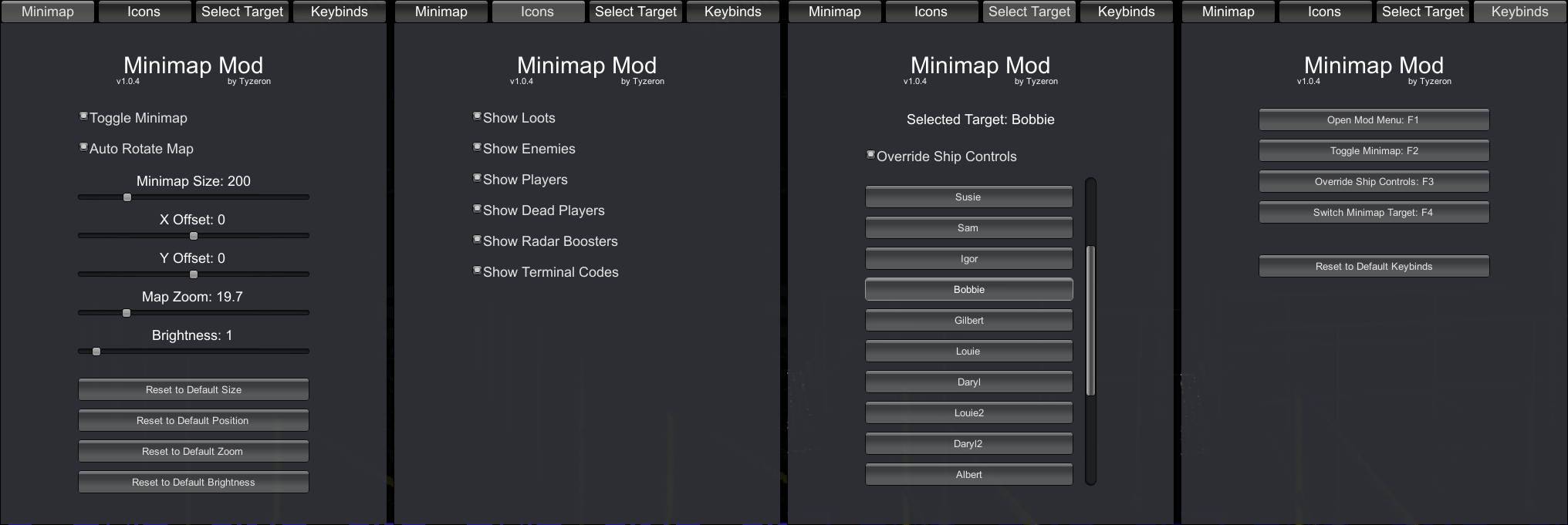
F1- open the Minimap Mod menuF2- toggle the Minimap visibilityF3- override the ship controlsF4- switch the Minimap target (when ship controls are overridden)
All hotkeys can be easily reconfigured via the Minimap mod menu.
The Minimap size, position, and the hotkeys, can be customized via the mod menu.
By default, the Minimap is synced with the ship's control panel. However, you can override the ship controls. This way, you can ensure that the Minimap focus doesn't change even if your teammate switches to a different player in the ship. It also allows you to switch the focused player on your Minimap without affecting the Minimap or ship map of other players.
Every player in the lobby (host and clients) must have this mod installed. Players without the mod cannot join a lobby that uses it, and players with the mod cannot join a lobby without it.
Features
- Minimap that can be toggled on and off
- You can toggle the Minimap via a configurable hotkey
- Auto-rotate the Minimap based on where the player is looking at
- You can turn this feature on and off via the mod menu
- Also auto-rotates certain Minimap icons (Terminal Code, Ship Arrow, Compass) accordingly
- Customize all aspect of the Minimap:
- the Minimap size
- the Minimap position
- the Minimap zoom level
- the Minimap brightness
- Switch Minimap focus without affecting other players map
- or you can have the Minimap linked with the ship's control panel
- Customize all the available hotkeys via a user-friendly GUI:
- Hotkey for opening the mod menu
- Hotkey for toggling the Minimap
- Hotkey for overriding ship controls
- Hotkey for switching Minimap target
- Hotkeys can be binded to not only keyboard but also mouse buttons
- Easily reset specific (or all) configurable settings
- All settings configurable via a user-friendly in-game GUI
- All configurable settings saved across sessions
- Toggle visibility of different Minimap icons
- Loots, Enemies, Turrets, Alived Players, Dead Players, Terminal Codes, Radar Boosters, Ship Arrow, Compass, and the Head Camera
- Informs if the mod is outdated and a newer version is available
Installation
Using a mod manager (recommended)
Search for Minimap by ZweitenKlite in Gale or r2modman and install it. BepInEx will be installed automatically as a dependency.
Do not install this fork together with Tyzeron's original Minimap mod. Both use the same plugin ID, so BepInEx will only load one of them.
Manual installation
-
Install BepInEx (see BepInEx Installation Guide)
-
Launch Lethal Company once with BepInEx installed to generate necessary mod folders and files
-
Navigate to your Lethal Company game directory and go to
./BepInEx/plugins- The
BepInExandpluginsfolder should have been generated in the previous step - Example:
C:\Program Files\Steam\steamapps\common\Lethal Company\BepInEx\plugins
- The
-
Download this mod from Thunderstore or GitHub Releases
-
Copy the downloaded DLL file (from the Thunderstore zip, or the one attached to the GitHub release) to the
pluginsfolder -
Launch the Lethal Company game and enjoy your new Minimap mod :)
Changelog (Fork)
v1.2.1
- The Thunderstore release no longer checks for updates in-game (mod managers keep it up to date). The DLL on GitHub Releases still does
v1.2.0
- All players in the lobby (host and clients) must now have this mod installed. Players without it cannot join a lobby that uses it, and vice versa. This is required by the Thunderstore Lethal Company community rules for mods that give an advantage
v1.1.1
- Fix the terrain contour map disappearing on the Minimap when outdoors
- Fix the Minimap showing only the moon info screen on non-host clients after a player joins mid-round (e.g. with late-join mods)
v1.1.0
- Compatibility with the game update v80
- The ship icon introduced in the newer game updates is now toggled together with the Ship Arrow
- The Ship Arrow now also follows radar boosters, not only players
- Version check now uses this fork's Thunderstore page (falls back to GitHub releases)
For changes up to v1.0.6, see the original repository.
Reporting Issues
Please report issues with this fork on the fork's GitHub issue tracker, not to the original author.
Credits & License
- Original mod by Tyzeron — tyzeron/LethalCompanyMinimap
- v80+ compatibility fork maintained by ZweitenKlite
Licensed under the GNU Affero General Public License v3.0, the same license as the original mod. The full source code of this fork is available at https://github.com/KCL-DreiKlite/LethalCompanyMinimap.
