

InventoryExpansion
Expand your inventory with additional backpack slots. Toggle between standard inventory and backpack with a configurable key. Features animated UI, visual key hints, and automatic cleanup when leaving the game.
| Date uploaded | 2 weeks ago |
| Version | 1.4.9 |
| Download link | DooDesch-InventoryExpansion-1.4.9.zip |
| Downloads | 50 |
| Dependency string | DooDesch-InventoryExpansion-1.4.9 |
This mod requires the following mods to function

LavaGang-MelonLoader
The World's First Universal Mod Loader for Unity Games compatible with both Il2Cpp and Mono
Preferred version: 0.7.3README
MIMESIS - InventoryExpansion
🛟 Need help or found a bug? Get support at support.doodesch.de/inventoryexpansion.
Adds extra backpack slots beneath the inventory HUD. Press
Cto raise the hotbar and reveal them, using the game's own slot frames and key hint. Carry more loot without permanently cluttering the standard 4-slot hotbar. Standalone, no MimicAPI required.




Features
- Adds 4, 9, or 16 usable inventory slots and preserves the native cosmetic and equipment slots. Carried bags add their normal capacity bonus.
- Toggle between the standard hotbar and the backpack with a configurable key (default
C); the mod reads the key live each frame. - Opening raises only the inventory HUD, including equipment and weight. The backpack sits below it with native slot artwork, a faint backing and small side marks.
- Rows have at most 8 slots and stay centered and balanced: 9 slots use 5+4, 12 use 6+6, 14 use 7+7, and 18 use 6+6+6.
- A small native key badge at the bottom shows the configured toggle key.
- While open, slot cycling affects backpack slots. While closed, it follows the visible native hotbar, cosmetic and equipment slots.
- Cursor handoff on toggle: opening the backpack moves your selection to the first backpack slot, and closing it returns the selection to the standard inventory, so the cursor never stays stuck on a hidden slot. Each direction is configurable.
- Optional backpack-first pickup: while the backpack is open, items you pick up fill the backpack slots before the standard inventory (host / single-player only).
- Optional movement-speed reduction to 50% while the backpack is fully open, restored automatically when it closes.
- Blocks large items from entering the open backpack and prevents opening it while holding one; configurable through
BlockLargeItemsInBackpack. - Automatically hides the panel during loading screens and map changes, and when you leave the game or return to the title screen.
Screenshots
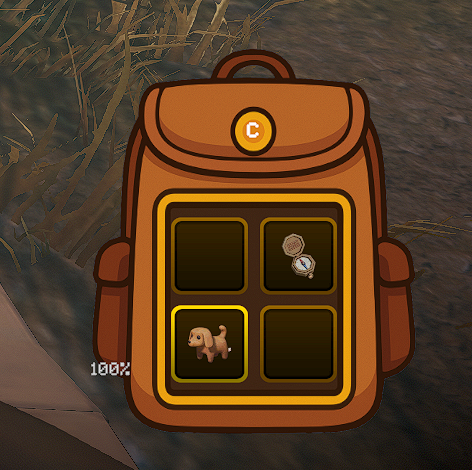
Open with items - the native inventory HUD moves up above the backpack.
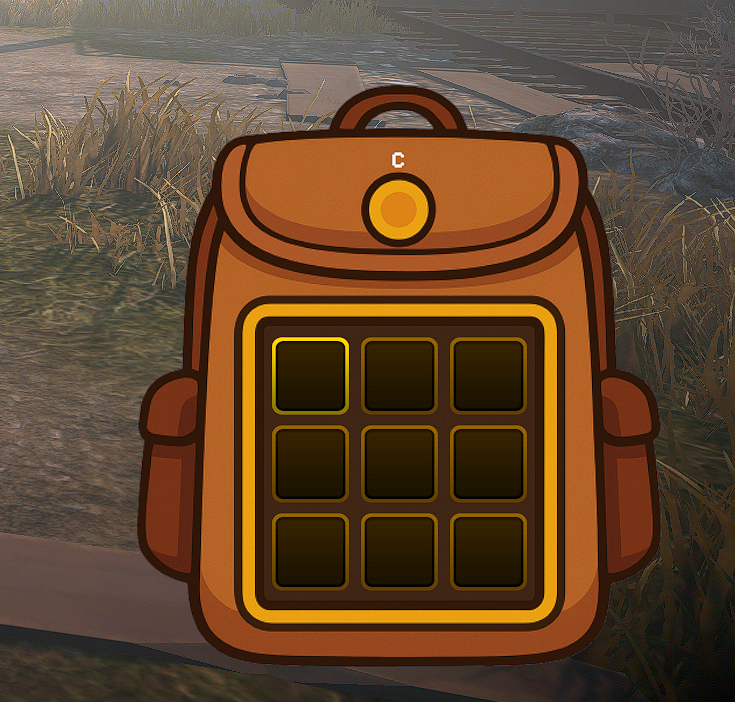
Nine slots - two centered rows of 5 and 4.
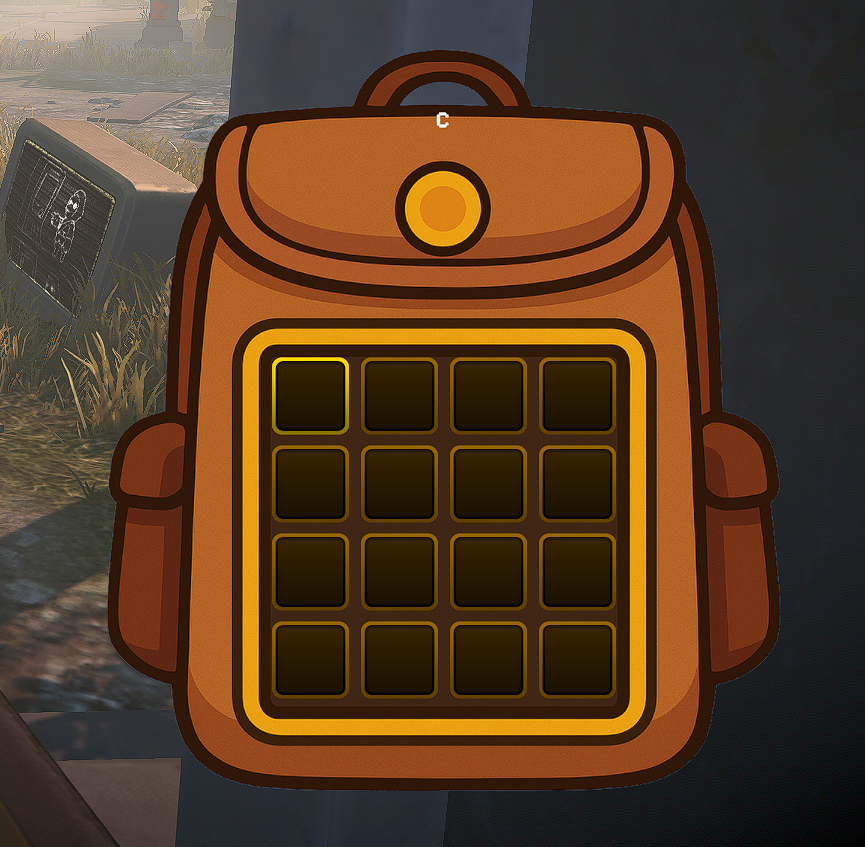
Sixteen slots - two rows of 8.
Closed - the hotbar returns to its original height and the small key hint remains.

Requirements
| Component | Version |
|---|---|
| MIMESIS | 0.4.0 |
| MelonLoader | 0.7.3+ |
Dependency: LavaGang-MelonLoader-0.7.3.
Installation
Recommended: Thunderstore mod manager
Install through a Thunderstore mod manager such as r2modman or Gale. The MelonLoader dependency is handled automatically.
Manual
- Install MelonLoader 0.7.3 into MIMESIS.
- Download this package and place
InventoryExpansion.dllintoMIMESIS/Mods/. - Launch the game once to generate the configuration file at
UserData/MelonPreferences.cfg.
Configuration
Stored in UserData/MelonPreferences.cfg under the [InventoryExpansion] category. You can also edit these through a MelonPreferences UI.
The host controls Enabled, AdditionalSlots, ReduceMovementSpeed, FillBackpackFirst, and BlockLargeItemsInBackpack for the lobby. Joining clients use those values automatically without changing their local config. BackpackKey, SelectBackpackSlotOnOpen, and RestoreStandardSlotOnClose stay local. A host without InventoryExpansion uses native inventory capacity and no mod backpack. Shared-setting changes apply to the next lobby.
| Option | Description | Default | Values/Range |
|---|---|---|---|
Enabled |
Enable InventoryExpansion functionality. When disabled, the mod will not modify game behavior. | true |
true / false |
AdditionalSlots |
Number of extra inventory slots to add on top of the game's default inventory size. Valid values: 4, 9, or 16. Rows are balanced with at most 8 slots each. Other values are rounded to the nearest valid option. | 4 |
4, 9, or 16 |
BackpackKey |
Key to toggle backpack visibility. Press to switch between standard inventory and backpack. | C |
A UnityEngine.KeyCode name that is also supported by the Unity Input System. Invalid or empty values fall back to C. |
ReduceMovementSpeed |
When enabled, player movement speed is reduced to 50% while the backpack is fully open. | true |
true / false |
SelectBackpackSlotOnOpen |
When opening the backpack, move the selected slot to the first backpack slot. | true |
true / false |
RestoreStandardSlotOnClose |
When closing the backpack, return the selected slot to the standard inventory (the slot selected before opening). | true |
true / false |
FillBackpackFirst |
While the backpack is open, picked-up items fill the backpack slots before the standard inventory. Host / single-player only. | true |
true / false |
BlockLargeItemsInBackpack |
Block large items from entering the open backpack and prevent opening it while holding one. | true |
true / false |
Usage
- Press the configured toggle key (default
C) to raise the inventory HUD and reveal the backpack underneath. Press it again to close the backpack and restore the original HUD height. - When the backpack is open, slot scrolling and selection cycle through its slots. When closed, native visible hotbar, cosmetic and equipment slots remain available.
- Opening the backpack jumps your selection to the first backpack slot; closing it returns the selection to your previous standard slot, so the cursor is never stuck on a hidden slot (toggle each via
SelectBackpackSlotOnOpen/RestoreStandardSlotOnClose). - With
FillBackpackFirston, items you pick up while the backpack is open go into backpack slots first. This changes server-side placement, so it only applies when you host or play single-player. - With
ReduceMovementSpeedon, you move at 50% speed while the backpack is fully open, and full speed is restored when it closes. - The panel auto-hides during loading screens and map changes, and when you leave the game or return to the title screen.
In multiplayer, install the mod on the host and clients using the extra slots. Clients automatically use the host's slot count and gameplay settings. Backpack-first pickup applies to the host's own inventory.
Source code and issues: github.com/DooDesch-Mods/Mimesis-InventoryExpansion.
AI disclosure
The mod icon is AI-generated.
Built against MIMESIS 0.4.0 / MelonLoader 0.7.3.
CHANGELOG
Changelog
All notable changes to InventoryExpansion are documented in this file. The format is based on Keep a Changelog, and this project adheres to Semantic Versioning.
[1.5.1] - 2026-11-01
Fixed
- Keep inventory diagnostic patches out of release builds to avoid extra reflection and log writes during pickups and inventory updates.
- Wait for the game's slot layout during loading instead of reporting a backpack error before slot sizes are ready.
[1.5.0] - 2026-10-30
Changed
- Apply host movement, pickup and large-item rules live; keep activation and capacity fixed until the next lobby.
- Add a host movement-speed multiplier and local HUD animation duration, including instant opening.
- Preserve native slot artwork, balanced rows and every whole capacity from 4 to 24.
[1.4.10] - 2026-10-27
Fixed
- Accept every whole-number backpack capacity from 4 to 24 instead of rounding settings to 4, 9 or 16. Joining clients use the host's chosen count.
Changed
- Use real gameplay photos for the package icon, thumbnail, banner and gallery.
[1.4.9] - 2026-10-27
Fixed
- Keep backpack frames the same size and proportions as the native hotbar. Version 1.4.8 incorrectly added icon layout padding to the frame height, stretching the slots vertically.
- Keep backpack rows and the key badge centered beneath the hotbar when the native equipment group changes its position.
[1.4.8] - 2026-10-27
Changed
- Open the backpack beneath the native inventory HUD, raising only the hotbar, equipment and weight display. Use the game's slot frames and a small native key badge at the bottom.
- Balance and center backpack rows with at most eight slots per row, including capacity added by carried bags.
Fixed
- Preserve the MIMESIS 0.4.0 cosmetic and equipment slots when placing and selecting items.
- Keep configured extra capacity during native inventory recalculations and combine it with the strongest carried bag's bonus.
- Keep backpack-first pickups inside usable generic slots and preserve native item setup and dedicated-slot priority.
- Build complete native slot UI objects and keep the backpack grid aligned with the active inventory capacity.
[1.4.7] - 2026-10-11
- Automatically use the host's backpack capacity and gameplay settings for the lobby while keeping your key and selection options local.
- Keep local config values when joining another host and use the vanilla inventory when the host has no InventoryExpansion.
- Preserve the host's backpack capacity after revival and restore local panel and movement state when leaving a session.
[1.4.6] - 2026-10-11
- Built against MIMESIS 0.3.2. Backpack settings are unchanged.
[1.4.5] - 2026-09-04
Changed
- The mod is built against MIMESIS 0.3.1 and tested in a running game on that build. Inventory behaviour does not change.
Fixed
- The log says why the backpack image did not load. Before, two failures were silent, thus a missing backpack image looked the same as a mod that never started.
[1.4.4] - 2026-06-23
Fixed
- The backpack image shows up again after installing from Thunderstore or Nexus. The release packages did not include Backpack.png, so the backpack panel had no image. The image is now bundled inside the mod itself, so no separate file is needed. You can still override it by placing your own Backpack.png in an "Assets" folder next to the mod DLL.
[1.4.3] - 2026-06-23
Fixed
- Multiplayer: fixed a backpack pickup issue that could make items appear duplicated on clients. The backpack-first pickup runs on the host for every player, but was decided from the local backpack state, so another player's pickup could be redirected based on the host's backpack. It now only applies to your own inventory.
Added
- Large items (the ones you cannot switch away from while holding them, such as two-handed items) can no longer be picked up into the backpack while it is open; a short message is shown instead.
- The backpack can no longer be opened while you are holding a large item.
- New "Block Large Items In Backpack" setting (on by default) controls both of the above. Disable it to allow large items in the backpack again.
[1.4.2] - 2026-06-22
Fixed
- The mod's Harmony patches were applied twice (MelonLoader auto-applies them, and the mod also called PatchAll() itself), so every patch ran twice. The redundant call was removed; patches now apply exactly once.
[1.4.1] - 2026-06-17
Changed
- Started maintaining a full changelog that is now published on GitHub, Thunderstore and Nexus. No gameplay changes compared to 1.4.0.
[1.4.0] - 2026-06-15
Added
- Configurable cursor handoff so the mouse cursor behaves predictably when the backpack is open.
- Backpack-first pickup: picked-up items now go into the backpack slots first.
Fixed
- Corrected the position of durability and stack-count labels on backpack slots.
- Fixed the slot label offset by scaling slots through their local scale, so labels line up at every grid size.
[1.3.1] - 2026-06-15
Fixed
- Compatibility with the Mimesis 0.3.0 game update (avatar detection now resolves again on the new game build).
- The backpack is now hidden during loading screens.
- Fixed the backpack panel breaking after a map change.
Changed
- Pinned the MelonLoader dependency to 0.7.3.
- Refreshed the README with structured content, badges, and detailed configuration options.
[1.1.0] - 2025-11-17
Added
- Movement speed is now reduced while the backpack is open.
- Backpack visibility now respects the game's pause state, and the key hint text was improved.
[1.0.0] - 2025-11-16
Added
- Initial release. Expand your inventory with additional backpack slots and toggle between the standard inventory and the backpack with a configurable key. Includes the backpack image, UI layout, and inventory slot selection handling.
