

ModConfigEnhance
ModConfig settings page enhancements: tree sidebar, description panel, translation tools, language files.
| Last updated | 2 months ago |
| Total downloads | 12667 |
| Total rating | 4 |
| Categories | AI Generated Quality Of Life Client Side Translations Optimization |
| Dependency string | AiAeT-ModConfigEnhance-1.0.2 |
| Dependants | 1 other package depends on this package |
This mod requires the following mods to function

BepInEx-BepInExPack_PEAK
BepInEx pack for PEAK. Preconfigured and ready to use.
Preferred version: 5.4.2403


README
ModConfig Enhance
English | 中文
PEAK · enhancements for the ModConfig (PEAKLib.ModConfig) settings page
Ever find yourself scrolling back and forth through a pile of mod settings just to change one value? Digging through cfg comments to figure out what an option does? Want to add multi-language support to your modpack? From now on, this mod lets you manage your modpack's settings far more elegantly!
Tree-style mod list sidebar — √ An info panel showing mod name, version, option descriptions and more — √ One-click export of all unlocalized texts, free to translate, multi-language supported — √ Name sorting and pinning — √ Compatible with TimeTheme's purple night theme — √ …and other small tweaks
Features
| Feature | Details |
|---|---|
| Tree sidebar | The left column lists mods; the selected mod's sections expand beneath it, options on the right. Pinning supported. |
| Search, type filters, a Pin column and an Export column that exports only the ticked mods' texts. | |
| Rows with no matches auto-hide while filtering; keybind options get their own filter button. | |
| Description panel | A persistent panel at the top right: hover/select an option to see its description, default value, range or choices; |
| select a mod/section to see its name, version and summary. Scrollable. | |
| UI localization | All UI text comes from language files; a dropdown on the page switches languages instantly. |
| Translation tools | Export every text awaiting translation / only the untranslated entries; global original ↔ translation toggle; |
| live dictionary reload — add as many languages to your modpack as you like! | |
| Gamepad support | Two-level navigation between the left and right panels: A enters/confirms, B steps back, LB/RB switch mods; |
| sliders need A to arm before adjusting; on a keybind, press A then hold the key for 1 second to write it. | |
| Theme | Hand-drawn paper look; follows TimeTheme's day/night palette when installed; plus vanilla-style visuals and animations. |
Demo
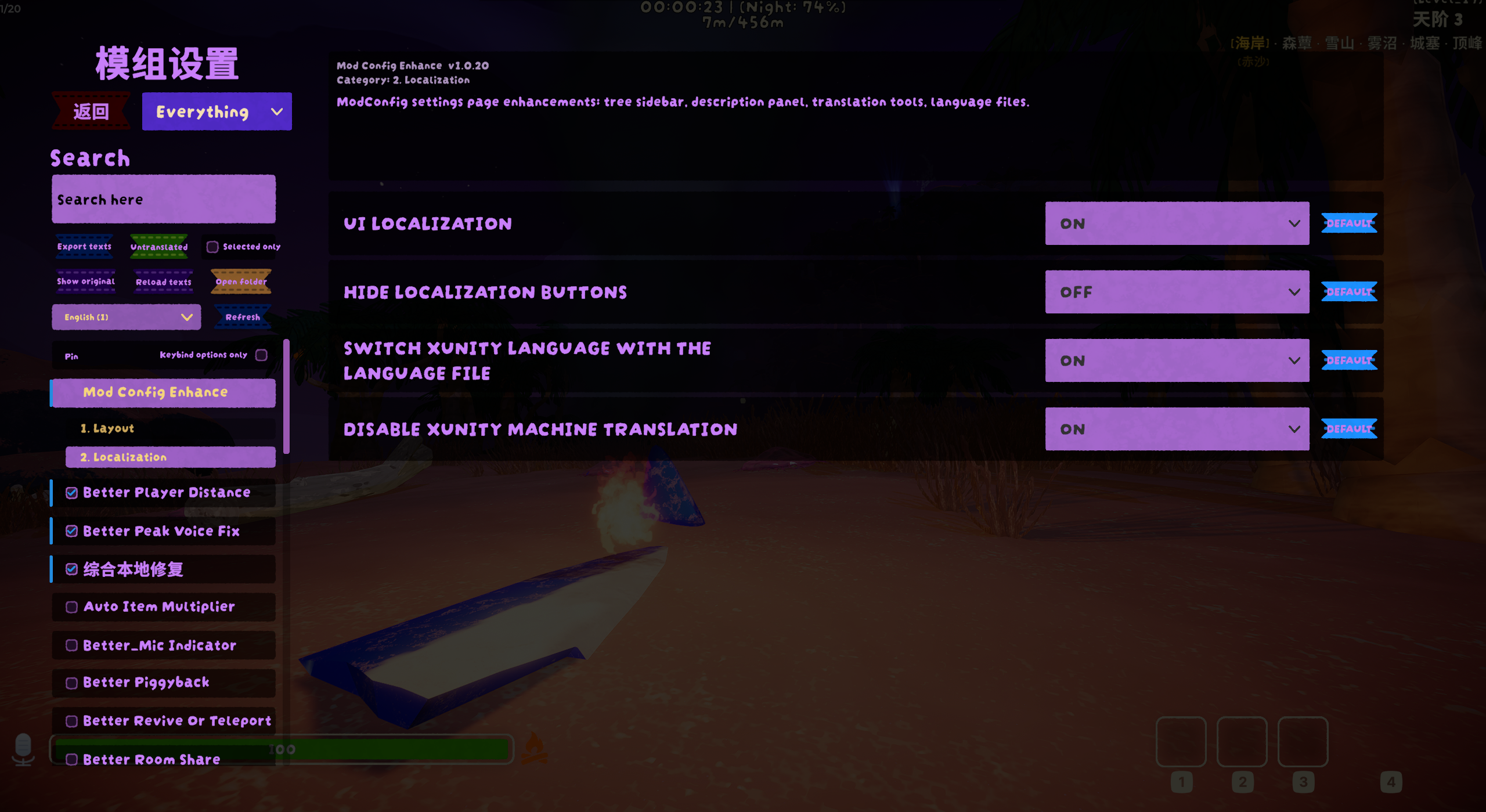 Night theme (TimeTheme)
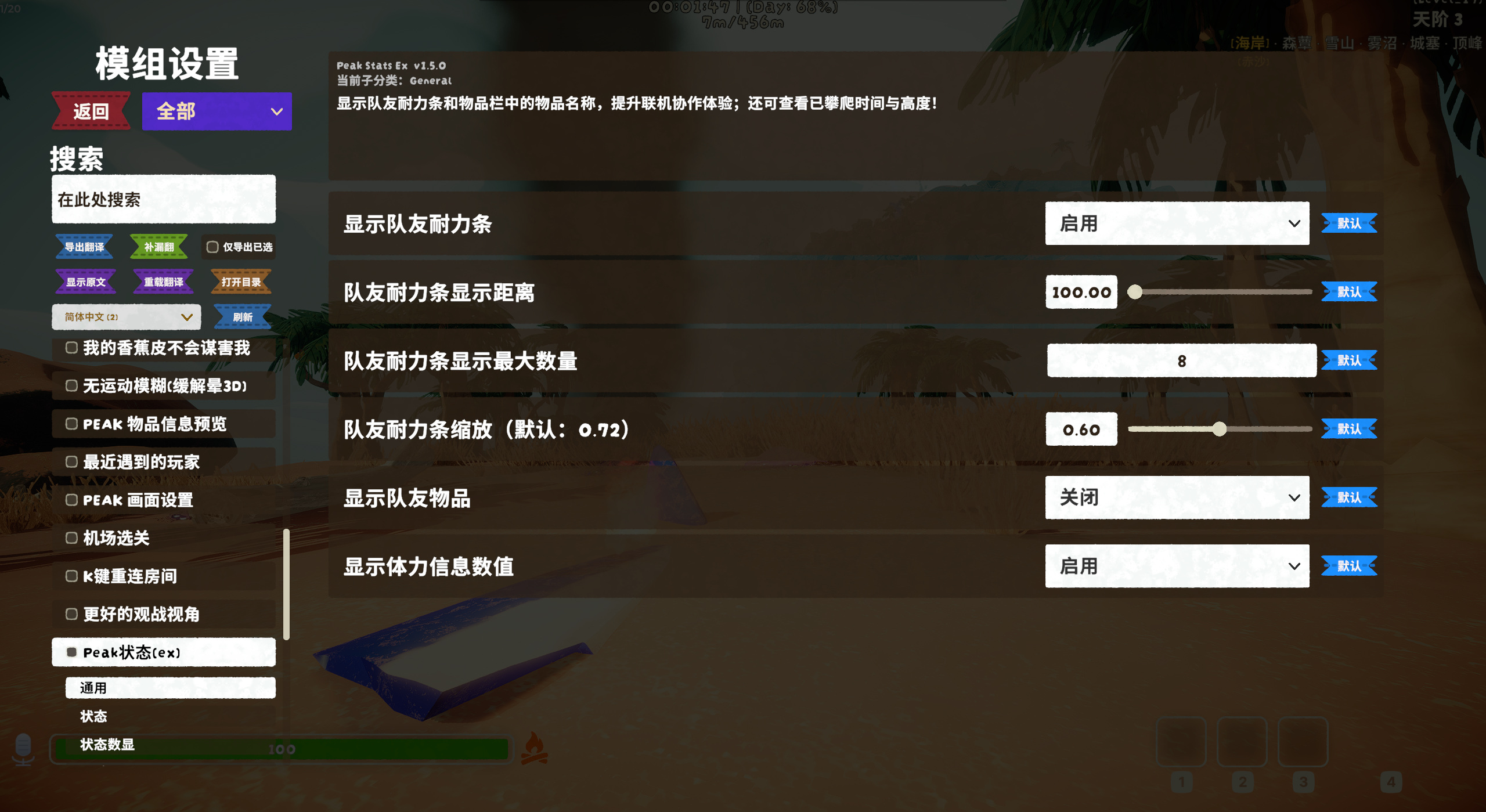 Daytime look
 Demo gif (may take a moment to load)
Dependencies
- Required: BepInEx 5, PEAKLib.Core, PEAKLib.UI, ModConfig 1.8.2
- Listed, but optional in practice: XUnity AutoTranslator — it is in the dependency list so the mod manager installs it alongside, but nothing breaks without it: only the translation tools (Untranslated / Show original / dictionary mirroring) are greyed out, everything else works. See the note below — this mod changes one of its settings.
- Optional: TimeTheme (day/night palette)
⚠️ This mod changes an XUnity AutoTranslator setting
With its factory-default endpoint (GoogleTranslateV2), XUnity AutoTranslator sends every UI text — mod settings included — to online machine translation, and the results are often nonsense. So when XUnity is installed, this mod's option Disable XUnity machine translation (on by default; BepInEx\config\com.aiae.modconfigenhance.cfg, section 2. Localization) does the following on every startup:
- empties
Endpoint/FallbackEndpointinAutoTranslatorConfig.ini, so XUnity only applies dictionaries (this mod's language files, your own dictionaries) and no longer machine-translates; - empties the machine-translation caches
_AutoGeneratedTranslations*.txtin every language folder, keeping a one-time.bakcopy next to each file.
If you rely on live machine translation, set this option to false before the first launch — or turn it off afterwards, put your endpoint back into AutoTranslatorConfig.ini and restore the .bak files.
Language files
Directory: BepInEx\config\ModConfigEnhance\language\
- Built-in
en-us.txt,zh-cn.txt,zh-tw.txtare created once and never overwritten; files whose name starts with_never appear in the dropdown. - Adding a language:
- Export texts → follow the rules written inside the exported file and put each translation to the right of the
= - Save as UTF-8 → rename to
lowercase-code.txt(e.g.de-de.txtfor German) and place it atPEAK\BepInEx\config\ModConfigEnhance\language\de-de.txt - Click Refresh, find your language in the dropdown on the left and select it — it loads automatically.
- After editing
de-de.txt, click Reload texts to load the new translations. - For top-up translations you have two choices:
- Save them as
de-de_*.txtinside thelanguagefolder, where*is any Chinese/English characters (other scripts unconfirmed). - Or paste all of them into
de-de.txt, save, then Reload texts.
- Save them as
- Export texts → follow the rules written inside the exported file and put each translation to the right of the
- Naming:
code[-variant][_part].txt—code-variant.txtis a standalone group of the same language (a different full translation with its own dropdown entry);group_part.txtmerges into the group named before the_and loads after it in filename order — later files override earlier ones, conflicts are logged. - Dropdown label: a
// display: <name>first line showsname (filename); without it the plain filename shows; multi-file groups get×count. Variant groups of the same code are fully independent — the untranslated check only counts the selected group. - Aliases:
zh=zh-cn,en=en-us; the code is just the leadingxx/xx-yyof the filename and only matters for the XUnity mirror folder and "Follow game language" matching. - Picking a language also switches XUnity to it: the dictionary folder becomes
Translation\<code>\Text\, entries are mirrored there asModConfigEnhance_<code>.txt, andLanguage=inAutoTranslatorConfig.iniis rewritten. Turn off this link with this mod's Switch XUnity language with the language file option. - File format is identical to XUnity dictionaries:
key=translation,//comments,\nnewline,\=literal equals,{0}placeholders kept — never modify the left side of=.
Toolbar
| Button | What it does |
|---|---|
| Export texts | Exports all UI texts to export\ (this mod's MCE_ block + one block per mod, manifest summaries included) |
| Untranslated | Exports only the entries the XUnity dictionary doesn't cover (requires XUnity AutoTranslator) |
| Selected only | Adds an "Export" checkbox column to the sidebar — only the ticked mods get exported (this mod is always included) |
| Show original / Show translated | Global original ↔ translation toggle (same as XUnity's Alt+T) |
| Reload texts | Re-reads the language files and refreshes XUnity's dictionaries |
| Open folder | Opens config\ModConfigEnhance\ |
| Language ▾ / Refresh | Pick a language group; Refresh after adding a new language, Reload texts after adding a sub-file to an existing one |
Gamepad controls
- Navigation: stick / D-pad moves focus; A confirms/enters; B steps back level by level (slider → editing → capture → right panel → left panel → leave page)
- LB/RB: switch mods
- Sliders: A arms value mode, left/right adjust, A or B exits; each step is 0.5% of the range — hold for 1s to auto-repeat at 10 steps/s, 3s for 40 steps/s
- Dropdowns: A opens, up/down to move, A picks, B closes
- Input fields: A starts editing, B exits. No on-screen keyboard — type on a physical keyboard or the platform OSK (Steam+X on Steam Deck)
- Keybinds: A starts capture, hold the target key for 1 second to write it; B cancels
Config file
BepInEx\config\com.aiae.modconfigenhance.cfg:
| Section | Contents |
|---|---|
| 1. Layout | Tree sidebar and description panel toggles (restart required) |
| 2. Localization | UI localization, hide localization buttons (instant), make XUnity follow the chosen language file, disable XUnity machine translation (on by default — see the note above) |
| 3. State | Runtime state: language file, pins, export exclusions etc. (Hidden) |
Feedback: [email protected] / QQ group 1104320838 · GitHub: https://github.com/AiAe-156/Peak-ModConfigEnhance
ModConfig Enhance
PEAK · ModConfig(PEAKLib.ModConfig)设置页增强
你是否经常在一堆模组配置里反复来回滑动,就为了改某一个参数;是否因为想知道某个配置项是做什么的而去config里翻注释;想为整合包添加多语言支持...从现在开始,你可以利用该模组更加优雅的管理你的整合包!
模组列表树形栏 - √ 一个能显示模组名称,版本号,配置项注释等信息的说明框 - √ 一键导出所有非本地化语言并自由发挥翻译,支持多重语言 - √ 名称排序和置顶功能 - √ 兼容TimeTheme 夜间幽紫主题 - √ 以及其他小改动...
功能
| 功能 | 说明 |
|---|---|
| 树形侧栏 | 左栏显示模组列表,选中模组会在其下方展开分区。可以置顶右侧为选项。 |
| 支持搜索、类型筛选、置顶选中列、仅导出勾选列的翻译文本。 | |
| 筛选时无匹配项的行自动隐藏;单独为按键设置添加了筛选按钮。 | |
| 说明面板 | 右上方常驻面板:悬停/选中选项时显示其说明、默认值、范围或可选值; |
| 选中模组/分区时显示该模组名称、版本与简介。可滚动 | |
| 界面本地化 | 全部界面文字走语言文件,页面内下拉实时切换语言 |
| 翻译工具 | 导出全部待翻文本/导出未翻条目、原文/译文全局切换; |
| 支持实时重载词典、为你的整合包添加多重语言! | |
| 手柄支持 | 左栏↔右栏两级导航,A 进入/确认、B 逐级返回、LB/RB 切模组; |
| 滑条按 A 激活后调值;按键绑定按 A 后长按 1 秒写入 | |
| 主题 | 手绘纸面风格;装 TimeTheme 后随昼夜配色;还有适配原本风格的视觉风格和动效 |
演示
夜晚主题(Timetheme)
白天样式
演示图片(可能需要时间加载)
依赖
- 必须:BepInEx 5、PEAKLib.Core、PEAKLib.UI、ModConfig 1.8.2
- 挂在依赖里,实际可选:XUnity AutoTranslator——列进依赖只是让模组管理器一起装上;不装也不会出问题,只是翻译工具(补漏翻 / 显示原文 / 词典镜像)置灰,其余功能照常。注意下方提醒:本模组会改它的一项设置。
- 可选:TimeTheme(昼夜配色)
⚠️ 本模组会改动 XUnity AutoTranslator 的一项设置
XUnity AutoTranslator 保持出厂默认的 GoogleTranslateV2 端点时,会把所有界面文字(包括模组设置)丢去在线机翻,结果常常不知所云。因此装有 XUnity 时,本模组的选项 Disable XUnity machine translation(默认开启;BepInEx\config\com.aiae.modconfigenhance.cfg 的 2. Localization 分区)每次启动会:
- 清空
AutoTranslatorConfig.ini的Endpoint/FallbackEndpoint,让 XUnity 只做词典翻译(本模组的语言文件、你自己的词典),不再机翻; - 清空各语言目录下的机翻缓存
_AutoGeneratedTranslations*.txt,每个文件旁留一份.bak(只留第一次的)。
依赖在线机翻的话,请在首次启动前把这个选项改成 false;事后想恢复也可以:关掉选项、把端点填回 AutoTranslatorConfig.ini、用 .bak 还原缓存。
语言文件
目录:BepInEx\config\ModConfigEnhance\language\
-
内建
en-us.txt、zh-cn.txt、zh-tw.txt,只建不覆;_前缀文件不进入下拉框 -
如何添加语言:
- 导出翻译 → 按待翻译文本内部的说明规则,将翻译文本填写在对应键值的
=右边 - 以 UTF-8 编码保存 → 重命名为
小写语言码.txt(如德文de-de.txt)放入PEAK\BepInEx\config\ModConfigEnhance\language\de-de.txt - 点击
「刷新🔃」按钮后,在左侧的语言切换下拉框中找到你添加的已翻译文本,选中后自动加载。 - 修改
de-de.txt后点击重载翻译按钮来加载新译文。 - 对于补翻的文本,有两种选择。
- 补翻完成后放入
language文件夹中并重命名为de-de_*.txt,其中*为任意中文/英文字符(我不确认其他语言的字符能否正常识别)。 - 将补翻的文本全部复制,粘贴到
de-de.txt中保存,然后重载翻译。
- 补翻完成后放入
- 导出翻译 → 按待翻译文本内部的说明规则,将翻译文本填写在对应键值的
-
命名规则:
语言码[-变体][_分包].txt——语言码-变体.txt是同语言码的独立分组(另一套完整翻译,下拉框单独一项,如zh-cn-old.txt);组名_分包.txt并入前缀所指的组、按文件名排序后读,后读覆盖先读,冲突记日志。 -
下拉框显示:首行
// display: 名字显示「名字 (文件名)」,没写显示文件名本身;多文件组末尾带×数量。同码变体组完全独立——补漏翻只统计当前选中的组。 -
别名:
zh=zh-cn、en=en-us;语言码只是文件名开头的xx/xx-yy,只管 XUnity 镜像目录与「跟随游戏语言」匹配。 -
选中语言会同步把 XUnity 切到该语言:词典目录变为
Translation\<语言码>\Text\,词条镜像为其中的ModConfigEnhance_<语言码>.txt,AutoTranslatorConfig.ini的Language=配置项会被同步改写。本模组的开关Switch XUnity language with the language file可关闭此联动 -
文件翻译格式同 XUnity 词典:
键=译文,//注释,\n换行、\=等号、{0}占位符保留,等号左边不可改
工具行
| 按钮 | 作用 |
|---|---|
| 导出翻译 | 全部界面文本导出到 export\(本模组 MCE_ 块 + 各模组分块,含 manifest 简介) |
| 补漏翻 | 只列 XUnity 词典未命中的条目(需 XUnityAutoTranslate) |
| 仅导出已选 | 侧栏出现「导出」复选框列,只导出勾选模组(本模组恒包含) |
| 显示原文/译文 | 全局原文/译文切换(=XUnityAutoTranslate Alt+T) |
| 重载翻译 | 重读语言文件并刷新 XUnityAutoTranslate 词典 |
| 打开目录 | 打开 config\ModConfigEnhance\ |
| 语言 ▾ / 刷新 | 按语言分组选择;新增语言点刷新,同语言新增分包点重载翻译 |
手柄操作
- 导航:摇杆/十字键移动焦点;A 确认/进入;B 逐级返回(调值→编辑→捕获→右栏→左栏→退页)
- LB/RB:切换模组
- 滑条:A 激活调值态,左右调值,再按 A 或 B 退出;步进为区间 0.5%,按住 1s 后 10 步/秒、3s 后 40 步/秒
- 下拉框:A 展开,上下选项,A 选定,B 关闭
- 输入框:A 进入编辑,B 退出。无屏幕键盘——打字靠实体键盘或平台 OSK(Deck 用 Steam+X)
- 按键绑定:A 进入捕获,按住目标键 1 秒写入;B 取消
配置项
BepInEx\config\com.aiae.modconfigenhance.cfg:
| 分区 | 内容 |
|---|---|
| 1. Layout | 树形侧栏、说明面板开关(重启生效) |
| 2. Localization | 界面本地化、隐藏本地化相关按钮(即时生效)、XUnityAutoTranslate 跟随切换、禁用 XUnityAutoTranslate 机翻(默认开,见上方提醒) |
| 3. State | 语言文件、置顶、导出排除等运行状态(Hidden) |
问题反馈:[email protected] / QQ 群 1104320838 · GitHub: https://github.com/AiAe-156/Peak-ModConfigEnhance
