

ModConfigEnhance
ModConfig settings page upgrades: tree sidebar, info panel, built-in translation. Plus a Mod overview: mod list with custom groups, one-page keybindings with controller combos, and a log viewer. Fully offline.
| Date uploaded | a week ago |
| Version | 1.1.0 |
| Download link | AiAeT-ModConfigEnhance-1.1.0.zip |
| Downloads | 4206 |
| Dependency string | AiAeT-ModConfigEnhance-1.1.0 |
This mod requires the following mods to function

BepInEx-BepInExPack_PEAK
BepInEx pack for PEAK. Preconfigured and ready to use.
Preferred version: 5.4.2403

README
ModConfig Enhance
PEAK · enhancements for the ModConfig (PEAKLib.ModConfig) settings page





English | 中文 👈
Ever find yourself scrolling back and forth through a pile of mod settings just to change one value? Digging through cfg comments to figure out what an option does? Want to add multi-language support to your modpack? From now on, this mod lets you organize your modpack's settings far more elegantly!
Mod overview: every installed mod at a glance, sorted into your own groups - √
Keybindings: every mod's keybinds on one page, with free-form controller combos - √
Log window: built in, with filters and one-click export - √
Tree sidebar: search, name sorting, pinning - √
Description panel: mod name, version, option descriptions, defaults and ranges - √
Translation: export untranslated texts in one click, translate freely, any number of languages, no XUnity needed - √
Theme: compatible with TimeTheme's purple night theme - √
…and other small tweaks
✨ At a glance
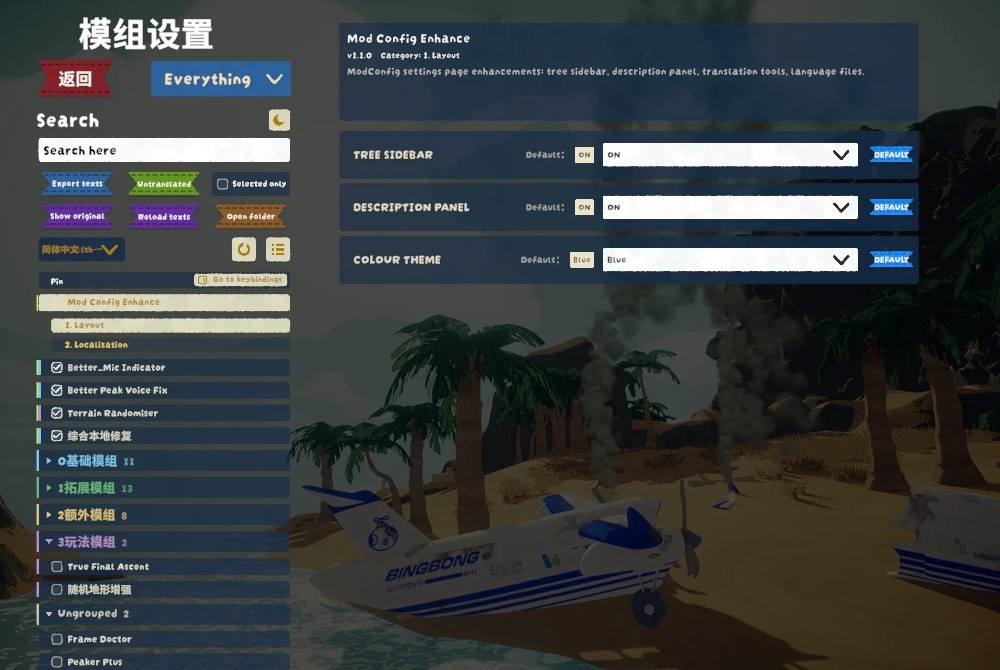 Tree sidebar & info panel · Every mod in a tree; descriptions, defaults and ranges at a glance. |
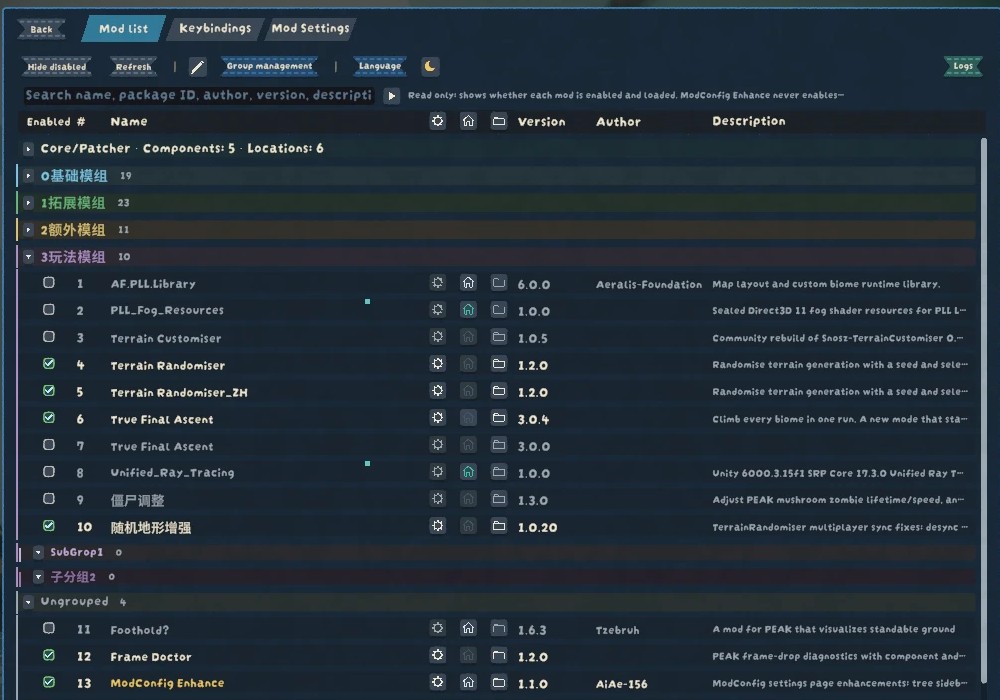 Mod list · Every installed mod on one page, with the full dependency chain on hover. |
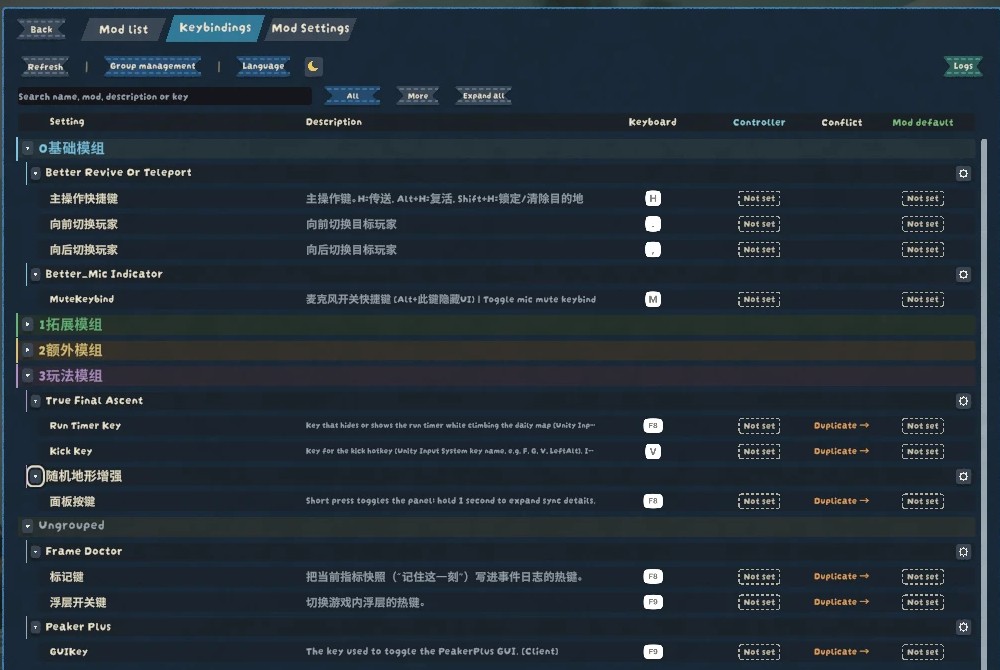 Keybindings · Every mod's keybinds on one page, keyboard and controller. |
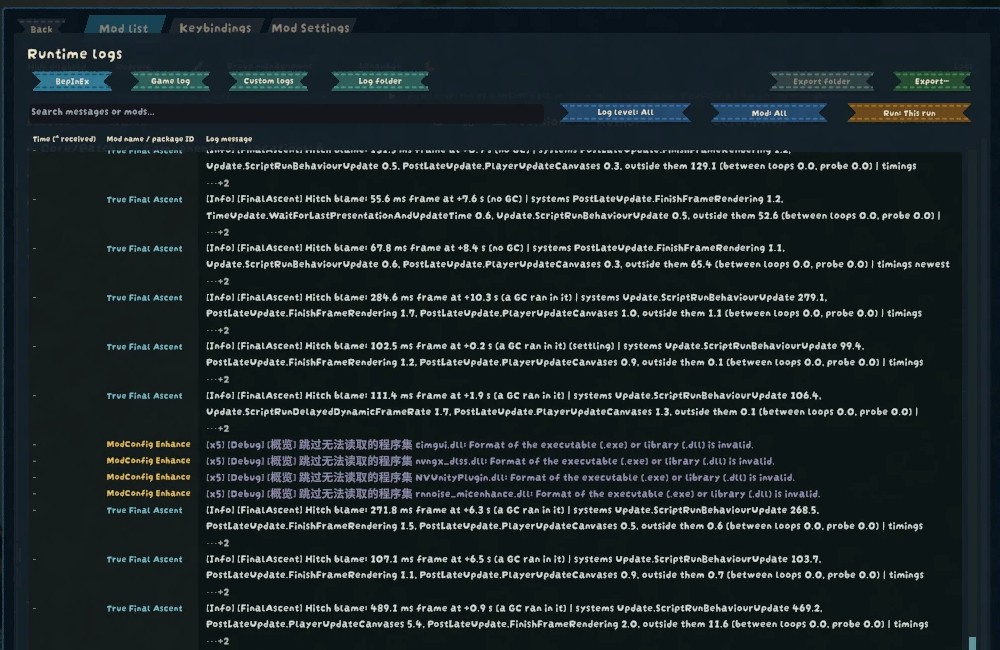 Log window · Live logs with filters, recent-launch history and ZIP export. |
⚙️ Settings page enhancements
- Tree sidebar: the left column lists mods, and the selected mod's sections expand beneath it. Search (option names, mod names, sections, config keys, descriptions), type filters and pinning.
- Option grid: compact rows with the default value beside each control; duplicate keybinds get a badge that jumps to the other option.
- Description panel: hover or select an option to see its description, default value and range; select a mod to see its name, version and summary.
- Themes: blue and purple, switched with the moon button; with TimeTheme installed it can turn purple at night.
- Go to keybindings in the header opens the keybindings page directly.
🎮 Controller on the settings page
- A confirms / enters; B steps back level by level (press B twice quickly to leave the page).
- LB / RB switch mods; the right stick scrolls the options.
- Sliders: press A, then left / right to adjust. Keybinds: press A, then hold the target key for 1 second to write it.
- Text boxes open the on-screen keyboard in Steam Big Picture / on Steam Deck.
🧭 Mod overview page
Where: the Mod overview button right below Mod Settings in the game's Settings menu. It has three tabs: Mod list, Keybindings and Mod Settings.
Mod list
- Every installed mod (disabled ones too): enabled state (read-only), name, version, author and description, plus settings / homepage / folder buttons.
- Hover a mod for its full dependency chain; badges mark resource packs, nested mods, loose DLLs and duplicate copies.
- Double-click a name or description to change it. It is saved into the current language file and every page shows it; leave it empty to restore the original.
Groups
- Your own display groups, up to 3 levels with colours; shared by the mod list, the keybindings page and the settings page sidebar. Groups are for display only and never move any folder.
- Group management edits names, parent groups, colours and members; right-click a group header to add a subgroup, edit or delete it.
- With the pencil on, drag to reorder or to drop mods into a group; with it off, dragging just scrolls. Drop a group header on the top or bottom edge of another to place it before / after that group, or on its middle to make it a subgroup.
- Subgroups are listed before a group's own mods.
- The first time you open it, groups can be built in one click from your
pluginsfolder layout.
Log window
Live BepInEx, game and custom logs; filter by level (several at once) / mod / group, search, and fold repeated errors. Run switches to the logs of the last 3 launches; one click exports a ZIP (no config values, personal paths removed).
🔌 For mod authors: plug into the log window
Your mod can show its own logs in this window (ModConfigEnhance.Diagnostics.MceLogApi, plugin GUID com.aiae.modconfigenhance). Four ways:
RegisterFile(guid, id, name, absolutePath): show an existing log file.RegisterSnapshot(guid, id, name, callback): the callback returns a list ofMceLogRecord.RegisterTextSnapshot(guid, id, name, textCallback, epochCallback): returns line number → text; a changed epoch means the log was cleared. Friendly to reflection.CreateChannel(guid, id, name): returns a channel; callWrite(record)for each entry. The simplest way.
[BepInDependency("com.aiae.modconfigenhance", BepInDependency.DependencyFlags.SoftDependency)]
public class MyMod : BaseUnityPlugin
{
    void Awake()
    {
        if (Chainloader.PluginInfos.ContainsKey("com.aiae.modconfigenhance")) AttachLog();
    }

    [MethodImpl(MethodImplOptions.NoInlining)] // keeps MCE types out of Awake
    void AttachLog()
    {
        var log = MceLogApi.CreateChannel(Info.Metadata.GUID, "main", "My Mod");
        log.Write(new MceLogRecord { Level = MceLogLevel.Info, Message = "Hello from My Mod" });
    }
}
- Callbacks run on a background thread: never call Unity from them.
- Each source keeps at most 10,000 records.
- The namespace and API are the same as In-Game Mod Manager's; if you connect through reflection, one code path works with both.
Keybindings
- Every mod's keybinds on one page, in keyboard and controller columns; a key is written to that mod's config as soon as it is recorded.
- Duplicate keys are flagged (including keys the game itself uses); ignore the ones you don't mind.
- Double-click a cell to write a one-line note for the current language.
- Controller combos: keybinds that only accept keyboard keys can still get a controller button or combo in the controller column (hold a few buttons, then press the last one; up to 4). Combos work only in game.
⚠️ Heads-up: the buttons you hold first still reach the game — only the last button is blocked.
🎮 Controller on the overview page
- ↑ / ↓ select (hold the D-pad or left stick to keep moving); LB / RB jump between toolbar buttons.
- RT + LB / RB move to the tab buttons, then A opens the tab; RT + ← / → page up / down; RT + L3 expand / collapse all.
- B steps back; press B twice quickly to leave the page.
- Recording a controller key / combo: hold a few buttons, then press the last one (up to 4); hold B for 1 second to finish.
📦 Dependencies & compatibility
- Required: BepInEx 5, PEAKLib.Core, PEAKLib.UI, ModConfig 1.8.2
- Optional: TimeTheme (purple at night)
- No longer needed: XUnity AutoTranslator — this mod now does all translation itself. An endpoint that an older version emptied is not restored automatically; fill it in again yourself if you want it back.
- Do not install together with In-Game Mod Manager: it already contains everything this mod does. When both are installed, this mod does not load and only leaves a warning in the log.
📁 Files & languages
Everything this mod keeps lives in one folder and stays on this machine:
BepInEx\config\ModConfigEnhance\
├─ language\              Language files: en-us.txt  zh-cn.txt  zh-tw.txt (add your own)
├─ export\                Texts written by "Export texts"
├─ overview.json          Groups, folded state, Hide disabled
├─ hotkeys.json           Ignored duplicate warnings, folded mods
├─ gamepad-combos.json    Controller combos
└─ cache\                 Log favourites, copies of the last 3 launches' logs (safe to delete)
Adding a language: click Export texts → put each translation to the right of the = → save as UTF-8 named lowercase-code.txt (e.g. de-de.txt) in language\ → click Refresh, then pick it in the language dropdown.
🧰 Toolbar and translation file format
| Button | What it does |
|---|---|
| Export texts / Untranslated | Exports all / not-yet-translated texts to export\ |
| Selected only | Exports only the mods ticked in the sidebar |
| Show original / translated | Switches between original and translated text |
| Reload texts / Refresh | Re-reads the language files / finds new languages |
| Open folder | Opens config\ModConfigEnhance\ |
After editing a file, click Reload texts. Top-up translations can be saved as de-de_extra.txt and are merged in automatically. Same format as XUnity dictionaries: key=translation, // comments, and r:"regex"=translation for regex rules.
💬 Feedback: [email protected] / QQ group 1104320838 · GitHub: https://github.com/AiAe-156/Peak-ModConfigEnhance
你是否经常在一堆模组配置里反复来回滑动,就为了改某一个参数;是否因为想知道某个配置项是做什么的而去config里翻注释;想为整合包添加多语言支持...从现在开始,你可以利用该模组更加优雅的整理你的整合包!
模组概览:已装模组一览,按自己的分组整理 - √
快捷键:所有模组的快捷键集中一页设置,手柄组合键自由组合 - √
日志窗口:内置,可筛选、一键导出 - √
树形模组栏:搜索、名称排序、置顶 - √
说明面板:显示模组名称、版本号、配置项说明、默认值与范围 - √
翻译:一键导出未翻译的文本,自由翻译,支持多种语言,不再依赖 XUnity - √
主题:兼容 TimeTheme 夜间幽紫主题 - √
以及其他小改动...
✨ 功能一览
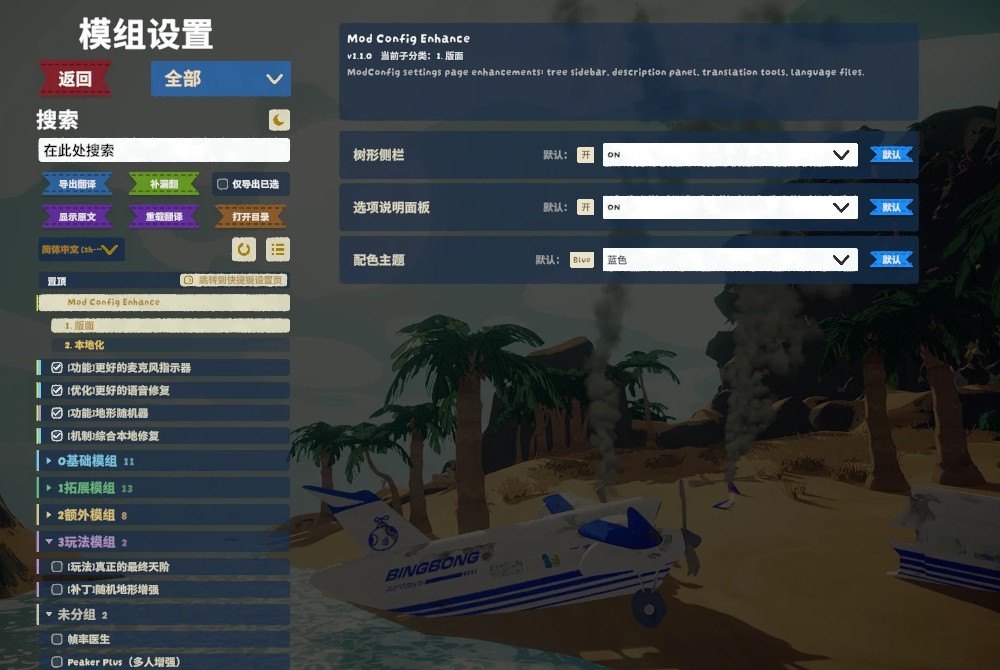 树形侧栏与说明面板 · 模组一棵树列完,说明、默认值、范围一眼可见。 |
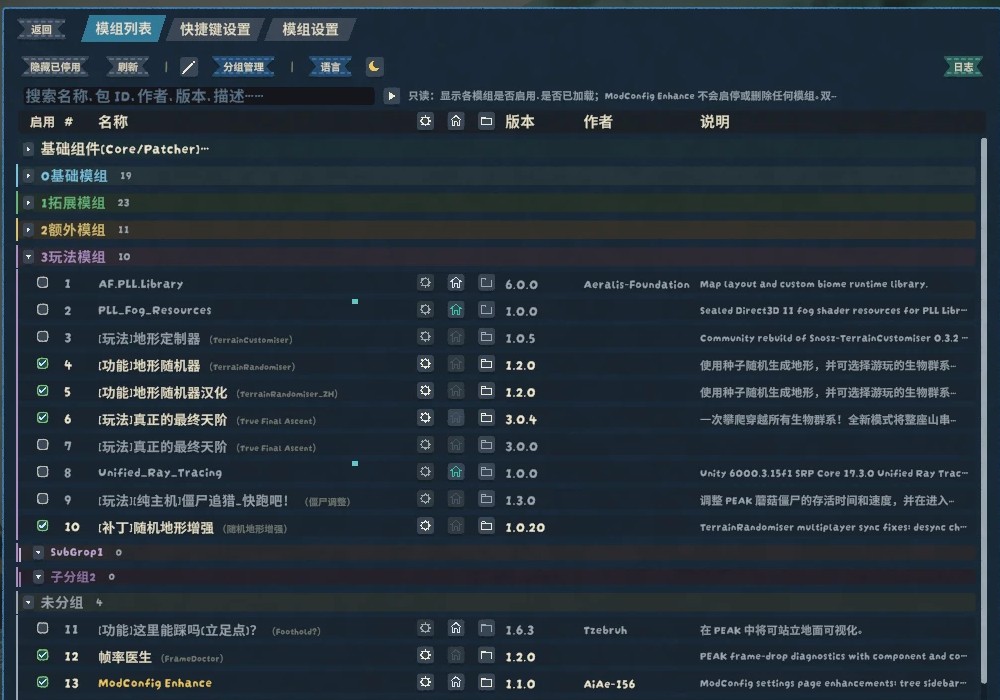 模组列表 · 已装模组一页看完,悬停显示完整依赖链。 |
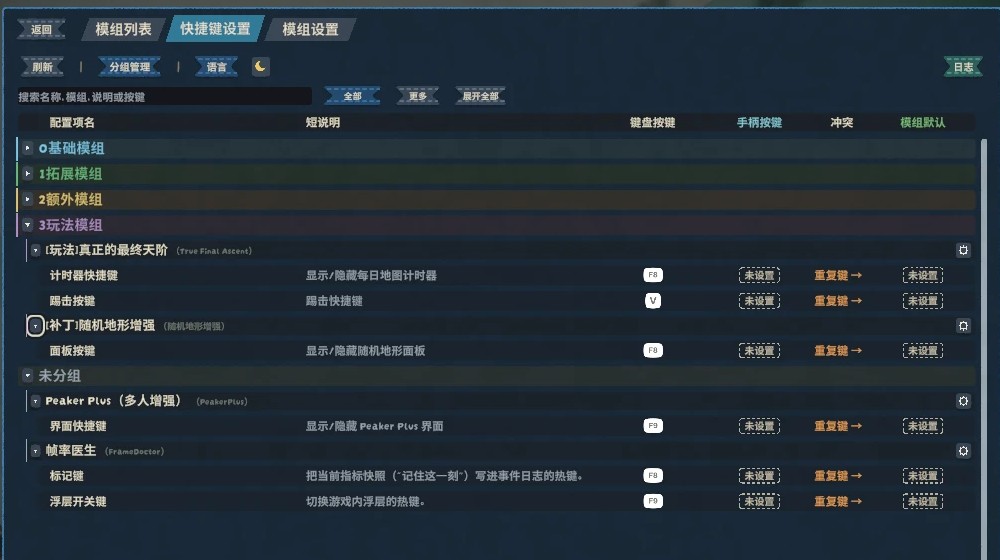 快捷键设置 · 所有模组的快捷键集中一页,键盘、手柄两栏。 |
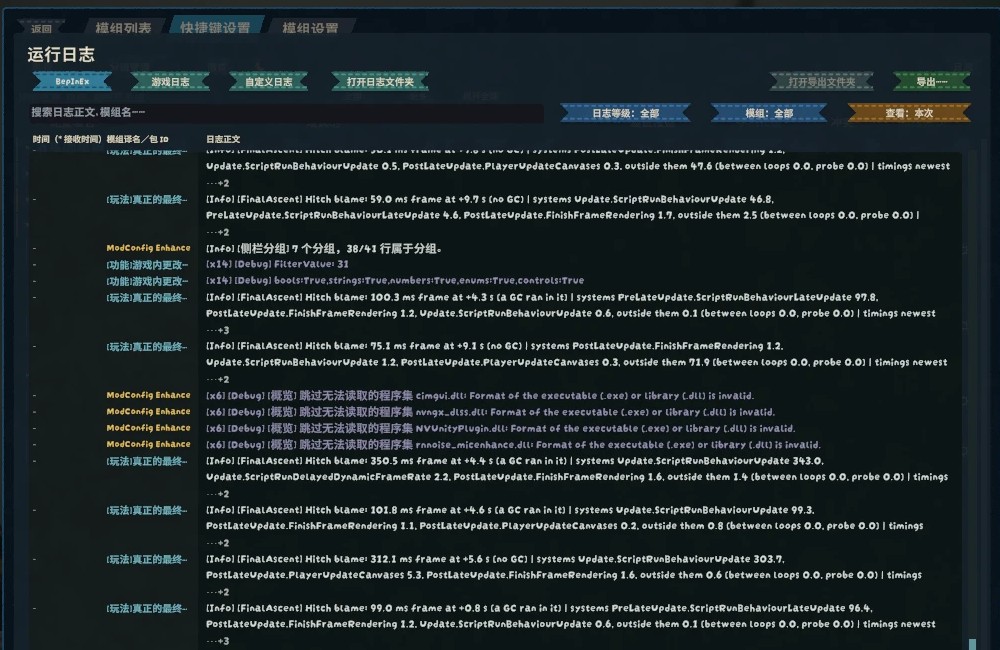 日志窗口 · 实时日志,可筛选、看最近几次启动、导出 ZIP。 |
⚙️ 设置页增强
- 树形侧栏:左栏列出模组,选中后展开分区;可搜索(选项名、模组名、分区、键名、说明)、按类型筛选、置顶。
- 选项格:紧凑行高,控件旁显示默认值;快捷键重复时出现角标,可跳到对方。
- 说明面板:悬停或选中时显示说明、默认值、范围;选中模组时显示名称、版本与简介。
- 主题:蓝 / 紫两套,月亮按钮切换;装 TimeTheme 可在夜里自动换紫。
- 表头「跳转到快捷键设置页」直接进入快捷键设置页。
🎮 设置页手柄操作
- A 确认 / 进入,B 逐级返回(快速连按两次 B 退页)。
- LB / RB 切换模组;右摇杆滚动选项。
- 滑条:按 A 后左右调值;按键绑定:按 A 后按住目标键 1 秒写入。
- Steam 大屏幕 / Deck 下,输入框弹出屏幕键盘。
🧭 模组概览页
入口:游戏「设置」菜单里「模组设置」正下方的「模组概览」按钮,分「模组列表」「快捷键设置」「模组设置」三个页签。
模组列表
- 列出所有已安装的模组(含已停用的):启用状态(只读)、名称、版本、作者、简介,以及设置 / 主页 / 文件夹按钮。
- 悬停显示完整依赖链;角标标出资源包、嵌套模组、散放 DLL 和重复副本。
- 双击名称或简介即可修改,保存到当前语言文件,各页面同步显示;留空恢复原文。
分组
- 自己的显示分组,最多 3 层、可配颜色,模组列表、快捷键设置页和设置页侧栏共用。分组只用于显示,不移动任何文件夹。
- 「分组管理」编辑名称、上级、颜色、成员;右键分组标题可新建子分组、编辑、删除。
- 打开铅笔后按住拖动,可排序、拖进分组;关着时拖动就是滚动。分组标题拖到另一个分组标题的上缘 / 下缘,排到它前面 / 后面;拖到中间成为它的子分组。
- 子分组排在本组模组的前面。
- 第一次打开时,可按
plugins的文件夹结构一键生成分组。
日志窗口
实时查看 BepInEx 日志、游戏日志和自定义日志;按等级(可多选)/ 模组 / 分组筛选,可搜索、折叠重复报错。「查看」切到最近 3 次启动的历史日志;一键导出 ZIP(不含配置值,已去掉个人路径)。
🔌 给模组作者:接入日志窗口
你的模组可以把自己的日志显示在这个窗口里(ModConfigEnhance.Diagnostics.MceLogApi,插件 GUID com.aiae.modconfigenhance),四种接法:
RegisterFile(guid, id, 名称, 绝对路径):显示一个现成的日志文件。RegisterSnapshot(guid, id, 名称, 回调):回调返回MceLogRecord列表。RegisterTextSnapshot(guid, id, 名称, 文本回调, 世代回调):返回「行号 → 文本」;世代值变了就当作日志已清空。适合用反射接入。CreateChannel(guid, id, 名称):得到一个通道,每条日志调用Write(record)写入。最省事。
[BepInDependency("com.aiae.modconfigenhance", BepInDependency.DependencyFlags.SoftDependency)]
public class MyMod : BaseUnityPlugin
{
    void Awake()
    {
        if (Chainloader.PluginInfos.ContainsKey("com.aiae.modconfigenhance")) AttachLog();
    }

    [MethodImpl(MethodImplOptions.NoInlining)] // 不让 MCE 的类型出现在 Awake 里
    void AttachLog()
    {
        var log = MceLogApi.CreateChannel(Info.Metadata.GUID, "main", "My Mod");
        log.Write(new MceLogRecord { Level = MceLogLevel.Info, Message = "Hello from My Mod" });
    }
}
- 回调在后台线程执行,不能调用 Unity。
- 每个来源最多保留 10,000 条。
- 命名空间和 API 与 In-Game Mod Manager 相同;用反射接入的话,一套代码两边都能用。
快捷键设置
- 所有模组的快捷键集中一页,键盘 / 手柄两栏,录完立即写入该模组的配置。
- 重复键会标出来(包括与游戏自身操作相同的键),不在意的可以忽略。
- 双击格子,可为当前语言写一句短说明。
- 手柄组合键:只认键盘的快捷键,也能在手柄栏录一个手柄键或组合键(先按住几个键,再按最后一个,最多 4 个)。只在游戏中生效。
⚠️ 注意:先按住的键游戏仍会读到,只有最后一个键被屏蔽。
🎮 概览页手柄操作
- ↑ / ↓ 选择(按住十字键或左摇杆可连续移动);LB / RB 在工具行按钮间跳。
- RT + LB / RB 移到页签按钮,再按 A 切换;RT + ← / → 翻页;RT + L3 全部展开 / 收起。
- B 逐级返回,快速连按两次 B 离开本页。
- 录制手柄键 / 组合键:先按住几个键,再按最后一个(最多 4 个);长按 B 1 秒结束录制。
📦 依赖与兼容
- 必须:BepInEx 5、PEAKLib.Core、PEAKLib.UI、ModConfig 1.8.2
- 可选:TimeTheme(夜里自动换紫)
- 不再需要 XUnity AutoTranslator:翻译已由本模组自己完成。旧版清空过的 XUnity 机翻端点不会自动恢复,需要的话请自行填回。
- 不要与 In-Game Mod Manager 同时安装:它已包含本模组的全部功能。同时安装时本模组不加载,只在日志里留一条警告。
📁 文件与语言
本模组的文件都在一个文件夹里,只存在本机:
BepInEx\config\ModConfigEnhance\
├─ language\              语言文件:en-us.txt  zh-cn.txt  zh-tw.txt(可自己添加)
├─ export\                「导出翻译」导出的文本
├─ overview.json          分组、折叠状态、隐藏已停用
├─ hotkeys.json           忽略的重复提示、收起的模组
├─ gamepad-combos.json    手柄组合键
└─ cache\                 日志收藏、最近 3 次启动的日志副本(可随时删除)
添加语言:点「导出翻译」→ 把译文填在 = 右边 → 以 UTF-8 存成 小写语言码.txt(如 de-de.txt)放进 language\ → 点「刷新」后在语言下拉里选中。
🧰 工具行与翻译文件格式
| 按钮 | 作用 |
|---|---|
| 导出翻译 / 补漏翻 | 导出全部 / 尚未翻译的文本到 export\ |
| 仅导出已选 | 只导出侧栏勾选的模组 |
| 显示原文 / 译文 | 在原文和译文之间切换 |
| 重载翻译 / 刷新 | 重新读取语言文件 / 发现新语言 |
| 打开目录 | 打开 config\ModConfigEnhance\ |
改完文件点「重载翻译」生效;补翻的内容可另存为 de-de_补充.txt,会自动并入。格式同 XUnity 词典:键=译文,// 注释,r:"正则"=译文 为正则规则。
📁 个人文件(都在 BepInEx\config\ModConfigEnhance\,只存在本机)
| 文件 | 内容 |
|---|---|
overview.json |
分组、折叠状态、隐藏已停用 |
hotkeys.json |
忽略的重复提示、收起的模组 |
gamepad-combos.json |
手柄组合键 |
cache\ |
日志收藏、最近 3 次日志副本(可随时删除) |
💬 问题反馈:[email protected] / QQ 群 1104320838 · GitHub: https://github.com/AiAe-156/Peak-ModConfigEnhance
CHANGELOG
更新日志 / Changelog
1.1.0 — 2026-11-16
新增 / Added
- 模组概览页:游戏「设置」菜单里「模组设置」正下方新增「模组概览」按钮,分「模组列表」「快捷键设置」「模组设置」三个页签。
- 模组列表:列出所有已安装的模组(含已停用的),悬停看完整依赖链;双击名称或简介可修改,各页面同步显示。
- 分组:自己的显示分组,最多 3 层、可配颜色,模组列表、快捷键设置页和设置页侧栏共用;只用于显示,不移动任何文件夹。第一次打开可按
plugins的文件夹结构一键生成。 - 日志窗口:实时查看 BepInEx、游戏和自定义日志,可筛选、搜索,可看最近 3 次启动的历史日志,一键导出 ZIP(不含配置值,去掉个人路径)。其他模组可把自己的日志接进来(见 README「给模组作者」)。
- 快捷键设置页:所有模组的快捷键集中一页,键盘 / 手柄两栏,录完立即写进该模组的配置;重复键会标出来,也包括与游戏自身操作相同的键。
- 手柄组合键:只认键盘的快捷键也能录手柄键或组合键(最多 4 个),只在游戏中生效;先按住的键游戏仍会读到,只有最后一个键被屏蔽。
- 概览页两个页签的手柄操作已统一,详见 README。
- 模组设置页表头新增「跳转到快捷键设置页」按钮。
- 与 In-Game Mod Manager 同时安装时,本模组整个不加载,只在日志里留一条警告。
- 新增的个人文件(分组、快捷键、手柄组合键、缓存)都在
config\ModConfigEnhance\下,详见 README。
更改 / Changed
- 配色与版面:设置页改为跟随游戏设置菜单的深蓝配色(原来是棕色),新增紫色主题(月亮按钮切换,装了 TimeTheme 可夜里自动变紫);版面更紧凑,一屏看到更多模组和选项;每个选项旁显示默认值;快捷键重复改为角标,可跳到对方。
- 搜索与下拉:搜索也匹配模组名、分区名、配置键名和说明;选项不超过 12 个的下拉框改为紧凑小列表。
- 手柄(设置页):文本框按 A 才开始输入,Steam 大屏幕 / Deck 下弹出屏幕键盘;右摇杆滚动选项;焦点框更清楚,焦点移动有轻微提示音;进入右栏时不再落在「默认」按钮上,避免误重置。
- 翻译改由本模组自己完成,不再依赖 XUnity AutoTranslator(依赖列表已移除):「显示原文 / 显示译文」「重载翻译」「补漏翻」始终可用;语言文件新增正则规则
r:"正则"=译文;旧版语言文件缺新词条时不再回落成英文。 - 依赖的 PEAKLib.UI 升到 1.7.2。
修复 / Fixed
- 适配 PEAK 3.1.0:小数参数不再显示成整数,输入时小数点不再被吞掉。
- 内建语言文件被清空或只剩注释时改用内置译文,不再导致语言应用失败。
- 从暂停菜单先进入设置页时,纸面抖动不再失效;原文以反斜杠结尾时,语言文件的转义不再出错。
移除 / Removed
- 选项「经典棕色配色」,由「配色主题」取代。
- 选项「Switch XUnity language with the language file」「Disable XUnity machine translation」;本模组不再改动 XUnity 的任何设置。以前被清空的机翻端点不会自动恢复,需要请自行填回。旧版写进 XUnity 词典目录的
ModConfigEnhance_<码>.txt会一次性移到language\_xunity-mirror-backup_<日期>\。
- New Mod overview page: a Mod overview button right below Mod Settings in the game's Settings menu, with Mod list, Keybindings and Mod Settings tabs.
- Mod list: every installed mod, disabled ones included, with the full dependency chain on hover; double-click a name or description to change it, and every page shows the change.
- Groups: your own display groups, up to 3 levels with colours, shared by the mod list, the keybindings page and the settings page sidebar; display-only, never moves a folder. The first time, groups can be built in one click from your
pluginsfolder layout. - Log window: live BepInEx, game and custom logs with filters and search, the logs of the last 3 launches, and a one-click ZIP export (no config values, personal paths removed). Other mods can plug their own logs in (see "For mod authors" in the README).
- Keybindings page: every mod's keybinds on one page, keyboard and controller columns; a recorded key is written to the mod's config at once; duplicates are flagged, including keys the game itself uses.
- Controller combos: keyboard-only keybinds can get a controller button or combo (up to 4), in game only; the buttons held first still reach the game, only the last one is blocked.
- Controller controls on the overview page are the same on both tabs; see the README.
- A Go to keybindings button in the mod settings page header.
- When In-Game Mod Manager is installed too, this mod does not load at all and leaves one warning in the log.
- New personal files (groups, keybindings, controller combos, cache) all live in
config\ModConfigEnhance\; see the README. - Changed: colours and layout. The settings page follows the game's dark-blue settings colours (it used to be brown); a purple theme is added (moon button; with TimeTheme it can turn purple at night); the layout is tighter so more mods and options fit on screen; each option shows its default value; duplicate keybinds get a badge that jumps to the other option.
- Changed: search and dropdowns. Search also matches mod names, section names, config keys and descriptions; dropdowns with up to 12 choices open as a compact list.
- Changed: controller on the settings page. A text box starts typing on A, with the Steam on-screen keyboard on Big Picture / Deck; the right stick scrolls the options; the focus frame is clearer and moving it plays a soft click; entering the right panel no longer lands on Default, so a press of A can't reset a value by accident.
- Changed: translation is now done by this mod itself, and XUnity AutoTranslator is no longer needed (removed from the dependency list). Show original / translated, Reload texts and Untranslated are always available; language files accept regex rules
r:"regex"=translation; a language file from an older version no longer falls back to English for new entries. - Changed: the PEAKLib.UI dependency is now 1.7.2.
- Fixed: PEAK 3.1.0 support — decimal parameters no longer show as whole numbers, and typing a decimal point no longer gets swallowed.
- Fixed: an empty or comment-only built-in language file now falls back to the built-in texts instead of failing.
- Fixed: the paper wobble no longer stays off when the settings page is first opened from the pause menu; line escaping in language files when an original text ends with a backslash.
- Removed: the Classic brown colours option, replaced by Colour theme.
- Removed: the options Switch XUnity language with the language file and Disable XUnity machine translation; this mod no longer changes any XUnity setting. An endpoint emptied by an older version is not restored automatically; fill it in again if you want it back. Dictionaries older versions wrote into XUnity's folder (
ModConfigEnhance_<code>.txt) are moved once intolanguage\_xunity-mirror-backup_<date>\.
1.0.2 — 2026-09-18
修复 / Fixed
- 依赖列表里的 XUnity AutoTranslator 换成仍在维护的
RTLC-XUnity_AutoTranslator-5.6.11;1.0.1 写的Hayrizan-XUnity_AutoTranslator-5.6.1在 Thunderstore 上已标记弃用。两个包里的插件本体都是 XUnity 5.6.1,本模组的反射对接不受影响,已装 XUnity 的用户无需操作。
- The XUnity AutoTranslator dependency now points at the maintained
RTLC-XUnity_AutoTranslator-5.6.11; theHayrizan-XUnity_AutoTranslator-5.6.1listed in 1.0.1 is marked deprecated on Thunderstore. Both packages ship the same XUnity 5.6.1 plugin, so the reflection bridge is unaffected and existing installs need no action.
1.0.1 — 2026-09-18
更改 / Changed
- XUnity AutoTranslator 列入依赖(
Hayrizan-XUnity_AutoTranslator-5.6.1):只是让模组管理器一起装上,不装也不会出问题——翻译工具(补漏翻 / 显示原文 / 词典镜像)置灰,其余功能照常。 - 「Disable XUnity machine translation」默认改为开启:装有 XUnity 时每次启动清空它的机翻端点(
AutoTranslatorConfig.ini的Endpoint/FallbackEndpoint),并清空各语言目录的机翻缓存_AutoGeneratedTranslations*.txt(每个文件旁留一份.bak)。依赖在线机翻的话请在首次启动前把它关掉。README 与生成的 readme.md 新增「本模组会改动 XUnity AutoTranslator 的一项设置」一节,cfg 选项说明同步。
- XUnity AutoTranslator added to the dependency list (
Hayrizan-XUnity_AutoTranslator-5.6.1) so the mod manager installs it alongside; nothing breaks without it — the translation tools (Untranslated / Show original / dictionary mirroring) are greyed out, everything else works. - "Disable XUnity machine translation" is now on by default: with XUnity installed, every startup empties its machine-translation endpoints (
Endpoint/FallbackEndpointinAutoTranslatorConfig.ini) and the_AutoGeneratedTranslations*.txtcaches in every language folder (a one-time.bakcopy is kept). Turn it off before the first launch if you rely on live machine translation. README and the generated readme.md gained a "This mod changes an XUnity AutoTranslator setting" section; the cfg description was updated to match.
