

PeakStatsEx
Displays teammate stamina bars and item names in the inventory for improved cooperative gameplay. You can also see how long and how far you've been climbing!
| Last updated | a week ago |
| Total downloads | 94035 |
| Total rating | 17 |
| Categories | Mods Quality Of Life Client Side AI Generated |
| Dependency string | LengSword-PeakStatsEx-1.5.1 |
| Dependants | 5 other packages depend on this package |
This mod requires the following mods to function

BepInEx-BepInExPack_PEAK
BepInEx pack for PEAK. Preconfigured and ready to use.
Preferred version: 5.4.75301README
PeakStatsEx
A mod for PEAK that enhances cooperative gameplay by displaying information about your teammates.
Combine PeakStats, FriendsInfo and StaminaInfo.

Features
-
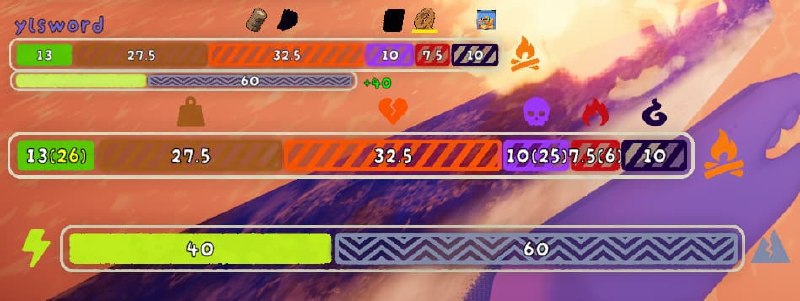
Teammate stamina bars
- Displays stamina bars for nearby teammates
- Supports proximity-based visibility
- Supports a configurable bar limit and scale
-
Extra stamina information
- Shows extra stamina bars for teammates
- Displays affliction-related status indicators
- Optionally shows stamina info text such as current stamina, extra stamina, and affliction bar values
-
Teammate inventory and backpack visibility
- Shows teammate inventory slot icons
- Shows backpack-related slot information when available
- Supports optional item name display behavior via configuration
-
Run and map statistics
- Displays elapsed run timer
- Displays climbed height in meters
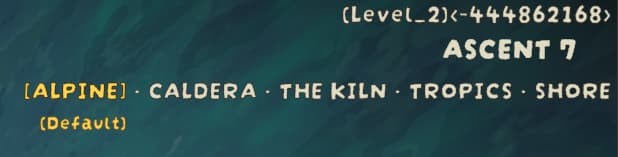
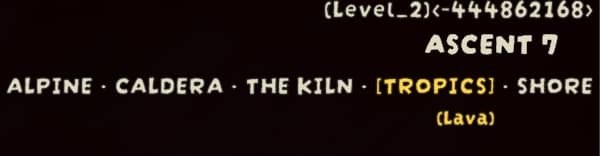
- Displays current level name
- Displays current biomes
- Displays the current biome variant on a separate HUD line when available
- Displays day/night countdown
- Displays fog boundary height, arrival countdown, and movement speed
- Displays rising hazard height, arrival countdown, and movement speed for Lava, Gloom, and Void Ghosts
-
Compatibility support
- Detects the map seed from Terrain Randomiser, Terrain Customiser, or PLL Library when exactly one is loaded
- Uses PLL Library's projected biome titles for custom biome routes
- Works automatically when local characters are registered
Configuration
The mod creates a configuration file with the following options:
General
-
Display Teammate Stamina Bars
- Default: true
- Enables or disables teammate stamina bar display
-
Teammate Stamina Bar Proximity
- Default: 30.0
- Maximum distance at which teammate stamina bars are shown
-
Teammate Stamina Bar Limit
- Default: 4
- Maximum number of stamina bars displayed at once
-
Teammate Stamina Bar Scale (Default: 0.72)
- Default: 0.72
- Controls the size of teammate stamina bars and automatically adjusts related vertical spacing
-
Show Inventory Slots
- Default: true
- Shows teammate inventory slot UI
-
Show Stamina Info
- Default: true
- Shows stamina-related numeric info when stamina bars are visible
Stats
-
Display Timer
- Default: true
- Shows how long you have been climbing
-
Display Height
- Default: true
- Shows your current climbed height in meters
-
Display Level
- Default: true
- Shows the current level name
-
Display Biomes
-
Default: true
-
Shows the current map biomes and the active biome variant when available
-
Display Day Night Countdown
- Default: true
- Shows current day/night countdown information
-
Display Fog Stats
- Default: true
- Shows fog-related statistics when relevant
-
Display Lava Stats
- Default: true
- Shows rising hazard height, arrival countdown, and movement speed for Lava, Gloom, and Void Ghosts when relevant
-
Display Map Seed
- Default: true
- Shows the current map seed from Terrain Randomiser, Terrain Customiser, or PLL Library when supported
StaminaInfo
-
Bar Font Size
- Default: 20.0
- Adjusts the font size of stamina info text
-
Bar Outline Width
- Default: 0.08
- Adjusts the outline width of stamina info text
-
Round Stamina Bars
- Default: true
- Rounds stamina and extra stamina bar values to whole numbers
-
Round Affliction Bars
- Default: false
- Rounds affliction bar values to whole numbers
-
Show Affliction Countdown
- Default: true
- Shows affliction countdown values when enabled
-
Show Hunger Countdown
- Default: true
- Shows local hunger countdown values in stamina info
-
Show Teammate Extra Stamina Outside Bar
- Default: false
- Shows teammate extra stamina values outside the right side of the full extra stamina bar with a
+prefix
Debug
-
Display Self Stamina Bar
- Default: false
- Displays your own stamina bar for debugging or personal tracking
-
Self Stamina Bar Count
- Default: 1
- Controls how many duplicate self stamina bars are shown when Display Self Stamina Bar is enabled
Installation
- Install BepInEx
- Place
com.github.LengSword.PeakStatsEx.dllinto theBepInEx/plugins/folder - Launch the game and configure settings via the config file
Compatibility
Terrain Randomiser, Terrain Customiser, and PLL Library conflict with each other and must not be enabled together. PeakStatsEx displays a map seed only when exactly one of them is loaded.
Other features activate automatically when local characters are registered.
