

PEAK Quick Resume
One key to browse and load any saved campfire from anywhere
| Date uploaded | 2 weeks ago |
| Version | 1.1.0 |
| Download link | OnlyCook-PEAK_Quick_Resume-1.1.0.zip |
| Downloads | 575 |
| Dependency string | OnlyCook-PEAK_Quick_Resume-1.1.0 |
This mod requires the following mods to function

BepInEx-BepInExPack_PEAK
BepInEx pack for PEAK. Preconfigured and ready to use.
Preferred version: 5.4.2403README
PEAK Quick Resume
Press one key to browse your campfires and jump straight back to any of them.
Tired of the long ritual to load a PEAK Checkpoint Save: die, restart, walk to and open the Gate Kiosk, pick the difficulty, load in, then press the load key twice? This mod collapses all of that into a single key and adds an in-game menu so you can pick which checkpoint to load.
Press F7 anywhere and a save picker opens listing all your checkpoints for the current mode. Choose one with the arrow keys and press F7 (or Enter) and it will:
- Start a fresh run of that save's difficulty, then
- Automatically load that checkpoint. So you're back at that campfire with your items and progress.
The newest save is preselected, so pressing F7 twice still loads your latest checkpoint just like before.
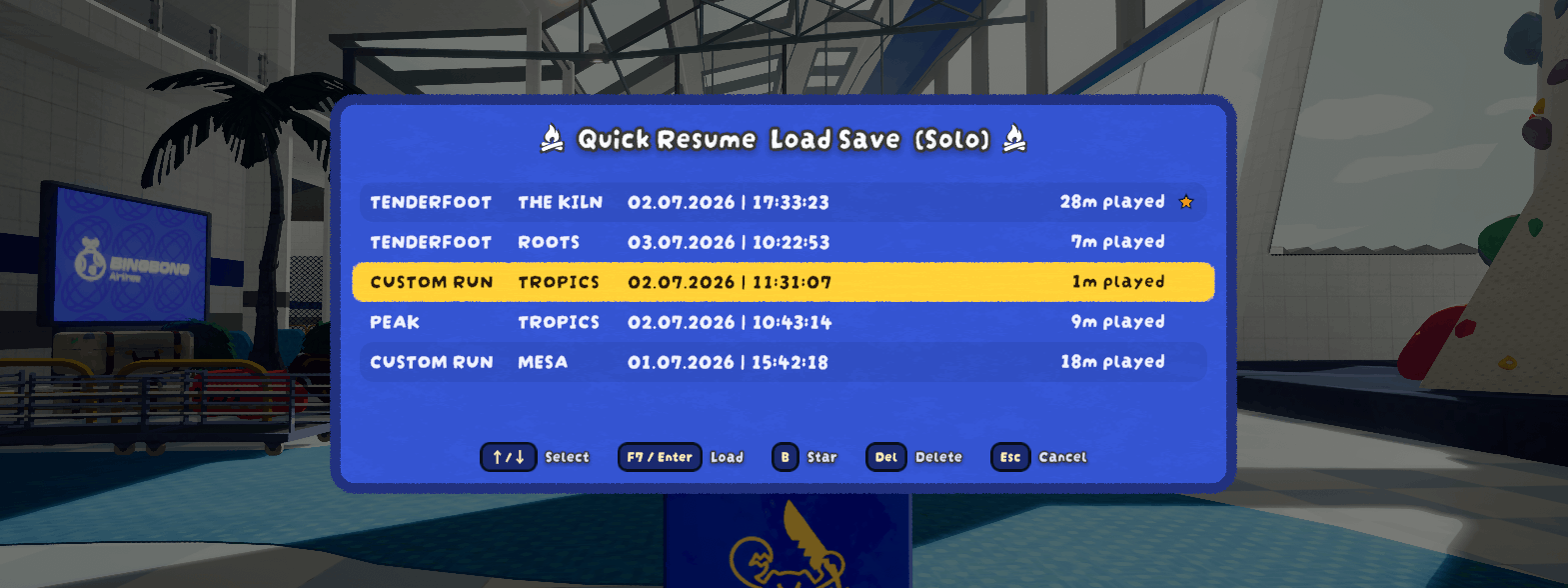
Works after you die, from the Airport, or mid-run (so no need to die first). Full co-op support: the host presses F7 and everyone is brought along and restored.
Because it always spins up a fresh run instance before loading, you can resume as many times as you like without having the problem of loading twice (through F6) and breaking the game.
The mod also adds a few optional Quality of Life pause menu buttons (more details at the bottom of this README).
⚠️ Requires PEAK Checkpoint Save
This mod does not save or load anything by itself, it automates PEAK Checkpoint Save by dominik0207, which does all the real work. Huge thanks to them; that mod is a hard dependency and will be installed automatically.
The campfire saving is still handled entirely by PEAK Checkpoint Save (light a campfire to save). Quick Resume archives each of those saves (now you can have multiple saves per difficulty), makes loading effortless from anywhere in-game, and lets you pick which one to load.
Note: As this mod does all the restoring, it's the one that causes issues regarding client teleport. The Quick Resume mod tries to mitigate these issues by applying a custom config and trying to steer it in the right direction.
How to use
- Play as normal. Light a campfire to save (that's PEAK Checkpoint Save doing its thing). Each save is added to your history (and is never overwritten/deleted automatically).
- Press F7 to open the save picker.
- Use ↑/↓ to highlight a checkpoint, then press F7 again (or Enter) to load it. Just want the latest? Press F7 twice.
- Press Del to delete the highlighted save (press it twice to confirm), or Esc to close the menu.
In co-op, only the host can use F7 and everyone is restored together.
Configuration
Config file: BepInEx/config/OnlyCook.PEAKQuickResume.cfg. If you have PEAKLib.ModConfig installed, every setting below (including a proper click-to-rebind widget for the resume key) is also editable in the game's settings under Mod Settings → PEAK Quick Resume, no need to touch the config file by hand.
- resume-key: the key to open the picker / load the highlighted save (default F7). Rebindable directly in ModConfig's menu.
- resume-key-also-confirms-load: if disabled, pressing the resume key while the picker is open does nothing, only Enter confirms a load (useful if you keep accidentally reloading while trying to close the picker).
- allow-mid-game: allow resuming while still alive (default on).
- panel-opacity: how see-through the picker's background panel is (0 = fully see-through; 1 = fully opaque, default).
- Pause-Menu: disable/re-enable any of the 3 added QoL pause menu buttons, and optionally enable
move-rebind-controls-to-settingsto move the 'Rebind Controls' button away from the pause menu. - Timing: advanced settle/timeout values; raise
coop-airport-settleif a client occasionally gets left behind on a slow connection. - Teleport-Override:
enable-optimized-coop-loading(on by default) makes a plain co-op load use PEAK Checkpoint Save'steleportJumpLogic 1instead of your own base setting, since extensive testing found this avoids nearly all of the teleport glitching described below. Hold Shift while loading to use your own base setting instead for just that one load, or Alt forteleportJumpLogic 2. Solo play is never affected. Press F1 in-game for a live explanation using your actual current settings. - Teleport-Mitigation: detects and helps recover from the teleport glitching described below (see Notes). Everything here is on by default and rarely needs touching; thresholds and delays are all individually configurable if you want to tune them.
Your archived checkpoints live in BepInEx/plugins/QuickResume/Archive/ (split into Offline/ and Coop/). PEAK Checkpoint Save's own files are never modified.
Notes
- Host-only in co-op. Although everyone should have PEAK Quick Resume installed for compatibility reasons.
- Loading a checkpoint can grant Steam achievements (a property of the underlying mod). Don't use it if you want to earn everything unassisted.
- Custom runs are resumed with your current custom settings (the checkpoint file doesn't store the run's original settings).
- Client teleport glitches (co-op): occasionally, PEAK Checkpoint Save's own teleport logic may keep trying to re-correct a client's position right after loading, causing brief up/down glitching (and sometimes fall damage from being repeatedly snapped back into the air). Quick Resume now detects this, cancels the excess corrections, refunds any fall damage they caused, and forces you back to the right spot if you're still stuck.
- Translations were done by AI, so if something is off in your language, then you are free to open a GitHub Issue (see below).
Feedback & bug reports
Found a bug or have a suggestion? Please open an issue on GitHub or send me an email at [email protected]. It helps a lot to include:
- what you did and what happened (solo or co-op; if co-op, whether you were the host),
- your
LogOutput.log(Quick Resume logs every step of a resume, this file is what makes bugs fixable).
Where is LogOutput.log?
BepInEx rewrites this file every time you launch the game, so reproduce the bug, then quit and grab the file before playing again.
r2modman / Thunderstore Manager:
- Open the manager, pick PEAK, choose your profile, then go to Settings and search for the following setting:
Copy log file contents to clipboard, click on that setting and paste it in your GitHub Issue.
Manual install?
- Find out where your
LogOutput.logfile is on your OS. You can for example use Everything on Windows or use this commandfind ~ -name "LogOutput.log"on Linux/Mac.
Miscellaneous Pause Menu Buttons
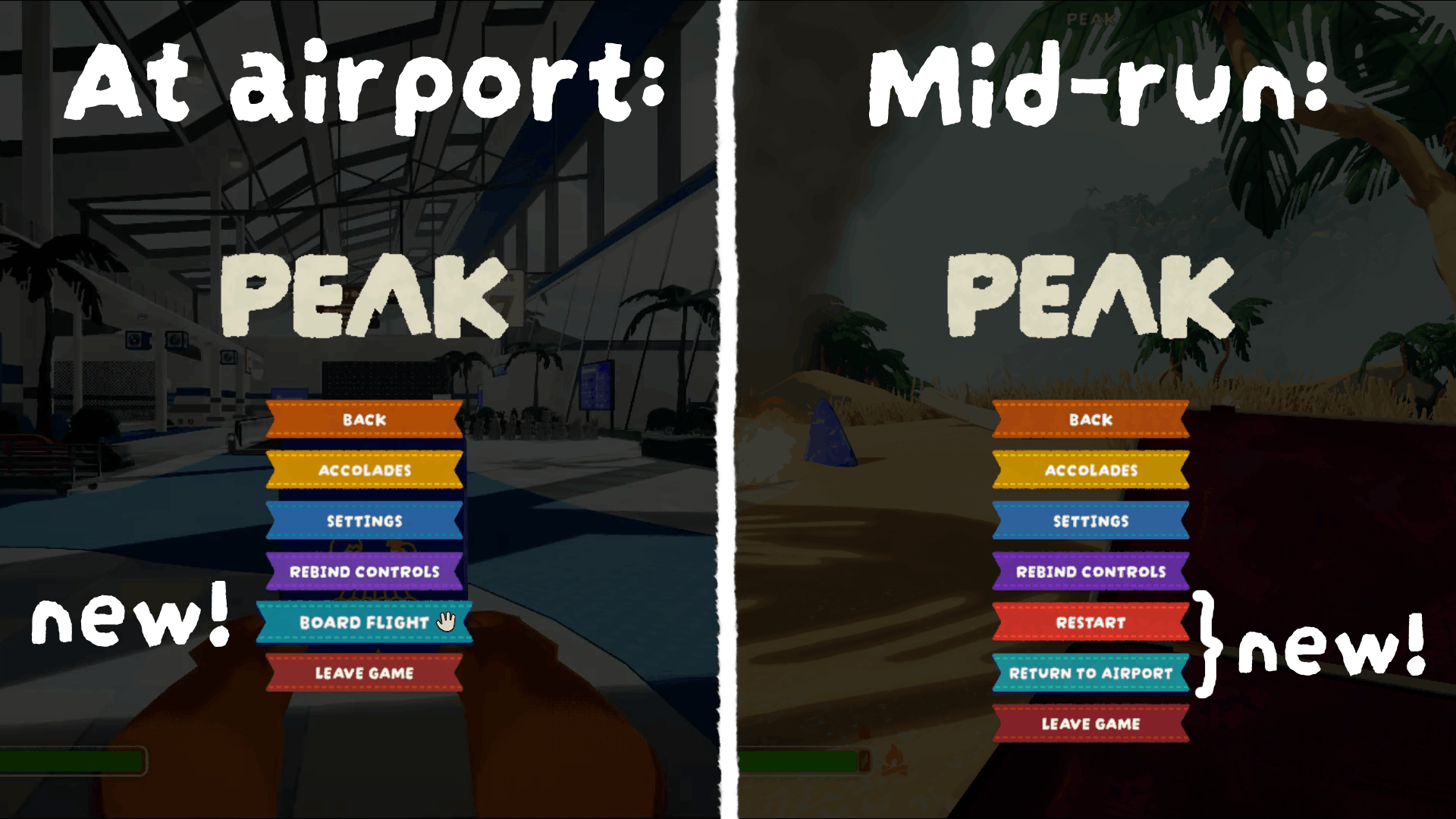
- Board Flight (at the Airport): Opens the gate kiosk directly without having to walk over.
- Restart and Return to Airport (mid-run, host-only): Both buttons do the advertised action and apply it to all clients.
You can disable/hide any of these buttons through 'Mod Settings' (on the PEAK Quick Resume tab, under Pause Menu)
If you have too many pause menu buttons because of this, you can enable the
move-rebind-controls-to-settingssetting (also underPause-Menu). This will move the 'Rebind Controls' button from the pause menu to the 'Settings' page, below the 'Back' (or if applicable 'Mod Settings') button.
CHANGELOG
2.1.0
- Saves are now stored in one place only. Previously a save was written into the old
Checkpoint_Savefolder and then copied into this mod's own archive, and loading a checkpoint copied it back again. That copying is now gone and everything is happening directly inside theQuickResume/Archivefolder. - Changed co-op save structure: saves are now split by who owns what. The host's save file holds everything about the world (the island and its biomes, items on the ground, etc.), while each client's save file only holds that client's own stuff (inventory, status effects, etc.). Although there is still full backward compatibility with settingsVersion 6, so all your old saves will still work as if nothing changed.
- Death state is now being saved and restored. Anyone who has no save file in the loaded checkpoint (your friend who joined after it was saved, for example) is always restored alive, never dead. You can turn the whole thing off with the new restore-death-state setting, in which case everyone is simply restored alive as before.
- Fixed the same checkpoint showing up as several separate entries in the save picker (happened in co-op whenever the picker couldn't work out which of the save files was the host's).
- Fixed a co-op client occasionally being restored from a near-miss save file belonging to a different checkpoint than the one actually being loaded.
- Deleting a save in the picker now deletes that whole checkpoint, meaning the host's file and every client's file from the same save, instead of leaving the clients' ones behind.
- Fixed a co-op client being dead and stuck spectating the host after a save was loaded.
- Fixed restarting (as the host) while a resume was still in progress sending the host onto the daily island rotation instead of the loaded save.
- Fixed co-op clients occasionally getting stuck on an infinite loading screen. This happened especially for clients on slower machines.
- Fixed cases where if only the host had this mod installed it would fail to resume entirely.
- Fixed a serious co-op bug where restarting (or loading another save) immediately after a previous load finished could very much corrupt a client's state. Still works like before, but there is now a small (configurable) delay before actually starting.
- Fixed a co-op player without this mod installed sometimes ending up with their 4th item slot permanently locked. Now that item is just not restored at all, as it's impossible to restore if the given client doesn't have Quick Resume installed.
- Known remaining issue (rare, and appears to be a vanilla PEAK/Photon bug rather than anything in this mod; I am pretty sure I managed to reproduce it in vanilla even): a co-op client can occasionally still get stuck after a host restart, with the client's own game incorrectly believing the host disconnected. If this happens, simply restarting again (almost) always resolves it.
2.0.3
All your saves created in v1.64.a (or older) will (probably) load incorrect islands because the game's map pool was rotated.
- Compatibility update with version 1.65.a (23.07.2026): the mod was analyzed and tested, nothing seems to be broken as the game update didn't change anything for us.
- Made it that you get a notification if you start the game while having a save of an outdated version which mentions the game updated and the map pool rotated.
- Save files now store the game version (on save) and outdated save entries show their old version in the save picker to indicate that they will likely load a wrong island.
- TEMPORARY: If you used this mod and have saved a run, you will see the version update notification when loading into the airport initially. All saves without a saved version will fallback to v1.64.a for now. These two will be cut in the next mod update and only exist for compatiblity reasons.
2.0.2
- The save picker entries' content was reworked to show them ordered (and aligned) in a column-style to make it more organized and easier to spot the right save. Also summarized players for co-op saves to only show the count instead of all player names.
- Added a new minimal-picker-ui setting to show the save picker (and help screen) in a UI without any effects or animations. This makes the picker open much faster.
- Added native compatibility with the TerrainRandomiser mod: if you're starting a game through the Boarding Pass, no conflict will exist between the mods, TR will do its thing as intended. If you're loading a save game through the save picker, TR is temporarily ignored to load the correct saved run. NOTE: any biomes created by TR are entirely temporary and cannot be restored.
- Added native compatibility with the MorePeak mod: loading a save through the save picker will now always load the saved run instead of sometimes an incorrect one.
- Now able to traverse 5 save entries at a time by holding
Shiftwhen pressing↑/↓in the save picker. - Now biome names are also localized in the save picker.
- Fixed stale saved-level override leaking into normal Boarding Pass starts.
- Fixed loading-save overlay not kept up until all co-op clients actually finish connecting.
- Changed the help screen default key to be
F4(although still changeable through the config; changed to not compete with PEAK Unlimited).
2.0.1
- Updated visual style of some labels in the save picker and the help screen. Also actually centered the campfire icons in the save picker.
- Fixed an issue where clients would be matched a save file that is completely unrelated to the loaded one if it was saved without that client in-game.
- Add widescreen support to the save picker and help screen panels.
- Fixed two unlocalized thus in english hard-coded strings and added their corresponding translations.
2.0.0
TL;DR: You don't need PEAK Checkpoint Save anymore (I'd recommend removing that mod). The loading screen is now pretty clean, save loading should be more stable and in solo slightly faster. Items on the ground, backpacks, luggage, the Ancient Statue, some deployables, player attached entities, a player's temporary 4th slot, the day and achievement progress' are now being saved and restored (at least while they are close to the campfire).
This update declares independence! It's recommended to delete
PEAK Checkpoint Saveand the config file of this modBepInEx/config/OnlyCook.PEAKQuickResume.cfg, so that the dependency is dropped (although PEAK Checkpoint Save won't conflict with this mod if still installed) and your old config won't cause issues.
- No longer requires PEAK Checkpoint Save: Quick Resume now has its own independent save/load/teleport implementation and works entirely on its own. PEAK Checkpoint Save can still be installed alongside it without conflicting, but it's optional now, not a dependency. Huge thanks to dominik0207, whose PEAK Checkpoint Save this mod was originally built around and whose save file format this mod's own implementation is still based on.
- Teleport safety net is now fully native, and all PEAK Checkpoint Save integration was removed: the bad-teleport detection and recovery (the on-screen hint, the fall-damage refund, and the force-you-to-the-checkpoint fallback) no longer rely on anything from the old mod, and every piece of code that hooked into, patched, or worked around it has been deleted, so Quick Resume is now completely standalone (the old mod is simply ignored if still installed). As part of this: a rare case where a co-op client was never teleported at all can now recover to the correct spot on its own, and the old blanket 'block all teleports for ~30s after loading' workaround, which only ever existed to fight the old mod's runaway re-teleport loop, is gone (could otherwise have swallowed legitimate teleports after a resume).
- Remove the island switching button injected into the Boarding Pass (not needed anymore: Boarding Pass always loads newest island, and saves load their referenced levels).
- Removed all unintuitive manual 'Shift/Alt alters
teleportJumpLogictemporarily' behavior. This is now fully handled automatically by the mod itself. - Note: I have dropped the dependency mainly to make it easier for me to maintain when the game updates and to have an easier time fixing any of its issues (making this mod more robust) as well as expanding on it.
- New native-feeling loading transition: resuming now crossfades into the game's own real loading save screen instead of the old abrupt instant on/off overlay, hiding the teleport itself, then crossfades back out revealing your character already lying at the checkpoint before visibly waking up and standing up. You can fully configure or simply disable this through the config at will.
- Faster solo resumes: once the map has loaded and you've been warped to the campfire, the extra per-step waits before the final precise teleport are now skipped in solo (they only matter in co-op, where they give other players time to catch up over the network), cutting a few seconds off every solo load. New
fast-solo-teleportsetting (on by default) controls this; co-op is unaffected. - Objects near the campfire you save at are now restored too, not just your own inventory:
- The Ancient Statue's broken/unbroken state, and its held item if it hadn't been picked up yet.
- Ordinary Luggage boxes within 30m: opened/closed state and any items still inside.
- Anything else loose within 30m: backpacks, berries, coconuts, campfire food, items you dropped or threw nearby, etc.
- A placed Portable Stove or Scout Cannon within 30m.
- Reduced the backpack-save mitigation's search radius from 100m to 50m.
- Achievement progress is now saved and restored when you load a checkpoint: progress toward Plunderer, Foraging, Mycology, Advanced Mycology, Gourmand, Knot Tying, First Aid, Clutch, and the 'without ever X' kind of achievements no longer resets to zero (previously lost, since resuming always starts a fresh run first). Also fixes teleporting inflating the High Altitude Badge's climbed-height total. This only applies per-player, to whoever has PEAK Quick Resume installed themselves, a co-op player without it keeps the old, unrestored behavior for their own achievements.
- The 4th temporary ('held in hands') item is now saved and restored: if all 3 of your inventory slots were full and you were carrying an extra item in your hands, it's no longer lost on load.
- Physical thorns and an attached tick are now saved and restored, instead of always coming back clean after a load.
- The in-game day is now being saved and restored.
- Fixed disabling "restore time of day" also disabling inventory restore: the underlying save format's own logic nested inventory/backpack/affliction restore (and the internal cleanup that ends teleport-bug watching and re-arms loading) inside the daytime toggle, so turning daytime off silently broke all of them. Each restore now honours only its own setting.
- Fixed the sky flickering to night after loading a night save: the saved time of day is now snapped in early (the moment the map's biome/lighting starts blending, hidden behind the loading screen) instead of a few seconds after you'd already loaded in, so a night save is fully dark when the screen clears instead of jumping from bright morning to night in front of you.
- Co-op: fixed the host repeatedly re-teleporting a client (the up/down glitch), especially a client on slower hardware/connection: the teleport target is a few meters up in the air (everyone drops to the ground on arrival), but the host decided whether a client had 'arrived' by comparing heights, so a client resting on the ground below that target looked like it had never teleported, and the host re-warped it over and over (up to 150 times originally). This showed as the client glitching up and down on the host's screen only (the client itself was fine and never actually moved). The host now judges arrival by horizontal position instead, so a client that's landed at the right spot is left alone. Also added a grace delay and a cap on any genuine re-sends (new
max-client-warp-resends/client-warp-resend-grace-secondssettings), handing off to the client's own teleport recovery rather than firing endlessly. - The default key for the help menu was changed to be
F2(although still changeable through the config) and fixed other languages as well as the logs hardcoding the old key (now dynamic).
1.1.0
- Star/favorite saves in the F7 picker: press
B(rebindable, newstar-keysetting) to star the highlighted save. Starred saves are pinned to the top (newest first) and can't be deleted until unstarred again. - Mitigated a common footgun: dropping your backpack to rearrange items, then having the campfire lit before picking it back up, used to leave that backpack (and everything in it) out of the save entirely. It's now restored automatically as long as it's still on the ground, within 100m of that campfire, when it's lit.
- Fixed a PEAK Checkpoint Save bug: a client finishing a cook on an already-lit campfire could sometimes trigger an extra, unwanted save (and its own "Saved!" message) on the host.
- Fixed saved islands/biomes not being restored correctly: this mod now forces PEAK Checkpoint Save's own "use saved island" setting on for every load, regardless of its checkbox state, so resuming a save reliably restores the exact island (and therefore the exact biomes) you saved on, instead of sometimes silently loading today's daily island rotation instead.
- Fixed a co-op bug where resuming an older save only restored the host correctly: PEAK Checkpoint Save restores every player from their own separate save file, but only the host's file was ever rolled back to the chosen checkpoint, every other player kept whatever their most recent actual save was, regardless of which checkpoint was picked. Resuming now rolls every connected player's file back to the matching moment.
- Solo: campfires you spawn next to on load are no longer left unlit when using PEAK Checkpoint Save's default
teleportJumpLogic 0, a gap in that setting's own vanilla-adjacent teleport logic. Fixed silently (no save or on-screen indicator triggered). - F1 help screen rewritten for clarity: simplified language throughout (all languages), and added a new tip: most load issues are fixed simply by everyone quitting and rejoining (or restarting) the game before trying a different
teleportJumpLogic.
1.0.0
Full release.
If you ever had issues as the client (not the host) in co-op while loading a save (such as falling through the world or seeing an empty map), then this update should fix a lot of such issues.
Note: if you are updating from a beta release (v0.3.0 or older) then be sure to delete thisPEAK Quick Resumemod and the underlyingPEAK Checkpoint Savemod and then simply reinstall thePEAK Quick Resumemod (which will install the other automatically). This makes sure an outdated or changed config does not interfere with any functionality.
If this update made save game loading worse for you, then please either open a GitHub Issue or send me an email at[email protected]. This would help out a lot, so that we can try to improve the mod for everyone!
- Detects and mitigates PEAK Checkpoint Save's occasional bad-teleport bug:
- In co-op, a plain load now defaults to
teleportJumpLogic 1instead of PEAK Checkpoint Save's own base setting, since extensive testing found this avoids nearly every case of the bug above. Newenable-optimized-coop-loadingsetting (on by default) controls this; hold Shift while loading to use your own base setting instead for just that one load, or Alt forteleportJumpLogic 2. Solo play is never affected.
- In co-op, a plain load now defaults to
- F7 save picker redesign: rebuilt as a real UGUI Canvas matching the game's own visual style, with a smoothly fading-in dimming overlay, and a one-time loading indicator on the very first open each session so the initial build doesn't cause a seemingly freeze.
- New
panel-opacityconfig setting: lower it to see through the picker's background while it's open. - New
resume-key-also-confirms-loadsetting, and the resume key is now a real rebindableKeyCode, so PEAKLib.ModConfig's in-game menu can rebind it directly (click, press a key) instead of only via the config file. - Localized everything in the picker and its messages across every language the game ships
- Fixed
Escapebleeding through to also open the vanilla pause menu. - Now the arrow keys can be held down to quickly traverse save entries on an interval.
- Panel is now restricted to only showing 10 save entries at a time. It introduces a scrolling mechanic with an arrow indicator, if there are more entries instead.
- Localized PEAK Checkpoint Save's own "Savegame loading..." and "Savegame loaded!" messages.
- All config setting names now use hyphens as spaces, so they are actually readable (
ALLOW-MID-GAMEinstead ofALLOWMIDGAME). - "Board Flight" pause menu button now matches "Return to Airport"'s teal.
- F1 help screen rewritten into a real small menu matching the F7 picker's look.
- Added a bigger more noticeable version of the PEAK Checkpoint Save's island toggle button to the Boarding Pass.
- New
move-rebind-controls-to-settingssetting (off by default): moves the vanilla "Rebind Controls" button out of the pause menu into the Settings page (below theMod Settingsbutton), freeing up a row for this mod's and other mods' own pause-menu buttons. - New
help-keysetting: the F1 help screen key is now a real rebindableKeyCode(like the resume key), and rebinding it also overrides PEAK Checkpoint Save's own tutorial key to match, so its own F1 detection and footer prompt stay in sync instead of only being editable by hand in its config file. - Removed the
require-double-press_DEPRECATED/double-press-window_DEPRECATEDsettings (deprecated since 0.2.0, superseded by the picker's confirm step).
0.3.0
- Miscellaneous QoL: pause menu buttons. Three extra buttons are injected into the vanilla pause menu:
- Restart (mid-run, host-only): returns everyone to the Airport and immediately starts a fresh run of the same difficulty, no checkpoint is loaded.
- Return to Airport (mid-run, host-only): sends everyone back to the Airport without starting a new run.
- Board Flight (at the Airport, any player): opens the gate-kiosk UI directly, skipping the walk over to it.
- Each is independently toggleable in config (
PauseMenusection) and confirms before acting on Restart/Return to Airport.
- Localized into every language the game ships (French, Italian, German, Spanish Spain/Latam, Portuguese Brazil, Russian, Ukrainian, Simplified Chinese, Japanese, Korean, Polish, Turkish), both the button labels and their confirm dialogs. Translations were done with AI, if one reads wrong in your language, please open a GitHub issue.
- Appended
_DEPRECATEDtorequireDoublePress/doublePressWindowconfig keys in settings.
0.2.0
- In-game save picker (F7): browse all your checkpoints (newest first) and load any of them from anywhere. Arrow keys to select, F7/Enter to load, Del to delete (twice to confirm), Esc to close.
- Multiple saves per difficulty: checkpoints are now archived instead of overwritten, so older campfires are kept and can be revisited (even mid-run, without losing the run's later saves). PEAK Checkpoint Save's own files are untouched.
- Custom-run support: custom difficulty runs can now be resumed, not just the standard difficulties.
- Pressing F7 twice still loads your latest checkpoint, exactly as before.
requireDoublePress/doublePressWindowconfig are deprecated (superseded by the picker's confirm step).
0.1.1
- Description and README updated.
0.1.0
Initial release.
- Press F7 (twice to confirm) to start a fresh run of your saved difficulty and automatically load your PEAK Checkpoint Save checkpoint.
- Works after death, from the Airport, and mid-run.
- Full co-op support (host-driven): all players are returned to the Airport, brought into the fresh run, and restored together.
- On-screen prompts, configurable resume key, double-press confirmation, and advanced timing options.
