

PEAK Daily Expeditions
Adds true Daily Seeded Expeditions, airport board countdown, multiplayer sync, and allows Steam Badges & Achievements in custom runs!
| Last updated | a week ago |
| Total downloads | 802 |
| Total rating | 3 |
| Categories | Mods Misc World Items Client Side Host Only Afflictions AI Generated |
| Dependency string | Pxntxrez-PEAK_Daily_Expeditions-1.0.1 |
| Dependants | 0 other packages depend on this package |
This mod requires the following mods to function

BepInEx-BepInExPack
BepInEx pack for Mono Unity games. Preconfigured and ready to use.
Preferred version: 5.4.2100README
PEAK: Daily Expeditions
⚠️ IMPORTANT NOTICE: RECOMMENDED FOR ALL PLAYERS ⚠️
It is strongly recommended that all players in the lobby have this mod installed.
While players without the mod can still join your lobby, having the mod installed on all clients ensures full synchronization of daily challenge rules, proper petrification damage mechanics, in-game HUD indicators, and Steam Badge / Achievement unlocks for everyone in your group.




If you like my work, you can:

PEAK: Daily Expeditions is a full-fledged expansion mod for PEAK that introduces daily challenge expeditions, a main menu countdown board, restored cut game mechanics, new custom menu buttons, full multiplayer co-op support, and enabled Steam Badges and Achievements for challenge runs.
What is this mod?
In standard PEAK, the custom expedition menu allows you to tweak sliders, but it disables all badge and achievement progress.
PEAK: Daily Expeditions turns custom expeditions into an active daily challenge mode. Every single day, a brand-new daily expedition is generated with unique rules, hazards, and item pools. This run is identical for every player in the world, giving everyone a shared challenge to conquer.
If you beat today''s daily run, your win counter goes up, and you unlock the next daily challenge for the rest of the day.
Preview
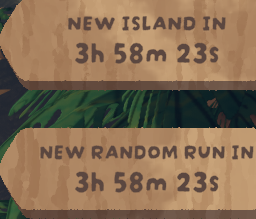
1. Main Menu Live Countdown
A live countdown board displayed directly underneath the island title shows exactly when the next worldwide daily expedition rolls over.
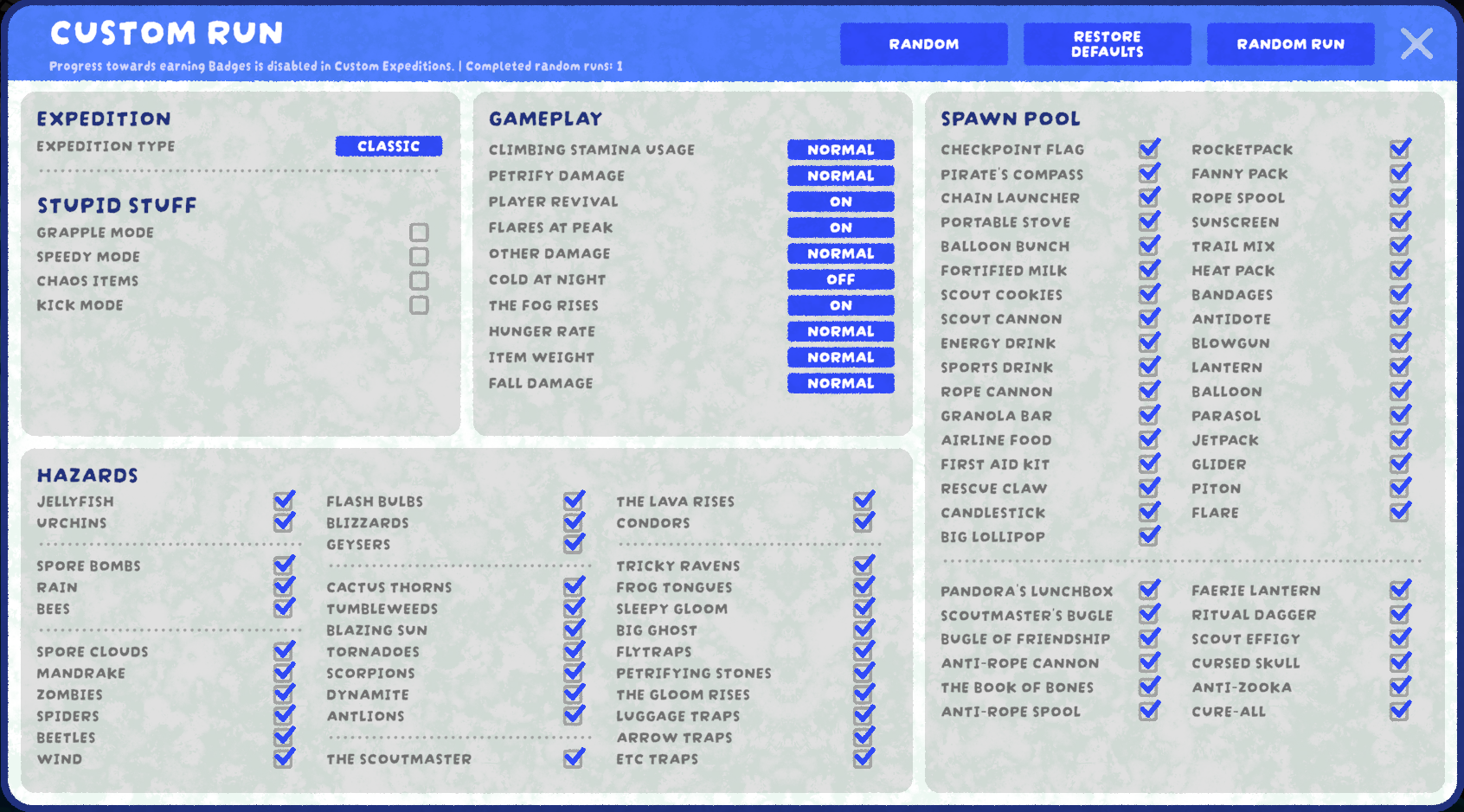
2. New Custom Expedition Menu & Restored Mechanics
Features new action buttons, a career win tracker, and restored cut features (Chaos Items, Speedy Mode, Petrification Damage slider, Player Revival toggle).
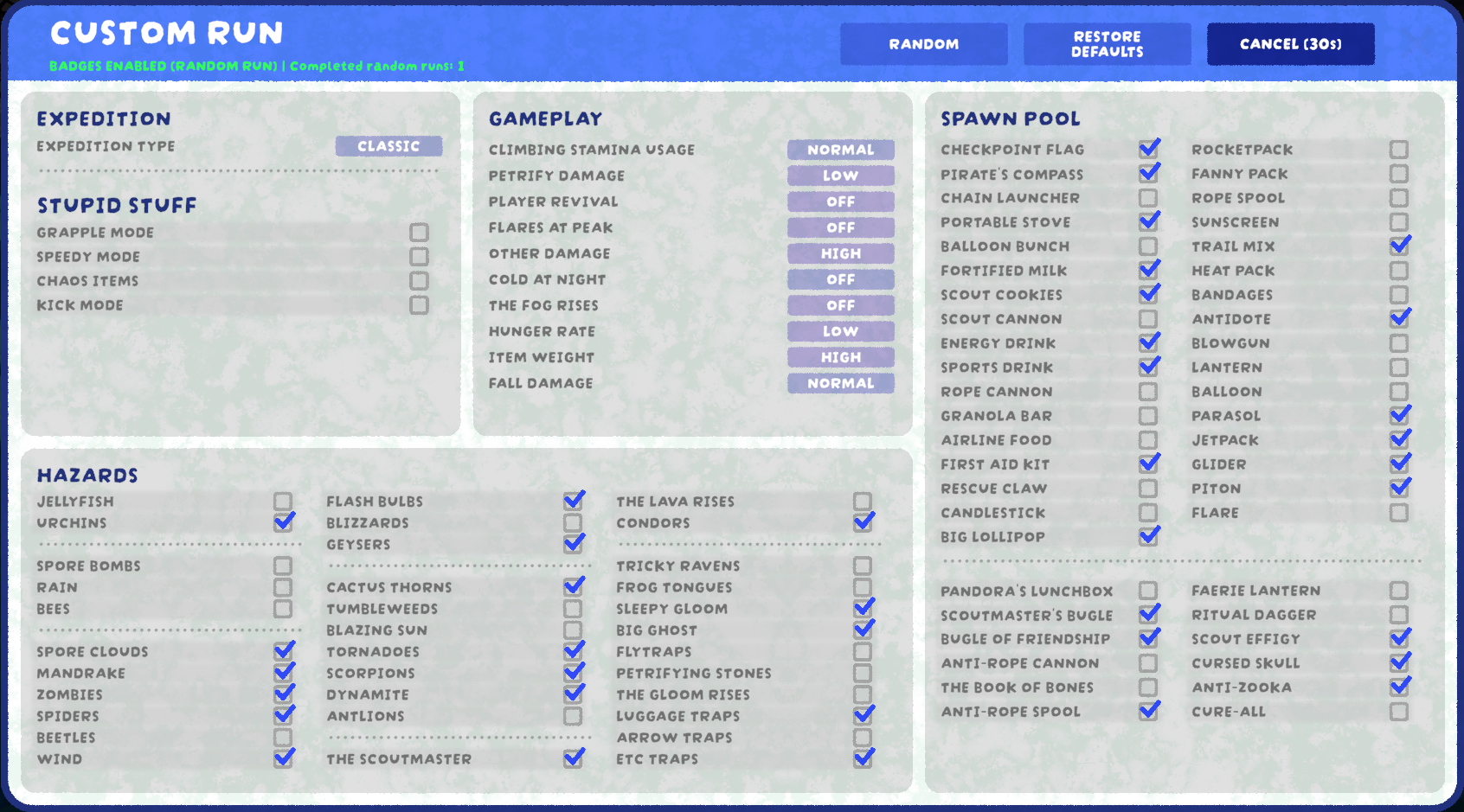
3. 30-Second Challenge Preparation Countdown
Pressing RANDOM RUN generates the worldwide daily seed, enables Steam Badges & Achievements, and begins a 30-second countdown with an instant Cancel option.
4. In-Game Challenge HUD Indicator
During official daily expeditions, your climbing HUD prominently displays the RANDOM RUN status badge in the top-right corner.

Restored & Unlocked Hidden Features
The mod restores and fixes several cut or hidden mechanics that the original developers left unfinished in the game files:
- Chaos Items (Restored & Fixed): The developers left a Chaos Item mode in the code, but its spawn system was broken. This mod completely fixes and enables it, allowing wild, random drops of any item in the game.
- Speedy Mode (Unlocked): Restores the hidden game speed multiplier.
- Petrification Damage (Restored Slider): Restores the unused Petrification Damage slider with working damage scaling and hazard mechanics.
- Player Revival (Unlocked Toggle): Re-enables the hidden toggle that lets you turn player revives on or off in multiplayer.
What''s New in the Menu
When you open the Custom Expedition window at the Airport Kiosk, you will find new buttons and features:
1. New Buttons
- [ RANDOM RUN ]: Starts the official Daily Expedition. It rolls the worldwide daily rules, enables Steam Badges & Achievements, and begins a 30-second preparation countdown.
- [ RANDOM ]: Instantly randomizes all items, hazards, and damage sliders (50/50 chance) for your own casual custom run without starting the daily countdown.
- [ CANCEL (30s) ]: Appears after clicking Random Run. It gives you 30 seconds to review the day''s rules before the game locks in. If you change your mind and press Cancel, the game restores 100% of the custom settings you had before clicking the button.
2. Header & Stats
- Badge Disclaimer & Win Counter:
Directly under the "Custom Expedition" title, the menu displays:
Badges Enabled (Random Run) | Completed random runs: XThis tracks your total career wins in daily runs across all days.
In-Game Features
Live Main Menu Countdown Board
In the main menu, look at the island board banner. Right underneath the island title, a live countdown clock is displayed:
NEW RANDOM RUN IN 14h 25m 10s
This tells you exactly how much time remains until the next worldwide daily expedition rolls over.
Steam Badges & Achievements Enabled
Unlike standard custom runs where badge progress is disabled, playing a Daily Random Run allows you to earn Steam Badges and unlock achievements normally.
In-Game HUD Indicator
While climbing the mountain, the text in the top-right corner of your screen will clearly display RANDOM RUN during official daily challenges, or CUSTOM RUN if you configured the settings manually.
Balanced Game Modifiers & Randomized Rules
Every daily expedition rolls a completely unique combination of gameplay settings:
- Full Settings Randomization: All items in the spawn pool, environmental hazards (blizzards, lava, tornadoes, bees, spore clouds, etc.), gameplay difficulty, stamina usage, and damage sliders are randomly rolled for the day.
- 50% Chance: Pure Classic Ascent (all special modifiers disabled, pure climbing skill).
- 50% Chance: One of the fun special modifiers is activated:
- Kick Mode: Scouts can kick each other.
- Chaos Items: Completely wild random item spawns.
- Speedy Mode: Increased movement and game speed.
- Grapple Mode: Special grappling mechanics enabled.
- All sliders roll between low, normal, and high (zero-damage god mode is never rolled).
Multiplayer Co-Op Support
- When the lobby Host starts a Daily Random Run, the exact challenge rules are automatically synchronized to all players in the party.
- Every player in the lobby gets the RANDOM RUN indicator, Steam badge unlocking, and a win added to their counter upon reaching the peak.
- If a friend in your lobby doesn''t have the mod installed, they can still play the match with you normally without crashes.
How to Start a Daily Run
- Walk up to the Airport Kiosk in the lobby.
- Select Custom Expedition.
- Press the RANDOM RUN button.
- Review the generated rules during the 30-second countdown (press Cancel if you want to back out).
- And after 30 seconds, the game starts automatically
Installation
Method 1: Thunderstore Mod Manager (Recommended)
- Open the Thunderstore Mod Manager app.
- Search for PEAK: Daily Expeditions.
- Click Download / Install with Mod Manager.
Method 2: Manual Installation
- Make sure you have BepInEx 5 installed for PEAK.
- Download
PEAK_Daily_Expeditions_v1.0.0.zip. - Extract
PEAKDailyExpeditions.dllinto yourPEAK/BepInEx/plugins/folder. - Start the game.
Languages
The mod automatically adapts to your game language:
- English
- Russian
📞 Support & Community
Report bugs, suggest features, or provide feedback:
| Discord Server | Channel | Post |
|---|---|---|
| Pxntxrez Studio | #released-mods |
PEAK: Daily Expeditions |
Made with ❤️ by Pxntxrez
