
Please disclose if any significant portion of your mod was created using AI tools by adding the 'AI Generated' category. Failing to do so may result in the mod being removed from Thunderstore.

MapVotePlusPlus
Vote on the next map in the truck or the lobby. Works with custom maps. If nobody votes, the map is random; otherwise it's drawn from the maps people picked.
| Date uploaded | 2 days ago |
| Version | 1.3.0 |
| Download link | RoryDotGG-MapVotePlusPlus-1.3.0.zip |
| Downloads | 2564 |
| Dependency string | RoryDotGG-MapVotePlusPlus-1.3.0 |
This mod requires the following mods to function

BepInEx-BepInExPack
BepInEx pack for Mono Unity games. Preconfigured and ready to use.
Preferred version: 5.4.2305

README
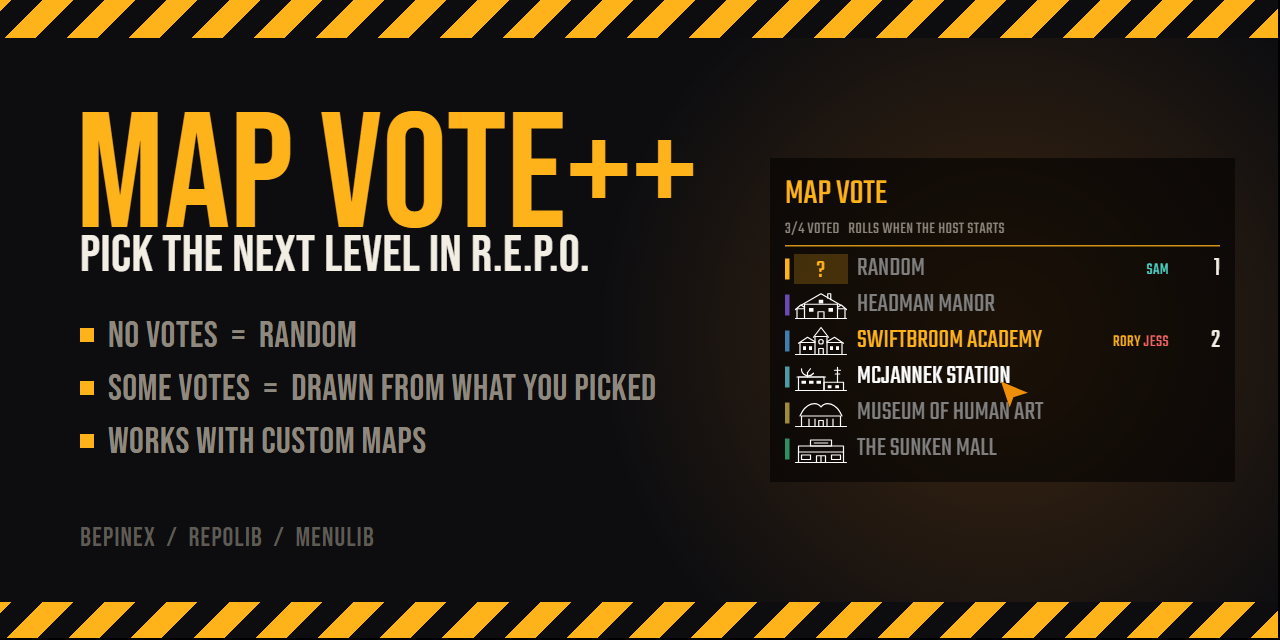


MapVote++ lets your crew vote on the next level, in the truck between levels or in the pre-game lobby. It reads the map list from the game at runtime, so new official maps and custom maps show up without any config.
How the next map is picked
- If nobody votes, you get a random map that isn't the one you just played, as in vanilla. The host can make it skip more recent maps with
RecentMapsToSkip. - If anyone votes, the winner comes only from the maps people picked. How depends on the host's
VoteMode:- Lottery (the default): each vote is one ticket, so 3 votes for A and 1 for B gives A a 75% chance and B 25%.
- Majority: the map with the most votes wins. A tie is drawn at random between the tied maps, so 2 votes each for A and B is 50/50, and a map with fewer votes can't win.
- A vote for Random can land on any map on the list that wasn't just played. In a lottery it's one ticket. In a majority vote it counts as a choice of its own: if Random has the most votes, or ties and is drawn, the next map is random.
- The list shows who has voted for each map as the votes come in.
- The host can limit how many maps each vote offers with
MapsPerVote. Each time a vote opens, that many maps are drawn at random, skipping recent maps (by default, the one you just played). Random, and the pick when nobody votes, only land on one of those maps. The vote list says so, for example 3 OF 5 MAPS, DRAWN AT RANDOM. - The host can keep the last few maps played this run out of random draws with
RecentMapsToSkip. That covers Random, the pick when nobody votes and the mapsMapsPerVotedraws.1is vanilla's rule: skip the map you just played.0lets it come straight back. If too few other maps are left, the ones played longest ago come back first. A vote for a recent map still counts. It applies with voting off too. - The host can drop maps with
ExcludedMaps, for example bad levels in a custom pack. They aren't on the vote list and never come up at random, even with voting off. Name each map as the vote list shows it (Headman Manor) or by its level name (Level - Manor), in any case. If the list names every map, it's ignored. The host's log says which maps it leaves out, and lists every map's names if one doesn't match. - The host can skip the vote and pick the next map outright, for a stream or a planned run, by shift-clicking it on the vote list (see How to vote). That map wins whatever the votes say, even if it's one
RecentMapsToSkipwould skip, and it stands if the host excludes it afterwards. The host can only pick a map that's on the list, so withMapsPerVoteset, only one of the maps drawn for that vote. If the host shift-clicks Random, the map is drawn at random from the list, skipping recent maps as usual.
What it looks like
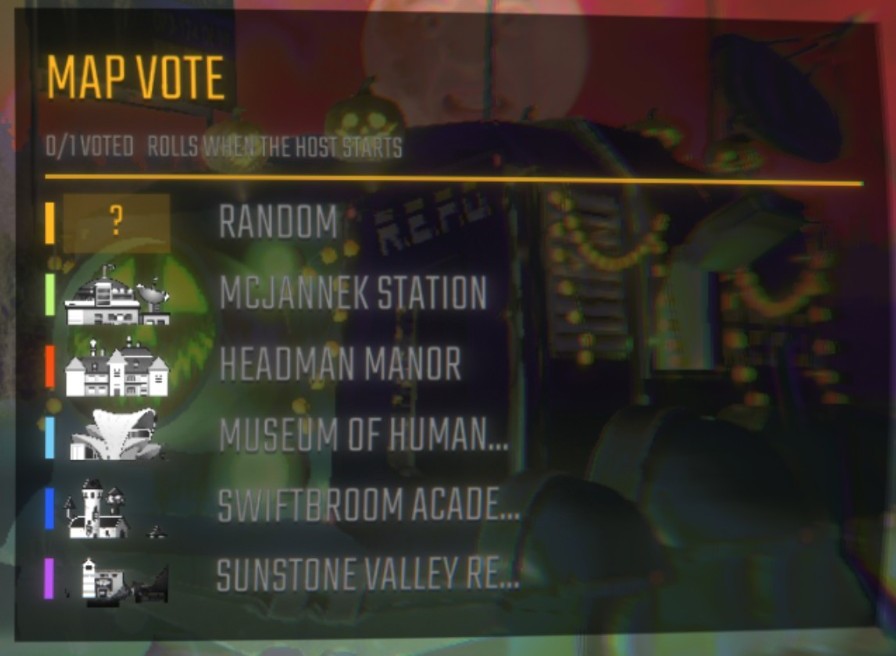
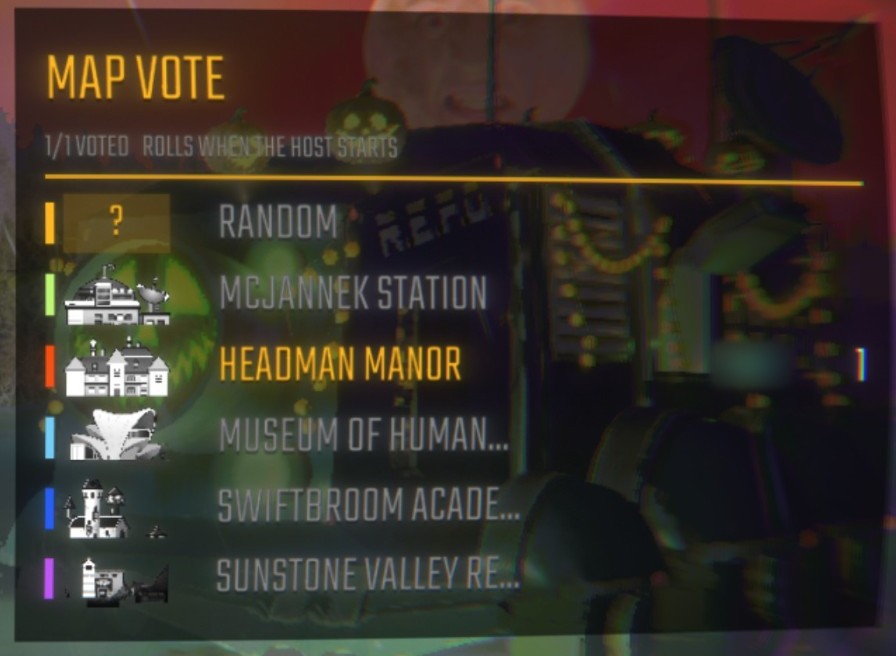
The vote list is part of the game's own menu, built with MenuLib, so it uses R.E.P.O.'s font, buttons and cursor. In the lobby it sits to the right of the player list.
| Before anyone votes | After a vote |
|---|---|
 |
 |
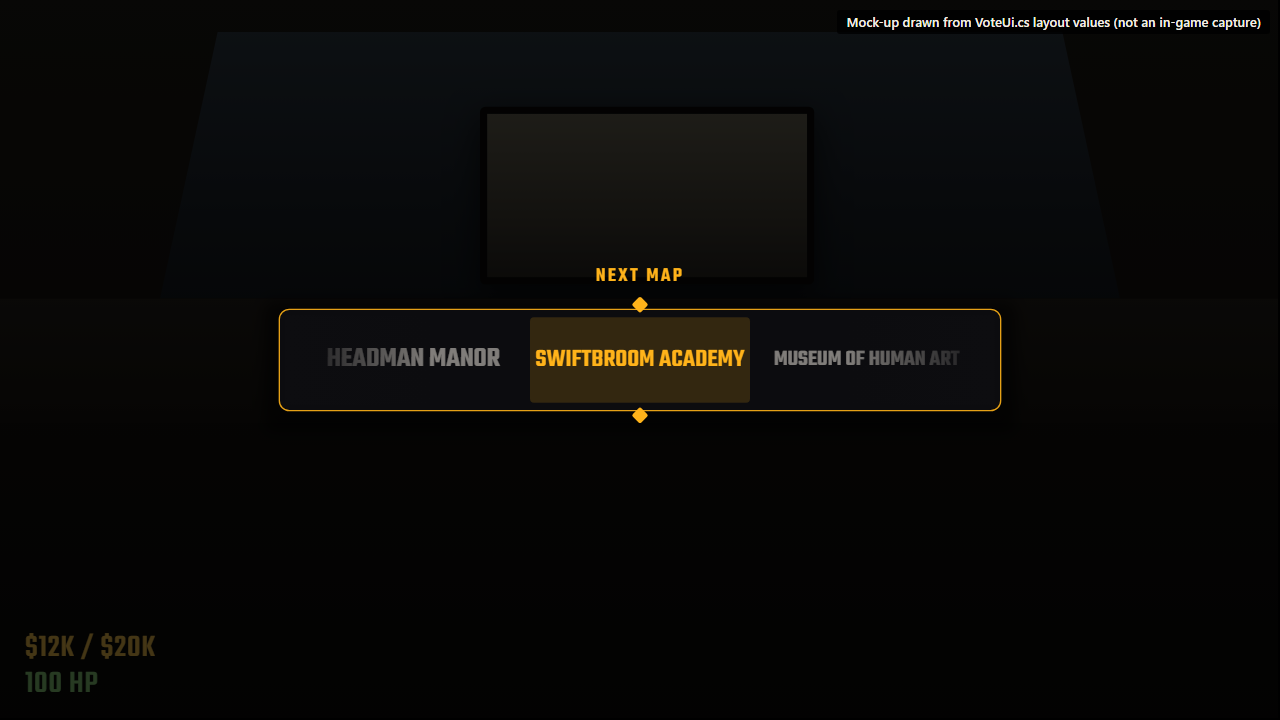
When the host presses Start Game, or someone sends the truck off, the game dims and a reel in the middle of the screen lands on the next map for everyone:
In the truck, the same list pops up when you arrive, so you can pick a map or skip it. M opens it again:
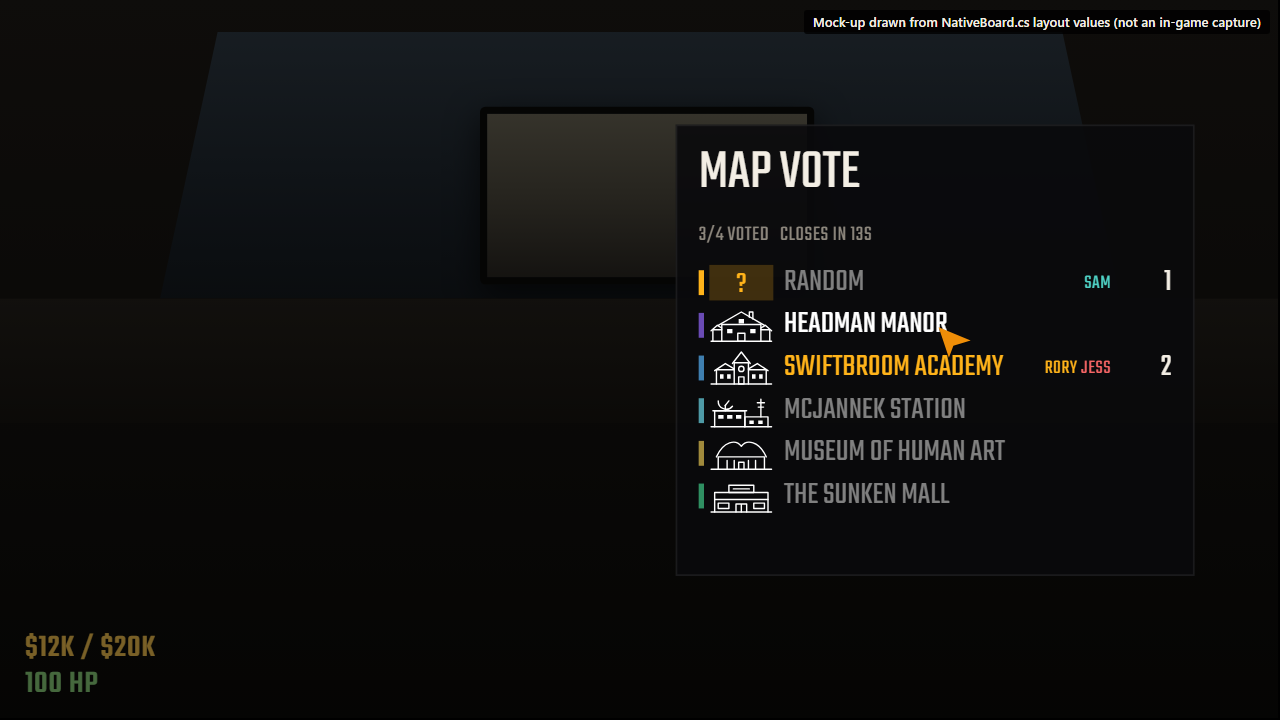
The reveal and truck shots are mock-ups drawn from the UI's layout values. The lobby shots are in-game captures.
How to vote
| Where | What you see | Controls |
|---|---|---|
| Truck | The vote menu opens when you arrive. After that, a MAP VOTE box bottom-right | Click a map, or press 1-9 (R for Random), and the menu closes. Skip, M or Esc closes it without voting. M opens it again. |
| Lobby menu | A MAP VOTE panel to the right of the player list | Click a map, or press 1-9 (R for Random). |
- Click your pick again to clear your vote.
- Neither vote has a timer. Anyone can vote or change their vote until the vote rolls, including players who join the lobby late.
- In the lobby, the vote rolls when the host presses Start Game. The reveal plays, and the game starts once it lands.
- In the truck, the vote rolls when someone sends the truck off. The reveal plays, landing on a random map if nobody voted, and the truck leaves once it lands.
- The truck's MAP VOTE box pulses until you vote. If you skip, it stops pulsing, and you can still vote with M until the truck leaves. Turn off
ShowVoteOnArrivalto open the truck vote yourself instead. - The reveal is a slot-machine reel in the middle of the screen, with the game dimmed behind it. It lands on the next map for everyone at once, and the vote list doesn't show the winner until it does.
- Host only: hold
Shiftand click a map, or press its number, to pick it for everyone. The vote ends there and the reveal plays straight away. It lands on your map with HOST'S PICK under it, and the game starts on that map when you press Start Game, or when the truck leaves.Shiftwith Random (orShift+R) rolls a random map straight away instead. A pick can't be undone. In multiplayer, the host's vote list says SHIFT-CLICK TO PICK FOR EVERYONE while the vote is open. Players never see it, and for them a click is always a vote.
Install
With a mod manager (r2modman, Gale), search for MapVotePlusPlus in the Online tab and install it. REPOLib and MenuLib are installed with it.
To install by hand, set up BepInEx, REPOLib and MenuLib, then put MapVotePlusPlus.dll in BepInEx/plugins/MapVotePlusPlus/.
Everyone in the lobby needs the mod. The host runs the vote.
If you can't vote because of the host, the vote list greys out its maps and says why:
| It says | Why | Next map |
|---|---|---|
| HOST DOESN'T HAVE MAPVOTE++ | The host isn't running the mod. | Random |
| HOST HAS TURNED THIS VOTE OFF | The host switched off VoteInLobbyMenu or VoteInTruck. |
Random |
| HOST HAS V…, YOU HAVE V… | Your versions can't talk to each other. | The host's vote, without you |
| NO REPLY FROM THE HOST'S VOTE | The host has the mod, but its vote never reached you, usually because your mod lists differ. See Compatibility. | The host's vote, without you |
Config
BepInEx/config/RoryDotGG.MapVotePlusPlus.cfg
| Key | Default | Notes |
|---|---|---|
Controls.ToggleKey |
M |
Opens the vote in the truck. Any Unity Input System key name. |
Voting.VoteInLobbyMenu |
true |
|
Voting.VoteInTruck |
true |
|
Voting.ShowVoteOnArrival |
true |
Opens the truck vote when you arrive, so you pick a map or skip first. Each player's own setting. |
Voting.MapsPerVote |
All |
All, or 2 to 20. How many maps each vote offers, drawn at random every vote, skipping recent maps (see RecentMapsToSkip). The host's value is used. |
Voting.VoteMode |
Lottery |
Lottery: each vote is a ticket in a draw. Majority: the most votes wins, and a tie is drawn at random. The host's value is used. |
Voting.RecentMapsToSkip |
1 |
0 to 10. How many of the maps played most recently this run random draws skip. 1 skips the map you just played, as in vanilla. 0 lets it come straight back. The host's value is used. |
Voting.ExcludedMaps |
(empty) | Comma-separated maps that never come up, named as the vote list shows them (Headman Manor) or by level name (Level - Manor), in any case. Ignored if it names every map. The host's value is used. |
Privacy.ShareAnonymousStats |
true |
When you host, send anonymous counts to the public stats page. See Anonymous stats. false sends nothing. |
Changing settings in game
With REPOConfig installed, press Mods in the main menu, the lobby or the escape menu, pick Map Vote++, change a setting and press Save Changes. Changes apply straight away:
- Maps Per Vote, Recent Maps To Skip and Excluded Maps draw the open vote's list again. Votes for Random, or for a map that's still on the list, are kept.
- Vote Mode applies to the open vote straight away, and everyone's odds change with it. Once the reveal has started, the map it lands on stands and the change applies to the next vote.
- If the host switches off Vote In Lobby Menu or Vote In Truck where a vote is open, it closes and the next map is random, still keeping to Excluded Maps and Recent Maps To Skip. Switching it back on opens a new vote.
- Toggle Key works at once. Switching on Show Vote On Arrival applies the next time you arrive in the truck.
Anonymous stats
When you host, MapVote++ sends a few anonymous counts to a public stats page, mvpp.rory.gg, so we can see which maps people pick and how many people play. Players who aren't hosting send nothing. Turn it off with ShareAnonymousStats = false.
What a host sends:
- Once every half hour while you're in a game: the mod version, how many players are in it, and your
VoteMode,MapsPerVoteandRecentMapsToSkip. - Each time a vote rolls: the map that won, whether it was the lobby or the truck vote, how it was won (votes, nobody voted, host's pick), how many votes each offered map got, and how many players there were.
What's never sent or kept: IDs of any kind, player or Steam names, lobby codes, chat, or anything else about you or your game. The stats server doesn't read or store IP addresses. It adds each ping to totals per day (per half hour for games and players) and throws the ping away, so there's no record of any one game to leak. Maps offered fewer than 20 times in 30 days are grouped as "Other maps" on the page, so a private map never shows by name.
To see exactly what your game sends, set LogLevels to include Debug in BepInEx/config/BepInEx.cfg. Each ping is written to the log as Anonymous stats: {...}. The server code is in stats/.
How it works
Clients send their votes to the host over REPOLib NetworkedEvents. The host draws the winner and broadcasts the full vote state, so players who join mid-vote catch up immediately. The state carries the host's vote rules too, so every player's odds and reveal follow the host's settings, and it says when the host picked the map itself. To load the winner, the host patches RunManager.SetRunLevel, and the game's own level sync tells every client which map it is. The same patch notes each level the run moves on to, for RecentMapsToSkip, and a patch on RunManager.ResetProgress forgets them when a new run starts.
The host also puts its MapVote++ version and vote settings in the Photon room's custom properties. Every player gets these on joining, whatever mods they run. That's how a player tells a host without the mod apart from a vote that hasn't reached them yet.
Maps come from REPOLib.Modules.Levels.AllLevels. Each Level asset supplies the map's name, thumbnail (loading-screen art) and accent colour (fog colour), so custom maps get them too.
The vote list is made of the game's own menu buttons, via MenuLib. It's docked on the lobby page and opens as a popup page in the truck, where the game frees the cursor and holds the player while it's open. The reveal reel and HUD box are drawn in code on an overlay canvas, with procedural sprites and no asset bundle.
| File | Purpose |
|---|---|
src/VoteLogic.cs |
Pure vote rules (no Unity), covered by tests/VoteLogicCheck |
src/VoteSession.cs |
State, networking, host timers, level override |
src/HostCheck.cs |
Whether the host can run a vote with you, and if not, why |
src/NativeBoard.cs |
The vote list, as a game menu (MenuLib) |
src/VoteUi.cs |
HUD box, reveal reel, hotkeys |
src/UiKit.cs, src/MapInfo.cs |
Palette, procedural sprites, per-map display data |
src/Stats.cs, src/StatsPayload.cs |
Anonymous stats pings (host only) |
stats/ |
The stats server and dashboard: a Cloudflare Worker with D1 |
src/Compat.cs |
Calls game methods whose signatures change between updates |
Build
You need the .NET SDK, version 8 or later. MenuLib isn't on NuGet, and it's GPL-3.0, so it isn't bundled here. The first build downloads it from Thunderstore into obj/.
dotnet build -c Release
To copy the DLL straight into a mod manager profile on build:
dotnet build -c Release -p:PluginsDir="$HOME/path/to/profile/BepInEx/plugins"
To build the Thunderstore package (dist/MapVotePlusPlus-<version>.zip, ready to upload):
dotnet build -c Release -t:ThunderstorePackage
To release, bump <Version> in MapVotePlusPlus.csproj, add a CHANGELOG.md entry, and merge it to main. That's the only place the version lives: the build writes it into the plugin, and the package build adds it to the zip's manifest.json. Then tag that commit and push the tag:
git tag v1.0.1
git push origin v1.0.1
The release workflow checks the tag matches the version, runs the vote-rule check, builds the package, publishes it to Thunderstore and attaches the zip to a GitHub release. It needs a THUNDERSTORE_TOKEN repository secret holding a Thunderstore service account token for the team.
Run the vote-rule self-check (no game needed):
dotnet run --project tests/VoteLogicCheck
The check workflow runs that check and builds the package on every pull request and every push to main. It doesn't publish anything.
The mock-ups, banner and icon are HTML in docs/mockups. To re-render them, run this in PowerShell. It needs Brave, or pass -Browser with the path to any Chromium-based browser:
./docs/mockups/render.ps1
Compatibility
- REPOLib assigns network event codes in registration order, so it's safest when every player runs the same mod list. If they don't match, your vote list may say NO REPLY FROM THE HOST'S VOTE.
- Don't run MapVote++ alongside another map-vote mod. Both patch
RunManager.SetRunLevel.
Licence
CHANGELOG
Changelog
1.3.0
- When you host, MapVote++ now sends anonymous counts to a public stats page: how many players are in your game, which map each vote picked and how, and your vote settings. Nothing that identifies you, your game or your players is sent or kept. Turn it off with the new
ShareAnonymousStatssetting. The README's Anonymous stats section lists exactly what is sent. - Players and hosts on 1.2.0 can still vote together with 1.3.0.
1.2.0
- The host can choose how the votes pick the next map with the new
VoteModesetting. Lottery works as before: each vote is a ticket, so 3 votes to 1 is a 75% chance. With Majority, the map with the most votes wins, and a tie is drawn at random between the tied maps. - The new
RecentMapsToSkipsetting keeps the last few maps played this run out of Random, out of the pick when nobody votes, and out of the mapsMapsPerVotedraws. The default of 1 skips only the map you just played, as before. - The new
ExcludedMapssetting leaves maps out of the vote and out of random draws altogether, for example to drop a level you don't like from a custom map pack. Name each map as the vote list shows it or by its level name. - The host can pick the next map outright, for a stream or a planned run, by holding Shift and clicking it or pressing its number. The reveal plays straight away and lands on that map with HOST'S PICK under it. Shift with Random rolls a random map instead. Players' clicks are always votes.
- Once someone has voted, each map's row shows its chance of winning, so you can see how far ahead the leader really is.
- A long map list in the lobby now scrolls instead of shrinking. Up to ten rows show at once, and the mouse wheel moves the list.
- The reveal reel shows each map's art behind its name, and says how the winner won when it lands, for example 3 OF 4 VOTES.
- The truck vote no longer has a countdown, and the
VoteSecondssetting is gone. The vote stays open until someone sends the truck off, and then the reveal plays. - When you arrive in the truck, the vote opens by itself so you can pick a map or skip. Turn off
ShowVoteOnArrivalto open it yourself with M instead. - If the host doesn't have MapVote++, has switched the vote off, or runs a version that can't talk to yours, the vote list now says so instead of waiting for the host forever.
- The vote list does less work every frame.
- Players and hosts on 1.1.0 can still vote together with 1.2.0.
1.1.0
- The host can limit how many maps each vote offers with the new
MapsPerVotesetting. Each vote draws that many maps at random, never the one you just played, and the list says so, for example 3 OF 5 MAPS, DRAWN AT RANDOM. Random, and the pick when nobody votes, only land on one of those maps. - With REPOConfig installed, settings changed in game apply straight away. Changing Maps Per Vote draws the open vote's list again and keeps votes for Random or for maps still on it. If the host switches off Vote In Lobby Menu or Vote In Truck while a vote is open there, the vote closes and the next map is random.
- Players who join the lobby now pick up the vote that's already running straight away.
1.0.1
- The truck's vote list no longer runs off the right edge of its popup.
- The vote no longer shows up in the shop or on the truck's loading screen.
- Sending the truck off now plays the reveal, and the truck leaves once the reel lands. If nobody voted, it lands on a random map other than the last one, as in vanilla.
- The reveal is bigger and sits in the middle of the screen, with the game dimmed behind it. It fades out when the level changes instead of vanishing.
1.0.0
First release.
- Vote on the next level in the truck between levels (press M) or in the pre-game lobby.
- If nobody votes, the next map is random, as in vanilla. Otherwise the winner is drawn from the votes, one ticket per vote, and a vote for Random can land on any map.
- The map list comes from the game at runtime, so official and custom maps show up without config.
- The vote list is a native game menu built with MenuLib. It shows map thumbnails and who voted for each map.
- A slot-machine reel reveals the next map to everyone at once.
- The host runs the vote over REPOLib networked events, and players who join mid-vote catch up straight away.
