
BepisDynamicVariablePowerTools
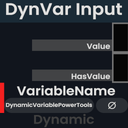
Adds a variety of powerful functions to dynamic variables and their spaces. Including an expanded component UI for Dynamic Variable Spaces and all Dynamic Variable Types eg:Renaming linked variables, and getting a space tree of linked dynvar components
| Last updated | 2 months ago |
| Total downloads | 714 |
| Total rating | 1 |
| Categories | Mods Tools Inspectors Technical Tweaks |
| Dependency string | BowenArrows-BepisDynamicVariablePowerTools-1.1.2 |
| Dependants | 0 other packages depend on this package |
This mod requires the following mods to function

ResoniteModding-BepisLoader
A mod loader which allows using BepInEx with Resonite
Preferred version: 1.6.0
ResoniteModding-BepisResoniteWrapper
Common hooks and events library for BepInEx Resonite mods. Provides essential events like OnEngineReady to simplify mod development.
Preferred version: 1.0.2README
Bepis Dynamic Variable Power Tools


A Resonite mod that adds a variety of powerful functions to dynamic variables and their spaces. This mod is a port of and heavily inspired by Dynamic Variable Power Tools
Installation (Manual)
- Install BepisLoader for Resonite.
- Download the latest release ZIP file (e.g.,
BowenArrows-BepisDynamicVariablePowerTools-1.X.X.zip) from the Releases page. - Extract the ZIP and copy the
pluginsfolder to your BepInEx folder in your Resonite installation directory:- Default location:
C:\Program Files (x86)\Steam\steamapps\common\Resonite\BepInEx\
- Default location:
- Start the game. If you want to verify that the mod is working you can check your BepInEx logs.
Features
- Expanded Component UI for Dynamic Variable Spaces and all Dynamic Variable Types
- Dynamic Variable Space:
- Rename UI to apply a new space name to all linked dynamic variable under the variable space.
- Debug Info generation buttons:
- Output Variable Definitions: This outputs a list of all defined variables under a space.
- Output Component Hierarchy: This outputs a space tree of all linked dynamic variable components under the dynamic variable space.
- Dynamic Variables:
- Linked Space Name display with OpenInspector and OpenWorkInspector buttons (Similar to SyncRef fields.)
- Rename UI to apply a new name to all linked Dynamic Variable components.
- Dynamic Variable Space:
- Protoflux Node_UI generation:
- Source: If a dynamic variable field is used as a source in ProtoFlux the ui will include the dynamic variable name.
