
ModSettingsMenu
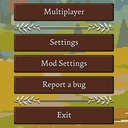
Adds a mod configuration menu under the game's Settings menu. Used to display mod configuration entries.
| Last updated | 4 days ago |
| Total downloads | 644 |
| Total rating | 1 |
| Categories | Mods Tools Libraries |
| Dependency string | Ice_Box_Studio_Romestead-ModSettingsMenu-1.1.3 |
| Dependants | 10 other packages depend on this package |
This mod requires the following mods to function

Romestead_Modding-BepInExPack_Romestead
Romestead-specific BepInEx 6 CoreCLR mod loader. Preconfigured and ready to use.
Preferred version: 0.4.1
Ice_Box_Studio_Romestead-RomesteadLocalizationAPI
Romestead Localization API is a small dependency mod for Romestead mod authors. It lets mods register localized text through JSON files or embedded C# strings, then reapplies those strings automatically when the game loads or changes language.
Preferred version: 1.0.1README
说明:本描述为中英双语版本,英文内容位于中文内容下方。
Note: This description is bilingual. The English section is provided below the Chinese section.
Mod Settings Menu (English)
Adds a mod configuration menu under the game's Settings menu. Used to display mod configuration entries.
Main Features
- Adds a Mod Settings button under Settings
- Shows mod names on the left and mod settings on the right
- Automatically shows standard config entries from loaded mods
- Adds mod hotkeys to the native
Settings > Bindingspage throughConfigDescriptiontags, without a separate keybind registration step - Shows keybind entries in
Mod Settings Menuas read-only hints, with compact binding text such asF8orF8 / D1 - Supports single-key
ConfigEntry<Keys>hotkeys and three-slotConfigEntry<string>bindings for keyboard, mouse, and stored controller button slots - Supports optional mod-side registration metadata, including version, author, description, sorting, hidden entries, built-in game icons, optional PNG icons, NexusMods links, Thunderstore links, and update checks
Mod Author API
- Registering your mod with
Mod Settings Menuis optional. If your mod uses normalBepInEx Config.Bindentries,Mod Settings Menucan detect and display those entries automatically. - Only use the API when you want better presentation control, such as a custom display name, author, version, description, section names, entry names, entry descriptions, sorting, hidden entries, or an icon.
- You can use a hard dependency by referencing
ModSettingsMenu.dll, or use a soft dependency and call the API through reflection so your mod can still load withoutMod Settings Menuinstalled. - For soft dependencies, the tag metadata can also be anonymous objects with matching property names, such as
new { DisplayName = "Speed", Order = 10, SliderStep = 0.5 }. - The older
ConfigureSectionandConfigureEntryAPI remains supported for compatibility, but new integrations should prefer the simplifiedConfigDescriptiontag workflow. - You can also register metadata only. You do not need to call
ConfigureEntry; standardConfig.Bindentries will still be displayed automatically. If your mod has no config entries but you still want it listed for its description, NexusMods link, Thunderstore link, or update status, setHideWhenEmptytofalse. - Thunderstore links use
ThunderstoreTeamandThunderstoreModNametogether. Both values must contain only ASCII letters, numbers, and underscores. ShowInMainMenuandShowInGamecontrol whether your mod appears in the mod settings menu opened from the main menu or the in-game top bar. Both default totrue; omit them or passnullto keep the defaults. Set either tofalseto hide your mod from that menu, or both tofalseto hide it from both. Unregistered mods remain visible in both menus. These options do not affect the native Bindings page or hotkey behavior.- Keybinds use the same zero-registration workflow. Add
ModKeybindTags.Keybind(...)orModSettingsTags.Keybind(...)to a BepInEx config entry and it will appear under the game's nativeSettings > Bindingspage, grouped by mod name. - Supported keybind config types:
ConfigEntry<Keys>for a simple keyboard key, andConfigEntry<string>usingK:key,key,key;M:mouse,mouse,mouse;B:button,button,button.Kmeans keyboardKeys,Mmeans mouseMouseButtons, andBmeans gamepad/controllerButtons. - The in-game Reset to Default button also resets mod keybinds back to each config entry's default value.
ModKeybindValueprovides a small helper API for reading keybind config values:FromEntry,Parse,Keys,MouseButtons,Buttons,ToSingleKey,ToConfigString, andToDisplayString.
Optional hard dependency example:
using BepInEx;
using BepInEx.Configuration;
using BepInEx.NET.Common;
using Microsoft.Xna.Framework.Input;
using ModSettingsMenu.Api;
using System.IO;

[BepInDependency(ModSettingsMenu.PluginInfo.PLUGIN_GUID)]
public sealed class MyPlugin : BasePlugin
{
    public override void Load()
    {
        /*
         * Config.Bind(section, key, defaultValue, description)
         * section: BepInEx .cfg section and Mod Settings Menu category.
         * key: BepInEx .cfg key used to match saved config values.
         * defaultValue: value used when the .cfg does not already contain this key.
         * ConfigDescription(description, acceptableValues, params tags):
         *   description: BepInEx .cfg comment text. Mod Settings Menu also shows it unless Entry sets a custom description.
         *   acceptableValues: BepInEx validation metadata. Use null for unrestricted values.
         *   tags: optional extra objects after acceptableValues. Mod Settings Menu reads ModSettingsTags here.
         * ModSettingsTags.Section(section, displayName, order, hidden): category metadata. Put it on one entry in that section.
         * ModSettingsTags.Entry(displayName, description, order, sliderStep, hidden): config entry display metadata.
         * ModKeybindTags.Keybind(displayName, description, order, hidden): native Settings > Bindings keybind metadata.
         *   Keys entries use the first keyboard slot.
         *   String entries use K:key,key,key;M:mouse,mouse,mouse;B:button,button,button.
         *   K = keyboard Keys, M = mouse MouseButtons, B = gamepad/controller Buttons.
         * ModKeybindValue.FromEntry(entry): parse ConfigEntry<Keys> or ConfigEntry<string>.
         * ModKeybindValue.Parse(raw): parse a raw K/M/B config string.
         * value.Keys / value.MouseButtons / value.Buttons: read the three binding slots.
         * value.ToSingleKey(): convert slot 0 to a Keys value for ConfigEntry<Keys>.
         * value.ToConfigString(): serialize back to K/M/B string format.
         * value.ToDisplayString(): compact display text, for example F8 or F8 / D1.
         */
        Config.Bind("General", "Enabled", true, new ConfigDescription(
            // BepInEx description shown by default.
            "Master switch for this mod.",
            // Acceptable values. Null means any value of this config type is accepted.
            null,
            // Optional section metadata. Put it on one entry in the section to rename or sort the category.
            ModSettingsTags.Section("General", "General", 10),
            // Optional entry metadata: display name, description, order, slider step, and hidden state.
            ModSettingsTags.Entry("Enabled", order: 1)));

        Config.Bind("General", "SpeedMultiplier", 1f, new ConfigDescription(
            "Speed multiplier.",
            // AcceptableValueRange creates a slider for supported numeric types.
            new AcceptableValueRange<float>(0.1f, 5f),
            ModSettingsTags.Entry(
                displayName: "Speed Multiplier",
                description: "Custom description shown under this config entry.",
                order: 2,
                sliderStep: 0.5)));

        Config.Bind("Controls", "QuickAction", Keys.F7, new ConfigDescription(
            "Simple keyboard hotkey.",
            null,
            ModSettingsTags.Section("Controls", "Controls", 30),
            ModKeybindTags.Keybind("Quick Action", order: 1)));

        var quickActionAlt = Config.Bind("Controls", "QuickActionAlt", "K:F8,-,-;M:-,-,-;B:-,-,-", new ConfigDescription(
            "Three-slot hotkey string. K = keyboard Keys, M = mouse MouseButtons, B = gamepad/controller Buttons.",
            null,
            ModKeybindTags.Keybind("Quick Action Alt", order: 2)));

        var quickActionAltValue = ModKeybindValue.FromEntry(quickActionAlt);
        Log.LogInfo($"Quick Action Alt: {quickActionAltValue.ToDisplayString()}");

        ModSettingsRegistry.Register(PluginInfo.PLUGIN_GUID, "My Mod", Config, new ModSettingsModOptions
        {
            Icon = "cog",
            // Optional: use a PNG icon if your mod ships one.
            // IconPath = Path.Combine(Paths.PluginPath, "MyMod", "icon.png"),
            Version = PluginInfo.PLUGIN_VERSION,
            Author = "Your Name",
            Description = "A short description shown above this mod's config entries.",
            // Optional: link to your NexusMods page.
            // NexusModsId = 8,
            // Optional: link to your Thunderstore page.
            // ThunderstoreTeam = "YourTeam",
            // ThunderstoreModName = "YourMod",
            // Optional: HTTPS JSON manifest used only for update checks.
            // Example: { "version": "1.1.0" }
            // UpdateManifestUrl = "https://example.com/my-mod/version.json",
            // Optional: show metadata-only mods even when there are no config entries.
            // HideWhenEmpty = false,
            // Optional: both default to true. Set either to false to hide this mod from that menu.
            // ShowInMainMenu = true,
            // ShowInGame = true,
            Order = 10
        });
    }
}
Compatibility
- Game version:
0.26.1_2+
Localization Credits
- French: AireAyquaza
- Portuguese (Brazil): GIGIMONT77
Bug Reports & Feature Suggestions
If you have any questions or feature suggestions, please submit them through GitHub Issues, or contact me directly at [email protected] or [email protected].
Mod Settings Menu (中文)
在游戏设置菜单下添加一个模组配置菜单。用于显示模组的配置项。
主要功能
- 在设置菜单下添加模组配置按钮
- 左侧显示模组名字,右侧显示模组设置
- 自动显示已加载模组的标准配置项
- 通过
ConfigDescriptiontag 将模组快捷键加入游戏原生设置 > 绑定页面,不需要单独注册快捷键 - 在
Mod Settings Menu中把快捷键配置项显示为只读提示,并使用F8或F8 / D1这样的紧凑绑定文本 - 支持单键
ConfigEntry<Keys>快捷键,也支持ConfigEntry<string>三槽位绑定格式;字符串格式可以保存键盘、鼠标和手柄按钮槽位 - 支持可选的模组主动注册信息,包括版本、作者、简介、排序、隐藏项、游戏内置图标、可选 PNG 图标、NexusMods 链接、Thunderstore 链接和更新检测
模组作者 API
- 把模组注册到
Mod Settings Menu是可选的。只要你的模组使用普通的BepInEx Config.Bind配置项,Mod Settings Menu就可以自动检测并显示这些配置。 - 只在你需要更好的显示控制时使用,例如自定义显示名称、作者、版本、简介、分类名称、配置项名称、配置项说明、排序、隐藏项或图标。
- 你可以硬依赖
ModSettingsMenu.dll,也可以使用软依赖并通过反射调用 API,这样即使玩家没有安装Mod Settings Menu,你的模组也能继续加载。 - 如果使用软依赖,tag 信息也可以使用属性名匹配的匿名对象,例如
new { DisplayName = "速度", Order = 10, SliderStep = 0.5 }。 - 旧的
ConfigureSection和ConfigureEntryAPI 会继续作为兼容层保留,但新接入推荐使用简化的ConfigDescriptiontag 工作流。 - 也可以只注册 meta 信息,不需要调用
ConfigureEntry;标准Config.Bind配置项仍会自动显示。如果你的模组没有任何配置项,但仍想在菜单里显示简介、NexusMods 链接、Thunderstore 链接或更新状态,可以把HideWhenEmpty设置为false。 - Thunderstore 链接需要同时填写
ThunderstoreTeam和ThunderstoreModName,且两个值只能包含 ASCII 字母、数字和下划线。 ShowInMainMenu和ShowInGame分别控制模组是否显示在从主菜单或游戏内顶部栏打开的模组设置菜单中。两者默认均为true;省略或传null即保留默认值。将对应选项设为false可在该菜单中隐藏模组,两者均为false则在两处都隐藏。未主动注册的模组仍在两处显示。这些选项不影响原生绑定页面或快捷键功能。- 快捷键也使用同样的零注册工作流。给 BepInEx 配置项添加
ModKeybindTags.Keybind(...)或ModSettingsTags.Keybind(...)后,它会出现在游戏原生设置 > 绑定页面,并按模组名分组。 - 支持的快捷键配置类型:
ConfigEntry<Keys>用于简单键盘单键,ConfigEntry<string>使用K:key,key,key;M:mouse,mouse,mouse;B:button,button,button格式。K表示键盘Keys,M表示鼠标MouseButtons,B表示手柄/控制器Buttons。 - 游戏里的重置为默认按钮也会把模组快捷键重置回每个配置项的默认值。
ModKeybindValue提供小型辅助 API 用于读取快捷键配置值:FromEntry、Parse、Keys、MouseButtons、Buttons、ToSingleKey、ToConfigString和ToDisplayString。
可选硬依赖示例:
using BepInEx;
using BepInEx.Configuration;
using BepInEx.NET.Common;
using Microsoft.Xna.Framework.Input;
using ModSettingsMenu.Api;
using System.IO;

[BepInDependency(ModSettingsMenu.PluginInfo.PLUGIN_GUID)]
public sealed class MyPlugin : BasePlugin
{
    public override void Load()
    {
        /*
         * Config.Bind(section, key, defaultValue, description)
         * section: BepInEx .cfg 分类,也是 Mod Settings Menu 里的分类。
         * key: BepInEx .cfg 键名,用于匹配已保存的配置值。
         * defaultValue: .cfg 里还没有这个键时使用的默认值。
         * ConfigDescription(description, acceptableValues, params tags):
         *   description: BepInEx .cfg 注释文本。Mod Settings Menu 默认也会显示它,除非 Entry 设置了自定义说明。
         *   acceptableValues: BepInEx 的值校验信息。不限制值时传 null。
         *   tags: acceptableValues 后面的可选附加对象。Mod Settings Menu 会从这里读取 ModSettingsTags。
         * ModSettingsTags.Section(section, displayName, order, hidden): 分类信息。放在该分类中的任意一个配置项上即可。
         * ModSettingsTags.Entry(displayName, description, order, sliderStep, hidden): 配置项显示信息。
         * ModKeybindTags.Keybind(displayName, description, order, hidden): 游戏原生 设置 > 绑定 页面的快捷键信息。
         *   Keys 配置项使用第一个键盘槽位。
         *   string 配置项使用 K:key,key,key;M:mouse,mouse,mouse;B:button,button,button。
         *   K = 键盘 Keys,M = 鼠标 MouseButtons,B = 手柄/控制器 Buttons。
         * ModKeybindValue.FromEntry(entry): 解析 ConfigEntry<Keys> 或 ConfigEntry<string>。
         * ModKeybindValue.Parse(raw): 解析原始 K/M/B 配置字符串。
         * value.Keys / value.MouseButtons / value.Buttons: 读取三个绑定槽位。
         * value.ToSingleKey(): 将槽位 0 转为 ConfigEntry<Keys> 使用的 Keys 值。
         * value.ToConfigString(): 序列化回 K/M/B 字符串格式。
         * value.ToDisplayString(): 生成紧凑显示文本,例如 F8 或 F8 / D1。
         */
        Config.Bind("General", "Enabled", true, new ConfigDescription(
            // BepInEx 原始说明,默认会显示在菜单里。
            "这个模组的总开关。",
            // 可接受值。null 表示接受这个配置类型的任意值。
            null,
            // 可选分类信息。放在这个分类中的任意一个配置项上,用于重命名或排序分类。
            ModSettingsTags.Section("General", "通用", 10),
            // 可选配置项信息:显示名、说明、排序、滑条步长、隐藏状态。
            ModSettingsTags.Entry("启用", order: 1)));

        Config.Bind("General", "SpeedMultiplier", 1f, new ConfigDescription(
            "速度倍率。",
            // AcceptableValueRange 会为支持的数值类型创建滑条。
            new AcceptableValueRange<float>(0.1f, 5f),
            ModSettingsTags.Entry(
                displayName: "速度倍率",
                description: "显示在这个配置项下方的自定义说明。",
                order: 2,
                sliderStep: 0.5)));

        Config.Bind("Controls", "QuickAction", Keys.F7, new ConfigDescription(
            "简单键盘快捷键。",
            null,
            ModSettingsTags.Section("Controls", "控制", 30),
            ModKeybindTags.Keybind("快速动作", order: 1)));

        var quickActionAlt = Config.Bind("Controls", "QuickActionAlt", "K:F8,-,-;M:-,-,-;B:-,-,-", new ConfigDescription(
            "三槽位快捷键字符串。K = 键盘 Keys,M = 鼠标 MouseButtons,B = 手柄/控制器 Buttons。",
            null,
            ModKeybindTags.Keybind("快速动作备用", order: 2)));

        var quickActionAltValue = ModKeybindValue.FromEntry(quickActionAlt);
        Log.LogInfo($"快速动作备用:{quickActionAltValue.ToDisplayString()}");

        ModSettingsRegistry.Register(PluginInfo.PLUGIN_GUID, "我的模组", Config, new ModSettingsModOptions
        {
            Icon = "cog",
            // 可选:如果你的模组自带 PNG 图标,可以设置 IconPath。
            // IconPath = Path.Combine(Paths.PluginPath, "MyMod", "icon.png"),
            Version = PluginInfo.PLUGIN_VERSION,
            Author = "你的名字",
            Description = "显示在这个模组配置项上方的简短介绍。",
            // 可选:点击进入你的 NexusMods 模组页面。
            // NexusModsId = 8,
            // 可选:点击进入你的 Thunderstore 模组页面。
            // ThunderstoreTeam = "YourTeam",
            // ThunderstoreModName = "YourMod",
            // 可选 HTTPS JSON manifest,只用于检测更新。
            // 示例:{ "version": "1.1.0" }
            // UpdateManifestUrl = "https://example.com/my-mod/version.json",
            // 可选:没有配置项时也显示只包含 meta 信息的模组。
            // HideWhenEmpty = false,
            // 可选:两者默认均为 true。将对应选项设为 false 可在该菜单中隐藏模组。
            // ShowInMainMenu = true,
            // ShowInGame = true,
            Order = 10
        });
    }
}
兼容性
- 游戏版本:
0.26.1_2+
翻译贡献
- 法语:AireAyquaza 贡献。
- 巴西葡萄牙语:GIGIMONT77 贡献。
Bug 提交 & 新功能建议
如果你有任何问题或新功能建议,请通过 GitHub Issues 提交,或直接通过邮箱 [email protected] 或 [email protected] 联系我。
