
Some mods target the Mono version of the game, which is available by opting into the Steam beta branch "alternate"

Personify
In-game NPC editor: build NPCs with a live 3D preview, test them next to you in your save, and publish a ready-to-upload Personnel NPC pack.
| Date uploaded | a week ago |
| Version | 2.2.1 |
| Download link | DooDesch-Personify-2.2.1.zip |
| Downloads | 34 |
| Dependency string | DooDesch-Personify-2.2.1 |
This mod requires the following mods to function

LavaGang-MelonLoader
The World's First Universal Mod Loader for Unity Games compatible with both Il2Cpp and Mono
Preferred version: 0.7.3
ifBars-S1API_Forked
S1API is an open source collaboration project to help standardize Schedule One modding processes. The goal is to provide a standard place for common functionalities so you can focus on making content versus reverse engineering the game.
Preferred version: 3.2.1
DooDesch-SideHustle
A main-menu hub that lists installed gamemode mods and launches them - singleplayer, host or join via a server browser - without touching your saves.
Preferred version: 3.2.1
DooDesch-Sideload
Write a mod interface as HTML, CSS and JavaScript. Sideload renders the web bundle into real Unity UI and puts it on the in game phone, so an app is three files instead of a thousand lines of panel code.
Preferred version: 1.36.4
DooDesch-Personnel
The NPC framework for Schedule I. NPC packs as plain folders - spawn points, daily schedules, customer/dealer economy, contacts - spawned as real networked, saved NPCs. No code needed.
Preferred version: 2.7.0README
Personify - In-Game NPC Editor for Schedule I
🛟 Need help or found a bug? Get support at support.doodesch.de/personify.
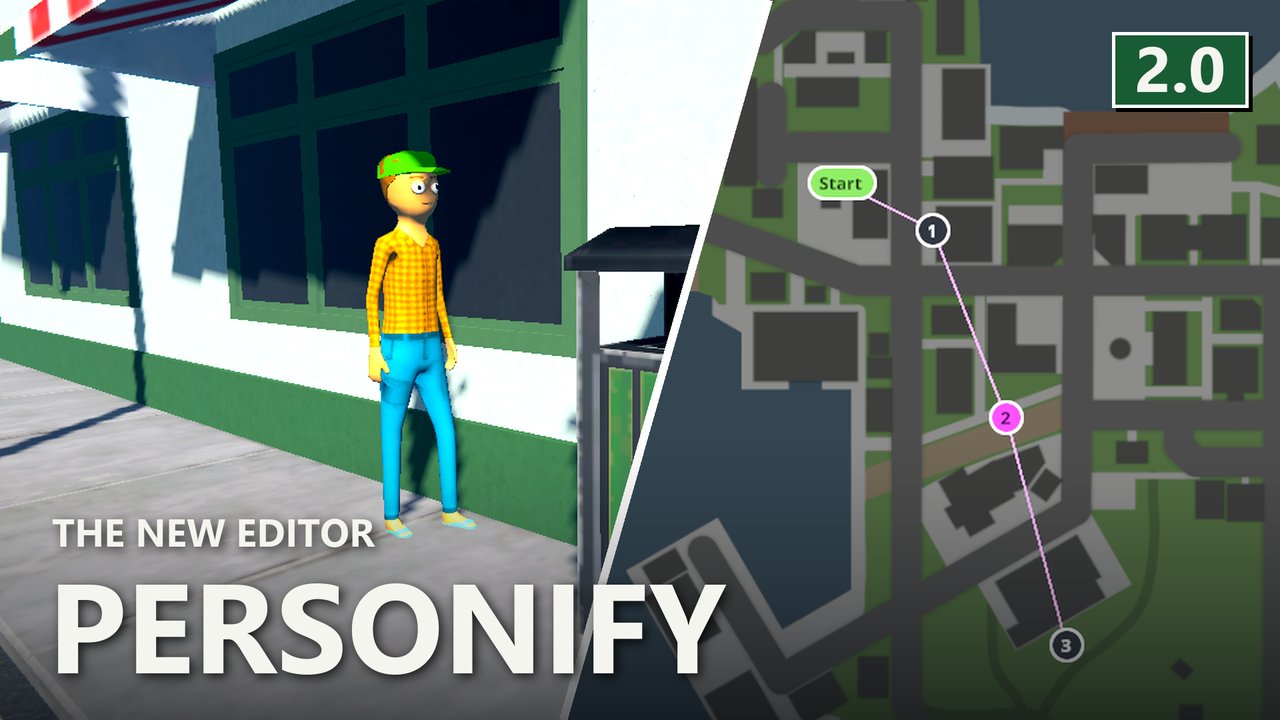
Build your own NPCs inside the game - look, role, daily routine and contacts - with a live 3D preview, test them next to you in your save, and publish a ready-to-upload Personnel NPC pack. Opens from the Side Hustle hub on the main menu.






What it does
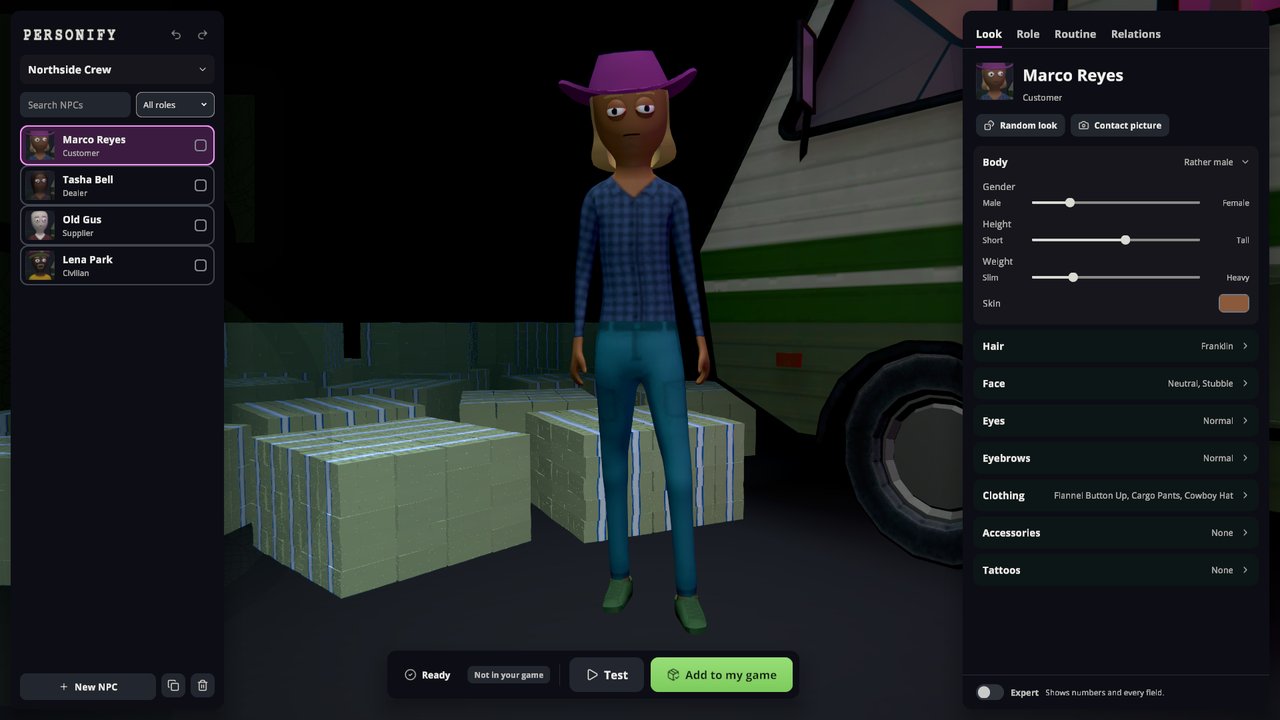
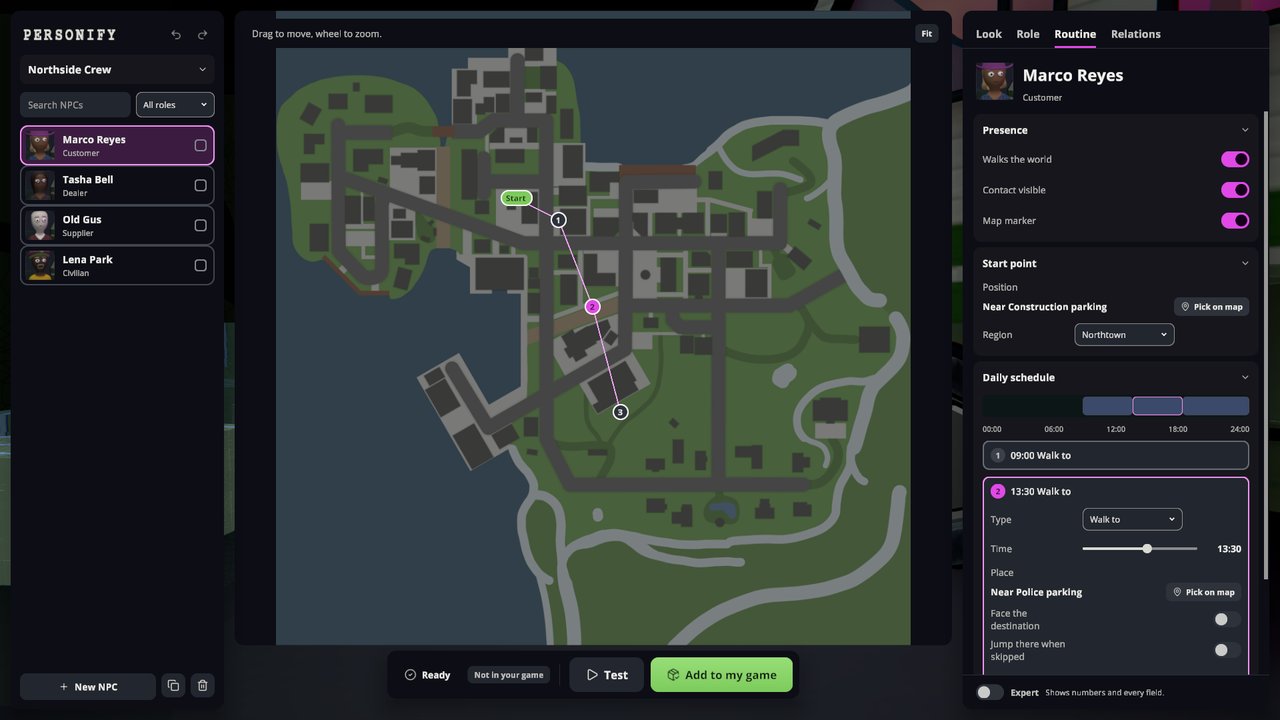
- Look, Role, Routine, Relations in one editor, with a live 3D preview, random look, undo and redo, and edits on several NPCs at once.
- Roles: civilian, customer, dealer, supplier or police, each with its own settings.
- Routine: click the town map to set the start point and plan the day, including drives to a car park in the NPC's own car.
- Test: pick a save; the game restarts into it and puts you right next to your NPC.
- Phone app: in a loaded save, set an NPC's start point or a route stop where you stand.
- Projects save as you go, with a history to step back to. Import any installed Personnel pack.
- Installed packs can be switched on or off, or removed, from the start page.
- Publish builds a Thunderstore-ready zip under
UserData/Personify/Exports/. - Inkorporated tattoos appear in the tattoo picker if Inkorporated is installed.
Screenshots
Requirements
- Schedule I (IL2CPP) with MelonLoader 0.7.3+.
- S1API, Side Hustle, Sideload 1.36.0+ and Personnel 2.5.0+ (pulled in as dependencies).
- Optional: Inkorporated (tattoo packs in the editor).
Usage
Main menu -> Side Hustle -> Personify. Create a project, add NPCs with + New NPC and work
through Look, Role, Routine and Relations. Add to my game installs the pack, Test starts a save
next to the NPC, Publish writes the zip. Add a 256x256 icon.png before you upload it.
Escape or right-click steps back one level. Ctrl+Z and Ctrl+Y undo and redo.
Full guide on GitHub.
License
MIT. See the included LICENSE.md.
This mod is written with help from generative AI tools (Anthropic Claude, OpenAI Codex).
If you have fun with it, a like on the Thunderstore page really helps other people find it (thumbs up next to Download, you need to be logged in) - ty either way, and lemme know if anything breaks or you've got ideas
CHANGELOG
Changelog
All notable changes to Personify are documented here. This project adheres to Semantic Versioning.
[2.4.0] - 2026-11-09
Added
- Hostile toggle and Weapon picker in the Character section. Needs Personnel 2.7.0.
Changed
- The Thunderstore page links the required mods on Nexus Mods and GitHub, for when Thunderstore can't install them.
[2.3.1] - 2026-11-06
Fixed
- "Unlocked from the start" shows whether the NPC starts unlocked. It showed off for customers without connections, and flipping it on and off locked them.
- The warning about a locked customer without connections only shows when the customer is set to start locked.
- Buttons in the editor react on the first click (with Sideload 1.36.4).
Changed
- Needs Personnel 2.6.2 and Sideload 1.36.4.
[2.3.0] - 2026-11-05
Added
- Start a new NPC as a copy of a town NPC: their look, clothing and role come along, name and routine are new.
- Edit a town NPC directly. Your version replaces them in every save and keeps their name, routine and contacts.
- When you add a card, choose whether it joins as a new NPC or replaces a town NPC. The cards tab can change it.
- Cards in your game can be remixed as a new project, also those from NPC Vault and NPC Cards.
Changed
- Needs Personnel 2.6.0.
[2.2.2] - 2026-11-04
Fixed
- The problems list warns when a routine step points at a seat or building the game doesn't have. A click jumps to the step.
- Routine map pins show for seat paths that differ only in case or give just the end of the path.
[2.2.1] - 2026-11-03
Fixed
- Personify loads without Side Hustle installed. The phone app works; the editor still opens only from the Side Hustle hub.
[2.2.0] - 2026-11-02
Added
- New role: Police. The NPC joins the station as one more officer and keeps its look.
- A schedule on a police NPC shows a warning, because officers follow the station instead.
Changed
- Needs Personnel 2.5.0.
[2.1.4] - 2026-11-01
Changed
- Needs Personnel 2.4.6, which skips schedule steps into buildings no NPC can enter.
- The Side Hustle hub shows the Personify icon.
- Building markers sit at a door NPCs can use. This moves the markers of the Chinese Restaurant, North Warehouse, Sauerkraut Supreme and Shooting Range.
Fixed
- Buildings no NPC can enter, like the Pawn Shop, are no longer offered for schedules. An existing step into one shows a warning.
[2.1.3] - 2026-10-31
Changed
- Needs Personnel 2.4.4, the first version MLVScan 2.1.7 does not disable.
Fixed
- Very tall NPCs keep their head on the card: anyone taller than the chart is drawn smaller to fit.
[2.1.2] - 2026-10-31
Fixed
- Cards converted from another mod now show their original author in the vault list.
[2.1.1] - 2026-10-31
Fixed
- Making a card right after opening a project no longer hangs while contact pictures are still drawing.
- Cards and contact pictures show big, tiny and missing heads. Hair no longer goes wrong on the NPCs after them.
- Custom body pictures stay in their list position in the editor and on cards. They no longer vanish under underwear or clothing.
Changed
- Needs Personnel 2.4.2. Update it along with the mod.
[2.1.0] - 2026-10-29
Added
- Share NPCs as cards: "Create card" in the NPC header saves the NPC as an image.
- NPC Vault tab on the start page: browse personify.doomods.com, install a card or publish your own.
- Remix a card into a new project. The card keeps the credit of the original author.
Changed
- Needs Personnel 2.4.0. Update it along with the mod.
[2.0.1] - 2026-10-29
Fixed
- New NPCs appear in the world. Before, only copies of older NPCs did.
[2.0.0] - 2026-10-29
Added
- New editor: four areas (Look, Role, Routine, Relations), a live 3D preview, undo and redo, and edit several NPCs at once.
- Test puts you in a save of your choice, right next to your NPC.
- Phone app: set an NPC's start point and route steps where you stand, and see a look on the live NPC.
- NPCs can be civilians, customers, dealers or suppliers. Customers unlock through the contacts you pick.
- Installed packs: switch them on or off, or remove them, from the editor's start page.
Changed
- Your work lives in projects: saved as you go, with a history to step back to. Import turns a pack into a project.
- Publish builds a Thunderstore-ready zip under
UserData/Personify/Exports. - Needs Sideload 1.36.0 and Personnel 2.3.0. Update both along with the mod.
Removed
- Custom PNG layers from
UserData/Personify/Import. Tattoos come from the game or from Inkorporated packs, made with Inkubator.
[1.5.0] - 2026-10-28
Added
- Customers can start locked: set Unlock to "With a sample" and pick their contacts. Once you know a contact, a free sample opens them, like vanilla customers.
- The contact picker lists every NPC in town by area. Load a save once after updating so the list fills.
[1.4.0] - 2026-10-15
Added
- New World tab: click the town map to set where an NPC starts the day and where it goes.
- Drag pins to move stops, undo mistakes, and see the whole day on a 24 h strip.
- Drive stops bring their own car, so exported NPCs drive with only Personnel installed. Pick it under "Car".
- Duplicate copies an NPC with its look and day plan.
Fixed
- NPCs made with Personify are visible again on game 0.4.7.
- Pickers hide avatar parts the game no longer has.
Changed
- Needs S1API 3.2.1, up from 3.1.1. Update it along with the mod.
[1.3.0] - 2026-08-13
Added
- Advanced now reaches every value the game's own NPCs use: gender as a slider, eyebrow angle from -15 to 15, thickness up to 4, resting height from -2 to 2.
- Eyelid colour can be set by hand: turn off "Eyelids follow skin" in Advanced and each eye gets its own row.
- Layer tints carry an opacity channel, so a face detail can sit at part strength the way vanilla's freckles do.
- Experimental adds unclamped body and face sliders: gender -3 to 4, height up to 4x, and eyebrow rails far past anything vanilla uses.
Fixed
- Eyelids take the skin colour. They stayed on the default tan, so a dark-skinned NPC ended up with pale lids.
- The censor layer takes its tint from the skin colour, and the underwear swaps when you change the gender.
- Face layers land in the slots the game reads them from. A freckle or eye-shadow layer could take the facial-hair slot, where the game draws it in the hair colour.
- A new face layer arrives black instead of white, which is how every stock NPC tints mouths, facial hair and detail layers.
- Upper and lower eyelid stay apart in Advanced. One slider per eye used to set both to the same value and lose what the Character tab had set.
[1.2.2] - 2026-08-01
Changed
- Runs on Schedule I 0.4.6f11.
- Needs S1API 3.1.1, up from 3.0.5. Update it along with the mod.
[1.2.1] - 2026-07-27
Fixed
- Clothing no longer sticks between characters. Building several NPCs in a row could leave a garment from an earlier one on the new character: the game clears only six of its eight avatar layer slots, so an NPC with more layers than that strands its clothing where the next NPC inherits it.
- Layers no longer look darker than they should. The same leak could composite one layer several times over, which read as a tint that nothing in the editor removed.
- A layer no longer vanishes without explanation. Past eight body layers the game silently drops one; the surplus is now dropped deliberately and named in the log.
- Two NPCs that each import a PNG with the same filename no longer share one texture. Custom layer paths were derived from the filename alone, so the second NPC rendered the first one's image.
[1.2.0] - 2026-07-23
Added
- Inkorporated tattoo packs now show up directly in the Advanced tab's face and body layer pickers, grouped by pack - face-placement tattoos in the face picker, everything else in the body picker. Picking one copies the PNG into your NPC pack, so exports stay self-contained (same behaviour as the Character tab's tattoo button, which previously was the only place they appeared).
Fixed
- Tattoo packs installed while the game is running are picked up the next time the editor or a layer picker opens - the pack list is no longer read only once per session.
[1.1.2] - 2026-07-11
Changed
- Hardened the release build to cut down on antivirus false positives. The published DLL no longer carries debug symbols or a local build path, and it now ships proper assembly identity (author, product, copyright). Packaging only - no gameplay changes.
[1.1.1] - 2026-07-10
Fixed
- Released builds now compile the shared UI layer into Personify itself instead of silently borrowing it from SideHustle.dll, so a future Side Hustle update can no longer break the editor at launch.
- The mod now reports its real version to MelonLoader (previous releases always said 1.0.0).
[1.1.0] - 2026-07-08
Added
- Quick-pick chips for the game's standard clothing colours in the colour picker.
Changed
- Clothing colour is easier to find: clothing rows now show a labelled "Colour" swatch.
[1.0.1] - 2026-07-10
Not released. The tag points at the same commit as 1.1.1; there is no GitHub release and no Thunderstore version under this number.
[1.0.0] - 2026-07-06
Initial release.
Added
- Side Hustle gamemode: full NPC editor at the main menu with live preview on the menu character (rotate, zoom, base-human comparison).
- Character mode mirroring the vanilla character creator: gender, weight, skin, hair, mouth, facial hair, facial details, eyes, eyebrows, top/bottom, shoes, headwear, eyewear, tattoos.
- Advanced mode: stacked face/body/accessory layers, custom PNG layer import, per-layer visibility and tint, extension blocks for consumer mods.
- Inkorporated integration: installed tattoo packs are offered in the tattoo picker; chosen art is copied into the pack so exports stay self-contained.
- One-click export to a complete Personnel pack, wrapped Thunderstore-ready (manifest.json, README, LICENSE, optional icon).
- Auto-derived, duplicate-proof NPC ids (
packname_npcname); duplicate names rejected at export. - Project management under
UserData/Personify/Projects/with autosave.
