
Some mods target the Mono version of the game, which is available by opting into the Steam beta branch "alternate"

BiggerLobbies
Host up to 250 players in Schedule I 0.4.7, or 748 with experimental large lobbies, on the default or Mono branch. Join mid-game, rejoin after a crash, autosave, and Host settings to kick, ban, whitelist and take back items. Host only.
| Date uploaded | a day ago |
| Version | 2.2.0 |
| Download link | SCHEDULE1-BiggerLobbies-2.2.0.zip |
| Downloads | 55 |
| Dependency string | SCHEDULE1-BiggerLobbies-2.2.0 |
This mod requires the following mods to function

LavaGang-MelonLoader
The World's First Universal Mod Loader for Unity Games compatible with both Il2Cpp and Mono
Preferred version: 0.7.3README
BiggerLobbies
Friends join any time, rejoin after a crash, and nobody loses progress. Only the host installs it.
Schedule I's co-op stops at 4 players, and one crash can end the night. BiggerLobbies takes those limits away, and everyone else joins with the normal game.
What you get
- Room for everyone. 20 players by default, and anything up to 250 if your PC and connection can carry it, or 748 with the experimental large lobbies.
- Invite whenever you like. Your game goes online as your save loads, so friends can accept an invite or use Steam's Join Game at any point in the session.
- Crashes don't end the session. A player whose game crashes can come straight back in, without you restarting.
- Nobody loses progress. The world saves every 5 minutes, each player every 30 seconds, and everything saves the moment someone drops.
- Everyone sees the same plants. Water levels and growth stay in step for every player, so a watered pot never shows as dry.
- Nobody can pretend to be your friend. Each joining player's Steam ID is checked against the one Steam verified for their connection, so bans and the whitelist can't be dodged with a faked ID.
- On your Discord profile. Shows "Hosting a lobby, Friends only (3 of 20)" under Playing Schedule I. Each part can be turned off.
Run the room
Host settings sits under Settings in the main menu and the pause menu, or press F6 while you host. Changes apply straight away, without a restart.
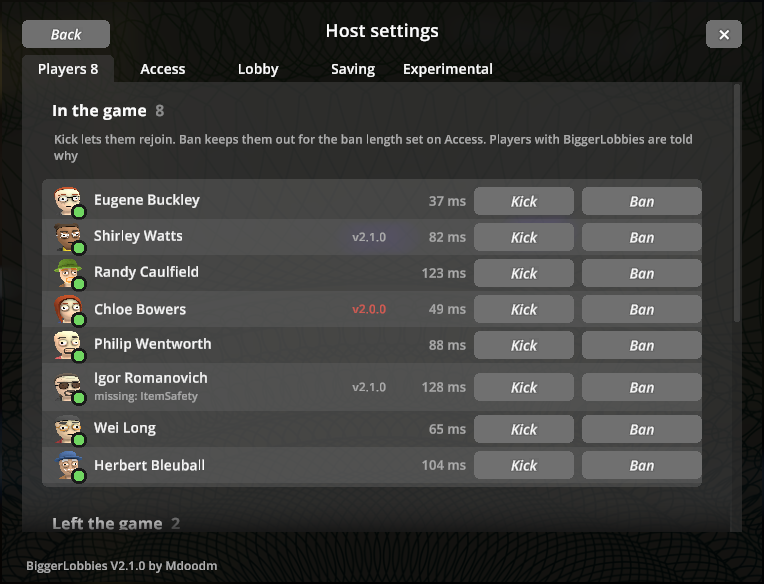
- Players. See everyone's ping. Kick lets them rejoin; Ban keeps them out for an hour, a day, a week or for good, with an optional reason that stays on your side. Players who also have BiggerLobbies are told whether they were kicked, banned or not on the whitelist, and you see their version and any mods they're missing.
- Take items. Someone grabbed the product and left? Move their items and cash into your inventory, and they don't get them back if they rejoin. If your inventory is full, it takes what fits and leaves the rest with them, so nothing is ever lost or doubled. Every take is logged, with a copy of what they had. Changed your mind? Give back returns what you still carry.
- Access. Build a whitelist from your Steam friends, save it as a crew, and load it next session in one click. Bans are saved between games and end on their own.
- Lobby. Private, Friends only or Open, and the lobby size, even while friends are in.
- Saving. How often the world and each player save, plus a Save now button.
- Experimental. Large lobbies and other branches, below.
Settings that let more people in, or are experimental, turn amber when they're on. The bottom-left corner of your screen shows which version of BiggerLobbies is running.
Experimental
Two features are experimental. Both are off by default, on the Experimental tab of Host settings, and only one can be on at a time. Back up your save before you turn either on.
- Large lobbies. Go past 250 players, up to 748. Steam caps one lobby at 250, so past that, up to two extra lobbies open that lead into the same game. Once your lobby is full, your invite button sends new players there. Steam's Join Game only reaches the first lobby. Your PC and connection set the real limit.
- Other branches. Friends on the other Steam branch join your game, without the mod. Invite them with Invite (other branch), or they use Join Game twice: the first try shows "Version Mismatch", the second within 15 seconds gets in.
The Experimental features page explains both.
Install
You need Schedule I 0.4.7, on either Steam branch. The package has a DLL for each: BiggerLobbies_Il2cpp.dll for the default branch and BiggerLobbies_Mono.dll for alternate (Mono). MelonLoader loads the right one and skips the other.
- Click Install with Mod Manager above, or search for SCHEDULE1-BiggerLobbies in r2modman or Thunderstore Mod Manager. MelonLoader v0.7.3 installs with it.
- Launch with Start modded, not from Steam.
- Load a save and invite your friends.
!!!
Please note: The Mono DLL is also bundled into the release for alternative build users and a harmless error will show in the MelonLoader Console. if you wish to silence the error, simply remove the build you're not running.
!!!
Updating? Your settings, bans and crews carry over.
Coming from the original ifBars-BiggerLobbies? Disable or uninstall it first. Two copies in one profile conflict.
Settings
Everything is on by default except the experimental features and the testing tools, and most of it is easier to change in Host settings. To edit the file instead, open r2modman's Config editor, file MelonPreferences.cfg, section [BiggerLobbies], then restart the game.
| Setting | Default | What it does |
|---|---|---|
MaxPlayers |
20 |
Lobby size, from 4 to 250 (748 with ExperimentalLargeLobbies) |
LobbyPrivacy |
FriendsOnly |
Who can join: Private, FriendsOnly or Open |
WhitelistEnabled |
false |
Only whitelisted players can join, and unlisted players already in are removed. The list starts empty each game, and nobody is removed while it's empty |
SavedCrews |
empty | Named whitelists, managed in Host settings |
BannedPlayers |
empty | Banned Steam IDs, with an optional end time |
HostPanelKey |
F6 |
Opens Host settings while you host |
AlwaysHostLobby |
true |
Go online automatically when you load a save |
LateJoinEnabled |
true |
Let players join a game that has already started |
AutoSaveEnabled |
true |
Save the world every few minutes, and when a player leaves |
AutoSaveMinutes |
5 |
Real-time minutes between world saves |
PlayerSaveEnabled |
true |
Save each connected player between world saves |
PlayerSaveSeconds |
30 |
Seconds between player saves |
PlantSyncEnabled |
true |
Send pot water levels and growth to every player |
PlantSyncMinutes |
30 |
In-game minutes between full resyncs of each pot |
DiscordPresence |
true |
Show what you're doing under "Playing Schedule I" on Discord. Needs Discord running. Under Proton (Linux, Steam Deck) it needs a Discord IPC bridge |
DiscordShowPlayers |
true |
Show the player count, like (3 of 20) |
DiscordShowLobbyType |
true |
Show Friends only, Open or Private |
DiscordShowSaveName |
false |
Show your organisation's name. Anyone who can see your profile can read it |
IgnoredModNames |
empty | Mod names, comma separated, to leave out of the mod comparison. HUD mods and MLVScan are always left out |
DiagnosticLog |
false |
Detailed log lines. Otherwise only warnings and errors |
ExperimentalLargeLobbies |
false |
Allows a MaxPlayers past 250, up to 748 |
CrossBranchLobby |
false |
Lets friends on the other Steam branch join |
The full list, with the testing tools, is in the README on GitHub.
Good to know
- Friends don't need the mod. If they run MelonLoader for other mods, it must be v0.7.3 or later.
- Every player needs the same content mods as the host. A mod that adds new items or objects on the host but not on a friend's game breaks their world.
- Without the experimental Other branches, everyone in a lobby must be on the same Steam branch. A player on the other branch gets "Version Mismatch" from the game itself.
- The log shows the other branch's DLL being skipped. On the default branch that's a short
'BiggerLobbies (Mono)' is incompatiblenotice. Onalternateit's a redFailed to load Melon 'BiggerLobbies_Il2cpp'error. Both are expected and harmless. - The Mono build shows as
BiggerLobbies (Mono)in the log. - MelonLoader won't load it alongside ModManager & PhoneApp.
- Going past 20 players? Your frame rate and upload speed set the real limit. The hosting guide explains what to expect.
Losing leaves, petrol or deliveries?
That's a bug in the base game, not the lobby. The companion mod ItemSafety catches it on the host. It's in alpha, so back up your saves first.
Something broke?
Open an issue on GitHub and attach the host's MelonLoader\Latest.log (turn on DiagnosticLog first for more detail). In r2modman, find it under Settings, Browse profile folder. The troubleshooting page covers load errors, friends who can't join, and lost progress.
Credits
BiggerLobbies was created by Bars (ifBars/BiggerLobbies). This fork, with the 0.4.7 update and everything since, is by mdoodm, with AI assistance, and published here under the SCHEDULE1 team. Source on GitHub, MIT licence.
CHANGELOG
Changelog
All versions are for Schedule I 0.4.7 and need MelonLoader v0.7.3 or later. Only the host needs the mod. Up to 2.0.3 they were for the default (Il2Cpp) branch only; from 2.1.0 there's a build for each branch.
2.2.0
Added
- Large lobbies (experimental, off by default). Lobby sizes up to 748, on the Experimental tab or with
ExperimentalLargeLobbies. Steam caps one lobby at 250, so past that, up to two extra lobbies open that lead into the same game and share your lobby size. You take a place in each lobby you host, so 748 is the most three can hold. Once your lobby is full, the invite button invites into an extra lobby; Steam's Join Game only reaches the main one. Large lobbies turn off other branches. See Experimental features. - Experimental tab in Host settings, for large lobbies and other branches. Other branches was on the Lobby tab, and now has an Accept other branches switch there.
- Version label. The bottom-left corner of your screen, and of Host settings, shows which version of BiggerLobbies is running.
- Testing tools:
DebugShowcasefills Host settings with made-up players (random NPCs from your save, with their portraits) for screenshots, and hides your real players, bans and logs while it's on.DebugTourruns the menus by itself and saves screenshots toUserData/BiggerLobbies/Tour. See Testing tools.
Changed
- Host settings:
- Status messages sit at the bottom of the window and clear after a few seconds.
- Help text wraps instead of being cut off, and so do the full list of what was taken and the save comparison under a player who left.
- Settings that let more people in, or are experimental (Open privacy, large lobbies, other branches), show amber when they're on.
- Buttons that can't do anything right now are greyed out, and the Lobby tab's size slider stops at 250.
- The Discord connection note sits under Rich presence, and Save now is its own row on the Saving tab.
- An extra lobby that's no longer needed (other branches or large lobbies turned off, or the size lowered) stops taking new players and closes once it's empty, instead of closing with players still in it.
- Docs: a new Experimental features page, real screenshots of Host settings in the README, and every testing tool described in one place.
Fixed
- Other branches: if Steam answered the request for the extra lobby late, the game could take that lobby for your main one, or leave a lobby you'd just joined. Each extra lobby is now matched to its own request.
- Other branches: a mid-game join through the extra lobby could count kicked players who were still in the Steam lobby, and load twice.
2.1.0
Added
- Mono build for the
alternateSteam branch:BiggerLobbies_Mono.dll, with every feature of the Il2Cpp build. It shows asBiggerLobbies (Mono)in the log, and uses the same settings, bans, crews andUserData/BiggerLobbiesfiles. Tested solo on 0.4.7f12 Alternate (lobby, Host settings, hosting, autosave, Take items and Give back), not yet with other players. - Both DLLs can sit in
Modstogether: MelonLoader loads the one for your branch and skips the other. On thealternatebranch the skipped Il2Cpp DLL shows a harmless load error. - If a DLL ever runs on the wrong branch, it says so in the log and does nothing else.
- Other branch (experimental, off by default). Friends on the other Steam branch can join your game, with no mod on their side. Turn it on in Host settings, on the Lobby tab, or with
CrossBranchLobby. While you host, a second, hidden lobby set to the other branch's version opens next to yours. It copies your lobby's state, chat messages and kick notices, and closes when you stop hosting. Invite (other branch) invites friends into it. Steam's Join Game can only lead to your main lobby, so a friend on the other branch who uses it sees "Version Mismatch" once, and your lobby then accepts their branch for 15 seconds so their second try works. Both lobbies share your lobby size. A join from the Mono branch into an Il2Cpp host has been tested with kicks, bans, Take items, Give back, harvesting, bagging and looting. The second lobby itself is new in this release and not yet tested with other players. DebugCrossBranchKey: a testing switch that flips your lobby between the two branches by hand.
Changed
- Without Other branch, everyone in a lobby must still be on the same branch: the game refuses a player from the other one with "Version Mismatch". The docs now say so.
- Build: source and PDB paths in the DLLs are mapped to
/_/, so builds don't contain the path they were built in. - Build: one codebase for both builds, with every backend difference in
Utils/Shim.csandUtils/GlobalUsings.cs. TheMonoconfiguration is back. Harmony patches are applied after the backend check rather than automatically.Il2CppLobbyPatches.csis nowLobbyPatches.cs. - Bug reports ask which game branch you're on.
Fixed
- Host settings is now in the pause menu during the tutorial too. It was only added in a normal save.
2.0.3
Security
- The host now checks that a joining player's Steam ID matches the one Steam verified for their connection. Spoofed IDs are disconnected without affecting the real player.
- Kick and ban notices are rate-limited, and no longer post the ban reason in lobby chat, where every member could read it. Banned players with the mod now see "Banned from this lobby" without the reason; the reason stays in your ban list.
- Text other players' games send (mod names and versions) is cleaned before it's shown or logged.
Changed
- Take items now moves one stack at a time and writes the player's file first, so nothing is lost or duplicated when your inventory is full or a write fails.
- Player backups skip identical copies. Records are tied to the save's creation date, so a reused save slot doesn't inherit old records.
- Turning on the whitelist or loading a crew removes connected players who aren't on it. Nothing is removed when the list is empty.
- Host settings: presence dots and F6 keep working after returning to the menu, lists no longer rebuild every minute, and each refresh does less work.
- Build: the Mono build is removed, and the project targets net6.0. On Windows, builds copy into Mods by default. Closing and relaunching the game needs
-p:Deploy=true.
Fixed
- Autosave no longer fires while a different save is loading.
- Bans that can't be applied now say so and kick the player instead.
- Always host lobby waits until the lobby is entered, and only leaves a lobby it abandoned after a timeout. The invite overlay no longer opens by itself when joining a friend.
- Late join ignores kicked and hidden players. The lobby layout is restored when the size drops back to 20 or fewer.
- Discord presence can't hang, and it stops when turned off.
2.0.2
Added
- Left with vs. saved. When a player leaves, the host keeps one copy of their last save (their exit save, or the last player save before a crash) as what they left with, in
UserData/BiggerLobbies/LeftWith/<save>/. Nothing extra is saved while they play. Under Left the game on the Players tab, each of them gets a line comparing what they left with against their save file now, and anything you took is noted there. A difference shows in red, with what's missing or extra. - When a player rejoins and their save doesn't match what they left with (minus what you took, plus what you gave back), the save is put back just before the game loads it, so they spawn with exactly what they left with. The replaced files are copied to
PlayerBackupsfirst. If a take doesn't line up with what they left with, nothing is changed and the log says why. Turn this off withRestoreLeftWith.
2.0.1
Fixed
- A player who crashed and rejoined could lose all the clothes they were wearing. If a save ran while they were still loading back in (for example the save when their old connection dropped), the game wrote their blank outfit over their saved one. The host now keeps their saved clothing until they've finished loading, and the mod's own player saves skip them until then.
Added
- Player backups. Before a player's files are saved, the host keeps a copy of their clothing, appearance and inventory in
UserData/BiggerLobbies/PlayerBackups/<save>/<Steam ID>/, the last 10 that differ. To undo a bad save, copy the files back into that player'sPlayers/Player_<Steam ID>folder in the save while the game is closed.
2.0.0
Added
- Give back on the Taken items list. It returns a take to the player who left: only what you still carry (the same item, quality and packaging), only into the slots it came from while they're still empty, and never more than you took. It never makes items. Cash comes back too, up to what you have on you. If you don't have all of it, it gives back what you can; items you had none of, and the rest of the cash, can be given back later with another press. When everything is back the button says Returned. Takes from before this version can't be given back.
- Ban reasons. Type an optional reason on the Access tab before banning, from the Players tab or your friends list. It shows in the Banned list, and players with BiggerLobbies see it in their ban message. Old
BannedPlayersentries still read. - Version and mod check. Players with BiggerLobbies tell you their version and mods when they join. The Players tab shows their version (red if it's older than yours) and any mods they're missing or have extra. Mods that only change one player's screen are skipped; add more to skip with
IgnoredModNames. You get a warning in the log when someone is missing one of your mods. - Players who left, and bans without a name, show the name the player had in your game, even if they aren't your Steam friend. Names are remembered from this version on, in
UserData/BiggerLobbies/PlayerNames.tsv. - Discord rich presence. Under "Playing Schedule I" on your Discord profile: "Hosting a lobby" with the lobby type and player count, like (3 of 20), and a session timer; "In a friend's lobby" with its count; or "Playing solo". The organisation name is off by default (
DiscordShowSaveName). Turn parts of it off on the Lobby tab, or all of it withDiscordPresence. It uses Discord's own entry for Schedule I, so there's nothing to register;DiscordAppIdtakes your own application if you want a logo. Needs Discord running on the host's PC.
Fixed
- A player you kicked, or the whitelist refused, stayed hidden from your lobby screen after you let them back in.
- Take items could duplicate items if the player was rejoining at that moment. It now waits until they're fully gone.
- The kick or ban message could replace a later, unrelated popup. It now replaces only the game's error popup, once.
- Banned and unlisted players are refused faster when they first log in.
- Switching to a tab in Host settings could show its sections overlapping until one of its lists changed.
1.0.9
Added
- Take items from players who left. The Players tab has a new Left the game section listing saved players who aren't connected and still carry items, with their item icons and cash. Take items moves their items (as many stacks as fit) and their cash into your inventory, and removes them from their saved inventory, so they don't get them back if they rejoin. A copy of their original inventory is kept in
UserData/BiggerLobbies/Taken. It waits a few seconds after someone leaves so their own exit save lands first. - Lists in Host settings sit on quiet panels with alternating rows, and each section has a one-line description.
DebugFakePlayers(testing only) now also fills the Players tab with test entries that borrow your Steam friends' names and avatars. They can't be kicked or banned.- Tabs in Host settings, using the game's own tab bar: Players (who's connected, kick, ban), Access (whitelist, saved crews, bans), Lobby (who can join, size) and Saving (autosave). It opens on Players in game and on Lobby from the main menu.
- Saved crews in Host settings. Save the current whitelist under a name, then load it in one click: it replaces the whitelist and turns it on. Banned players are left off. Each crew shows a few member avatars, with Load and Delete (Delete asks to confirm). Saved as
SavedCrews. - Autosave in Host settings: world saves and player saves on or off, how often each runs, a Save now button, and when the game last saved. Changes apply without a restart.
- Taken items log on the Players tab: who you took from, what, and when, for the save you're in.
- Kick and ban messages for players who have BiggerLobbies. Instead of "Authentication Error" and a lobby that still shows everyone, they go back to the main menu with "Kicked by the host", "Banned from this lobby" (with the ban length) or "Not on the whitelist", and leave the Steam lobby. Players without the mod are disconnected as before.
- Players you kick, ban or refuse no longer show on your lobby screen. A kicked player shows again if they rejoin; banned players stay hidden.
DiagnosticLogsetting. The mod now only writes warnings and errors to the MelonLoader log; turn this on for the detailed lines when reporting a problem.
Fixed
- A list that grew or shrank while Host settings was open (for example adding to the whitelist) overlapped the section below it.
- In lobbies of 40+ players, the game's lobby avatar grid covered Host settings. It's hidden while the screen is open.
1.0.8
Added
- Host settings, a new entry under Settings in the main menu and the pause menu, built from the game's own Settings screen. F6 opens it while you host (
HostPanelKey). In the pause menu it only shows for the host. Both screens have Back and Close buttons. - Lobby type (
LobbyPrivacy): Private (invite only), Friends only (the game's default) or Open (listed in Steam's lobby search, and strangers can join). Applies straight away to an open lobby. - Lobby size without a restart. The slider updates the Steam lobby and the network limit straight away, and can't go below the number of players already in.
- Players: everyone connected, with their Steam avatar, ping, and Kick and Ban buttons.
- Whitelist (
WhitelistEnabled). When it's on, only players you add can join. It starts empty each time you start the game. Players already in stay. - Banned players (
BannedPlayers). Ban for 1 hour, 1 day, 1 week or Permanent (shown in red). Each ban shows the time left and has an Unban button; timed bans end on their own and are saved between games. A banned player is refused at login and removed straight away if they're already in. Bans always win over the whitelist. Bans use the Steam ID that Steam verifies at login, so nobody can get someone else banned, and you can't ban yourself. - Picking from your Steam friends for the whitelist and bans: friends playing Schedule I first, then online, then the rest, with a search box. A green dot means online, a green name means playing Schedule I, a red dot means banned.
Fixed
- Open lobbies now let strangers play. The base game kicked anyone who isn't the host's Steam friend as they loaded in.
Known
- A kicked or banned player's game says "Authentication Error" and still shows the Steam lobby. Steam doesn't let the host remove someone from a lobby, and the message comes from their game. A banned player can't get back in.
1.0.7
Added
- Adjustable lobby size (
MaxPlayers, default 20, from 4 to 250). Restart the game after changing it. - The host raises the Steam network transport's connection limit to match, and logs it.
- Above 20 players, the lobby screen shows players as a table in rows of 20, with the invite button beside the first row. Up to 5 rows (100 players) are shown; past that the title adds
+N. At 20 or fewer it looks exactly as before. DebugFakePlayers(testing only, default 0) fills the lobby screen with placeholder players to check the layout without real players.DebugDummyPlayers(testing only, default 0) spawns copies of your character around you after a save loads and logs the frame rate every 10 seconds. They aren't networked or saved. Tested with 40 and 250 simulated players on one save.
Fixed
- Only 5 players could actually connect. The game's Steam network transport accepts just 4 connections besides the host, whatever the lobby size. The host now raises it to
MaxPlayersbefore the server starts (the log showsSteam transport player limit raised from 4 to 20). - A player whose own
MaxPlayersis lower than the host's lobby size no longer breaks their lobby member list. The member list now always has room for Steam's 250-player cap.
1.0.6
Added
- Always host a lobby (
AlwaysHostLobby, on by default). Loading a save without pressing Invite first now creates a Steam lobby before the save loads, so the game starts online and friends can be invited or use Steam's Join Game at any time. It loads solo straight away if Steam isn't running or you're signed out, if Steam reports the lobby couldn't be created, or if Steam doesn't answer within 10 seconds. - Rejoin after a crash. Before checking a new connection, the host ends any old Steam auth session for that player, which used to block rejoins with
k_EBeginAuthSessionResultDuplicateRequest. - Re-authentication instead of a kick. When a player's game sends its authentication a second time on a connection that's already accepted, the host checks the new Steam ticket again and keeps them if Steam accepts it. The base game disconnects them.
Fixed
- Joining a started game with 4 or fewer players made the player load twice and fail authentication. The host now only re-sends the lobby's "ready" message when there are 5 or more players, which is when the base game can't connect them by itself.
- Pressing Continue with the automatic lobby waited the full 10-second timeout before loading.
1.0.5 (pre-release)
Added
- Join a started game (
LateJoinEnabled). With 5 or more players in the lobby, the host re-sends the lobby's "ready" message when someone joins mid-game, so they can connect without the host restarting. - Client player saves (
PlayerSaveEnabled,PlayerSaveSeconds, default 30 s). The host saves each connected player's money, inventory and position from its own copy. - Save on leave. When a player leaves or crashes, the host runs a full save straight away.
1.0.4
Added
- Host autosave (
AutoSaveEnabled,AutoSaveMinutes, default 5). Runs the game's own full save, skipping while a save or sleep is in progress. - Plant sync (
PlantSyncEnabled,PlantSyncMinutes, default 30 in-game minutes). The host sends pot water levels after a botanist waters and after sleeping, and resends every pot's water and growth periodically, so clients don't see a wrong "needs water" icon or frozen growth.
1.0.3
Fixed
- The mod failed to load on game 0.4.7 (
Undefined target method ... Lobby_OnLobbyCreated_Postfix). Patches now target the newSteamLobbyServiceclass andLobbyInterface.Start. - Writing
Lobby.PlayerLimitcrashed the game. The 20-player limit is now applied when the lobby is created. - One click on Invite could create two Steam lobbies, so friends joined a different lobby from the host and stayed in the main menu.
Added
- Invites past 4 players.
[diag]logging of the lobby and join flow.
