
ModSettingsMenu
Adds a unified in-game mod configuration screen to the main and pause menus.
| Last updated | 2 months ago |
| Total downloads | 3049 |
| Total rating | 1 |
| Categories | Mods |
| Dependency string | Ice_Box_Studio_SAM-ModSettingsMenu-1.1.0 |
| Dependants | 4 other packages depend on this package |
This mod requires the following mods to function

BepInEx-BepInExPack_IL2CPP
BepInEx pack for IL2CPP x64 Unity games. Preconfigured and ready to use.
Preferred version: 6.0.755
Ice_Box_Studio_SAM-ShiftAtMidnightLocalizationAPI
Shift At Midnight Localization API is a simple API module that enables mods to support multiple languages.
Preferred version: 1.0.0README
Note: This description is bilingual. The Chinese section is provided below the English section.
说明:本描述为中英双语版本,中文内容位于英文内容下方。
Mod Settings Menu (English)
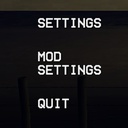
Adds a Mod Settings button below Settings in the main menu and to the in-game pause menu, providing a unified configuration interface for mods.
Main Features
- Shows configurable mod names on the left and the selected mod's settings on the right.
- Lets mod authors optionally register a display name, description, author, version, Nexus Mods ID, and Thunderstore package.
For Players
This mod does not change gameplay by itself. It provides a common settings screen for compatible mods.
Only loaded mods with at least one configuration entry appear in the list. The available settings depend on the mods you have installed.
Mod Author API
- Registration is optional. A loaded BepInEx IL2CPP plugin with normal
Config.Bindentries is detected automatically. - Use
ModSettingsRegistry.Registeronly when you want to provide custom metadata or Nexus Mods and Thunderstore links.
Optional hard dependency example:
using BepInEx;
using BepInEx.Configuration;
using BepInEx.Unity.IL2CPP;
using ModSettingsMenu.Api;
using UnityEngine;

[BepInPlugin(PluginInfo.PLUGIN_GUID, PluginInfo.PLUGIN_NAME, PluginInfo.PLUGIN_VERSION)]
[BepInDependency(ModSettingsMenu.PluginInfo.PLUGIN_GUID)]
public sealed class MyPlugin : BasePlugin
{
    public override void Load()
    {
        Config.Bind("General", "Enabled", true, "Enable this mod.");
        Config.Bind("General", "SpeedMultiplier", 1f, new ConfigDescription("Adjust the speed multiplier.", new AcceptableValueRange<float>(0.1f, 5f)));
        Config.Bind("Controls", "QuickAction", KeyCode.F7, "Choose the quick action key.");

        ModSettingsRegistry.Register(
            PluginInfo.PLUGIN_GUID,
            new ModSettingsModOptions
            {
                Name = "My Mod",
                Description = "A short description shown above this mod's settings.",
                Author = "Author Name",
                Version = PluginInfo.PLUGIN_VERSION,
                NexusModsId = 6,
                ThunderstoreTeam = "MyTeam",
                ThunderstoreModName = "MyMod"
            });
    }
}
ThunderstoreTeam and ThunderstoreModName must be provided together and may only contain ASCII letters, numbers, and underscores. The example opens https://thunderstore.io/c/shift-at-midnight/p/MyTeam/MyMod/. Do not pass a full URL.
When both links are registered, the metadata uses the compact format V1.0.0 · Author Name · Nexus · Thunderstore to help keep it on one line. Nexus and Thunderstore remain separate clickable links with hover underlines.
The menu chooses controls from the config entry type and acceptable values:
bool: toggleUnityEngine.KeyCode: key binding button- Numeric value with
AcceptableValueRange: slider - Enum or
AcceptableValueList: dropdown - Other supported serialized values: text field
Compatibility
- Game version:
1.0.1.0723.2253+
Installation
- Download and install BepInEx be.785 Unity (IL2CPP) for Windows (x64) games.
- Install Shift At Midnight Localization API.
- Extract this mod into the game's root folder. The archive already includes the
BepInEx\pluginsfolder structure.
Bug Reports & Feature Suggestions
If you have any questions or feature suggestions, please submit them through GitHub Issues, contact me on Discord at iceboxcool, or email me at [email protected] or [email protected].
If you enjoy my mods, feel free to support me! / 如果你喜欢我的模组,请支持我一下吧!


Mod Settings Menu (中文)
在主菜单的“设置”下方和游戏内暂停菜单中添加“模组设置”按钮,为模组提供统一的配置界面。
主要功能
- 左侧显示可配置的模组名称,右侧显示当前选中模组的设置项。
- 模组作者可以选择注册显示名称、简介、作者、版本、Nexus Mods ID 和 Thunderstore 包信息。
给玩家
本模组不会自行修改游戏玩法,只为兼容的模组提供统一设置界面。
列表中只会显示已经加载并且至少包含一个配置项的模组。实际可用设置由你安装的其他模组决定。
模组作者 API
- 注册不是必需的。已加载的 BepInEx IL2CPP 模组只要使用普通
Config.Bind配置项,就会被自动识别。 - 只有需要自定义元数据或提供 Nexus Mods、Thunderstore 链接时,才需要调用
ModSettingsRegistry.Register。
可选硬依赖示例:
using BepInEx;
using BepInEx.Configuration;
using BepInEx.Unity.IL2CPP;
using ModSettingsMenu.Api;
using UnityEngine;

[BepInPlugin(PluginInfo.PLUGIN_GUID, PluginInfo.PLUGIN_NAME, PluginInfo.PLUGIN_VERSION)]
[BepInDependency(ModSettingsMenu.PluginInfo.PLUGIN_GUID)]
public sealed class MyPlugin : BasePlugin
{
    public override void Load()
    {
        Config.Bind("General", "Enabled", true, "启用这个模组。");
        Config.Bind("General", "SpeedMultiplier", 1f, new ConfigDescription("调整速度倍率。", new AcceptableValueRange<float>(0.1f, 5f)));
        Config.Bind("Controls", "QuickAction", KeyCode.F7, "选择快速操作按键。");

        ModSettingsRegistry.Register(
            PluginInfo.PLUGIN_GUID,
            new ModSettingsModOptions
            {
                Name = "我的模组",
                Description = "显示在这个模组设置项上方的简短介绍。",
                Author = "作者名称",
                Version = PluginInfo.PLUGIN_VERSION,
                NexusModsId = 6,
                ThunderstoreTeam = "MyTeam",
                ThunderstoreModName = "MyMod"
            });
    }
}
ThunderstoreTeam 和 ThunderstoreModName 必须成对填写,并且只能包含 ASCII 字母、数字和下划线。上面的例子会打开 https://thunderstore.io/c/shift-at-midnight/p/MyTeam/MyMod/,不需要传入完整 URL。
同时注册两个链接时,元数据会使用 V1.0.0 · 作者名称 · Nexus · Thunderstore 的紧凑格式,尽量保持单行显示。Nexus 和 Thunderstore 仍是两个独立链接,并保留悬停下划线。
菜单根据配置项类型和可接受值选择控件:
bool:复选框UnityEngine.KeyCode:按键绑定按钮- 带
AcceptableValueRange的数值:滑条 - 枚举或
AcceptableValueList:下拉框 - 其他支持序列化的值:文本输入框
兼容性
- 游戏版本:
1.0.1.0723.2253+
安装方法
- 下载并安装 BepInEx be.785 Unity (IL2CPP) for Windows (x64) games。
- 安装 Shift At Midnight Localization API。
- 将本模组解压到游戏根目录,压缩包内已包含
BepInEx\plugins路径。
Bug 提交 & 新功能建议
如果你有任何问题或新功能建议,请通过 GitHub Issues 提交,也可以通过 Discord:iceboxcool,或邮箱 [email protected]、[email protected] 联系我。
