
Please disclose if any significant portion of your mod was created using AI tools by adding the 'AI Generated' category. Failing to do so may result in the mod being removed from Thunderstore.
Configuration
Updated 2 weeks agoConfiguration
Use the optional client-side BotanicOwnerDebug overlay to see who owns objects and mobs while testing your setup.
FiresGhettoNetworking and simulation mode
With AutoConfigureFiresGhettoNetworking=true (default), TooManyLags applies required FiresGhettoNetworking settings at startup, including enabling Server-Side Simulation on the dedicated server by default. Their saved config values are ignored for that session; the config file stays unchanged. Other FiresGhettoNetworking settings and incompatible-mod safety blocks remain active.
Set AutoConfigureFiresGhettoNetworking=false only if you configure the required FiresGhettoNetworking settings manually on the server and clients. TooManyLags' ownership rules and handoff safeguards remain active. Changing this option requires a server restart.
Quick start: Install both mods on the dedicated server and every client, then play. FiresGhettoNetworking's default settings and Auto-Tune, combined with TooManyLags' defaults and required overrides, are intended to provide an optimal starting setup for almost all dedicated servers without manual configuration. You can still fine-tune all other FiresGhettoNetworking settings yourself; its config is worth a look.
Server-Side Simulation adds CPU workload to the server. For a weak or already overloaded server CPU, set NoServerSideSimulation=true. Objects and Hostile Mobs then stay player-owned; shared fields prefer the better-connected player. Server-owned buildings, default ownership and permanent station ownership are unavailable. Inventory, refilling and active-use safeguards remain; all clients need the mod for full handoffs. Shared interactions can still depend on the selected player's latency.
Usefull settings demonstrated
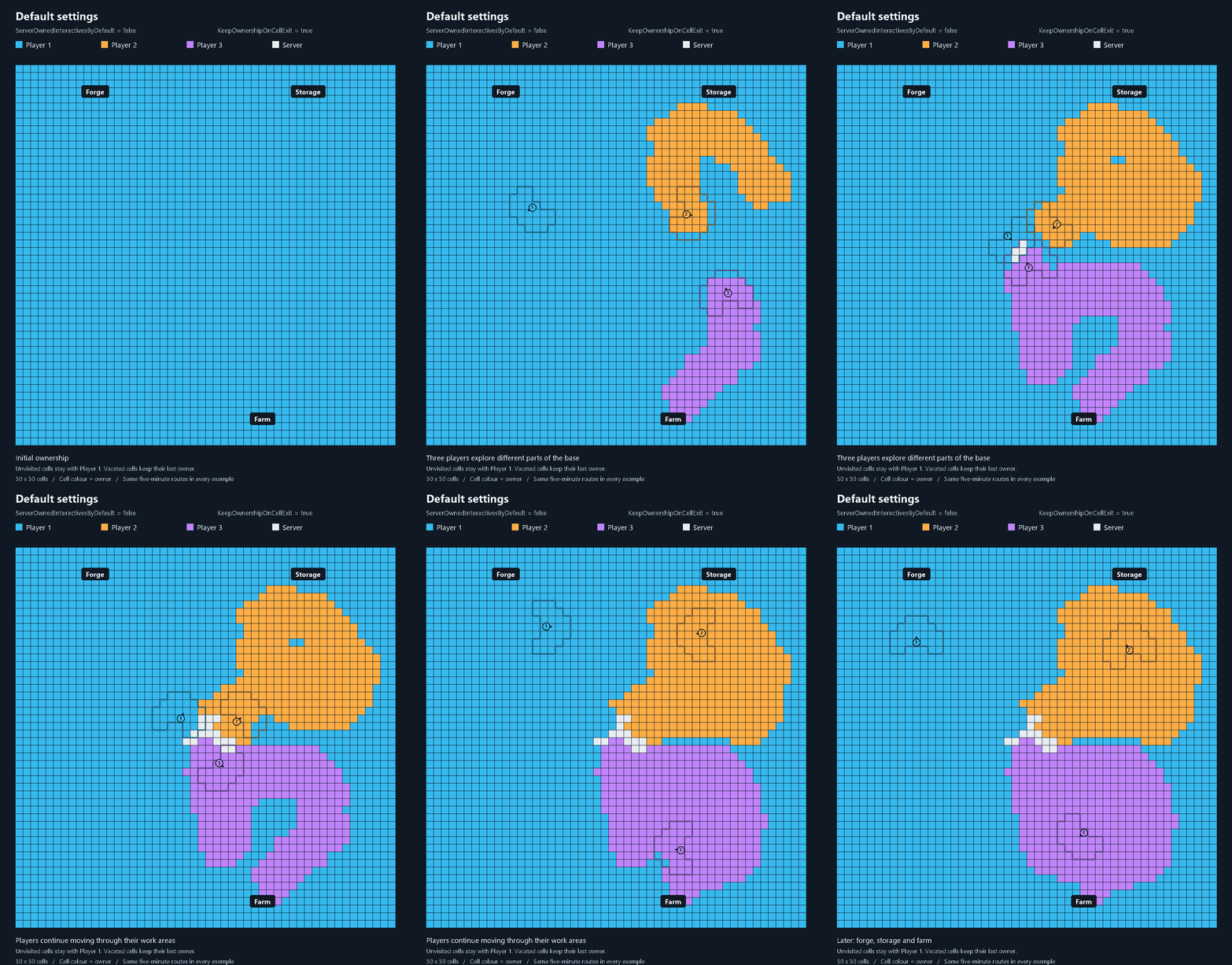
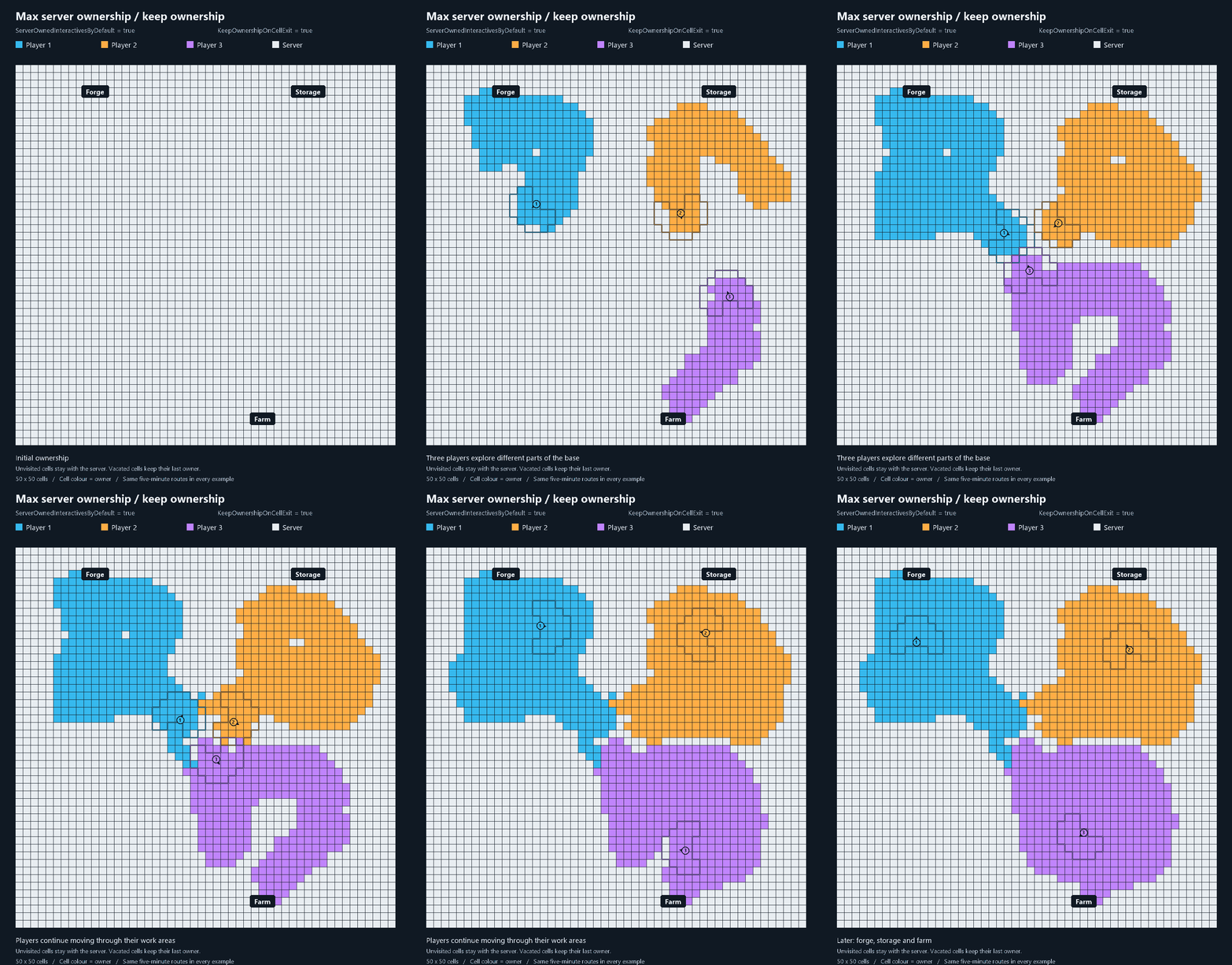
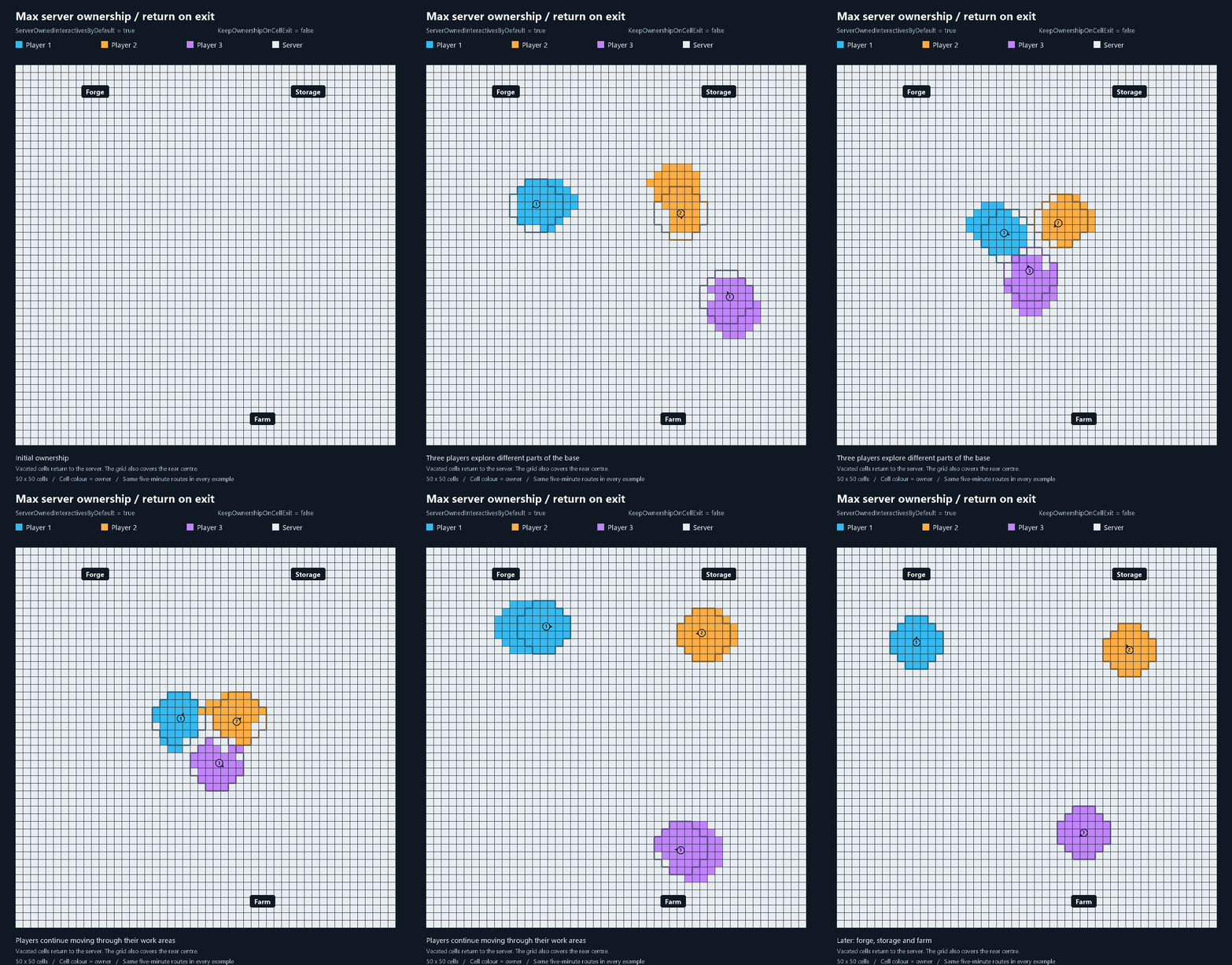
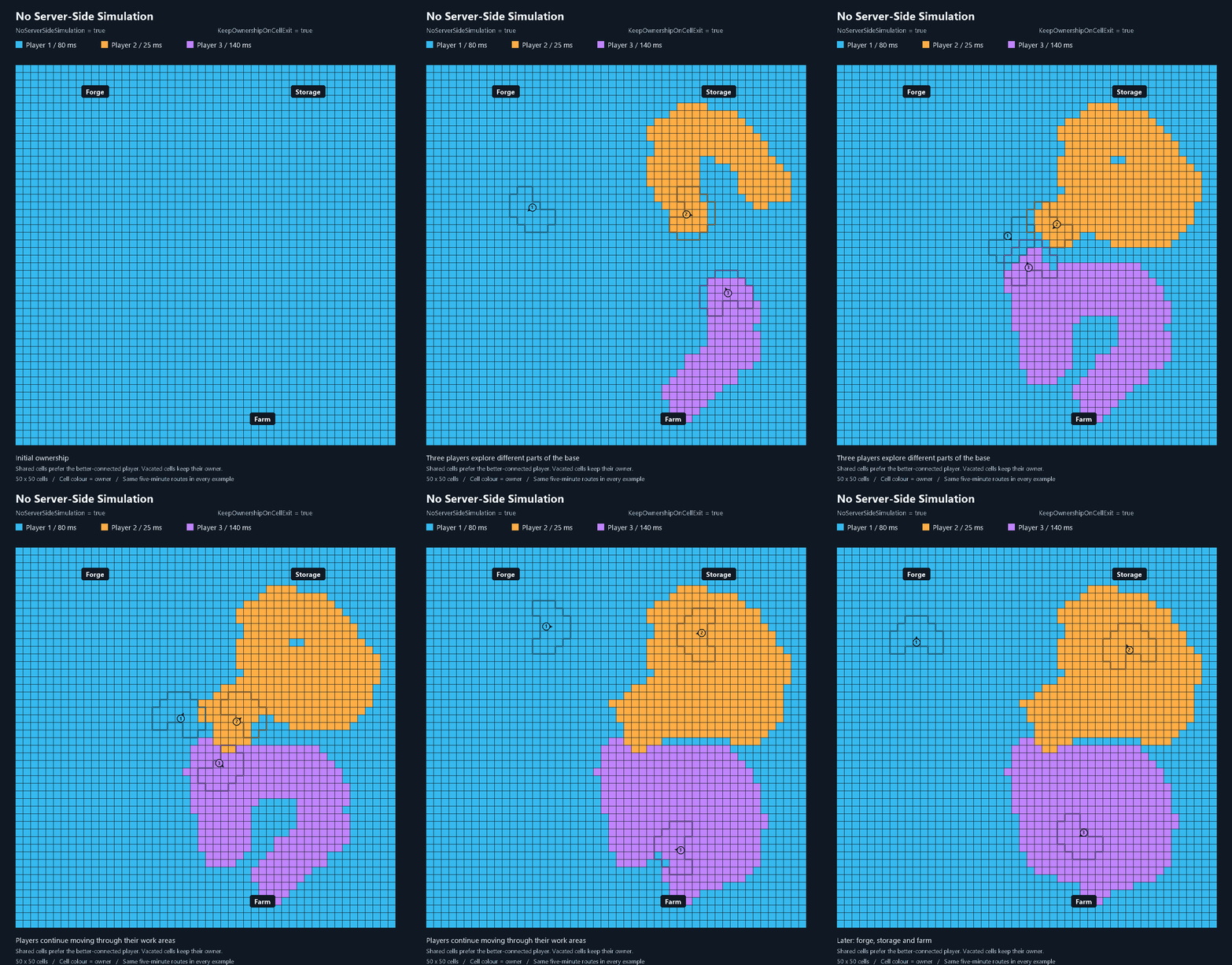
The colours show where supported objects are simulated:
| Cell colour | Simulation runs on | Connection-related delay |
|---|---|---|
| Your player's colour | Your client | No latency, like Singleplayer. |
| White | The server | Depends on your own connection. |
| Another player's colour | Their client | Depend on both connections. |
TooManyLags prioritises local ownership whenever possible. Shared fields use the server; without Server-Side Simulation, they prefer the better-connected player.
Default settings — ServerOwnedInteractivesByDefault=false, KeepOwnershipOnCellExit=true. Player 1 initially owns the base. Players 2 and 3 take ownership where their grids settle; overlapping fields use the server. Unvisited cells keep their initial owner, and vacated cells keep their last owner.
Max server ownership, ownership retained — ServerOwnedInteractivesByDefault=true, KeepOwnershipOnCellExit=true. The same routes leave the same kind of ownership trails, but unvisited cells start and remain with the server. If all default-ownership options are enabled, static pieces outside the static grid also remain server-owned.
Max server ownership, return on exit — ServerOwnedInteractivesByDefault=true, KeepOwnershipOnCellExit=false. Vacated cells return to the server after the applicable transition period. Coverage includes the rear centre; the final view keeps player ownership around their current work areas rather than along their old routes.
Without Server-Side Simulation — NoServerSideSimulation=true, KeepOwnershipOnCellExit=true. Objects remain player-owned, including shared fields. This example uses stable pings of 80 / 25 / 140 ms: Player 2 has a meaningful connection advantage and takes shared cells. Small ping differences can retain the current candidate to avoid unnecessary transfers.
Server configuration
Clients follow the server when connecting;
EnableLogs and EnablePupCompatibility are local. The PUP switch automatically stays inactive without its dependencies.
The default settings should be optimal for most setups. However, adjust simulation mode and cell ownership retention (KeepOwnershipOnCellExit) to suit your needs.
1. Distribute simulation between server and clients
The Simulation Settings sections control default ownership. The grid prepares nearby supported objects for local ownership; overlapping fields use the server. Field timers, active-use protection and permanent server-ownership overrides still apply, so not every nearby object immediately belongs to a player.
These settings and KeepOwnershipOnCellExit only distribute part of the CPU workload between server and clients. They do not affect perceived latency.
ServerOwnedInteractivesByDefault = false
- false: keep vanilla default ownership. The grid steps in where players' loaded areas are shared.
- true: use the server as the default owner of managed interactives and idle tamed animals outside settled player fields. Nearby grid fields can still transfer them to a player. Overlapping fields use the server.
Enable it if you want more of the remaining simulation on the server and have spare server CPU.
ServerOwnedStaticBuildingsByDefault = false
Controls eligible building pieces without interactions, separately from doors, chests and other interactives. With true, these pieces use a server default. By itself, this keeps eligible static pieces on the server rather than sharing them through the grid.
UseGridForStaticBuildings = false
With true, eligible static pieces join the same grid as interactives. This works independently of ServerOwnedStaticBuildingsByDefault: that setting selects the default outside player fields; KeepOwnershipOnCellExit can retain the last owner after leaving. Nearby exclusive fields can belong to a player; overlapping fields belong to the server. PUP FPS clusters stay excluded. Both static options require Server-Side Simulation. Changes require a server restart.
Common static setups:
| Goal | ServerOwnedStaticBuildingsByDefault |
UseGridForStaticBuildings |
|---|---|---|
| Keep normal static ownership | false | false |
| Put eligible static simulation on the server | true | false |
| Share static simulation through the grid, with a vanilla default | false | true |
| Share static simulation through the grid, with a server default | true | true |
2. Decide what happens after leaving a field
KeepOwnershipOnCellExit = true
- true: when everyone leaves a field, keep its last owner while the area remains loaded. This avoids return transfers and gradually leaves different parts of a base with different clients or the server. Another player's later grid request can still change ownership.
- false: return vacated objects to their configured server default. This requires Server-Side Simulation and at least one interactive or static server-default option enabled. Without that combination, ownership retention stays enabled. Directional coverage also includes the rear cells instead of cutting them out.
This setting concerns fully vacated fields. With the default directional grid, when one player leaves an overlap but another stays, the remaining player's inner/red fields can transfer automatically; outer fields wait for that player's next movement or camera-coverage change.
Vanilla region unloading and ownership release still apply. Keeping ownership does not keep distant areas loaded forever.
3. Set how far ahead the grid prepares objects
GridCellSizeMeters = 4 sets the size of each cell. Available sizes are 4, 6.4, 8 and 16 metres.
GridCoveragePattern = Rounded7x7 sets the overall shape. Alternatives are Rounded5x5 and Square3x3. Four-metre cells require a rounded pattern.
Larger cells or a larger pattern prepare ownership farther ahead. This is useful for poor connections or fast movement, but covers more objects and can create more ownership work. Try the defaults first; enlarge coverage if ownership arrives too late. These settings do not change vanilla or PUP FPS loading distances.
DirectionalGridMode = true concentrates coverage towards your camera direction. Leave this enabled. Missing camera data uses character direction. With the default exit-retention setting, some rear cells make no new ownership requests.
The three directional timers have different purposes. Their delays help avoid unnecessary ownership changes at the edge of the grid. With a poor connection, lowering the forward or outer delay can help ownership keep up during fast movement:
| Setting | Default | What it does |
|---|---|---|
InnerTransitionDelaySeconds |
0 seconds | Red: your nearby cells and the row directly ahead. Requests start without a deliberate wait. |
ForwardTransitionDelaySeconds |
0.2 seconds | Orange: one extra three-cell row ahead, active with 4-metre cells and either rounded pattern. Prepares objects you are approaching. |
OuterTransitionDelaySeconds |
3 seconds | Yellow: the remaining active cells. Waiting avoids taking objects that you merely pass. |
Default grid example: 4-metre cells, Rounded7x7, KeepOwnershipOnCellExit=true. Camera direction points upwards. White rear cells make no new ownership requests.
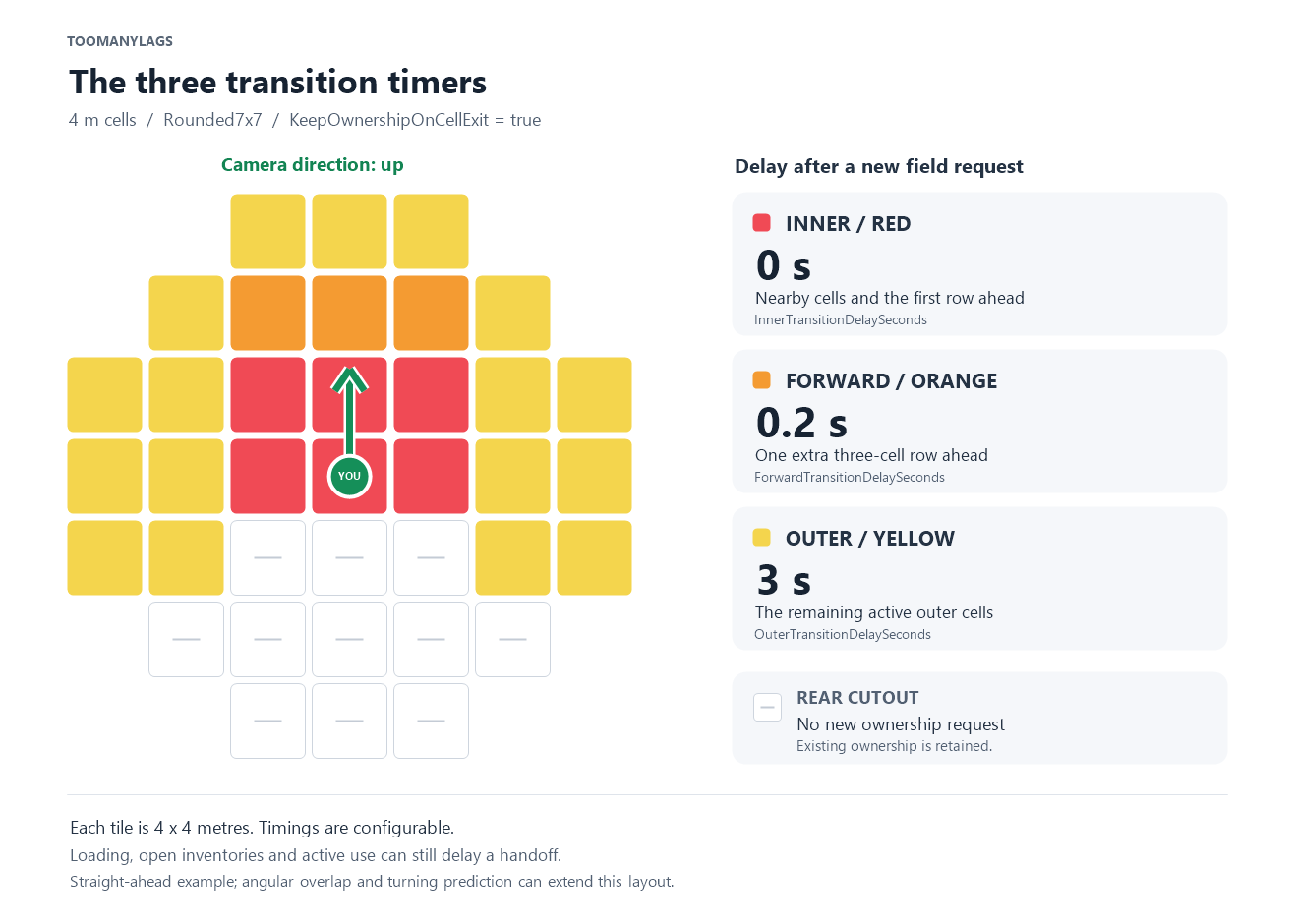
With KeepOwnershipOnCellExit=false, red covers a full 3x3 centre. The farthest row of the 7x7 pattern remains yellow.
A delay of 0 removes the configured wait, not network delivery or usage protection. New requests use the current timing settings; existing handoffs are not reset. Running timers can finish while you stand still.
Set DirectionalGridMode=false if you want the full shape in every direction with one uniform timer: TransitionDelaySeconds = 2. The red/orange/yellow delays then do not apply.
4. Tune turning and responsiveness
CameraDirectionOverlapDegrees = 30 lets adjacent directional grids overlap during a turn. Increasing it, up to 45 degrees, keeps both directions covered for longer; 0 removes the extra angular overlap. More overlap can prepare objects earlier, but also covers more cells.
CameraRotationPredictionSeconds = 0.1 looks ahead in your turning direction. Faster turns can add another direction; newly predicted cells use the inner/red delay. Set 0 to disable prediction.
CameraHeadingCheckIntervalSeconds = 0.05 checks camera coverage up to 20 times per second.
MovementRotationCheckIntervalSeconds = 0.1 checks cell changes and fallback heading up to 10 times per second. Both accept 0.05-5 seconds; larger values reduce checking frequency but react more slowly. Camera-coverage changes wake the next server pass without another movement-interval wait.
Unchanged coverage creates no new field requests. Standing players still count for overlaps, and pending timers and handoffs continue.
ServerOverlapCooldownSeconds = 1 prevents rapid server-to-player-to-server changes when nearby players turn their cameras. After an overlap gives a field to the server, new grid decisions for that field are ignored for one second. Expiry alone does not transfer it: the next relevant movement or camera change can request it again. Set 0 to disable. This applies only to directional overlaps with Server-Side Simulation.
5. Configure Hostile Mob ownership
EnableAIOwnership = true enables target-based ownership. Ordinary Hostile Mobs normally run on their player target's client; attacks and active use protect ongoing actions from an unsafe transfer.
The high-ping fallback needs both conditions:
ServerFallbackPingMs = 200: the target player's measured ping exceeds 200 ms.ServerFallbackRadius = 6: another eligible player is within 6 metres of the mob, not of its target, and has that area loaded.
With Server-Side Simulation, the server can then take over once loading and handoff safeguards allow it. High ping alone does not force server ownership. Without Server-Side Simulation, fallback selects a suitable lower-latency player instead.
A lower ping limit or larger radius makes fallback apply more often and can increase server CPU use. Setting the ping limit to 0 uses a relative rule: the target must exceed the best other candidate by 250 ms; the nearby-player condition still applies. It does not disable fallback.
BossAlwaysServerOwned = true has a separate shared-combat rule: when a boss acquires or changes its player target, at least two living eligible players within BossPlayerRadius = 30 metres select server ownership. Otherwise normal Hostile Mob rules apply. This is not a permanent server pin; distance decisions are updated on target events, not continuously while players move. With Server-Side Simulation disabled, bosses retain their existing vanilla exclusion.
On false bosses use same rules like other Hostile Mobs. Not well tested so default is true. Not shure if many owner changes while fighting can lead to changes in the behavior. - Help me testing and report Issues!
6. Optional server ownership overrides
ServerOwnedRefillStations = false normally lets stations follow the grid. Each observed refill renews 1 second of protection against ownership changes. With true, enabled refill stations stay server-owned even inside a single player's grid. This includes smelters, cooking/fire stations, fermenters, shield generators and turrets. Incinerators use separate inventory/burning protection and are not pinned by this option. - Only maybe usefull if u had problems with it, never used it myself.
ServerOwnedMobsByDefault = false can independently give idle tamed animals a server default outside player fields and put Hostile Mobs without a player target on the server. Hostile Mobs require EnableAIOwnership; friendly magic summons, bosses and active riding/following remain excluded. These overrides require Server-Side Simulation and can add server CPU work.
The Object Categories section at the bottom enables or disables broad groups such as doors, containers and tamed animals. Disabled groups keep native vanilla/FiresGhettoNetworking handling. Static building pieces use their separate Simulation Settings switches.
LooseItems=true includes dropped items in the grid. Leave it enabled; native pickup takes priority over automatic ownership changes. With false, loose items keep native ownership. Update server and clients for this feature; older clients retain native item ownership.
Optional PUP FPS compatibility
EnablePupCompatibility=true adds the built-in collision/stability guards when PUP FPS is present. No separate BotanicPupPatch is needed. Without the required mods, or when a separate PupPatch is detected, the embedded module stays completely inactive. Configure this switch locally on each installation and restart; see Compatibility for details.
Apply changes and check the result
Only admins can change server settings through the in-game console:
tml_config list
tml_config GridCellSizeMeters
tml_config OuterTransitionDelaySeconds 2
Use tml_config <Key> to read a setting and tml_config <Key> <Value> to save it. Check intervals, camera overlap/prediction, transition delays, overlap cooldown and mob fallback ping/radius apply live. Other settings require a server restart; the reply confirms this and shows pending values. Manual config-file edits require a restart. Clients receive server settings when connecting; live camera changes are sent automatically. EnableLogs affects only the machine where it is changed.
