
Please disclose if any significant portion of your mod was created using AI tools by adding the 'AI Generated' category. Failing to do so may result in the mod being removed from Thunderstore.
Configuration
Updated 3 weeks agoConfiguration
Host/server settings
Edit BepInEx/config/botanic.toomanylags.standalone.cfg on the host/server. This controls all gameplay settings, including Enabled, EnableAIOwnership and camera settings. Modded clients receive the host's settings when connecting; their local gameplay values are ignored. Only EnableLogs is local.
The defaults are the recommended starting point. Standalone keeps simulation on players, even on a dedicated server. It does not require FiresGhettoNetworking, enable Server-Side Simulation or add server-default ownership settings.
Prepare nearby ownership
GridCellSizeMeters = 4 sets the cell size. Available sizes are 4, 6.4, 8 and 16 metres. The 6.4-metre option divides a vanilla zone into ten cells per side.
GridCoveragePattern = Rounded7x7 sets the shape. Alternatives are Rounded5x5 and Square3x3; 4-metre cells require a rounded pattern. Larger coverage gives ownership more lead time for poor connections or fast movement, but also includes more objects. These settings do not change vanilla loading distances.
DirectionalGridMode = true focuses coverage towards camera direction on modded clients. Without camera data, the server uses character direction. Leave this enabled. With the default exit-retention setting, rear cells make no new requests.
The three directional timers have different purposes. Their delays avoid unnecessary changes at the grid's edge; with a poor connection, lowering the forward or outer delay can help ownership keep up during fast movement:
| Setting | Default | Purpose |
|---|---|---|
InnerTransitionDelaySeconds |
0 seconds | Red: nearby cells and the row directly ahead. No deliberate wait. |
ForwardTransitionDelaySeconds |
0.2 seconds | Orange: one additional three-cell row ahead, active with 4-metre cells and a rounded pattern. |
OuterTransitionDelaySeconds |
3 seconds | Yellow: remaining active cells. Avoids claiming objects you merely pass. |
Default example: 4-metre cells, Rounded7x7, KeepOwnershipOnCellExit=true. Camera direction points upwards; white rear cells make no new requests.
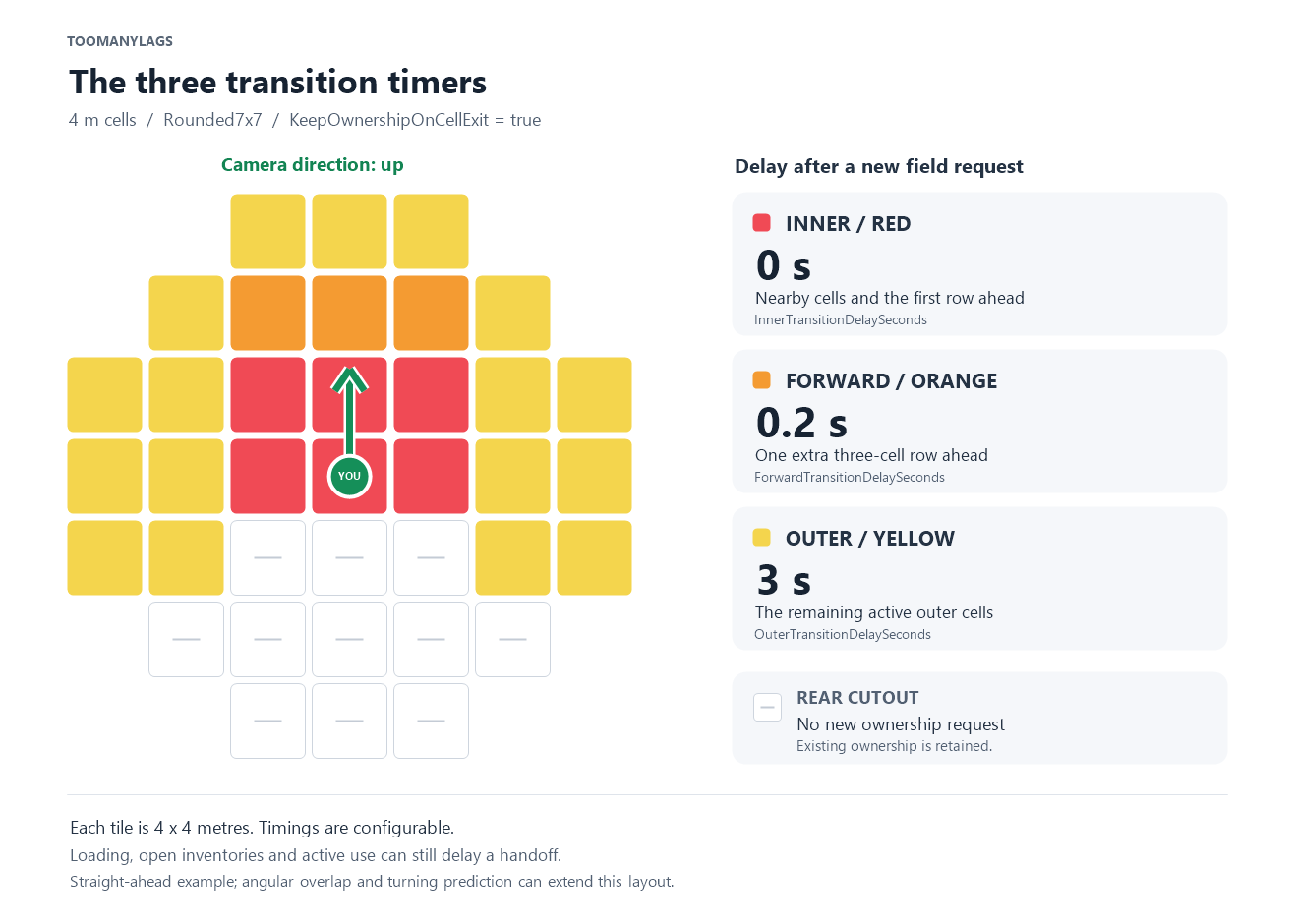
Set DirectionalGridMode=false to use the complete shape with one timer, TransitionDelaySeconds = 2. A zero delay removes the configured wait, not network delivery or handoff protection.
Turning, movement and leaving fields
CameraDirectionOverlapDegrees = 30 keeps adjacent directional grids active together during a turn. Range 0–45 degrees; more overlap prepares more cells. CameraRotationPredictionSeconds = 0.1 looks ahead during camera rotation and can add one direction. Newly predicted fields use the inner/red delay; actual coverage stays active. Set prediction to 0 to disable it.
CameraHeadingCheckIntervalSeconds = 0.05 allows up to 20 camera checks per second. MovementRotationCheckIntervalSeconds = 0.1 allows up to 10 movement/fallback-heading checks per second. Both accept 0.05–5 seconds. Changed camera coverage wakes the next host/server pass without an extra movement-interval wait. Unchanged coverage creates no new field requests. Timers and handoffs can finish while you stand still. Existing config values are retained when updating.
KeepOwnershipOnCellExit = true retains the last owner after everyone leaves a field, while the area remains loaded. Another player's later request can change it. With false, empty field decisions are discarded and the directional footprint includes the rear cells with a full red 3x3 centre. It does not force a return to a prior owner or add server simulation. Vanilla active-area release still applies.
When one player leaves an overlap but another remains, the remaining player's inner fields can update automatically. Outer fields wait for that player's next movement or coverage change.
Select owners in shared areas
Overlapping fields prefer an eligible player with a better measured connection to the host/server.
OwnershipPingMarginMs = 30keeps the current candidate unless another player is sufficiently better connected. It avoids changes caused by small ping fluctuations.PingMeasurementIntervalSeconds = 2sets the measurement cadence. Unmodified clients use existing native transport measurements; no client plugin is required for those readings.OverlapOwnershipCooldownSeconds = 1temporarily holds a selected overlapping-field owner. Exclusive fields have no extra cooldown. Expiry alone creates no transfer; a later movement, turn or relevant ping change can reassess the field. Set 0 to disable.
Ping is measured relative to the host/server, not directly between every pair of players. Shared client-owned interactions can still reflect their owner's connection.
Hostile Mobs and categories
EnableAIOwnership = true makes ordinary Hostile Mobs prefer their current player target as owner. When the target exceeds HighTargetPingMs = 200, a sufficiently better-connected player within NearbyAlternativeOwnerRadiusMeters = 6 metres of the mob can take over simulation. The attack target does not change. Eligible owner clients need the mod; otherwise native behavior remains.
Friendly magic summons and bosses retain vanilla ownership. Idle tamed animals use the object grid when both owner clients support its guards; riding, following and relevant combat protect ongoing use.
The Object Categories section at the bottom enables or disables broad groups separately. Open inventories, pending opening requests and supported active use block unsafe transfers. Every observed refill renews 1 second of protection. Incinerators also check native burning state and inventory use. These safeguards require compatible modded owner clients.
Native signs and portal names prepare the editor's ownership before opening their text window. Only the edited object is protected until the player moves, including after confirming or closing the window. Automatic takeover requests during the lock are discarded; a fresh covering grid update is needed afterwards. Older or unmodified owner clients retain native sign/portal ownership. No extra config switch is needed.
Apply changes
Only the host or an authorized server admin can change gameplay settings through the in-game console:
tml_config list
tml_config GridCellSizeMeters
tml_config OuterTransitionDelaySeconds 2
tml_config <Key> reads a setting; tml_config <Key> <Value> saves a change. Intervals, delays, camera overlap/prediction and mob fallback limits apply live. Other changes are saved for a restart; the reply confirms this and shows pending values. Manual config-file edits require a restart. Live camera settings are sent to modded clients automatically.
Use the optional client-side BotanicOwnerDebug overlay to inspect ownership while tuning. Update the host/server and modded clients together for the full handoff protocol.
Updating configs
Old configs are automatically reorganized at startup, preserving supported values. The original file is kept once as .cfg.pre-layout.bak. The sections follow the Addon layout where applicable; Standalone adds its own latency-selection settings and has no server-simulation options. Object categories stay at the bottom.
