
Please disclose if any significant portion of your mod was created using AI tools by adding the 'AI Generated' category. Failing to do so may result in the mod being removed from Thunderstore.

MoonforgedVikingSense
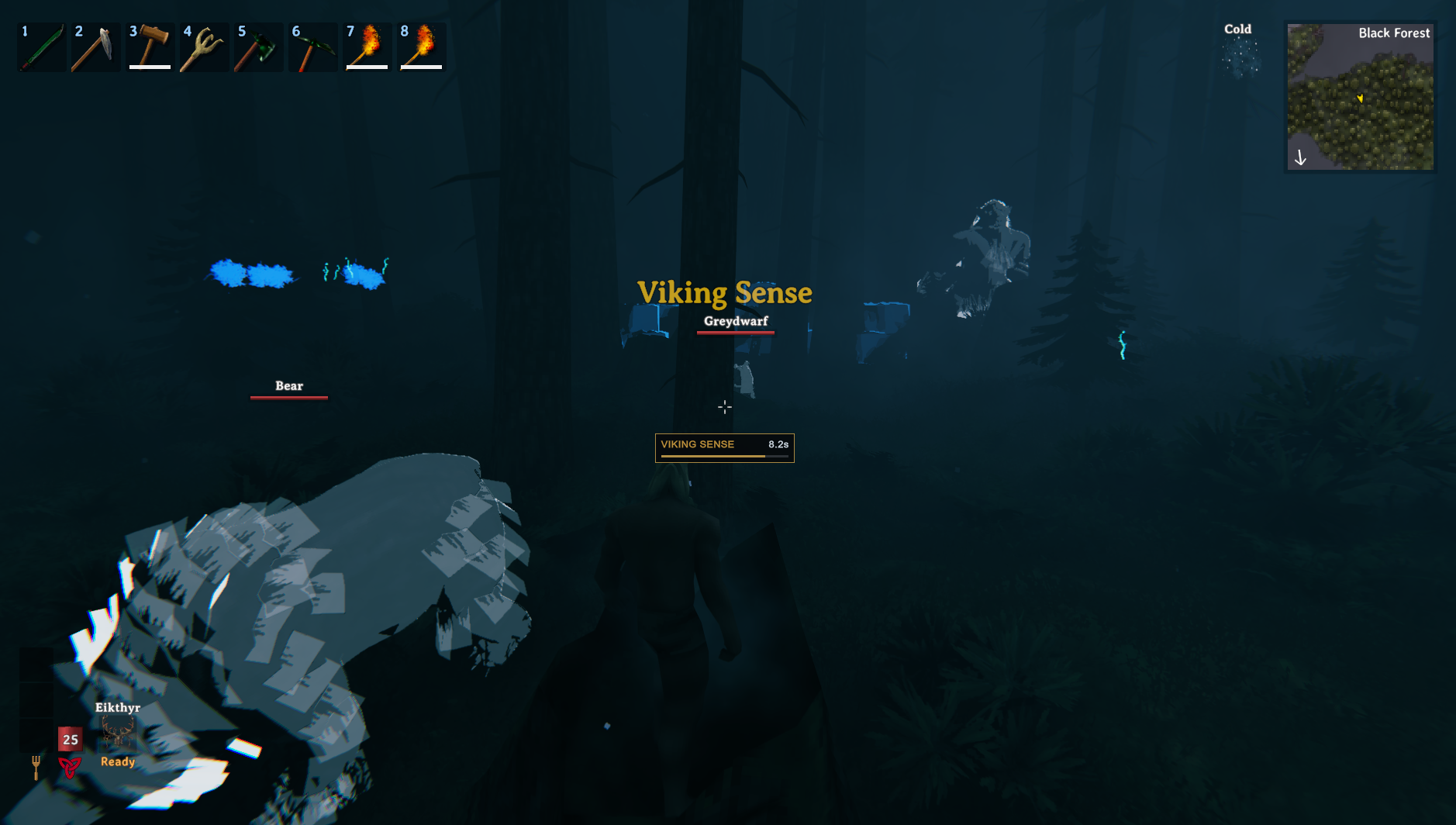
Scan nearby resources, visible ore deposits, structures, caves, creatures and players. Features resource-colored highlights, glowing flora, a configurable scan key and cooldown display. Scan while moving; effects are visible only to you.
| Last updated | 6 hours ago |
| Total downloads | 29 |
| Total rating | 1 |
| Categories | Mods Misc Server-side Client-side Deep North Update |
| Dependency string | Caenos-MoonforgedVikingSense-1.0.0 |
| Dependants | 0 other packages depend on this package |
This mod requires the following mods to function

denikson-BepInExPack_Valheim
BepInEx pack for Valheim. Preconfigured with the correct entry point for mods and preferred defaults for the community.
Preferred version: 5.4.2351
ValheimModding-Jotunn
Jötunn (/ˈjɔːtʊn/, 'giant'), the Valheim Library was created with the goal of making the lives of mod developers easier. It enables you to create mods for Valheim using an abstracted API so you can focus on the actual content creation.
Preferred version: 2.30.2README
Moonforged Viking Sense
Find useful resources and nearby threats with a single key press.
Moonforged Viking Sense sends an expanding scan wave around your character, temporarily highlighting nearby resources, visible ore deposits, structures, caves, creatures, and other players.
Inspired by ASKA's resource scanning, with resource-specific colors and glowing flora to help you explore Valheim.
🔎 How to Use
Press Z to activate Viking Sense.
- The scan wave expands from your position and highlights nearby objects as it reaches them.
- You can scan while walking or sprinting.
- Highlights fade after a short duration.
- An on-screen timer shows the remaining cooldown.
- A one-time help panel explains the mod when you first enter the world.
The scan key, range, duration, and cooldown can be changed in the configuration file.
Default Settings
| Setting | Default |
|---|---|
| Scan key | Z |
| Scan radius | 60 metres |
| Pulse travel time | 1.5 seconds |
| Highlight duration | 10 seconds |
| Cooldown | 10 seconds |
| Maximum targets per scan | 400 |
🌿 What Viking Sense Detects
- Flora and pickables – Berry bushes, mushrooms, dandelions, thistles, crops, and other useful pickables.
- Visible resource deposits – Copper, tin, obsidian, and supported later-biome resource nodes.
- Structures – Player-built pieces and other objects using Valheim's building components.
- Caves and dungeons – Nearby loaded location entrances.
- World spawners – Such as Greydwarf Nests and Monuments of Torment.
- Mistlands landmarks – Ancient giant objects and remains.
- Creatures – Animals, enemies, bosses, and tamed creatures.
- Dropped items – Loose items lying in the world.
- Other players – Nearby players in multiplayer; your own character is excluded.
Detection applies to objects currently loaded around you. It does not search the entire world.
🎨 Resource Colors and Flora Glow
Flora uses a colored glow that remains visible at night while preserving the transparent parts of leaf and flower textures.
| Resource | Highlight color |
|---|---|
| Raspberries | Red |
| Blueberries | Blue |
| Cloudberries | Golden orange |
| Vineberries | Purple |
| Dandelions and flowers | Yellow |
| Thistles | Cyan |
| Red mushrooms | Red-orange |
| Yellow mushrooms | Yellow |
| Blue mushrooms and Jotun puffs | Blue |
| Magecaps | Purple |
| Fiddleheads | Green |
| Copper deposits | Orange |
| Tin deposits | Silver-grey |
| Obsidian | Muted purple |
| Flametal and related deposits | Orange-red |
| Crystal deposits | Pale cyan |
| Guck | Green |
Buildings, caves, spawners, and landmarks use blue highlights. Creatures use light grey, and other players use green by default.
Recognized resources use their assigned colors. Unrecognized resources use the configured fallback color.
🪵 Less Clutter, Normal Progression
Ground pickable branches, stones, and flint are excluded from the scan.
Loose dropped Wood, Stone, and Flint items can still appear when dropped-item detection is enabled.
Silver veins and hidden iron deposits remain excluded, preserving their normal discovery mechanics. Ordinary mineable stone formations are disabled by default and can be enabled in the configuration.
🌐 Multiplayer
Only you can see your scan wave and highlights.
The scan visuals are local to your game and are not synchronized to other players. The mod can be used in single-player or multiplayer and does not need to be installed on the dedicated server for your scan to work.
⚙️ Configuration
After launching Valheim with the mod installed, edit:
BepInEx/config/Moonforged.VikingSense.cfg
Available settings include:
- Enable or disable Viking Sense.
- Change the scan key, radius, pulse travel time, cooldown, and highlight duration.
- Adjust highlight intensity and fallback/category colors.
- Enable or disable detection categories independently.
- Set the maximum number of targets processed per scan.
- Add prefab-name tokens for custom or modded resources.
- Show or hide scan messages, the cooldown display, and first-run help.
To display the help panel again, set First Run Help Shown to false before your next launch.
📦 How to Install
1. Install the Dependencies
2. Install Moonforged Viking Sense
Install through your mod manager, or place MoonforgedVikingSense.dll inside:
BepInEx/plugins/MoonforgedVikingSense/
3. Launch Valheim
Enter your world and press Z to scan your surroundings.
📝 Credits & Feedback
- Made by Caenos
- Join the community on Discord for feedback, support, and sneak peeks.
- If the invite link expires, you can also find me in the Thunderstore or Valheim Discord communities.
- Watch live on Twitch: https://www.twitch.tv/Caen007
- Videos and tutorials on YouTube: https://www.youtube.com/@Caenos007
- Join the discussion on Reddit: Modded Valheim Discussion
- Support the project: 💖 PayPal
🎄 Special Thanks
- Madd Tish – Testing and support
