
Please disclose if any significant portion of your mod was created using AI tools by adding the 'AI Generated' category. Failing to do so may result in the mod being removed from Thunderstore.

Carturs Compass and Clock
A Skyrim-style compass bar across the top of the screen. Shows your heading and your map pins at their real bearing, scaled and faded by distance.
| Date uploaded | 19 hours ago |
| Version | 1.5.7 |
| Download link | Cartur-Carturs_Compass_and_Clock-1.5.7.zip |
| Downloads | 452 |
| Dependency string | Cartur-Carturs_Compass_and_Clock-1.5.7 |
This mod requires the following mods to function

denikson-BepInExPack_Valheim
BepInEx pack for Valheim. Preconfigured with the correct entry point for mods and preferred defaults for the community.
Preferred version: 5.4.2333README
Cartur's Compass and Clock
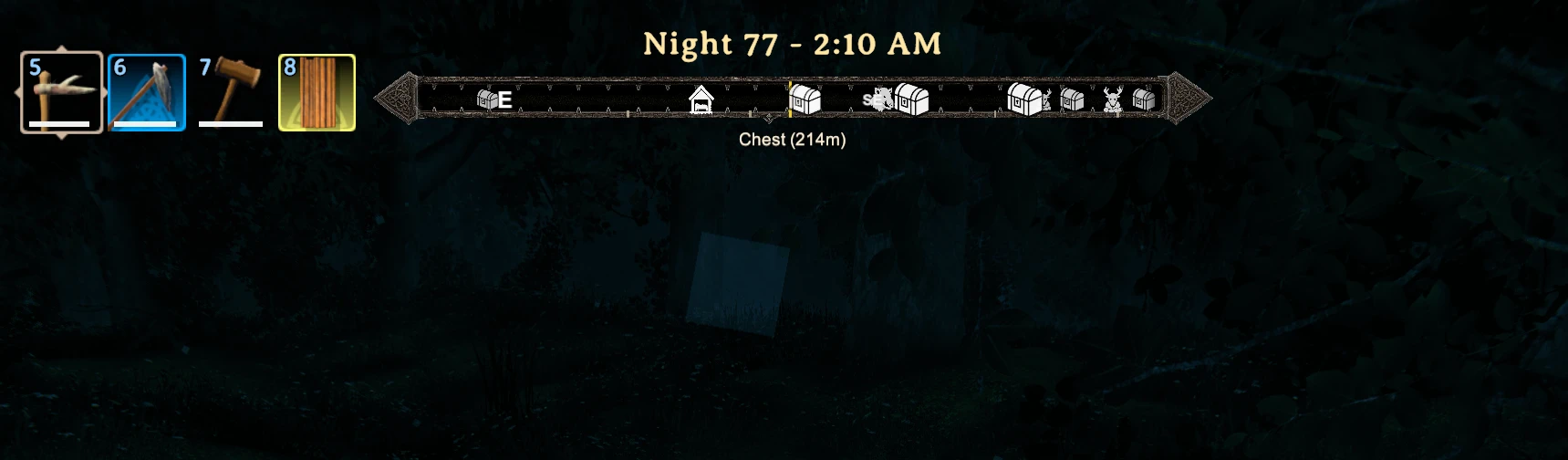
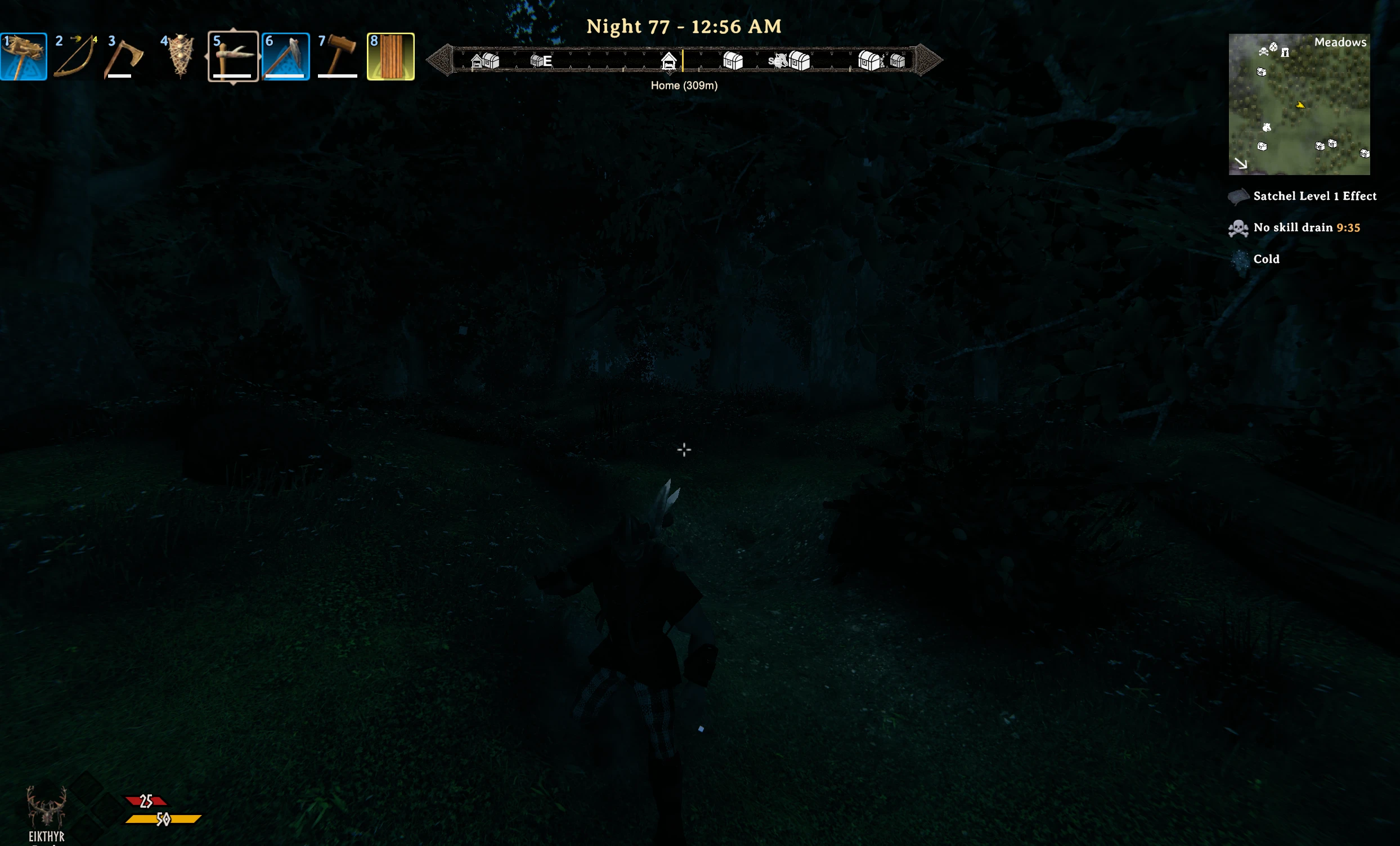
A compass bar across the top of the screen with your map pins on it at their real bearing, and a clock above it that names the time of day.
What it does
The bar shows the cardinal and intercardinal letters and a tick every 15 degrees, across a field of view of 90 degrees by default. Pins are read straight from the in-game map and drawn with the same icons, so a pin at your two o'clock appears at your two o'clock. A pin takes the colour it has on the map. If you run Cartur's Map Pins, its per-pin colours and ore tints carry over, and emptied chests are left off the compass. Without that mod you get the vanilla pins in white. Pins further away than PinRange (300 metres) are not drawn, and neither are pins you have ticked off on the map or pins you are standing within 8 metres of.
Icons grow and get more opaque as you close on a pin. The pin nearest the centre of the bar, within about 12 degrees, shows its name and distance under the frame, one at a time. Where several pins would pile up on the same spot, the nearest one wins and the ones behind it are skipped for that frame.
Your home bed and your graves are treated differently. They ignore PinRange, so they show at any distance, they are drawn larger in a fixed colour (gold for home, red for graves), and they sit on top of the other markers. A grave marker goes away once you have emptied the grave. The graves rule is per session, so a grave emptied before the mod was installed or in an earlier session keeps its marker until you clear it on the map. DeathMarkers can limit graves to the pin range or hide them.
The clock sits above the bar and reads like Morning, Day 42 - 6:40 AM or Night, Day 43 - 12:15 AM. The part of the day is one of Morning, Afternoon or Night, so you can tell whether it is safe out without doing the arithmetic. These words are translated for English, German, Russian, French, Spanish, Italian, Polish, Brazilian Portuguese, Chinese, Japanese and Korean. Any other language shows English.
The whole thing hides itself while the large map, your inventory or the menu is open, when you toggle the HUD off, and during the cutscene after a boss kill.
Settings
Config file: BepInEx/config/com.jekkle.valheim.carturcompassandclock.cfg. Changes apply live.
| Setting | Default | What it does |
|---|---|---|
PinRange |
300 | Metres. Pins further out don't show. |
DeathMarkers |
All | Grave markers: All shows every grave on your map at any distance, InRange applies PinRange, Off hides them. Your map is not changed. |
FieldOfView |
90 | Degrees of heading visible across the bar. |
ShowPinNames |
true | Name and distance of the centred pin. |
ShowClock |
true | Off hides the clock and leaves the compass. |
ShowDay |
true | Show the time of day and day number with the clock. Off shows the time alone. |
TwelveHourClock |
true | 1:05 PM. Off gives 13:05. |
ClockFormat |
empty | Write your own clock text, for example {day} | {time24} gives Day 12 | 13:05. Tokens: {phase} (Morning, Afternoon, Night), {day} (Day 12), {daynum} (12), {time} (follows TwelveHourClock), {time12} (1:05 PM), {time24} (13:05), {hour} (13), {hour12} (1), {minute} (05), {ampm} (PM). Empty keeps the text above. Applies straight away. |
ClockTextSize |
26 | Size of the clock text, separate from the bar's size. 10 to 60. |
Opacity |
1 | How solid the compass and clock are, 0.1 to 1. Lower lets the game show through. |
Style |
Auto | Bronze is the bronze frame. Rune is a flat dark panel with a thin black border, matching Cartur's RuneUI. Auto uses Rune when Cartur's RuneUI is installed, Bronze otherwise. |
FrameWidth |
657 | Bar width, on a 1920x1080 basis. Scales with your resolution. |
FrameOffsetX |
0 | Distance right of screen centre. Negative moves it left. |
FrameOffsetY |
54 | Gap from the top of the screen down to the bar. |
EditMode |
false | Drag the compass around the screen, see below. |
Moving and resizing it
- Turn on
EditMode. - Open your inventory, so you have a free cursor.
- Drag the box to move it. Drag the grip on its right edge to resize it.
- Turn
EditModeback off.
Where you drop it is written back to the three layout settings, so it survives restarts and you can still fine-tune the numbers by hand.
Compatibility
It reads the game's own pin list, so it works with vanilla pins on its own. Cartur's Map Pins is optional. With it installed, the compass shows that mod's pins in their map colours and drops chests it has marked as looted. The compass looks the mod up at runtime, and without it nothing breaks.
The mod patches one game method, TombStone.UpdateDespawn, to learn when a grave is emptied. If that patch fails, the compass still works and recovered graves keep their marker.
Client-side. The server does not need it and neither do the people you play with.
Install
Use a mod manager (r2modman, Thunderstore or Gale) and it pulls in BepInEx for you. To install by hand, drop CarturCompassAndClock.dll into BepInEx/plugins.
Free, and always will be. If it improved your game you can tip me on Patreon.
Discord: bug reports, install help, and mod requests. Bug reports get their own thread so nothing is lost in a chat scroll, and requests are voted on.
More from Cartur: HD Blood · Map Pins · Safe Stamina · Follow Command · Flooring · UI HUD · Waste Management · Feeding Trough · Combat Text
CHANGELOG
Changelog
1.5.7
- New icon in the Cartur's Mods style. The mod itself is unchanged from 1.5.6 (BepInEx still reports 1.5.6).
1.5.6
Style: a RuneUI look. Rune swaps the bronze frame for a flat dark panel with a thin black border, matching Cartur's RuneUI. Auto (the default) uses it when RuneUI is installed and keeps the bronze frame otherwise. Bronze or Rune forces one.
1.5.5
ClockFormat. Write your own clock text with tokens such as{day},{time24},{time12},{hour},{minute},{ampm},{phase}. For example{day} | {time24}givesDay 12 | 13:05. Empty keeps the old text. Requested on Discord.
1.5.4
- The README is rewritten: a fuller description of what the mod does, every setting and default checked against the code, and image captions that match the pictures. No code changes.
1.5.3
- ClockTextSize setting. Make the clock text bigger or smaller without touching the bar. The clock still sits on top of the frame at any size. Requested on Nexus.
- Opacity setting. Fade the compass and clock so they stand out less. Requested on Nexus.
1.5.2
- Bronze frame. The compass bar is redrawn in bronze knotwork to match Cartur's UI.
- ShowClock setting. Off hides the clock completely and leaves the compass. Requested on Discord.
1.5.1
- Finds Map Pins' looted-chest setting again: Map Pins renamed its config sections, and the compass now looks the setting up by key.
- Looted graves are cleared per world, so a grave looted in one world no longer hides one in another.
1.5.0
General / ShowDay. Turn it off to show just the time above the compass, without the time of day and day number.
1.4.1
- The clock no longer disappears after edit mode. Any settings change - including the one written when you finish dragging the compass - rebuilt it with the clock switched off, and nothing switched it back on until a restart.
1.4.0
- The compass hides during a cinematic. Sleeping after a boss kill plays a full-screen video and the compass was drawn straight over it.
- Grave markers no longer have to crowd the bar. New DeathMarkers setting. Graves were exempt from the range test entirely, so every grave a character had ever left was drawn at any distance, and a long-lived character ended up with a bar full of skulls. All keeps that behaviour, InRange makes graves obey PinRange like every other pin - so the one you just made still shows while you walk back to it - and Off draws none. Your map is untouched either way.
1.3.1
- Markers no longer freeze at the edge of the compass. The sweep that retires a marker and the draw loop disagreed about how far is too far, so a pin in the gap between them was dropped by the draw without ever being hidden, and its marker stayed on screen.
1.3.0
- Home is always on the compass, in gold. The bed you last slept in shows at any distance, at a fixed size, and does not fade out - the whole point of a home marker is the walk back from somewhere you have never been. The name under the frame reads "Home".
- Graves show in dark red, at any distance, over everything else. A grave whose tombstone you have emptied stops being drawn, so only the ones still holding your gear stay on the bar. That lasts for the session; the pin itself is left alone on the map.
- A crowded bar stays readable. When several pins land on the same stretch of the compass, the nearest one keeps the spot and the ones behind it are hidden until the view thins out. Nothing is filtered by distance or by type, and home and graves are never the ones dropped.
- Pins take their colour from Cartur's Map Pins. A pin you have coloured on the map is drawn in that colour on the compass, ore tints included. Without that mod, or with a pin left at its default style, nothing changes.
- The clock says what time of day it is, and names the day. Three phases now - Morning 06:00-12:00, Afternoon 12:00-18:00, Night 18:00-06:00 - and the day number is labelled, so it reads "Morning, Day 106 - 9:14 AM" instead of "Night 106". Dawn and Dusk are gone: they were narrow bands that told you nothing the clock beside them did not. Translated into the same eleven languages as the rest of the clock.
- The name under the frame clears when you turn away. It only names a pin within 12 degrees of centre now, instead of anywhere in the visible arc.
1.2.1
- The compass no longer eats mouse clicks. Three of its parts - the centre tick, the clock and the name label under the frame - were set to catch clicks, which they have no use for, so anything of the game's sitting behind them could not be clicked. All three now let clicks straight through. Only the edit-mode box and its resize grip catch clicks, which is what they are for.
1.2.0
- Emptied chests drop off the compass again. If you also run Cartur's Map Pins, the compass hides chests you have already cleared out - it reads that mod's looted-chest icon to know which those are. Map Pins 1.3.0 renamed that setting, changed its type and moved where its icons live, so the compass stopped recognising them and looted chests came back. It now reads all three rather than assuming them, and asks Map Pins directly where its icons start, so a future icon set will not break it the same way.
- Links to Cartur's Flooring.
1.1.3
- Store page only - the plugin is unchanged from 1.1.2. Added in-game screenshots, a new icon taken from one of them, and a link to Cartur's Follow Command.
1.1.2
- Moved the links to my other mods to the top of the page.
1.1.1
- Added links to my other mods.
1.1.0
- Edit mode. Turn on
EditModeand a box appears around the bar: drag the box to move the compass anywhere on screen, drag the grip on its right edge to resize it. Position and size are saved when you let go. The compass stays visible in menus while edit mode is on, so you have a free cursor to drag with. - New
FrameOffsetXsetting for horizontal position. The bar could only be moved up and down before. - The slim tick-marked bar is now the frame you actually get. 1.0.0 shipped the older wide Nordic frame by mistake - the store icon has shown the slim one all along.
- New defaults: a little wider, a little further down, horizontally centred. Existing configs are left exactly as they are - this only changes a fresh install.
- The clock is set in Valheim's own serif, Averia Serif Libre, instead of Arial.
- New
TwelveHourClocksetting, on by default: the clock readsDay 42 - 1:05 PM. Turn it off forDay 42 - 13:05. - The clock names the time of day - Dawn, Morning, Afternoon, Dusk, Night - so the hour means something at a glance. Night keeps the game's own 18:00 to 06:00, the boundary its spawns and sleep rules run on, so the word still answers "is it safe out". Dusk is the two hours before dark, as a warning.
- Pin names under the bar are readable again. A chest read
$piece_chestwoodrather than its name. Pins store a raw localization token and the map translates it on the way to the label; the compass was printing the token straight through.
1.0.0
First release.
- Compass bar with cardinal and intercardinal headings and a tick every 15°.
- Map pins placed at their real bearing, scaling and fading with distance.
- Name and distance shown for the pin nearest the centre of the bar.
- Checked-off pins, emptied chests (with Cartur's Map Pins) and pins within 8 metres are left off the bar.
- Hides with the HUD, the large map, the inventory and the game menu.
- In-game day and time above the bar.
