
Please disclose if any significant portion of your mod was created using AI tools by adding the 'AI Generated' category. Failing to do so may result in the mod being removed from Thunderstore.
ImmersiveFirstPerson
A body-aware first-person camera for Valheim with shoulder peek and first-person rendering optimization options.
| Date uploaded | a month ago |
| Version | 1.3.3 |
| Download link | Gerominoes-ImmersiveFirstPerson-1.3.3.zip |
| Downloads | 357 |
| Dependency string | Gerominoes-ImmersiveFirstPerson-1.3.3 |
This mod requires the following mods to function

denikson-BepInExPack_Valheim
BepInEx pack for Valheim. Preconfigured with the correct entry point for mods and preferred defaults for the community.
Preferred version: 5.4.2333
GoldenJude-Blacksmiths_tools
Tool for hiding parts of the player model when equipping wearables, also a fix for incorrectly deforming skinned meshes on custom items.
Preferred version: 2.0.3README
Immersive First Person
A body-aware first-person camera for Valheim.
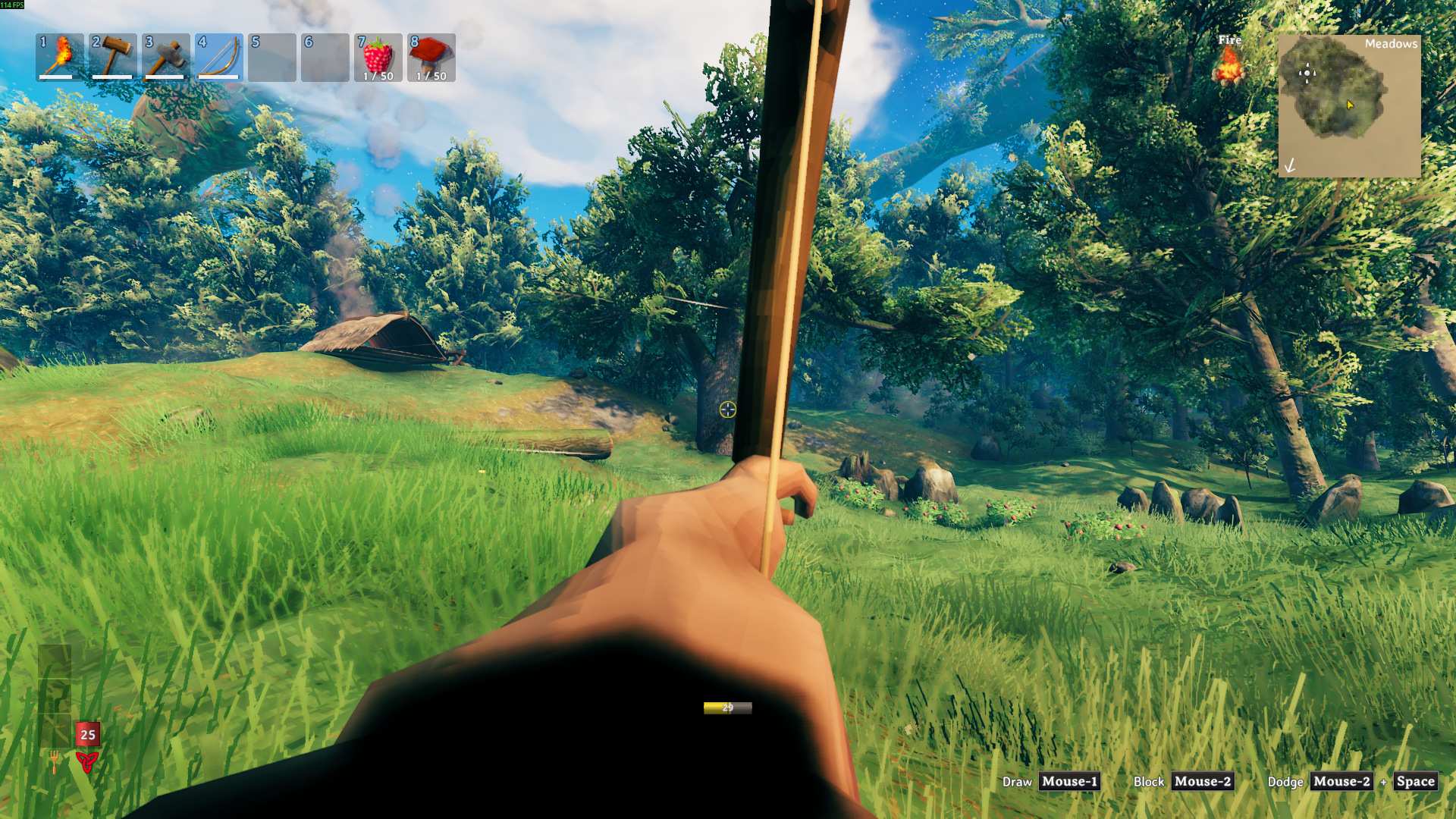
Step into your character's boots and keep Valheim feeling like Valheim. Immersive First Person tracks your animated head, keeps your local body visible, and handles the awkward moments where the game normally pulls the camera back out.
Highlights
- Toggle first person with
F6. - Keep your body, hands, and held items visible.
- Stay first person while crafting, sailing, sitting, holding fast, or opening inventory.
- Peek left or right in first person with hold or toggle controls.
- Smooth out intense head movement with the head bob slider.
- Hide head and helmet-slot gear when camera clipping gets in the way.
- Keep
HideHeadlocal-only for multiplayer. - Tune shadows, occlusion culling, camera effects, and visibility refresh cost.
Quick Start
Install the mod, launch Valheim once, then press F6.
If your head or helmet gets in the camera, enable:
[Visibility]
HideHead = true
Recommended settings
For the intended first-person feel, start here:
[Camera Overrides]
OverrideForcedThirdPerson = true
LockCameraWhileAttached = true
AttachedCameraExtraVerticalOffset = 0
AttachedCameraExtraForwardOffset = 0.08
AttachedCameraMaxYaw = 80
AttachedCameraMaxPitch = 55

[Camera Motion]
HeadBobAmount = 0.5

[Shoulder Peek]
EnableShoulderPeek = true
ShoulderPeekMode = Hold
PeekLeftKey = Mouse3
PeekRightKey = Mouse4
ShoulderPeekOffset = 0.28
ShoulderPeekSpeed = 12

[Graphics]
FirstPersonShadowDistance = 30
FirstPersonShadowCascades = 0
UseOcclusionCulling = true
DisableCameraEffects = false

[Visibility]
HideHead = false
ForceBodyVisible = true
VisibilityRefreshInterval = 1
Performance
Version 1.3.3 keeps view distance and LOD unchanged for immersion. The optimization settings focus on shadows, occlusion culling, optional camera effects, and head-hiding scan cost.
To keep the game's current shadow settings:
[Graphics]
FirstPersonShadowDistance = -1
FirstPersonShadowCascades = -1
DisableCameraEffects = false
Notable config options
| Section | Option | Default | What it does |
|---|---|---|---|
Camera Overrides |
OverrideForcedThirdPerson |
true |
Keeps first person active during gameplay interactions. |
Camera Overrides |
LockCameraWhileAttached |
true |
Locks the camera to a stable body offset while seated, sailing, or attached. |
Camera Overrides |
AttachedCameraExtraVerticalOffset |
0 |
Adds height to the attached camera position. |
Camera Overrides |
AttachedCameraExtraForwardOffset |
0.08 |
Moves the attached camera forward slightly. |
Camera Overrides |
AttachedCameraMaxYaw |
80 |
Limits left and right looking while attached. |
Camera Overrides |
AttachedCameraMaxPitch |
55 |
Limits up and down looking while attached. |
Shoulder Peek |
EnableShoulderPeek |
true |
Enables first-person side peeking. |
Shoulder Peek |
ShoulderPeekMode |
Hold |
Uses hold or toggle input behavior. |
Shoulder Peek |
PeekLeftKey |
Mouse3 |
Peeks the camera left. |
Shoulder Peek |
PeekRightKey |
Mouse4 |
Peeks the camera right. |
Shoulder Peek |
ShoulderPeekOffset |
0.28 |
Sets the side-only camera offset. |
Shoulder Peek |
ShoulderPeekSpeed |
12 |
Sets how quickly the side offset blends. |
Graphics |
FirstPersonShadowDistance |
30 |
Caps first-person shadow distance. Use -1 to keep the current value. |
Graphics |
FirstPersonShadowCascades |
0 |
Caps first-person shadow cascades. Use -1 to keep the current value. |
Graphics |
UseOcclusionCulling |
true |
Enables camera occlusion culling in first person. |
Graphics |
DisableCameraEffects |
false |
Temporarily disables known camera post-processing components. |
Camera Motion |
HeadBobAmount |
0.5 |
Controls how much animated head movement affects the camera. |
Visibility |
HideHead |
false |
Hides the local head and matched head-slot gear from the camera. |
Visibility |
VisibilityRefreshInterval |
1 |
Controls how often head-slot renderers and head bones are refreshed. |
Installation
Use your preferred Valheim mod manager, or place ImmersiveFirstPerson.dll here:
Valheim/BepInEx/plugins/ImmersiveFirstPerson/
Launch the game once to generate the config file.
Updating
If the mod acts oddly after an update, back up and delete the old config file, then launch the game once to regenerate it.
Compatibility
This mod touches the camera, local player visibility, the character skeleton, and attached camera states. Mods that heavily change those systems may overlap.
HideHead only mutates the local player's renderers and bones. Remote player characters are ignored for multiplayer compatibility.
Credits
Inspired by Azumatt's First Person Mode.
Support
If you enjoy the mod and want to support future updates, you can buy me a coffee on Ko-fi.

CHANGELOG
Changelog
1.4.1
- Added a new Dodge Where You Look config option.
- Fixed first-person dodge direction when Dodge Where You Look is disabled. Holding S before dodging now performs a backward dodge instead of forcing a camera-forward dodge.
- Fixed unintended foliage/world-object culling near the player. ImmersiveFirstPerson now restricts visibility changes to local player-owned renderers only.
- Improved renderer state restoration safeguards when entering/exiting first-person mode.
v1.4.0
Changed
- Improved head hiding using Blacksmith's Tools.
- Helmets now render as ShadowsOnly in first-person.
- Head shrink is now fallback-only.
- Improved compatibility with vanilla and custom helmets.
v1.3.3
Fixed
- Fixed
HideHeadmatching weapon parts withheadin mesh or material names. - Improved
HideHeadbehavior for helmets and characters where the head is part of a shared body mesh. - Fixed helmet-slot transform compensation that could make equipped helmets appear far away or in the skybox.
v1.3.2
Fixed file upload
v1.3.1
Added
- Added first-person Shoulder Peek.
- Added config option to enable or disable Shoulder Peek.
- Added Shoulder Peek input mode config with Hold and Toggle behavior.
- Added configurable left and right peek keybinds.
- Added configurable peek offset and peek smoothing speed.
Changed
- Updated mod version from v1.3.0 to v1.3.1.
Fixed
- Shoulder Peek resets when leaving first-person mode to prevent stuck camera offsets.
v1.3.0 - Optimization Update
Added
- Added first-person graphics controls:
[Graphics]
FirstPersonShadowDistance = 30
FirstPersonShadowCascades = 0
UseOcclusionCulling = true
DisableCameraEffects = false
Changed
- First-person mode now captures and restores occlusion culling, shadow distance, and shadow cascades.
- First-person view distance and LOD stay unchanged for immersion.
- Camera effect disabling is optional and restores each component to its previous enabled state when first person ends.
- Head hiding now caches head bones and head-slot renderers instead of scanning the full player transform hierarchy every frame.
HideHeadnow validates local-player ownership before mutating renderers or bones for multiplayer compatibility.HideHeadno longer shrinks equipment skeleton head bones, fixing shoulder-linked helmets such as padded helmets rendering at reduced size.HideHeadnow compensates skinned head-slot renderers that use shrunken head bones, so helmet shadows keep their intended size while the renderer stays hidden from the camera.
Notes
- Set
FirstPersonShadowDistance = -1andFirstPersonShadowCascades = -1to keep current game shadow settings. - Existing generated configs keep their previous values until edited or regenerated.
- Actual FPS gains depend on the scene, hardware, world density, and other installed mods.
v1.2.2
Fix wrong file upload for real this time.
v1.2.1
Fixed wrong file uploaded.
v1.2.0
Added
-
Added first-person support for more gameplay states that normally force third person.
- Inventory
- Crafting
- Ships
- Hold fast
- Sitting / attached states
-
Added attached camera lock for ships, seats, hold-fast points, and similar attachment states.
- The camera now locks to a captured head-level body position while attached.
- This reduces sailing rubberbanding and seated camera jitter.
- Look movement is limited while attached to prevent extreme camera/body mismatch.
-
Added configurable attached camera settings:
[Camera Overrides]
LockCameraWhileAttached = true
AttachedCameraExtraVerticalOffset = 0
AttachedCameraExtraForwardOffset = 0.08
AttachedCameraMaxYaw = 80
AttachedCameraMaxPitch = 55
- Added
HeadBobAmountunderCamera Motion.
[Camera Motion]
HeadBobAmount = 0.5
Changed
-
Reworked head bob reduction.
HeadBobAmount = 0now uses filtered head tracking.HeadBobAmount = 1uses full animated head movement.- This keeps the camera tied to the character while reducing motion sickness.
-
Reworked
HideHead.HideHeadis now the single visibility option for head clipping.- Removed separate hide options for hair, face, helmet, shoulders, and back items.
- Head-slot equipment is hidden from the camera while preserving shadows where possible.
- Held items remain visible.
-
Improved the README.
- Friendlier introduction.
- Clearer feature list.
- Recommended settings section.
- Cleaner install and compatibility sections.
- Added Ko-fi support link.
Removed
-
Removed camera smoothing and its config options.
SmoothCameraCameraSmoothing
-
Removed the old visibility mode options.
RendererDisableBoneShrinkShadowsOnlyas a user-facing option
-
Removed extra body-part visibility toggles.
HideHairHideFaceHideHelmetHideShoulderPadsHideBackItems
Fixed
- Fixed first-person camera rubberbanding while sailing in attached states.
- Fixed seated and hold-fast camera placement showing the player head.
- Fixed head bob slider not having a noticeable effect.
- Fixed head hiding accidentally affecting held items.
- Fixed head hiding collapsing helmet/head-slot equipment.
- Fixed helmet/head-slot shadows being misplaced after hiding the head.
- Fixed visibility restoration when first person is disabled or temporarily suppressed.
- Reduced camera clipping from helmets and head-slot equipment.
v1.1.2
Added
-
Added forced first-person camera override for gameplay states that normally push the camera back to third person, including inventory, crafting interactions, ships, hold fast, and attached states.
-
Added HeadBobAmount under
Camera Motion.0keeps only filtered head tracking.1uses full animated head movement.- Default:
0.5
Changed
-
Reworked head bob reduction to use filtered head tracking instead of falling back to a stable eye anchor.
-
Simplified visibility settings.
- Removed separate hair, face, helmet, shoulder, back item, and renderer mode options.
HideHeadis now the only head visibility option.
-
HideHeadnow uses shadows-only rendering by default.- The head and head-slot equipment are hidden from the first-person view.
- Player shadows are preserved.
- Held items should remain visible.
Fixed
- Fixed the head bob slider not having a visible effect when camera smoothing was disabled.
- Fixed head visibility options accidentally hiding the entire player body.
- Fixed head hiding accidentally affecting held items.
- Reduced camera clipping caused by helmets and head-slot equipment in first person.
- Improved cleanup so hidden renderers are restored properly when first person is disabled or temporarily suppressed.
Notes
Old config entries may still exist in existing generated config files, but the mod no longer uses them. For the cleanest test, delete the old config file and let the mod regenerate it.
v1.0.2
ANOTHER README FIX
v1.0.1
README Fix lol
v1.0.0
Initial public release of Immersive First Person.
Added
- Toggleable immersive first-person camera for Valheim.
- Animated head-tracked camera anchor with fallback to the player eye transform.
- Body-aware first-person view while preserving vanilla mouse and movement controls.
- Body yaw lock to vanilla camera yaw to reduce seeing the player's own back in first person.
- Local player visibility restoration while first-person mode is active.
- Automatic head/body visibility restoration when first-person camera override is suppressed by inventory, menu, or minimap UI.
- Configurable camera offsets, field of view, near clipping, and optional camera smoothing.
- Optional visibility toggles for head, hair, face, helmet, shoulders, capes, cloaks, and back items.
- Debug renderer logging for compatibility troubleshooting.
Defaults
UseHeadTrackedAnchor = true.SmoothCamera = false.LockBodyToCamera = true.HideHead = false.HideHair = false.HideFace = false.HideHelmet = false.
Notes
Head, hair, face, and helmet hiding are disabled by default to avoid headless shadows. These options remain available for users who experience clipping with specific characters, armor, or modded equipment.
