
Please disclose if any significant portion of your mod was created using AI tools by adding the 'AI Generated' category. Failing to do so may result in the mod being removed from Thunderstore.

VargheimHUD
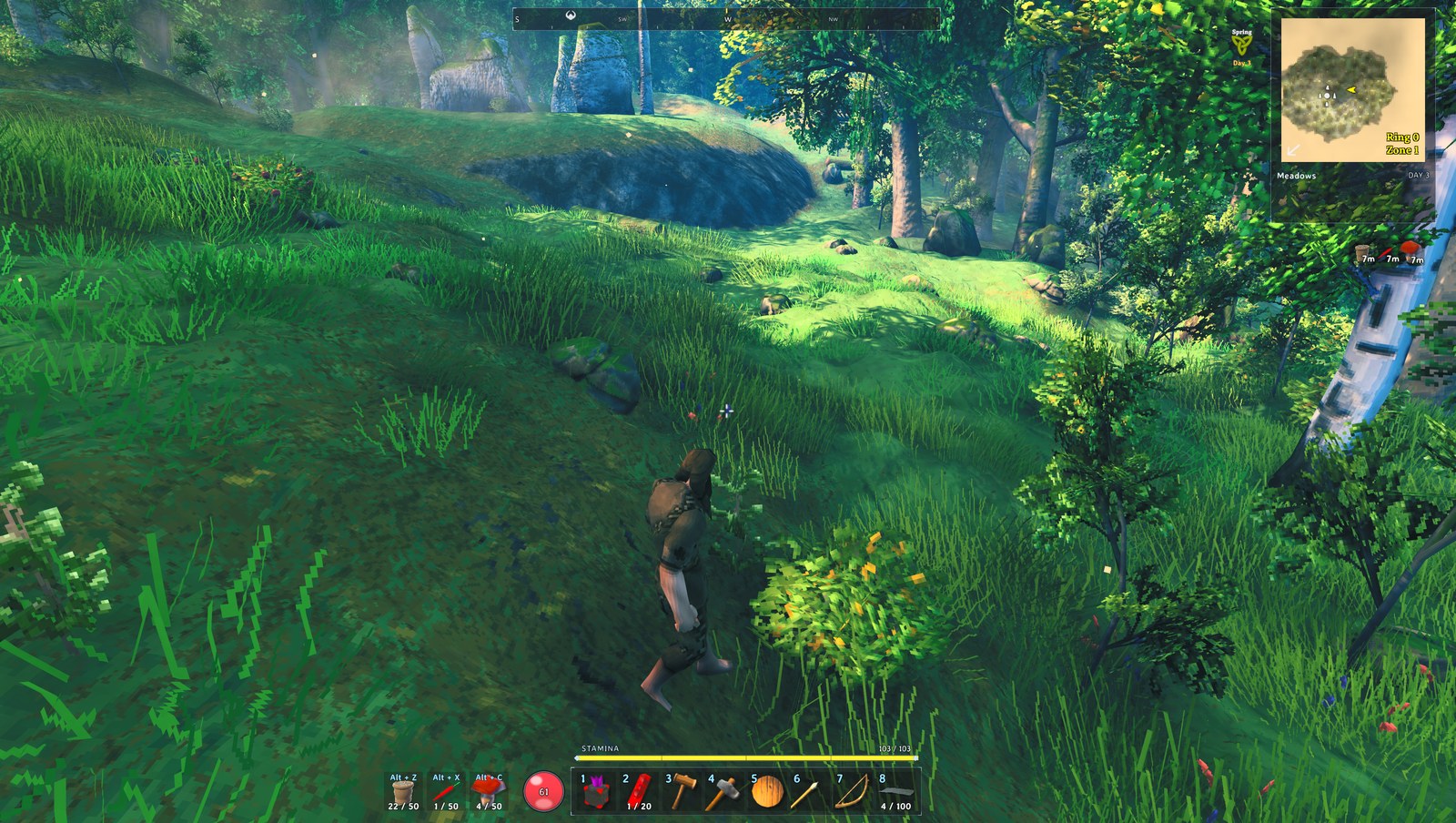
Vargheim HUD skin: compass strip, dark-glass bottom strip with health/eitr orbs, yellow stamina bar, map panel with zone meter, glass windows and slot frames. Client-side.
| Date uploaded | 17 hours ago |
| Version | 0.3.2 |
| Download link | Ghost_Pack-VargheimHUD-0.3.2.zip |
| Downloads | 18 |
| Dependency string | Ghost_Pack-VargheimHUD-0.3.2 |
This mod requires the following mods to function

denikson-BepInExPack_Valheim
BepInEx pack for Valheim. Preconfigured with the correct entry point for mods and preferred defaults for the community.
Preferred version: 5.4.2351README
⚔️ Vargheim Season 2 — pre-registration open
Vargheim is a Ghost Pack community server with a hand-built ruleset: pick three professions and the whole modded economy runs through them; ships over portals; seasons that change what grows and what sails; zone scaling and a season gate so everyone starts the same day. Season 2 is in closed testing now and opens soon. Spots are limited — join the Discord to pre-register. The mod list, sync code and start date go out there first.
VargheimHUD
A dark-glass HUD skin with a compass, built for the Vargheim Season 2 server. Client-side; the server does not need it, and other HUD mods that decorate the vanilla objects keep working because everything here is the game's own HUD re-anchored and re-sprited.
Features
Compass strip
 Top centre: cardinal letters and ticks for ±90° of your heading. Markers for your own map pins (with their VargheimPins glyphs), other players in their map colours, pings and your death marker; distances under markers when they're close.
 [Compass] — width, range, degrees on/off.
Bottom strip
 Hotbar in a glass panel with Vargheim slot frames, yellow stamina bar above it, health orb left, eitr orb right (only once you have eitr), AzuExtendedPlayerInventory quick slots next to the health orb, forsaken power on the right. The whole strip scales with
 [Skin] BottomScale.
Map panel
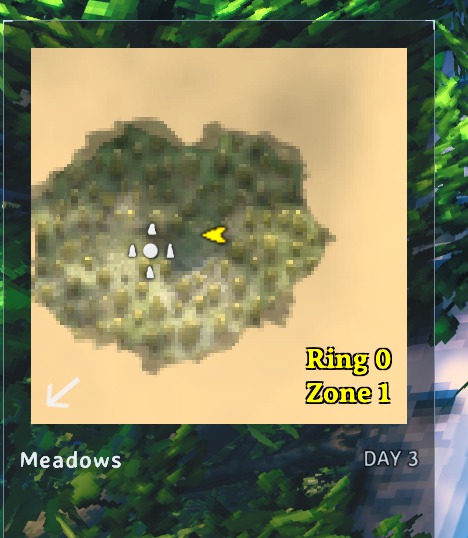 Biome, day/night, StarLevelSystem zone level and kills to the next level (needs VargheimZoneMeter on the server), ring line; status effects beside the minimap at half size; food row under the panel.
 [Skin] MapOffsetX/Y nudge it.
Windows and slots
Inventory, chests, crafting, skills, compendium, trophies, trader, build menu and the big map use the glass panel ([Windows]); item slots everywhere draw the Vargheim slot frame ([Slots]). Build-piece panel sits above the stamina bar; pickup messages wrap at the left margin.
Install
- Gale / r2modman / Thunderstore app: install like any mod; it comes with the Vargheim Season 2 profile (Gale Sync code (handed out in the Discord)).
- Manual: drop the package contents into
BepInEx/plugins/Ghost_Pack-VargheimHUD/— keep the PNG files next to the DLL (the art is loaded from beside the DLL).
Config
BepInEx/config/digi.vargheim.hud.cfg — [Skin] Enabled (false = vanilla back after a relaunch), BottomScale, StripBottom, OrbSize, QuickGap, FoodSpacing, StatusScale, MessageX/Y, KeyHintsX/Y, MapOffsetX/Y; [Compass]; [Windows]; [Slots].
Compatibility
AzuExtendedPlayerInventory (quick slots), VargheimPins (glyphs and player colours on the compass), VargheimZoneMeter (zone meter in the map panel), StarLevelSystem. Needs BepInEx 5.4.2351.
Changelog
- 0.3.2 — hammer menu: the cost panel ("Stone 0/5") now draws on top of the build window and pickup/chat text fades out while it is open; the build window's backdrop is swapped for the glass panel (wider sprite match; its sprite names are logged once so the list can be tightened).
- 0.3.1 — icon and README (no code change).
- 0.3.0 — compass strip (
[Compass]);[Skin] BottomScale(0.8) scales the bottom strip;[Skin] MapOffsetY/X(20) raise and tuck the minimap, its panel and the food row; StripBottom 40 / KeyHintsY 124 are the defaults. - 0.2.3 — the skin hides while the big map is open.
- 0.2.2 — logging out and rejoining without closing the game rebuilds the skin on the new HUD.
- 0.2.1 — item slot frames on the hotbar, quick-slot bar and inventory/chest grids (
[Slots]). - 0.2.0 — window backgrounds use the glass panel (
[Windows]). - 0.1.2 — art ships beside the DLL (Gale flattens packages); vanilla HUD if no art is found.
- 0.1.1 — quick slots line up with the hotbar; messages wrap at the left margin.
- 0.1.0 — first release.
Part of the Vargheim mod set by Ghost Pack. Source and runbook: https://github.com/dig1talwolve3/vargheim-mods · Questions and bug reports: the Ghost Pack Discord, #s2-bug-reports.
