
Please disclose if any significant portion of your mod was created using AI tools by adding the 'AI Generated' category. Failing to do so may result in the mod being removed from Thunderstore.

PingMark
Mark loot, creatures, and locations with named pings, colored outlines, and live distances. Share discoveries with your party.
| Last updated | a day ago |
| Total downloads | 33 |
| Total rating | 0 |
| Categories | Mods Misc Server-side Client-side Utility |
| Dependency string | JoksterCube-PingMark-1.0.4 |
| Dependants | 0 other packages depend on this package |
This mod requires the following mods to function

denikson-BepInExPack_Valheim
BepInEx pack for Valheim. Preconfigured with the correct entry point for mods and preferred defaults for the community.
Preferred version: 5.4.2351README
PingMark
Share discoveries and keep your party on target!
Spot useful loot, point out creatures, and see how far you have to travel. With PingMark, named pings, colored outlines, and live distances make it easier to explore and coordinate with friends.
📸 Screenshots
See what matters at a glance. Live distances, item names, and moving creature highlights keep your party's discoveries easy to find.
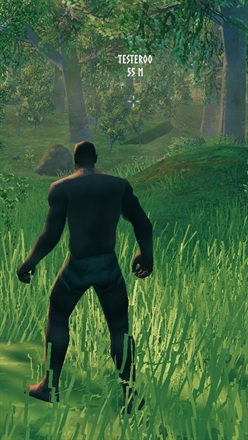
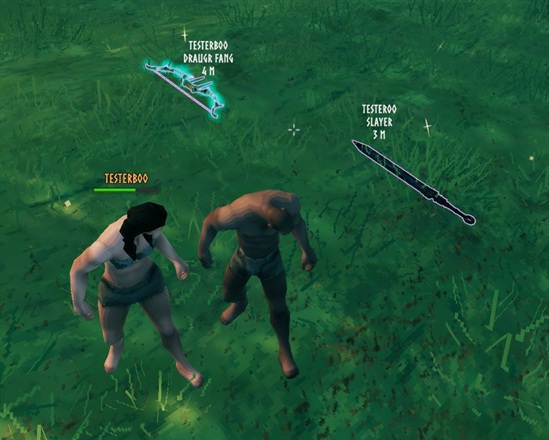
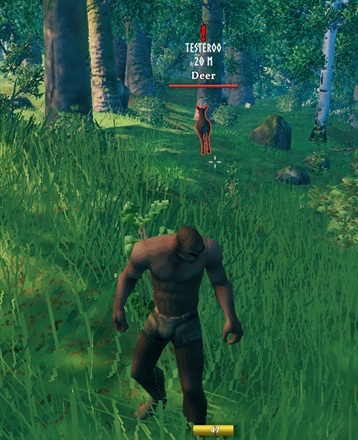
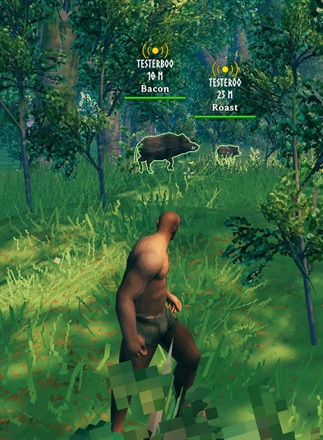
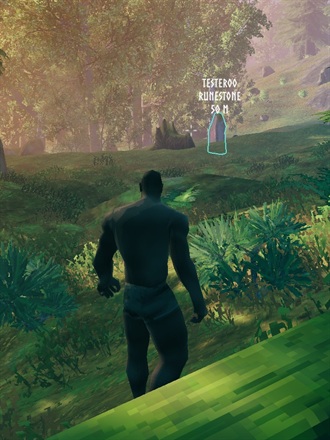
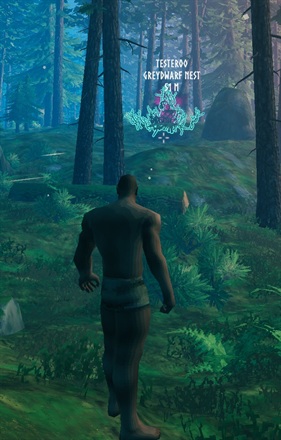
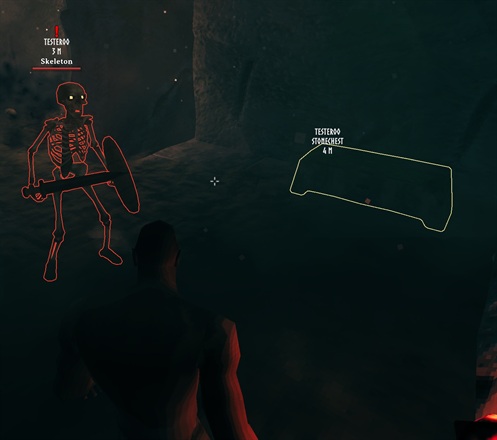
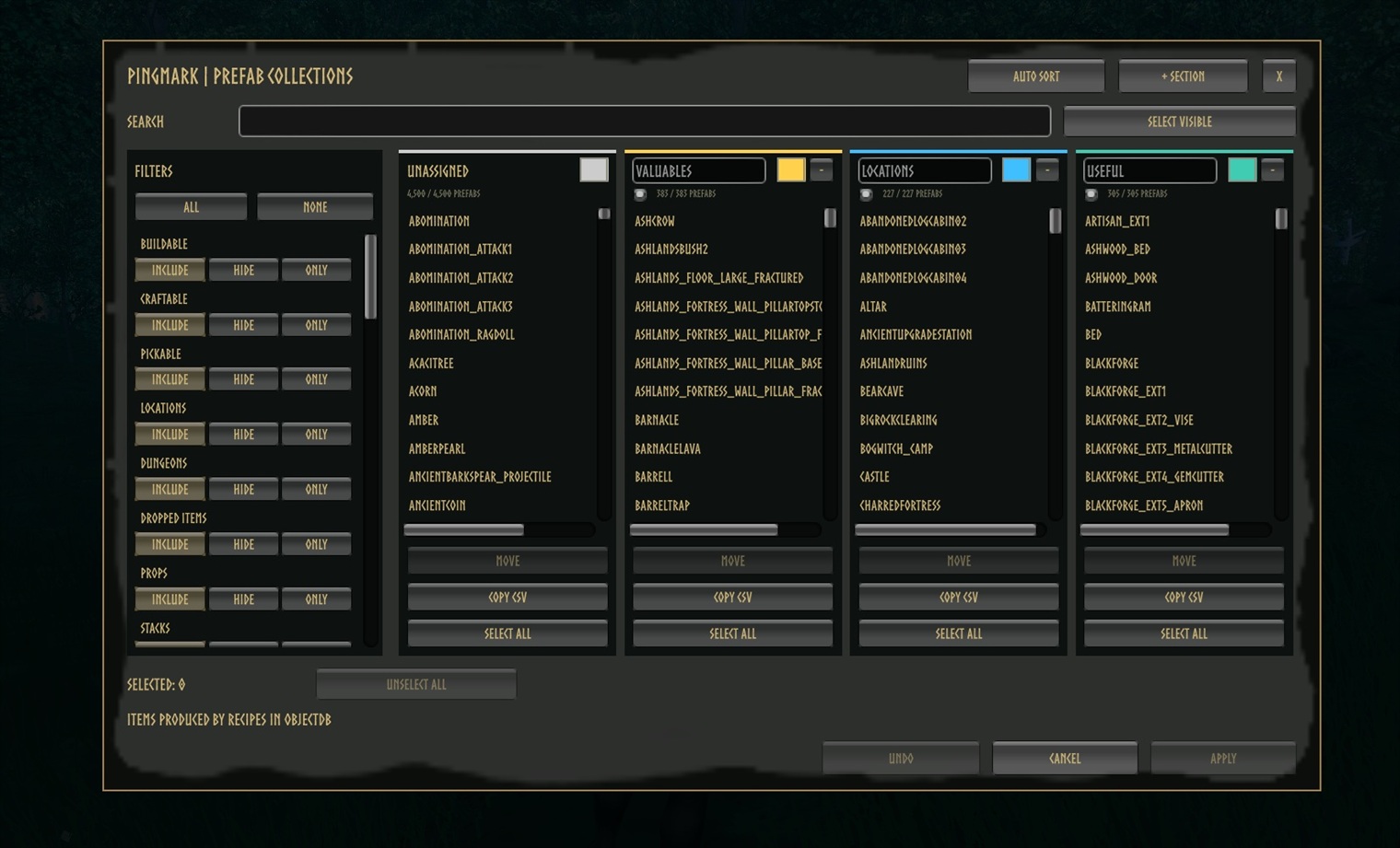
Choose what your party can mark. The admin menu organizes objects and locations into searchable, color-coded collections.
🧭 Features
- Distance at a glance: world and map ping labels show who pinged and your distance to the marker. World markers stay in place instead of floating upward.
- Aim and ping: press Z to mark what you are looking at, with a target name and outline for enabled objects.
- Find the loot: highlight dropped weapons, armor, and materials so your friends can spot them in the grass.
- Keep creatures in sight: temporarily highlight wildlife, enemies, and tamed animals with a moving nameplate, distance, and friendly or hostile outline.
- Mark teammates: optionally highlight moving players instead of their last position. Player pinging is off by default.
- Choose what matters: organize object and location IDs into colored collections, starting with Valuables, Locations, and Useful.
- Play your way: customize labels, colors, outlines, shortcuts, and ping range. Works in single-player and on servers without PingMark.
🎮 Controls
| Default Shortcut | Action |
|---|---|
| Z | Highlight the aimed creature or enabled player; otherwise ping the aimed location/object. |
| Right Ctrl + P | Toggle PingMark on or off. |
| Right Ctrl + Right Shift + P | Open the Prefab Collections admin menu. |
All shortcuts can be changed under 9 - Inputs.
🛠️ Admin Menu
The Prefab Collections menu lets you search and filter object IDs, move them between collections, and add, rename, enable, or remove sections. Each section uses a configurable palette color. Copy CSV exports the visible IDs.
Auto Sort rebuilds the collections as Valuables, Locations, and Useful, including eligible modded objects. It replaces custom sections after confirmation. Use Undo to restore changes, Apply to save, or Cancel to discard them.
When PingMark is installed on the server, only the host/server admins can open and configure this menu, even if Lock Configuration is off. Applied collections are saved on the server and synchronized to clients. In single-player or on a server without PingMark, the menu edits your local configuration.
⚙️ Installation
Install with a Thunderstore-compatible mod manager, or manually:
- Install BepInExPack Valheim.
- Extract PingMark into your game's
BepInEx/pluginsfolder. - Launch the game to generate
BepInEx/config/JoksterCube.PingMark.cfg.
Server installation is optional. Install it on the server to synchronize gameplay settings and centrally manage collections.
🧩 Compatibility
- Players with PingMark share named Z pings and moving highlights, even on a server without the mod.
- By default, Z pings reach PingMark players within 200 m of the sender, not the target. Set the broadcast distance to
0for unlimited range. Normal map pings remain global. - Players without PingMark can still join. By default, they receive ordinary location pings at any distance, not outlines or moving highlights. Disable Send Z Pings To Unmodded Players to stop these fallback pings.
- On a PingMark server, modded clients must use the same version as the server. This also applies when a modded player hosts the game.
- Each sender can highlight one creature or player at a time by default. A new highlight replaces that sender's oldest one, not another player's marks.
🔧 Configuration
Edit BepInEx/config/JoksterCube.PingMark.cfg. Defaults below apply to new entries; existing saved values are preserved.
Scope: Local affects your client only. Server is synchronized when the server runs PingMark; otherwise your local value applies. Lock Configuration restricts synchronized changes to admins when on. The admin menu remains admin-only on a PingMark server regardless of that lock.
1 - General
| Setting | Default | Scope | What It Does |
|---|---|---|---|
| Enabled | On | Local | Enable all PingMark features. |
| Lock Configuration | On | Server | Restrict synchronized configuration changes to server admins. |
| Refresh Interval | 0.25 s | Server | Recalculate visible distances every 0.05-5 seconds. |
| Ping Cooldown | 0 s | Server | Delay between Z location pings, 0-60 seconds; 0 disables the cooldown. |
| Z Ping Broadcast Distance | 200 m | Server | Sender-to-recipient range for Z pings/highlights, 0-10,000 m; 0 means unlimited. Map pings stay global. |
| Send Z Pings To Unmodded Players | On | Server | Send ordinary fallback pings to players without PingMark, regardless of distance. |
| Debug Ping Names | Off | Local | Show detected prefab, location, and other target names in a diagnostic message. |
2 - Ping Label
| Setting | Default | Scope | What It Does |
|---|---|---|---|
| Show Pinger Name | On | Local | Show who sent the ping or character highlight. |
| Show Distance | On | Local | Show your distance to pings and highlighted characters. |
| Empty Label Text | PING | Local | Fallback text when all label details are hidden. |
| Use Kilometers | On | Local | Display distances of at least 1,000 m in kilometers with two decimals. |
| Show Target Name | On | Local | Show the pinged object/location name, independently of the sender's preference. |
| Ping Color | White | Local | World ping label color when not matched to the outline. |
| Match Ping Text To Outline | Off | Local | Use the target's outline color for the ping label. |
3 - Camera Ping
| Setting | Default | Scope | What It Does |
|---|---|---|---|
| Max Distance | 500 m | Local | Maximum aiming range, 10-2,000 m; also used when nothing is hit. |
| Max Underwater Depth | 10 m | Local | Allowed target depth below water, 0-100 m; deeper targets ping the surface instead. |
4 - Ping Targets
| Setting | Default | Scope | What It Does |
|---|---|---|---|
| Prefab Sections | Valuables, Locations, Useful; all enabled | Server | Collection definitions: names, object/location IDs, enabled states, and palette color IDs. Manage these in the admin menu. |
| Enable Drops | On | Server | Name and outline dropped items. |
| Enable Gravestones | On | Server | Name and outline gravestones. |
| Enable Other Players | Off | Server | Highlight moving players instead of sending a ground ping. |
| Enable All Other | Off | Server | Name and outline models not covered by the configured collections or dedicated targets. |
5 - Outlines
| Setting | Default | Scope | What It Does |
|---|---|---|---|
| Enable Ping Outline | On | Local | Outline pinged objects and enabled players. |
| Outline Width | 2 px | Local | Shared outline width, 0-10 pixels; 0 hides outlines. Visible through obstacles. |
| Ping Drop Color | Purple; RGB 0.7, 0.5, 1 | Local | Dropped-item outline color. |
| Ping Gravestone/Player Color | Orange; RGB 1, 0.5, 0.15 | Local | Gravestone and player outline color. |
| Ping Anything Color | White | Local | Outline color for other models. |
| Hostile Outline Color | Red; RGB 0.9, 0.18, 0.12 | Local | Hostile creature outline color. |
| Ally Outline Color | Green; RGB 0.5, 0.85, 0.3 | Local | Friendly and tamed creature outline color. |
6 - Mob Highlight
| Setting | Default | Scope | What It Does |
|---|---|---|---|
| Enable Mob Highlight | On | Server | Allow temporary creature highlights and visible nameplates. |
| Enable Mob Outline | On | Local | Outline highlighted creatures. |
| Mob Highlight Duration | 10 s | Server | Creature highlight lifetime, 1-120 seconds. |
| Max Highlighted Mobs | 1 | Server | Shared creature/player highlight limit per sender, 1-20; replaces that sender's oldest mark. |
7 - Prefab Collections
Palette RGB values use a 0-1 scale; default colors are fully opaque. A section's color ID selects one of these local colors. Initially, Valuables uses 5, Locations 9, and Useful 8.
| Setting | Default | Scope | What It Does |
|---|---|---|---|
| Color 1 | Gray; RGB 0.8, 0.8, 0.8 | Local | Collection palette slot 1. |
| Color 2 | White; RGB 1, 1, 1 | Local | Collection palette slot 2. |
| Color 3 | Red; RGB 0.95, 0.25, 0.2 | Local | Collection palette slot 3. |
| Color 4 | Orange; RGB 1, 0.5, 0.15 | Local | Collection palette slot 4. |
| Color 5 | Gold; RGB 1, 0.82, 0.3 | Local | Collection palette slot 5. |
| Color 6 | Lime; RGB 0.65, 0.85, 0.25 | Local | Collection palette slot 6. |
| Color 7 | Green; RGB 0.25, 0.75, 0.35 | Local | Collection palette slot 7. |
| Color 8 | Teal; RGB 0.25, 0.8, 0.7 | Local | Collection palette slot 8. |
| Color 9 | Cyan; RGB 0.25, 0.75, 1 | Local | Collection palette slot 9. |
| Color 10 | Blue; RGB 0.35, 0.45, 1 | Local | Collection palette slot 10. |
| Color 11 | Violet; RGB 0.7, 0.45, 0.9 | Local | Collection palette slot 11. |
| Color 12 | Pink; RGB 1, 0.45, 0.7 | Local | Collection palette slot 12. |
| Unassigned Section Color ID | 1 | Local | Palette slot used by the menu's Unassigned section, 1-12. |
8 - Player Highlight
| Setting | Default | Scope | What It Does |
|---|---|---|---|
| Player Highlight Duration | 5 s | Server | Player highlight lifetime, 1-120 seconds; requires Enable Other Players. |
| Hide Own Player Outline | On | Server | Hide the outline on your own character when another player marks you; other recipients still see it. |
9 - Inputs
| Setting | Default | Scope | What It Does |
|---|---|---|---|
| Toggle Mod Shortcut | Right Ctrl + P | Local | Toggle all mod features. |
| Prefab Editor Shortcut | Right Ctrl + Right Shift + P | Local | Open the Prefab Collections admin menu when permitted. |
| Mob Highlight Shortcut | Z | Local | Aim to highlight a character or ping a location/object. |
| Enable Prefab Editor Shortcut | On | Local | Enable the admin-menu keyboard shortcut. |
💬 Feedback & Support
Report bugs or suggest improvements on GitHub.
Author: JoksterCube
Version: 1.0.4
License: MIT
