
Please disclose if any significant portion of your mod was created using AI tools by adding the 'AI Generated' category. Failing to do so may result in the mod being removed from Thunderstore.
Teleporter Overhead Text
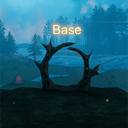
Shows floating 3D text above portals with their tag name.
| Date uploaded | 13 hours ago |
| Version | 1.0.0 |
| Download link | ModdedWolf-Teleporter_Overhead_Text-1.0.0.zip |
| Downloads | 51 |
| Dependency string | ModdedWolf-Teleporter_Overhead_Text-1.0.0 |
This mod requires the following mods to function

denikson-BepInExPack_Valheim
BepInEx pack for Valheim. Preconfigured and includes unstripped Unity DLLs.
Preferred version: 5.4.2202README
Teleporter Overhead Text
See portal tags from a distance — floating 3D text above each teleporter shows the name you set.
When you walk near a portal, Teleporter Overhead Text draws the tag in world space above the frame so you can tell where it goes without hovering. Labels update when you rename a portal, and they hide when walls block your view.
- Floating 3D text above wood and stone portals
- Color presets, custom RGB, and RGB cycle modes
- Line-of-sight and distance checks (no wall-hack names)
- Press Page Up to show or hide labels (changeable in config)
- Client-side only — no server install required
Questions or bugs? Discord
Install with r2modman (recommended)
- Install r2modman.
- Select Valheim and open the Default profile.
- Make sure BepInExPack Valheim is installed.
- Download this mod and click Install with Mod Manager,
or go to Settings → Import local mod and select the downloaded zip. - Click Start modded.
Manual install (BepInEx)
-
Install BepInExPack Valheim if you do not already have it.
-
Extract the zip.
-
Copy files into:
Valheim\BepInEx\plugins\ModdedWolf-Teleporter_Overhead_Text\The folder should contain
Teleporter_Overhead_Text.dll,manifest.json,icon.png, andREADME.md.Prefer the Thunderstore / r2modman package folder name (
ModdedWolf-Teleporter_Overhead_Text) so enable/disable in the mod manager controls the install. A bareplugins\Teleporter_Overhead_Text\folder is invisible to r2modman and will always load. -
Launch Valheim.
Configuration
After first launch, settings are saved here:
BepInEx\config\ModdedWolf.Teleporter_Overhead_Text.cfg
| Section | Key | Default | Description |
|---|---|---|---|
| General | Enabled | true | Master toggle for portal overhead labels |
| General | ToggleKey | PageUp | Hotkey to show/hide labels (None disables) |
| Appearance | HeightOffset | 2.5 | Minimum height above the portal origin (tall portals also clear the mesh top) |
| Appearance | Font | Arial | Builtin or installed OS font name |
| Appearance | Size | 0.12 | World-space character size |
| Appearance | FontSize | 64 | TextMesh glyph resolution |
| Appearance | ColorPreset | SoftGold | Custom, White, SoftGold, Red, Green, Blue, Yellow, Cyan, Magenta, Orange, RGBCycleSlow, RGBCycleMedium, RGBCycleFast |
| Appearance | ColorR / ColorG / ColorB / ColorA | 255 / 184 / 56 / 255 | RGB channels (0–255) when ColorPreset is Custom; alpha also used by RGB cycle presets |
| Visibility | MaxDistance | 40 | Hide labels farther than this many meters (0 = always show in range) |
| Visibility | RequireLineOfSight | true | Hide labels when a wall blocks view of the teleporter |
| Visibility | ShowWhenEmpty | false | Show (unnamed) on portals with no tag |
| Advanced | UpdateInterval | 0.5 | Seconds between tag text refreshes |
Notes
Labels sit above the portal mesh (including Portal Stone). With RequireLineOfSight on, names stay hidden through walls and closed gates. The ToggleKey only flips visibility while you play — it does not rewrite the Enabled config entry. Toggle is ignored while console, chat, or text input is focused.
CHANGELOG
Changelog
1.0.0
- Initial release — floating 3D portal tag labels with height, scale, color, and distance config.
