
Please disclose if any significant portion of your mod was created using AI tools by adding the 'AI Generated' category. Failing to do so may result in the mod being removed from Thunderstore.

DynamicStorageForge
Dynamic forge storage that grows as it fills, with server-synced capacities, presets, multiple ingot layouts, and per-piece visual customization.
| Date uploaded | 8 hours ago |
| Version | 1.0.1 |
| Download link | Muji-DynamicStorageForge-1.0.1.zip |
| Downloads | 66 |
| Dependency string | Muji-DynamicStorageForge-1.0.1 |
This mod requires the following mods to function

denikson-BepInExPack_Valheim
BepInEx pack for Valheim. Preconfigured with the correct entry point for mods and preferred defaults for the community.
Preferred version: 5.4.2350
ValheimModding-Jotunn
Jötunn (/ˈjɔːtʊn/, 'giant'), the Valheim Library was created with the goal of making the lives of mod developers easier. It enables you to create mods for Valheim using an abstracted API so you can focus on the actual content creation.
Preferred version: 2.30.1README

Bug reports, feature requests and new DynamicStorage ideas are very welcome. DynamicStorage isn't limited to piles and containers — if you've got an idea for a cool decorative but practical Valheim object that dynamically stores, displays, changes or does something useful in-world, come pitch it. If it fits the theme, there's a good chance I'll want to build it.
DynamicStorage Forge
Functional forge storage that visibly grows as you fill it.
DynamicStorage Forge adds dedicated storage piles and metal stacks for Valheim's ores, scraps and refined metals.
Each piece behaves as real storage restricted to its matching resource, while its appearance changes as materials are added or removed. Instead of hiding everything inside ordinary chests, your forge stock can become part of the workshop itself.
Ore piles and metal stacks have separate server-controlled capacities, while appearance and visual-fill settings are saved individually to each placed piece.
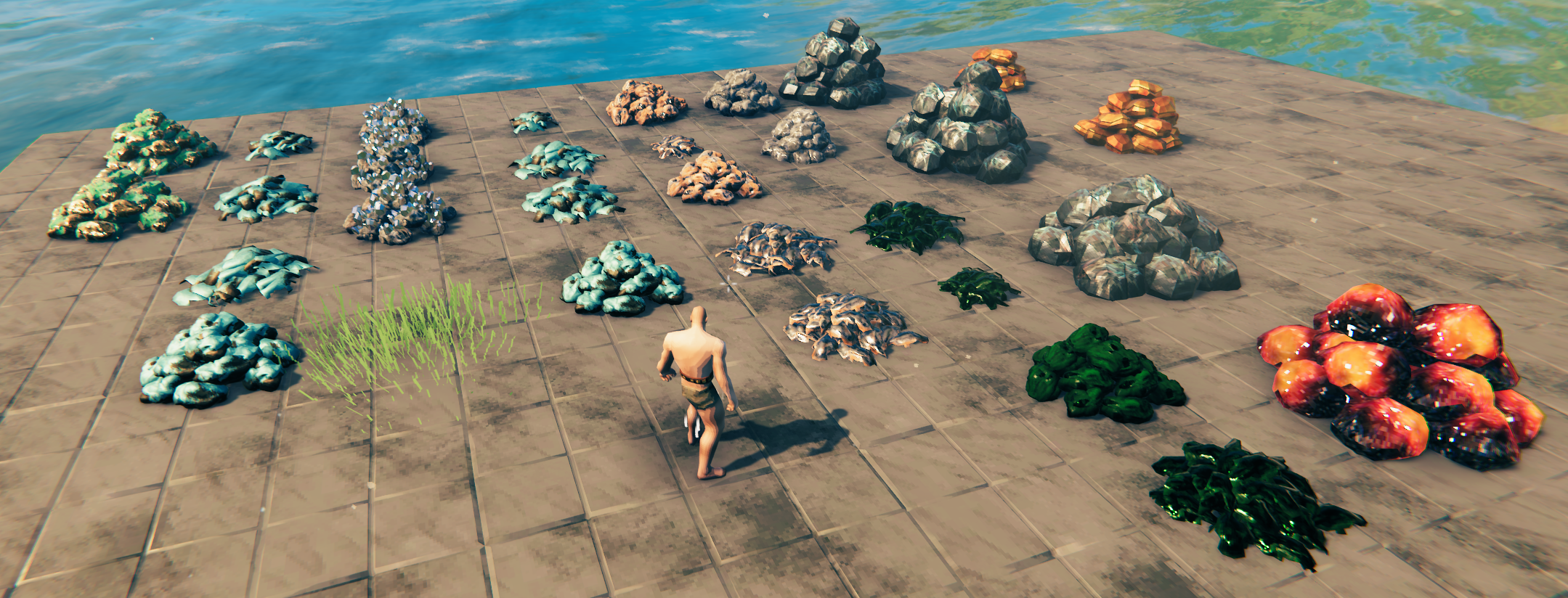
Dynamic Visual Filling
The core idea is simple:
Your forge storage should visibly grow as you fill it.
Ore piles progress through visual stages as more inventory slots are occupied.
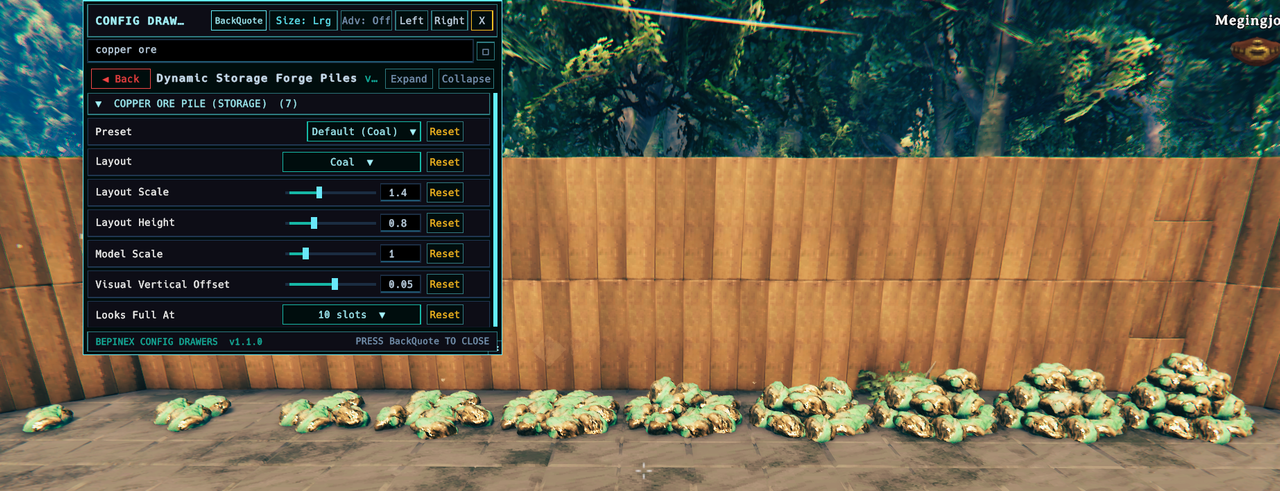
By default, ore piles use:
- Looks Full At: Match Storage Capacity
- Ore Pile Capacity: 10 / 20 / 40 / 60 slots
This means the visual progression automatically scales with the server-selected capacity.
You can also choose a fixed threshold or Always Full for a static appearance.
Metal stacks can fill using either Occupied Slots or Stored Bar Count, allowing their visible size to track either inventory usage or the actual number of stored bars.
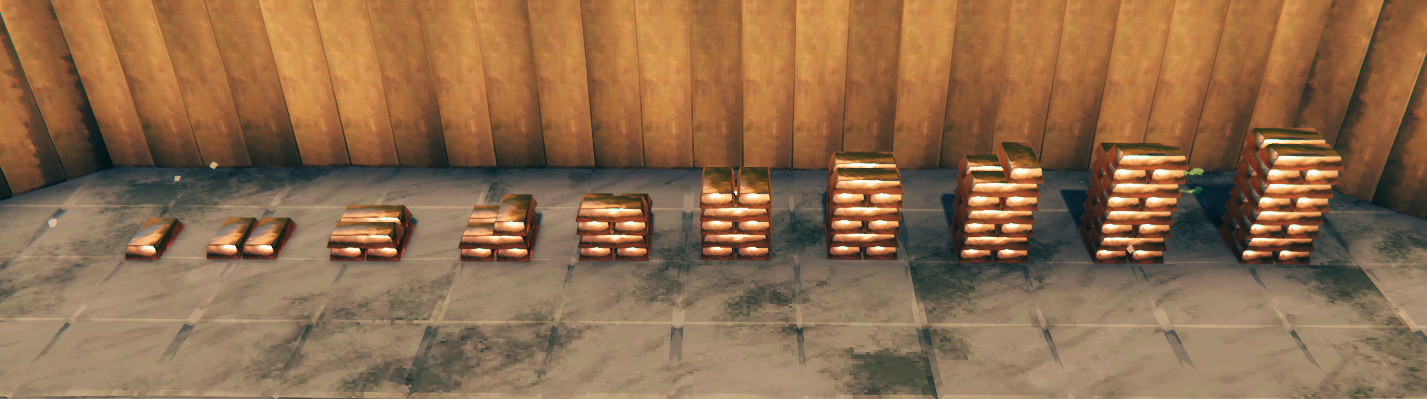
Visual fullness is separate from actual storage capacity, so large-capacity storage does not need to generate an excessive number of visible objects.
Other DynamicStorage Mods
DynamicStorage Forge is part of a growing collection of mods focused on turning stored resources into functional, visible parts of your base.
 |
DynamicStorage Piles — The original DynamicStorage mod, covering wood and stone piles. |
 |
DynamicStorage Materials — Dynamic storage for common crafting materials and resources. |
 |
DynamicStorage Mead Hall — Themed mead storage with dynamic labels and Quick Grab. |
 |
DynamicStorage Ammunition Piles — Dynamic Arrow, Bolt and Ballista Missile Barrels that visibly fill as ammunition is stored. |
| DynamicStorage Animals | Development in progress. |
| DynamicStorage Food Hall | Development in progress. |
Recommended: BepInEx ConfigDrawers
BepInEx ConfigDrawers by Vapok is not required, but is highly recommended if you want to use DynamicStorage Forge's appearance controls.
Forge contains separate configuration sections for its piles and metal stacks, and ConfigDrawers makes those settings much easier to browse and adjust in-game.
It is particularly useful for:
- Searching configuration options
- Collapsing sections you are not currently using
- Adjusting appearance values while in-game
- Quickly finding settings for a particular resource
Main Features
- 19 dedicated storage pieces
- 10 ore, scrap and resource piles
- 9 refined metal stacks
- Each piece accepts only its matching resource
- Pieces unlock when their corresponding stored resource is discovered
- Dynamic visual filling for piles and metal stacks
- Separate server-synchronised capacities for piles and stacks
- Choose between 10 / 20 / 40 / 60 slots
- Safe storage downsizing protection
- Configurable Looks Full At behaviour
- Metal-stack filling based on occupied slots or actual stored bar count
- Multiple generated metal-stack layouts and dimensions
- Selectable pile layouts, models, materials and finishes
- Appearance settings saved individually per placed piece
- Built-in Pile Appearance Editor for changing existing storage
- Server-controlled visual-bar safety limit
- Optional client-side Hammer menu hiding
- Incompatible items are safely rejected
Included Forge Storage
Ore, Scrap & Resource Piles
- Copper Ore
- Copper Scrap
- Tin Ore
- Bronze Scrap
- Iron Ore
- Iron Scrap
- Silver Ore
- Black Metal Scrap
- Flametal Ore
- Petrified Tissue
Metal Stacks
- Copper
- Tin
- Bronze
- Iron
- Silver
- Black Metal
- Flametal
- Ancient Metal
- Bloodgold
Flint, Obsidian and many other crafting materials are covered separately by DynamicStorage Materials.
Built for Customisation
Each ore, scrap and resource pile has its own appearance controls, including:
- Preset
- Layout
- Layout Scale
- Layout Height
- Model
- Model Scale
- Material
- Finish
- Visual Vertical Offset
- Looks Full At
Supported layouts, models and materials can be mixed and matched rather than being locked to one hard-coded pile appearance.
Configuration values act as placement templates.
Once a piece is placed, its appearance is saved directly to that individual object.
This means two Copper Ore piles can use completely different layouts or scales while still sharing the same server-controlled storage capacity.
Metal Stack Styles
Metal storage uses generated layouts rather than one fixed stack model.
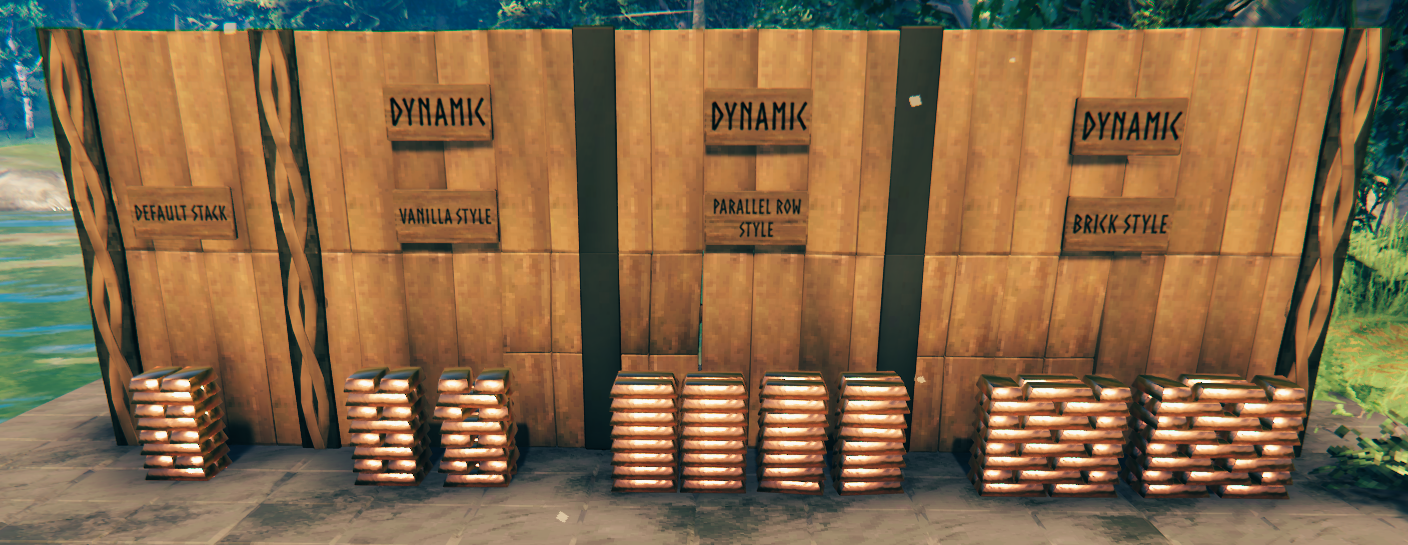
Available arrangement families include:
- Vanilla Cross-Stacked
- Parallel Rows
- Brick Stacked
- Brick Stacked Sideways
- Misaligned variants for a less uniform hand-stacked look
Each metal stack can also configure:
- Bars Across
- Bars Deep
- Layers High
- Fill Based On
- Looks Full At
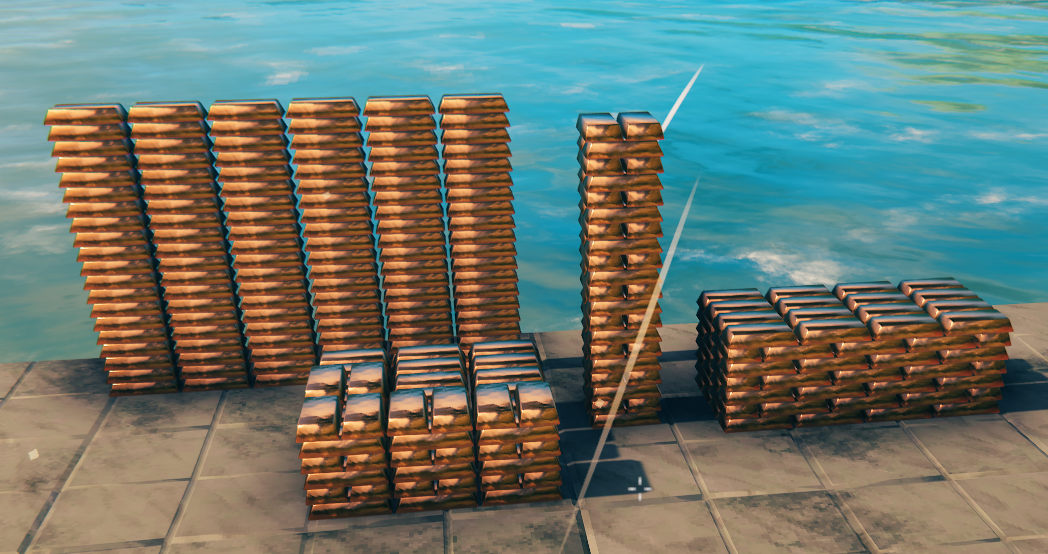
The generated visual layout is independent from the underlying inventory capacity, so you can change the shape of a stack without changing how much it stores.
Pile Appearance Editor
Changed your mind after placing something?
Enable:
Appearance Editor → Pile Appearance Editor
Then:
- Change the appearance settings for that resource.
- Look at an existing DynamicStorage Forge piece.
- Press R.
- The current configuration is saved to that individual placed piece.
Existing pieces are not automatically restyled when global configuration changes.
Server Configuration
Ore piles and metal stacks have separate server-synchronised capacity settings.
| Setting | Default | Allowed Values | Description |
|---|---|---|---|
| Ore Pile Slots | 20 | 10 / 20 / 40 / 60 | Capacity used by ore, scrap and resource piles. |
| Ingot Stack Slots | 20 | 10 / 20 / 40 / 60 | Capacity used by metal stacks. |
| Maximum Visual Bars Per Stack | 120 | 10 - 400 | Safety limit for generated bar visuals. Does not change storage capacity. |
Storage capacity and the visual-bar safety limit are controlled by the server.
Appearance settings remain separate and are saved on each placed object.
Storage Safety
Reducing storage capacity will not delete existing items.
If a placed piece currently needs more inventory space than the new limit allows, it temporarily retains enough room for its existing contents.
Once enough items are removed, it can safely return to the configured capacity.
Incompatible items are rejected rather than being allowed into the wrong Forge storage piece.
Multiplayer
DynamicStorage Forge is designed with multiplayer use in mind.
Players joining a world containing Forge storage should have the mod installed.
Gameplay-affecting capacity settings are server-controlled, while appearance information is stored on the placed object so players see the intended layout and visual-fill behaviour.
Build Menu Control
DynamicStorage Forge adds a number of Hammer build pieces.
The client-local Show Forge Build Pieces setting can hide them from your Hammer menu without unregistering the prefabs or affecting existing placed storage.
Inspiration
DynamicStorage Forge is a ground-up expansion of the older dynamic ingot-storage concept.
The original IngotStacks by MySoloTeam and its integration with DynamicStorage Piles helped inspire the project.
Forge was rebuilt around modern Valheim resources, server-synchronised storage, per-piece appearance saving, dynamic layouts and deeper visual customisation.
Requirements
DynamicStorage Forge requires:
- BepInExPack Valheim
- Jötunn
Recommended
ConfigDrawers is optional, but recommended if you want an easier way to browse and adjust Forge's appearance settings in-game.
Installation
Thunderstore / r2modman
Install DynamicStorage Forge through your preferred Thunderstore-compatible mod manager.
Required dependencies should install automatically.
Manual Installation
Install BepInEx and Jötunn, then place the plugin at:
BepInEx/plugins/DynamicStorageForge/
└── DynamicStorageForge.dll
Compatibility / Updating
Do not install multiple versions of DynamicStorageForge.dll at the same time.
When updating, replace the previous DLL with the newer version.
The internal plugin identity, prefab names and saved-data identities are intentionally kept stable so existing Forge storage can survive supported updates.
Questions, bugs, feature requests or ideas for something new and dynamic? Join Muji's Mods Discord.
CHANGELOG
Changelog
1.0.1
- Fixed a potential item-loss issue when an incompatible item is dragged directly onto an occupied Forge storage slot.
- Removed the obsolete inventory-content change notification when only a storage grid's dimensions change, preserving the existing 60-slot preload and safe downsizing behaviour.
- Made ore/resource pile
Looks Full Atpart of preset identity and application; default pile presets now restoreMatch Storage Capacity, and changing the value marks the preset asCustom. - Corrected visual-stage rounding so the final/full stage appears only when the configured
Looks Full Atthreshold is actually reached. - Unified runtime, appearance-editor and mesh-debug visible-stage calculations while preserving one visible stage on empty Forge storage pieces.
1.0.0
Initial public release of DynamicStorage Forge.
- Added dynamic ore, scrap and metal storage that visually grows as it fills.
- Added separate server-synchronised 10 / 20 / 40 / 60 slot capacities for ore piles and ingot stacks.
- Added per-piece saved appearance settings and configurable visual fill thresholds.
- Added resource-specific visual presets with interchangeable supported layouts, models and materials.
- Added generated ingot layouts including Cross-Stacked, Parallel Rows, Brick Stacked and misaligned variants.
- Added configurable ingot width, depth, layer count and fill basis.
- Added the Pile Appearance Editor for applying current appearance settings to existing storage.
- Added storage downsizing protection.
- Added a server-controlled visual-bar safety limit.
- Added a client-local option to hide Forge build pieces from the Hammer menu.
