
Please disclose if any significant portion of your mod was created using AI tools by adding the 'AI Generated' category. Failing to do so may result in the mod being removed from Thunderstore.

DynamicStorageForge
Dynamic forge storage that grows as it fills, with server-synced capacities, presets, multiple ingot layouts, and per-piece visual customization.
| Last updated | a day ago |
| Total downloads | 67 |
| Total rating | 0 |
| Categories | Mods Skins Crafting Server-side Client-side Utility Building |
| Dependency string | Muji-DynamicStorageForge-1.0.0 |
| Dependants | 0 other packages depend on this package |
This mod requires the following mods to function

denikson-BepInExPack_Valheim
BepInEx pack for Valheim. Preconfigured with the correct entry point for mods and preferred defaults for the community.
Preferred version: 5.4.2350
ValheimModding-Jotunn
Jötunn (/ˈjɔːtʊn/, 'giant'), the Valheim Library was created with the goal of making the lives of mod developers easier. It enables you to create mods for Valheim using an abstracted API so you can focus on the actual content creation.
Preferred version: 2.30.1README
Dynamic Storage Forge
Fully configurable dynamic storage for Valheim's ores, scraps and metals.
Dynamic visual filling • Server-synchronised storage capacities • Fully customisable ore piles and ingot stacks
Join Muji's Mods Discord
Bug reports, feature requests, preset sharing and feedback are all welcome.
Dynamic Storage Forge adds functional ore piles and ingot stacks that physically grow as their storage fills.
Instead of hiding all of your forge materials inside another chest, ores, scraps and metals can be stored in visible piles and stacks that change as resources are added and removed.
Storage capacity is separately configurable and server-synchronised, while the appearance of each placed pile can be customised and saved individually.
Main Features
- Separate server-synchronised capacities for ore piles and ingot stacks
- Choose between 10 / 20 / 40 / 60 storage slots
- Dynamic visuals that grow as resources are stored
- Uses the actual Valheim resource models and materials
- Mix and match supported models, layouts and materials
- Curated visual presets for each resource — only a small starter selection for now. If you make a great-looking setup, share it on the Discord and I may add the best community designs as built-in presets.
- Multiple configurable ingot stacking styles
- Custom stack width, depth and height
- Per-pile visual fill thresholds
- Fill ingot stacks using either occupied inventory slots or actual stored bar count
- Individual appearances saved directly to each placed pile
- Built-in Pile Appearance Editor for changing existing storage
- Server-controlled visual safety limit for large ingot stacks
- Storage downsizing protection
- Optional client-side Hammer menu hiding
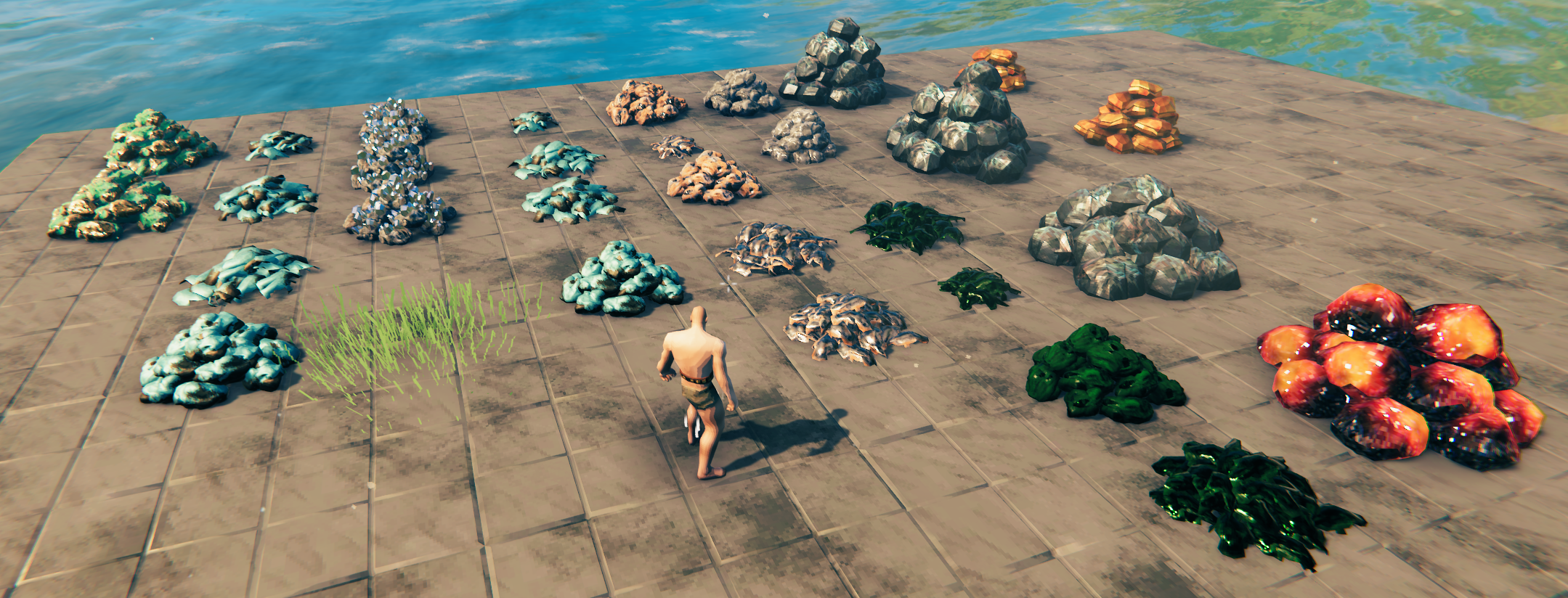
More Muji mods using this framework coming soon
Over the next few days I plan to expand this same framework to cover many more useful Valheim material stacks, with the same dynamic filling, configurable storage and appearance-control systems.
Dynamic Visual Filling
The core idea behind Dynamic Storage Forge is simple:
Your storage should visibly grow as you fill it.
Ore piles build up naturally as more resources are stored, while ingot stacks reveal additional bars based on their current contents.
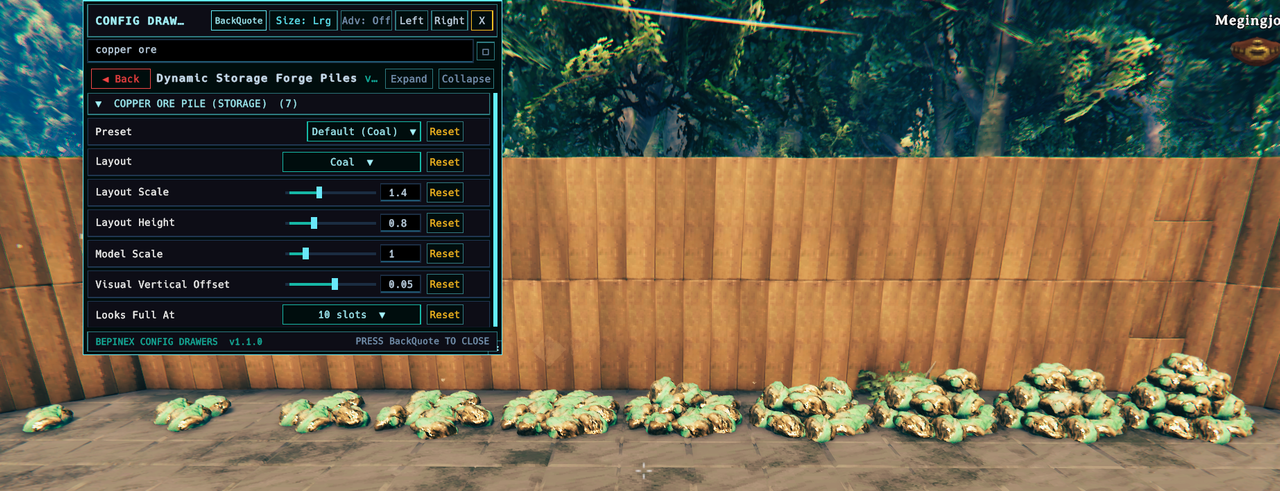
The example above shows Copper Ore storage progressing through different fill levels using its normal appearance settings.
Visual fullness is deliberately separate from actual inventory capacity.
Each pile has a configurable Looks Full At setting, allowing you to decide how quickly the visible pile reaches its maximum size.
For ingot stacks, visual fill can be calculated using either:
- Occupied Slots
- Stored Bar Count
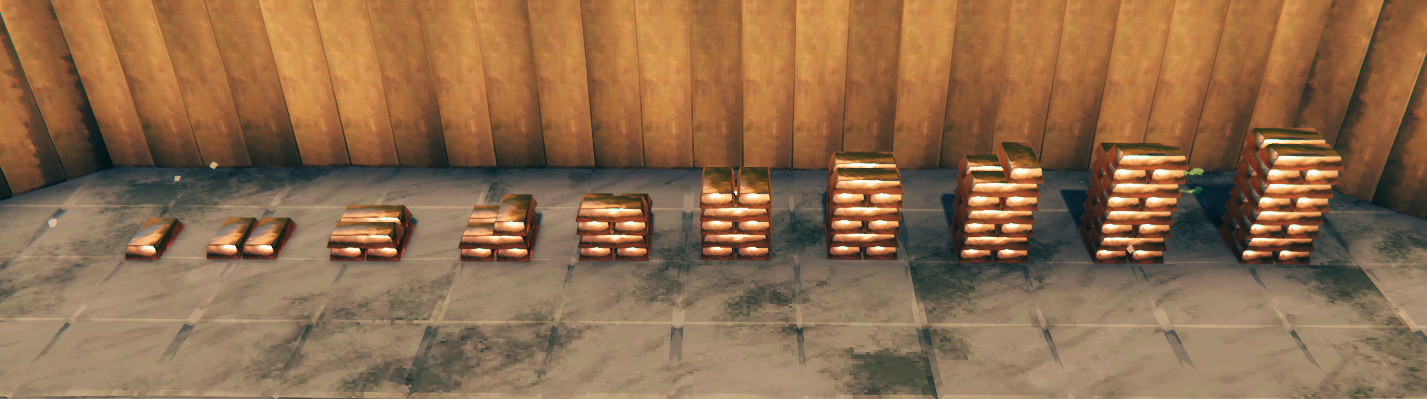
A single visual bar can represent more than one stored item, allowing large-capacity storage without requiring hundreds of rendered objects.
The result is storage that gives you a useful visual indication of how much material you have while still behaving like a normal container.
Recommended: BepInEx ConfigDrawers
BepInEx ConfigDrawers by Vapok is not required, but is highly recommended when using Dynamic Storage Forge.
Dynamic Storage Forge contains a large number of appearance options, and ConfigDrawers provides a much cleaner in-game interface for browsing and adjusting them.
It is particularly useful for:
- Searching for individual resource settings
- Changing appearance values while in-game
- Collapsing sections you are not currently using
- Quickly identifying ServerSync-controlled settings
Built for Customisation
Dynamic filling is the foundation of the mod, but the appearance of that storage is deliberately not fixed.
Your storage should look the way you want it to look.
Want a compact Copper pile inside your workshop but a much larger stockpile outside your smeltery?
You can do that.
Prefer a different supported model or pile layout for a particular resource?
You can do that too.
Each ore, scrap and resource pile has its own appearance controls, including:
- Preset
- Layout
- Layout Scale
- Layout Height
- Model
- Model Scale
- Material
- Finish
- Visual Vertical Offset
- Looks Full At
Models, layouts and materials are configurable independently.
That means you are not locked into one hard-coded pile mesh for each resource. Supported layouts, resource models and materials can be mixed and matched to create very different storage styles.
The system uses the actual Valheim resource models and materials wherever possible rather than simply recolouring one generic pile.
Presets
Each resource includes curated appearance presets intended to provide good-looking starting points without requiring manual tuning.
There are only a small number of presets at launch because I would rather add good designs than fill the menu with arbitrary variations.
If you create something that looks great, please post:
- A screenshot
- The resource
- The appearance settings you used
on the Muji's Mods Discord.
I would like to add the best community-created designs as built-in presets in future updates.
Included Forge Storage
Ore, Scrap & Resource Piles
- Copper Ore
- Copper Scrap
- Tin Ore
- Bronze Scrap
- Iron Ore
- Iron Scrap
- Silver Ore
- Black Metal Scrap
- Flametal Ore
- Petrified Tissue
Ingot & Metal Stacks
- Copper
- Tin
- Bronze
- Iron
- Silver
- Black Metal
- Flametal
- Bloodgold
Multiple Ingot Stack Styles
Ingot storage uses a generated layout system rather than one fixed stack model.
Available arrangement styles include:
- Vanilla Cross-Stacked
- Parallel Rows
- Brick Stacked
- Brick Stacked Sideways
- Misaligned variants for a more naturally hand-stacked appearance
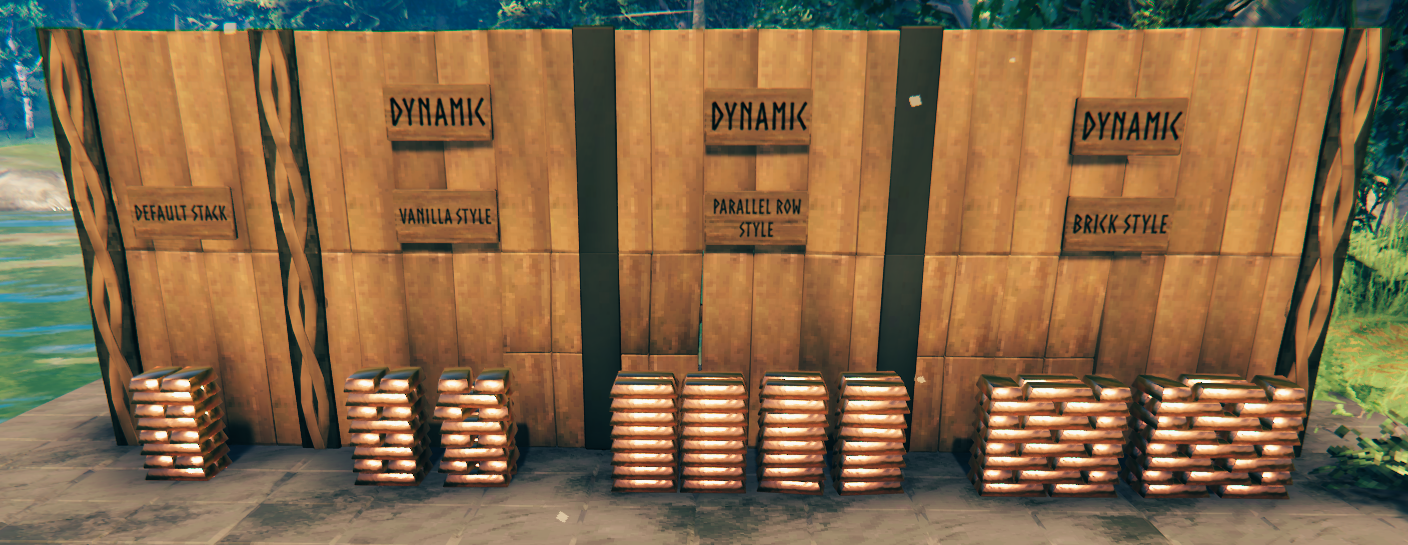
The default layout is only the starting point.
Each ingot stack also provides controls for:
- Bars Across
- Bars Deep
- Layers High
- Fill Based On
- Looks Full At
This allows anything from a small workshop stack to long warehouse rows, compact towers or broad brick-style stockpiles.
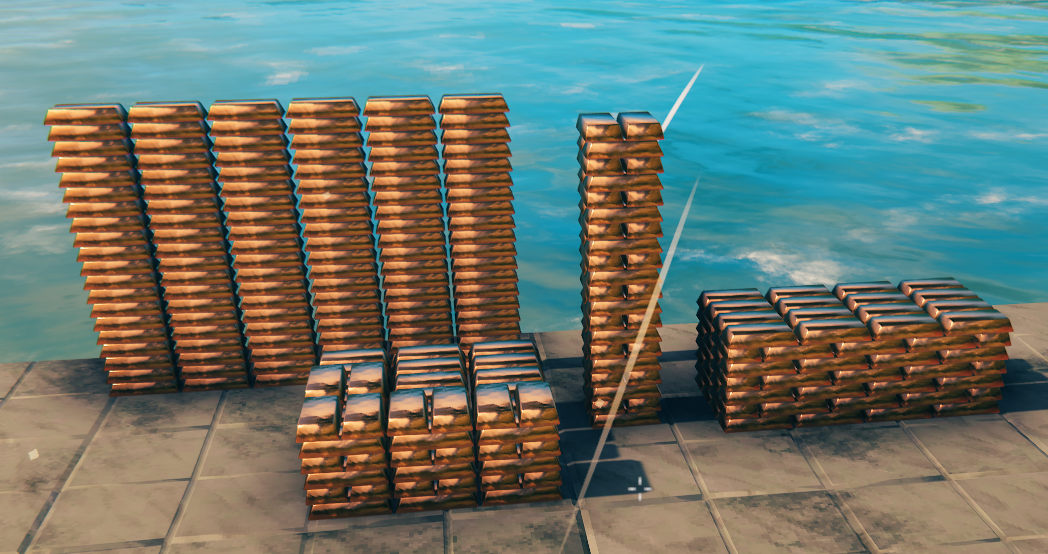
The generated visual layout is independent from the underlying inventory capacity.
This means you can choose the shape and style you want without having to change how much the container actually holds.
Pile Appearance Editor
Changed your mind after building something?
You do not need to destroy the storage and place it again.
Dynamic Storage Forge includes a built-in Pile Appearance Editor.
- Change the appearance settings for the resource.
- Look at an existing Dynamic Storage Forge pile.
- Press R.
- The current appearance settings are applied to that individual piece.
Appearance data is stored directly on the placed storage object.
This means two Copper Ore piles can have completely different:
- Models
- Layouts
- Scales
- Materials
- Finishes
- Fill thresholds
while both still function as Copper Ore storage.
Your configuration therefore acts as a template for new placements, rather than permanently forcing every pile of that resource to look identical.
Storage Capacity
Ore piles and ingot stacks have separate storage-capacity settings.
Available capacities are:
- 10 slots
- 20 slots
- 40 slots
- 60 slots
These settings are server-synchronised and server-authoritative.
Clients cannot simply increase their own storage capacity beyond the value selected by the server.
Storage capacity is also deliberately separate from visual size.
For example, a 60-slot ore pile does not need to become enormous before it looks full. You can independently choose the pile's appearance and its Looks Full At threshold.
Downsizing Protection
Reducing server storage capacity will not simply throw away items from existing containers.
If an existing container currently requires more inventory space than the newly selected capacity, it temporarily retains the larger inventory size needed to hold its contents.
As items are removed and the contents fit inside the new limit, the container can return to the configured capacity.
Server-Controlled Visual Safety
Custom ingot stacks can potentially contain a large number of visible bars.
To prevent extreme configurations from generating excessive numbers of meshes, the server also controls:
Maximum Visual Bars Per Stack
The default limit is 120 visual bars per placed stack.
This setting does not affect actual storage capacity.
It only controls the maximum number of generated ingot visuals used to represent one stack.
Multiplayer
Dynamic Storage Forge is designed with multiplayer use in mind.
Players joining a world containing Forge storage should have the mod installed.
Gameplay-affecting storage settings are controlled by the server, while appearance information is saved directly to each placed storage piece.
This means players see the intended pile layout and fill behaviour rather than every client applying their own local appearance settings to the same storage.
Client-Side Build Menu Control
Dynamic Storage Forge adds a number of new Hammer build pieces.
If you prefer a cleaner Hammer menu once you have built the storage you need, the client-local:
Show Forge Build Pieces
setting can hide the Forge entries without unregistering the prefabs or affecting any existing placed storage.
This setting is deliberately not ServerSynced, so each player can choose their own preference.
Inspiration & Previous Mods
Dynamic Storage Forge is a ground-up rewrite and major expansion of the old dynamic storage pile / ingot stack concept.
The original IngotStacks by MySoloTeam and its integration with Dynamic Storage Piles provided much of the inspiration for this project.
Rather than simply restoring the old functionality, Dynamic Storage Forge was rebuilt around deeper visual control, modern Valheim resources and multiplayer-safe configuration.
The new framework adds features including:
- Server-synchronised storage capacity
- Separate ore and ingot capacities
- Storage downsizing protection
- Actual resource models and materials
- Interchangeable supported models and layouts
- Resource-specific presets
- Per-piece saved appearances
- Adjustable model and layout scaling
- Material and finish controls
- Multiple generated ingot layouts
- Adjustable stack dimensions
- Misaligned / hand-stacked variants
- Occupied-slot or stored-item visual filling
- Configurable visual fullness thresholds
- Built-in appearance editing for existing storage
- Server-controlled visual-bar safety limits
The goal is not simply to bring the old functionality back.
It is to make forge storage something that can be properly integrated into the look and layout of your base.
Server Configuration
Dynamic Storage Forge contains a small number of ServerSync-controlled settings.
On a dedicated server, install Dynamic Storage Forge and its dependencies and start the server once.
BepInEx will automatically generate:
BepInEx/config/com.modularvalheim.DynamicStorageForge.cfg
For manual server configuration:
- Start the server once so the configuration file is generated.
- Stop the server.
- Edit the
.cfgfile. - Start the server again.
The values configured by the server are authoritative and synchronised to connecting clients.
Server-Synchronised Settings
| Setting | Default | Allowed Values | Description |
|---|---|---|---|
| Ore Pile Slots | 20 | 10 / 20 / 40 / 60 | Inventory capacity used by ore, scrap and resource piles. |
| Ingot Stack Slots | 20 | 10 / 20 / 40 / 60 | Inventory capacity used by ingot and metal stacks. |
| Maximum Visual Bars Per Stack | 120 | 10 - 400 | Safety limit for generated ingot/bar visuals on a single placed stack. Does not change storage capacity. |
Appearance Settings
Appearance settings are not global server storage settings.
They act as templates when placing new piles or when using the Pile Appearance Editor.
Once an appearance is applied, it is saved to that individual placed piece.
This allows multiple storage pieces for the same resource to use completely different appearances while still obeying the same server storage rules.
Requirements
Dynamic Storage Forge requires:
- BepInExPack Valheim
- Jötunn
Recommended
ConfigDrawers is optional, but strongly recommended if you intend to make significant use of the appearance customisation system.
Installation
Thunderstore / r2modman
Install Dynamic Storage Forge through your preferred Thunderstore-compatible mod manager.
Required dependencies should be installed automatically.
Manual Installation
Install BepInEx and Jötunn, then place:
DynamicStorageForge.dll
inside:
BepInEx/plugins
Compatibility / Updating
Do not install multiple versions of DynamicStorageForge.dll at the same time.
When updating, replace the previous DLL with the newer version.
The internal plugin identity, prefab names and saved-data identities are intentionally kept stable to preserve existing Dynamic Storage Forge storage across supported updates.
Version 1.0.0
Initial public release of Dynamic Storage Forge.
Version 1.0 focuses on providing a complete forge-storage framework with:
- Dynamic visual filling
- Deep visual customisation
- Multiple ingot layout styles
- Server-synchronised storage capacities
- Per-piece saved appearances
- Multiplayer-safe configuration
Feedback & Community
Found a bug, have a feature request, or made a pile setup that deserves to become an official preset?
Join Muji's Mods Discord
Please share bug reports, feature ideas, screenshots and your best pile configurations.
More Muji mods using this same framework are coming soon, covering many more useful Valheim material stacks.
