
Please disclose if any significant portion of your mod was created using AI tools by adding the 'AI Generated' category. Failing to do so may result in the mod being removed from Thunderstore.

XPortalNetworksTribesPins
Select portal destination from a list of existing portals with custom networks with private portal and tribe restrictions. No more tag pairing, and no more portal hubs! Also manages map pins for the portals a player is allowed to use.
| Date uploaded | 4 days ago |
| Version | 3.1.0 |
| Download link | NorCal_Nerds-XPortalNetworksTribesPins-3.1.0.zip |
| Downloads | 33 |
| Dependency string | NorCal_Nerds-XPortalNetworksTribesPins-3.1.0 |
This mod requires the following mods to function

denikson-BepInExPack_Valheim
BepInEx pack for Valheim. Preconfigured with the correct entry point for mods and preferred defaults for the community.
Preferred version: 5.4.2350
ValheimModding-Jotunn
Jötunn (/ˈjɔːtʊn/, 'giant'), the Valheim Library was created with the goal of making the lives of mod developers easier. It enables you to create mods for Valheim using an abstracted API so you can focus on the actual content creation.
Preferred version: 2.30.2README
🌀XPortal Networks Tribes Pins
This is a re-work of Vapok's XPortalNetworks with map pin features inspired by buldosik's XPortalSharedMapPins. This mod combines the features of both while adding support for private Tribe portal networks! Adding a new layer of portal privacy on multiplayer servers!
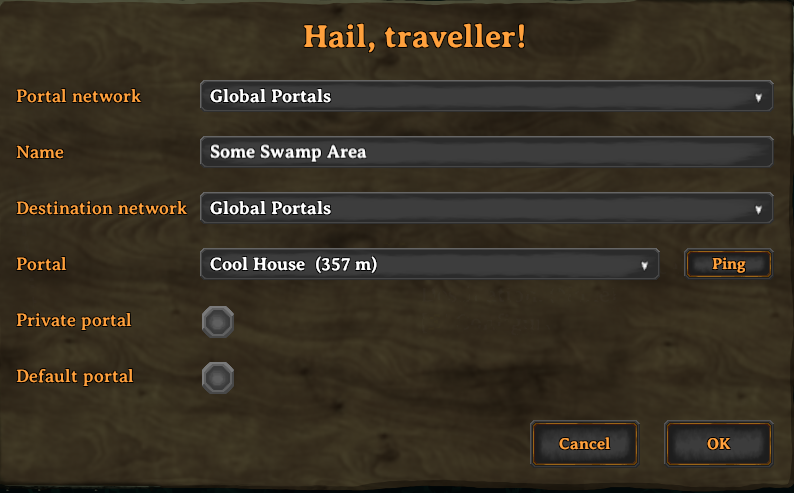
Portal Configuration UI
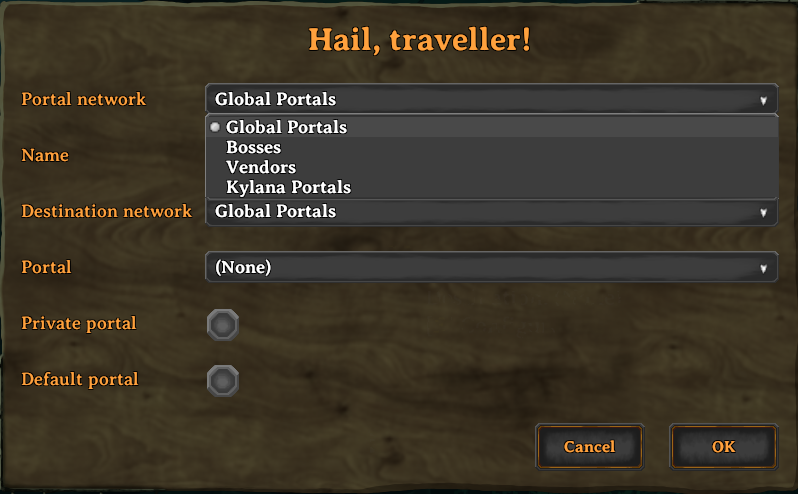
Network Selection Window
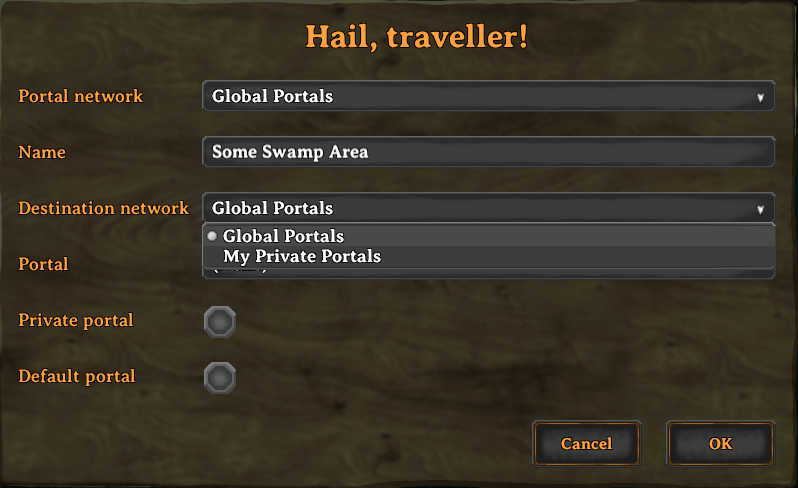
Destination Network Selection
Where to Download
- Thunderstore — install with a mod manager (Gale, r2modman, Thunderstore Mod Manager), or download the
.zipmanually. - GitHub Releases — the latest and previous
.zipbuilds.
What's New in XPortal Networks Tribes Pins
XPortal Networks Tribes Pins builds upon the solid foundation of the original XPortal mod by SpikeHimself, expanding it into a dedicated networking framework with extensive multiplayer features and numerous bug fixes:
- Portal Networks: Group portals into distinct networks:
- Global / Public Network: Accessible to all players on the server.
- Player Networks & Private Portals: Portals tied to individual players. Toggle the Private setting so unauthorized players cannot view or teleport through your personal portals.
- Custom Named Networks: Define up to 15 server-wide custom networks (such as Trade Hub, Clan Base, Mining Outposts, or Admin Only) via configuration, complete with real-time hot-reloading.
- Server Admin & Permission Controls: Configurable permissions allowing server admins to manage networks and prevent non-owners from deconstructing portals.
- Portal Pins on Your Map: Every portal you are allowed to use is pinned on your own map - the feature the XPortal Shared Map Pins companion mod inspired, built in as this mod's own re-implementation (an inspiration only - no code from that project is used here). Other players' private portals and restricted networks stay hidden.
- Bug Fixes & Modernization:
- Upgraded for the latest Valheim versions and .NET Framework 4.8.
- Resolved controller UI legend and navigation issues.
- Fixed dedicated server admin destruction and permission edge-cases.
- Enhanced ZDO network synchronization and reconnection reliability.
Features
🌐 Destination Selection Menu
When interacting with a portal, a clean UI opens allowing you to select your target destination from a dropdown menu. The list displays:
- The destination portal name
- Distance to the destination (in meters)
- Portal light color indicator (when paired with mods like Advanced Portals or Stone Portal)
🔒 Public, Private & Custom Networks
Organize your world’s transportation:
- Global Network: The shared network open to everyone.
- Personal Network: Portals automatically grouped under your character.
- Private Portals: Mark sensitive portals as private so other players cannot use or retarget them.
- Custom Named Networks: Admin-defined portal networks (up to 15) that live in this mod's own config file, so they can be added, renamed or restricted on the fly - in-game with tools like ConfigurationManager, or by editing the
[Portal Network <n>]sections by hand. Each network carries aPermittedlist of the player ids allowed to use it, which is how a portal network is restricted to a specific Tribe or faction on a multiplayer server.
⭐ Default Portal Destination
You can set a portal as your Default Portal. Newly constructed portals will immediately link to your default portal automatically, saving you time when setting up forward operating bases.
🏷️ Uncapped Portal Name Length
XPortal Networks Tribes Pins removes the vanilla character limit on portal tags, allowing you to give your portals descriptive and memorable names.
📍 Ping Portal on Map
Forgot where a portal leads? Click the Ping button to highlight the destination portal directly on your map and alert your fellow adventurers with a map ping.
🗺️ Portal Pins on Your Map
Every portal you are allowed to use is pinned on your own map automatically - this is the feature the standalone XPortal Shared Map Pins mod by buldosik inspired, built right in as this mod's own re-implementation. buldosik's mod is credited as an inspiration only: no code from that project is used here.
- Portals on the Global network, on tribe networks you are a member of, and your own private portals are pinned.
- Other players' private portals and restricted networks are never pinned, so the map cannot reveal portals you have no access to.
- The pins are local map data: nothing is written to the world, nothing is sent to other players, and vanilla player pins are untouched.
- Pins follow renamed, moved and destroyed portals, and come back if you delete one on the map.
- Disable them with
Show Portal Map Pins, or useShow Network In Pin Nameto prefix each pin with its network (for example[Trade Hub] North Base).
🎮 Full Gamepad & Controller Support
Fully navigable using controllers with integrated on-screen key hints:
| Button (Xbox / PlayStation) | Action |
|---|---|
| A / Cross | Confirm / Submit portal configuration |
| B / Circle | Cancel / Close menu |
| Y / Triangle | Ping selected destination on map |
| X / Square | Open / close destination dropdown list |
| D-Pad Up / Down | Navigate destination list |
Mod Compatibility & Integration
- Jötunn, the Valheim Library (Required)
- AdventureBackpacks: Fully Supported (Teleportation restrictions in equipped backpacks are strictly enforced).
Note: Incompatible with AnyPortal (XPortal Networks Tribes Pins replaces and supersedes AnyPortal functionality).
How to Use
- Build a Portal: Place a portal as normal.
- Access the Configuration UI: Walk up to the portal and press your interact key (
E/A). - Configure Your Portal:
- Portal Name: Enter a name for the current portal.
- Network: Choose whether this portal belongs to the Global network, your Personal network, or a Custom Named Network.
- Destination: Select the destination portal from the dropdown list.
- Make Private: (Optional) Check to restrict access so only you (and admins) can use or alter the portal.
- Set as Default: (Optional) Check to make this portal the automatic destination for newly built portals.
- Confirm: Click OK to save and activate the connection.
Configuration
General & Server Settings
The main configuration file is located at BepInEx/config/ghostwheel.mods.xportalnetworkstribespins.cfg. Server-owned settings (PingMapDisabled, DoublePortalCosts, HidePortalDistance, RestrictPortalRemovalToCreator, RestrictPortalRemovalToUsable, AdminsSeeAllNetworks and the Portal Networks entries) are synchronized from the server to every connected client via Jotunn's ServerSync, and can only be changed by server admins (or the host) - including from within the game client through the ConfigurationManager window.
| Setting | Type | Description |
|---|---|---|
PingMapDisabled |
Server Enforced | Disables map pinging for servers playing with nomap or immersive navigation rules. |
HidePortalDistance |
Server Enforced | Hides the meter distance displayed next to portal names in the dropdown. |
DoublePortalCosts |
Server Enforced | Doubles portal crafting costs to balance the convenience of one-to-many portal routing. |
RestrictPortalRemovalToCreator |
Server Enforced | Restricts deconstructing/destroying portals to the original creator, or to server admins while AdminsSeeAllNetworks is enabled. On by default. |
RestrictPortalRemovalToUsable |
Server Enforced | Lets a player deconstruct a portal only if they are allowed to use it: Global network, an unrestricted network, a network they are a member of, or their own private portal. Admins and the host are treated like normal players unless AdminsSeeAllNetworks is enabled. On by default; with RestrictPortalRemovalToCreator also on, both rules must hold. |
AdminsSeeAllNetworks |
Server Enforced | When disabled (the default), server admins and the host are treated like normal players for portal networks; when enabled they can see and use every network. |
Portal Network <n> -> Name |
Server Enforced | Display name of portal network n (1-15). Leave empty to keep that slot unused. |
Portal Network <n> -> Permitted |
Server Enforced | Comma separated player ids allowed to use network n (e.g. Steam_12345678901234567). Empty allows everyone. |
DefaultPrivatePortal |
Client Config | If true, newly placed portals start as private (owner-only). |
Show Portal Map Pins |
Client Config | Shows the portals you are allowed to use as pins on your own map. |
Show Network In Pin Name |
Client Config | Prefixes map pins with the name of the portal network, e.g. [Trade Hub] North Base. |
DisplayPortalColour |
Client Config | Displays colored indicators matching portal types in the menu. |
Custom Named Networks (config)
Servers define custom networks (ids 1-15) in per-network sections of BepInEx/config/ghostwheel.mods.xportalnetworkstribespins.cfg:
[Portal Network 1]
Name = Admin Network

[Portal Network 2]
Name = Trade Hub
Permitted = Steam_12345678901234567, Steam_76543210987654321

[Portal Network 3]
Name = North Outposts
Leave a name empty to keep that slot unused, and leave the allow list empty to let everyone use the network.
These entries are server-owned and synchronized by Jotunn's ServerSync, so server admins can add, rename and restrict networks from inside the game (ConfigurationManager -> XPortalNetworksTribesPins -> Portal Networks) without touching any server files. Networks previously lived in xportal_networks.json; that file is imported once on upgrade, after which it is ignored and can be deleted.
Installation & Server Setup
Prerequisites
- BepInExPack Valheim (v5.4.2200+)
- Jötunn (ValheimLib) (v2.20.0+)
Automatic (Recommended)
Use a mod manager like Gale or Thunderstore Mod Manager, or install straight from Thunderstore with one click.
Mod-manager Installation (Automatic)
- Open XPortalNetworksTribesPins on Thunderstore, or search for
XPortalNetworksTribesPinsin Gale / r2modman / Thunderstore Mod Manager. - Click Install with Mod Manager.
Mod-manager Installation (Latest)
- Download the latest release
.zipfrom GitHub Releases. - Using the Gale mod manager, use
Import->local modto import the downloaded .zip file.
Manual Installation
- Download the latest release
.zipfrom Thunderstore or GitHub Releases. - Extract the archive contents into your
Valheim/BepInEx/plugins/directory. - Ensure both client and dedicated server have XPortal Networks Tribes Pins installed for multiplayer synchronization.
Bugs, Feature Requests & Community
- Bug Reports: Please submit an issue on the GitHub Issues page using the
Bug reporttemplate. Please include yourLogOutput.logfile. - Feature Requests: Open an issue on GitHub selecting the
Feature requesttemplate. - Translations: Contributions for new languages or localization updates are welcome via GitHub pull requests or on Discord.
Credits & Acknowledgements
- Vapok: Author of the expanded XPortalNetworks - the base this project is built upon and continues.
- SpikeHimself: Creator of the original XPortal mod, upon which XPortal Networks Tribes Pins is built and expanded.
- sweetgiorni: Creator of the original AnyPortal concept.
- buldosik: Author of XPortalSharedMapPins - the standalone companion mod that inspired this mod's portal map pins (built in as of v2.6.0). Credited as an inspiration only: this mod contains no code from that project.
- Translations & Community: Thanks to kaiqueknup, makou, Smok3y97, MexExe, hanawa07, bonesbro, VasariRulez, Felix, and cawa-93 for original translations and community contributions.
🔒 Privacy
This mod collects and sends nothing. As of 3.0.0 the Vapok.Valheim.Common splash screen, its anonymous usage telemetry (mod_launch, mod_heartbeat, world_session_start) and its error reporting are no longer used at all: the mod never contacts that telemetry endpoint, never registers itself with it, and neither reads nor writes its opt-in preferences. There is no telemetry toggle to configure, and no setting in this mod's config file causes anything to leave your machine.
- What this mod stores locally: your own configuration file (see below), and the portal map pins, which are local map data - nothing is written to the world, sent over the network, or saved into your map file.
- Third-party telemetry: Unity's and the game's own analytics are untouched by this mod, and nothing here changes them either.
- Configuration Files: Settings can be managed through the BepInEx Configuration Manager, or by editing
[General]and[Local Config]inBepInEx/config/ghostwheel.mods.xportalnetworkstribespins.cfg.
👨💻 Blended and mixed by Ghostwheel

Author: Ghostwheel
Based On: Vapok/XPortalNetworks — the original mod this project continues
Source Code: ghstwhl/XPortalNetworksTribesPins
Changelog: Release Notes
CHANGELOG
3.1.1 - Documentation Presentation & Asset Cleanup
The docs now show the mod with one hero screenshot, and every image they hot-link lives in this repository.
- One hero screenshot instead of three: the three stacked UI screenshots (portal configuration, network selection, destination selection) in
README.mdare replaced by a single "Opposing Tribe Views" image,images/split-tribe-view.png- three windows of the same feature read better as one picture. - No image hot-linked from another repository: the Advanced Portals illustration and the Thunderstore badge, both served out of someone else's repositories (
SpikeHimself/XPortalandSpikeHimself/resources), are gone - the Advanced Portals paragraph simply ends where its picture was, the store README's "Where to Download" keeps its existing Thunderstore bullet (which is what the badge linked to), and the keyhints screenshot points at this repository's ownimages/ui-keyhints-small.png. Links to other projects (credits, the original mod, Jotunn, BepInEx, Advanced Portals, the Nexus pages) are untouched: this is about images, not links. - Unreferenced images deleted:
images/loses the 15 files nothing pointed at any more - about 2.1 MB, being the three superseded UI screenshots, both Advanced Portals illustrations, the retired Nexus and Survival Servers banners, and the older single-shot UI images - leavingcontroller.gif,icon.png,ui-keyhints-small.pngand the new hero image. - Docs and repository assets only: no code, config or behaviour change.
3.1.0 - Usable-Portal Removal Restriction
RestrictPortalRemovalToCreator(renamed fromRestrictPortalRemoval): the existing rule - on its own it simply restricts removing a portal with the hammer to the player who placed it, and it never looks at portal networks. It now defaults to enabled (it used to default to off), and an existing value is carried over to the new key, so a server that had it set tofalsekeeps that instead of picking up the new default; the old key is left behind as an inert line that can be deleted.RestrictPortalRemovalToUsable(new): on its own it restricts removing a portal with the hammer to portals the player is allowed to use - the portal's own network must be the Global network, an unrestricted network, or one they are a member of, and a private portal may only be removed by its owner. It reuses the check that already gates the portal configuration panel (a portal you can configure is one you can remove) and deliberately ignores the portal's destination. It defaults to enabled.- How the two interact: every enabled rule has to be satisfied, so turning one on never loosens the other; with both enabled - the default - a player may only remove a portal they placed and may still use. Neither rule gives the host or server admins a free pass by itself: the privileged bypass is the gated
AdminsSeeAllNetworksnotion the rest of the mod uses, so with that setting off (the default) a portal they cannot open is also one they cannot hammer, and enabling it restores unconditional admin removal. Both settings are server-owned and synchronized, and neither affects other removal such as structural damage. - Enforcement: the rule lives in the existing
Piece.CanBeRemovedpostfix, which vanilla also calls from the owner-sideWearNTear.UpdateWearwear simulation. A newWearNTear.CanBeRemovedpostfix keeps that decay question out of the player-facing rules, so portals still decay exactly as before and no unconditional admin short-circuit is needed. As with the existing removal restriction, the decision is made by the acting client while vanilla'sRPC_Removeperforms no permission check, so treat it as a gameplay rule rather than an anti-cheat guarantee. - Docs: both settings are documented in the configuration docs (the template plus its Nexus/Thunderstore mirrors) and in both hand-maintained READMEs.
3.0.4 - Live Store Links
The mod is now published, so the docs point at the real listings.
- Live locations linked: the root
README.mdgains a Where to Download section and its installation section loses the stale "Automatic (Not currently available)" heading, naming the live Thunderstore listing and the GitHub releases page;Docs/SolutionDir/README.mdlists both in its "Where to Download" section and drops the leftover "Nexus Mods" from its manual-install step (this fork has no Nexus page);REFERENCES.mdrecords both locations. - Generated install links updated:
Docs/_Header.t4now builds the currenthttps://thunderstore.io/c/valheim/p/<team>/<package>/Thunderstore URL instead of the legacy host,Docs/Modules/11HeaderGitHub.t4also offers the GitHub releases page, and the hand-mirroredDocs/README.Nexus.bbcode/Docs/SolutionDir/Package/Release/README.mdare updated to match. Docs only: no code, config or behaviour change.
3.0.3 - Documentation Naming Consistency
The docs mixed two names for the mod, so there is now one rule: XPortalNetworksTribesPins is the technical identity (plugin name, Thunderstore/GitHub/repository name) and "XPortal Networks Tribes Pins" is the human name used in prose.
- Display name added:
Mod.Info.HumanName(ModInfo.cs) sits next toMod.Info.Nameand is exposed to the doc templates asthisModHumanName(Docs/_Header.t4). The pluginName,GUIDandLegacyNameare unchanged, so the plugin identity, the ZDO key prefix, the RPC names and the store/repository name are all unaffected. - Templates and their tracked outputs use the human name for prose:
Docs/Modules/*.t4and the issue-template.ttsources writethisModHumanNamein headings and sentences, and the generatedDocs/README.Nexus.bbcode,Docs/SolutionDir/Package/Release/README.md,.github/ISSUE_TEMPLATE/*and theDocs/SolutionDir/.github/ISSUE_TEMPLATE/mirrors - which still carried the pre-3.0.0 namesXPortalNetworksandXPortal- are mirrored to match. Store and repository references keep the technicalXPortalNetworksTribesPins. (These are design-time T4 outputs, and the standaloneTextTransform.execannot compile the templates, so they stay hand-mirrored.) - Hand-maintained docs corrected:
README.md,Docs/SolutionDir/README.mdandREFERENCES.mduse "XPortal Networks Tribes Pins" in prose, and the technicalXPortalNetworksTribesPinsfor the ConfigurationManager path, the mod-manager search term and the store/repository links. - Untouched on purpose: the historical entries that describe the 3.0.0 rename, the
Vapok/XPortalNetworksand SpikeHimself credits (different, original projects), and everyXPortalNetworks*code identifier (config class, csproj paths, legacy ZDO keys,XPortalNetworks.dll, the release zips). Apart from the newMod.Info.HumanNameconstant this is wording only: no config or behaviour change.
3.0.2 - Portal Network Docs Correction
- Outdated network wording fixed: the "Public, Private & Custom Networks" list in both hand-maintained READMEs still claimed custom networks are "defined in
xportal_networks.json", which has not been the case since 2.4.0. It now describes the current workflow: up to 15 networks are admin-defined in this mod's own config file and can be added, renamed or restricted on the fly - in-game with tools like ConfigurationManager, or by editing the[Portal Network <n>]sections by hand - and thePermittedlist takes the player ids allowed to use that network, which is how a portal network is restricted to a specific Tribe or faction on a multiplayer server. - Mod name and typos corrected: both hand-maintained READMEs spelled the mod "XPortal Networks Teams Pins" in their titles, headings and prose, while the plugin name, the manifest, the repository and the Thunderstore package all say Tribes - it now reads "XPortal Networks Tribes Pins" everywhere, and the historical 2.0.0 entry was corrected to match. The same files lose their typos too: "re-woprk" -> "re-work", "Valpok" -> "Vapok", "XPortalNetwork" -> "XPortalNetworks", "private Triibe" -> "private Tribe", "the the expanded" -> "the expanded", and the "Teams Pinss" instances that carried the wrong name.
- Stale reference removed: the 3.0.1 notes described mirroring changes into a
README copy.mdthat is not part of the repository, so those mentions are gone and the lines now name only the files that exist. - Docs only: no code, config or behaviour change, and the historical changelog entries that describe the old JSON file are left untouched.
3.0.1 - Lime Green Pins & Nexus Reference Removed
- Portal map pins are lime green: the pins this mod draws on your own map are now tinted lime green (
#32CD32) instead of the bright blue (0.4, 0.8, 1) of the standalone XPortal Shared Map Pins mod that inspired them (an inspiration only - no code from that project is used here), so this fork's pins are recognisable at a glance. Everything else about the pins is unchanged - the same dedicated minimap pin category, the same marker (the game's own portal map icon, or the generated white ring when the icon list has no portal sprite), the same access rules, and the colour is still re-applied after everyMinimap.UpdatePinspass because the game re-tints all markers itself. The colour remains an internal constant rather than a setting, so there is no new config key. - Internals: the generated fallback marker (
PortalMapPins.CreateFallbackPortalIcon) is built with a different formulation that produces exactly the same texture, which removes the last lines this re-implementation shared textually with the source of the mod that inspired the feature; what the two now have in common are bare C# keywords such astry,return;andcontinue;. No behaviour change. - No Nexus ID:
Mod.Info.NexusIdand theGeneral/NexusIDconfig key are removed - this fork has no Nexus page of its own, and the ID they carried (3719) was the upstream mod's listing, so the key only ever pointed a third-party update checker at a page that is not this mod. Nothing breaks: the value was never read by this mod, and BepInEx ignores the retired key that existing config files still hold. The READMEs and the docs lose their Nexus badges and their "on Nexus Mods click 'Mod manager download'" step in favour of Thunderstore and the GitHub releases page (Docs/SolutionDir/README.mdalso linked to an unrelated Nexus ID); third-party Nexus links such as Jötunn, Vortex and Advanced Portals stay, as do the upstream credits. - Attribution clarified: buldosik's XPortal Shared Map Pins is now credited everywhere as the inspiration only for the portal map pins - the implementation is this mod's own re-implementation and contains no code from that project. The
PortalMapPinsclass comment no longer describes the feature as "ported", and the note appears wherever that mod is named: the pin sections and the compatibility/credits lists of the READMEs and the generated package/Nexus docs, andREFERENCES.md. Wording only - no code, config or behaviour change.
3.0.0 - Independent Plugin Identity
- New plugin GUID: the plugin now registers as
ghostwheel.mods.xportalnetworkstribespinsinstead ofvapok.mods.xportalnetworks, so this fork carries its own plugin identity in BepInEx and Jotunn instead of living under the upstream author's namespace. The pluginNameis nowXPortalNetworksTribesPinsas well (wasXPortalNetworks), so the plugin shows up under the fork's own name and the portal ZDO key prefix and the RPC names change with it. - Existing worlds keep their portal data: the portal ZDO keys are read through a legacy fallback (
XPortalNetworks.LegacyKey_*, used byZdoTools) that prefers the newXPortalNetworksTribesPins_*keys and falls back to theXPortalNetworks_*keys that 2.6.0 and older wrote, while every write updates both - so portal links, networks and private flags survive the rename, and a portal deliberately reset to Global (or un-privated) cannot pick its old value back up. The one-timexportal_networks.jsonimport also still looks in the oldBepInEx/config/XPortalNetworks/folder. - Config file renamed: BepInEx names the plugin's config file after the GUID, so it is now
BepInEx/config/ghostwheel.mods.xportalnetworkstribespins.cfg. An existingvapok.mods.xportalnetworks.cfgis copied to the new name on first start - only when the new file holds no settings yet - and reloaded before any setting is bound, so portal networks, allow lists and preferences survive the upgrade; the old file is then ignored and can be deleted. - Vapok splash screen and telemetry removed: the mod no longer registers with Vapok.Valheim.Common's splash/telemetry manager, so that library's startup splash modal, its anonymous launch/heartbeat/world-session events and its error reporting are gone from this mod entirely.
IPluginInfo, theShow Splash on Startup/Enable Anonymous Telemetry/Send Error Reportssettings and all code that read or wrote the library's global switches went with it - removing the code paths rather than forcing the switches off means this mod cannot affect another Vapok mod's telemetry settings (and a stored opt-in cannot turn anything back on for us). The dependency itself is then removed outright - assembly reference,packages.configentry and the ILRepack merge - with the two local preferences switching to Jotunn'sConfigurationManagerAttributes(the class the server-owned entries already use), so the shipped DLL contains no Vapok code at all: 552,960 -> 118,784 bytes for the mod DLL and 339,969 -> 176,874 bytes for the release zip, and the library's HTTP/UnityWebRequestreferences go with it. The README's privacy section now states plainly that the mod collects and sends nothing. - Breaking for mixed-version multiplayer (
MAJOR): server and clients must be updated together, because Jotunn's mod compatibility and ServerSync treat 3.0.0 as a different mod - a 2.6.0 peer counts as not having the mod installed. Mods that hard-depend onvapok.mods.xportalnetworks(the standalone XPortal Shared Map Pins mod does - it is the inspiration for our map pins, and no code from it is used here) refer to the upstream mod and no longer resolve against this one; the map-pin feature is built in here, so install 3.0.0 rather than both. Existing worlds keep their portal links, networks and private flags (see the legacy ZDO keys above). - Docs: the config file path is corrected everywhere it is documented - the READMEs and the generated Nexus/package docs - and
REFERENCES.mdrecords the GUID/Name change. The Nexus reference (Mod.Info.NexusId, ID 3719) is deliberately left pointing at the upstream mod's page, since this fork has no Nexus upload of its own. - Version note: 2.6.0 was uploaded to Thunderstore but its listing was rejected, so it never went public; Thunderstore also refuses a repeated namespace/name/version, which is why this release moves to 3.0.0.
2.6.0 - Portal Map Pins
- Project home moved: the project now lives at ghstwhl/XPortalNetworksTribesPins -
ModInfo.GitHubRepo, both manifests and the packaged README/CHANGELOG point there, while Vapok's original Vapok/XPortalNetworks stays credited as the base this project is built upon (the README lists it underBased On). The plugin GUID, the plugin name (and therefore the portal ZDO keys) and the config file name are deliberately left alone, so existing worlds, settings and multiplayer compatibility are unaffected. The publishing identity is nowghstwhl(author) with the Thunderstore team/packageNorCal_Nerds/XPortalNetworksTribesPins- declared once inModInfo.cs, used for the generated install links and for the build's package folder. The Nexus ID still points at the upstream mod's page until this fork has its own. - Portal pins are built in: buldosik's standalone XPortal Shared Map Pins companion mod is the inspiration for this feature - no code from that project is used here, the pins are this mod's own implementation - and they are now part of XPortal Networks Tribes Pins: every portal you are allowed to use is drawn as a pin on your own map. Pins are purely local map data: nothing is written to the world, nothing is sent over the network, the pins are never saved to your map file, and vanilla player pins are untouched.
- Only portals you may actually use: a portal is pinned when it is on the Global network, on a tribe network you are a member of (or may bypass as an admin, depending on
AdminsSeeAllNetworks), on a personal network (public portals there are usable by anyone), or when it is one of your own private portals. Other players' private portals and restricted tribe networks are never pinned, so the map can't be used to discover portals you have no access to. - New
[Local Config]settings:Show Portal Map Pins(on by default) turns the pins off again, andShow Network In Pin Name(off by default) prefixes a pin with its network name, e.g.[Trade Hub] North Base. Both are client-side preferences that are not synchronized from the server. - No map, no pins: on a server that has
PingMapDisabledenabled, portal pins are suppressed as well, so a server asking to be played without a map stays that way. - Always current: pins are refreshed every 5 seconds and immediately when the portal list or the configuration changes - renamed or moved portals get a fresh pin, destroyed portals lose theirs, and pins deleted on the map come back.
- Dedicated pin type: portal pins use their own minimap pin category (with the portal's build icon) instead of hijacking one of the vanilla pin categories, so the map legend toggles keep behaving as usual.
- Pins look like the standalone mod's: the marker is the game's own portal map icon - located in
Minimap.m_iconsby sprite name (a sprite whose name containsportal), exactly how the standalone mod found it - tinted with that mod's bright blue (0.4, 0.8, 1). If the icon list has no portal sprite, the standalone mod's generated white ring is used instead. BecauseMinimap.UpdatePinsre-colours every marker on each of its passes, a small postfix patch re-applies the portal colour right afterwards (the standalone mod shipped the same patch). The wood-toned portal build icon is not used, since a tint only darkened it. That mod is the inspiration for these pins - no code from it is used here. - References updated (
REFERENCES.md): the companion mod that inspired the map-pin feature is now listed as a source and credited explicitly as an inspiration only - no code from it is used here (the upstream repository declares no licence) - and the file records that the BepInEx Valheim ships - and therefore the one this mod builds against - comes from thev5-ltsmaintenance branch at https://github.com/AzumattDev/BepInEx, not from the EOL upstream repository: pack version5.4.2350is assembly5.4.23.5, and theBepInEx.dllwe reference carries that fork's commitef506e0a("Bump ThunderStore version to 5.4.2350"). - Docs: the new settings and the map-pin feature are documented in the READMEs and in the doc templates, including the note that the standalone XPortal Shared Map Pins mod (the inspiration for the feature - no code from that project is used here) must be removed to avoid duplicate pins. buldosik is credited in the READMEs' Credits & Acknowledgements section, linked to the standalone mod's Thunderstore page.
- Build tooling:
tools/Build.ps1now emits two release artifacts -XPortalNetworks-release.zipplus a copy named after the version (XPortalNetworks-<version>.zip), so a download can be pinned to an exact build while the unversioned name keeps working as the "latest" link. - Terminology: shared portal networks are described as tribe networks (was: team networks) in the code comments and documentation - a wording change only, with no behaviour, config or localization changes. Entries for already-released versions keep their original wording.
2.5.0 - Portal Network Config Sections
- One config section per network: Networks are now configured as
[Portal Network 1],[Portal Network 2], ... withNameandPermittedkeys, instead of a single[Portal Networks]section withNetwork <n> Name/Network <n> Allow List. The sections are bound in order, andNamecarries the higherConfigurationManagerAttributes.Orderso it is listed abovePermitted- ConfigurationManager sorts settings by Order descending and then by display name, which is why the old layout showed the allow list first ('Allow List' sorts before 'Name'). - Automatic migration: an existing configuration is carried over on first load - the values left in the old
[Portal Networks]section are copied into the new per-network sections, so nothing has to be re-entered after upgrading. The old keys are left behind as an inert section and no longer show up in the ConfigurationManager UI. [Local Config]ordering fixed:Show Splash on StartupandEnable Anonymous TelemetrycarriedOrder4 and 5, which - because ConfigurationManager lists higher order values first - displayed the telemetry toggle above the splash toggle. The values are swapped so the splash toggle is listed first.- No behaviour change: network visibility, allow-list enforcement and in-game editing are unchanged.
2.4.0 - Portal Networks in the Server Config
- Networks moved into the config: Portal networks are now defined in the
Portal Networkssection ofvapok.mods.xportalnetworks.cfg(Network <n> NameandNetwork <n> Allow List) instead ofxportal_networks.json. Those entries are server-owned and handed to Jotunn's ServerSync, so an admin can add, rename and restrict networks from inside the game - no SSH or file editing on the server. - Automatic import: an existing
xportal_networks.jsonis imported into the config once, and only when no network is configured yet; afterwards the file is ignored and can be deleted. - Allow lists are synchronized too:
Network <n> Allow Listtakes comma separated player ids and is pushed to clients along with the names, so membership is editable in-game as well. Server-side enforcement (portal edits and links) is unchanged. - Removed the custom network RPC: the per-client
_CustomNetworkspush and_RequestCustomNetworksrequest are gone, since ServerSync now distributes the definitions and each peer evaluates visibility locally. - Simpler internals:
CustomNetworkslost its JSON parser, embedded template,FileSystemWatcherand main-thread polling; a config change now rebuilds the network list directly. - Docs: the configuration documentation is complete again - the README settings table and the
25Configuration.t4template (with its generated Nexus/package output) now listDefaultPrivatePortal,RestrictPortalRemoval,AdminsSeeAllNetworks, thePortal Networksentries and the two[Local Config]toggles, all of which were missing. - Doc templates repaired: the T4 modules no longer hard-code the pre-rename
XPortalname or the originalSpikeHimself/XPortalbanner URL (they use the assembly-derivedthisModName/thisModGitHubRepo), and the template for the hybridDocs/SolutionDir/README.mdwas removed so a regeneration can no longer delete its hand-written sections.tools/README.mdnow documents which files are generated and how to regenerate them.
2.3.2 - Offline-Capable Research Tooling
- Local web access for development:
.vscode/mcp.jsonnow configures two locally-hosted MCP servers -mcp/fetchfor URL retrieval (verified against the previously-failing GitHub URL) andmcp/brave-searchfor keyword web search. The Brave API key is requested through VS Code's secure prompt (${input:...},password: true), so no key is stored in the repository. - Documented correction (
REFERENCES.md): ConfigurationManager's source confirms thatIsAdminOnly/IsUnlockedare sync-library fields, not ConfigurationManager ones - it resolves an attributes class by type name and copies only matching fields, and its own class has no admin concept. Server-owned settings are therefore enforced by ServerSync (the server's value is pushed and local writes to synced entries are blocked), not by a lock in the ConfigurationManager window. - No mod behaviour changes: this release is tooling/documentation only.
2.3.1 - Reference Documentation
- New
REFERENCES.md: every external source used for this project is now documented in one place - the Valheim 1.0.16 (Unity 6000.0.75f1) game assemblies, BepInEx 5.4.2350, HarmonyX 2.9.0, Jötunn 2.30.2, Vapok.Valheim.Common 3.21.1015, the build tooling (AssemblyPublicizer, ILRepack, Mono.Cecil, nuget.exe), the offline API-doc and metadata sources used for verification, referenced third-party mods, and the source-availability caveats.
2.3.0 - Server-Owned Config via Jotunn ServerSync
- Server settings are now editable from the game client by admins: The server-owned settings (
PingMapDisabled,DoublePortalCosts,HidePortalDistance,RestrictPortalRemovalandAdminsSeeAllNetworks) are handed to Jotunn's ServerSync. Server admins and the host can change them from within the game through the ConfigurationManager window, and the new value is sent to the server and pushed to every client immediately. - Non-admins can no longer change server-owned settings: Those entries are tagged admin-only, so players without admin rights cannot edit them, and any local edit is overwritten by the server's value.
- Removed the custom config sync: The bespoke
XPortalNetworks_ConfigRPC was server-to-client only, so client-side changes were silently ignored. It has been removed in favour of ServerSync; portal network lists are still re-pushed by the server whenever a relevant setting changes.
2.2.1 - Admin Bypass Live Toggle Fix
AdminsSeeAllNetworksnow applies on the server: The server's effective settings were only aliased to the local config at plugin load (before the network existed), so the option could read as disabled on a dedicated server. The alias is now re-asserted at session start and on every config reload.- Live toggle re-pushes networks: Changing the setting on the server now re-pushes each client's permitted network list, so admins gain/lose network access immediately without relogging.
2.2.0 - Admin Network Bypass Option
- New config option
AdminsSeeAllNetworks(default disabled): when disabled, server admins/host are treated like normal players for portal networks — they only see and use unrestricted networks, or networks they are members of. When enabled, admins can see and use every network (the previous behaviour). - The admin bypass is now applied consistently across network visibility (dropdowns/hover), portal interaction, teleporting, and server-side portal edits.
2.1.2 - Valheim 1.0.16 Alignment
- Valheim 1.0.16: Re-publicized the game assemblies and updated all reference paths so the mod compiles against Valheim 1.0.16.
- Single-source game version: The Valheim version is now defined once (
ValheimGameVersioninDirectory.Build.props) and shared by the csproj and thetools/scripts.
2.1.1 - Config Hot-Reload Resilience
- Deleted config is re-seeded: If
xportal_networks.jsonis removed while the server is running, the reload poll now detects the deletion and recreates the file from the embedded default — previously this relied solely on a file-watch delete event. - No redundant reloads: The watcher now re-baselines the file's timestamp/size after each reload, avoiding a spurious second reload pass.
2.1.0 - Team Portal Networks
- Team Networks (
allow_list):xportal_networks.jsonentries can now include an optional"allow_list"of player ids. Only listed players can see the network in the portal configuration UI, edit its portals, or step through them; an omitted/empty list keeps the network open to everyone. - Server-Authoritative Policy: Each client now receives only the networks it is permitted to use (names only — allow lists never leave the server), and the server rejects portal edits and links on networks a player cannot access.
- Privacy & UI: Portals on a restricted network the player isn't a member of are hidden from hover text and from the network/destination dropdowns.
- Config Hot-Reload:
xportal_networks.jsonedits are now applied live on the game's main thread, with a polling fallback so changes are picked up even when file-watch events are missed — no server restart required.
2.0.10 - Portal Connection Fix
Author's Note: Apologies for the update earlier which messed up portals connections. This has been fixed.
- Fixed portal destinations reconnecting to incorrect portals on world reload or server restart.
2.0 Changelog History (Valheim Release) (click to expand)
2.0.9 - Dedicated Server UI Patch Hardening & Dependency Updates
- Dedicated Server Safety: Ensured UI hooks and hover text patches are bypassed on headless dedicated servers.
- Compatibility Notice: An issue in ValheimCommunityPatch prevented portals from connecting properly. This has been resolved in version 0.29.0 of that mod; please ensure you update if you use it.
- Game Shutdown & Placement Safety: Cleaned up shutdown routines to prevent harmless errors on game exit and hardened piece placement checks.
- Dependency Updates: Updated Jotunn to 2.30.2 and internal dependencies for stability.
2.0.8 - Valheim 1.0.15 Alignment & Internalized Dependency Updates
- Valheim 1.0.15 Alignment: Updated game assembly references and internalized
Vapok.Valheim.Common3.13.1015. - Transpiler & Patch Hardening: Added bounds validation and null-safety guards to the
TeleportWorld.UpdatePortaltranspiler. - Localization & Stability: Re-synchronized 35-language splash localizations and verified patch compatibility.
2.0.7 - Scene Transition & Portal Target Exception Hardening
- Scene Transition Fix: Resolved an
ArgumentException: The scene is invalidduring world loading and logout scene transitions by safely caching headless environment checks. - Portal Target Resilience: Fixed a
KeyNotFoundExceptioncrash when inspecting, hovering over, or interacting with portals whose linked destination had been destroyed or moved out of the active zone. - Map Ping Hardening: Hardened the map ping broadcast RPC with safe fallbacks and exception protection when user or network instances are initializing.
2.0.6 - Splash Window Updates & Valheim 1.0.14 Alignment
- Splash Window Updates:
- Telemetry is now unchecked when first loaded (Opt-In visibility)
- Added Send Error Logs (Opt-Out)
- Privacy Policy is now available directly in-game
- Added Data Disclaimers on hover over checkboxes for transparency on what data is sent
- Valheim 1.0.14 Alignment: Updated game assembly references and internalized Vapok.Valheim.Common 3.12.1014.
2.0.5 - Jewelcrafting Font Compatibility
- Fixed: Jewelcrafting packages it's own font which was overriding part of a vanilla font, causing the Splash screen to appear blank.
2.0.4 - Updated README with Telemetry Information
- Updated the README.md with Anonymous Telemetry information per request of mod stores.
2.0.3 - Unified Splash Screen & Telemetry Controls
- Unified Startup Splash Screen: Integrated with a centralized startup splash screen.
- Added configurable
Show on Game Startupwhich can be enabled or disabled in the configuration file.
- Added configurable
- Anonymous Telemetry:
- Added configurable
Enable Anonymous Telemetryconfiguration which can be enabled or disabled in the configuration file.- Defaults to enabled with auto-opt-in on launch. Uncheck to Opt-Out
- ANONYMOUS DATA ONLY - I track version number and usage data. No personal data is ever collected. For more information, see the Privacy Policy.
- Added configurable
2.0.1 - Dependency & Compatibility Maintenance
- Dependency Updates: Updated Jotunn and BepInEx runtime package bindings.
- Compatibility Maintenance: Verified compatibility against the latest Valheim 1.0 release.
- Documentation Improvements: Standardized README, user guides, and technical patch documentation.
2.0.0 - Portal Networks & Valheim 1.0+ Overhaul
- Portal Networks Architecture:
- Expanded into XPortal Networks Tribes Pins with support for Global (Public), Player-Specific (Private), and Custom Named networks (up to 15 configured in
xportal_networks.jsonwith live hot-reloading).
- Expanded into XPortal Networks Tribes Pins with support for Global (Public), Player-Specific (Private), and Custom Named networks (up to 15 configured in
- Server Admin & Permission Controls:
- Added permission settings to restrict portal destruction to the creator or authenticated server admins.
- Synchronized portal network settings and permissions across dedicated servers.
- Modernization & Bug Fixes:
- Updated for Valheim 1.0+, .NET Framework 4.8, BepInEx 5.4.2350, and Jotunn 2.30.0.
- Resolved controller legend display and gamepad navigation issues.
- Improved network synchronization and portal pairing reliability.
